ESP PEUGEOT 308 2012 Owner's Guide
[x] Cancel search | Manufacturer: PEUGEOT, Model Year: 2012, Model line: 308, Model: PEUGEOT 308 2012Pages: 328, PDF Size: 62.62 MB
Page 142 of 328
140
DRIVING
Particular situations
In certain situations (e.g. start-
ing the engine), the parking brake
can automatically alter its force. This
is normal operation.
To advance your vehicle a few cen-
timetres without starting the engine,
but with the ignition on, press on the
brake pedal and release the park-
ing brake by pulling
then releasing
control lever A
. The full release of
the parking brake is confi rmed by the
warning lamp in the control lever A
and the warning lamp in the instru-
ment panel going off and the display
of the message "Handbrake off".
If a parking brake fault occurs while
applied
or if the battery runs fl at, an
emergency release is always pos-
sible.
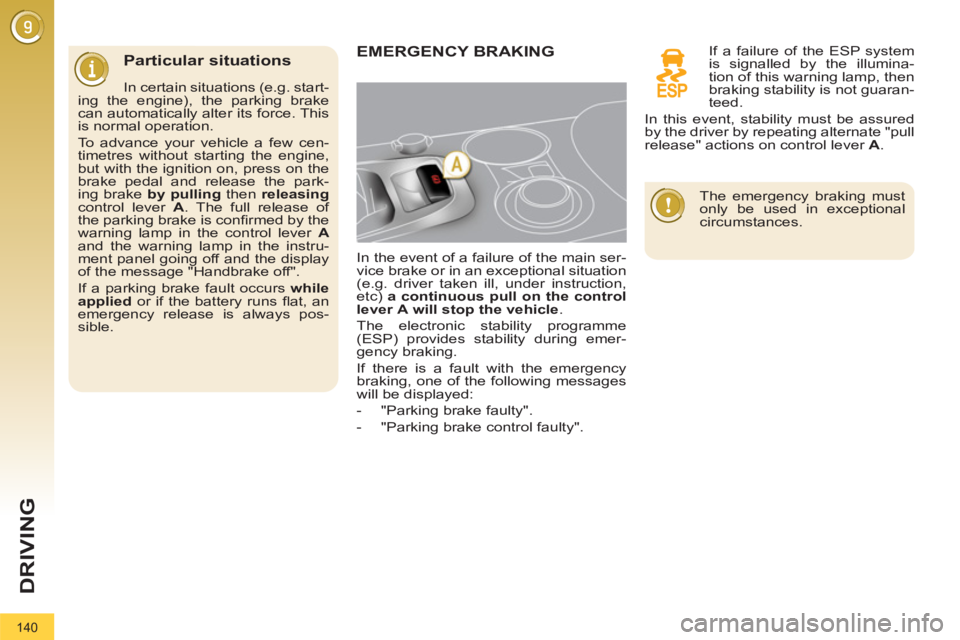
EMERGENCY BRAKING
In the event of a failure of the main ser-
vice brake or in an exceptional situation
(e.g. driver taken ill, under instruction,
etc) a continuous pull
on the control
lever
A
will stop the vehicle
.
The electronic stability programme
(ESP) provides stability during emer-
gency braking.
If there is a fault with the emergency
braking, one of the following messages
will be displayed:
- "Parking brake faulty".
- "Parking brake control faulty".
If a failure of the ESP system
is signalled by the illumina-
tion of this warning lamp, then
braking stability is not guaran-
teed.
In this event, stability must be assured
by the driver by repeating alternate "pull
release" actions on control lever A
.
The emergency braking must
only be used in exceptional
circumstances.
Page 149 of 328
147
DRIVING
DISTANCE ALERT *
For the safety time to be observed, re-
fer to the current legislation or highway
code recommendations in your country.
The system operates when the speed of your
vehicle is higher than 45 mph (70 km/h) and
below 90 mph (150 km/h).
It has a programmable visual alert
which remains in the memory when the
ignition is switched off.
This system is a driving aid and cannot,
in any circumstances, take the place of
the vigilance and responsibility of the
driver.
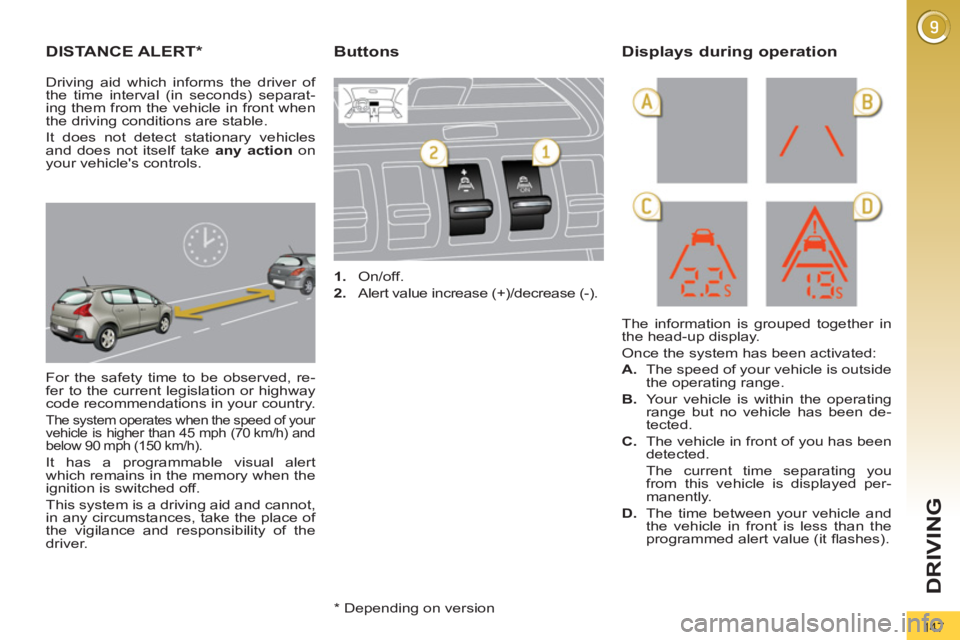
1.
On/off.
2.
Alert value increase (+)/decrease (-).
The information is grouped together in
the head-up display.
Once the system has been activated:
A.
The speed of your vehicle is outside
the operating range.
B.
Your vehicle is within the operating
range but no vehicle has been de-
tected.
C.
The vehicle in front of you has been
detected.
The current time separating you
from this vehicle is displayed per-
manently.
D.
The time between your vehicle and
the vehicle in front is less than the
programmed alert value (it fl ashes).
Buttons
Displays during operation
Driving aid which informs the driver of
the time interval (in seconds) separat-
ing them from the vehicle in front when
the driving conditions are stable.
It does not detect stationary vehicles
and does not itself take any action
on
your vehicle's controls.
* Depending on version
Page 150 of 328
148
DRIVING
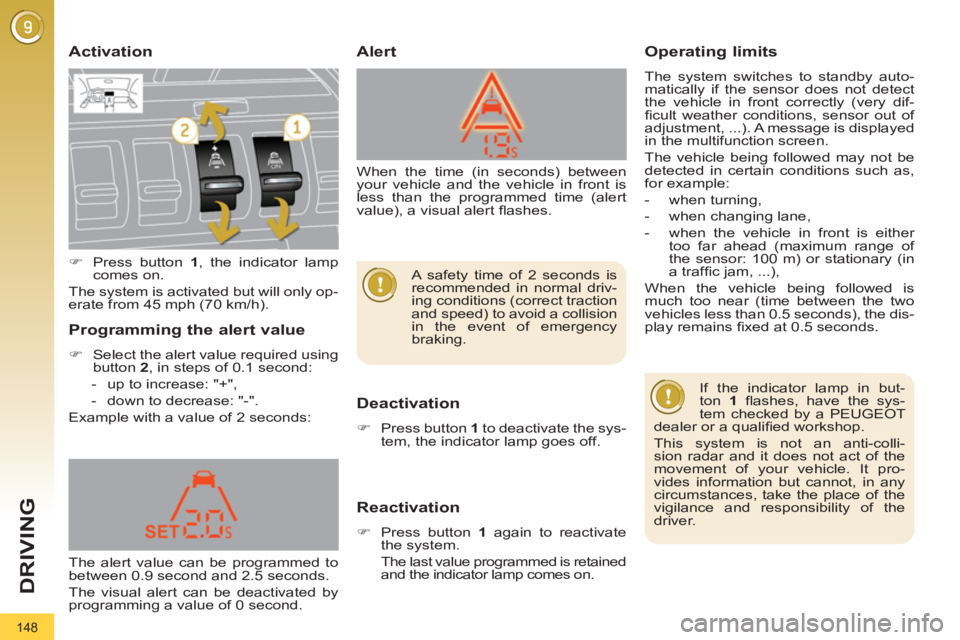
Activation
Deactivation
)
Press button 1
to deactivate the sys-
tem, the indicator lamp goes off.
Reactivation
)
Press button 1
again to reactivate
the system.
The last value programmed is retained
and the indicator lamp comes on.
Operating limits
The system switches to standby auto-
matically if the sensor does not detect
the vehicle in front correctly (very dif-
fi cult weather conditions, sensor out of
adjustment, ...). A message is displayed
in the multifunction screen.
The vehicle being followed may not be
detected in certain conditions such as,
for example:
- when turning,
- when changing lane,
- when the vehicle in front is either
too far ahead (maximum range of
the sensor: 100 m) or stationary (in
a traffi c jam, ...),
When the vehicle being followed is
much too near (time between the two
vehicles less than 0.5 seconds), the dis-
play remains fi xed at 0.5 seconds.
Alert
Programming the alert value
)
Select the alert value required using
button 2
, in steps of 0.1 second:
- up to increase: "+",
- down to decrease: "-".
Example with a value of 2 seconds:
If the indicator lamp in but-
ton 1
fl ashes, have the sys-
tem checked by a PEUGEOT
dealer or a qualifi ed workshop.
This system is not an anti-colli-
sion radar and it does not act of the
movement of your vehicle. It pro-
vides information but cannot, in any
circumstances, take the place of the
vigilance and responsibility of the
driver.
)
Press button 1
, the indicator lamp
comes on.
The system is activated but will only op-
erate from 45 mph (70 km/h).
The alert value can be programmed to
between 0.9 second and 2.5 seconds.
The visual alert can be deactivated by
programming a value of 0 second. When the time (in seconds) between
your vehicle and the vehicle in front is
less than the programmed time (alert
value), a visual alert fl ashes.
A safety time of 2 seconds is
recommended in normal driv-
ing conditions (correct traction
and speed) to avoid a collision
in the event of emergency
braking.
Page 153 of 328
151
DRIVING
CRUISE CONTROL
System which automatically maintains
the speed of the vehicle at the value
programmed by the driver, without any
action on the accelerator pedal.
The cruise control is switched on
manually: it requires a minimum vehicle
speed of 25 mph (40 km/h) and the en-
gagement of:
- fourth gear on the manual gearbox,
- second gear in sequential mode on
the electronic gear control gearbox
or automatic gearbox,
- position A
on the electronic gear
control gearbox or D
on the auto-
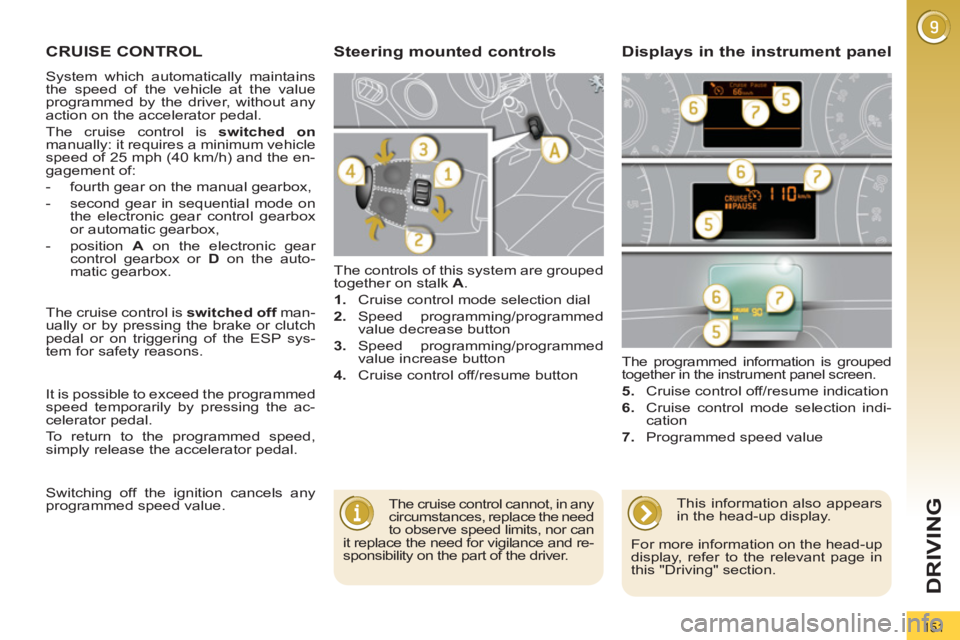
matic gearbox. The controls of this system are grouped
together on stalk A
.
1.
Cruise control mode selection dial
2.
Speed programming/programmed
value decrease button
3.
Speed programming/programmed
value increase button
4.
Cruise control off/resume button The programmed information is grouped
together in the instrument panel screen.
5.
Cruise control off/resume indication
6.
Cruise control mode selection indi-
cation
7.
Programmed speed value
Steering mounted controls
Displays in the instrument panel
The cruise control cannot, in any
circumstances, replace the need
to observe speed limits, nor can
it replace the need for vigilance and re-
sponsibility on the part of the driver. The cruise control is switched off
man-
ually or by pressing the brake or clutch
pedal or on triggering of the ESP sys-
tem for safety reasons.
It is possible to exceed the programmed
speed temporarily by pressing the ac-
celerator pedal.
To return to the programmed speed,
simply release the accelerator pedal.
Switching off the ignition cancels any
programmed speed value.
This information also appears
in the head-up display.
For more information on the head-up
display, refer to the relevant page in
this "Driving" section.
Page 155 of 328
153
DRIVING
6-SPEED MANUAL GEARBOX
As a safety precaution and to fa-
cilitate starting of the engine: Only engage reverse gear
when the vehicle is stationary
with the engine at idle.
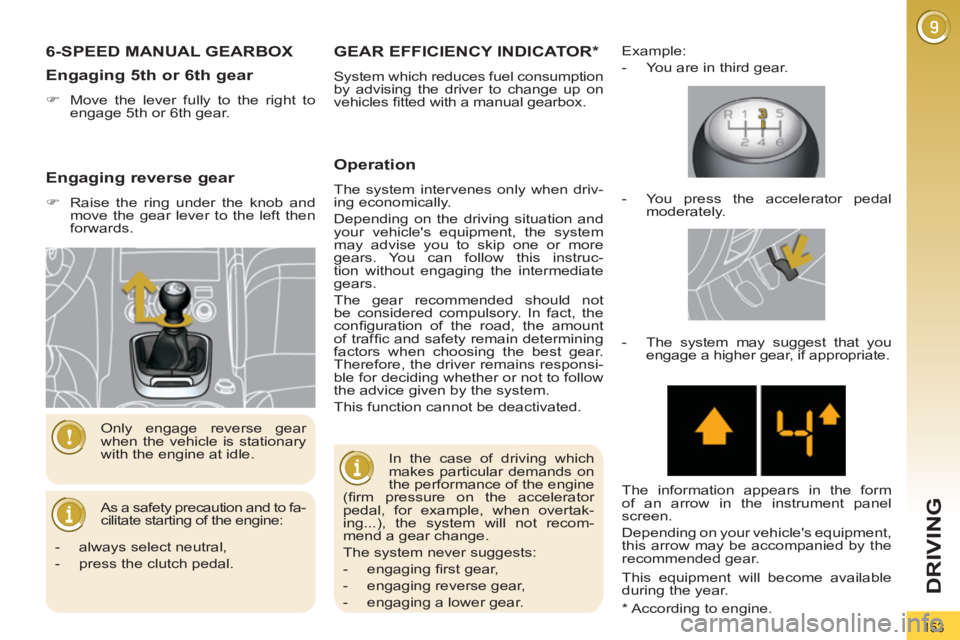
Engaging 5th or 6th gear
)
Move the lever fully to the right to
engage 5th or 6th gear.
* According to engine.
GEAR EFFICIENCY INDICATOR *
System which reduces fuel consumption
by advising the driver to change up on
vehicles fi tted with a manual gearbox.
Operation
The system intervenes only when driv-
ing economically.
Depending on the driving situation and
your vehicle's equipment, the system
may advise you to skip one or more
gears. You can follow this instruc-
tion without engaging the intermediate
gears.
The gear recommended should not
be considered compulsory. In fact, the
confi guration of the road, the amount
of traffi c and safety remain determining
factors when choosing the best gear.
Therefore, the driver remains responsi-
ble for deciding whether or not to follow
the advice given by the system.
This function cannot be deactivated.
Example:
- You are in third gear.
In the case of driving which
makes particular demands on
the performance of the engine
(fi rm pressure on the accelerator
pedal, for example, when overtak-
ing...), the system will not recom-
mend a gear change.
The system never suggests:
- engaging fi rst gear,
- engaging reverse gear,
- engaging a lower gear.
- You press the accelerator pedal
moderately.
- The system may suggest that you
engage a higher gear, if appropriate.
The information appears in the form
of an arrow in the instrument panel
screen.
Depending on your vehicle's equipment,
this arrow may be accompanied by the
recommended gear.
This equipment will become available
during the year.
- always select neutral,
- press the clutch pedal.
Engaging reverse gear
)
Raise the ring under the knob and
move the gear lever to the left then
forwards.
Page 160 of 328
158
DRIVING
"PORSCHE TIPTRONIC
SYSTEM" AUTOMATIC
GEARBOX
Six speed automatic gearbox which of-
fers a choice between the comfort of
fully automatic operation, enhanced by
sport and snow programmes, or manual
gear changing.
Four driving modes are offered:
- automatic
operation for electronic
management of the gears by the
gearbox,
- sport
programme for a more dy-
namic style of driving,
- snow
programme to improve driv-
ing when traction is poor,
- manual
operation for sequential
changing of the gears by the driver.
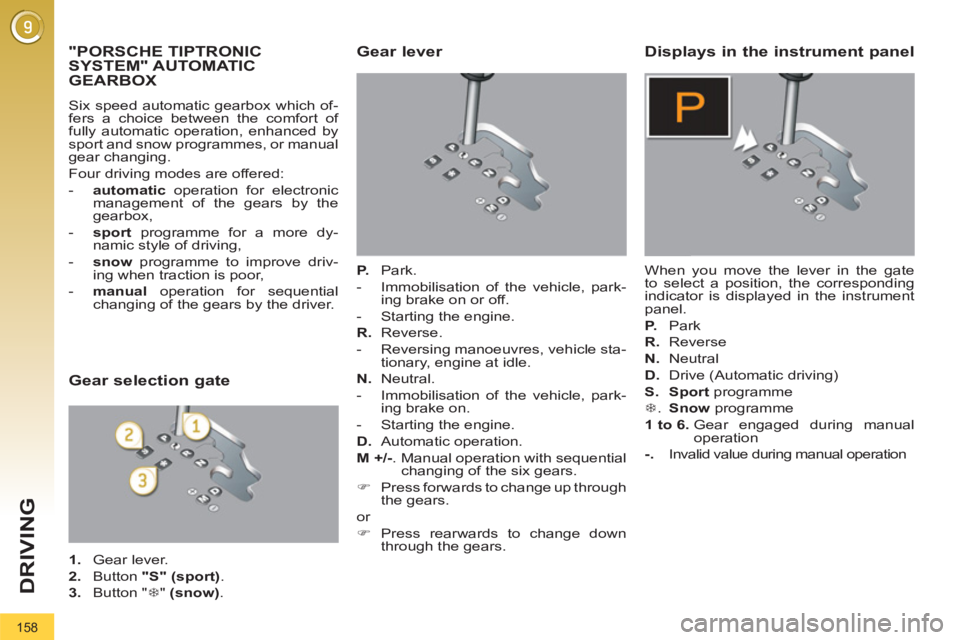
Gear lever
P.
Park.
- Immobilisation of the vehicle, park-
ing brake on or off.
- Starting the engine.
R.
Reverse.
- Reversing manoeuvres, vehicle sta-
tionary, engine at idle.
N.
Neutral.
- Immobilisation of the vehicle, park-
ing brake on.
- Starting the engine.
D.
Automatic operation.
M +/-
. Manual operation with sequential
changing of the six gears.
)
Press forwards to change up through
the gears.
or
)
Press rearwards to change down
through the gears.
Displays in the instrument panel
When you move the lever in the gate
to select a position, the corresponding
indicator is displayed in the instrument
panel.
P.
Park
R.
Reverse
N.
Neutral
D.
Drive (Automatic driving)
S.
Sport
programme
7
. Snow
programme
1 to 6.
Gear engaged during manual
operation
-.
Invalid value during manual operation
Gear selection gate
1.
Gear lever.
2.
Button "S"
(sport)
.
3.
Button " 7
" (snow)
.
Page 167 of 328
165
DRIVING
The parking sensor system
cannot, in any circumstances,
replace the need for vigilance
and responsibility on the part
of the driver. The parking sensors are switched off
:
- when you exit reverse gear,
- when the speed is higher than 6 mph
(10 km/h) in forward gear,
- when the vehicle has been station-
ary for more than three seconds in
forward gear.
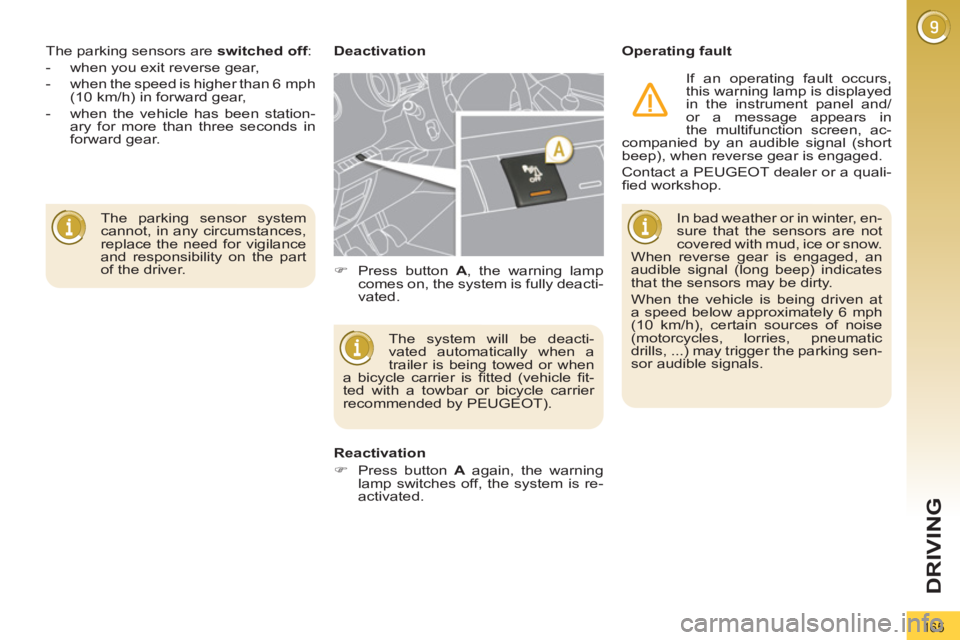
Deactivation
Operating fault
The system will be deacti-
vated automatically when a
trailer is being towed or when
a bicycle carrier is fi tted (vehicle fi t-
ted with a towbar or bicycle carrier
recommended by PEUGEOT).
Reactivation
)
Press button A
again, the warning
lamp switches off, the system is re-
activated.
)
Press button A
, the warning lamp
comes on, the system is fully deacti-
vated. In bad weather or in winter, en-
sure that the sensors are not
covered with mud, ice or snow.
When reverse gear is engaged, an
audible signal (long beep) indicates
that the sensors may be dirty.
When the vehicle is being driven at
a speed below approximately 6 mph
(10 km/h), certain sources of noise
(motorcycles, lorries, pneumatic
drills, ...) may trigger the parking sen-
sor audible signals.
If an operating fault occurs,
this warning lamp is displayed
in the instrument panel and/
or a message appears in
the multifunction screen, ac-
companied by an audible signal (short
beep), when reverse gear is engaged.
Contact a PEUGEOT dealer or a quali-
fi ed workshop.
Page 173 of 328
171
CHECKS
CHECKING LEVELS
Check all of these levels regularly and
top them up if necessary, unless other-
wise indicated.
If a level drops signifi cantly, have the
corresponding system checked by a
PEUGEOT dealer or a qualifi ed work-
shop.
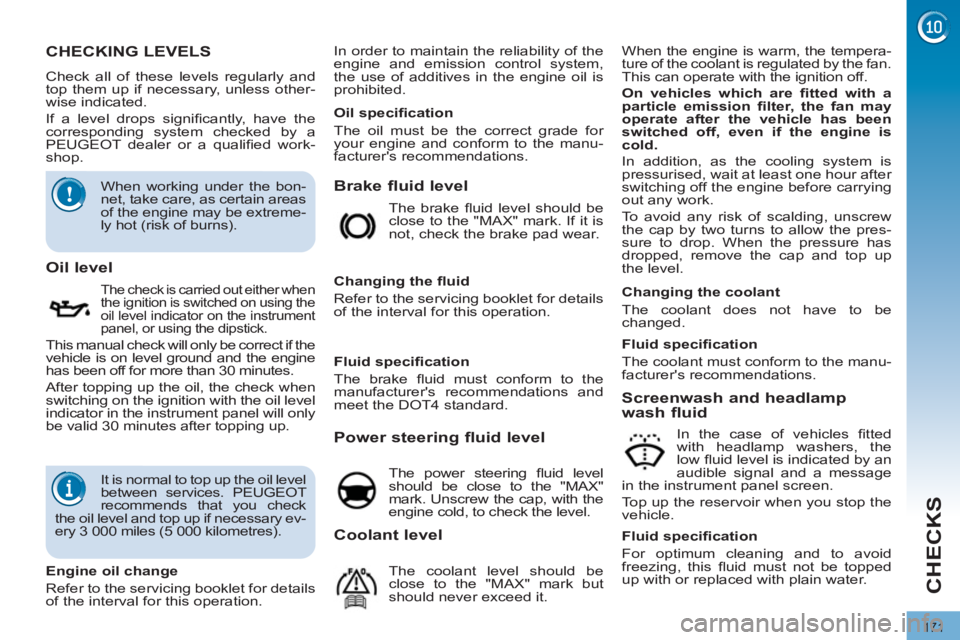
Brake fluid level
When the engine is warm, the tempera-
ture of the coolant is regulated by the fan.
This can operate with the ignition off.
On vehicles which are fi tted with a
particle emission fi lter, the fan may
operate after the vehicle has been
switched off, even if the engine is
cold.
In addition, as the cooling system is
pressurised, wait at least one hour after
switching off the engine before carrying
out any work.
To avoid any risk of scalding, unscrew
the cap by two turns to allow the pres-
sure to drop. When the pressure has
dropped, remove the cap and top up
the level.
Oil level
The check is carried out either when
the ignition is switched on using the
oil level indicator on the instrument
panel, or using the dipstick.
This manual check will only be correct if the
vehicle is on level ground and the engine
has been off for more than 30 minutes.
After topping up the oil, the check when
switching on the ignition with the oil level
indicator in the instrument panel will only
be valid 30 minutes after topping up. The brake fl uid level should be
close to the "MAX" mark. If it is
not, check the brake pad wear.
Changing the fl uid
Refer to the servicing booklet for details
of the interval for this operation.
Power steering fluid level
The power steering fl uid level
should be close to the "MAX"
mark. Unscrew the cap, with the
engine cold, to check the level.
Screenwash and headlamp
wash fluid
In the case of vehicles fi tted
with headlamp washers, the
low fl uid level is indicated by an
audible signal and a message
in the instrument panel screen.
Top up the reservoir when you stop the
vehicle.
Engine oil change
Refer to the servicing booklet for details
of the interval for this operation.
Oil specifi cation
The oil must be the correct grade for
your engine and conform to the manu-
facturer's recommendations.
Fluid specifi cation
The brake fl uid must conform to the
manufacturer's recommendations and
meet the DOT4 standard.
Changing the coolant
The coolant does not have to be
changed.
Fluid specifi cation
For optimum cleaning and to avoid
freezing, this fl uid must not be topped
up with or replaced with plain water.
Coolant level
The coolant level should be
close to the "MAX" mark but
should never exceed it.
Fluid specifi cation
The coolant must conform to the manu-
facturer's recommendations.
When working under the bon-
net, take care, as certain areas
of the engine may be extreme-
ly hot (risk of burns).
It is normal to top up the oil level
between services. PEUGEOT
recommends that you check
the oil level and top up if necessary ev-
ery 3 000 miles (5 000 kilometres). In order to maintain the reliability of the
engine and emission control system,
the use of additives in the engine oil is
prohibited.
Page 192 of 328
190
PRACTICAL INFORMATION
CHANGING A FUSE
Procedure for replacing a faulty fuse
with a new fuse to rectify a failure of the
corresponding function.
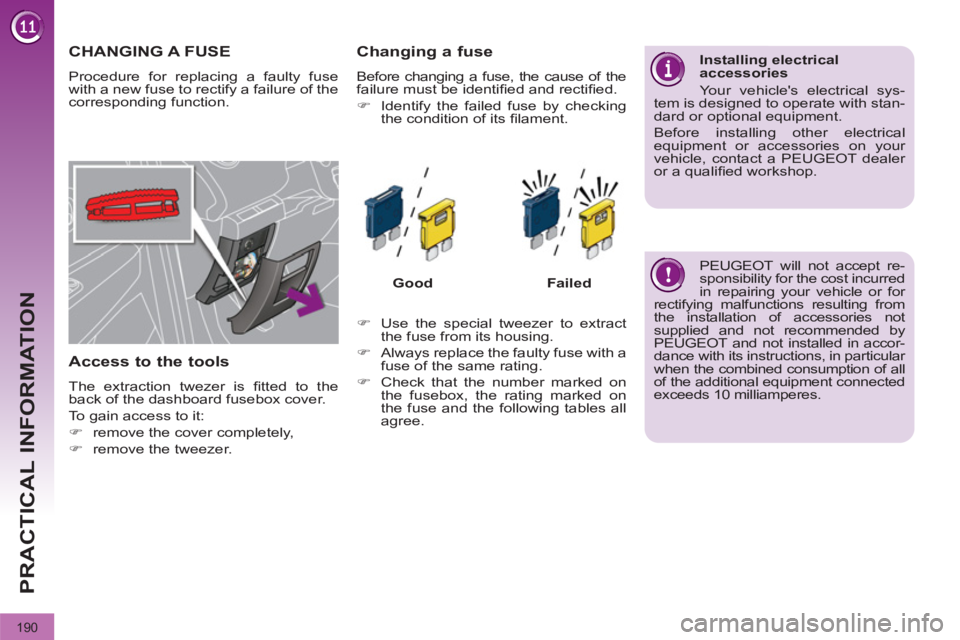
Access to the tools
The extraction twezer is fi tted to the
back of the dashboard fusebox cover.
To gain access to it:
)
remove the cover completely,
)
remove the tweezer.
Changing a fuse
Before changing a fuse, the cause of the
failure must be identifi ed and rectifi ed.
)
Identify the failed fuse by checking
the condition of its fi lament.
Good
Failed
)
Use the special tweezer to extract
the fuse from its housing.
)
Always replace the faulty fuse with a
fuse of the same rating.
)
Check that the number marked on
the fusebox, the rating marked on
the fuse and the following tables all
agree.
Installing electrical
accessories
Your vehicle's electrical sys-
tem is designed to operate with stan-
dard or optional equipment.
Before installing other electrical
equipment or accessories on your
vehicle, contact a PEUGEOT dealer
or a qualifi ed workshop.
PEUGEOT will not accept re-
sponsibility for the cost incurred
in repairing your vehicle or for
rectifying malfunctions resulting from
the installation of accessories not
supplied and not recommended by
PEUGEOT and not installed in accor-
dance with its instructions, in particular
when the combined consumption of all
of the additional equipment connected
exceeds 10 milliamperes.
Page 196 of 328
194
PRACTICAL INFORMATION
Engine compartment fuses
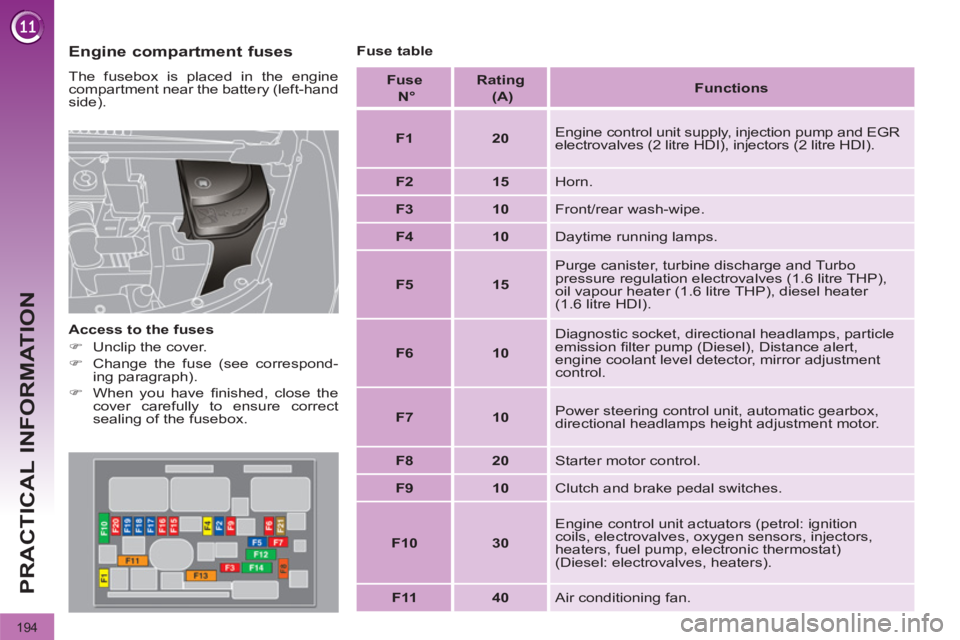
The fusebox is placed in the engine
compartment near the battery (left-hand
side).
Access to the fuses
)
Unclip the cover.
)
Change the fuse (see correspond-
ing paragraph).
)
When you have fi nished, close the
cover carefully to ensure correct
sealing of the fusebox.
Fuse table
Fuse
N°
Rating
(A)
Functions
F1
20
Engine control unit supply, injection pump and EGR
electrovalves (2 litre HDI), injectors (2 litre HDI).
F2
15
Horn.
F3
10
Front/rear wash-wipe.
F4
10
Daytime running lamps.
F5
15
Purge canister, turbine discharge and Turbo
pressure regulation electrovalves (1.6 litre THP),
oil vapour heater (1.6 litre THP), diesel heater
(1.6 litre HDI).
F6
10
Diagnostic socket, directional headlamps, particle
emission fi lter pump (Diesel), Distance alert,
engine coolant level detector, mirror adjustment
control.
F7
10
Power steering control unit, automatic gearbox,
directional headlamps height adjustment motor.
F8
20
Starter motor control.
F9
10
Clutch and brake pedal switches.
F10
30
Engine control unit actuators (petrol: ignition
coils, electrovalves, oxygen sensors, injectors,
heaters, fuel pump, electronic thermostat)
(Diesel: electrovalves, heaters).
F11
40
Air conditioning fan.