navigation PEUGEOT 308 2012 Workshop Manual
[x] Cancel search | Manufacturer: PEUGEOT, Model Year: 2012, Model line: 308, Model: PEUGEOT 308 2012Pages: 328, PDF Size: 62.62 MB
Page 285 of 328
283
08
1
3 2
2 1
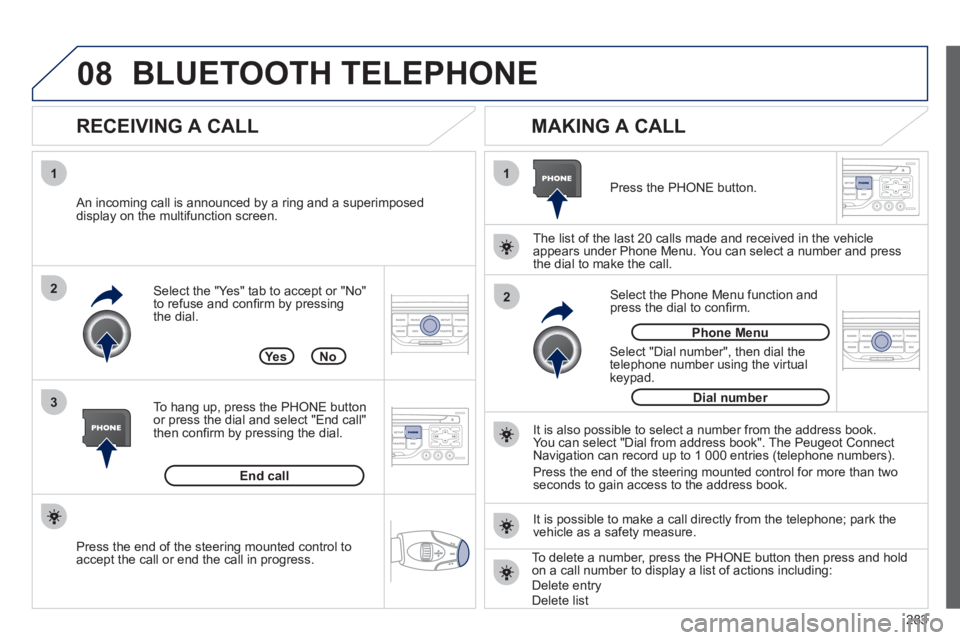
Select the "Yes" tab to accept or "No"
to refuse and confi rm by pressing
the dial.
RECEIVING A CALL
MAKING A CALL
An incoming call is announced by a ring and a superimposed
display on the multifunction screen.
Ye s
To hang up, press the PHONE button
or press the dial and select "End call"
then confi rm by pressing the dial.
End call
Press the PHONE button.
Select "Dial number", then dial the
telephone number using the virtual
keypad.
Select the Phone Menu function and
press the dial to confi rm.
The list of the last 20 calls made and received in the vehicle
appears under Phone Menu. You can select a number and press
the dial to make the call.
No
It is also possible to select a number from the address book.
You can select "Dial from address book". The Peugeot Connect
Navigation can record up to 1 000 entries (telephone numbers).
Press the end of the steering mounted control for more than two
seconds to gain access to the address book.
Phone Menu
Dial number
It is possible to make a call directly from the telephone; park the
vehicle as a safety measure.
BLUETOOTH TELEPHONE
Press the end of the steering mounted control to
accept the call or end the call in progress.
To delete a number, press the PHONE button then press and hold
on a call number to display a list of actions including:
Delete entry
Delete list
Page 288 of 328
286
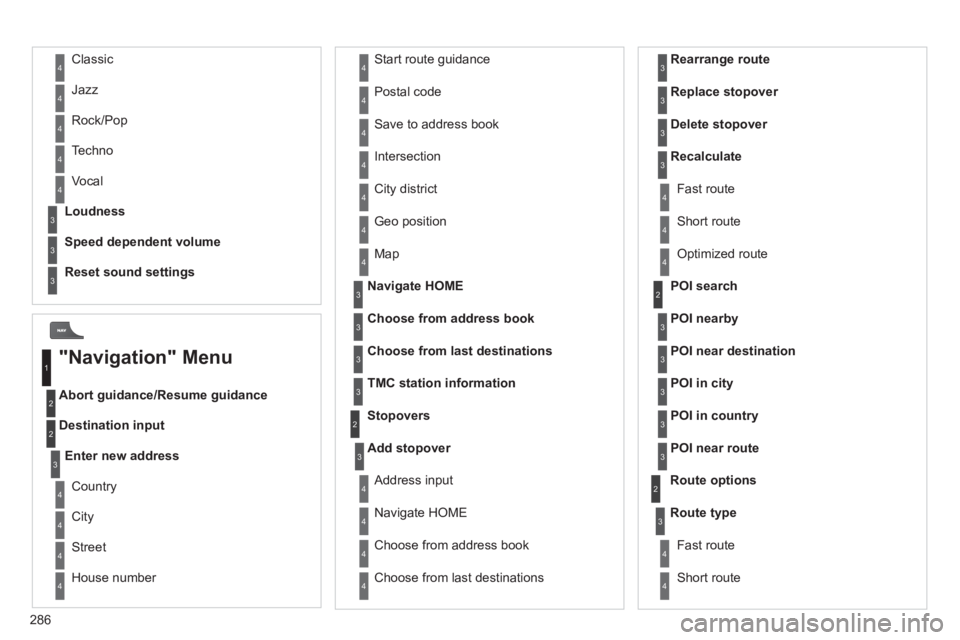
Abort guidance/Resume guidance
Destination input Geo position
Map
Stopovers
Add stopover
Navigate HOME
Choose from address book
Rearrange route
Choose from last destinations
Replace stopover
Delete stopover
Recalculate
Fast route
Short route
Optimized route
POI search
POI nearby
Route options
Route type
Short route Fast route
"Navigation" Menu
City
Street
Enter new address
Country
Navigate HOME
City district
House number Start route guidance
Postal code
Save to address book
Intersection
Address input
POI near destination
POI in city
POI in country
POI near route
Choose from address book
3
3
Choose from last destinations
TMC station information
Loudness
Speed dependent volume
Reset sound settings
3
3
3
1
2
4
4
4
4
4
4
4
4
4
4
4
3
2
3
3
2
3
4
4
4
4
3
3
3
3
4
4
4
2
4
2
3
3
3
3
3
3
4
Classic
Jazz
Rock/Pop
Techno
Vocal 4
4
4
4
4
Page 293 of 328
291
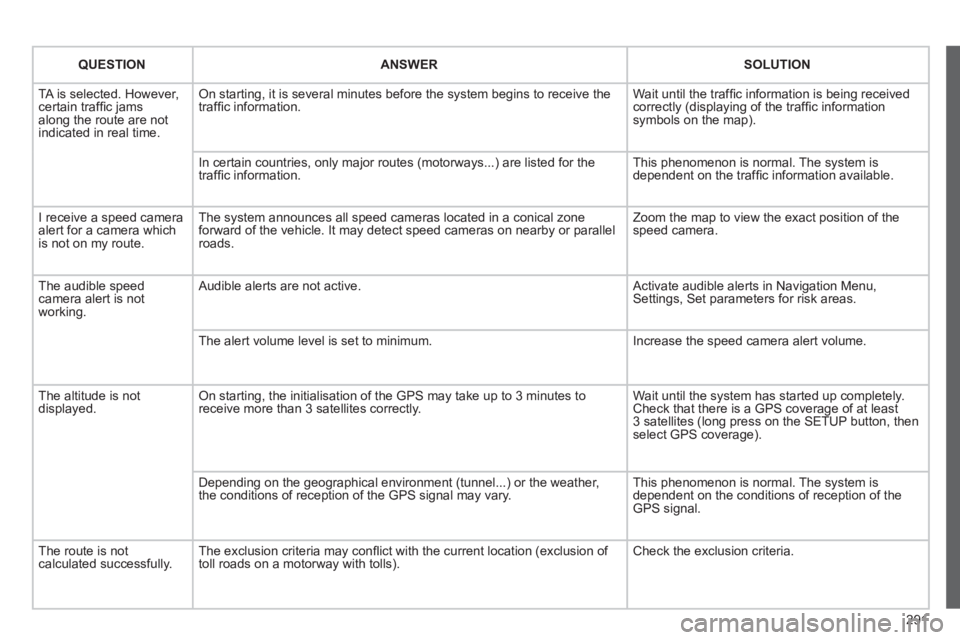
QUESTION
ANSWER
SOLUTION
TA is selected. However,
certain traffi c jams
along the route are not
indicated in real time. On starting, it is several minutes before the system begins to receive the
traffi c information. Wait until the traffi c information is being received
correctly (displaying of the traffi c information
symbols on the map).
In certain countries, only major routes (motorways...) are listed for the
traffi c information. This phenomenon is normal. The system is
dependent on the traffi c information available.
I receive a speed camera
alert for a camera which
is not on my route. The system announces all speed cameras located in a conical zone
forward of the vehicle. It may detect speed cameras on nearby or parallel
roads. Zoom the map to view the exact position of the
speed camera.
The audible speed
camera alert is not
working. Audible alerts are not active. Activate audible alerts in Navigation Menu,
Settings, Set parameters for risk areas.
The alert volume level is set to minimum. Increase the speed camera alert volume.
The altitude is not
displayed. On starting, the initialisation of the GPS may take up to 3 minutes to
receive more than 3 satellites correctly. Wait until the system has started up completely.
Check that there is a GPS coverage of at least
3 satellites (long press on the SETUP button, then
select GPS coverage).
Depending on the geographical environment (tunnel...) or the weather,
the conditions of reception of the GPS signal may vary. This phenomenon is normal. The system is
dependent on the conditions of reception of the
GPS signal.
The route is not
calculated successfully. The exclusion criteria may confl ict with the current location (exclusion of
toll roads on a motorway with tolls). Check the exclusion criteria.
Page 294 of 328
292
QUESTION
ANSWER
SOLUTION
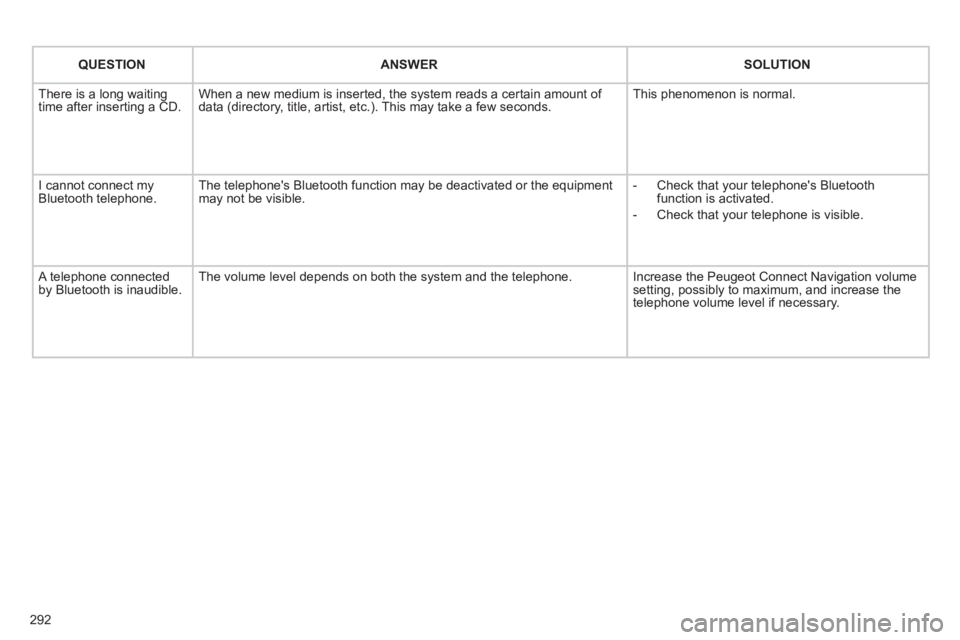
There is a long waiting
time after inserting a CD. When a new medium is inserted, the system reads a certain amount of
data (directory, title, artist, etc.). This may take a few seconds. This phenomenon is normal.
I cannot connect my
Bluetooth telephone. The telephone's Bluetooth function may be deactivated or the equipment
may not be visible.
- Check that your telephone's Bluetooth
function is activated.
- Check that your telephone is visible.
A telephone connected
by Bluetooth is inaudible. The volume level depends on both the system and the telephone. Increase the Peugeot Connect Navigation volume
setting, possibly to maximum, and increase the
telephone volume level if necessary.
Page 302 of 328
300
05
1
1
2
3
PEUGEOT CONNECT USB
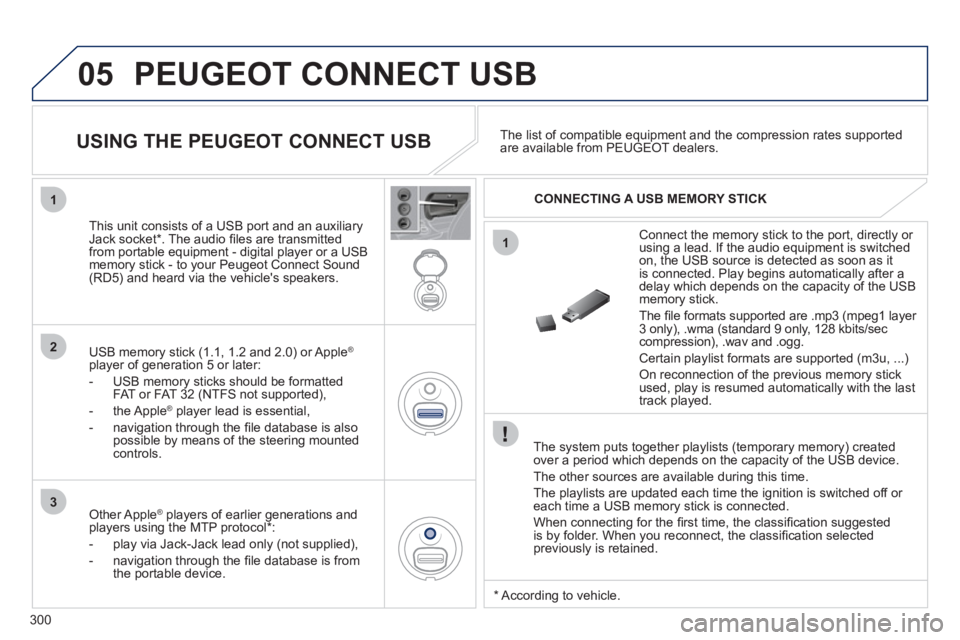
The system puts together playlists (temporary memory) created
over a period which depends on the capacity of the USB device.
The other sources are available during this time.
The playlists are updated each time the ignition is switched off or
each time a USB memory stick is connected.
When connecting for the fi rst time, the classifi cation suggested
is by folder. When you reconnect, the classifi cation selected
previously is retained.
Connect the memory stick to the port, directly or
using a lead. If the audio equipment is switched
on, the USB source is detected as soon as it
is connected. Play begins automatically after a
delay which depends on the capacity of the USB
memory stick.
The fi le formats supported are .mp3 (mpeg1 layer
3 only), .wma (standard 9 only, 128 kbits/sec
compression), .wav and .ogg.
Certain playlist formats are supported (m3u, ...)
On reconnection of the previous memory stick
used, play is resumed automatically with the last
track played.
This unit consists of a USB port and an auxiliary
Jack socket * . The audio fi les are transmitted
from portable equipment - digital player or a USB
memory stick - to your Peugeot Connect Sound
(RD5) and heard via the vehicle's speakers.
USB memory stick (1.1, 1.2 and 2.0) or Apple
®
player of generation 5 or later:
- USB memory sticks should be formatted
FAT or FAT 32 (NTFS not supported),
- the Apple
®
player lead is essential,
- navigation through the fi le database is also
possible by means of the steering mounted
controls.
The list of compatible equipment and the compression rates supported
are available from PEUGEOT dealers.
USING THE PEUGEOT CONNECT USB
CONNECTING A USB MEMORY STICK
Other Apple
®
players of earlier generations and
players using the MTP protocol * :
- play via Jack-Jack lead only (not supplied),
- navigation through the fi le database is from
the portable device.
*
According to vehicle.
Page 303 of 328
301
3
4
05
2
1
LISTREFRESH
LISTREFRESH
USING THE PEUGEOT CONNECT USB
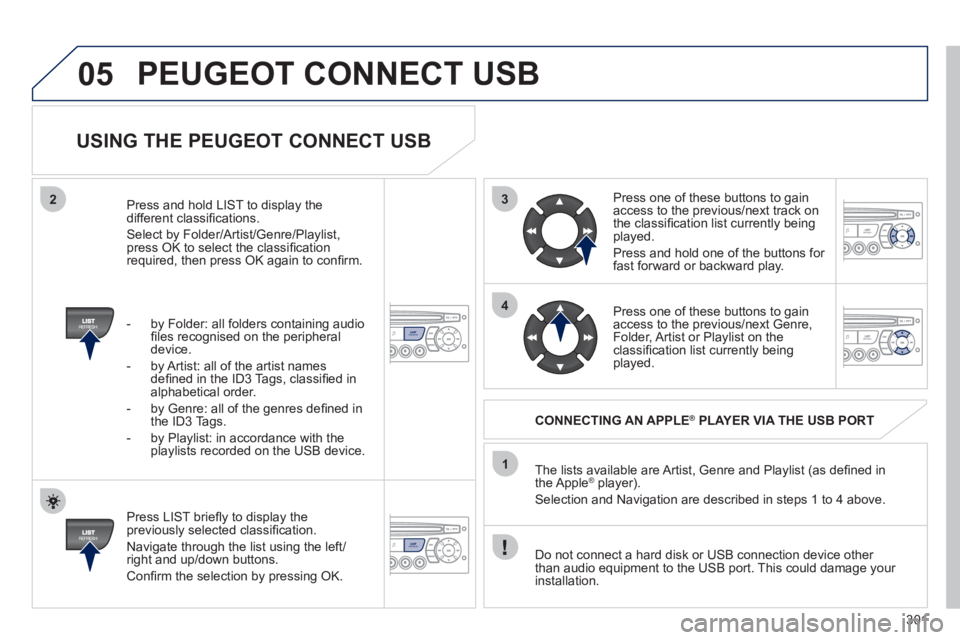
Press LIST briefl y to display the
previously selected classifi cation.
Navigate through the list using the left/
right and up/down buttons.
Confi rm the selection by pressing OK. The lists available are Artist, Genre and Playlist (as defi ned in
the Apple
® player).
Selection and Navigation are described in steps 1 to 4 above.
Do not connect a hard disk or USB connection device other
than audio equipment to the USB port. This could damage your
installation.
CONNECTING AN APPLE
®
PLAYER VIA THE USB PORT
Press one of these buttons to gain
access to the previous/next track on
the classifi cation list currently being
played.
Press and hold one of the buttons for
fast forward or backward play.
Press one of these buttons to gain
access to the previous/next Genre,
Folder, Artist or Playlist on the
classifi cation list currently being
played.
Press and hold LIST to display the
different classifi cations.
Select by Folder/Artist/Genre/Playlist,
press OK to select the classifi cation
required, then press OK again to confi rm.
- by Folder: all folders containing audio
fi les recognised on the peripheral
device.
- by Artist: all of the artist names
defi ned in the ID3 Tags, classifi ed in
alphabetical order.
- by Genre: all of the genres defi ned in
the ID3 Tags.
- by Playlist: in accordance with the
playlists recorded on the USB device.
PEUGEOT CONNECT USB
Page 319 of 328
317
ALPHABETICAL INDEX
NP
K
LM
Navigation...........................228, 267
Number plate lamps ...................189Paint colour code ........................ 211
Panoramic glass sunroof ............106
Parking brake .............................173
Parking brake,
electric .............................137, 140
Parking sensors,
rear ..........................................164
Particle emission fi lter.........172, 173
Passenger compartment
fi lter ..........................................172
PEUGEOT call button .................215
Peugeot Connect
ASSISTANCE ..........................214
Peugeot Connect Media
Navigation (NG4 3D) ....28, 51, 53,
55, 217, 220,
223, 251
Peugeot Connect
Navigation (RNEG) .............49, 53,
264, 285
Peugeot Connect
SOS .................................214, 215
Peugeot Connect
Sound (RD5) ..... 46, 293, 308, 310
PEUGEOT services ....................215
PIN code .....................................248
Player, CD MP3 ..................279, 299
POIs (updating) ..........................235
Port, USB................... 102, 300, 302
Priming the fuel system ..............168
Protecting
children ..... 113, 118, 120-122, 133
Puncture .....................................174 Keeping children
safe .................. 113, 121, 122, 133
Key with remote control .... 74-76, 78Main beam .................... 89, 185-187
Maintenance .................................25
Map reading lamps .......................97
Markings, identifi cation ............... 211
Mat..............................................103
Menu, main .................................296
Mini fuel level ................................87
Mirror, rear view ............................72
Mirrors, door .................................71
Misfuel prevention ........................88
Motorway function
(direction indicators) ................124
Mountings for ISOFIX seats .......120
MP3 CD ..............................279, 299
Multimedia, rear ..........................104
Music media players ...........240, 278 Labels,
identifi cation ............................. 211
Lamps,
warning and indicator ....29, 32, 33
Level,
brake fl uid ................................171
Level,
headlamp wash .................95, 171
Level,
power steering fl uid .................171
Levels and
checks ............................. 169-172
Lighting .........................................99
Lighting,
guide-me home ....................91, 92
Lighting, interior ......................97, 98
Lighting bulbs
(replacement) ......... 185, 188, 189
Lighting control stalk .....................89
Lighting dimmer ............................41
Loading .................................25, 203
Load reduction mode ..................199
Load space cover .......................108
Locating your vehicle ....................75
Locking from
the inside ...................................84
Long objects,
transporting ........................68, 105
Luggage retaining net .................109
Luggage retaining strap ..............107
O
Oil fi lter .......................................172
Oil level .................................40, 171
Opening the bonnet ....................167
Opening the boot ....................74, 85
Opening the doors ..................74, 83
Opening the panoramic sunroof
blind .........................................106
Opening the retractable screen ....53
Opening the tailgate ...............85, 86
Operation indicator
lamps ...................... 29, 31, 32, 34
Page 320 of 328
318
ALPHABETICAL INDEX
SRStorage .............. 100, 102, 105, 107
Storage box ................................101
Storage wells ..............................107
Stowing rings ..............................107
Sun visor.....................................101
Synchronising the remote control ...77
System, ASR ..............................128
System, navigation .............228, 267
Systems, ASR and ESP .............127 Safety for children......... 81, 118, 123
Screen,
colour 16/9 ...... 223, 251, 264, 285
Screen, monochrome ... 296, 308, 310
Screen,
monochrome C ..........................55
Screen, multifunction (with audio
equipment) ........ 44, 46, 49, 51, 53
Screen, multifunction
(without audio equipment) .........42
Screen-wash reservoir................171
Screen menu
map ................. 251, 285, 308, 310
Screenwash, front.........................95
Screenwash fl uid level ..........95, 171
Seat adjustment......................65, 66
Seat belts............................ 130-132
Seats, electric ...............................66
Seats, rear ....................................69
Serial number, vehicle ................ 211
Service indicator ...........................38
Servicing .......................................25
Setting
the clock ......... 250, 284, 306, 307
Short-cut menus ........ 224, 265, 266
Sidelamps ..................... 89, 185-188
Side repeater ..............................187
SIM card .............................101, 248
Ski fl ap ........................................105
Spare wheel........................180, 182
Spectacles storage .....................100
Speed limiter...............................149
Speedometer ................................27
Spotlamps, side ............................98
Stability control (ESP).................127
Starting the vehicle ...... 76, 154, 158
Steering mounted controls,
audio ................................222, 295
Stopping the vehicle .... 76, 154, 158
Stop Start.................. 57, 61, 63, 87,
161, 167, 172, 197 Radio ......................... 239, 277, 297
RCA sockets ...............................244
Reading lamps, rear .....................97
Rear foglamp ......................188, 189
Rear screen
(demisting) .................................61
Recharging the battery ...............197
Reduction of electrical
load ..........................................199
Reinitialising the electric
windows .....................................81
Reinitialising the remote
control ........................................77
Remote control .................74, 75, 78
Removable screen
(snow shield) ...........................203
Removing a wheel ......................183
Removing the mat ......................103
Repair kit, puncture ....................174
Replacing bulbs ......... 185, 188, 189
Replacing fuses ..........................190
Replacing the air fi lter .................172
Replacing the oil fi lter .................172
Replacing the particle
emission fi lter ...........................173
Replacing the passenger
compartment fi lter ....................172
Replacing wiper
blades ................................96, 200
Resetting the service
indicator .....................................39
Resetting the trip
recorder .....................................41
Rev counter ..................................27
Reversing lamp...........................188
Risk areas
(update) ...........................235, 274
Roof bars ....................................203
Routine checks ...................172, 173
Running out of fuel
(Diesel) ....................................168
T
Table of weights ......... 206, 208, 209
Tables of engines................205, 207
Tables of fuses............................190
Tank, fuel ......................................88
Technical data..................... 205-209
Telephone ... 215, 245-247, 281, 282
Telephone, hands-free ........ 245-247
Temperature, coolant ....................37
Temperature control
for heated seats .........................67
Temporary tyre repair kit .............174
Third brake lamp.........................189
TMC (Traffi c info) ................237, 275
Tools ...................................180, 182
Torch ..................................... 99, 112
Total distance recorder .................41
Towbar ........................................202
Towed loads............... 206, 208, 209
Towing another vehicle ...............200
Traction control (ASR) ........127, 128
Traffi c information
(TA) ................. 238, 276, 277, 298
Traffi c information
(TMC) ............. 237, 238, 275, 276
Trip computer ...................54, 55, 57
Trip distance recorder ...................41
Tyre pressures ............................ 211
Tyres .............................................25
Tyre under-infl ation detection .....125
Page 324 of 328
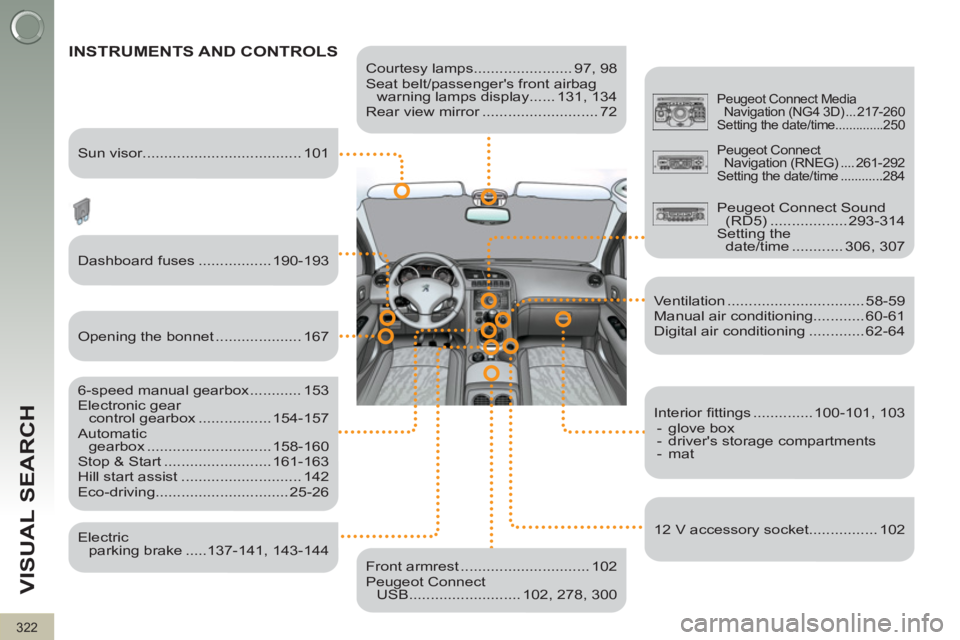
322
VISUAL SEARCH
Courtesy lamps....................... 97, 98
Seat belt/passenger's front airbag
warning lamps display ...... 131, 134
Rear view mirror ........................... 72
INSTRUMENTS AND CONTROLS
Dashboard fuses ................. 190-193
6-speed manual gearbox ............ 153
Electronic gear
control gearbox ................. 154-157
Automatic
gearbox ............................. 158-160
Stop & Start ......................... 161-163
Hill start assist ............................ 142
Eco-driving............................... 25-26
Ventilation ................................ 58-59
Manual air conditioning............ 60-61
Digital air conditioning ............. 62-64
Front armrest .............................. 102
Peugeot Connect
USB .......................... 102, 278, 300
Peugeot Connect Media
Navigation (NG4 3D) ... 217-260
Setting the date/time ..............250
Sun visor..................................... 101
Opening the bonnet .................... 167
Electric
parking brake .....137-141, 143-144
Interior fi ttings .............. 100-101, 103
- glove box
- driver's storage compartments
- mat
12 V accessory socket................ 102
Peugeot Connect
Navigation (RNEG) .... 261-292
Setting the date/time ............284
Peugeot Connect Sound
(RD5) .................. 293-314
Setting the
date/time ............ 306, 307