display PEUGEOT 308 2012 Owners Manual
[x] Cancel search | Manufacturer: PEUGEOT, Model Year: 2012, Model line: 308, Model: PEUGEOT 308 2012Pages: 328, PDF Size: 62.62 MB
Page 5 of 328
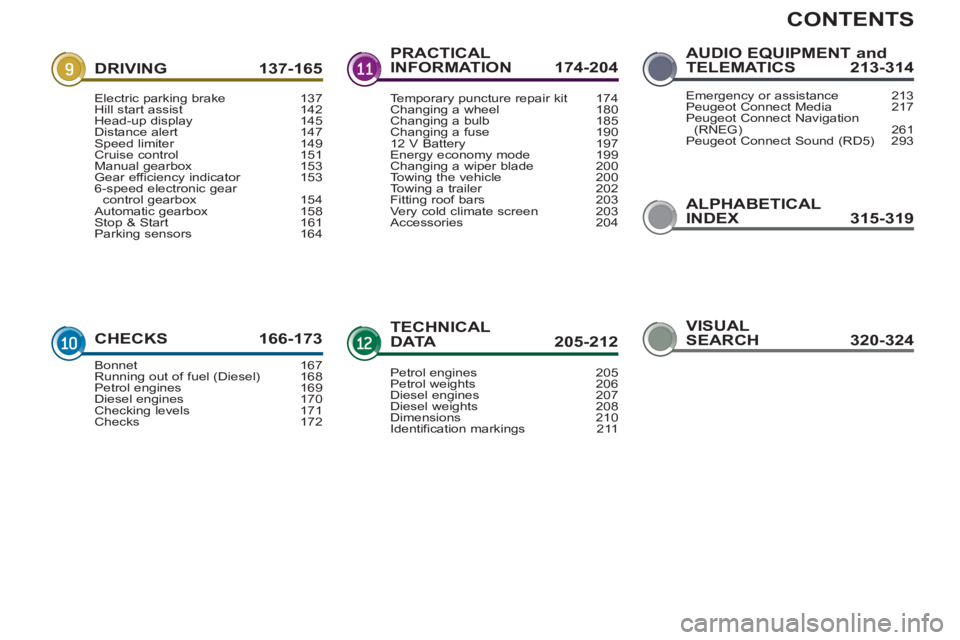
CONTENTS
ALPHABETICAL
INDEX 315-319 DRIVING 137-165
CHECKS 166-173PRACTICAL
INFORMATION 174-204
TECHNICAL
DATA 205-212AUDIO EQUIPMENT and
TELEMATICS 213-314
Electric parking brake 137
Hill start assist 142
Head-up display 145
Distance alert 147
Speed limiter 149
Cruise control 151
Manual gearbox 153
Gear efficiency indicator 153
6-speed electronic gear
control gearbox 154
Automatic gearbox 158
Stop & Start 161
Parking sensors 164
Bonnet 167
Running out of fuel (Diesel) 168
Petrol engines 169
Diesel engines 170
Checking levels 171
Checks 172Temporary puncture repair kit 174
Changing a wheel 180
Changing a bulb 185
Changing a fuse 190
12 V Battery 197
Energy economy mode 199
Changing a wiper blade 200
Towing the vehicle 200
Towing a trailer 202
Fitting roof bars 203
Very cold climate screen 203
Accessories 204
Petrol engines 205
Petrol weights 206
Diesel engines 207
Diesel weights 208
Dimensions 210
Identification markings 211Emergency or assistance 213
Peugeot Connect Media 217
Peugeot Connect Navigation
(RNEG) 261
Peugeot Connect Sound (RD5) 293
VISUAL
SEARCH 320-324
Page 10 of 328
8
FAMILIARISATION
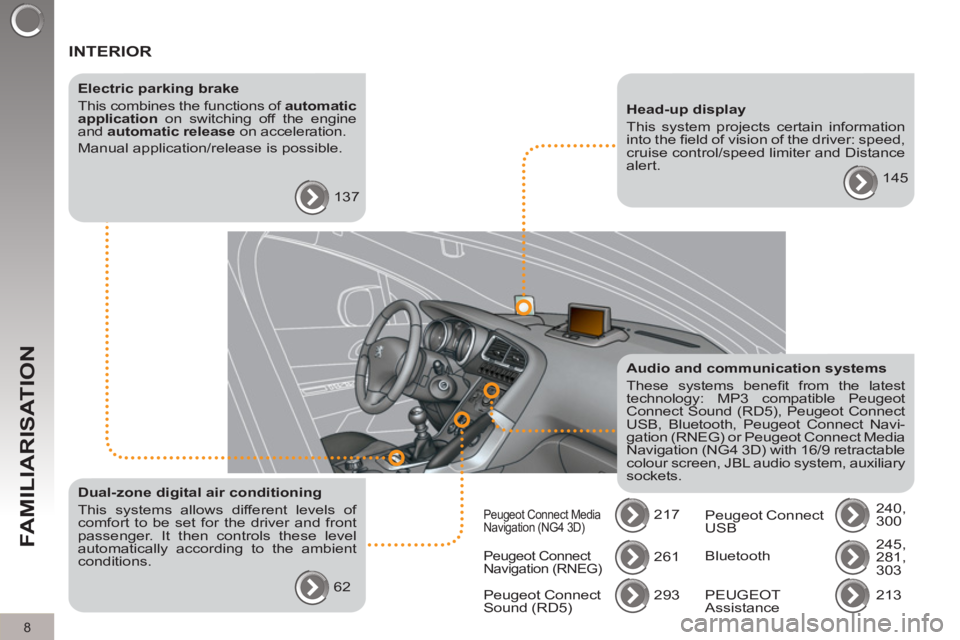
INTERIOR
Electric parking brake
This combines the functions of automatic
application
on switching off the engine
and automatic release
on acceleration.
Manual application/release is possible.
137
Audio and communication systems
These systems benefi t from the latest
technology: MP3 compatible Peugeot
Connect Sound (RD5), Peugeot Connect
USB, Bluetooth, Peugeot Connect Navi-
gation (RNEG) or Peugeot Connect Media
Navigation (NG4 3D) with 16/9 retractable
colour screen, JBL audio system, auxiliary
sockets.
217
Head-up display
This system projects certain information
into the fi eld of vision of the driver: speed,
cruise control/speed limiter and Distance
alert.
145
Dual-zone digital air conditioning
This systems allows different levels of
comfort to be set for the driver and front
passenger. It then controls these level
automatically according to the ambient
conditions.
62
Peugeot Connect
Navigation (RNEG) 261
293
Peugeot Connect
Sound (RD5)
Peugeot Connect Media
Navigation (NG4 3D) Peugeot Connect
USB 240,
300
Bluetooth 245,
281,
303
213
PEUGEOT
Assistance
Page 12 of 328
10
FAMILIARISATION
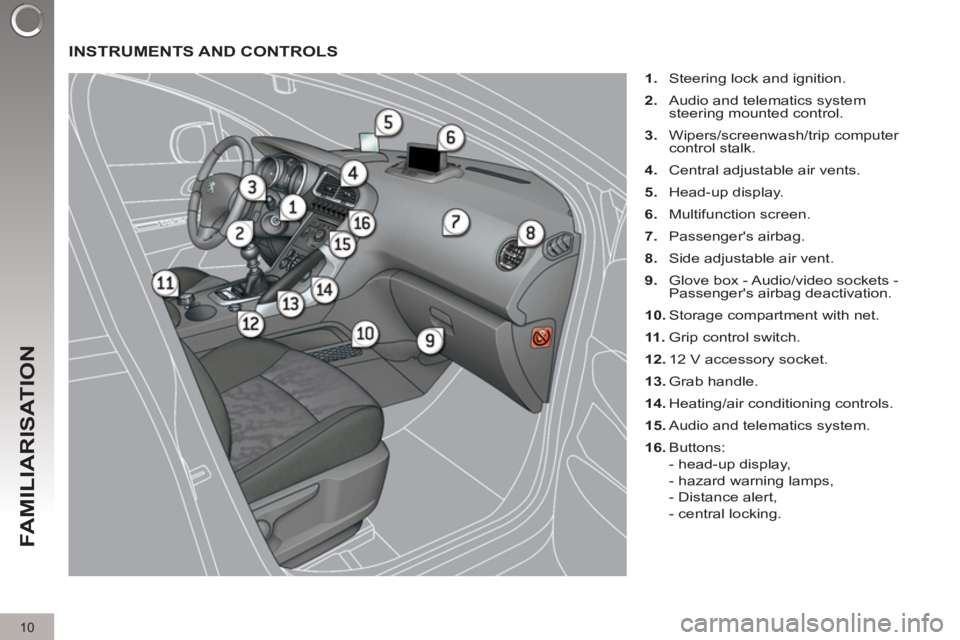
INSTRUMENTS AND CONTROLS
1.
Steering lock and ignition.
2.
Audio and telematics system
steering mounted control.
3.
Wipers/screenwash/trip computer
control stalk.
4.
Central adjustable air vents.
5.
Head-up display.
6.
Multifunction screen.
7.
Passenger's airbag.
8.
Side adjustable air vent.
9.
Glove box - Audio/video sockets -
Passenger's airbag deactivation.
10.
Storage compartment with net.
11 .
Grip control switch.
12.
12 V accessory socket.
13.
Grab handle.
14.
Heating/air conditioning controls.
15.
Audio and telematics system.
16.
Buttons:
- head-up display,
- hazard warning lamps,
- Distance alert,
- central locking.
Page 18 of 328
16
FAMILIARISATION
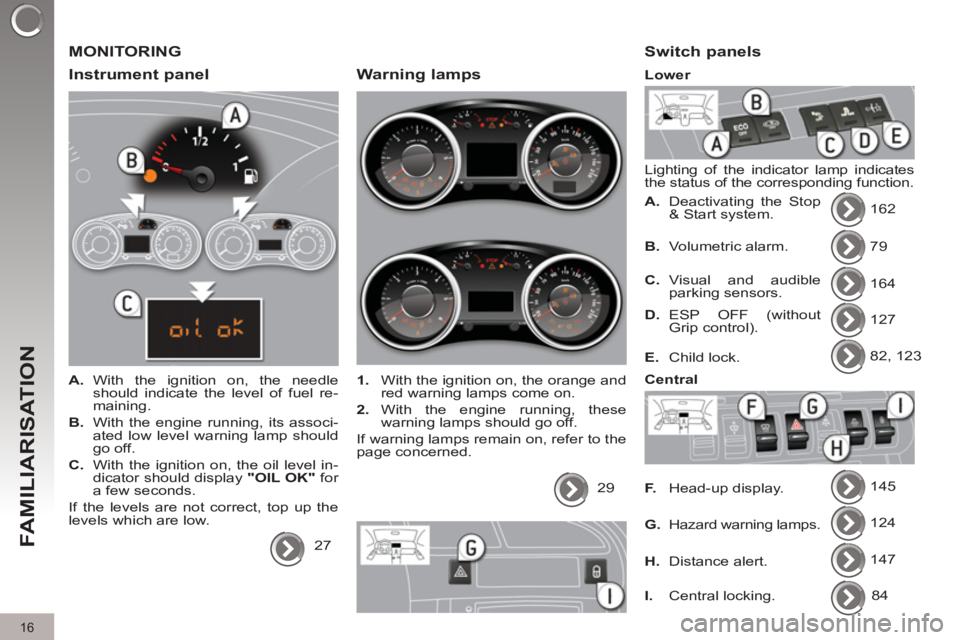
MONITORING
Instrument panel
A.
With the ignition on, the needle
should indicate the level of fuel re-
maining.
B.
With the engine running, its associ-
ated low level warning lamp should
go off.
C.
With the ignition on, the oil level in-
dicator should display "OIL OK"
for
a few seconds.
If the levels are not correct, top up the
levels which are low.
27
Warning lamps
1.
With the ignition on, the orange and
red warning lamps come on.
2.
With the engine running, these
warning lamps should go off.
If warning lamps remain on, refer to the
page concerned.
29
Switch panels
Lighting of the indicator lamp indicates
the status of the corresponding function.
A.
Deactivating the Stop
& Start system. 162
79
164
127
82, 123
145
124
147
B.
Volumetric alarm.
C.
Visual and audible
parking sensors.
D.
ESP OFF (without
Grip control).
E.
Child lock.
F.
Head-up display.
G.
Hazard warning lamps.
H.
Distance alert.
Lower
Central
I.
Central locking. 84
Page 24 of 328
DRIVING SAFELY
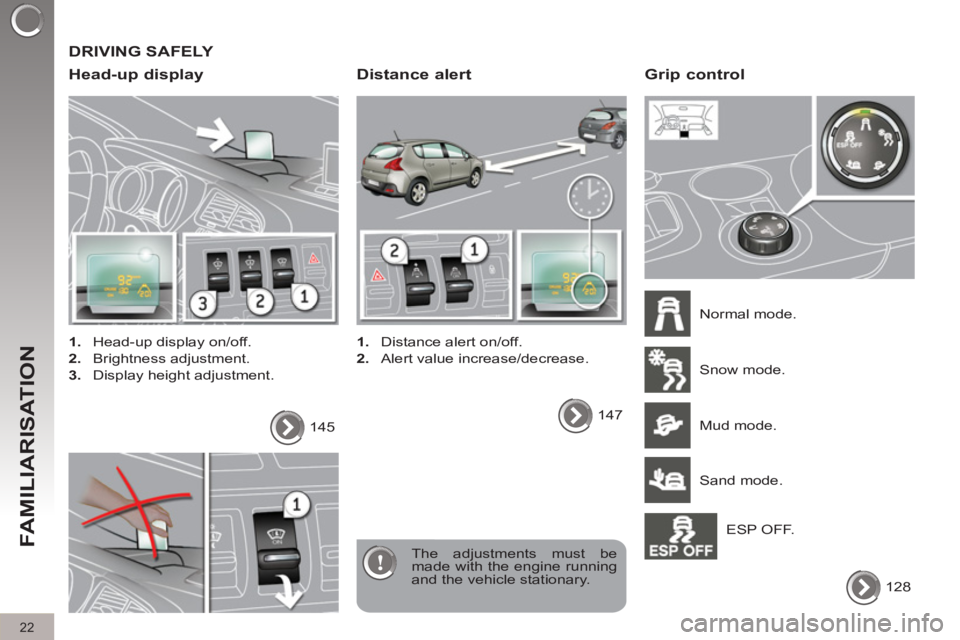
Head-up display
1.
Head-up display on/off.
2.
Brightness adjustment.
3.
Display height adjustment.
The adjustments must be
made with the engine running
and the vehicle stationary. 145
Distance alert
1.
Distance alert on/off.
2.
Alert value increase/decrease.
147
Grip control
Normal mode.
128 Snow mode.
Mud mode.
Sand mode.
ESP OFF.
22
FAMILIARISATION
Page 25 of 328
23
FAMILIARISATION
DRIVING SAFELY
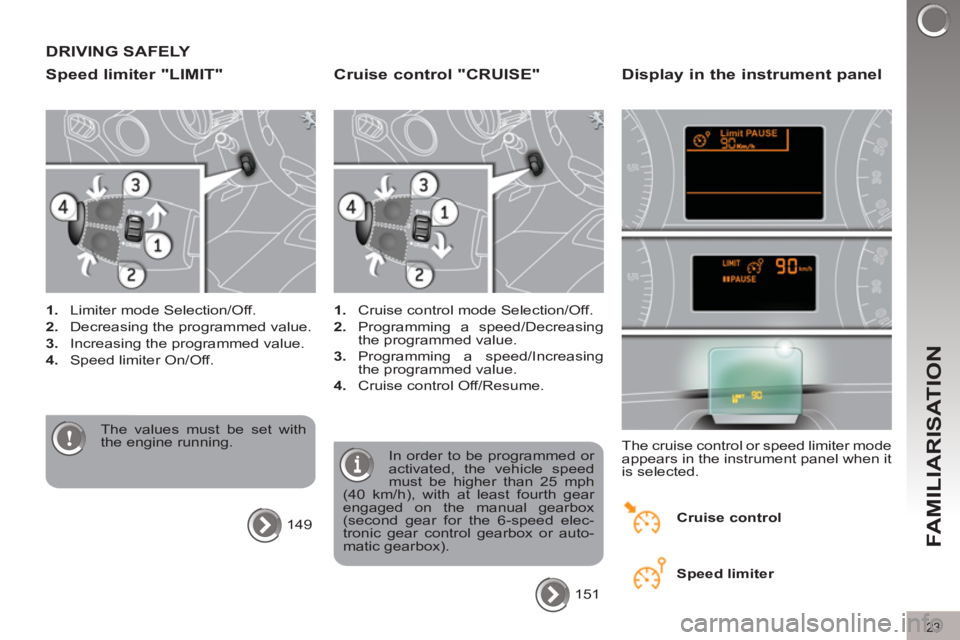
Speed limiter "LIMIT"
1.
Limiter mode Selection/Off.
2.
Decreasing the programmed value.
3.
Increasing the programmed value.
4.
Speed limiter On/Off.
The values must be set with
the engine running.
149
Cruise control "CRUISE"
1.
Cruise control mode Selection/Off.
2.
Programming a speed/Decreasing
the programmed value.
3.
Programming a speed/Increasing
the programmed value.
4.
Cruise control Off/Resume.
In order to be programmed or
activated, the vehicle speed
must be higher than 25 mph
(40 km/h), with at least fourth gear
engaged on the manual gearbox
(second gear for the 6-speed elec-
tronic gear control gearbox or auto-
matic gearbox).
151
Display in the instrument panel
The cruise control or speed limiter mode
appears in the instrument panel when it
is selected.
Cruise control
Speed limiter
Page 27 of 328
Optimise the use of your
gearbox
With a manual gearbox, move off gen-
tly, change up without waiting and
drive by changing up quite soon. If
your vehicle has the system, the gear
shift indicator invites you to change up;
it is displayed in the instrument panel,
follow its instructions.
With an automatic or electronic gear-
box, stay in Drive "D"
or Auto "A"
, ac-
cording to the type of gearbox, without
pressing the accelerator pedal heavily
or suddenly.
Drive smoothly
Maintain a safe distance between ve-
hicles, use engine braking rather than
the brake pedal, and press the accel-
erator progressively. These practices
contribute towards a reduction in fuel
consumption and CO
2 emissions and
also helps reduce the background traf-
fi c noise.
If your vehicle has cruise control, make
use of the system at speeds above
25 mph (40 km/h) when the traffi c is
fl owing well.
Control the use of your electrical equipment
Before moving off, if the passenger
compartment is too warm, ventilate it by
opening the windows and air vents be-
fore using the air conditioning.
Above 30 mph (50 km/h), close the win-
dows and leave the air vents open.
Remember to make use of equipment
that can help keep the temperature in
the passenger compartment down (sun
roof and window blinds...).
Switch off the air conditioning, unless
it has automatic digital regulation, as
soon as the desired temperature is at-
tained.
Switch off the demisting and defrosting
controls, if not automatic.
Switch off the heated seat as soon as
possible.
Switch off the headlamps and front
foglamps when the level of light does
not require their use.
Avoid running the engine before moving
off, particularly in winter; your vehicle will
warm up much faster while driving.
As a passenger, if you avoid connecting
your multimedia devices (fi lm, music,
video game...), you will contribute to-
wards limiting the consumption of elec-
trical energy, and so of fuel.
Disconnect your portable devices be-
fore leaving the vehicle.
ECO-DRIVING
25
Eco-driving is a range of everyday practices that allow the motorist to optimise their fuel consumption and CO2 emis-
sions.
Page 29 of 328
27
INSTRUMENTS and CONTROLS
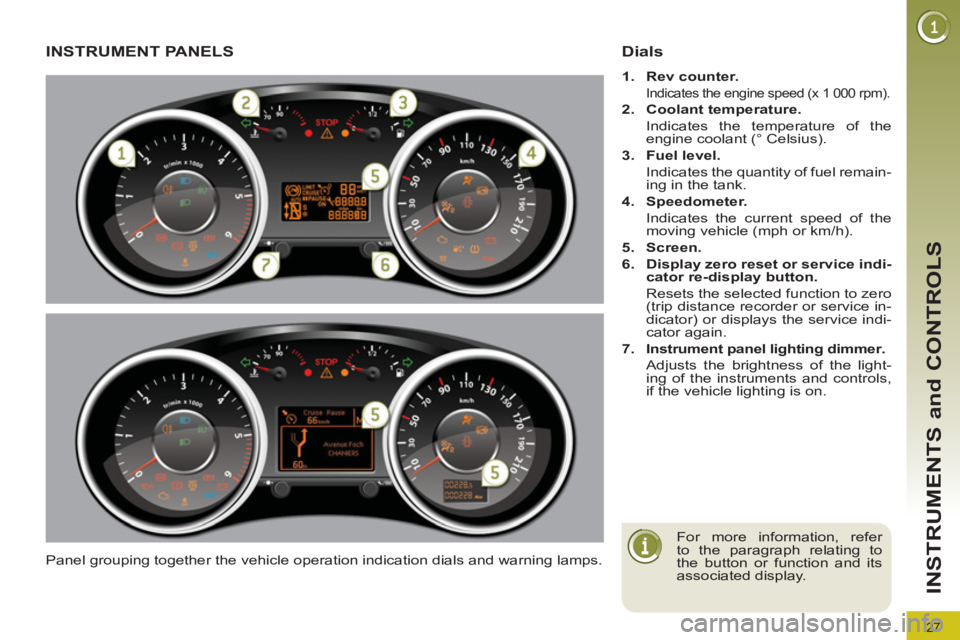
INSTRUMENT PANELS
Panel grouping together the vehicle operation indication dials and warning lamps.
Dials
1.
Rev counter.
Indicates the engine speed (x 1 000 rpm).
2.
Coolant temperature.
Indicates the temperature of the
engine coolant (° Celsius).
3.
Fuel level.
Indicates the quantity of fuel remain-
ing in the tank.
4.
Speedometer.
Indicates the current speed of the
moving vehicle (mph or km/h).
5.
Screen.
6.
Display zero reset or service indi-
cator re-display button.
Resets the selected function to zero
(trip distance recorder or service in-
dicator) or displays the service indi-
cator again.
7.
Instrument panel lighting
dimmer
.
Adjusts the brightness of the light-
ing of the instruments and controls,
if the vehicle lighting is on.
For more information, refer
to the paragraph relating to
the button or function and its
associated display.
Page 30 of 328
28
INSTRUMENTS and CONTROLS
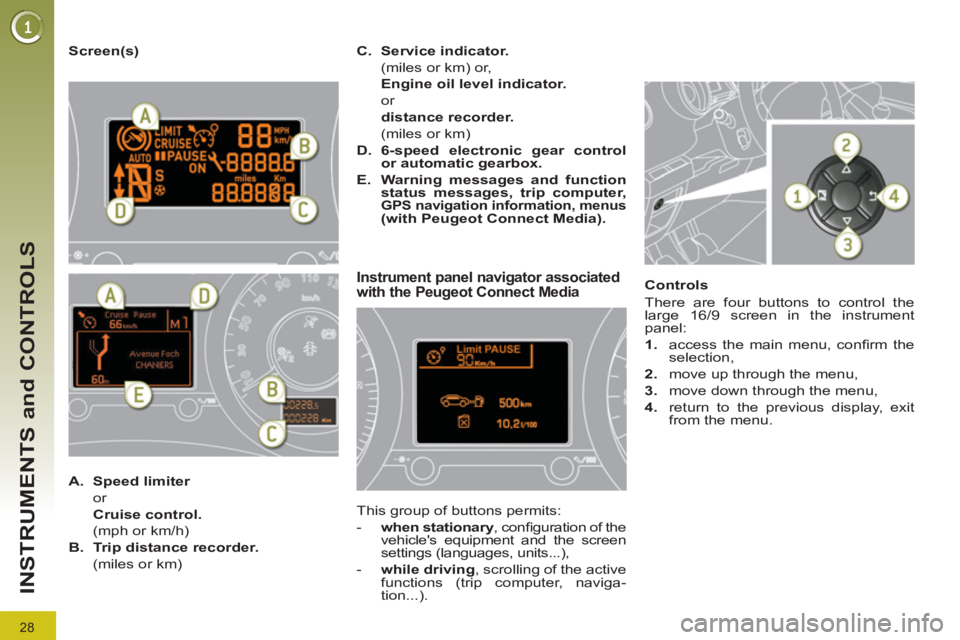
Screen(s)
Instrument panel navigator associated
with the Peugeot Connect Media
This group of buttons permits:
- when stationary
, confi guration of the
vehicle's equipment and the screen
settings (languages, units...),
- while driving
, scrolling of the active
functions (trip computer, naviga-
tion...).
Controls
There are four buttons to control the
large 16/9 screen in the instrument
panel:
1.
access the main menu, confi rm the
selection,
2.
move up through the menu,
3.
move down through the menu,
4.
return to the previous display, exit
from the menu.
A.
Speed limiter
or
Cruise control.
(mph or km/h)
B.
Trip distance recorder.
(miles or km)
C.
Service indicator.
(miles or km) or,
Engine oil level indicator.
or
distance recorder.
(miles or km)
D.
6-speed electronic gear control
or automatic gearbox.
E.
Warning messages and function
status messages, trip computer,
GPS navigation information, menus (with Peugeot Connect Media).
Page 31 of 328
29
INSTRUMENTS and CONTROLS
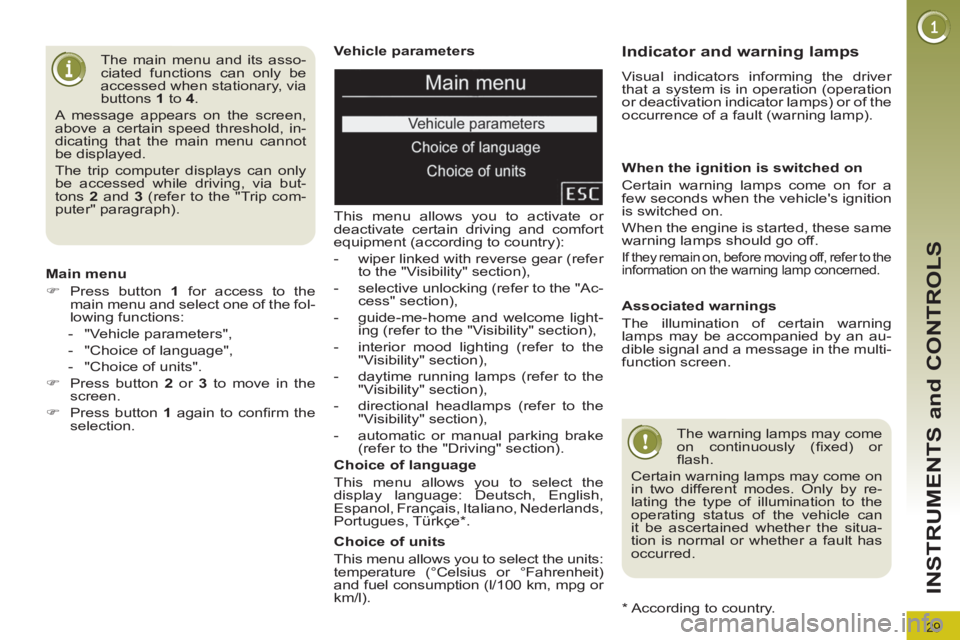
Vehicle parameters
This menu allows you to activate or
deactivate certain driving and comfort
equipment (according to country):
- wiper linked with reverse gear (refer
to the "Visibility" section),
- selective unlocking (refer to the "Ac-
cess" section),
- guide-me-home and welcome light-
ing (refer to the "Visibility" section),
- interior mood lighting (refer to the
"Visibility" section),
- daytime running lamps (refer to the
"Visibility" section),
- directional headlamps (refer to the
"Visibility" section),
- automatic or manual parking brake
(refer to the "Driving" section).
Choice of units
This menu allows you to select the units:
temperature (°Celsius or °Fahrenheit)
and fuel consumption (l/100 km, mpg or
km/l).
Choice of language
This menu allows you to select the
display language: Deutsch, English,
Espanol, Français, Italiano, Nederlands,
Portugues, Türkçe * .
The main menu and its asso-
ciated functions can only be
accessed when stationary, via
buttons 1
to 4
.
A message appears on the screen,
above a certain speed threshold, in-
dicating that the main menu cannot
be displayed.
The trip computer displays can only
be accessed while driving, via but-
tons 2
and 3
(refer to the "Trip com-
puter" paragraph).
Main menu
)
Press button 1
for access to the
main menu and select one of the fol-
lowing functions:
- "Vehicle parameters",
- "Choice of language",
- "Choice of units".
)
Press button 2
or 3
to move in the
screen.
)
Press button 1
again to confi rm the
selection.
*
According to country.
Indicator and warning lamps
Visual indicators informing the driver
that a system is in operation (operation
or deactivation indicator lamps) or of the
occurrence of a fault (warning lamp).
When the ignition is switched on
Certain warning lamps come on for a
few seconds when the vehicle's ignition
is switched on.
When the engine is started, these same
warning lamps should go off.
If they remain on, before moving off, refer to the
information on the warning lamp concerned.
Associated warnings
The illumination of certain warning
lamps may be accompanied by an au-
dible signal and a message in the multi-
function screen.
The warning lamps may come
on continuously (fi xed) or
fl ash.
Certain warning lamps may come on
in two different modes. Only by re-
lating the type of illumination to the
operating status of the vehicle can
it be ascertained whether the situa-
tion is normal or whether a fault has
occurred.