remote control Peugeot 308 2014.5 - RHD (UK, Australia) Owner's Guide
[x] Cancel search | Manufacturer: PEUGEOT, Model Year: 2014.5, Model line: 308, Model: Peugeot 308 2014.5Pages: 415, PDF Size: 11.57 MB
Page 74 of 415
72
Triggering of the alarm
this is indicated by sounding of the siren and
flashing of the direction indicators for thirty
seconds.
th
e monitoring functions remain active until
the alarm has been triggered eleven times in
succession.
When the vehicle is unlocked using
the remote control or the Keyless
en
try and starting system, rapid
flashing of the indicator lamp in the
button informs you that the alarm
was triggered during your absence.
When the ignition is switched on, this
flashing stops immediately.
Failure of the remote control
to deactivate the monitoring functions:
F un lock the vehicle using the key (integral
with the remote control) in the driver's door
lock.
F
O
pen the door; the alarm is triggered.
F
S
witch on the ignition; the alarm stops.
th
e indicator lamp in the button goes off.
Locking the vehicle without
activating the alarm
F Lock or deadlock the vehicle using the key (integral with the remote control) in the
driver's door lock.
Operating fault
When the ignition is switched on,
fixed illumination of the indicator
lamp in the button indicates a fault in
the system.
Have it checked by a P
e
uge
Ot
dealer or a qualified workshop.
Automatic activation
this function is either not available, an option
or is standard.
2 minutes after the last door or the boot is
closed, the system is activated automatically.
F
t
o a
void triggering the alarm on entering
the vehicle, first press the unlocking button
on the remote control or unlock the vehicle
using the Keyless
e
n
try and Starting
system.
Access
Page 75 of 415
73
electric windows
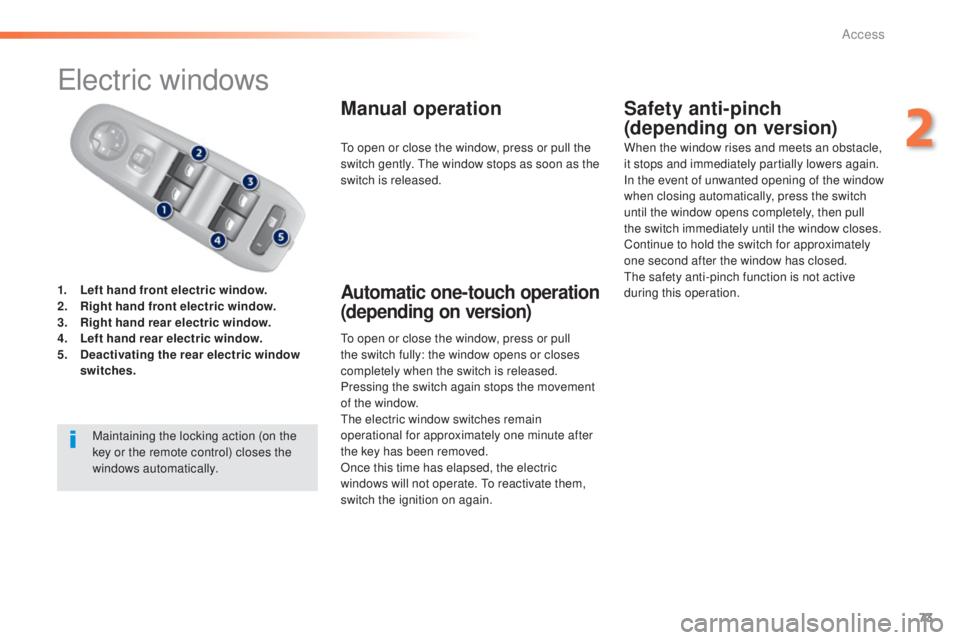
1. Left hand front electric window.
2. Right hand front electric window.
3.
R
ight hand rear electric window.
4.
Le
ft hand rear electric window.
5.
D
eactivating the rear electric window
switches .
Manual operation
to open or close the window, press or pull
the switch fully: the window opens or closes
completely when the switch is released.
Pressing the switch again stops the movement
of the window.
the
electric window switches remain
operational for approximately one minute after
the key has been removed.
Once this time has elapsed, the electric
windows will not operate.
t
o r
eactivate them,
switch the ignition on again.
Safety anti-pinch
(depending on version)
Automatic one-touch operation
(depending on version)
to open or close the window, press or pull the
switch gently. th e window stops as soon as the
switch is released. When the window rises and meets an obstacle,
it stops and immediately partially lowers again.
In the event of unwanted opening of the window
when closing automatically, press the switch
until the window opens completely, then pull
the switch immediately until the window closes.
Continue to hold the switch for approximately
one second after the window has closed.
th
e safety anti-pinch function is not active
during this operation.
Maintaining the locking action (on the
key or the remote control) closes the
windows automatically.
2
Access
Page 115 of 415
113
Starting-switching off the engine, remote control
Put the gear lever into neutral.
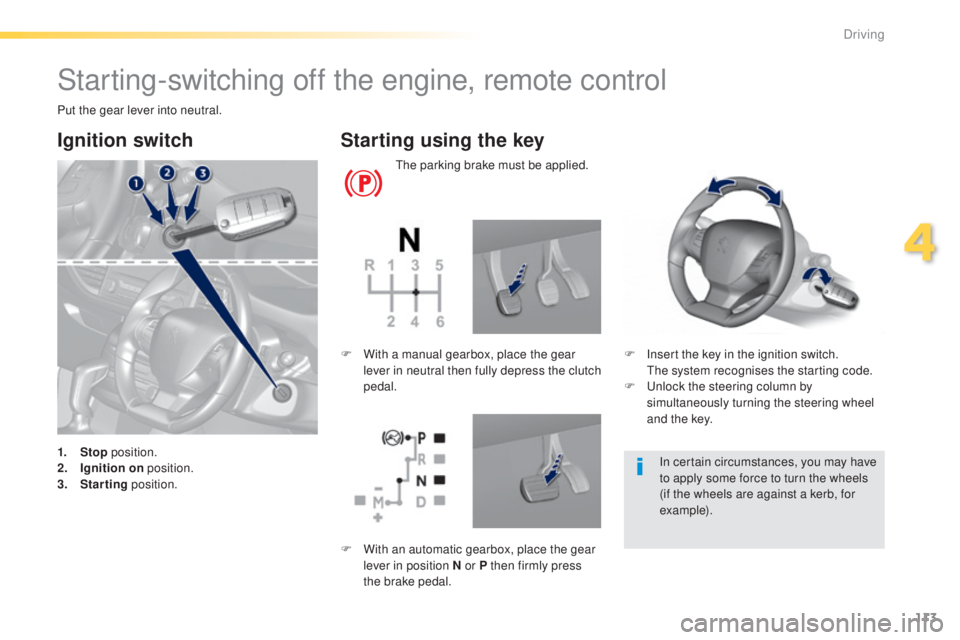
Ignition switch
1. Stop position.
2. I gnition on position.
3.
S
tarting position.
Starting using the key
the parking brake must be applied.
F
I
nsert the key in the ignition switch.
t
h
e system recognises the starting code.
F
u
n
lock the steering column by
simultaneously turning the steering wheel
and the key.
F
W
ith a manual gearbox, place the gear
lever in neutral then fully depress the clutch
pedal.
In certain circumstances, you may have
to apply some force to turn the wheels
(if the wheels are against a kerb, for
example).
F
W
ith an automatic gearbox, place the gear
lever in position N or P then firmly press
the brake pedal.
4
Driving
Page 120 of 415
118
Key left in reader
You are warned by a message if the
electronic key is is still in the reader on
opening the driver's door.
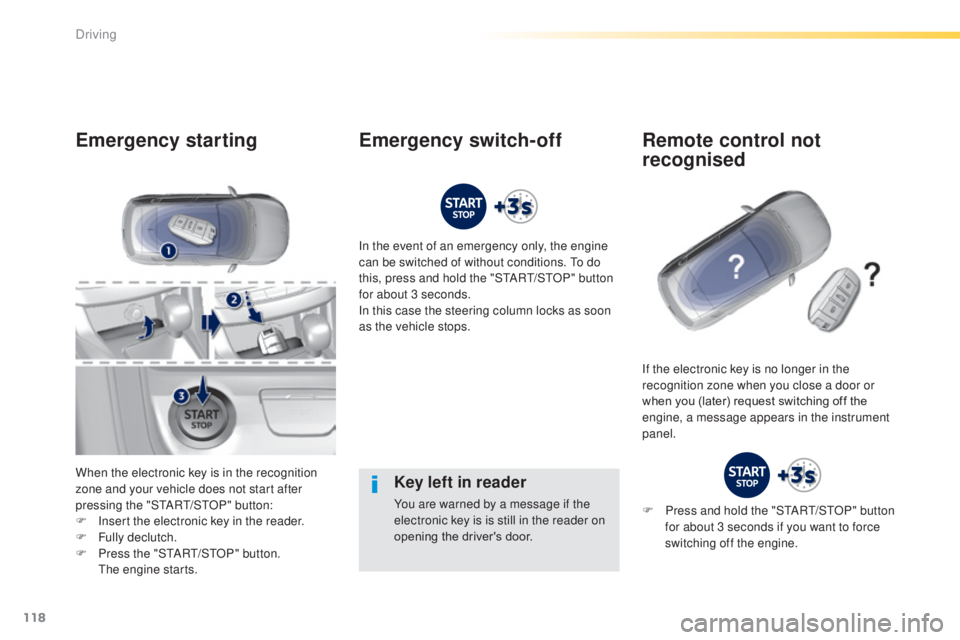
Emergency starting
When the electronic key is in the recognition
zone and your vehicle does not start after
pressing the "S
tA
R
t/
S
tO
P" button:
F
I
nsert the electronic key in the reader.
F
F
ully declutch.
F
P
ress the "S
tA
R
t/
S
tO
P" button.
t
h
e engine starts. In the event of an emergency only, the engine
can be switched of without conditions.
t
o d
o
this, press and hold the "S
tA
R
t/
S
tO
P" button
for about 3 seconds.
In this case the steering column locks as soon
as the vehicle stops.
If the electronic key is no longer in the
recognition zone when you close a door or
when you (later) request switching off the
engine, a message appears in the instrument
panel.
Emergency switch-off Remote control not recognised
F Press and hold the "StARt/ StO P" button
for about 3 seconds if you want to force
switching off the engine.
Driving
Page 181 of 415
179
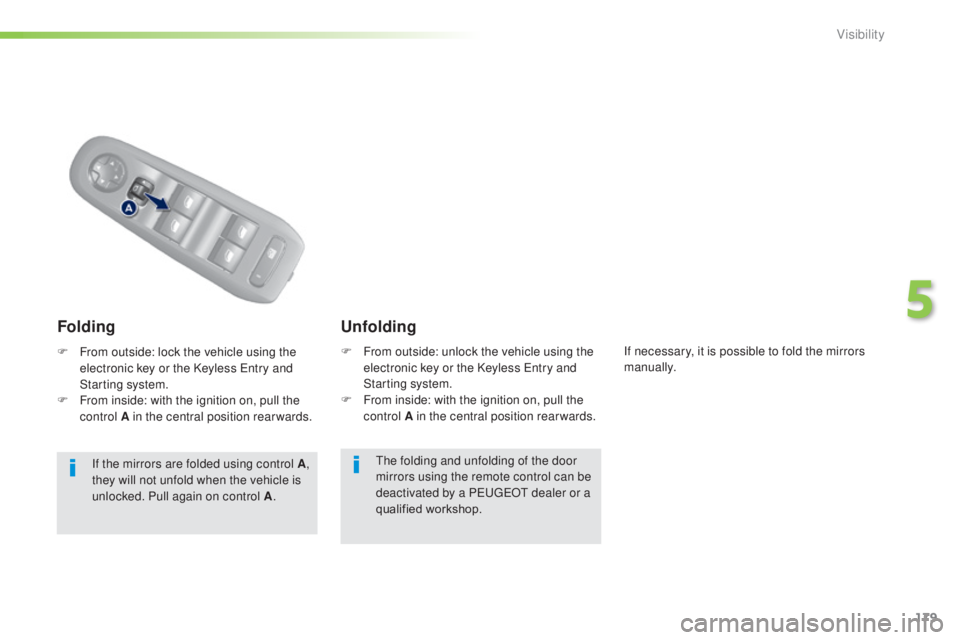
the folding and unfolding of the door
mirrors using the remote control can be
deactivated by a P
e
uge
Ot
dealer or a
qualified workshop.
F
F
rom outside: unlock the vehicle using the
electronic key or the Keyless e
n
try and
Starting system.
F
F
rom inside: with the ignition on, pull the
control A in the central position rearwards.
Unfolding
Folding
F From outside: lock the vehicle using the
electronic key or the Keyless en try and
Starting system.
F
F
rom inside: with the ignition on, pull the
control A in the central position rearwards.
If the mirrors are folded using control A ,
they will not unfold when the vehicle is
unlocked. Pull again on control A . If necessary, it is possible to fold the mirrors
manually.
5
Visibility
Page 189 of 415
187
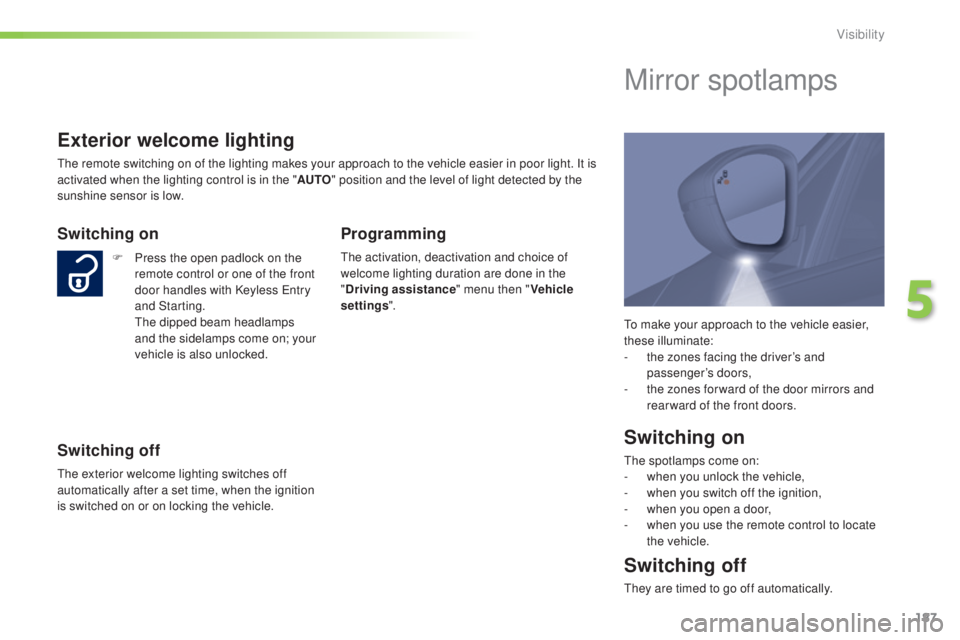
to make your approach to the vehicle easier,
these illuminate:
-
t
he zones facing the driver’s and
passenger’s doors,
-
t
he zones for ward of the door mirrors and
rear ward of the front doors.
Mirror spotlamps
Switching on
the spotlamps come on:
- w hen you unlock the vehicle,
-
w
hen you switch off the ignition,
-
w
hen you open a door,
-
w
hen you use the remote control to locate
the vehicle.
Switching off
they are timed to go off automatically.
Exterior welcome lighting
the remote switching on of the lighting makes your approach to the vehicle easier in poor light. It is
activated when the lighting control is in the " AUTO" position and the level of light detected by the
sunshine sensor is low.
Switching on
F Press the open padlock on the remote control or one of the front
door handles with Keyless
e
n
try
and Starting.
t
h
e dipped beam headlamps
and the sidelamps come on; your
vehicle is also unlocked.
Switching off
the exterior welcome lighting switches off
automatically after a set time, when the ignition
is switched on or on locking the vehicle.
Programming
the activation, deactivation and choice of
welcome lighting duration are done in the
" Driving assistance " menu then "Vehicle
settings ".
5
Visibility
Page 195 of 415
193
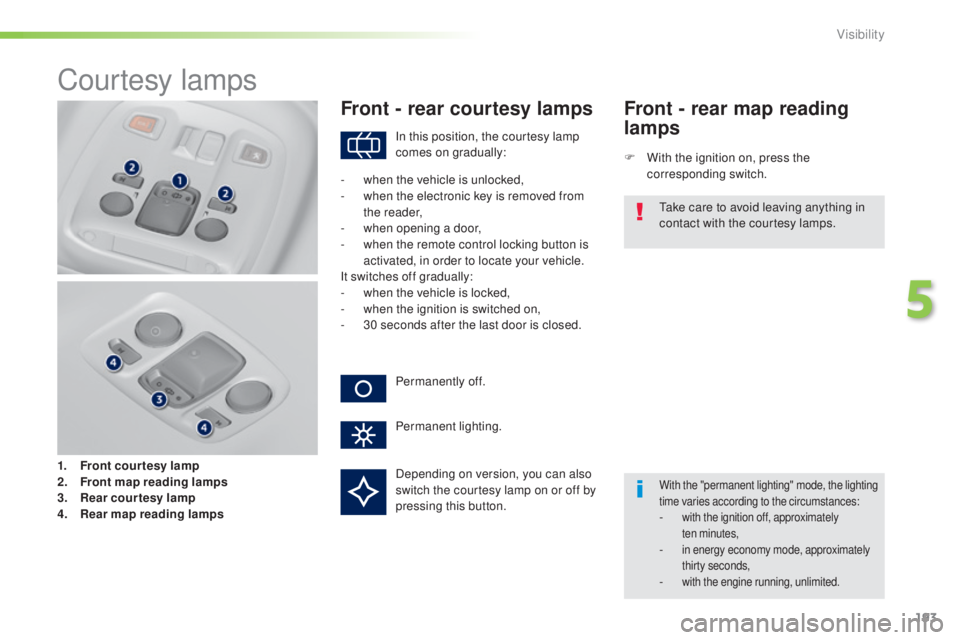
Courtesy lamps
1. Front courtesy lamp
2. Front map reading lamp s
3.
R
ear courtesy lamp
4.
R
ear map reading lamps
Front - rear courtesy lamps
F With the ignition on, press the corresponding switch.
Front - rear map reading
lamps
With the "permanent lighting" mode, the lighting
time varies according to the circumstances:
- with the ignition off, approximately ten minutes,
- in energy economy mode, approximately thirty seconds,
- with the engine running, unlimited.
In this position, the courtesy lamp
comes on gradually:
Permanently off.
Permanent lighting.
-
w
hen the vehicle is unlocked,
-
w
hen the electronic key is removed from
the reader,
-
w
hen opening a door,
-
w
hen the remote control locking button is
activated, in order to locate your vehicle.
It switches off gradually:
-
w
hen the vehicle is locked,
-
w
hen the ignition is switched on,
-
3
0 seconds after the last door is closed.
ta
ke care to avoid leaving anything in
contact with the courtesy lamps.
Depending on version, you can also
switch the courtesy lamp on or off by
pressing this button.
5
Visibility
Page 263 of 415
261
Starting using another
battery
First check that the slave battery has a
nominal voltage of 12 V and a capacity
at least equal to that of the discharged
battery.
Do not try to start the engine by
connecting a battery charger.
Do not disconnect the (+) terminal when
the engine is running.
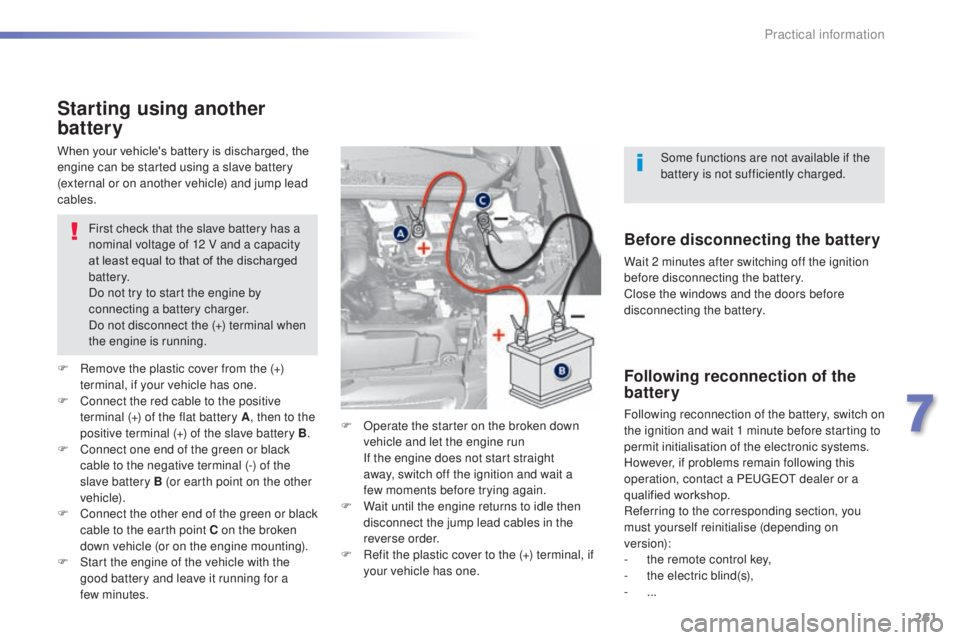
F
R
emove the plastic cover from the (+)
terminal, if your vehicle has one.
F
C
onnect the red cable to the positive
terminal (+) of the flat battery A , then to the
positive terminal (+) of the slave battery B.
F
C
onnect one end of the green or black
cable to the negative terminal (-) of the
slave battery B (or earth point on the other
vehicle).
F
C
onnect the other end of the green or black
cable to the earth point C on the broken
down vehicle (or on the engine mounting).
F
S
tart the engine of the vehicle with the
good battery and leave it running for a
few
minutes. F
O
perate the starter on the broken down
vehicle and let the engine run
I
f the engine does not start straight
away, switch off the ignition and wait a
few
moments before trying again.
F
W
ait until the engine returns to idle then
disconnect the jump lead cables in the
reverse order.
F
R
efit the plastic cover to the (+) terminal, if
your vehicle has one.
When your vehicle's battery is discharged, the
engine can be started using a slave battery
(external or on another vehicle) and jump lead
cables.Before disconnecting the battery
Wait 2 minutes after switching off the ignition
before disconnecting the battery.
Close the windows and the doors before
disconnecting the battery.
Following reconnection of the
battery
Following reconnection of the battery, switch on
the ignition and wait 1 minute before starting to
permit initialisation of the electronic systems.
However, if problems remain following this
operation, contact a P
e
uge
Ot
dealer or a
qualified workshop.
Referring to the corresponding section, you
must yourself reinitialise (depending on
version):
-
t
he remote control key,
-
t
he electric blind(s),
-
...Some functions are not available if the
battery is not sufficiently charged.
7
Practical information
Page 264 of 415
262
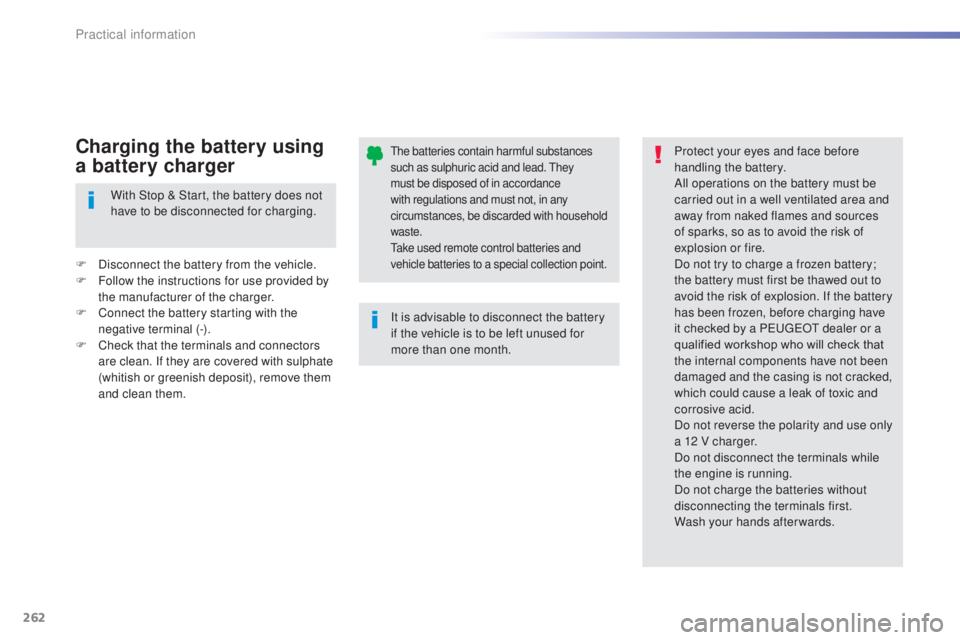
the batteries contain harmful substances
such as sulphuric acid and lead. th ey
must be disposed of in accordance
with regulations and must not, in any
circumstances, be discarded with household
waste.
ta
ke used remote control batteries and
vehicle batteries to a special collection point.
It is advisable to disconnect the battery
if the vehicle is to be left unused for
more than one month. Protect your eyes and face before
handling the battery.
All operations on the battery must be
carried out in a well ventilated area and
away from naked flames and sources
of sparks, so as to avoid the risk of
explosion or fire.
Do not try to charge a frozen battery;
the battery must first be thawed out to
avoid the risk of explosion. If the battery
has been frozen, before charging have
it checked by a Pe
ugeOt dealer or a
qualified workshop who will check that
the internal components have not been
damaged and the casing is not cracked,
which could cause a leak of toxic and
corrosive acid.
Do not reverse the polarity and use only
a 12 V charger.
Do not disconnect the terminals while
the engine is running.
Do not charge the batteries without
disconnecting the terminals first.
Wash your hands afterwards.
With Stop & Start, the battery does not
have to be disconnected for charging.
F
D
isconnect the battery from the vehicle.
F
F
ollow the instructions for use provided by
the manufacturer of the charger.
F
C
onnect the battery starting with the
negative terminal (-).
F
C
heck that the terminals and connectors
are clean. If they are covered with sulphate
(whitish or greenish deposit), remove them
and clean them.
Charging the battery using
a battery charger
Practical information
Page 397 of 415
395
Accessories .......................................... 271, 272
Accessory position ....................................... 117
Accessory socket, 12V
.............................88, 91
AdBlue
® ............................... ..........................279
Additive, AdBlue .............................. 26, 279-286
Adjusting headlamps
.................................... 188
Adjusting head restraints
................................ 83
Adjusting the steering wheel
..........................79
Advice on driving
.......................................... 112
Affaire version
............................................... 295
Airbags
.................................................... 23, 207
Airbags, curtain
..................................... 21
0, 211
Airbags, front ......................................... 208, 211
Airbags, lateral
...................................... 210, 211
Air conditioning
....................... 10, 102, 104, 108
Air conditioning, digital
................................. 105
Air conditioning, manual
.......................101, 103
Air distribution adjustment
............102, 104, 107
Air filter
.......................................................... 291
Air flow adjustment
....................... 101, 103, 107
Air intake
....................................................... 109
Air recirculation
..................................... 102, 109
Air vents
.......................................................... 99
Alarm
............................................................... 69
Anti-theft
................................................. 5 4 , 11 9
Armrest, front
............................................ 88, 90
Armrest, rear
................................................... 93
A
ssistance call
.............................. 196, 297, 298
Audible warning
............................................ 19 6
Audio cable
................................... 321, 322, 323
Audio streaming (Bluetooth)
..............................
....318, 321, 387
Automatic braking on risk of collision
......................................... 22, 158, 161
Automatic emergency braking
..............15 8, 161
Automatic illumination of headlamps
...................................... 182, 18 6
Automatic operation of hazard warning lamps
............................195Automatic rain sensitive windscreen
wipers
...............
..................................
189, 191
Auxiliary socket .......................
91, 318, 322, 384 Changing a wheel
.................................
2 3 5 - 2 41
Changing a wiper blade
........................
192, 26 4
Changing the date .........................
46, 47, 48, 49
Changing the remote control battery ........
56, 66
Changing the time .........................46, 47, 48, 49
Checking levels
..................................... 2
88-290
Checking the engine oil level
..................32, 288
Checking tyre pressures (using the kit)
........234
Checks
...............
...................276, 277, 291, 292
Child lock
...............................
........................228
Children
...............................
..206, 208, 212-228
Child seats
..............................
..............212-2 27
Child seats, conventional
..............................218
Child seats, ISOFIX
......................
221, 223, 224
Closing the boot
..............................................63
Closing the doors
................................52, 58 - 60
Cold climate screen
......................................267
Collision risk alert
..............................
...........15 8
Colour screen
...............................
........302, 303
Connectors, audio
.... 9
1, 92, 318, 322, 382, 384
Container, AdBlue
.........................................286
Coolant level
...........................................28, 289
Coolant temperature indicator
........................ 28
C
ourtesy lamps .............................................193
Cruise control
........................................ 13
9, 14 3
Cruise control active
.............................13 9, 14 6
Cup holder
...............................
........................88
A
B
CD
Battery ........................................... 259 -262, 291
Battery, charging ........................................... 262
Battery, remote control
............................. 5
6, 66
Bicycle carrier
............................................... 271
Blind spot sensors
.................................. 16, 163
Blue HDi
........................................................ 279
Bluetooth (hands-free)
......................... 3
60, 385
Bluetooth (telephone)
...........................360, 385
Bonnet
........................................................... 275
Bonnet stay
................................................... 275
Boot
........................................................... 61, 62
Brake discs
.................................................... 2
92
Brake lamps
...............................
...........248, 250
Brake pads
.................................................... 292
Braking system warning lamp
......................... 21
C
apacity, fuel tank
..............................
............76
CD
......................................................... 318, 378
CD MP3
................................................. 318, 379
Central locking
.............................. 52, 57, 59, 68
Changing a bulb
.................................... 243-252
Changing a fuse
.................................... 253-258DAB (Digital Audio
Broadcasting)
.....................316, 317, 380, 381
Date (setting)
...............................
..46, 47, 48, 49
Daytime running lamps
............185, 243, 244, 246, 247
Deactivating DSC .......................................... 203
.
Alphabetical index