AUX Peugeot 308 2014.5 Owner's Manual - RHD (UK, Australia)
[x] Cancel search | Manufacturer: PEUGEOT, Model Year: 2014.5, Model line: 308, Model: Peugeot 308 2014.5Pages: 415, PDF Size: 11.57 MB
Page 7 of 415
5
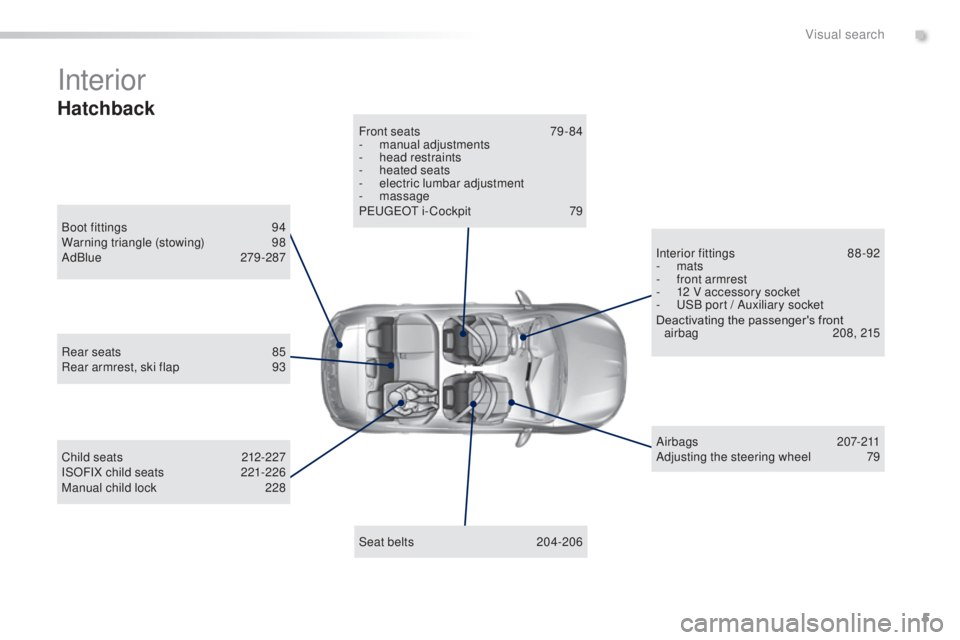
Interior
Boot fittings 94
Warning triangle (stowing) 9 8
AdBlue
279 -287
Seat belts
20
4-206
Front seats
7
9 - 84
-
m
anual adjustments
-
h
ead restraints
-
hea
ted seats
-
e
lectric lumbar adjustment
- massage
Pe ugeOt i- Cockpit 7 9
Child seats
2
12-227
ISOFIX child seats
2
21-226
Manual child lock
2
28 Airbags
2
07-211
Adjusting the steering wheel
7
9
Interior fittings
8
8-92
-
mats
-
f
ront armrest
-
1
2 V accessory socket
-
u
S
B port / Auxiliary socket
Deactivating the passenger's front airbag
2
08, 215
Rear seats
8
5
Rear armrest, ski flap
9
3
Hatchback
.
Visual search
Page 8 of 415
6
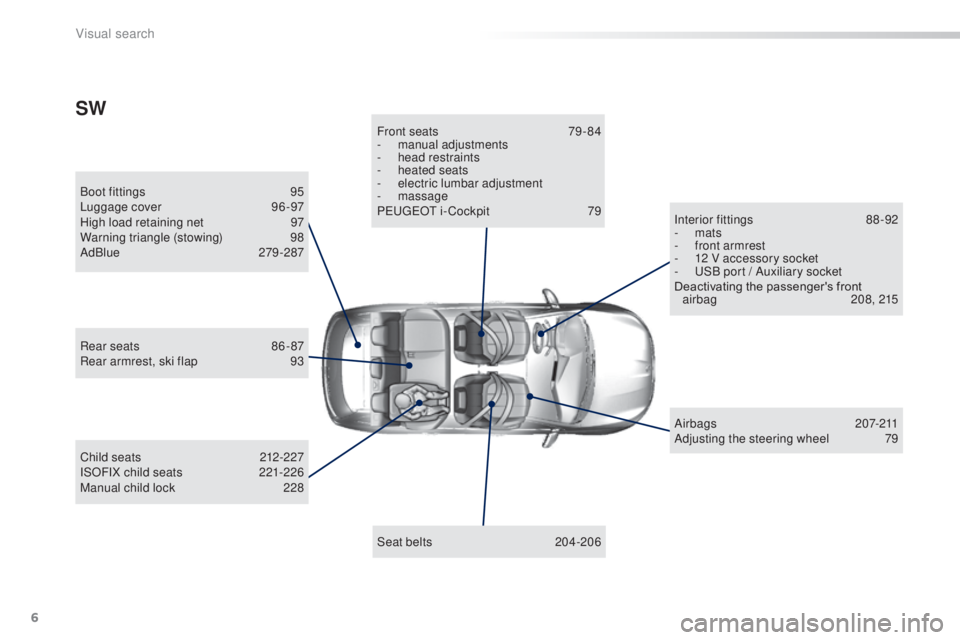
Boot fittings 95
Luggage cover 9 6 -97
High load retaining net
9
7
Warning triangle (stowing)
9
8
AdBlue
279 -287
Seat belts
20
4-206
Front seats
7
9 - 84
-
m
anual adjustments
-
h
ead restraints
-
hea
ted seats
- e lectric lumbar adjustment
- massage
P
e
uge
Ot
i- Cockpit
7
9
Child seats
2
12-227
ISOFIX child seats
2
21-226
Manual child lock
2
28 Airbags
2
07-211
Adjusting the steering wheel
7
9
Interior fittings
8
8-92
-
mats
-
f
ront armrest
-
1
2 V accessory socket
-
u
S
B port / Auxiliary socket
Deactivating the passenger's front airbag
2
08, 215
Rear seats
8
6 - 87
Rear armrest, ski flap
9
3
SW
Visual search
Page 9 of 415
7
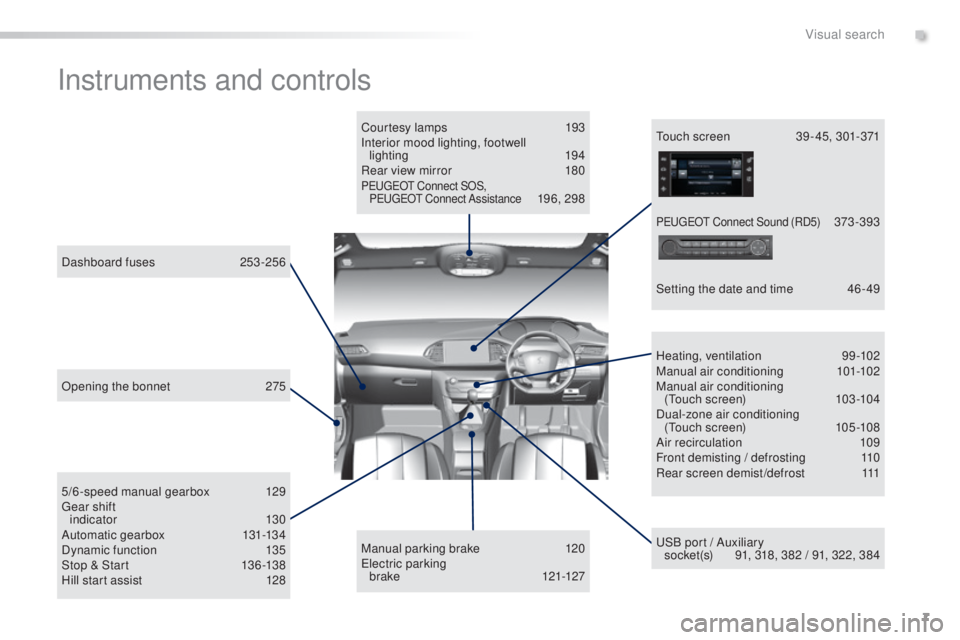
Instruments and controls
Courtesy lamps 193
Interior mood lighting, footwell lighting
194
Rear view mirror
1
80
PeugeOt Connect SOS,
PeugeO t Connect Assistance 196, 298
uS
B port / Auxiliary
socket(s)
9
1, 318, 382 / 91, 322, 384
5/6-speed manual gearbox
1
29
ge
ar shift
indic ator
13 0
Automatic gear box
13
1-13 4
Dynamic function
1
35
Stop & Start
1
36 -138
Hill start assist
1
28
Dashboard fuses
2
53-256
Heating, ventilation
9
9-102
Manual air conditioning
1
01-102
Manual air conditioning (
to
uch screen)
10
3 -104
Dual-zone air conditioning (
to
uch screen)
10
5 -108
Air recirculation
1
09
Front demisting / defrosting
1
10
Rear screen demist/defrost
1
11
Manual parking brake
1
20
el
ectric parking
brake
121-127
to
uch screen
3
9 - 45, 301-371
Setting the date and time
4
6 - 49
Opening the bonnet
2
75
PeugeO t C onnect Sound (RD5) 373 -393
.
Visual search
Page 90 of 415
88
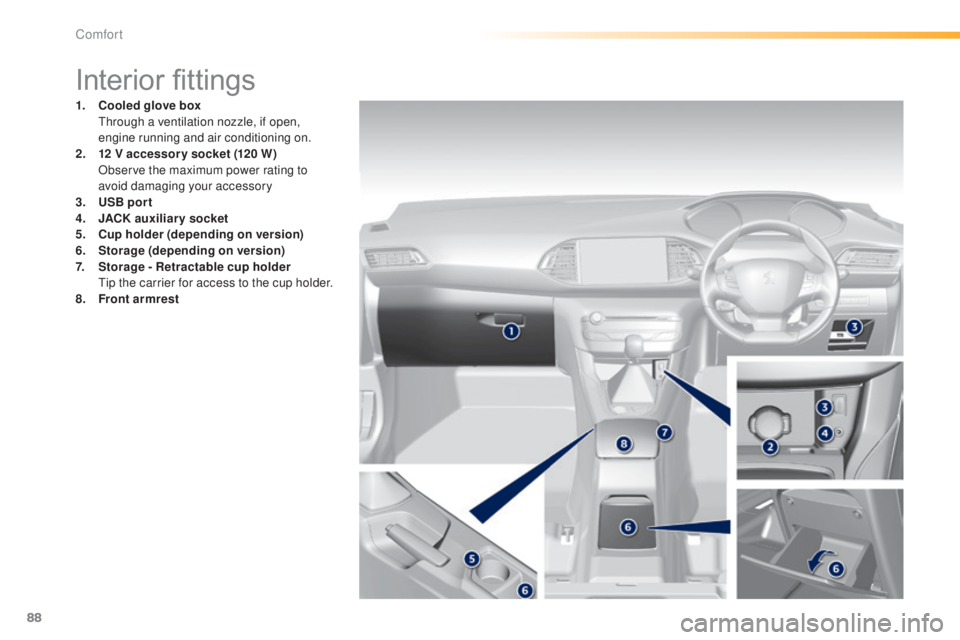
Interior fittings
1. Cooled glove box
th rough a ventilation nozzle, if open,
engine running and air conditioning on.
2.
1 2
V accessory socket (120 W )
O
bserve the maximum power rating to
avoid damaging your accessory
3.
U
SB por t
4.
J
ACK auxiliary socket
5.
C
up holder (depending on version)
6.
Sto
rage (depending on version)
7.
Sto
rage - Retractable cup holder
t
i
p the carrier for access to the cup holder.
8.
F
ront armrest
Comfort
Page 94 of 415
92
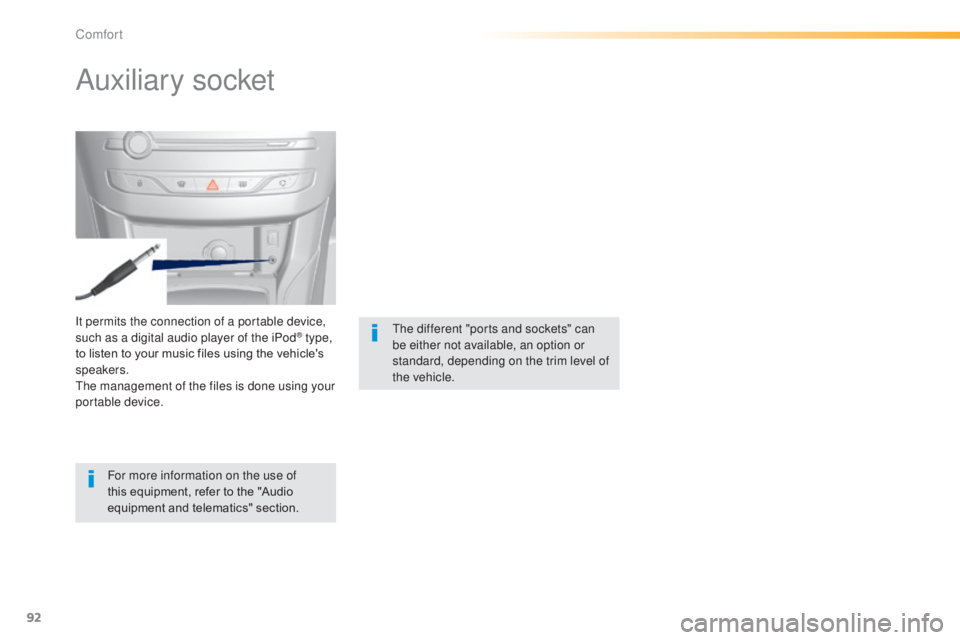
It permits the connection of a portable device,
such as a digital audio player of the iPod® type,
to listen to your music files using the vehicle's
speakers.
th
e management of the files is done using your
portable device.
Auxiliary socket
For more information on the use of
this equipment, refer to the "Audio
equipment and telematics" section.
th
e different "ports and sockets" can
be either not available, an option or
standard, depending on the trim level of
the vehicle.
Comfort
Page 306 of 415
02
304
FIRST STEPS
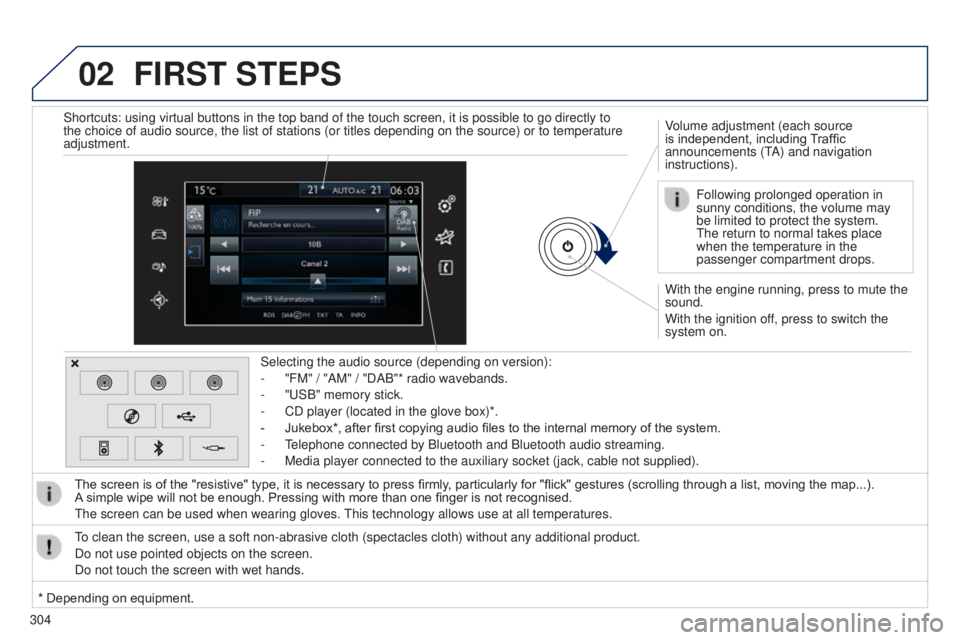
With the engine running, press to mute the
sound.
With the ignition off, press to switch the
system on. Volume adjustment (each source
is independent, including Traffic
announcements (t
A) and navigation
instructions).
Selecting the audio source (depending on version):
-
"FM" / "AM" / "DAB"* radio wavebands.
-
"
u
SB" memory stick.
-
CD player (located in the glove box)*.
-
Jukebox*, after first copying audio files to the internal memory of the system.
-
t
elephone connected by Bluetooth and Bluetooth audio streaming.
-
Media player connected to the auxiliary socket (jack, cable not supplie\
d).
The screen is of the "resistive" type, it is necessary to press firmly , particularly for "flick" gestures (scrolling through a list, moving the map...).
A
simple wipe will not be enough. Pressing with more than one finger is not recognised.
t
he screen can be used when wearing gloves.
t
his technology allows use at all temperatures.
to clean the screen, use a soft non-abrasive cloth (spectacles cloth) w\
ithout any additional product.
Do not use pointed objects on the screen.
Do not touch the screen with wet hands. Following prolonged operation in
sunny conditions, the volume may
be limited to protect the system.
t
he return to normal takes place
when the temperature in the
passenger compartment drops.
Shortcuts: using virtual buttons in the top band of the touch screen, it\
is possible to go directly to
the choice of audio source, the list of stations (or titles depending o\
n the source) or to temperature
adjustment.
* Depending on equipment.
Page 309 of 415
307
Level 1
Level 2 Comments
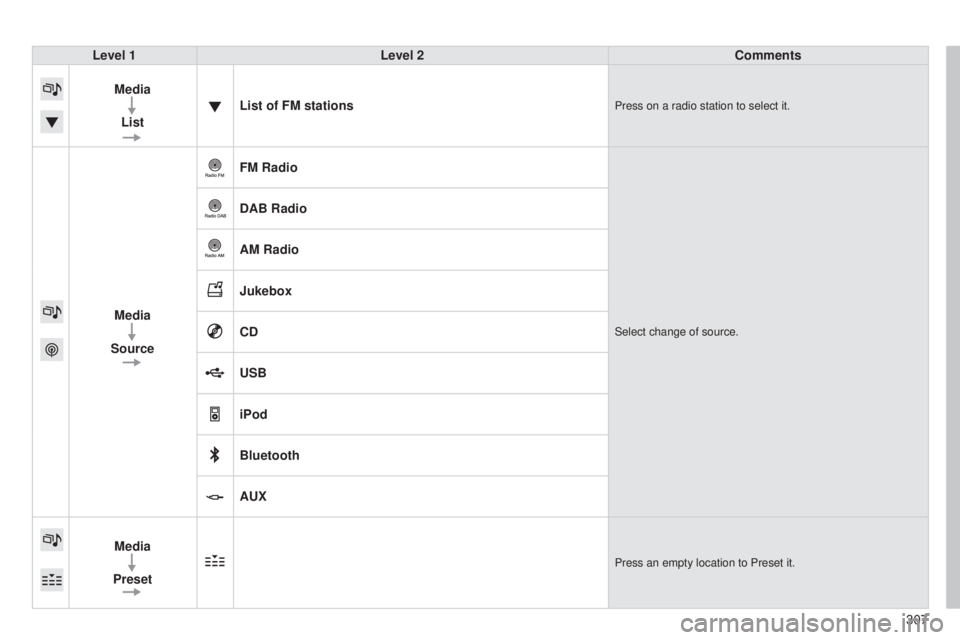
Media List List of FM stations
Press on a radio station to select it.
Media
Source FM RadioSelect change of source.
DAB Radio
AM Radio
Jukebox
CD
USB
iPod
Bluetooth
AUX
Media
Preset
Press an empty location to Preset it.
Page 313 of 415
Level 1Level 2 Level 3 Comments
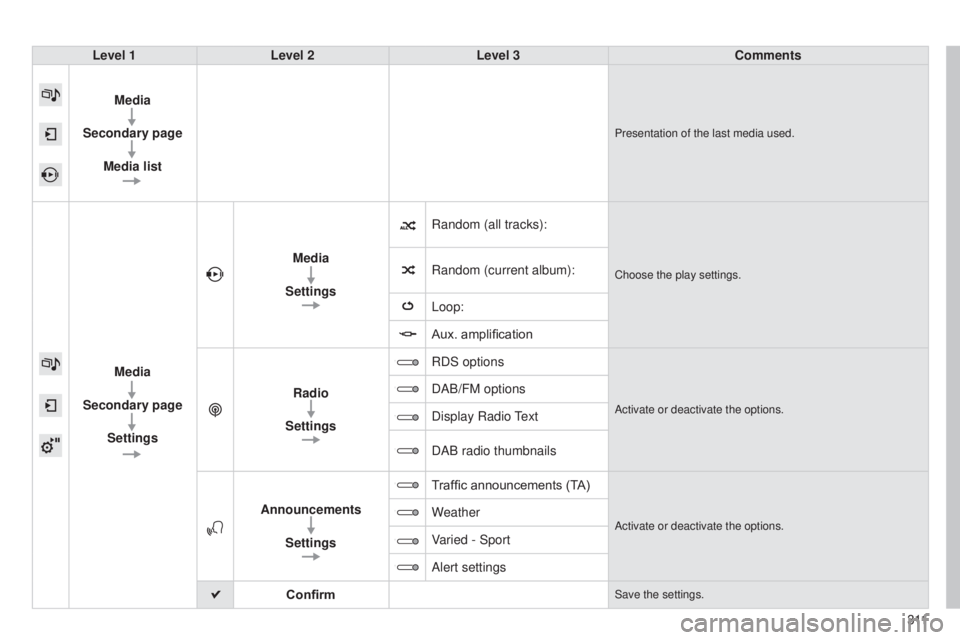
Media
Secondary page Media list
Presentation of the last media used.
Media
Secondary page Settings Media
Settings Random (all tracks):
Choose the play settings.Random (current album):
Loop:
Aux. amplification
Radio
Settings RDS options
Activate or deactivate the options.
DAB/FM options
Display Radio
text
DAB radio thumbnails
Announcements Settings T
raffic announcements (TA)
Activate or deactivate the options.Weather
Varied - Sport
Alert settings
Confirm
Save the settings.
3 11
Page 320 of 415
04
318
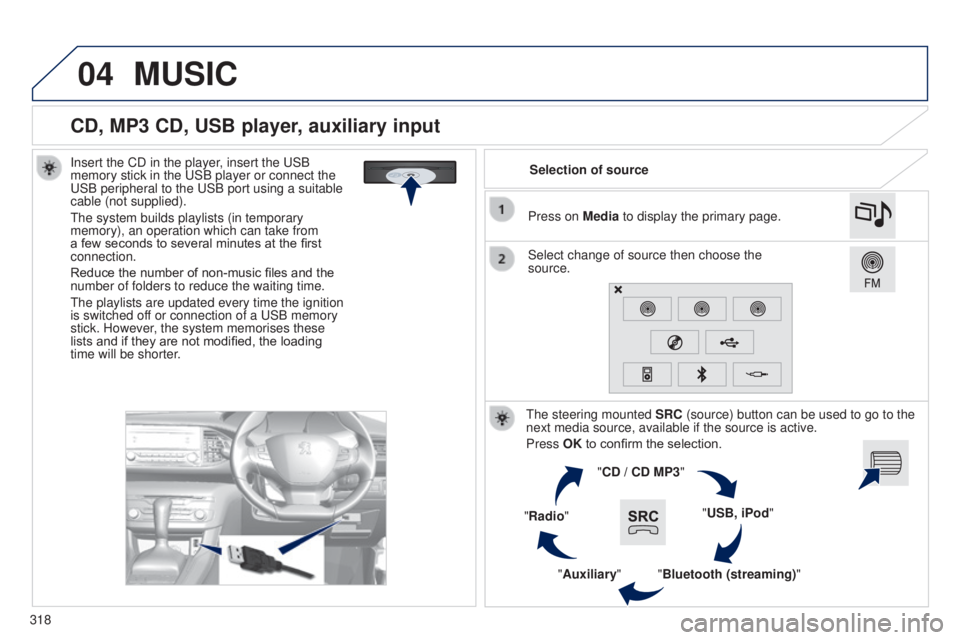
CD, MP3 CD, USB player, auxiliary input
Insert the CD in the player, insert the uSB
memory stick in the u SB player or connect the
u
SB peripheral to the u SB port using a suitable
cable (not supplied).
t
he system builds playlists (in temporary
memory), an operation which can take from
a few seconds to several minutes at the first
connection.
Reduce the number of non-music files and the
number of folders to reduce the waiting time.
t
he playlists are updated every time the ignition
is switched off or connection of a
u SB memory
stick. However, the system memorises these
lists and if they are not modified, the loading
time will be shorter. Selection of source
t
he steering mounted SRC (source) button can be used to go to the
next media source, available if the source is active.
Press OK to confirm the selection.
"CD / CD MP3"
"USB, iPod"
"Bluetooth (streaming)"
"Auxiliary"
"Radio" Select change of source then choose the
source. Press on Media to display the primary page.
MUSIC
Page 321 of 415
04
319
CD, MP3 CD / USB player
The audio equipment will only play audio files with ".wma, .aac,
.flac, .ogg and .mp3" file extensions and with a bit rate of between
32 Kbps and 320 Kbps.
It also supports VBR (Variable Bit Rate) mode.
No other type of file (.mp4, ...) can be played.
WMA files must be of the standard wma 9 type.
t
he sampling rates supported are 11, 22, 44 and 48 KHz.
It is advisable to restrict file names to 20 characters, without using of
special characters (e.g.: " " ? ; ù) to avoid any playing and displ\
aying
problems.
In order to be able to play a recorded CDR or CDRW, when
recording it is preferable to select the ISO 9660 level 1, 2 or Joliet
standard.
If the disc is recorded in another format it may not be played
correctly.
It is recommended that the same recording standard is always used
for an individual disc, with as low a speed as possible (4x maximum)
for optimum sound quality.
In the particular case of a multi-session CD, the Joliet standard is
recommended. Information and advicet he system supports u SB mass storage devices, BlackBerry®
devices or Apple® players via uSB ports. t he adaptor cable not
supplied.
Control of the peripheral device is with the audio system controls.
Other peripherals, not recognised on connection, must be connected
to the auxiliary socket using a Jack cable (not supplied).
Use only USB memory sticks formatted FAT 32 (28-bit file allocation
table).
MUSIC
the system does not support two identical devices connected at the
same time (two memory sticks, two Apple® players) but it is possible
to connect one memory stick and one
Apple® player at the same
time.
It is recommended that genuine Apple
® uSB cables are used to
ensure correct operation.