change time Peugeot 308 2014 User Guide
[x] Cancel search | Manufacturer: PEUGEOT, Model Year: 2014, Model line: 308, Model: Peugeot 308 2014Pages: 400, PDF Size: 10.05 MB
Page 239 of 400
237
7
Practical information
308_EN_CHAP07_INFO PR ATIQUES_ED02-2013
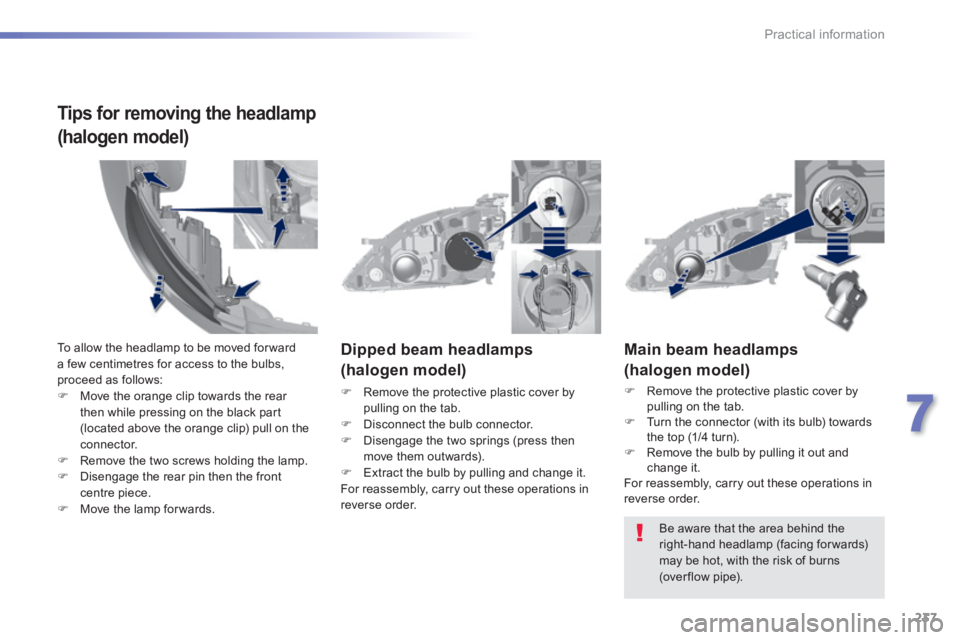
Main beam headlamps
(halogen model)
Remove the protective plastic cover by pulling on the tab. Turn the connector (with its bulb) towards the top (1/4 turn). Remove the bulb by pulling it out and change it. For reassembly, carry out these operations in reverse order.
Dipped beam headlamps
(halogen model)
Remove the protective plastic cover by pulling on the tab. Disconnect the bulb connector. Disengage the two springs (press then move them outwards). Extract the bulb by pulling and change it. For reassembly, carry out these operations in reverse order.
Be aware that the area behind the right-hand headlamp (facing forwards) may be hot, with the risk of burns (over flow pipe).
To allow the headlamp to be moved for ward a few centimetres for access to the bulbs, proceed as follows: Move the orange clip towards the rear then while pressing on the black part (located above the orange clip) pull on the
connector. Remove the two screws holding the lamp. Disengage the rear pin then the front centre piece. Move the lamp for wards.
Tips for removing the headlamp
(halogen model)
Page 240 of 400
238
Practical information
308_EN_CHAP07_INFO PR ATIQUES_ED02-2013
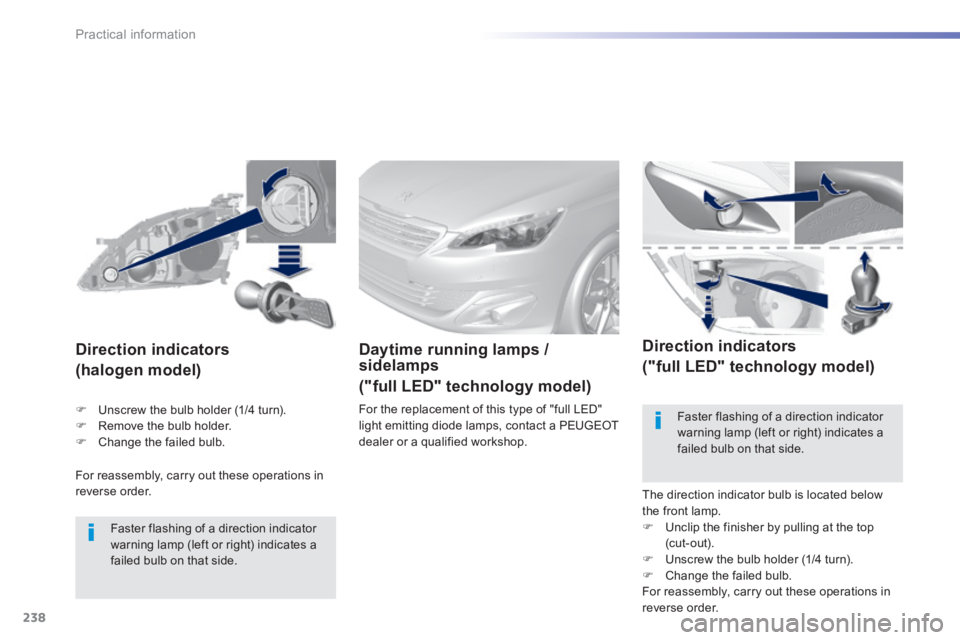
For reassembly, carry out these operations in reverse order.
Direction indicators
(halogen model)
Faster flashing of a direction indicator warning lamp (left or right) indicates a failed bulb on that side.
Daytime running lamps / sidelamps
("full LED" technology model)
For the replacement of this type of "full LED" light emitting diode lamps, contact a PEUGEOT dealer or a qualified workshop.
Direction indicators
("full LED" technology model)
The direction indicator bulb is located below the front lamp. Unclip the finisher by pulling at the top (cut-out). Unscrew the bulb holder (1/4 turn). Change the failed bulb. For reassembly, carry out these operations in reverse order.
Faster flashing of a direction indicator
warning lamp (left or right) indicates a failed bulb on that side.
Unscrew the bulb holder (1/4 turn). Remove the bulb holder. Change the failed bulb.
Page 282 of 400
280
Checks
308_EN_CHAP08_VERIFICATIONS_ED02-2013
Checking levels
Take care when working under the bonnet, as certain areas of the engine may be extremely hot (risk of burns) and the cooling fan could start at any time (even with the ignition off).
Oil level
The check is carried out either when the ignition is switched on using the oil level indicator in the instrument panel, or using the dipstick.
Engine oil change
Refer to the warranty and maintenance record for details of the interval for this operation. In order to maintain the reliability of the engine and emission control system, the use of additives in the engine oil is prohibited.
Oil specifi cation
The oil must be the correct grade for your engine and conform to the manufacturer's recommendations.
Check all of these levels regularly, in line with the warranty and maintenance record. Top them up if necessary, unless other wise indicated. If a level drops significantly, have the corresponding system checked by a PEUGEOT dealer or a qualified workshop.
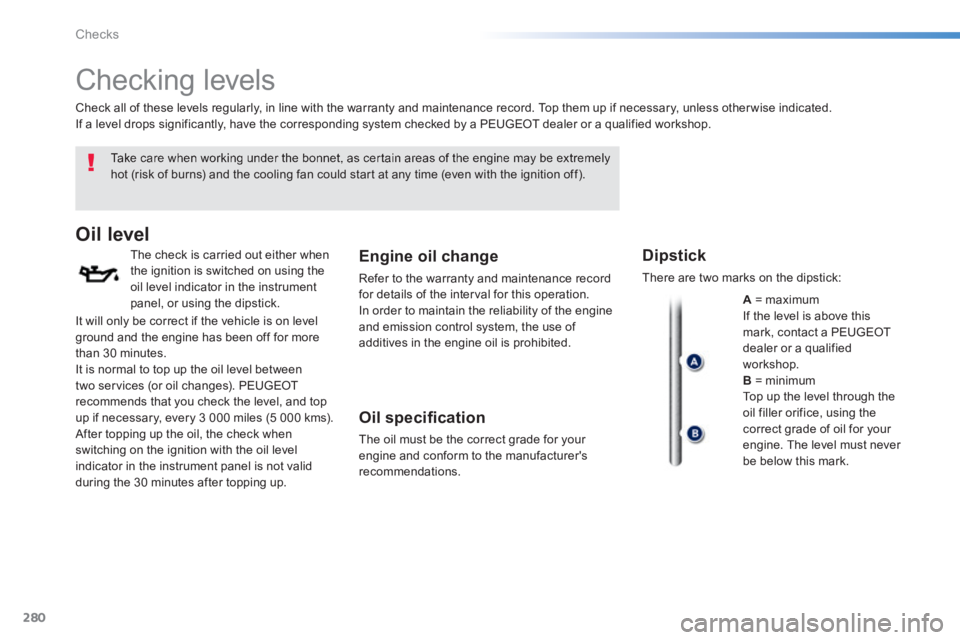
Dipstick
There are two marks on the dipstick:
A = maximum If the level is above this mark, contact a PEUGEOT dealer or a qualified workshop. B = minimum Top up the level through the oil filler orifice, using the correct grade of oil for your engine. The level must never be below this mark.
It will only be correct if the vehicle is on level ground and the engine has been off for more than 30 minutes. It is normal to top up the oil level between two services (or oil changes). PEUGEOT recommends that you check the level, and top up if necessary, every 3 000 miles (5 000 kms). After topping up the oil, the check when switching on the ignition with the oil level indicator in the instrument panel is not valid during the 30 minutes after topping up.
Page 285 of 400
283
8
Checks
308_EN_CHAP08_VERIFICATIONS_ED02-2013
Checks
12 V battery
The battery does not require any maintenance. However, check that the terminals are clean and correctly tightened, particularly in summer and winter.
Refer to the warranty and maintenance record for details of the replacement intervals for these components.
Air filter and passenger compartment filter
Replace the oil filter each time the engine oil is changed. Refer to the warranty and maintenance record for details of the replacement interval for this component.
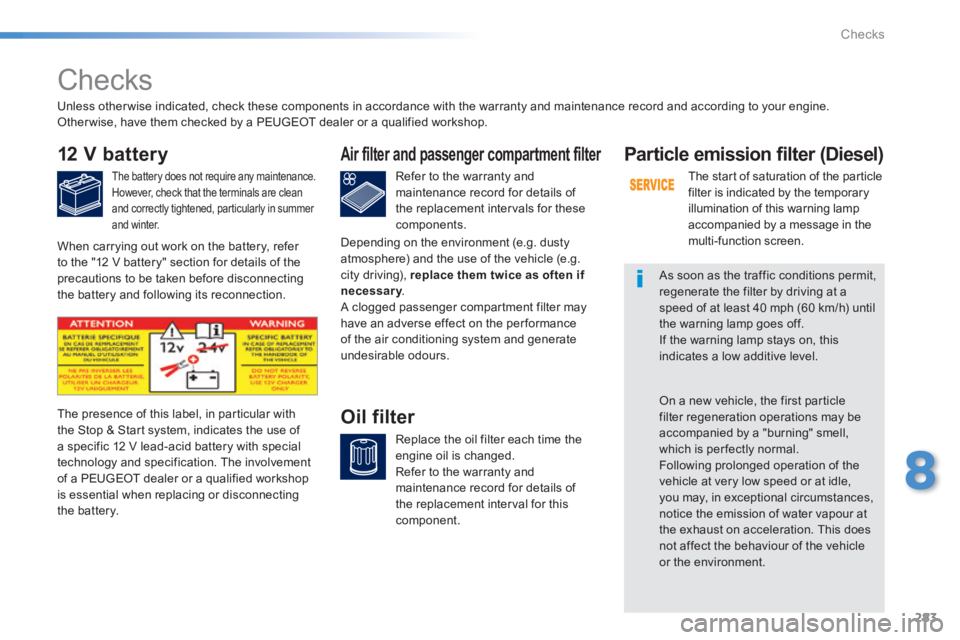
Oil filter The presence of this label, in particular with the Stop & Start system, indicates the use of a specific 12 V lead-acid battery with special technology and specification. The involvement of a PEUGEOT dealer or a qualified workshop is essential when replacing or disconnecting the battery.
Particle emission filter (Diesel)
The start of saturation of the particle filter is indicated by the temporary illumination of this warning lamp accompanied by a message in the multi-function screen.
As soon as the traffic conditions permit, regenerate the filter by driving at a speed of at least 40 mph (60 km/h) until the warning lamp goes off. If the warning lamp stays on, this indicates a low additive level.
On a new vehicle, the first particle filter regeneration operations may be accompanied by a "burning" smell, which is per fectly normal. Following prolonged operation of the vehicle at very low speed or at idle, you may, in exceptional circumstances, notice the emission of water vapour at the exhaust on acceleration. This does not affect the behaviour of the vehicle or the environment.
Unless other wise indicated, check these components in accordance with the warranty and maintenance record and according to your engine. Other wise, have them checked by a PEUGEOT dealer or a qualified workshop.
When carrying out work on the battery, refer to the "12 V battery" section for details of the precautions to be taken before disconnecting the battery and following its reconnection.
Depending on the environment (e.g. dusty atmosphere) and the use of the vehicle (e.g. city driving), replace them twice as often if necessary . necessary . necessary A clogged passenger compartment filter may have an adverse effect on the per formance of the air conditioning system and generate undesirable odours.
Page 311 of 400
04
309
308_EN_CHAP10C_SMEGPLUS_ED02-2013
RADIO
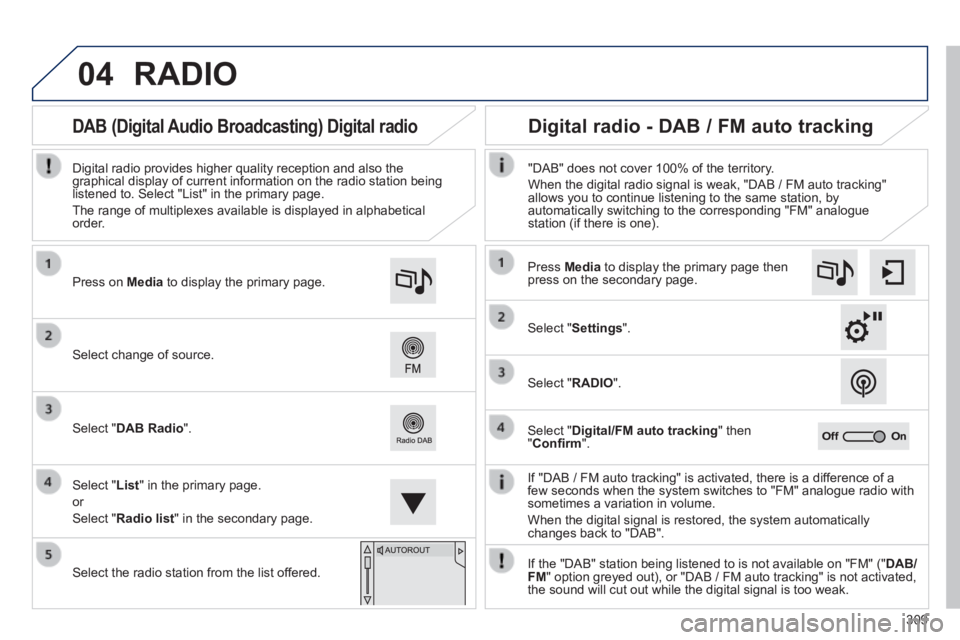
If "DAB / FM auto tracking" is activated, there is a difference of a few seconds when the system switches to "FM" analogue radio with sometimes a variation in volume.
When the digital signal is restored, the system automatically changes back to "DAB".
Select change of source.
Press on Media to display the primary page.
Select " DAB Radio ".
Select " List " in the primary page.
or
Select " Radio list " in the secondary page.
Select the radio station from the list offered.
Digital radio provides higher quality reception and also the graphical display of current information on the radio station being listened to. Select "List" in the primary page.
The range of multiplexes available is displayed in alphabetical order.
Press Media to display the primary page then press on the secondary page.
Select " Settings ".
Select " RADIO ".
Select " Digital/FM auto tracking " then " Confi rm ".
"DAB" does not cover 100% of the territory.
When the digital radio signal is weak, "DAB / FM auto tracking" allows you to continue listening to the same station, by automatically switching to the corresponding "FM" analogue station (if there is one).
If the "DAB" station being listened to is not available on "FM" (" DAB/FM " option greyed out), or "DAB / FM auto tracking" is not activated, the sound will cut out while the digital signal is too weak.
Digital radio - DAB / FM auto tracking DAB (Digital Audio Broadcasting) Digital radio
Page 312 of 400
04
310
308_EN_CHAP10C_SMEGPLUS_ED02-2013
CD, MP3 CD, USB player, auxiliary input
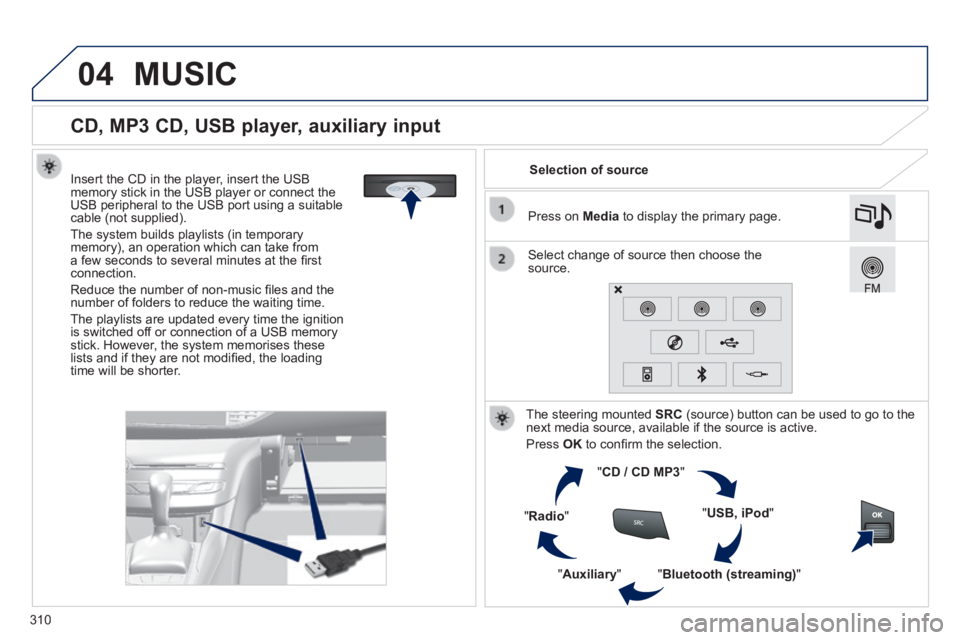
Insert the CD in the player, insert the USB memory stick in the USB player or connect the USB peripheral to the USB port using a suitable cable (not supplied) .
The system builds playlists (in temporary memory), an operation which can take from a few seconds to several minutes at the fi rst connection.
Reduce the number of non-music fi les and the number of folders to reduce the waiting time.
The playlists are updated every time the ignition is switched off or connection of a USB memory stick. However, the system memorises these lists and if they are not modifi ed, the loading time will be shorter.
Selection of source
The steering mounted SRC (source) button can be used to go to the next media source, available if the source is active.
Press OK to confi rm the selection.
" CD / CD MP3 "
" USB, iPod "
" Bluetooth (streaming) " " Auxiliary "
" Radio "
Select change of source then choose the source.
Press on Media to display the primary page.
MUSIC
Page 330 of 400
05
328
308_EN_CHAP10C_SMEGPLUS_ED02-2013
Adding a waypoint Organising waypoints
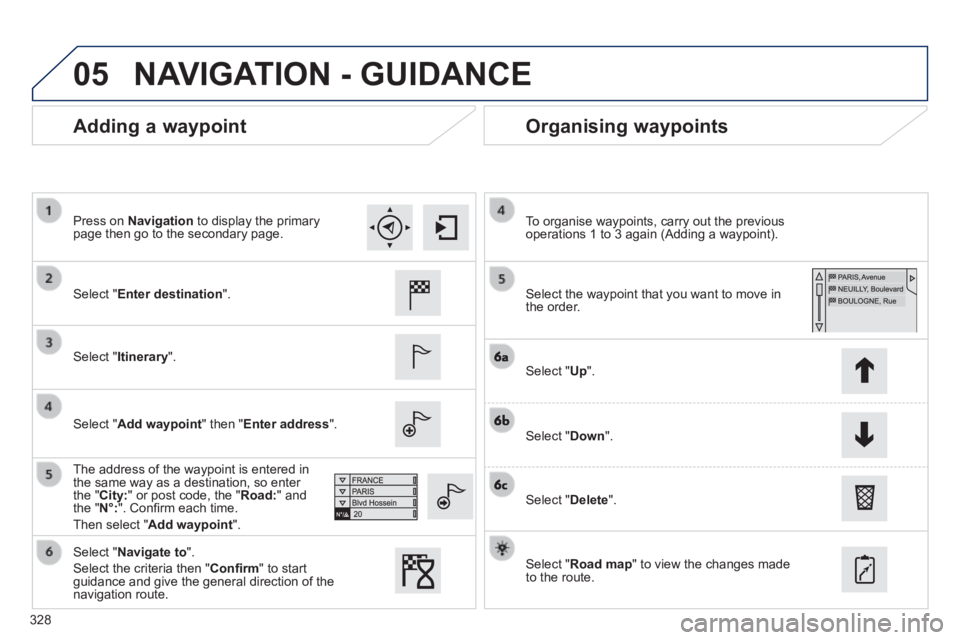
Select " Enter destination ".
Select " Itinerary ".
Select " Add waypoint " then " Enter address ".
The address of the waypoint is entered in the same way as a destination, so enter the " City: " or post code, the " Road: " and the " N°: ". Confi rm each time.
Then select " Add waypoint ".
Select the waypoint that you want to move in the order.
To organise waypoints, carry out the previous operations 1 to 3 again (Adding a waypoint).
Select " Up ".
Select " Down ".
Select " Delete ".
Select " Road map " to view the changes made to the route.
Select " Navigate to ".
Select the criteria then " Confi rm " to start guidance and give the general direction of the navigation route.
Press on Navigation to display the primary page then go to the secondary page.
NAVIGATION - GUIDANCE
Page 347 of 400
06
345
308_EN_CHAP10C_SMEGPLUS_ED02-2013
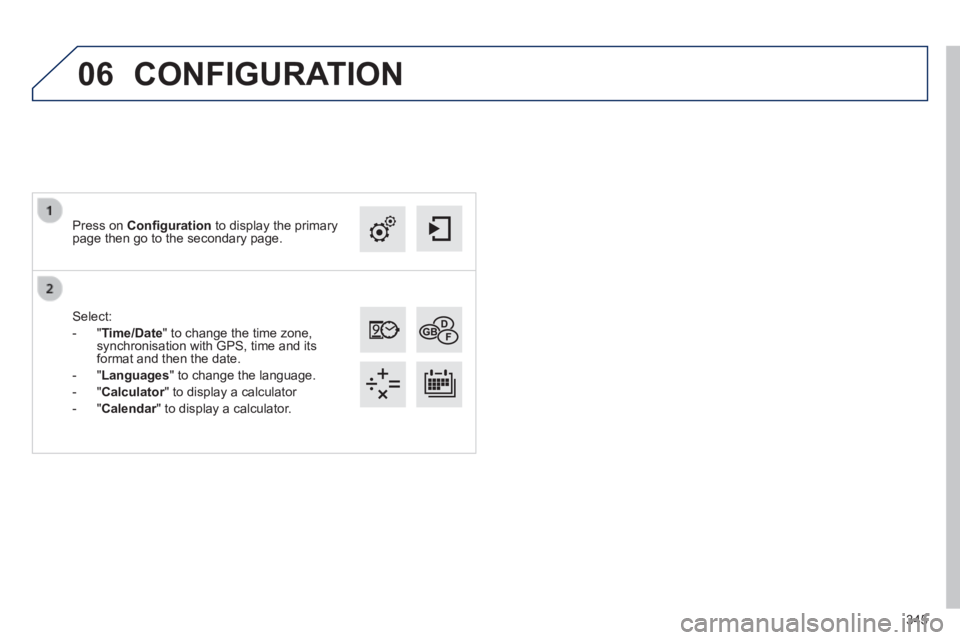
Select:
- " Time/Date " to change the time zone, synchronisation with GPS, time and its format and then the date.
- " Languages " to change the language.
- " Calculator " to display a calculator Calculator " to display a calculator Calculator
- " Calendar " to display a calculator. Calendar " to display a calculator. Calendar
Press on Confi guration to display the primary page then go to the secondary page.
CONFIGURATION
Page 371 of 400
04
SRC
BAND
LIST
MENU
369
308_EN_CHAP10D_RD45_ED02_2013
AUDIO
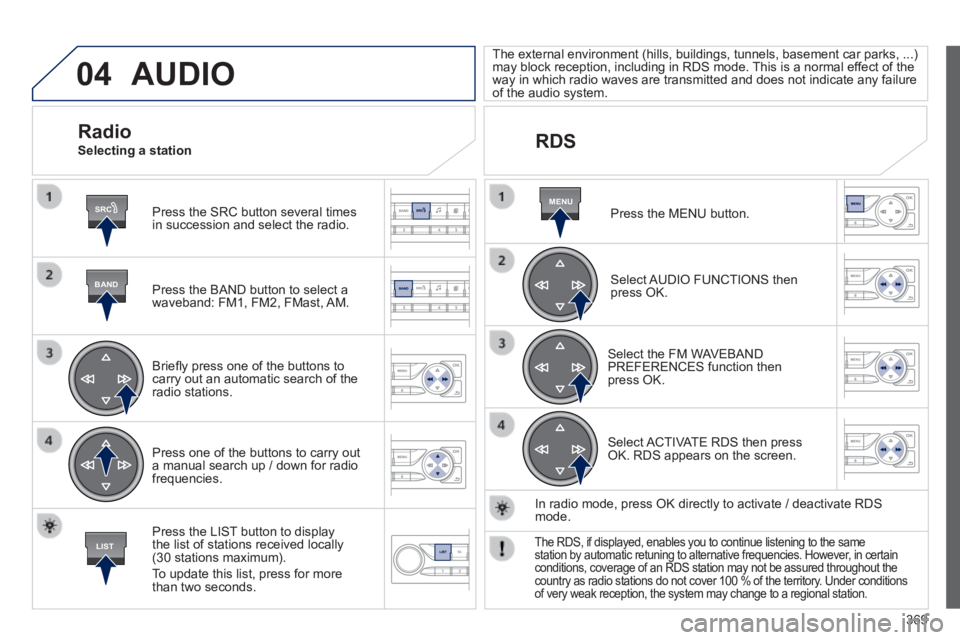
Press the SRC button several times in succession and select the radio.
Press the BAND button to select a waveband: FM1, FM2, FMast, AM.
Briefl y press one of the buttons to carry out an automatic search of the radio stations.
Press one of the buttons to carry out a manual search up / down for radio frequencies.
Press the LIST button to display the list of stations received locally (30 stations maximum).
To update this list, press for more than two seconds.
The external environment (hills, buildings, tunnels, basement car parks, ...) may block reception, including in RDS mode. This is a normal effect of the way in which radio waves are transmitted and does not indicate any failu\
re of the audio system.
RDS
Radio Selecting a station
Press the MENU button.
Select AUDIO FUNCTIONS then press OK.
Select the FM WAVEBAND PREFERENCES function then press OK.
Select ACTIVATE RDS then press OK. RDS appears on the screen.
In radio mode, press OK directly to activate / deactivate RDS mode.
The RDS, if displayed, enables you to continue listening to the same station by automatic retuning to alternative frequencies. However, in certain conditions, coverage of an RDS station may not be assured throughout the\
country as radio stations do not cover 100 % of the territory. Under conditions of very weak reception, the system may change to a regional station.
Page 375 of 400
04
BANDMENU
TA
373
308_EN_CHAP10D_RD45_ED02_2013
AUDIO
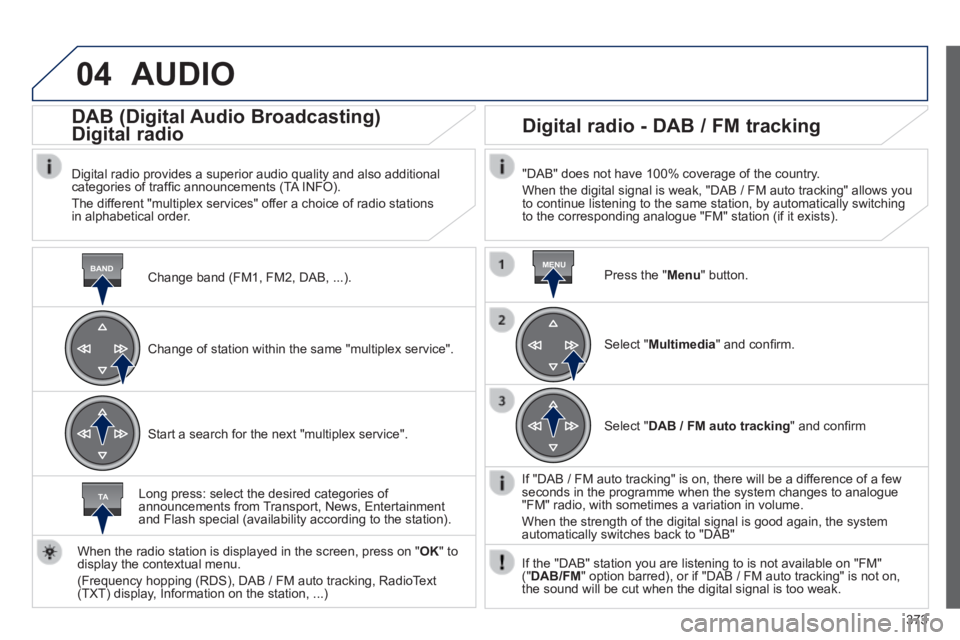
Change band (FM1, FM2, DAB, ...) .
DAB (Digital Audio Broadcasting)
Digital radio
Digital radio provides a superior audio quality and also additional categories of traffi c announcements (TA INFO).
The different "multiplex services" offer a choice of radio stations in alphabetical order.
Change of station within the same "multiplex service".
Start a search for the next "multiplex service".
Digital radio - DAB / FM tracking
"DAB" does not have 100% coverage of the country.
When the digital signal is weak, "DAB / FM auto tracking" allows you to continue listening to the same station, by automatically switching to the corresponding analogue "FM" station (if it exists).
Long press: select the desired categories of announcements from Transport, News, Entertainment and Flash special (availability according to the station).
When the radio station is displayed in the screen, press on " OK " to display the contextual menu.
(Frequency hopping (RDS), DAB / FM auto tracking, RadioText (TXT) display, Information on the station, ...)
Press the " Menu " button.
Select " Multimedia " and confi rm.
Select " DAB / FM auto tracking " and confi rm
If "DAB / FM auto tracking" is on, there will be a difference of a few seconds in the programme when the system changes to analogue "FM" radio, with sometimes a variation in volume.
When the strength of the digital signal is good again, the system automatically switches back to "DAB"
If the "DAB" station you are listening to is not available on "FM" (" DAB/FM " option barred), or if "DAB / FM auto tracking" is not on, the sound will be cut when the digital signal is too weak.