wheel Peugeot 308 2014 User Guide
[x] Cancel search | Manufacturer: PEUGEOT, Model Year: 2014, Model line: 308, Model: Peugeot 308 2014Pages: 400, PDF Size: 10.05 MB
Page 81 of 400
79
3
Comfort
308_EN_CHAP03_CONFORT_ED02-2013
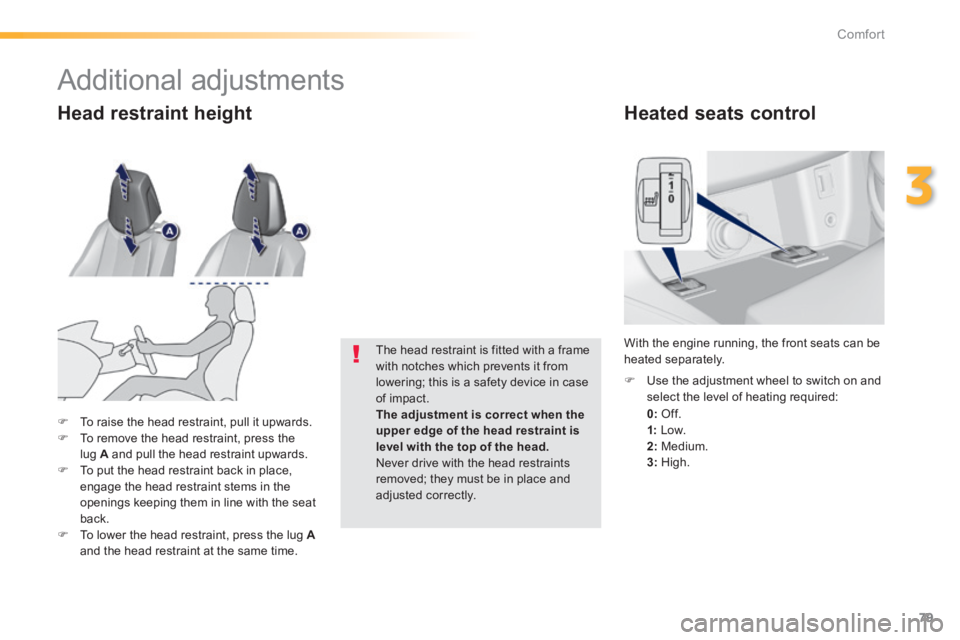
Heated seats control
0: Of f.
1: Low. 2: Medium. 3: High.
Use the adjustment wheel to switch on and select the level of heating required:
With the engine running, the front seats can be heated separately.
To raise the head restraint, pull it upwards. To remove the head restraint, press the lug A and pull the head restraint upwards. To put the head restraint back in place, engage the head restraint stems in the openings keeping them in line with the seat back. To lower the head restraint, press the lug Aand the head restraint at the same time.
The head restraint is fitted with a frame with notches which prevents it from lowering; this is a safety device in case of impact. The adjustment is correct when the
upper edge of the head restraint is level with the top of the head. Never drive with the head restraints removed; they must be in place and adjusted correctly.
Head restraint height
Additional adjustments
Page 92 of 400
90
Comfort
308_EN_CHAP03_CONFORT_ED02-2013
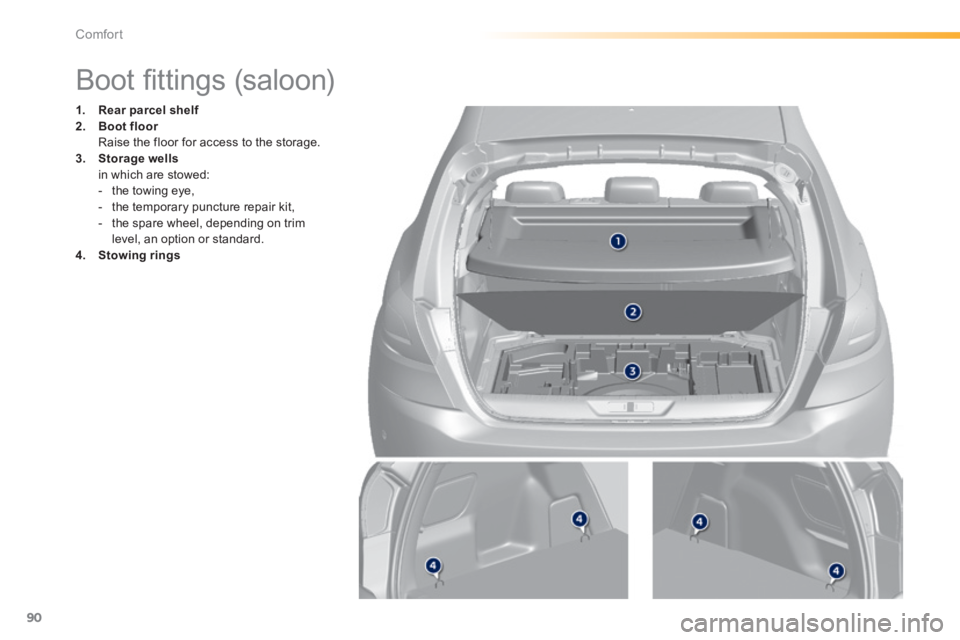
Boot fi ttings (saloon)
1. Rear parcel shelf2. Boot floor Boot floor Boot floor Raise the floor for access to the storage. 3. Storage wells in which are stowed: - the towing eye, - the temporary puncture repair kit, - the spare wheel, depending on trim level, an option or standard. 4. Stowing rings
Page 93 of 400
91
3
Comfort
308_EN_CHAP03_CONFORT_ED02-2013
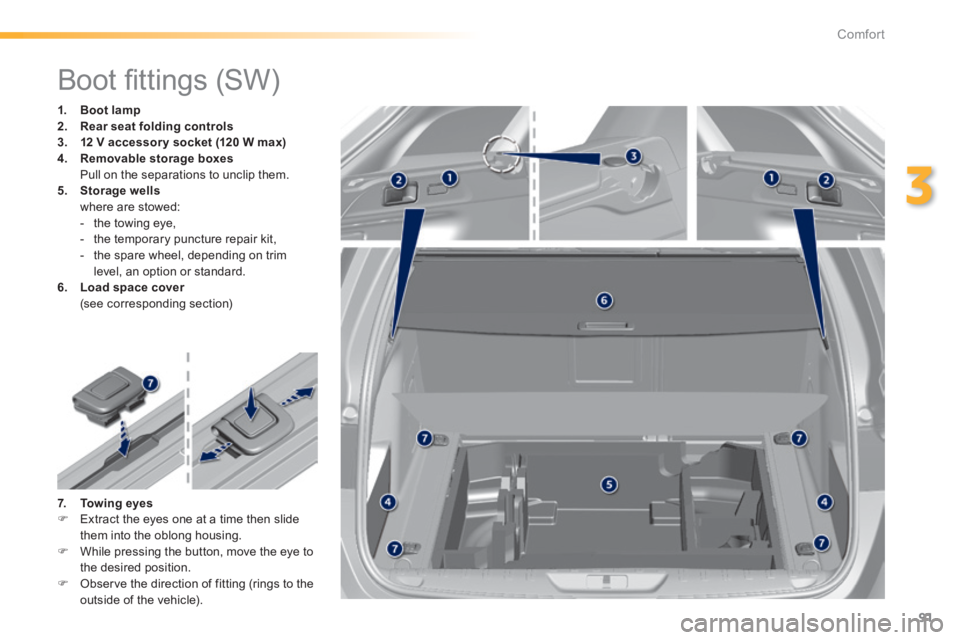
Boot fi ttings (SW)
1. Boot lamp2. Rear Rear Rearseat folding controls3. 12 V accessor y socket (120 W max)4. Removable storage boxes Pull on the separations to unclip them. 5. Storage wells where are stowed: - the towing eye, - the temporary puncture repair kit, - the spare wheel, depending on trim level, an option or standard. 6. Load space cover Load space cover Load space cover (see corresponding section)
7. Towing eyes Extract the eyes one at a time then slide them into the oblong housing. While pressing the button, move the eye to the desired position. Observe the direction of fitting (rings to the
outside of the vehicle).
Page 111 of 400
109
4
Driving
308_EN_CHAP04_CONDUITE_ED02-2013
For Diesel vehicles , in sub-zero temperatures the engine will not start until the pre-heater warning lamp has gone off.
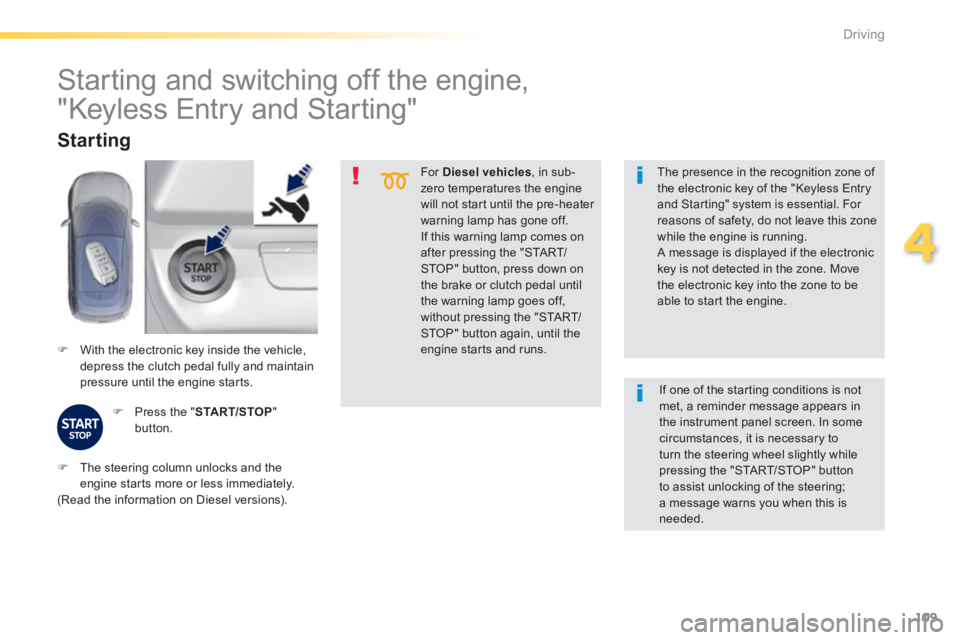
If this warning lamp comes on after pressing the "START/STOP" button, press down on the brake or clutch pedal until the warning lamp goes off, without pressing the "START/STOP" button again, until the engine starts and runs. With the electronic key inside the vehicle, depress the clutch pedal fully and maintain pressure until the engine starts.
Starting
Press the " START/STOP " button.
The presence in the recognition zone of the electronic key of the "Keyless Entry and Starting" system is essential. For reasons of safety, do not leave this zone
while the engine is running. A message is displayed if the electronic key is not detected in the zone. Move the electronic key into the zone to be able to start the engine.
Starting and switching off the engine,
"Keyless Entry and Starting"
The steering column unlocks and the engine starts more or less immediately. (Read the information on Diesel versions).
If one of the starting conditions is not met, a reminder message appears in the instrument panel screen. In some circumstances, it is necessary to turn the steering wheel slightly while pressing the "START/STOP" button to assist unlocking of the steering; a message warns you when this is needed.
Page 115 of 400
113
4
Driving
308_EN_CHAP04_CONDUITE_ED02-2013
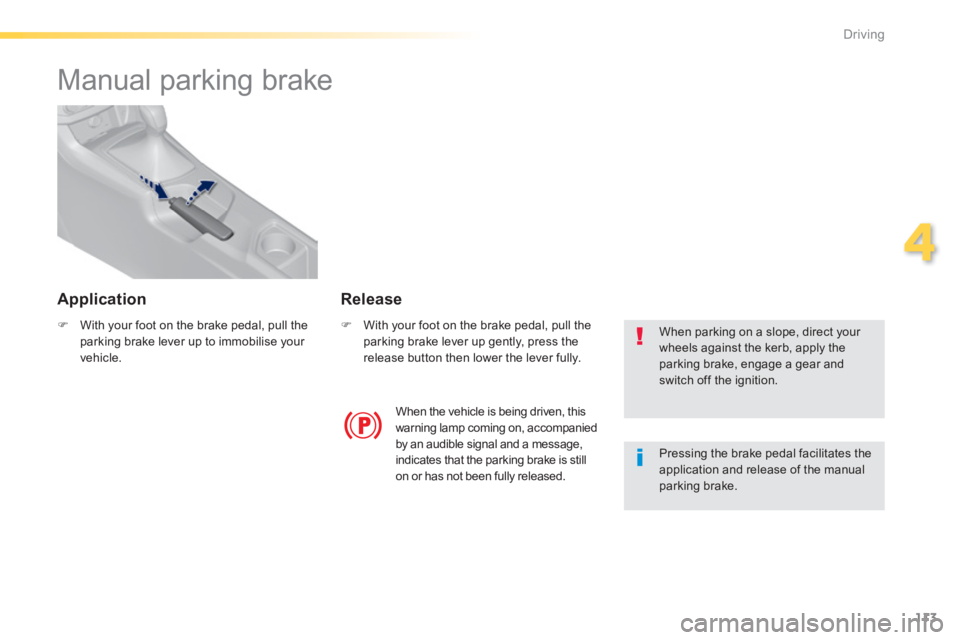
Manual parking brake
With your foot on the brake pedal, pull the parking brake lever up to immobilise your vehicle.
With your foot on the brake pedal, pull the parking brake lever up gently, press the release button then lower the lever fully.
When parking on a slope, direct your wheels against the kerb, apply the parking brake, engage a gear and switch off the ignition.
When the vehicle is being driven, this warning lamp coming on, accompanied by an audible signal and a message, indicates that the parking brake is still on or has not been fully released.
Pressing the brake pedal facilitates the application and release of the manual parking brake.
Release Application
Page 116 of 400
114
Driving
308_EN_CHAP04_CONDUITE_ED02-2013
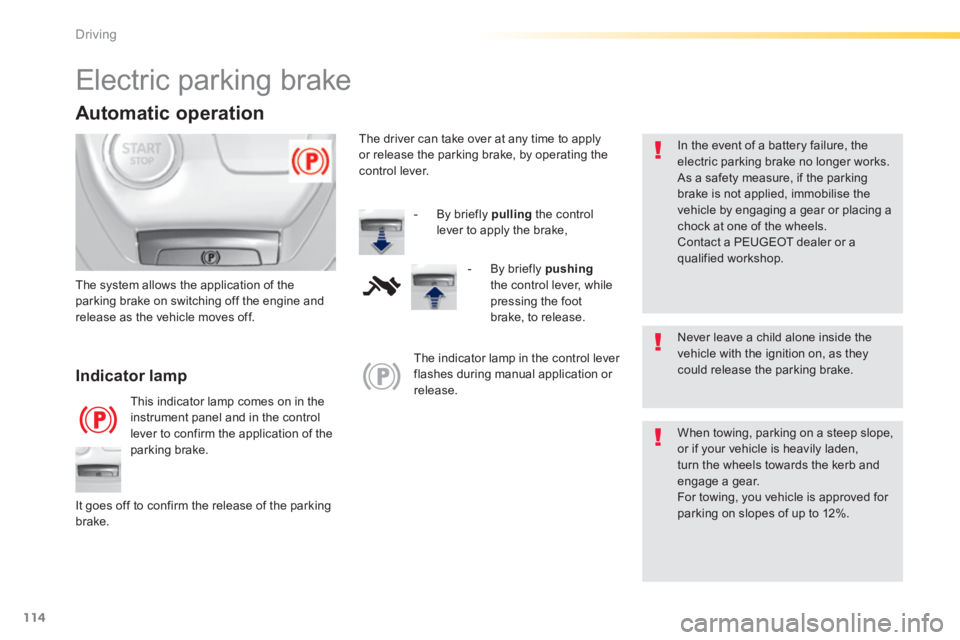
Electric parking brake
Never leave a child alone inside the vehicle with the ignition on, as they could release the parking brake. Indicator lamp
This indicator lamp comes on in the instrument panel and in the control lever to confirm the application of the parking brake.
The system allows the application of the parking brake on switching off the engine and release as the vehicle moves off.
When towing, parking on a steep slope, or if your vehicle is heavily laden, turn the wheels towards the kerb and engage a gear. For towing, you vehicle is approved for parking on slopes of up to 12%. It goes off to confirm the release of the parking brake.
The indicator lamp in the control lever flashes during manual application or release.
In the event of a battery failure, the electric parking brake no longer works. As a safety measure, if the parking brake is not applied, immobilise the vehicle by engaging a gear or placing a chock at one of the wheels. Contact a PEUGEOT dealer or a qualified workshop.
Automatic operation
The driver can take over at any time to apply or release the parking brake, by operating the control lever.
- By briefly pulling the control
lever to apply the brake,
- By briefly pushingthe control lever, while pressing the foot brake, to release.
Page 119 of 400
117
4
Driving
308_EN_CHAP04_CONDUITE_ED02-2013
Immobilisation of the vehicle (special cases)
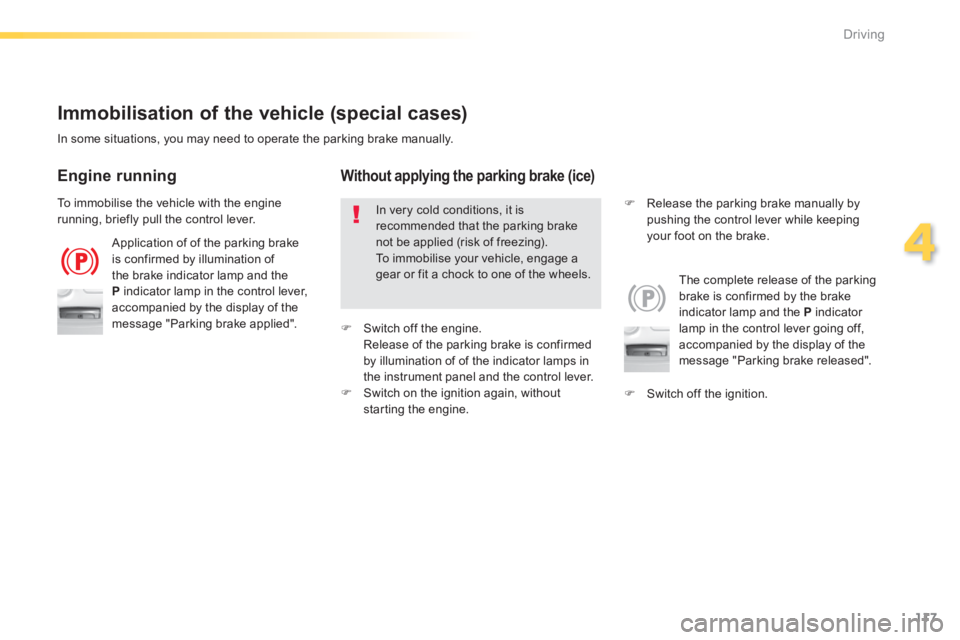
Application of of the parking brake is confirmed by illumination of the brake indicator lamp and the P indicator lamp in the control lever, accompanied by the display of the message "Parking brake applied".
The complete release of the parking brake is confirmed by the brake indicator lamp and the P indicator lamp in the control lever going off, accompanied by the display of the message "Parking brake released".
In some situations, you may need to operate the parking brake manually.
Engine running
In very cold conditions, it is
recommended that the parking brake not be applied (risk of freezing). To immobilise your vehicle, engage a gear or fit a chock to one of the wheels.
Without applying the parking brake (ice)
Switch off the ignition.
Release the parking brake manually by pushing the control lever while keeping your foot on the brake.
To immobilise the vehicle with the engine running, briefly pull the control lever.
Switch off the engine. Release of the parking brake is confirmed by illumination of of the indicator lamps in the instrument panel and the control lever. Switch on the ignition again, without starting the engine.
Page 122 of 400
120
Driving
308_EN_CHAP04_CONDUITE_ED02-2013
SituationsConsequences
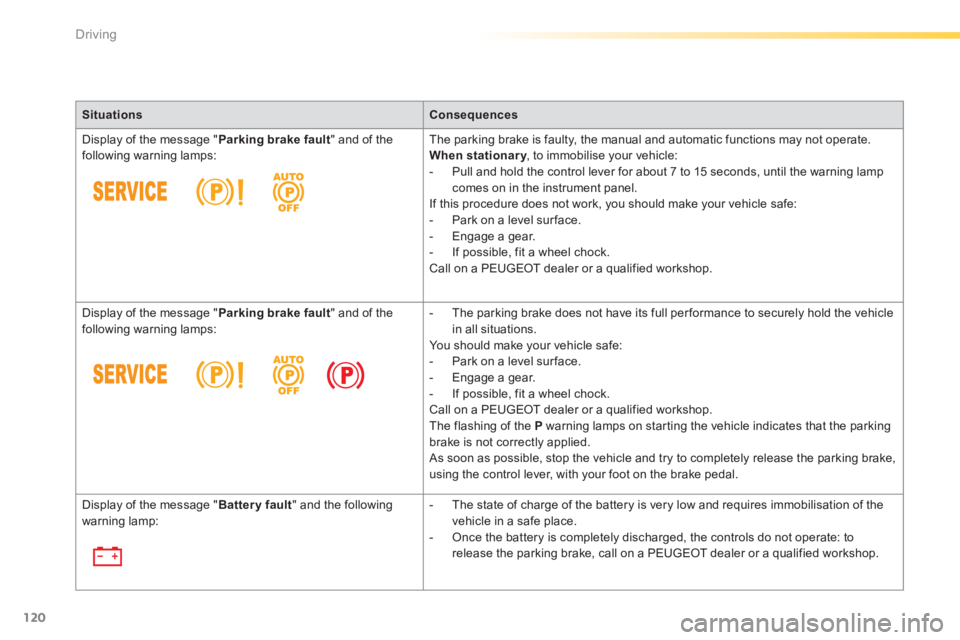
Display of the message " Parking brake fault " and of the following warning lamps: The parking brake is faulty, the manual and automatic functions may not operate. When stationary , to immobilise your vehicle: When stationary , to immobilise your vehicle: When stationary - Pull and hold the control lever for about 7 to 15 seconds, until the warning lamp comes on in the instrument panel. If this procedure does not work, you should make your vehicle safe: - Park on a level sur face. - Engage a gear. - If possible, fit a wheel chock. Call on a PEUGEOT dealer or a qualified workshop.
Display of the message " Parking brake fault " and of the following warning lamps: - The parking brake does not have its full per formance to securely hold the vehicle in all situations. You should make your vehicle safe: - Park on a level sur face. - Engage a gear. - If possible, fit a wheel chock. Call on a PEUGEOT dealer or a qualified workshop. The flashing of the P warning lamps on starting the vehicle indicates that the parking brake is not correctly applied. As soon as possible, stop the vehicle and try to completely release the parking brake, using the control lever, with your foot on the brake pedal.
Display of the message " Battery fault " and the following warning lamp: - The state of charge of the battery is very low and requires immobilisation of the vehicle in a safe place.
- Once the battery is completely discharged, the controls do not operate: to release the parking brake, call on a PEUGEOT dealer or a qualified workshop.
Page 135 of 400
133
4
Driving
308_EN_CHAP04_CONDUITE_ED02-2013
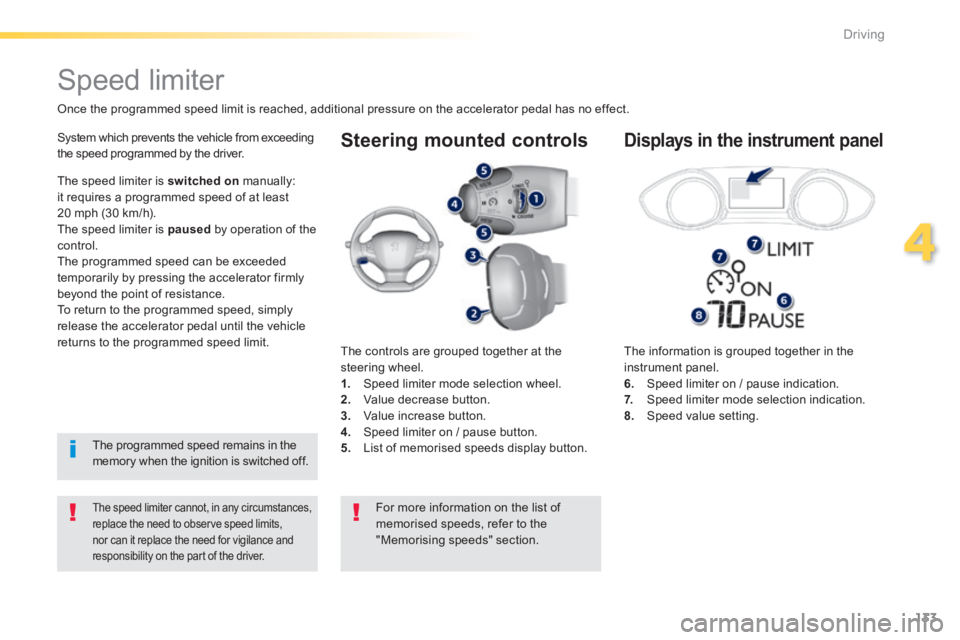
Steering mounted controls
The information is grouped together in the instrument panel. 6. Speed limiter on / pause indication. 7. Speed limiter mode selection indication. 8. Speed value setting.
Speed limiter
Once the programmed speed limit is reached, additional pressure on the accelerator pedal has no effect.
The speed limiter cannot, in any circumstances, replace the need to observe speed limits, nor can it replace the need for vigilance and responsibility on the part of the driver.
System which prevents the vehicle from exceeding the speed programmed by the driver.
The controls are grouped together at the steering wheel. 1. Speed limiter mode selection wheel. 2. Value decrease button. 3. Value increase button. 4. Speed limiter on / pause button. 5. List of memorised speeds display button.
Displays in the instrument panel
The speed limiter is switched on manually: it requires a programmed speed of at least 20 mph (30 km/h). The speed limiter is paused by operation of the control. The programmed speed can be exceeded temporarily by pressing the accelerator firmly beyond the point of resistance. To return to the programmed speed, simply release the accelerator pedal until the vehicle returns to the programmed speed limit.
The programmed speed remains in the memory when the ignition is switched off.
For more information on the list of memorised speeds, refer to the "Memorising speeds" section.
Page 136 of 400
134
Driving
308_EN_CHAP04_CONDUITE_ED02-2013
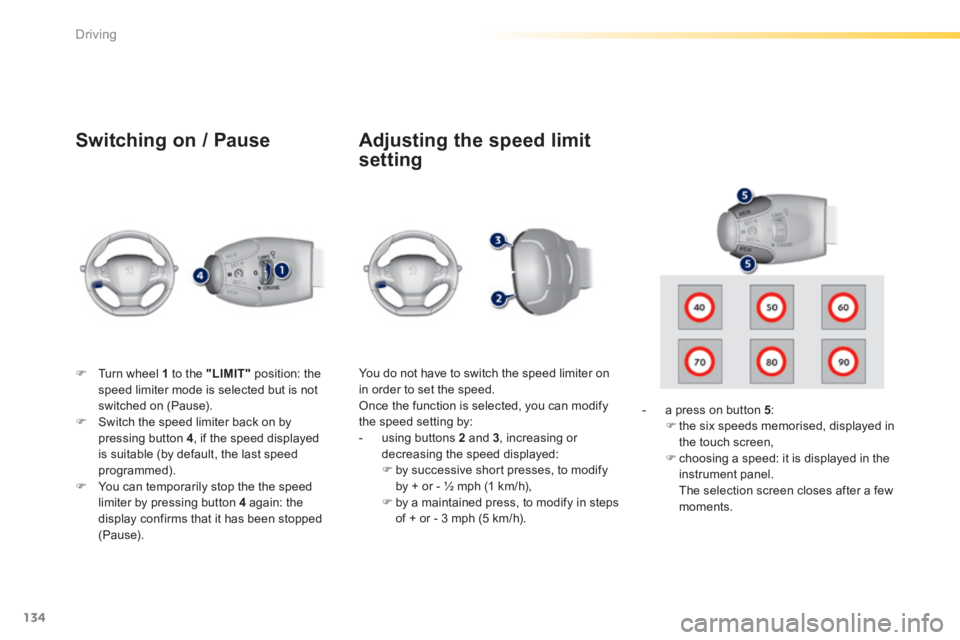
Switching on / Pause
Turn wheel 1 to the "LIMIT" position: the speed limiter mode is selected but is not switched on (Pause). Switch the speed limiter back on by pressing button 4 , if the speed displayed is suitable (by default, the last speed programmed). You can temporarily stop the the speed limiter by pressing button 4 again: the display confirms that it has been stopped (Pause).
You do not have to switch the speed limiter on in order to set the speed. Once the function is selected, you can modify the speed setting by: - using buttons 2 and 3 , increasing or decreasing the speed displayed: by successive short presses, to modify by + or - ½ mph (1 km/h), by a maintained press, to modify in steps of + or - 3 mph (5 km/h).
- a press on button 5 : the six speeds memorised, displayed in the touch screen, choosing a speed: it is displayed in the instrument panel. The selection screen closes after a few moments.
Adjusting the speed limit
setting