stop start Peugeot 308 2015 Owner's Guide
[x] Cancel search | Manufacturer: PEUGEOT, Model Year: 2015, Model line: 308, Model: Peugeot 308 2015Pages: 416, PDF Size: 11.81 MB
Page 261 of 416
259
308_en_Chap07_info-pratiques_ed01-2015
12 V battery
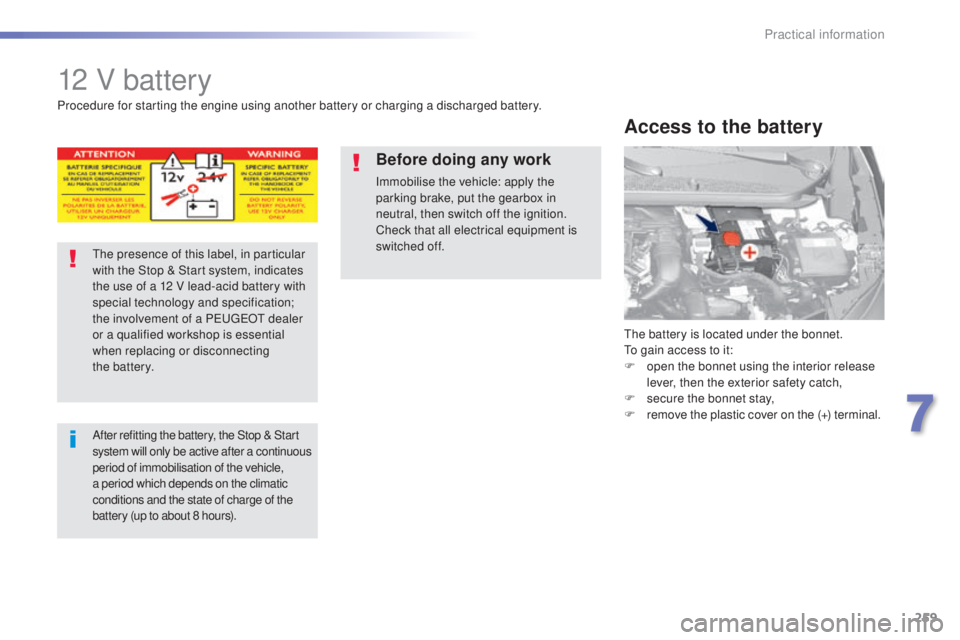
the battery is located under the bonnet.to gain access to it:
F
o
pen the bonnet using the interior release
lever, then the exterior safety catch,
F
s
ecure the bonnet stay,
F
r
emove the plastic cover on the (+) terminal.
Access to the battery
Procedure for starting the engine using another battery or charging a discharged battery.
th
e presence of this label, in particular
with the Stop & Start system, indicates
the use of a 12 V lead-acid battery with
special technology and specification;
the involvement of a P
e
uge
Ot
dealer
or a qualified workshop is essential
when replacing or disconnecting
the
battery.
After refitting the battery, the Stop & Start
s ystem will only be active after a continuous
period of immobilisation of the vehicle,
a period which depends on the climatic
conditions and the state of charge of the
battery (up to about 8 hours).
Before doing any work
Immobilise the vehicle: apply the
parking brake, put the gearbox in
neutral, then switch off the ignition.
Check that all electrical equipment is
switched off.
7
Practical information
Page 264 of 416
262
308_en_Chap07_info-pratiques_ed01-2015
the batteries contain harmful substances
such as sulphuric acid and lead. th ey
must be disposed of in accordance
with regulations and must not, in any
circumstances, be discarded with household
waste.
ta
ke used remote control batteries and
vehicle batteries to a special collection point.
It is advisable to disconnect the battery
if the vehicle is to be left unused for
more than one month. Protect your eyes and face before
handling the battery.
All operations on the battery must be
carried out in a well ventilated area and
away from naked flames and sources
of sparks, so as to avoid the risk of
explosion or fire.
Do not try to charge a frozen battery;
the battery must first be thawed out to
avoid the risk of explosion. If the battery
has been frozen, before charging have
it checked by a Pe
ugeOt dealer or a
qualified workshop who will check that
the internal components have not been
damaged and the casing is not cracked,
which could cause a leak of toxic and
corrosive acid.
Do not reverse the polarity and use only
a 12 V charger.
Do not disconnect the terminals while
the engine is running.
Do not charge the batteries without
disconnecting the terminals first.
Wash your hands afterwards.
With Stop & Start, the battery does not
have to be disconnected for charging.
F
D
isconnect the battery from the vehicle.
F
F
ollow the instructions for use provided by
the manufacturer of the charger.
F
C
onnect the battery starting with the
negative terminal (-).
F
C
heck that the terminals and connectors
are clean. If they are covered with sulphate
(whitish or greenish deposit), remove them
and clean them.
Charging the battery using
a battery charger
Practical information
Page 265 of 416
263
308_en_Chap07_info-pratiques_ed01-2015
System which manages the duration of use of certain functions to conserve a sufficient level of
charge in the battery.
After the engine has stopped, you can still use functions such as the audio and telematics
system, windscreen wipers, dipped beam headlamps, courtesy lamps, etc. for a maximum
combined duration of about forty minutes.
energy economy mode
Switching to economy
mode
A message then appears in the instrument
panel screen indicating that the vehicle has
switched to economy mode and the active
functions are put on standby.
If a telephone call is being made at this time,
it
will be maintained for around 10 minutes with
the Bluetooth hands-free system of your audio
system.
Exiting economy mode
these functions are reactivated automatically
next time the vehicle is driven.
In order to restore the use of these functions
immediately, start the engine and let it run:
-
f
or less than ten minutes, to use the
equipment for approximately five minutes,
-
f
or more than ten minutes, to use the
equipment for up to approximately
thirty
minutes.
Let the engine run for the duration specified to
ensure that the battery charge is sufficient.
Do not repeatedly and continuously restart the
engine in order to charge the battery.
A flat battery prevents the engine from starting
(refer to the "Battery" section).
Load reduction mode
System which manages the use of certain
functions according to the level of charge
remaining in the battery.
When the vehicle is being driven, the load
reduction function temporarily deactivates
certain functions, such as the air conditioning,
the heated rear screen...
th
e deactivated functions are reactivated
automatically as soon as conditions permit.
7
Practical information
Page 277 of 416
275
308_en_Chap08_verifications_ed01-2015
Bonnet
Before doing anything under the
bonnet, switch off the Stop & Start
system to avoid any risk of injury
resulting from an automatic change to
S
t
A R
t m
o d e .
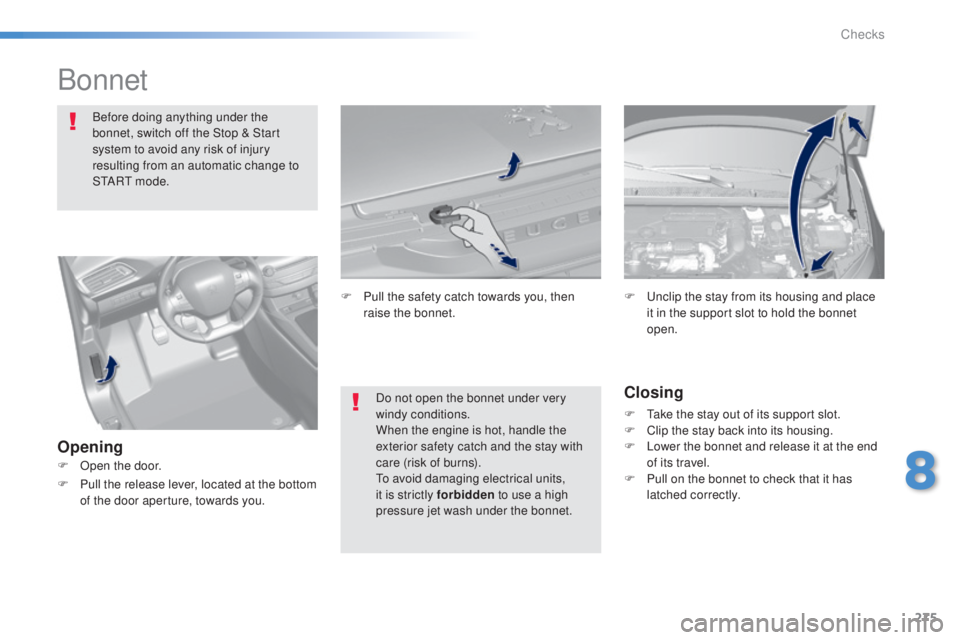
Opening Closing
F take the stay out of its support slot.
F
C lip the stay back into its housing.
F
L
ower the bonnet and release it at the end
of its travel.
F
P
ull on the bonnet to check that it has
latched correctly.
F
u
n
clip the stay from its housing and place
it in the support slot to hold the bonnet
open.
Do not open the bonnet under very
windy conditions.
When the engine is hot, handle the
exterior safety catch and the stay with
care (risk of burns).
to
avoid damaging electrical units,
it is strictly forbidden to use a high
pressure jet wash under the bonnet.
F
P
ull the safety catch towards you, then
raise the bonnet.
F
O
pen the door.
F
P
ull the release lever, located at the bottom
of the door aperture, towards you.
8
Checks
Page 288 of 416
286
308_en_Chap08_verifications_ed01-2015
Never dispose of AdBlue® additive
bottles in the household waste. Place
them in a special container provided
this purpose or take them to your dealer.
Important
: if your vehicle's
AdBlue
® tank is completely empty -
w
hich is confirmed by the alert
messages and the impossibility of
starting the engine, you must add at
least 3.8 litres (so two 1.89 litre bottles). F
A
fter emptying the bottle, wipe away any
spillage around the tank filler using a damp
cloth.
If any additive is split or splashed, wash
immediately with cold water or wipe with
a damp cloth.
If the additive has crystallised, clean it
off using a sponge and hot water.
F
R
efit the blue cap to the tank and turn it a
6
th of a turn clockwise, to its stop.
F
R
efit the black cap and turn it a quarter of
a turn clockwise without pressing.
e
n
sure
that the indicator on the cap lines up with
the indicator on the support.
F
D
epending on equipment, return the spare
wheel and/or the storage box to the bottom
of the boot.
F
R
efit the boot carpet and close the tailgate. Important: when topping
-up after
running out of additive , signalled
by the message "
to
p up emissions
additive: Starting prevented", you
must wait for about 5 minutes before
switching on the ignition, without
opening the driver's door, unlocking
the vehicle, introducing the key
into the ignition switch, or placing
the key of the "Keyless Entr y and
Star ting" system inside the vehicle.
Switch on the ignition, then wait for
10 seconds before starting the engine.
F
O
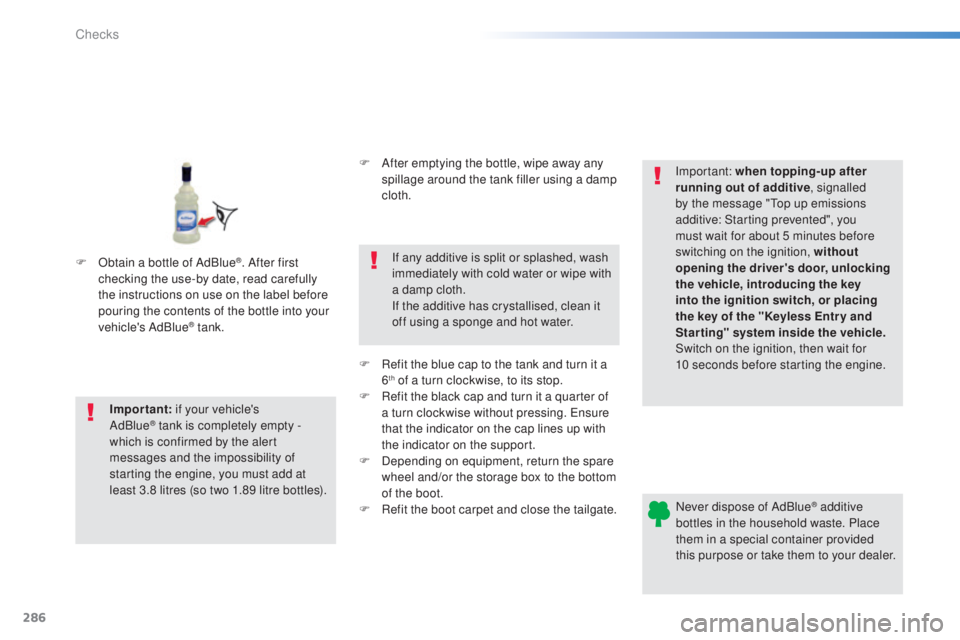
btain a bottle of AdBlue
®. After first
checking the use-by date, read carefully
the instructions on use on the label before
pouring the contents of the bottle into your
vehicle's AdBlue
® tank.
Checks
Page 293 of 416
291
308_en_Chap08_verifications_ed01-2015
Checks
12 V battery
the battery does not require any maintenance.
However, check that the terminals are clean
and correctly tightened, particularly in summer
and winter.Refer to the manufacturer's
service schedule for details of the
replacement intervals for these
components.
Air filter and passenger compartment filter
Replace the oil filter each time the
engine oil is changed.
Refer to the manufacturer's
service schedule for details of
the replacement interval for this
component.
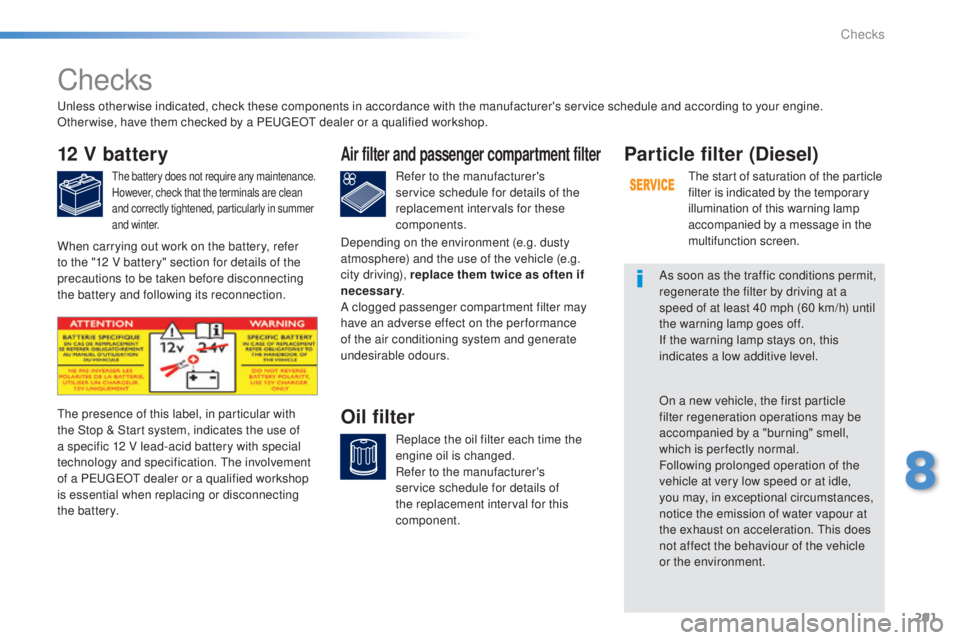
Oil filterthe presence of this label, in particular with
the Stop & Start system, indicates the use of
a specific 12 V lead-acid battery with special
technology and specification. t
h
e involvement
of a P
e
uge
Ot
dealer or a qualified workshop
is essential when replacing or disconnecting
the battery.
Particle filter (Diesel)
the start of saturation of the particle
filter is indicated by the temporary
illumination of this warning lamp
accompanied by a message in the
multifunction screen.
As soon as the traffic conditions permit,
regenerate the filter by driving at a
speed of at least 40 mph (60 km/h) until
the warning lamp goes off.
If the warning lamp stays on, this
indicates a low additive level.
On a new vehicle, the first particle
filter regeneration operations may be
accompanied by a "burning" smell,
which is per fectly normal.
Following prolonged operation of the
vehicle at very low speed or at idle,
you may, in exceptional circumstances,
notice the emission of water vapour at
the exhaust on acceleration.
t
h
is does
not affect the behaviour of the vehicle
or the environment.
un
less otherwise indicated, check these components in accordance with the manufacturer's service schedule and according to your engine.
Other wise, have them checked by a P
e
uge
Ot
dealer or a qualified workshop.
When carrying out work on the battery, refer
to the "12 V battery" section for details of the
precautions to be taken before disconnecting
the battery and following its reconnection. Depending on the environment (e.g. dusty
atmosphere) and the use of the vehicle (e.g.
city driving), replace them twice as often if
necessary
.
A clogged passenger compartment filter may
have an adverse effect on the per formance
of the air conditioning system and generate
undesirable odours.
8
Checks
Page 327 of 416
325
308_en_Chap10c_SMegplus_ed01-2015
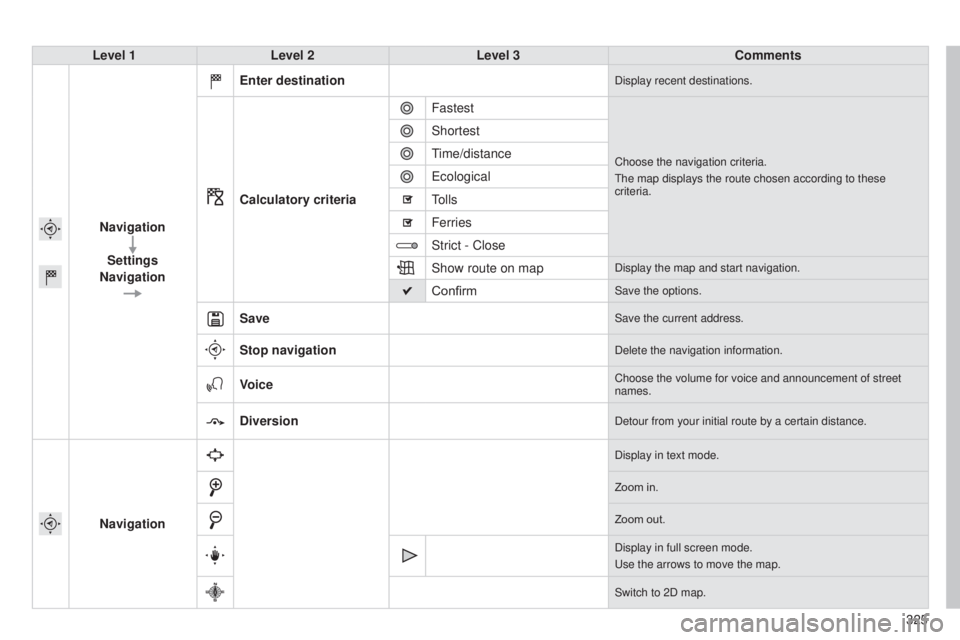
Level 1Level 2 Level 3 Comments
Navigation Settings
Navigation Enter destination
Display recent destinations.
Calculatory criteria
Fastest
Choose the navigation criteria.
t
he map displays the route chosen according to these
criteria.
Shortest
time/distance
e
cological
tolls
Ferries
Strict - Close
Show route on map
Display the map and start navigation.
ConfirmSave the options.
SaveSave the current address.
Stop navigationDelete the navigation information.
VoiceChoose the volume for voice and announcement of street
names.
DiversionDetour from your initial route by a certain distance.
Navigation
Display in text mode.
Zoom in.
Zoom out.
Display in full screen mode.
u
se the arrows to move the map.
Switch to 2D map.
Page 332 of 416
05
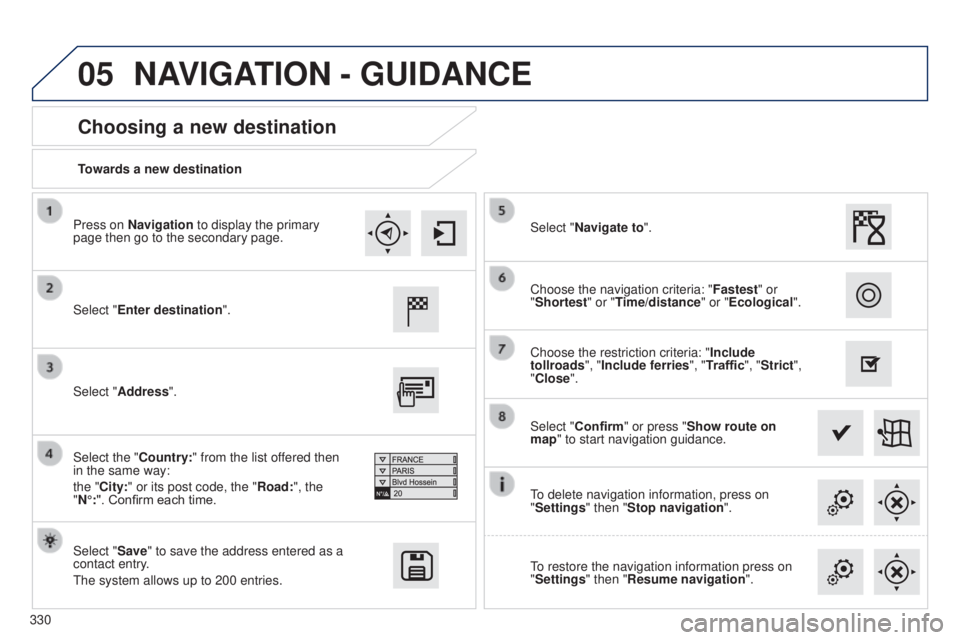
330Towards a new destination
Choosing a new destination
Select "Enter destination".
Select "Save" to save the address entered as a
contact entry.
t
he system allows up to 200 entries. Select "Confirm" or press "Show route on
map" to start navigation guidance.
Select "Address".
Select the "Country:" from the list offered then
in the same way:
the "City:" or its post code, the "Road:", the
"N°:". Confirm each time. Select "Navigate to".
Choose the restriction criteria: "
Include
tollroads", "Include ferries", "Traffic", "Strict",
"Close". Choose the navigation criteria: " Fastest" or
"Shortest" or "Time/distance" or "Ecological ".
to delete navigation information, press on
"
Settings" then "Stop navigation".
to restore the navigation information press on
"
Settings" then "Resume navigation".
Press on Navigation to display the primary
page then go to the secondary page.
NAVIGATION - GUIDANCE
Page 361 of 416
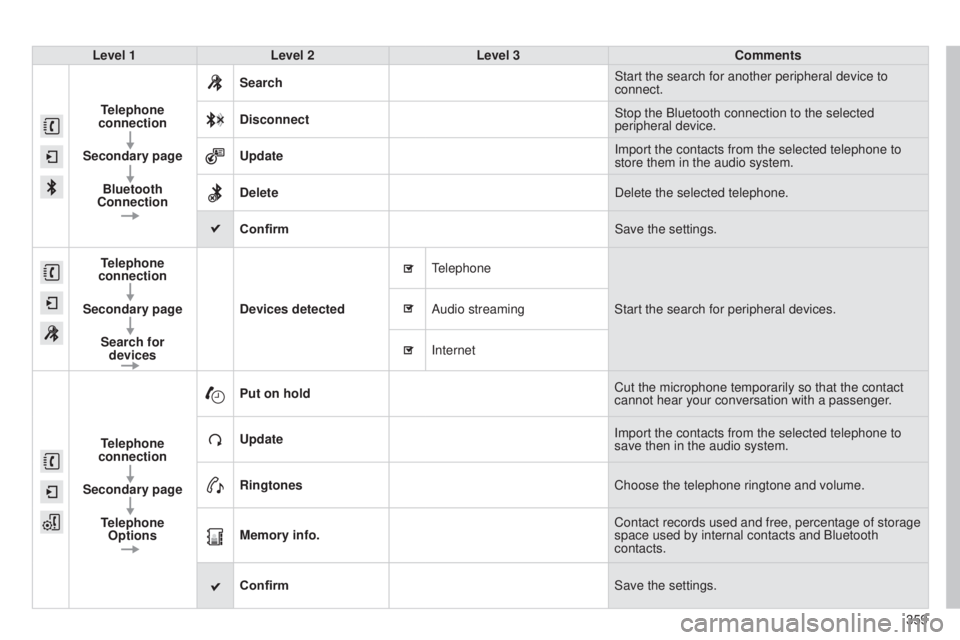
359
308_en_Chap10c_SMegplus_ed01-2015
Level 1Level 2 Level 3 Comments
Telephone
connection
Secondary page Bluetooth
Connection Search
Start the search for another peripheral device to
connect.
Disconnect Stop the Bluetooth connection to the selected
peripheral device.
Update Import the contacts from the selected telephone to
store them in the audio system.
Delete Delete the selected telephone.
Confirm Save the settings.
Telephone
connection
Secondary page Search for devices Devices detected
telephone
Start the search for peripheral devices.
Audio streaming
Internet
T
elephone
connection
Secondary page Telephone Options Put on hold
Cut the microphone temporarily so that the contact
cannot hear your conversation with a passenger.
Update Import the contacts from the selected telephone to
save then in the audio system.
Ringtones Choose the telephone ringtone and volume.
Memory info. Contact records used and free, percentage of storage
space used by internal contacts and Bluetooth
contacts.
Confirm Save the settings.
Page 395 of 416

393
FREqUENTLY ASKED q UESTIONS
qUESTION ANSWER SOLUTION
Sound cut-outs of 1 to
2
seconds in radio mode. During this brief sound cut-out, the RDS searches for another frequency \
giving better reception of the station. Deactivate the RDS function if the phenomenon is
too frequent and always on the same route.
With the engine off,
the audio equipment
switches off after a
few
minutes of use. When the engine is switched off, the audio equipment operating time
depends on the battery charge.
t
he switch-off is normal: the audio equipment switches to economy mode
and switches off to prevent discharging of the vehicle's battery. Start the vehicle's engine to increase the battery
charge.
t
he message "the audio
system is overheated"
appears on the display. In order to protect the installation if the surrounding temperature is t\
oo
high, the audio equipment switches to an automatic thermal protection
mode leading to a reduction of the volume or stopping of the playing of \
the CD. Switch the audio system off for a few minutes to
allow the system to cool.