navigation system PEUGEOT 308 2015 User Guide
[x] Cancel search | Manufacturer: PEUGEOT, Model Year: 2015, Model line: 308, Model: Peugeot 308 2015Pages: 344, PDF Size: 12.22 MB
Page 263 of 344
04
261
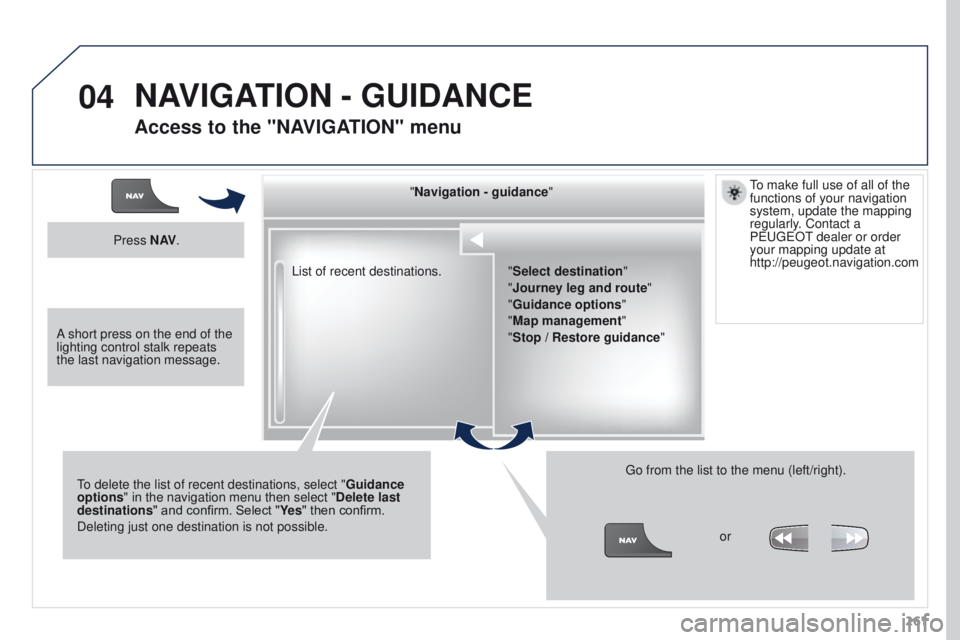
List of recent destinations.
"Navigation - guidance
"
To delete the list of recent destinations, select " Guidance
options " in the navigation menu then select " Delete last
destinations" and confirm. Select "Ye s " then confirm.
Deleting just one destination is not possible. Go from the list to the menu (left/right).
"Select destination"
"Journey leg and route
"
"Guidance options "
"Map management"
"Stop / Restore guidance "
Press N AV
.
orTo make full use of all of the
functions of your navigation
system, update the mapping
regularly. Contact a
PEUGEOT dealer or order
your mapping update at
http://peugeot.navigation.com
A short press on the end of the
lighting control stalk repeats
the last navigation message.
NAVIGATION - GUIDANCE
Access to the "NAVIGATION" menu
Page 264 of 344
04
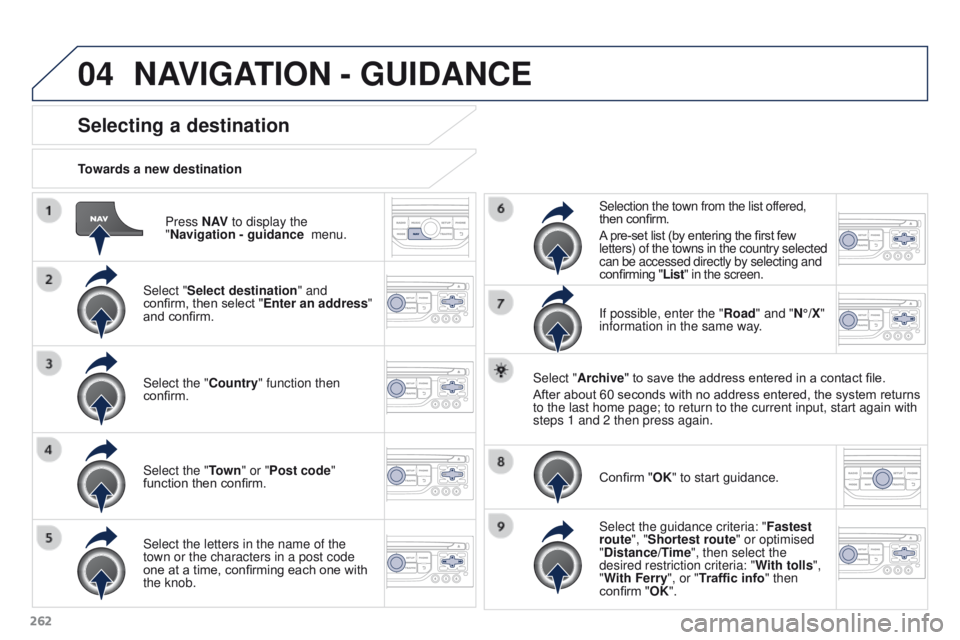
262Press N AV
to display the
"Navigation - guidance menu.
Towards a new destination
Selecting a destination
Select "Select destination" and
confirm, then select "Enter an address"
and confirm.
Select the "Country" function then
confirm.
Select the "Town
" or "Post code"
function then confirm.
Select the letters in the name of the
town or the characters in a post code
one at a time, confirming each one with
the knob. Selection the town from the list offered,
then confirm.
A pre-set list (by entering the first few
letters) of the towns in the country selected
can be accessed directly by selecting and
confirming "List" in the screen.
If possible, enter the "Road" and "N°/X"
information in the same way.
Select "Archive" to save the address entered in a contact file.
After about 60 seconds with no address entered, the system returns
to the last home page; to return to the current input, start again with \
steps 1 and 2 then press again.
Confirm "OK" to start guidance.
Select the guidance criteria: " Fastest
route", "Shortest route" or optimised
"Distance/Time", then select the
desired restriction criteria: " With tolls",
"With Ferry", or "Traffic info" then
confirm "OK".
NAVIGATION - GUIDANCE
Page 265 of 344
04
263
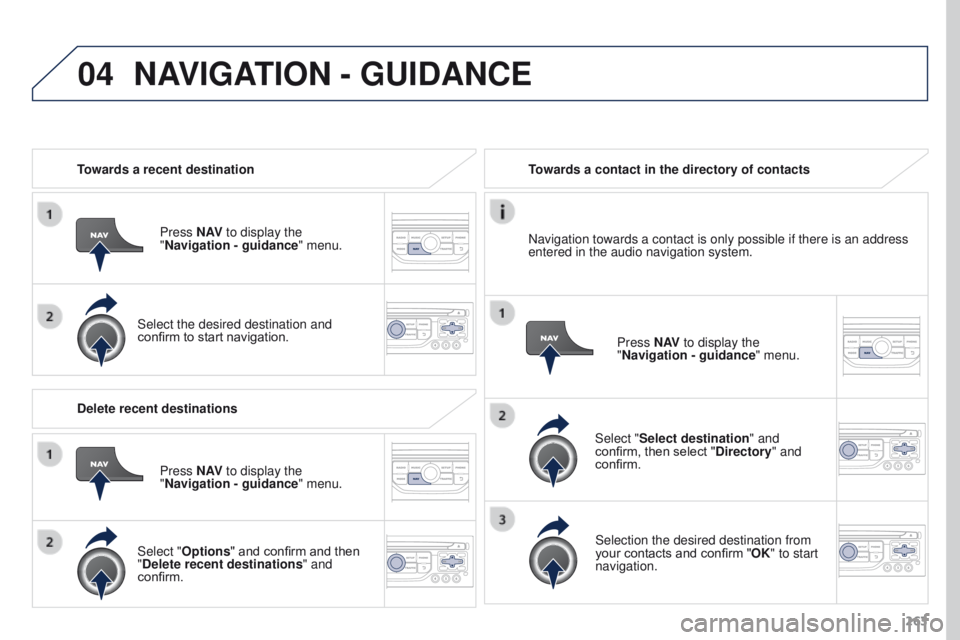
Towards a recent destination
Press N AV to display the
"Navigation - guidance " menu.
Select the desired destination and
confirm to start navigation. Towards a contact in the directory of contacts
Select "Select destination" and
confirm, then select "Directory " and
confirm.
Selection the desired destination from
your contacts and confirm "OK" to start
navigation. Press N AV
to display the
"Navigation - guidance " menu.
Navigation towards a contact is only possible if there is an address
entered in the audio navigation system.
Delete recent destinations Press N AV to display the
"Navigation - guidance " menu.
Select "Options " and confirm and then
"Delete recent destinations" and
confirm.
NAVIGATION - GUIDANCE
Page 269 of 344
04
267
NAVIGATION - GUIDANCE
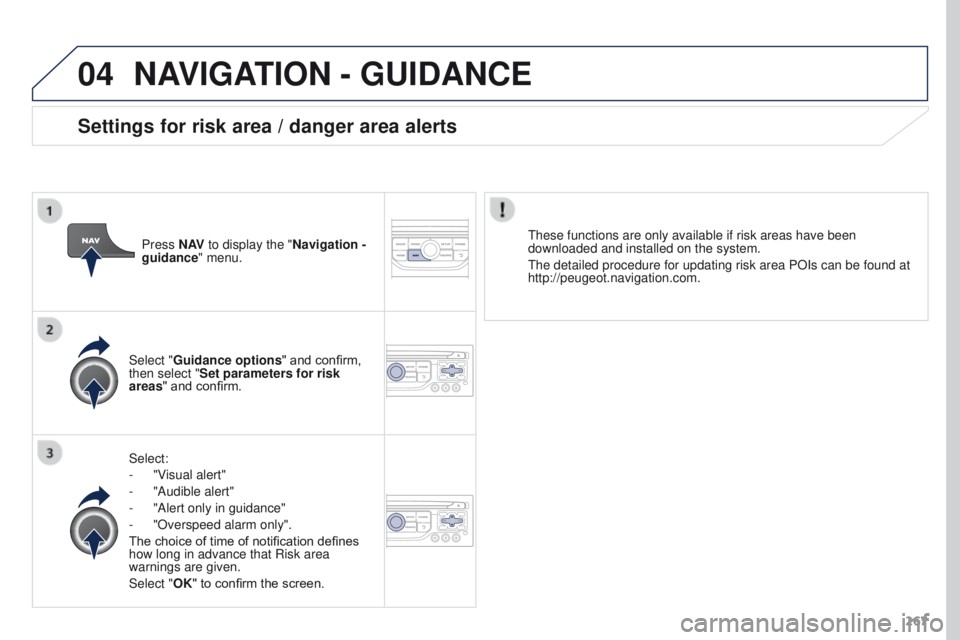
Select:
-
"V
isual alert"
-
"Audible alert"
-
"Alert only in guidance"
-
"Overspeed alarm only".
The choice of time of notification defines
how long in advance that Risk area
warnings are given.
Select "
OK" to confirm the screen.
Select "Guidance options
" and confirm,
then select "Set parameters for risk
areas " and confirm. These functions are only available if risk areas have been
downloaded and installed on the system.
The detailed procedure for updating risk area POIs can be found at
http://peugeot.navigation.com.
Press N AV
to display the "Navigation -
guidance" menu.
Settings for risk area / danger area alerts
Page 271 of 344
04
269
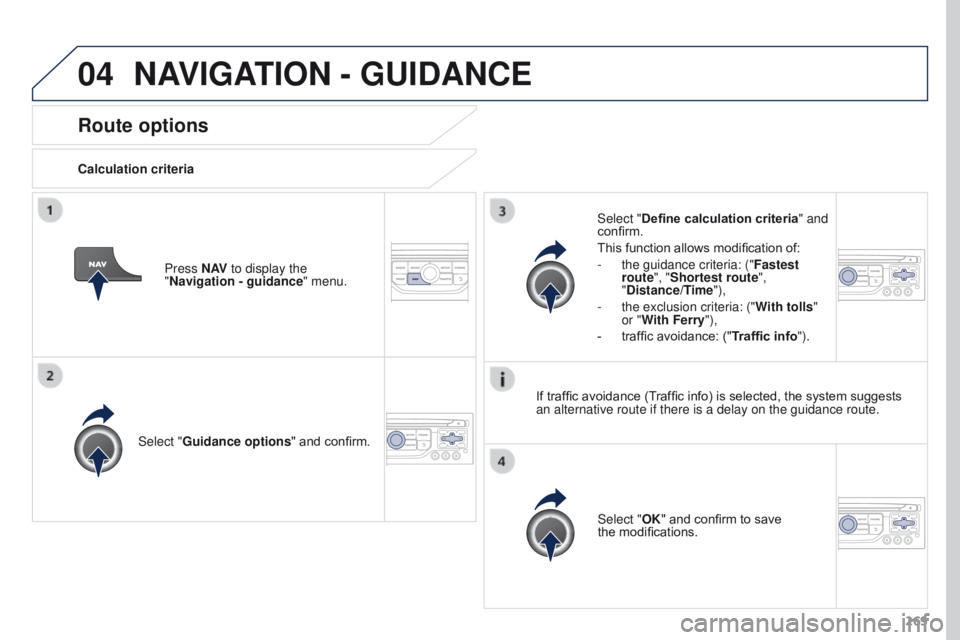
Route options
Calculation criteriaSelect "Guidance options " and confirm.
Select "OK" and confirm to save
the
modifications.
Select "Define calculation criteria" and
confirm.
This function allows modification of:
-
the guidance criteria: ("Fastest
route
", "Shortest route",
"Distance/Time"),
-
the exclusion criteria: ("W
ith tolls"
or "With Ferry"),
-
traffic avoidance: ("
Traffic info").
Press N AV
to display the
"Navigation - guidance " menu.
If traffic avoidance (Traffic info) is selected, the system suggests
an alternative route if there is a delay on the guidance route.
NAVIGATION - GUIDANCE
Page 272 of 344
04
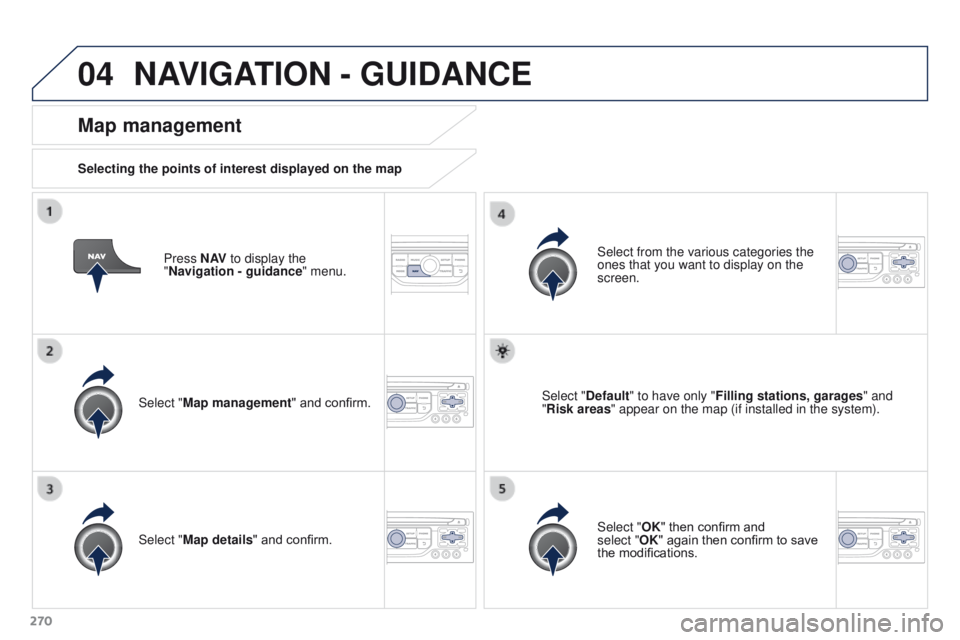
270Press N AV
to display the
"Navigation - guidance " menu.
Map management
Selecting the points of interest displayed on the map
Select "Map management" and confirm. Select from the various categories the
ones that you want to display on the
screen.
Select "Map details" and confirm. Select "Default" to have only "Filling stations, garages
" and
"Risk areas " appear on the map (if installed in the system).
Select "OK" then confirm and
select
"OK" again then confirm to save
the modifications.
NAVIGATION - GUIDANCE
Page 275 of 344
04
273
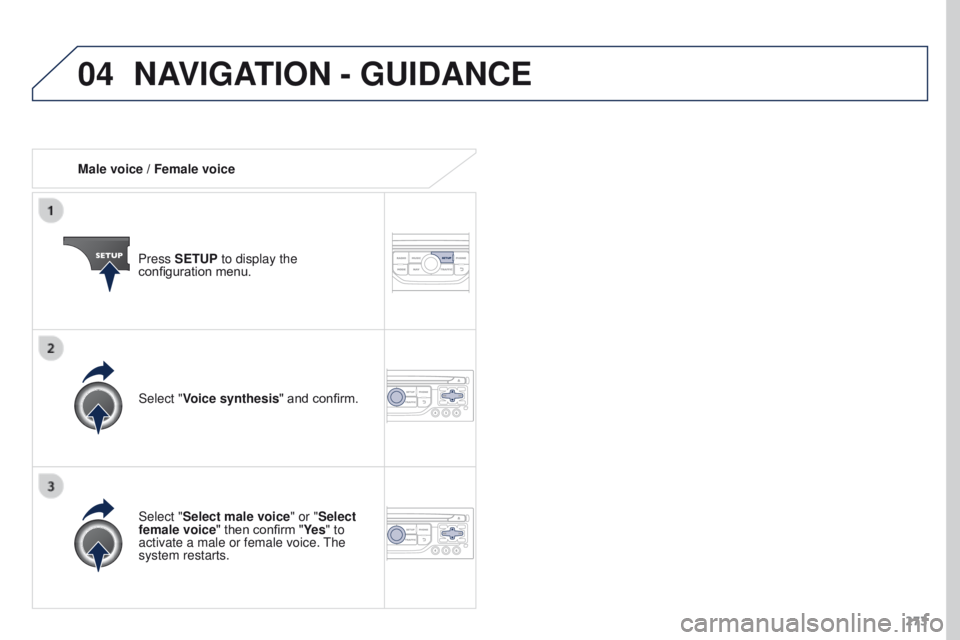
Male voice / Female voice
Press SETUP to display the
configuration menu.
Select "Select male voice" or "Select
female voice" then confirm "Ye s " to
activate a male or female voice. The
system restarts. Select "Voice synthesis" and confirm.
NAVIGATION - GUIDANCE
Page 277 of 344
05
275
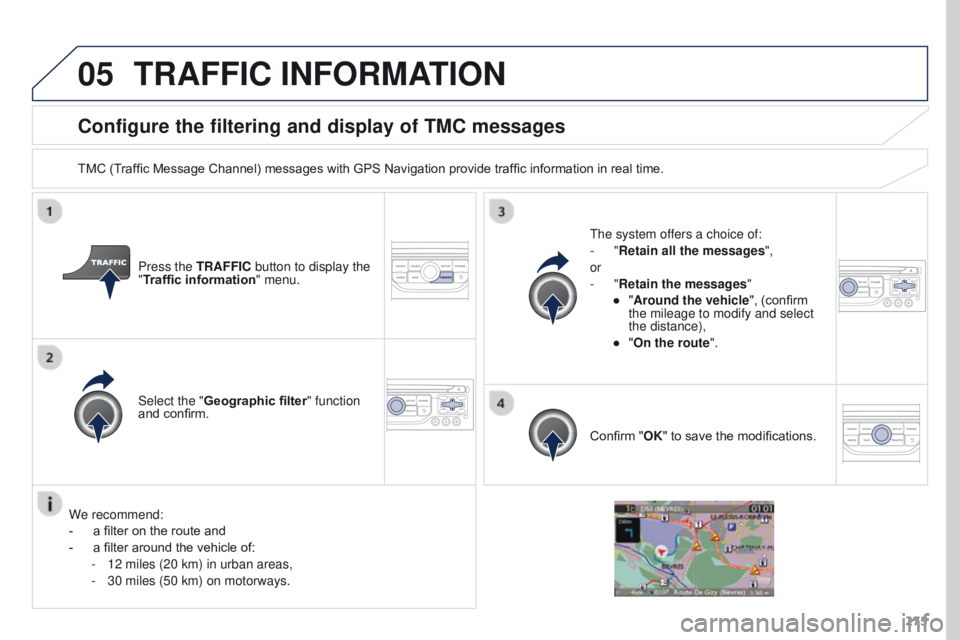
Configure the filtering and display of TMC messages
TMC (Traffic Message Channel) messages with GPS Navigation provide traffic information in real time.Press the TRAFFIC button to display the
"Traffic information" menu.
Select the "Geographic filter" function
and confirm. The system offers a choice of:
-
"Retain all the messages",
or
-
"Retain the messages"
●
"
Around the vehicle", (confirm
the mileage to modify and select
the distance),
●
"
On the route".
Confirm "OK" to save the modifications.
We recommend:
-
a filter on the route and
-
a filter around the vehicle of:
-
12 miles (20 km) in urban areas,
-
30 miles (50 km) on motorways.
TRAFFIC INFORMATION
Page 306 of 344

304The following table groups together the answers to the most frequently a\
sked questions concerning your audio system.
FREQUENTLY
ASKED QUESTIONS
QUESTION ANSWER SOLUTION
The route calculation is
not successful. The guidance criteria may conflict with the current location (exclusion of
toll roads on a toll motorway). Check the guidance criteria on the Navigation
Menu, "Guidance options"\ "Define calculation
criteria".
I am unable to enter my
post code. The system only accepts post codes of up to 7 characters.
The POIs do not appear. The POIs have not been selected. Select the POIs in the list of POIs.
The risk areas audible
warning does not work. The audible warning is not active.
Activate audible warnings in the Guidance options
menu, "Navigation - guidance", "Set parameters for
risk areas".
The system does not
suggest a detour around
an incident on the route. The guidance criteria do not take account of TMC messages.
Select the "Traffic info" function in the list of
guidance criteria.
I receive a Risk area alert
which is not on my route. Other than guidance, the system announces all Risk areas positioned in a\
cone located in front of the vehicle. It may provide an alert for a Risk\
area
located on nearby or parallel roads. Zoom in on the map to view the exact position of
the Risk area. Select "On the route" to no longer
receive alerts other than guidance or to reduce the
time for the announcement.
Page 320 of 344
05
318
PEUGEOT CONNECT USB
The system puts together playlists (temporary memory) created
over a period which depends on the capacity of the USB device.
The other sources are available during this time.
The playlists are updated each time the ignition is switched off or
each time a USB memory stick is connected.
When connecting for the first time, the classification suggested
is by folder. When you reconnect, the classification selected
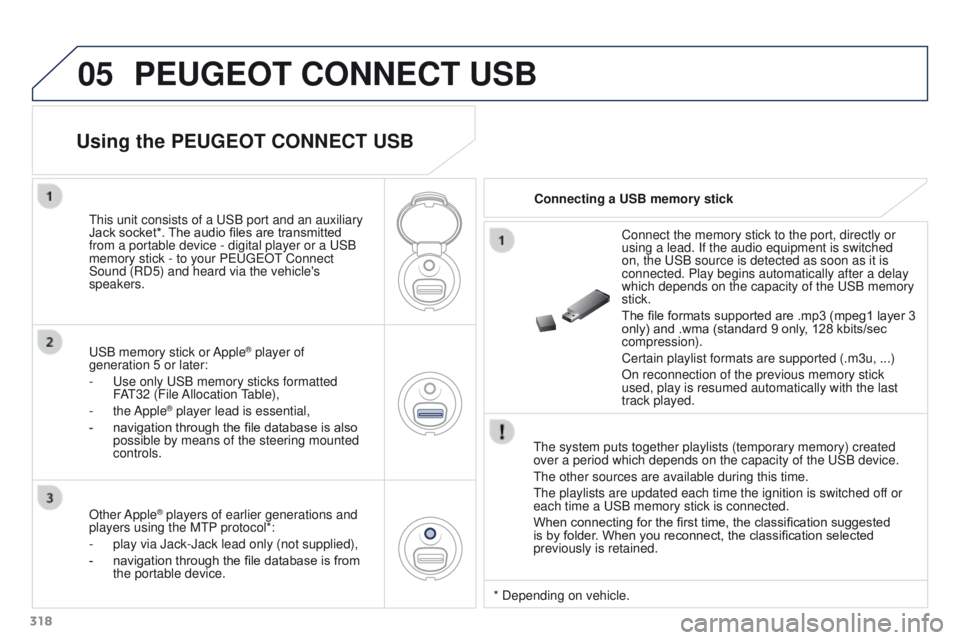
previously is retained.Connect the memory stick to the port, directly or
using a lead. If the audio equipment is switched
on, the USB source is detected as soon as it is
connected. Play begins automatically after a delay
which depends on the capacity of the USB memory
stick.
The file formats supported are .mp3 (mpeg1 layer
3
only) and .wma (standard 9 only, 128 kbits/sec
compression).
Certain playlist formats are supported (.m3u, ...)
On reconnection of the previous memory stick
used, play is resumed automatically with the last
track played.
This unit consists of a USB port and an auxiliary
Jack socket*. The audio files are transmitted
from a portable device - digital player or a USB
memory stick - to your PEUGEOT Connect
Sound (RD5) and heard via the vehicle's
speakers.
USB memory stick or Apple
® player of
generation 5 or later:
-
Use only USB memory sticks formatted
F
AT32 (File Allocation Table),
-
the Apple® player lead is essential,
-
navigation through the file database is also
possible by means of the steering mounted
controls.
Using the PEUGEOT CONNECT USB
Connecting a USB memory stick
Other Apple
® players of earlier generations and
players using the MTP protocol*:
-
play via Jack-Jack lead only (not supplied),
-
navigation through the file database is from
the portable device. * Depending on vehicle.