key PEUGEOT 308 2015 Owner's Guide
[x] Cancel search | Manufacturer: PEUGEOT, Model Year: 2015, Model line: 308, Model: Peugeot 308 2015Pages: 344, PDF Size: 12.22 MB
Page 201 of 344
199
Never store bottles of AdBlue® in your
vehicle.
Recommendations on storage
AdBlue® freezes at about -11°C and
deteriorates above 25°C. It is recommended
that bottles be stored in a cool area and
protected from direct sunlight.
Under these conditions, the additive can be
kept for at least a year.
If the additive has frozen, it can be used once it
has completely thawed out.
Procedure
Before topping-up, ensure that the vehicle is
parked on a flat and level sur face.
In wintry conditions, ensure that the
temperature of the vehicle is above -11°C.
Otherwise the AdBlue
® may be frozen and
so cannot be poured into its tank. Park your
vehicle in a warmer area for a few hours to
allow the top-up to be carried out.
F
S
witch off the ignition and remove the key. F
P
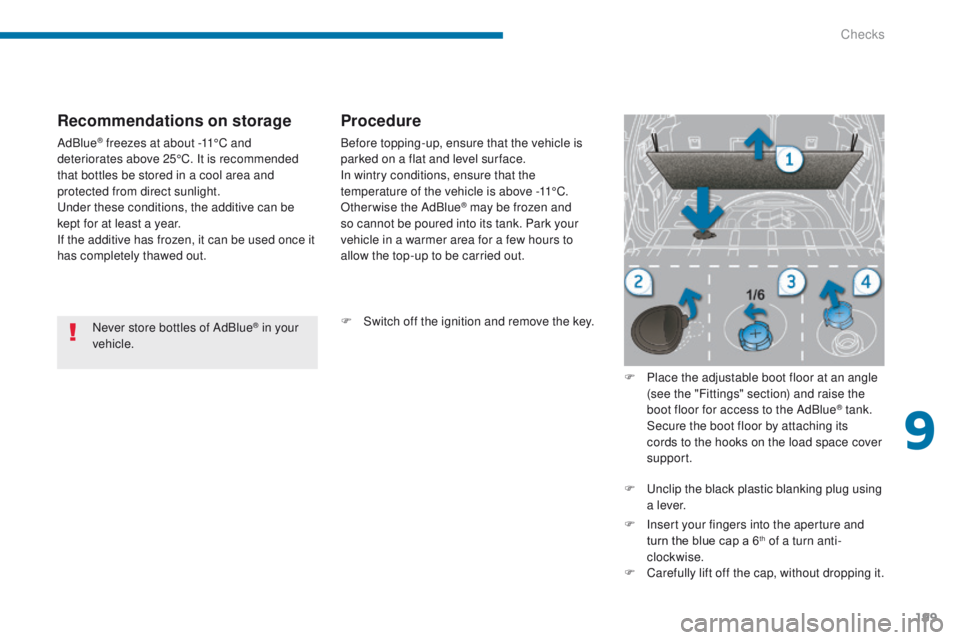
lace the adjustable boot floor at an angle
(see the "Fittings" section) and raise the
boot floor for access to the AdBlue
® tank. S
ecure the boot floor by attaching its
cords to the hooks on the load space cover
support.
F
U
nclip the black plastic blanking plug using
a l eve r.
F
I
nsert your fingers into the aperture and
turn the blue cap a 6
th of a turn anti-
clockwise.
F
C
arefully lift off the cap, without dropping it.
9
Checks
Page 202 of 344
200
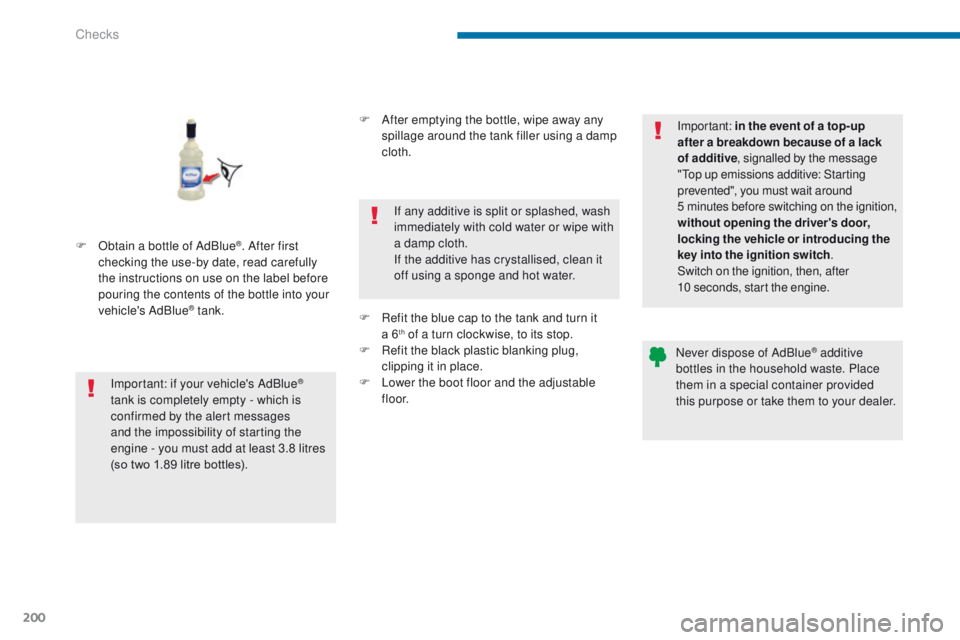
F Obtain a bottle of AdBlue®. After first
checking the use-by date, read carefully
the instructions on use on the label before
pouring the contents of the bottle into your
vehicle's AdBlue
® tank.
Important: if your vehicle's AdBlue
®
tank is completely empty - which is
confirmed by the alert messages
and the impossibility of starting the
engine - you must add at least 3.8 litres
(so
two
1.89 litre bottles). F
A
fter emptying the bottle, wipe away any
spillage around the tank filler using a damp
cloth.
If any additive is split or splashed, wash
immediately with cold water or wipe with
a damp cloth.
If the additive has crystallised, clean it
off using a sponge and hot water.
F
R
efit the blue cap to the tank and turn it
a 6
th of a turn clockwise, to its stop.
F
R
efit the black plastic blanking plug,
clipping it in place.
F
L
ower the boot floor and the adjustable
f l o o r. Important:
in the event of a top-up
after a breakdown because of a lack
of additive , signalled by the message
"Top up emissions additive: Starting
prevented", you must wait around
5 minutes before switching on the ignition,
without opening the driver's door,
locking the vehicle or introducing the
key into the ignition switch .
Switch on the ignition, then, after
10
seconds, start the engine.
Never dispose of AdBlue® additive
bottles in the household waste. Place
them in a special container provided
this purpose or take them to your dealer.
Checks
Page 232 of 344
230
Following reconnection of the
battery
Following reconnection of the battery, switch on
the ignition and wait 1 minute before starting to
permit initialisation of the electronic systems.
However, if problems remain following this
operation, contact a PEUGEOT dealer or a
qualified workshop.
Referring to the corresponding section, you
must yourself reinitialise (depending on
version):
-
t
he remote control key,
-
t
he electric blind(s),
-
...
Before disconnecting the battery
Wait 2 minutes after switching off the ignition
before disconnecting the battery.
Close the windows and the doors before
disconnecting the battery.
Charging the battery using
a battery charger
F Disconnect the battery from the vehicle.
F F ollow the instructions for use provided by
the manufacturer of the charger.
F
C
onnect the battery starting with the
negative terminal (-).
F
C
heck that the terminals and connectors
are clean. If they are covered with sulphate
(whitish or greenish deposit), remove them
and clean them.
The batteries contain harmful substances
such as sulphuric acid and lead. They
must be disposed of in accordance
with regulations and must not, in any
circumstances, be discarded with household
waste.
Take used remote control batteries and
vehicle batteries to a special collection point.
It is advisable to disconnect the battery
if the vehicle is to be left unused for
more than one month. Protect your eyes and face before
handling the battery.
All operations on the battery must be
carried out in a well ventilated area and
away from naked flames and sources
of sparks, so as to avoid the risk of
explosion or fire.
Do not try to charge a frozen battery;
the battery must first be thawed out to
avoid the risk of explosion. If the battery
has been frozen, before charging have
it checked by a PEUGEOT dealer or a
qualified workshop who will check that
the internal components have not been
damaged and the casing is not cracked,
which could cause a leak of toxic and
corrosive acid.
Do not reverse the polarity and use only
a 12 V charger.
Do not disconnect the terminals while
the engine is running.
Do not charge the batteries without
disconnecting the terminals first.
Wash your hands afterwards.
Do not push the vehicle to start the
engine if you have an electronic or
automatic gearbox.
Some functions are not available if the
battery is not sufficiently charged.
Practical information
Page 240 of 344
238
Fitting roof bars
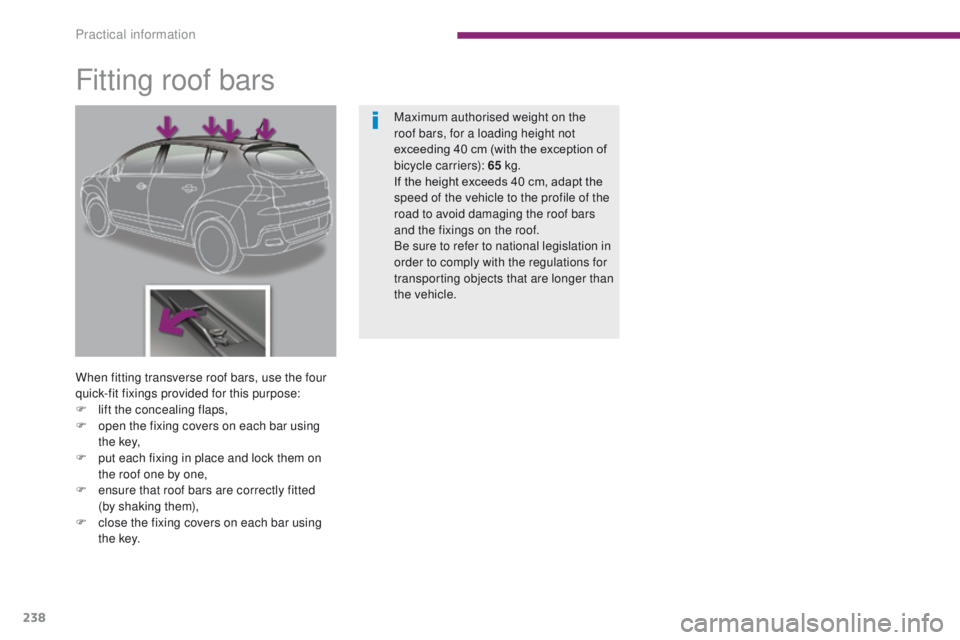
When fitting transverse roof bars, use the four
quick-fit fixings provided for this purpose:
F
l
ift the concealing flaps,
F
o
pen the fixing covers on each bar using
t h e key,
F
p
ut each fixing in place and lock them on
the roof one by one,
F
e
nsure that roof bars are correctly fitted
(by
shaking them),
F
c
lose the fixing covers on each bar using
t h e key. Maximum authorised weight on the
roof bars, for a loading height not
exceeding
40 cm (with the exception of
bicycle carriers): 65 kg.
If the height exceeds 40 cm, adapt the
speed of the vehicle to the profile of the
road to avoid damaging the roof bars
and the fixings on the roof.
Be sure to refer to national legislation in
order to comply with the regulations for
transporting objects that are longer than
the vehicle.
Practical information
Page 284 of 344
06
282
USING THE TELEPHONE
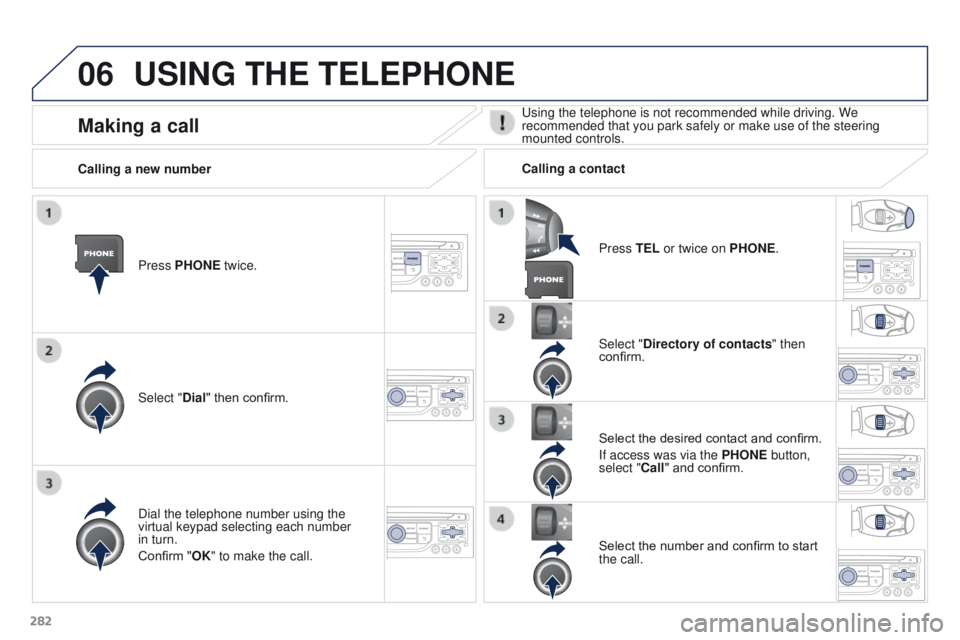
Press PHONE twice.
Select "Dial" then confirm.Select "Directory of contacts" then
confirm.
Dial the telephone number using the
virtual keypad selecting each number
in turn.
Confirm "OK" to make the call. Press TEL or twice on PHONE.
Calling a new number
Calling a contact
Select the desired contact and confirm.
If access was via the PHONE button,
select "Call" and confirm.
Select the number and confirm to start
the call.
Making a callUsing the telephone is not recommended while driving. We
recommended that you park safely or make use of the steering
mounted controls.
Page 287 of 344
06
285
Options during a call*
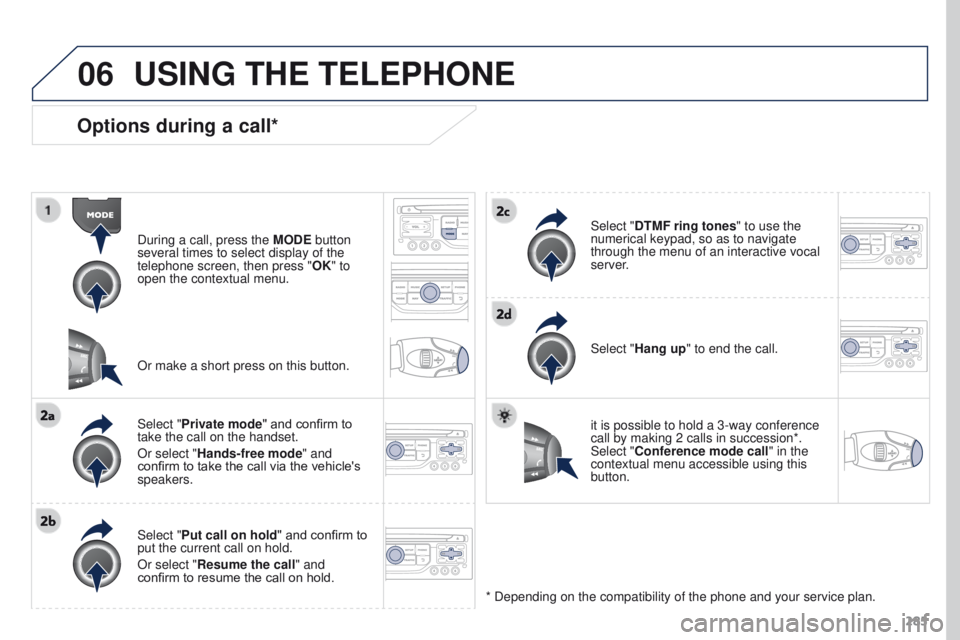
During a call, press the MODE button
several times to select display of the
telephone screen, then press " OK" to
open the contextual menu.
Select "Private mode" and confirm to
take the call on the handset.
Or select "Hands-free mode" and
confirm to take the call via the vehicle's
speakers.
Select "Put call on hold " and confirm to
put the current call on hold.
Or select "Resume the call" and
confirm to resume the call on hold. Select "DTMF ring tones
" to use the
numerical keypad, so as to navigate
through the menu of an interactive vocal
server.
Select "Hang up" to end the call.
* Depending on the compatibility of the phone and your service plan. it is possible to hold a 3-way conference
call by making 2 calls in succession*.
Select "Conference mode call" in the
contextual menu accessible using this
button.
Or make a short press on this button.
USING THE TELEPHONE
Page 291 of 344
07
289
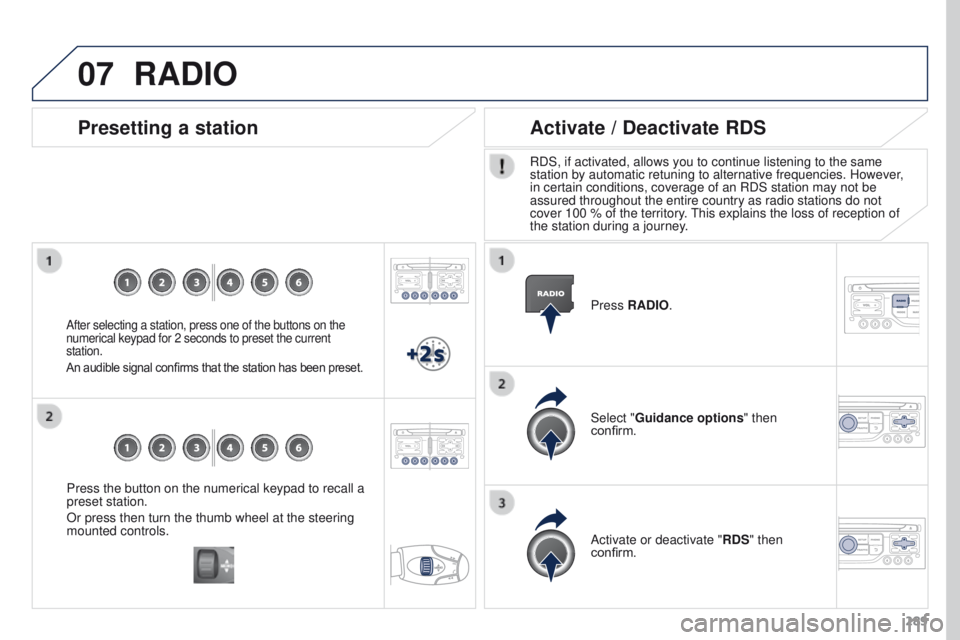
Press the button on the numerical keypad to recall a
preset station.
Or press then turn the thumb wheel at the steering
mounted controls.
Presetting a station
After selecting a station, press one of the buttons on the
numerical keypad for 2 seconds to preset the current
station.
An audible signal confirms that the station has been preset.
Press RADIO.
Activate / Deactivate RDS
RDS, if activated, allows you to continue listening to the same
station by automatic retuning to alternative frequencies. However,
in certain conditions, coverage of an RDS station may not be
assured throughout the entire country as radio stations do not
cover 100 % of the territory. This explains the loss of reception of
the station during a journey.
Select "Guidance options " then
confirm.
Activate or deactivate "RDS" then
confirm.
RADIO
Page 295 of 344
08
293
CD, MP3 CD / USB player
The audio equipment will only play audio files with ".wma, .aac, .flac,
.ogg and .mp3" file extensions and with a bit rate of between 32 Kbps
and 320 Kbps.
It also supports VBR (Variable Bit Rate) mode.
No other type of file (.mp4, .m3u...) can be played.
WMA files must be of the standard wma 9 type.
The sampling rates supported are greater than 32 KHz.
It is advisable to restrict file names to 20 characters, without using of
special characters (e.g.: " " ? ; ù) to avoid any playing and displaying
problems.
In order to be able to play a recorded CDR or CDRW, when recording
it is preferable to select the ISO 9660 level 1, 2 or Joliet standard.
If the disc is recorded in another format (udf,
...), it may not be played
correctly.
It is recommended that the same recording standard is always used
for an individual disc, with as low a speed as possible (4x maximum)
for optimum sound quality.
In the particular case of a multi-session CD, the Joliet standard is
recommended. Information and advice
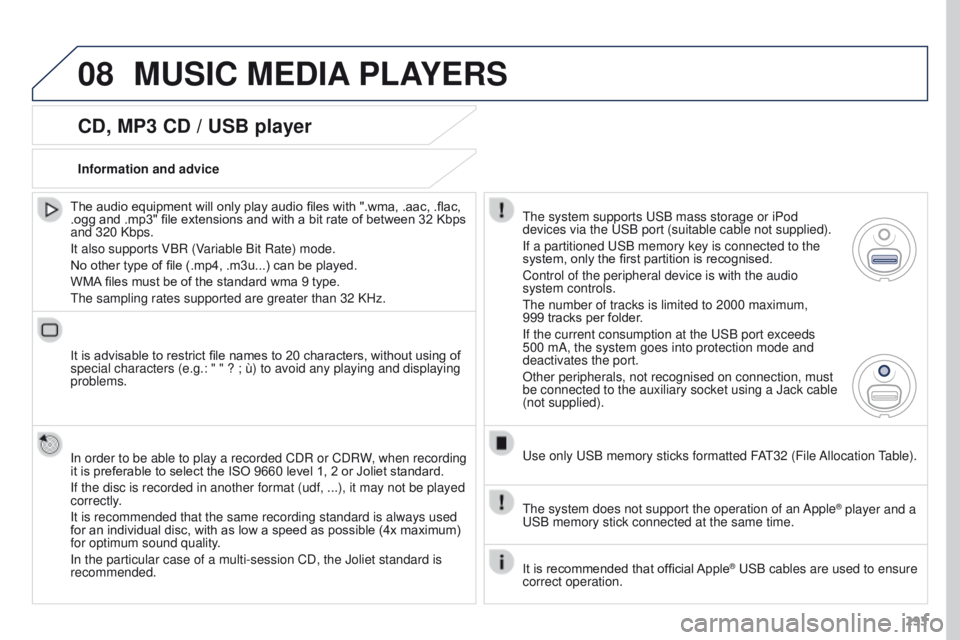
The system supports USB mass storage or iPod
devices via the USB port (suitable cable not supplied).
If a partitioned USB memory key is connected to the
system, only the first partition is recognised.
Control of the peripheral device is with the audio
system controls.
The number of tracks is limited to 2000 maximum,
999
tracks per folder.
If the current consumption at the USB port exceeds
500 mA, the system goes into protection mode and
deactivates the port.
Other peripherals, not recognised on connection, must
be connected to the auxiliary socket using a Jack cable
(not supplied).
Use only USB memory sticks formatted FAT32 (File Allocation Table).
The system does not support the operation of an Apple
® player and a
USB memory stick connected at the same time.
It is recommended that official Apple
® USB cables are used to ensure
correct operation.
MUSIC MEDIA PLAYERS
Page 323 of 344
06
321
BLUETOOTH
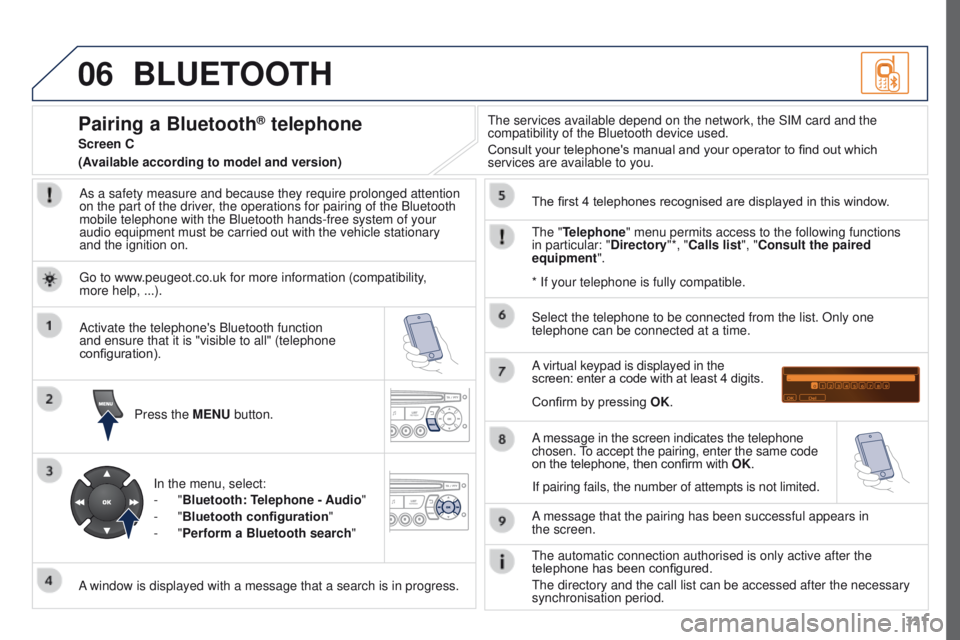
As a safety measure and because they require prolonged attention
on the part of the driver, the operations for pairing of the Bluetooth
mobile telephone with the Bluetooth hands-free system of your
audio equipment must be carried out with the vehicle stationary
and the ignition on.Press the MENU button.
A window is displayed with a message that a search is in progress. Activate the telephone's Bluetooth function
and ensure that it is "visible to all" (telephone
configuration).
In the menu, select:
-
"Bluetooth: Telephone - Audio"
-
"Bluetooth configuration "
-
"Perform a Bluetooth search" The services available depend on the network, the SIM card and the
compatibility of the Bluetooth device used.
Consult your telephone's manual and your operator to find out which
services are available to you.
Pairing a Bluetooth® telephone
Screen C
The "Telephone" menu permits access to the following functions
in particular: "Directory"*, "Calls list", "Consult the paired
equipment". The first 4 telephones recognised are displayed in this window.
A virtual keypad is displayed in the
screen: enter a code with at least 4 digits.
Confirm by pressing OK.
A message that the pairing has been successful appears in
the
screen.
Select the telephone to be connected from the list. Only one
telephone can be connected at a time.
A message in the screen indicates the telephone
chosen. To accept the pairing, enter the same code
on the telephone, then confirm with OK.
The automatic connection authorised is only active after the
telephone has been configured.
The directory and the call list can be accessed after the necessary
synchronisation period.
(Available according to model and version)
* If your telephone is fully compatible.
If pairing fails, the number of attempts is not limited.
Go to www.peugeot.co.uk for more information (compatibility,
more
help, ...).
Page 324 of 344
06
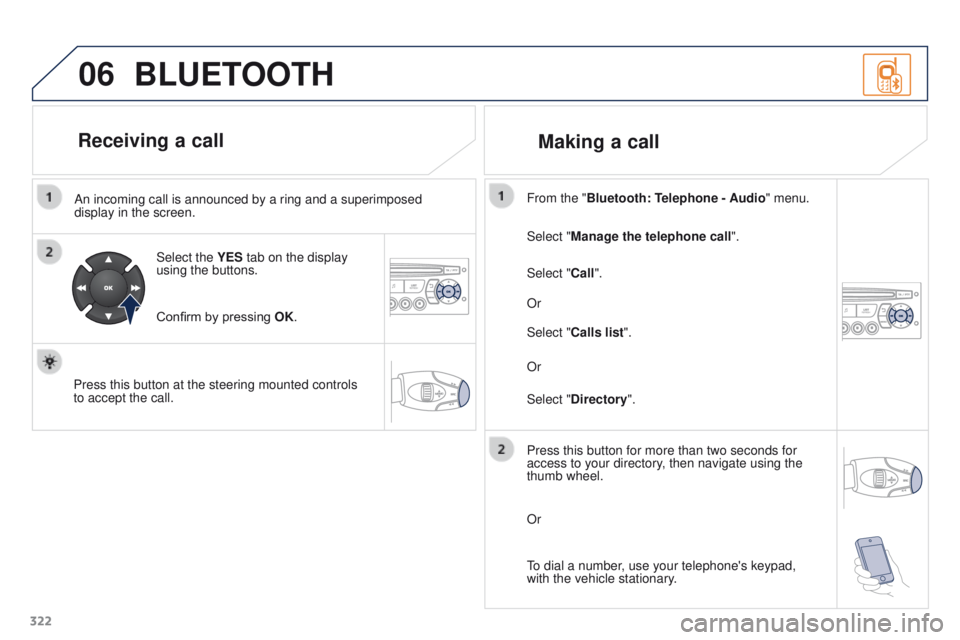
322An incoming call is announced by a ring and a superimposed
display in the screen.
Select the YES tab on the display
using the buttons.
Confirm by pressing OK.
Press this button at the steering mounted controls
to accept the call. Select "Manage the telephone call
".
Select "Call". From the "Bluetooth: Telephone - Audio " menu.
Or
Select "Calls list".
Or
Select "Directory ".
BLUETOOTH
Receiving a call
Making a call
Press this button for more than two seconds for
access to your directory, then navigate using the
thumb wheel.
Or
To dial a number, use your telephone's keypad,
with the vehicle stationary.