tow PEUGEOT 308 2015 Workshop Manual
[x] Cancel search | Manufacturer: PEUGEOT, Model Year: 2015, Model line: 308, Model: Peugeot 308 2015Pages: 344, PDF Size: 12.22 MB
Page 251 of 344
249
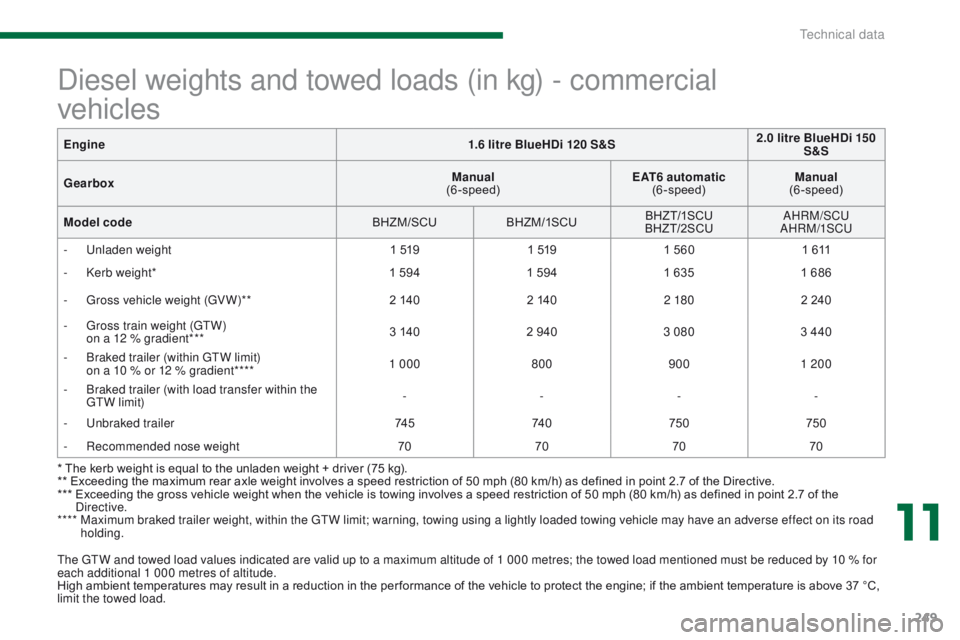
The GTW and towed load values indicated are valid up to a maximum altitude of 1 000 metres; the towed load mentioned must be reduced by 10 % for
each additional 1 000 metres of altitude.
High ambient temperatures may result in a reduction in the per formance of the vehicle to protect the engine; if the ambient temperature is above 37 °C,
limit the towed load.
Diesel weights and towed loads (in kg) - commercial
vehicles
* The kerb weight is equal to the unladen weight + driver (75 kg).
** Exceeding the maximum rear axle weight involves a speed restriction of 50 mph (80 km/h) as defined in point 2.7 of the Directive.
***
E
xceeding the gross vehicle weight when the vehicle is towing involves a speed restriction of 50 mph (80 km/h) as defined in point 2.7 of the
Directive.
****
M
aximum braked trailer weight, within the GTW limit; warning, towing using a lightly loaded towing vehicle may have an adverse effect on its road
holding.
Engine
1.6 litre BlueHDi 120 S&S 2.0 litre BlueHDi 150
S&S
Gearbox Manual
(6-speed) EAT6 automatic
(6-speed) Manual
(6-speed)
Model code BHZM/SCUBHZM/1SCU BHZ T/1SCU
BHZT/2SCU AHRM/SCU
AHRM/1SCU
-
U
nladen weight
1 5191 5191 560 1 611
-
K
erb weight*
1 5941 594 1 6351 686
-
G
ross vehicle weight (GV W)**
2 1402 1402 180 2 240
-
G
ross train weight (GTW)
o
n a 12 % gradient***
3 140
2 940 3 080 3 440
-
B
raked trailer (within GTW limit)
o
n a 10 % or 12 % gradient****
1 000
8009001 200
-
B
raked trailer (with load transfer within the
GTW limit) -
---
-
U
nbraked trailer
74 574 0750 750
-
R
ecommended nose weight
70707070
11
Technical data
Page 264 of 344
04
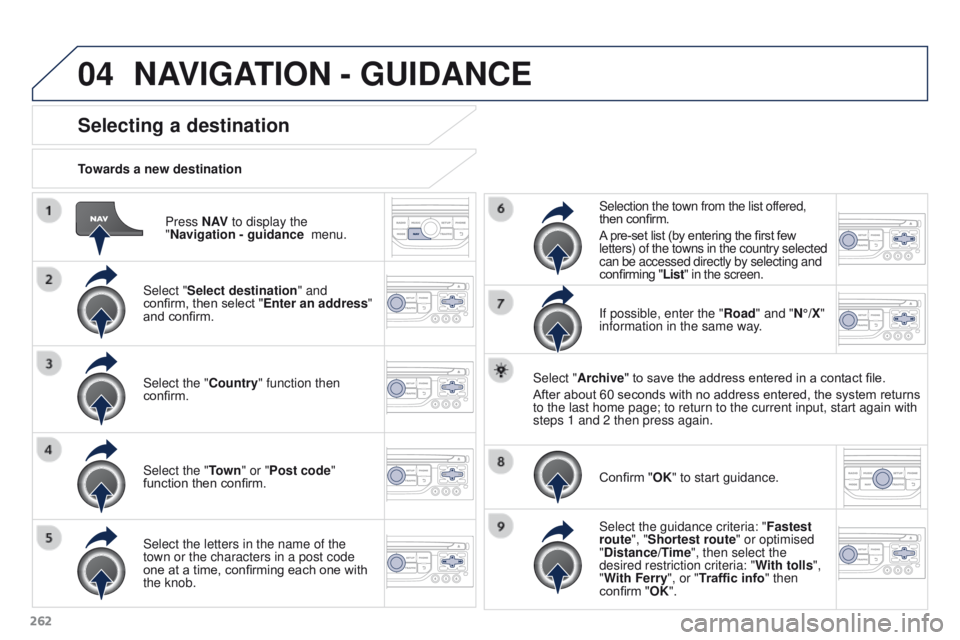
262Press N AV
to display the
"Navigation - guidance menu.
Towards a new destination
Selecting a destination
Select "Select destination" and
confirm, then select "Enter an address"
and confirm.
Select the "Country" function then
confirm.
Select the "Town
" or "Post code"
function then confirm.
Select the letters in the name of the
town or the characters in a post code
one at a time, confirming each one with
the knob. Selection the town from the list offered,
then confirm.
A pre-set list (by entering the first few
letters) of the towns in the country selected
can be accessed directly by selecting and
confirming "List" in the screen.
If possible, enter the "Road" and "N°/X"
information in the same way.
Select "Archive" to save the address entered in a contact file.
After about 60 seconds with no address entered, the system returns
to the last home page; to return to the current input, start again with \
steps 1 and 2 then press again.
Confirm "OK" to start guidance.
Select the guidance criteria: " Fastest
route", "Shortest route" or optimised
"Distance/Time", then select the
desired restriction criteria: " With tolls",
"With Ferry", or "Traffic info" then
confirm "OK".
NAVIGATION - GUIDANCE
Page 265 of 344
04
263
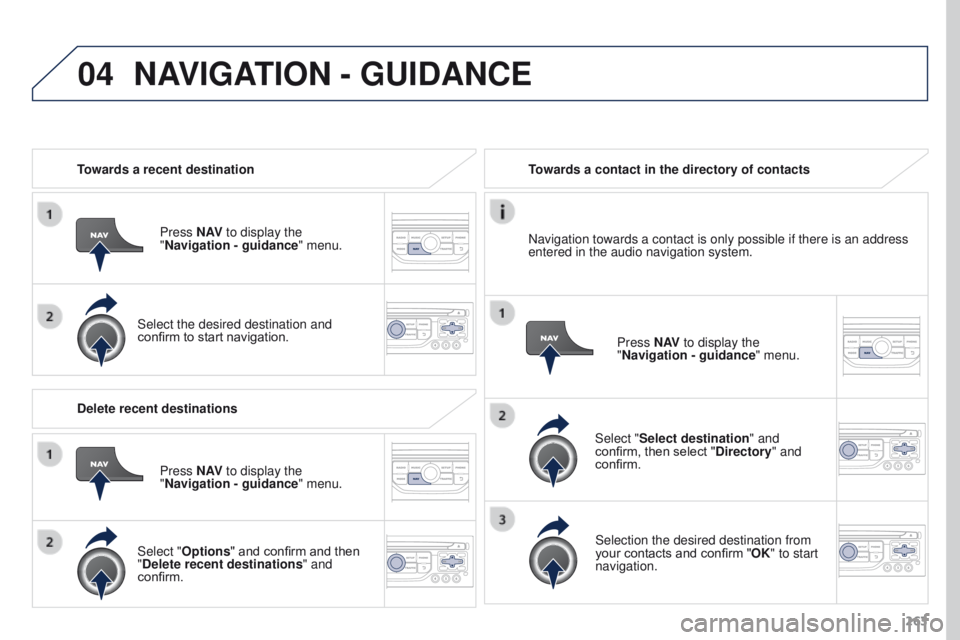
Towards a recent destination
Press N AV to display the
"Navigation - guidance " menu.
Select the desired destination and
confirm to start navigation. Towards a contact in the directory of contacts
Select "Select destination" and
confirm, then select "Directory " and
confirm.
Selection the desired destination from
your contacts and confirm "OK" to start
navigation. Press N AV
to display the
"Navigation - guidance " menu.
Navigation towards a contact is only possible if there is an address
entered in the audio navigation system.
Delete recent destinations Press N AV to display the
"Navigation - guidance " menu.
Select "Options " and confirm and then
"Delete recent destinations" and
confirm.
NAVIGATION - GUIDANCE
Page 266 of 344
04
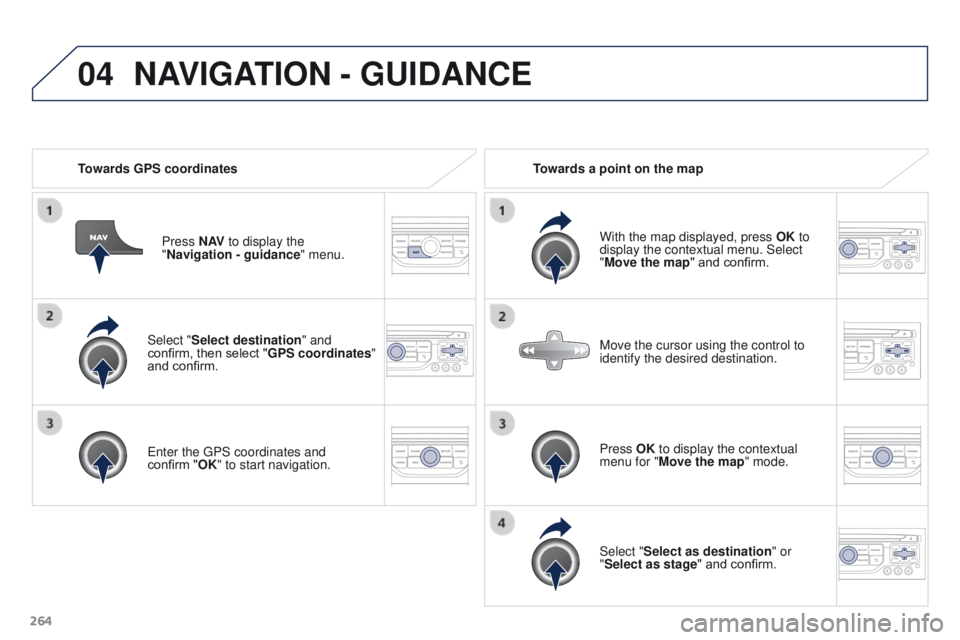
264Select "Select destination" and
confirm, then select "GPS coordinates"
and confirm.
Enter the GPS coordinates and
confirm
"OK" to start navigation.
Press N AV
to display the
"Navigation - guidance " menu.
Towards GPS coordinates
Towards a point on the map
With the map displayed, press OK to
display the contextual menu. Select
"Move the map" and confirm.
Press OK to display the contextual
menu for "Move the map" mode.
Select "Select as destination" or
"Select as stage" and confirm. Move the cursor using the control to
identify the desired destination.
NAVIGATION - GUIDANCE
Page 267 of 344

The points of interest (POI) indicate all of the service locations in \
the vicinity
(hotels, various businesses, airports...).
Select the \"Enter an addres")
04
265
Towards points of interest (POI)
The points of interest (POI) indicate all of the service locations in \
the vicinity
(hotels, various businesses, airports...).
Select the "Enter an address" function
and confirm, then select Select
destination and confirm.
To select a POI close to your current
location, select " POI" and confirm, then
select "Around the current place" and
confirm.
To select a POI as a stage on the route,
select "POI" and confirm, then select "On
the route" and confirm.
To select a POI as a destination, first
enter the country and town (refer to the
"Towards a new destination" section),
select "POI" and confirm, finally select
"Near " and confirm. Search for POIs in the categories
suggested in the following pages.
Select "Search by Name
" to search for POIs by name and not by
proximity.
Select the POI and confirm "OK" to start
navigation.
Press N AV
to display the
"Navigation - guidance " menu.
NAVIGATION - GUIDANCE
Page 268 of 344
04
266
NAVIGATION - GUIDANCE
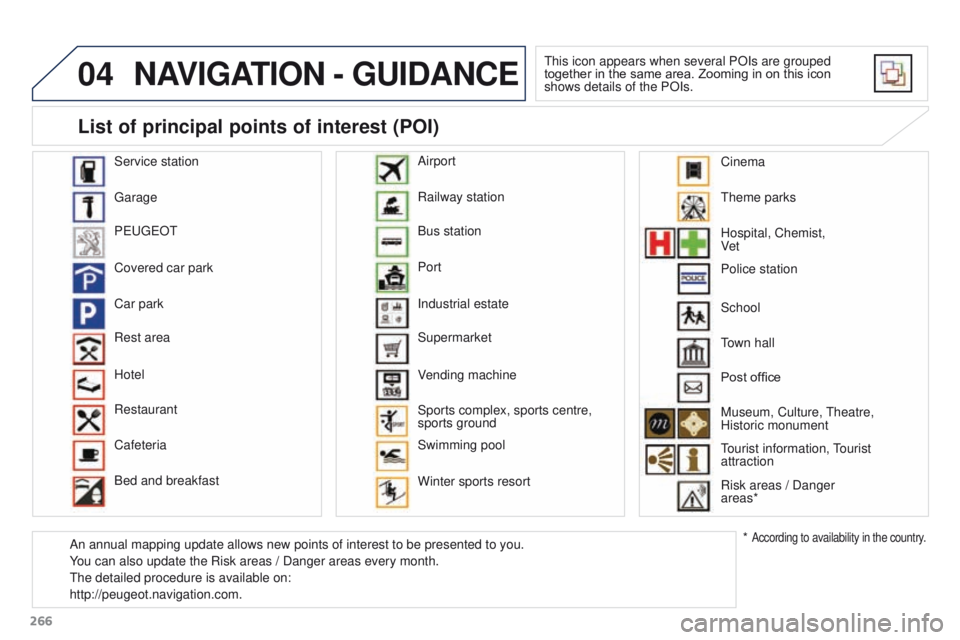
This icon appears when several POIs are grouped
together in the same area. Zooming in on this icon
shows details of the POIs.
Service station
Garage
PEUGEOT
Covered car park
Car park
Rest area
Hotel
Restaurant
Cafeteria
Bed and breakfast Railway station
Bus station
Port
Industrial estate
Supermarket
Vending machine
Sports complex, sports centre,
sports ground
Swimming pool
Winter sports resort Airport
Theme parks
Hospital, Chemist,
Ve t
Police station
Town hall
Post office
Museum, Culture, Theatre,
Historic monument
Tourist information, Tourist
attraction
Risk areas / Danger
areas*
List of principal points of interest (POI)
* According to availability in the country.
School
An annual mapping update allows new points of interest to be presented t\
o you.
You can also update the Risk areas / Danger areas every month.
The detailed procedure is available on:
http://peugeot.navigation.com. Cinema
Page 338 of 344
336
Stop & Start .......................... 18, 41, 62, 65, 169,
181, 185, 191, 228
Storage
..................................... 94, 96, 100, 103
Storage box
..................................................... 95
St
orage, spectacles
........................................ 94
St
orage wells
................................................ 103
Stowing rings
................................................ 103
Sun visor
................................................. 95, 108
Switching off the engine
............... 1
37, 163, 167
Synchronising the remote control
...................48
Synthesiser, voice
......................................... 2
72
Table of weights
....................2
43, 244, 247, 249
Tables of engines
.................................. 242, 245
Tables of fuses
.............................................. 221
Tank, AdBlue
® additive ......................... 19 3, 198
Ta n k , f u e l
............................................... 180, 183
Technical data
........................................ 242- 2 51
Telephone
............................................. 278, 321
Temperature, coolant
...................................... 26
Third brake lamp
........................................... 219
Three flashes (direction indicators)
..............123
Time (setting)
..............................
.32, 34, 35, 39
TMC (Traffic info)
.......................................... 2
75
To o l s
...................................................... 201, 209
Total distance recorder
................................... 30
To w b a r
........................................................... 236
Towed loads
.......................... 243, 244, 247, 249
Towing another vehicle
......................... 23
2, 233Under floor storage
.......................................
10 6
Under-inflation (detection)
.............. 2
6, 172, 210
Unlocking
..............................
..........................
45
Unlocking from the inside
...............................
55
U
nlocking the boot ..........................................
45
Unlocking the doors
........................................
45
Updating risk areas ....................................... 26 6
UREA ....................................................
193, 19 4
USB .................................96, 293, 297, 317, 318
USB (PEUGEOT Connect)
.....................9
6, 318
Ventilation
..............................
...... 59, 60, 61, 65
U
W
V
T
Traction control (ASR) ............................22, 124
Traffic information (TA) .................276, 289, 316
Traffic information (TMC)
...................... 2
75, 276
Tr a i l e r
............................................................ 236
Trip computer
............................................. 41- 4 3
Trip distance recorder
..................................... 30
Ty r e s
........................................................ 12 , 2 51
Tyre under-inflation detection
...............172, 210 Warning and indicator lamps
....................16 -26
Warning lamps
..........................................19 -26
Warning lamp, SCR emissions control
system
..............................................24
W
arning lamp, Service.................................... 20
Washing (advice) ........................................... 176
Weights
.................................243, 244, 247, 249
Wheel, spare
.................................201, 209, 210
Window controls
.............................................52
Wiper blades (changing)
......................... 9
0, 232
Wiper, rear ....................................................... 87
Wipers
.......................................................86, 89
Wipers, automatic rain sensitive
...............86, 89
Alphabetical index