remote control Peugeot 308 2016 Owner's Guide
[x] Cancel search | Manufacturer: PEUGEOT, Model Year: 2016, Model line: 308, Model: Peugeot 308 2016Pages: 398, PDF Size: 9.38 MB
Page 70 of 398
68
308_en_Chap02_ouvertures_ed02-2015
Failure of the remote control
to deactivate the monitoring functions:
F unl ock the vehicle using the key (integral
with the remote control) in the driver's door
lock.
F
Op
en the door; the alarm is triggered.
F
Sw
itch on the ignition; the alarm stops.
the
i
ndicator lamp in the button goes off.
Locking the vehicle without
activating the alarm
F Lock or deadlock the vehicle using the key
( integral with the remote control) in the
driver's door lock.
Operating fault
When the ignition is switched on,
fixed illumination of the indicator
lamp in the button indicates a fault in
the system.
Have it checked by a P
eu
ge
Ot
d
ealer or a qualified workshop.
Automatic activation
this function is either not available, an option
o r is standard.
2 minutes after the last door or the boot is
closed, the system is activated automatically.
F
t
o av
oid triggering the alarm on entering
the vehicle, first press the unlocking button
on the remote control or unlock the vehicle
using the Keyless
ent
ry and starting
system.
Access
Page 71 of 398
69
308_en_Chap02_ouvertures_ed02-2015
electric windows
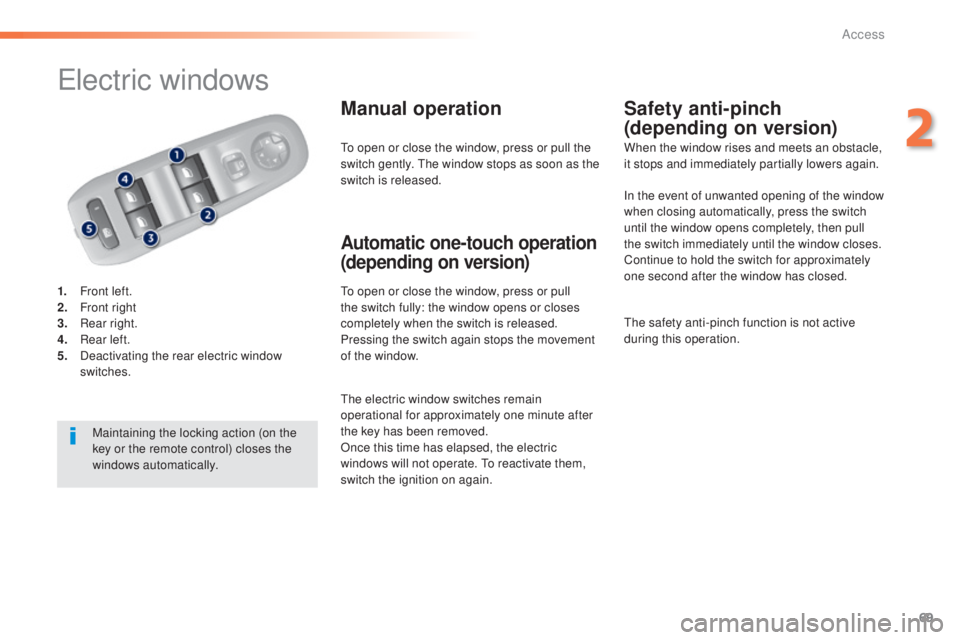
1. Front left.
2. Fr ont right
3.
Re
ar right.
4.
Re
ar left.
5.
Dea
ctivating the rear electric window
switches.
Manual operation
to open or close the window, press or pull
t he switch fully: the window opens or closes
completely when the switch is released.
Pressing the switch again stops the movement
of the window.
Safety anti-pinch
(depending on version)
Automatic one-touch operation
(depending on version)
to open or close the window, press or pull the
s witch gently. the w indow stops as soon as the
switch is released. When the window rises and meets an obstacle,
it stops and immediately partially lowers again.
Maintaining the locking action (on the
key or the remote control) closes the
windows automatically.
the e
lectric window switches remain
operational for approximately one minute after
the key has been removed.
Once this time has elapsed, the electric
windows will not operate.
to re
activate them,
switch the ignition on again. In the event of unwanted opening of the window
when closing automatically, press the switch
until the window opens completely, then pull
the switch immediately until the window closes.
Continue to hold the switch for approximately
one second after the window has closed.
the s
afety anti-pinch function is not active
during this operation.
2
Access
Page 106 of 398
104
308_en_Chap03_ergonomie-et-confort_ed02-2015
Courtesy lamps
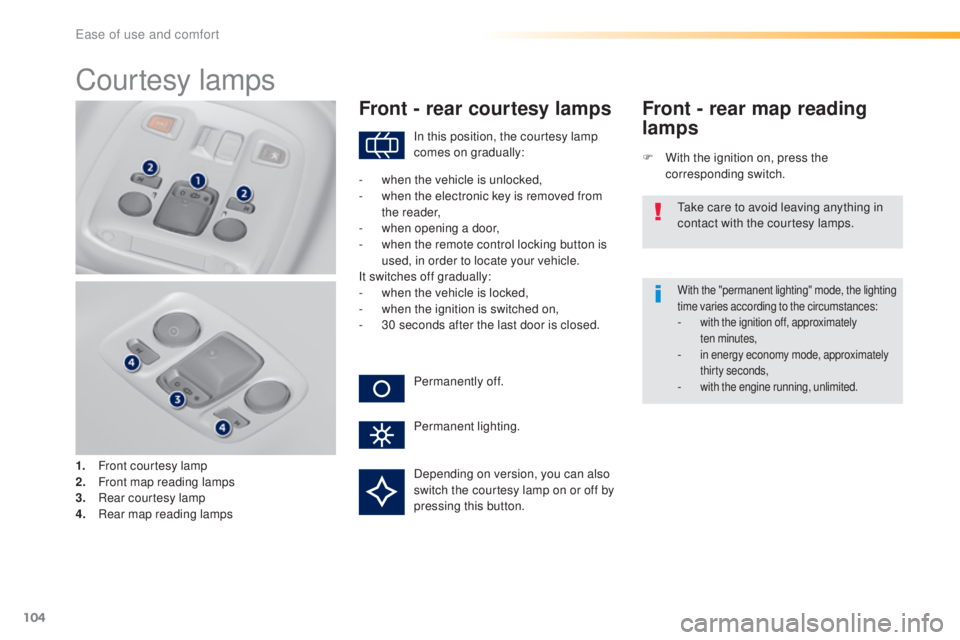
1. Front courtesy lamp
2. Fr ont map reading lamps
3.
Re
ar courtesy lamp
4.
Re
ar map reading lamps
Front - rear courtesy lamps
F With the ignition on, press the
corresponding switch.
Front - rear map reading
lamps
With the "permanent lighting" mode, the lighting
time varies according to the circumstances:
- with the ignition off, approximately
ten m inutes,
- in energy economy mode, approximately
thirty seconds,
- with the engine running, unlimited.
In this position, the courtesy lamp
comes on gradually:
Permanently off.
Permanent lighting.
-
wh
en the vehicle is unlocked,
-
wh
en the electronic key is removed from
the reader,
-
when
opening a door,
-
wh
en the remote control locking button is
used, in order to locate your vehicle.
It switches off gradually:
-
wh
en the vehicle is locked,
-
wh
en the ignition is switched on,
-
30 s
econds after the last door is closed.
tak
e care to avoid leaving anything in
contact with the courtesy lamps.
Depending on version, you can also
switch the courtesy lamp on or off by
pressing this button.
ease of use and comfort
Page 108 of 398
106
308_en_Chap04_eclairage-et-visibilite_ed02-2015
Mirrors
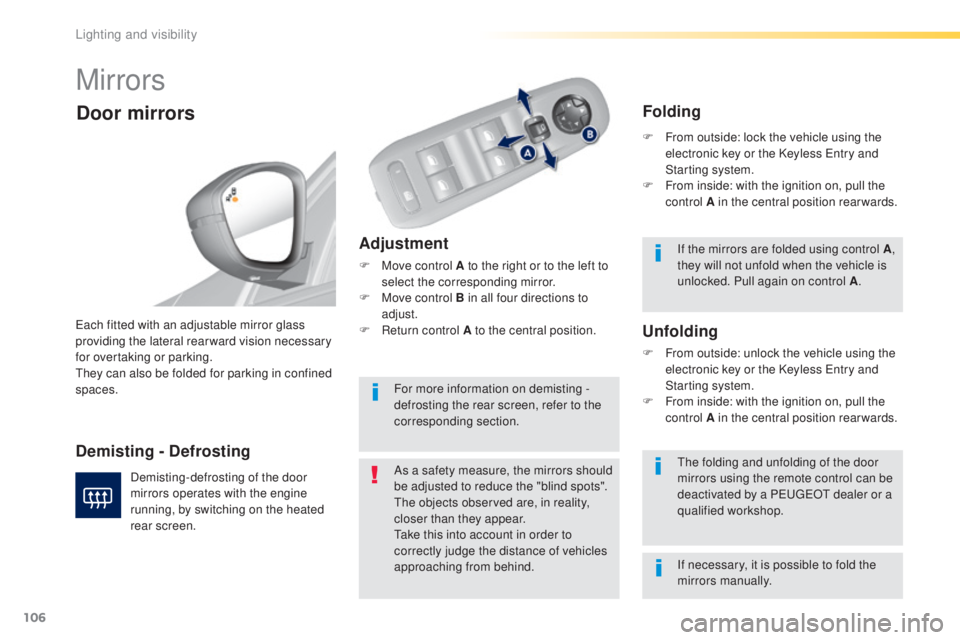
Adjustment
F Move control A to the right or to the left to
select the corresponding mirror.
F
Mov
e control B in all four directions to
adjust.
F
Re
turn control A to the central position.
eac
h fitted with an adjustable mirror glass
providing the lateral rear ward vision necessary
for overtaking or parking.
the
y can also be folded for parking in confined
spaces.
Demisting - Defrosting
Door mirrors
Demisting-defrosting of the door
mirrors operates with the engine
running, by switching on the heated
rear screen. As a safety measure, the mirrors should
be adjusted to reduce the "blind spots".
the o
bjects observed are, in reality,
closer than they appear.
tak
e this into account in order to
correctly judge the distance of vehicles
approaching from behind.the f olding and unfolding of the door
mirrors using the remote control can be
deactivated by a P
eu
ge
Ot d
ealer or a
qualified workshop.
Unfolding
F From outside: unlock the vehicle using the
e lectronic key or the Keyless ent ry and
Starting system.
F
Fr
om inside: with the ignition on, pull the
control A in the central position rearwards.
Folding
F From outside: lock the vehicle using the
e lectronic key or the Keyless ent ry and
Starting system.
F
Fr
om inside: with the ignition on, pull the
control A in the central position rearwards.
If the mirrors are folded using control A ,
they will not unfold when the vehicle is
unlocked. Pull again on control A .
For more information on demisting -
defrosting the rear screen, refer to the
corresponding section.
If necessary, it is possible to fold the
mirrors manually.
Lighting and visibility
Page 110 of 398
108
308_en_Chap04_eclairage-et-visibilite_ed02-2015
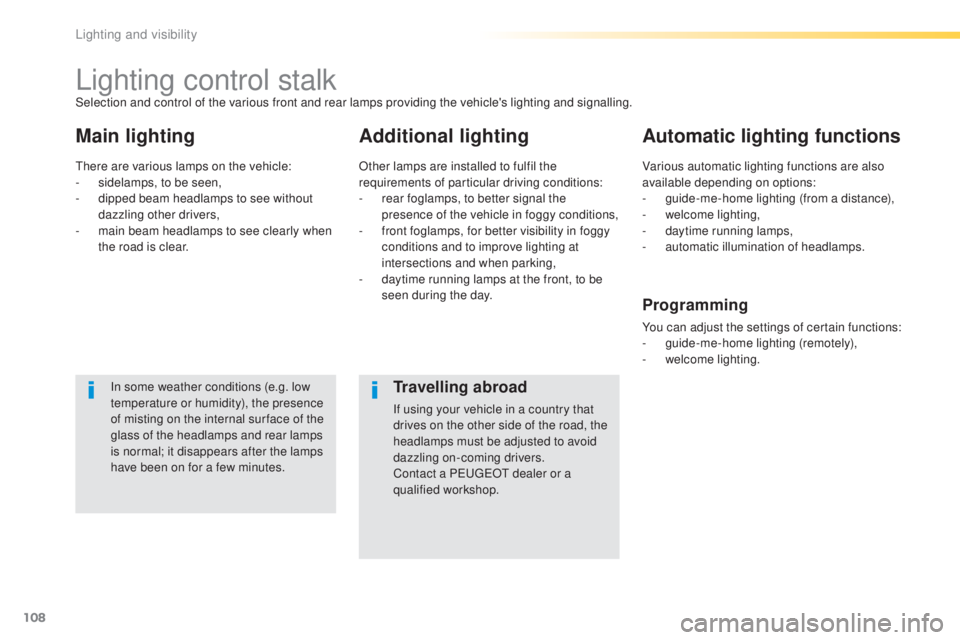
Lighting control stalk
Main lightingAdditional lightingAutomatic lighting functions
In some weather conditions (e.g. low
temperature or humidity), the presence
of misting on the internal sur face of the
glass of the headlamps and rear lamps
is normal; it disappears after the lamps
have been on for a few minutes.
Selection and control of the various front and rear lamps providing the vehicle's lighting and signalling.
the
re are various lamps on the vehicle:
-
si
delamps, to be seen,
-
di
pped beam headlamps to see without
dazzling other drivers,
-
ma
in beam headlamps to see clearly when
the road is clear. Other lamps are installed to fulfil the
requirements of particular driving conditions:
-
re
ar foglamps, to better signal the
presence of the vehicle in foggy conditions,
-
fr
ont foglamps, for better visibility in foggy
conditions and to improve lighting at
intersections and when parking,
-
da
ytime running lamps at the front, to be
seen during the day. Various automatic lighting functions are also
available depending on options:
-
gu
ide-me-home lighting (from a distance),
-
we
lcome lighting,
-
da
ytime running lamps,
-
au
tomatic illumination of headlamps.
Programming
You can adjust the settings of certain functions:
- gui
de-me-home lighting (remotely),
-
we
lcome lighting.
Travelling abroad
If using your vehicle in a country that
drives on the other side of the road, the
headlamps must be adjusted to avoid
dazzling on-coming drivers.
Contact a P
eu
ge
Ot d
ealer or a
qualified workshop.
Lighting and visibility
Page 115 of 398
113
308_en_Chap04_eclairage-et-visibilite_ed02-2015
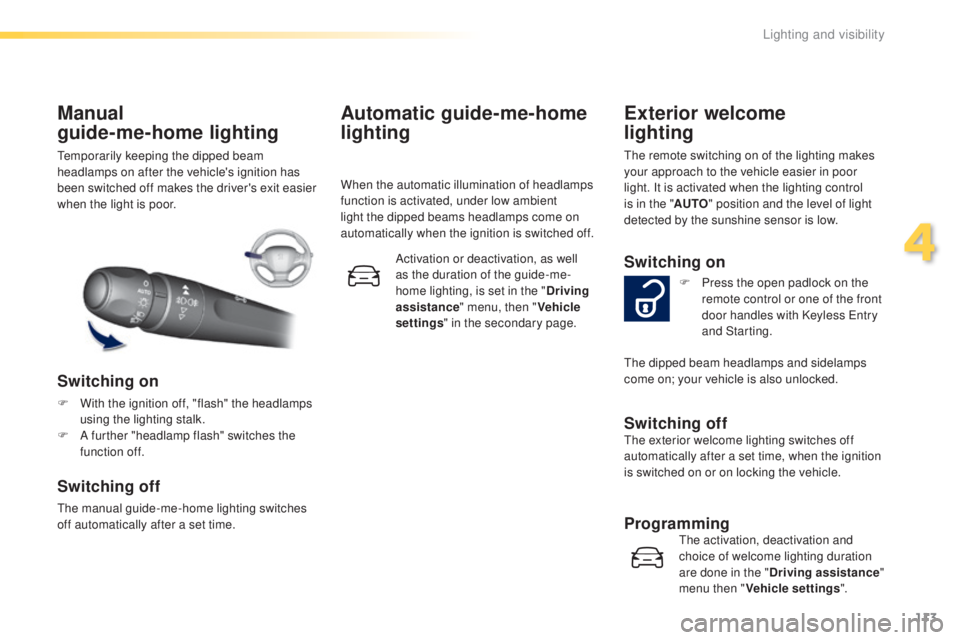
temporarily keeping the dipped beam
h eadlamps on after the vehicle's ignition has
been switched off makes the driver's exit easier
when the light is poor.
Manual
guide-me-home lighting
Switching on
F With the ignition off, "flash" the headlamps
us ing the lighting stalk.
F
A fu
rther "headlamp flash" switches the
function off.
Switching off
the manual guide-me-home lighting switches
o ff automatically after a set time.
Automatic guide-me-home
lighting
When the automatic illumination of headlamps
function is activated, under low ambient
light the dipped beams headlamps come on
automatically when the ignition is switched off.
Activation or deactivation, as well
as the duration of the guide-me-
home lighting, is set in the " Driving
assistance " menu, then " Vehicle
settings " in the secondary page.
Exterior welcome
lighting
the remote switching on of the lighting makes
y our approach to the vehicle easier in poor
light. It is activated when the lighting control
is in the " AUTO" position and the level of light
detected by the sunshine sensor is low.
Switching on
F Press the open padlock on the
r emote control or one of the front
door handles with Keyless
ent
ry
and Starting.
Switching offthe exterior welcome lighting switches off
a utomatically after a set time, when the ignition
is switched on or on locking the vehicle.
Programmingthe activation, deactivation and
c hoice of welcome lighting duration
are done in the " Driving assistance "
menu then " Vehicle settings ".
the
dipped beam headlamps and sidelamps
come on; your vehicle is also unlocked.
4
Lighting and visibility
Page 116 of 398
114
308_en_Chap04_eclairage-et-visibilite_ed02-2015
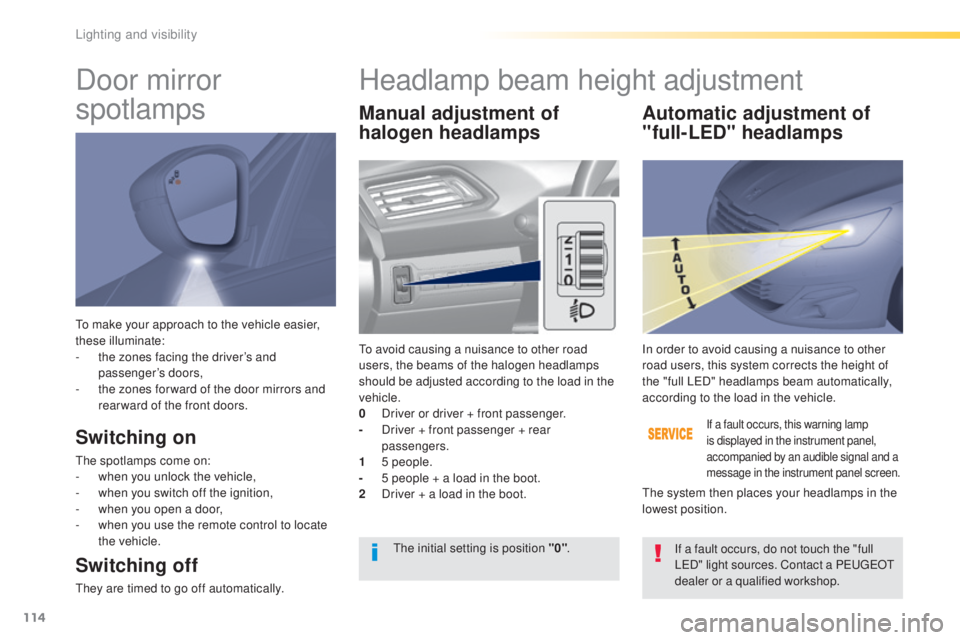
to make your approach to the vehicle easier,
t hese illuminate:
-
th
e zones facing the driver’s and
passenger’s doors,
-
th
e zones for ward of the door mirrors and
rear ward of the front doors.
Door mirror
spotlamps
Switching on
the spotlamps come on:
- wh en you unlock the vehicle,
-
wh
en you switch off the ignition,
-
wh
en you open a door,
-
wh
en you use the remote control to locate
the vehicle.
Switching off
they are timed to go off automatically.
Manual adjustment of
halogen headlamps Automatic adjustment of
"full-LED" headlamps
to avoid causing a nuisance to other road
u sers, the beams of the halogen headlamps
should be adjusted according to the load in the
vehicle.
0
Dr
iver or driver + front passenger.
-
Dr
iver + front passenger + rear
passengers.
1
5 p
eople.
-
5 pe
ople + a load in the boot.
2
Dr
iver + a load in the boot.
If a fault occurs, this warning lamp
is displayed in the instrument panel,
accompanied by an audible signal and a
message in the instrument panel screen.
In order to avoid causing a nuisance to other
road users, this system corrects the height of
the "full L
eD"
headlamps beam automatically,
according to the load in the vehicle.
the s
ystem then places your headlamps in the
lowest position.
the i
nitial setting is position "0" .
If a fault occurs, do not touch the "full
L
eD" l
ight sources. Contact a P
eu
ge
Ot
de
aler or a qualified workshop.
Headlamp beam height adjustment
Lighting and visibility
Page 150 of 398
148
308_en_Chap06_conduite_ed02-2015
Starting-switching off the engine, remote control
Put the gear lever into neutral.
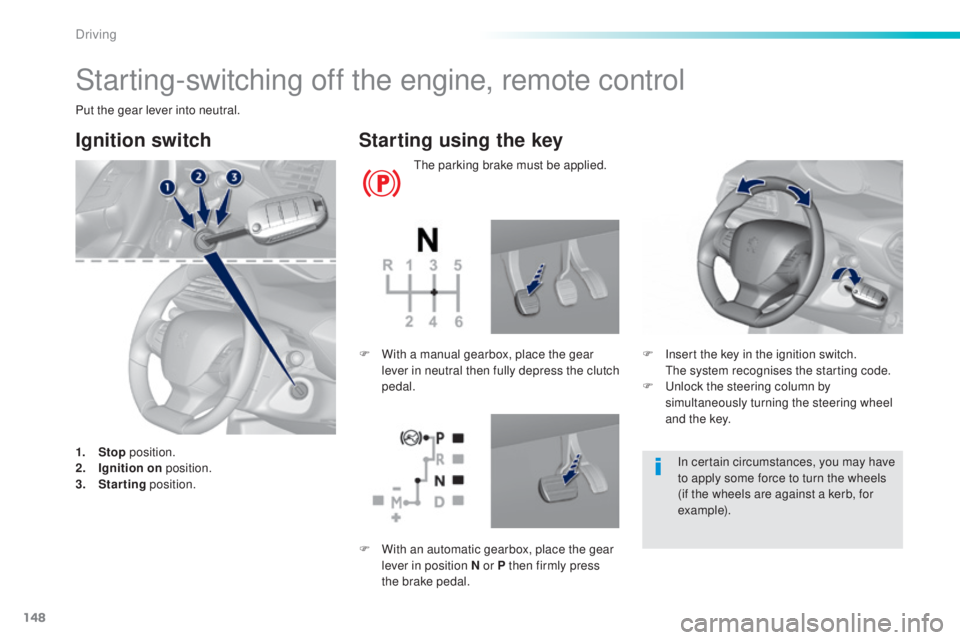
Ignition switch
1. Stop p osition.
2. Ig nition on position.
3.
Sta
rting position.
Starting using the key
the parking brake must be applied.
F
In
sert the key in the ignition switch.
the s
ystem recognises the starting code.
F
u
nl
ock the steering column by
simultaneously turning the steering wheel
and the key.
F
Wi
th a manual gearbox, place the gear
lever in neutral then fully depress the clutch
pedal.
In certain circumstances, you may have
to apply some force to turn the wheels
(if the wheels are against a kerb, for
example).
F
Wi
th an automatic gearbox, place the gear
lever in position N or P then firmly press
the brake pedal.
Driving
Page 155 of 398
153
308_en_Chap06_conduite_ed02-2015
Key left in reader
You are warned by a message if the
electronic key is is still in the reader on
opening the driver's door.
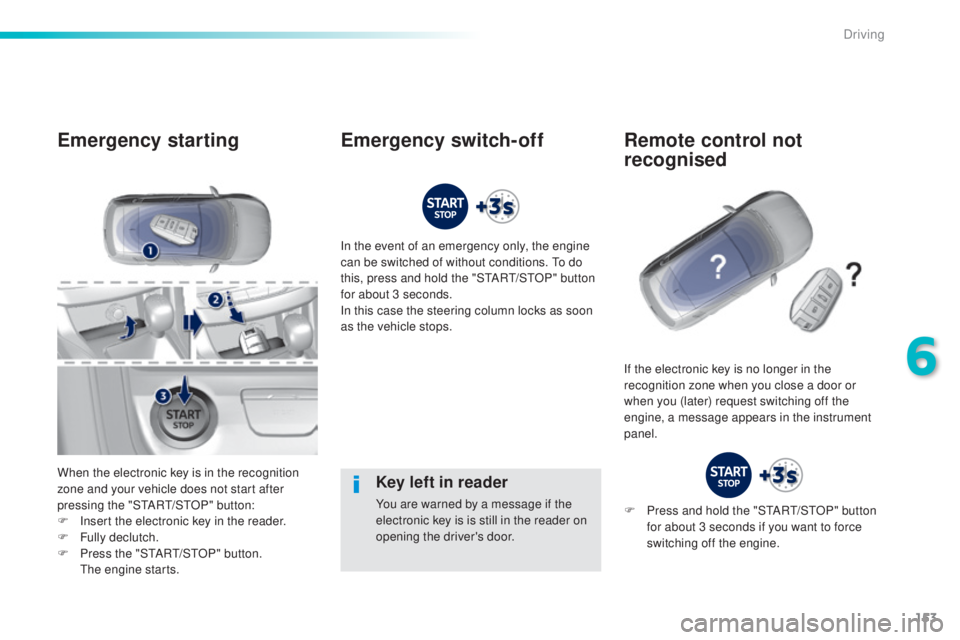
Emergency starting
When the electronic key is in the recognition
zone and your vehicle does not start after
pressing the "S
tARt/StOP
" button:
F
In
sert the electronic key in the reader.
F
Ful
ly declutch.
F
Pr
ess the "S
tARt/StOP
" button.
the
engine starts. In the event of an emergency only, the engine
can be switched of without conditions.
to do
t
his, press and hold the "S
tARt/StOP
" button
for about 3 seconds.
In this case the steering column locks as soon
as the vehicle stops.
If the electronic key is no longer in the
recognition zone when you close a door or
when you (later) request switching off the
engine, a message appears in the instrument
panel.
Emergency switch-off Remote control not recognised
F Press and hold the "StARt/StOP " button
for about 3 seconds if you want to force
switching off the engine.
6
Driving
Page 275 of 398
273
308_en_Chap08_en-cas-de-panne_ed02-2015
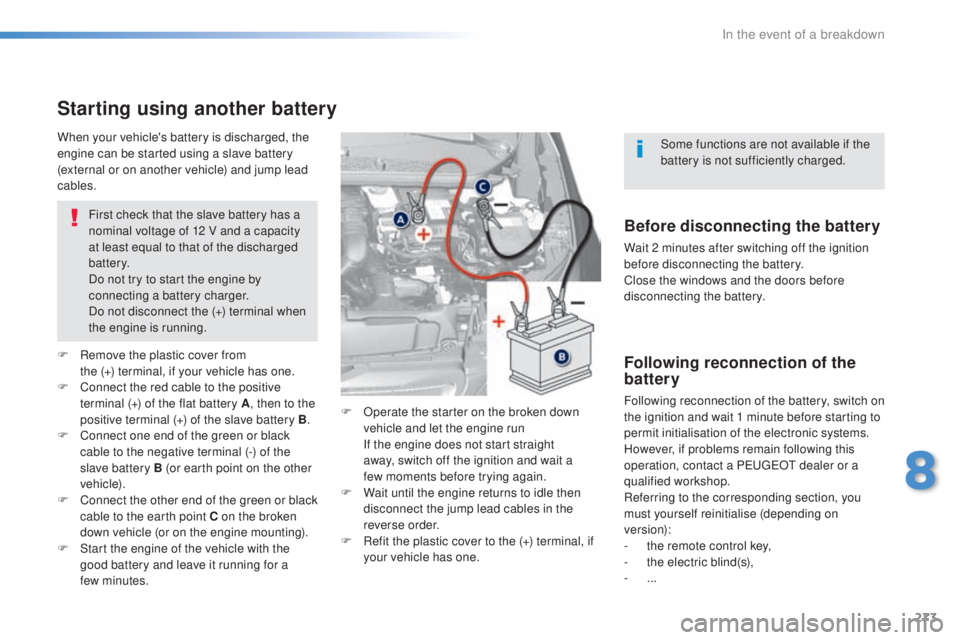
Starting using another battery
First check that the slave battery has a
nominal voltage of 12 V and a capacity
at least equal to that of the discharged
battery.
Do not try to start the engine by
connecting a battery charger.
Do not disconnect the (+) terminal when
the engine is running.
F
Re
move the plastic cover from
the
(
+)
t
erminal, if your vehicle has one.
F
Co
nnect the red cable to the positive
terminal (+) of the flat battery A , then to the
positive terminal (+) of the slave battery B.
F
Co
nnect one end of the green or black
cable to the negative terminal (-) of the
slave battery B (or earth point on the other
vehicle).
F
Co
nnect the other end of the green or black
cable to the earth point C on the broken
down vehicle (or on the engine mounting).
F
St
art the engine of the vehicle with the
good battery and leave it running for a
few
m
inutes. F
Op
erate the starter on the broken down
vehicle and let the engine run
If t
he engine does not start straight
away, switch off the ignition and wait a
few
m
oments before trying again.
F
Wa
it until the engine returns to idle then
disconnect the jump lead cables in the
reverse order.
F
Re
fit the plastic cover to the (+) terminal, if
your vehicle has one.
When your vehicle's battery is discharged, the
engine can be started using a slave battery
(external or on another vehicle) and jump lead
cables.Before disconnecting the battery
Wait 2 minutes after switching off the ignition
before disconnecting the battery.
Close the windows and the doors before
disconnecting the battery.
Following reconnection of the
battery
Following reconnection of the battery, switch on
the ignition and wait 1 minute before starting to
permit initialisation of the electronic systems.
However, if problems remain following this
operation, contact a P
eu
ge
Ot d
ealer or a
qualified workshop.
Referring to the corresponding section, you
must yourself reinitialise (depending on
version):
-
th
e remote control key,
-
th
e electric blind(s),
-
... S
ome functions are not available if the
battery is not sufficiently charged.
8
In the event of a breakdown