display PEUGEOT 308 2016 Owners Manual
[x] Cancel search | Manufacturer: PEUGEOT, Model Year: 2016, Model line: 308, Model: Peugeot 308 2016Pages: 344, PDF Size: 12.23 MB
Page 324 of 344
06
322
3008_en_Chap12c_RD45_ed01_2015
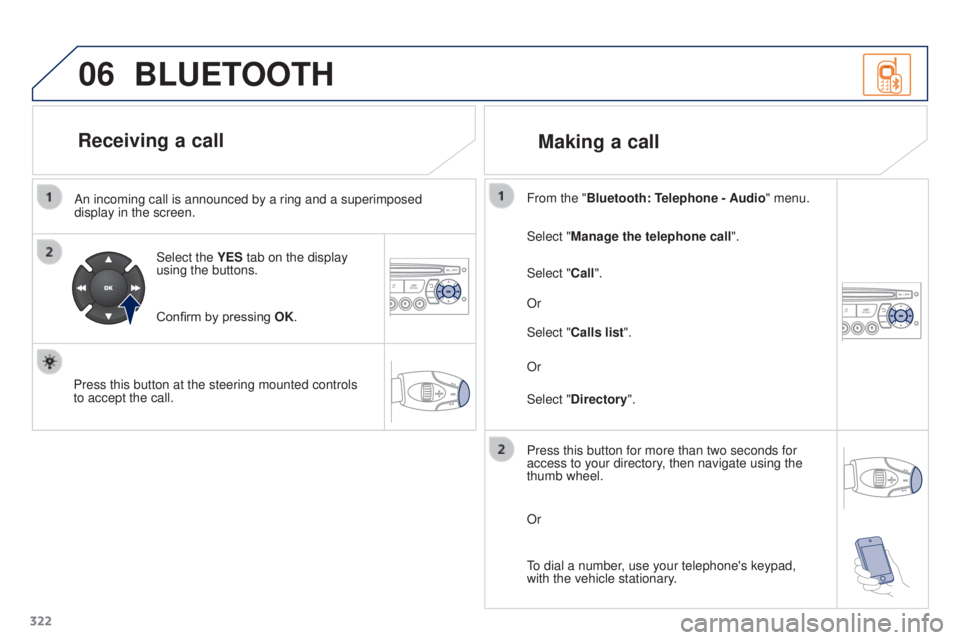
An incoming call is announced by a ring and a superimposed
display in the screen.Select the YES tab on the display
using the buttons.
Confirm by pressing OK.
Press this button at the steering mounted controls
to accept the call. Select "Manage the telephone call
".
Select "Call". From the "Bluetooth: Telephone - Audio " menu.
Or
Select "Calls list".
Or
Select "Directory ".
BLUETOOTH
Receiving a call
Making a call
Press this button for more than two seconds for
access to your directory, then navigate using the
thumb wheel.
Or
To dial a number, use your telephone's keypad,
with the vehicle stationary.
Page 325 of 344
06
323
3008_en_Chap12c_RD45_ed01_2015
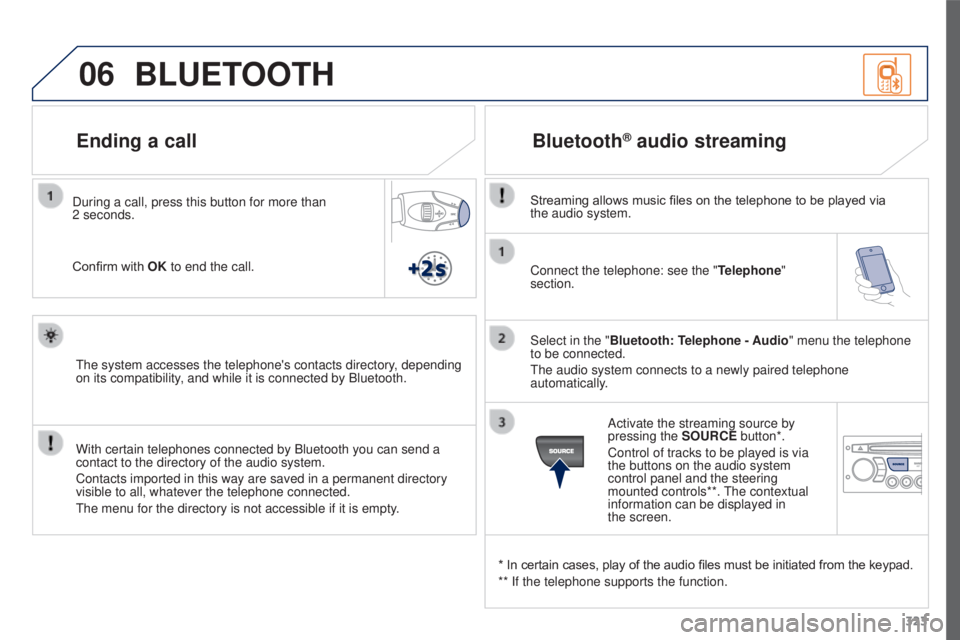
Connect the telephone: see the "Telephone"
section.
Select in the "Bluetooth: Telephone - Audio" menu the telephone
to be connected.
The audio system connects to a newly paired telephone
automatically.
Bluetooth® audio streaming
Streaming allows music files on the telephone to be played via
the audio system.
* In certain cases, play of the audio files must be initiated from the keypad.
** If the telephone supports the function. Activate the streaming source by
pressing the
SOURCE button*.
Control of tracks to be played is via
the buttons on the audio system
control panel and the steering
mounted controls**. The contextual
information can be displayed in
the
screen.
During a call, press this button for more than
2
seconds.
Confirm with OK to end the call.
BLUETOOTH
The system accesses the telephone's contacts directory, depending
on its compatibility, and while it is connected by Bluetooth.
With certain telephones connected by Bluetooth you can send a
contact to the directory of the audio system.
Contacts imported in this way are saved in a permanent directory
visible to all, whatever the telephone connected.
The menu for the directory is not accessible if it is empty.
Ending a call
Page 327 of 344
07
325
3008_en_Chap12c_RD45_ed01_2015
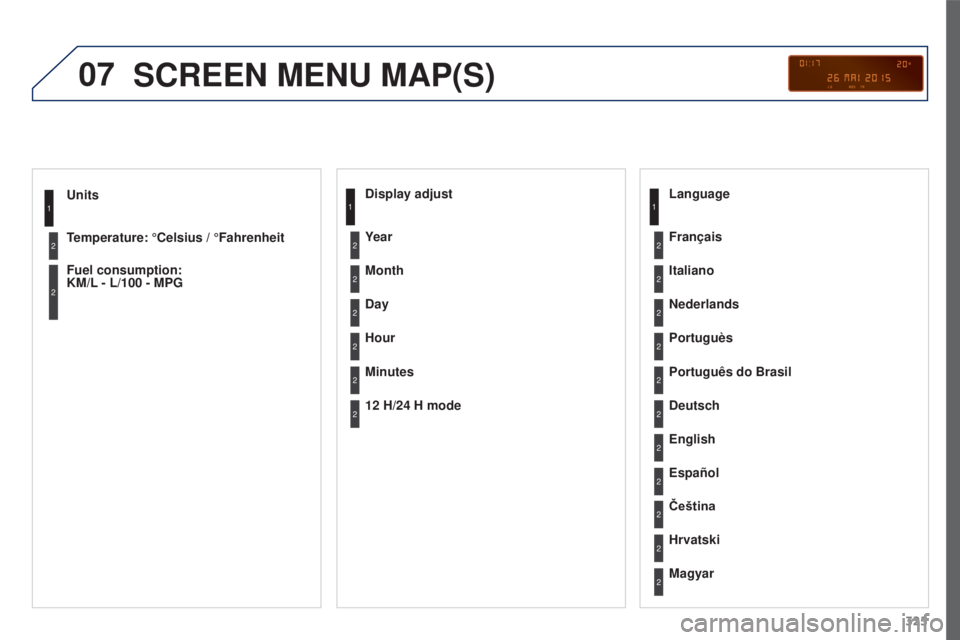
Units
Temperature: °Celsius / °Fahrenheit
Fuel consumption:
KM/L
- L/100 - MPG1
2
2
SCREEN MENU MAP(S)
Display adjust
Month
Day
Hour
Minutes Year
12 H/24 H mode Language
Italiano
Nederlands
Portuguès
Português do Brasil Français
Deutsch
Čeština English
Hrvatski Español
Magyar1
2
2
2
2
2
2
2
1
2
2
2
2
2
2
2
2
2
2
Page 328 of 344
07
326
3008_en_Chap12c_RD45_ed01_2015
SCREEN MENU MAP(S)
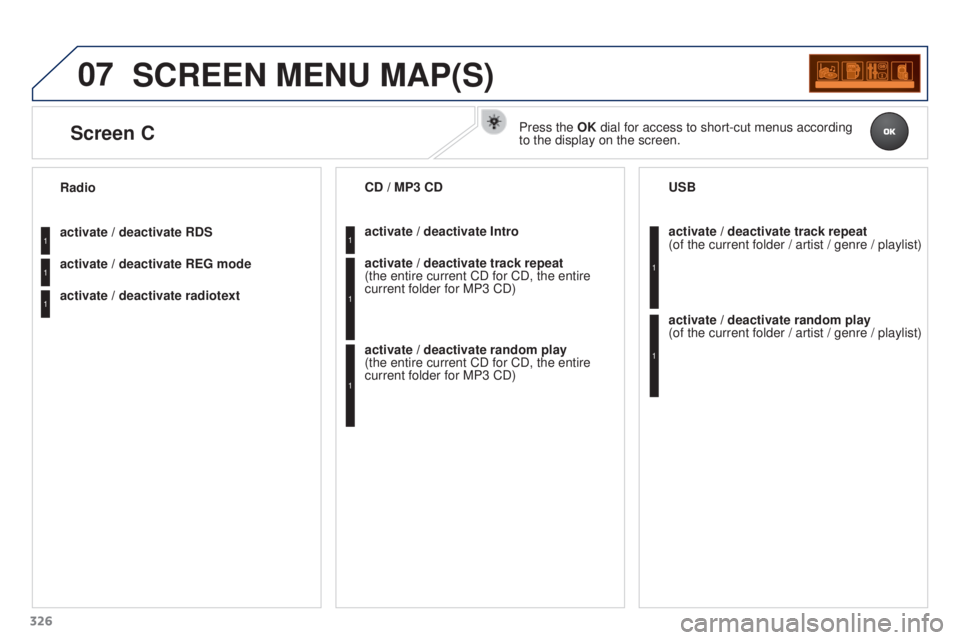
activate / deactivate RDS
activate / deactivate REG mode
activate
/ deactivate radiotext
Radio
activate / deactivate Intro
CD / MP3 CD
activate / deactivate track repeat
(the
entire current CD for CD, the entire
current folder for MP3 CD)
activate
/ deactivate random play
(the
entire current CD for CD, the entire
current folder for MP3 CD) activate
/ deactivate track repeat
(of the current folder / artist / genre / playlist)
USB
activate
/ deactivate random play
(of
the current folder / artist / genre / playlist)1
1
1
1
1
1
1
1
Screen CPress the OK dial for access to short-cut menus according
to the display on the screen.
Page 329 of 344
07
327
3008_en_Chap12c_RD45_ed01_2015
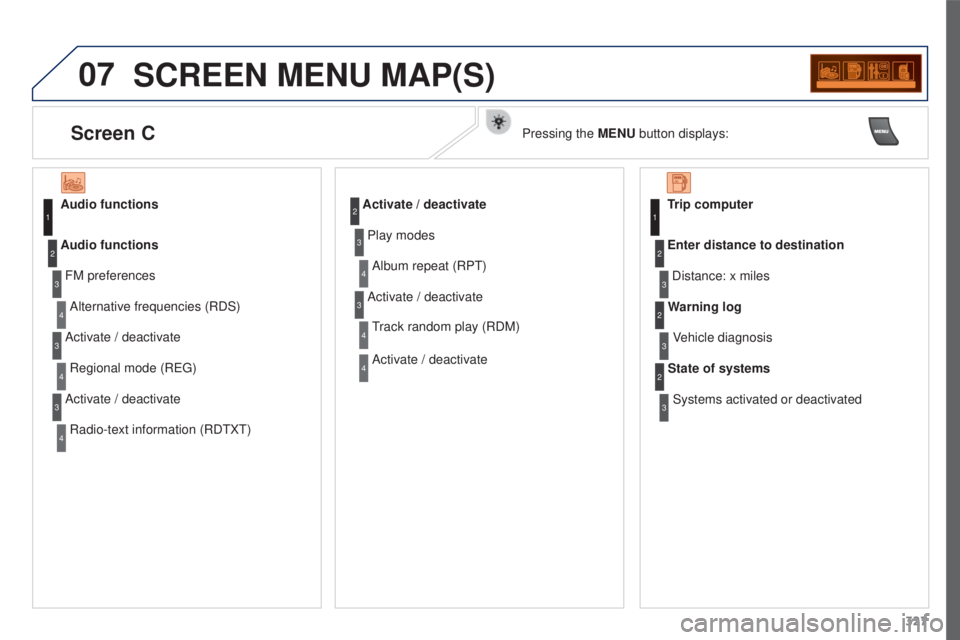
SCREEN MENU MAP(S)
Audio functionsFM preferencesAlternative frequencies (RDS)
Audio functions
Activate
/ deactivate
Regional mode (REG)
Activate
/ deactivate
Radio-text information (RDTXT)1
2
3
4
3
4
3
4
Activate / deactivate
Play modes Album repeat (RPT)
Activate
/ deactivate
Track random play (RDM)
Activate
/ deactivate2
3
4
3
4
4
Trip computerDistance: x miles
Enter distance to destination
Vehicle diagnosis
Warning log
Systems activated or deactivated
State of systems1
2
3
3
2
3
2
Screen CPressing the MENU button displays:
Page 330 of 344
07
328
3008_en_Chap12c_RD45_ed01_2015
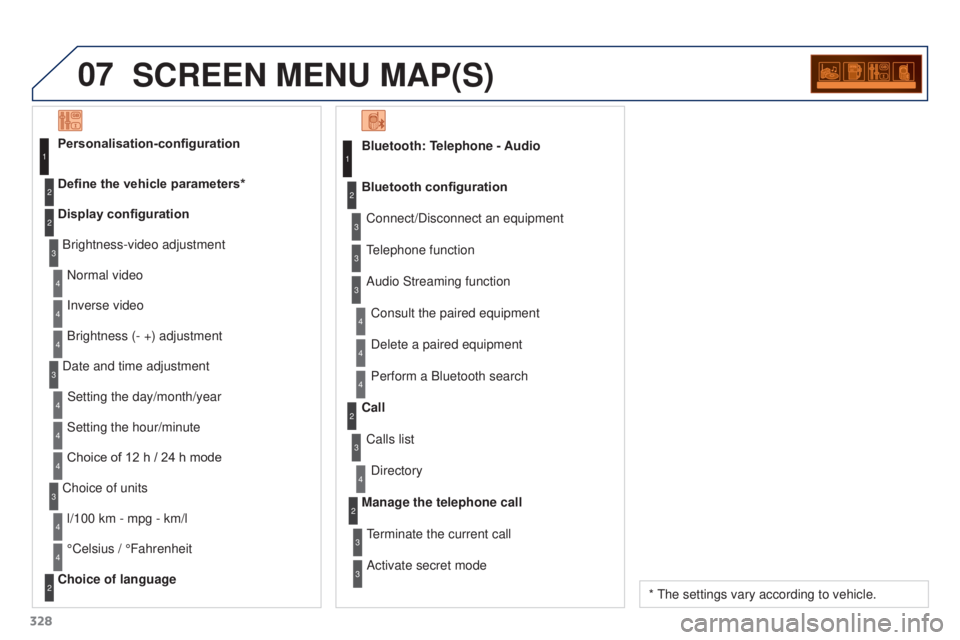
SCREEN MENU MAP(S)
Bluetooth: Telephone - AudioConnect/Disconnect an equipment
Consult the paired equipment
Bluetooth configuration
Telephone function
Audio Streaming functionDelete a paired equipment
Perform a Bluetooth search
Calls list
Call
Directory
Terminate the current call
Manage the telephone call
Activate secret mode1
2
3
3
3
4
4
4
2
3
4
2
3
3
Brightness-video adjustment
Display configuration Define the vehicle parameters* Personalisation-configuration
Normal video
Inverse video
Brightness (- +) adjustment
Date and time adjustment Setting the day/month/year
Setting the hour/minute
Choice of 12 h
/ 24 h mode
Choice of units l/100 km - mpg - km/l
°Celsius
/ °Fahrenheit
Choice of language
1
2
4
3
2
4
4
3
4
4
2
3
4
4
4
* The settings vary according to vehicle.
Page 331 of 344
329
3008_en_Chap12c_RD45_ed01_2015
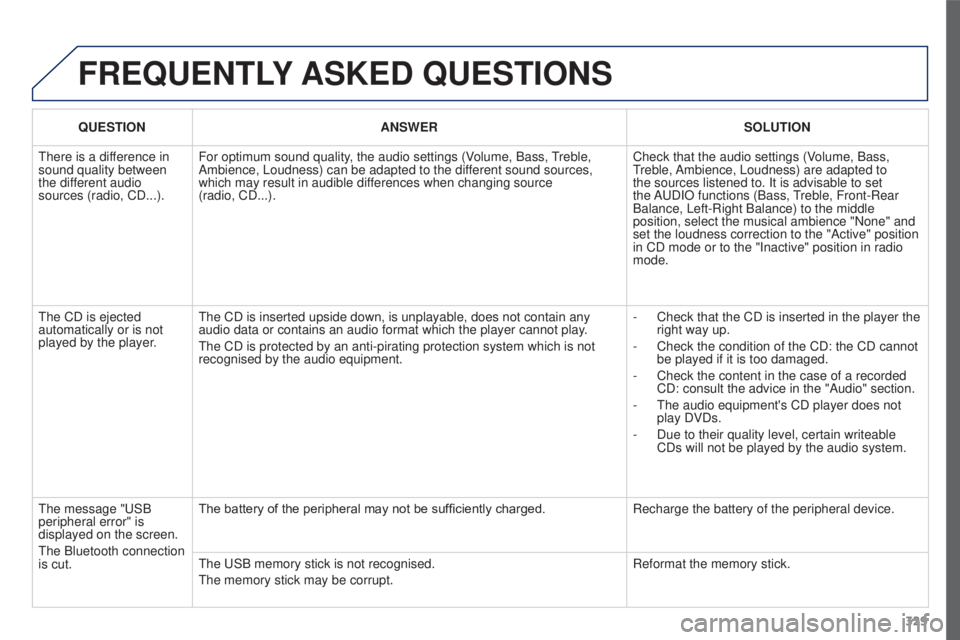
FREQUENTLY ASKED QUESTIONS
QUESTION ANSWER SOLUTION
There is a difference in
sound quality between
the different audio
sources (radio, CD...). For optimum sound quality, the audio settings (Volume, Bass, Treble,
Ambience, Loudness) can be adapted to the different sound sources,
which may result in audible differences when changing source
(radio,
CD...). Check that the audio settings (Volume, Bass,
Treble, Ambience, Loudness) are adapted to
the sources listened to. It is advisable to set
the AUDIO functions (Bass, Treble, Front-Rear
Balance, Left-Right Balance) to the middle
position, select the musical ambience "None" and
set the loudness correction to the "Active" position
in CD mode or to the "Inactive" position in radio
mode.
The CD is ejected
automatically or is not
played by the player. The CD is inserted upside down, is unplayable, does not contain any
audio data or contains an audio format which the player cannot play.
The CD is protected by an anti-pirating protection system which is not
recognised by the audio equipment. -
Check that the CD is inserted in the player the
right way up.
-
Check the condition of the CD: the CD cannot
be played if it is too damaged.
-
Check the content in the case of a recorded
CD: consult the advice in the "Audio" section.
-
The audio equipment's CD player does not
play DVDs.
-
Due to their quality level, certain writeable
CDs will not be played by the audio system.
The message "USB
peripheral error" is
displayed on the screen.
The Bluetooth connection
is cut. The battery of the peripheral may not be sufficiently charged.
Recharge the battery of the peripheral device.
The USB memory stick is not recognised.
The memory stick may be corrupt. Reformat the memory stick.
Page 332 of 344
330
3008_en_Chap12c_RD45_ed01_2015
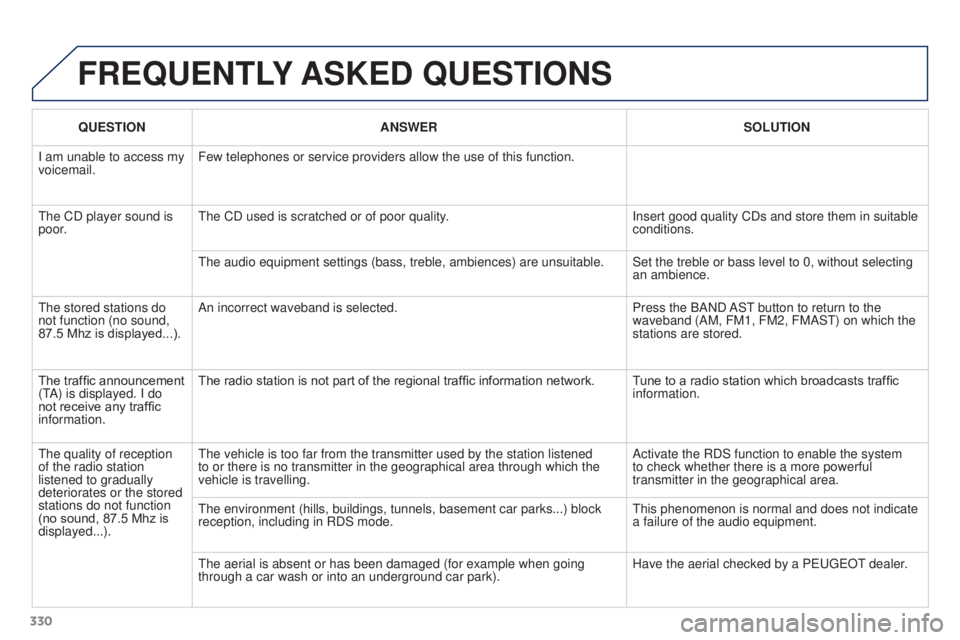
FREQUENTLY ASKED QUESTIONS
QUESTION ANSWER SOLUTION
I am unable to access my
voicemail. Few telephones or service providers allow the use of this function.
The CD player sound is
poor. The CD used is scratched or of poor quality.
Insert good quality CDs and store them in suitable
conditions.
The audio equipment settings (bass, treble, ambiences) are unsuitable.\
Set the treble or bass level to 0, without selecting an ambience.
The stored stations do
not function (no sound,
87.5 Mhz is displayed...). An incorrect waveband is selected.
Press the BAND AST button to return to the
waveband (AM, FM1, FM2, FMAST) on which the
stations are stored.
The traffic announcement
(TA) is displayed. I do
not receive any traffic
information. The radio station is not part of the regional traffic information network.
Tune to a radio station which broadcasts traffic
information.
The quality of reception
of the radio station
listened to gradually
deteriorates or the stored
stations do not function
(no sound, 87.5
Mhz is
displayed...). The vehicle is too far from the transmitter used by the station listened\
to or there is no transmitter in the geographical area through which the\
vehicle is travelling.
Activate the RDS function to enable the system
to check whether there is a more powerful
transmitter in the geographical area.
The environment (hills, buildings, tunnels, basement car parks...) blo\
ck
reception, including in RDS mode. This phenomenon is normal and does not indicate
a failure of the audio equipment.
The aerial is absent or has been damaged (for example when going
through a car wash or into an underground car park). Have the aerial checked by a PEUGEOT dealer.
Page 333 of 344
331
3008_en_Chap12c_RD45_ed01_2015
FREQUENTLY ASKED QUESTIONS
QUESTION ANSWER SOLUTION
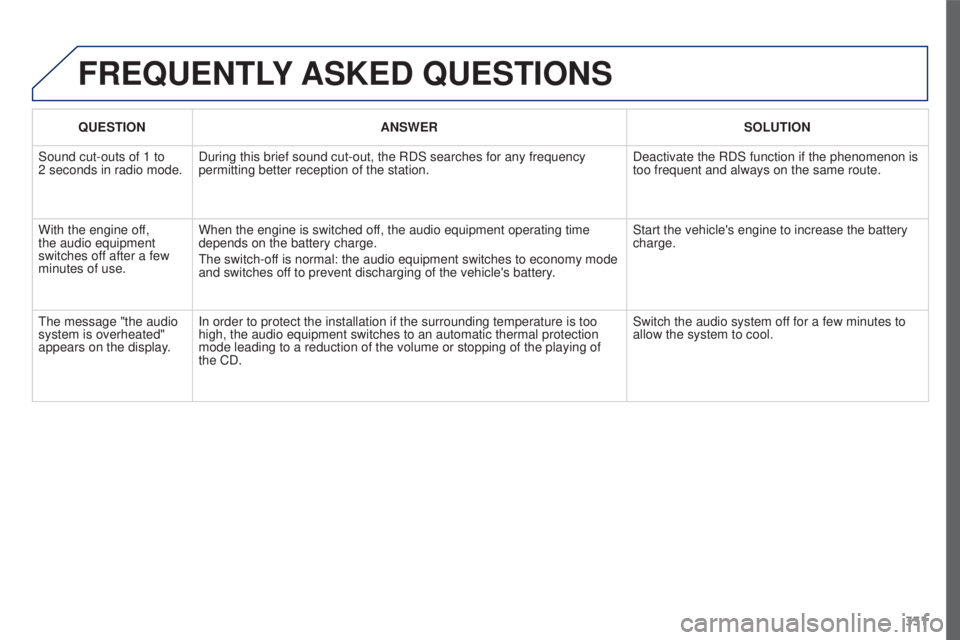
Sound cut-outs of 1 to
2
seconds in radio mode. During this brief sound cut-out, the RDS searches for any frequency
permitting better reception of the station. Deactivate the RDS function if the phenomenon is
too frequent and always on the same route.
With the engine off,
the audio equipment
switches off after a few
minutes of use. When the engine is switched off, the audio equipment operating time
depends on the battery charge.
The switch-off is normal: the audio equipment switches to economy mode
and switches off to prevent discharging of the vehicle's battery. Start the vehicle's engine to increase the battery
charge.
The message "the audio
system is overheated"
appears on the display. In order to protect the installation if the surrounding temperature is t\
oo
high, the audio equipment switches to an automatic thermal protection
mode leading to a reduction of the volume or stopping of the playing of \
the CD. Switch the audio system off for a few minutes to
allow the system to cool.
Page 334 of 344
332
3008_en_Chap13_index-alpha_ed01-2015
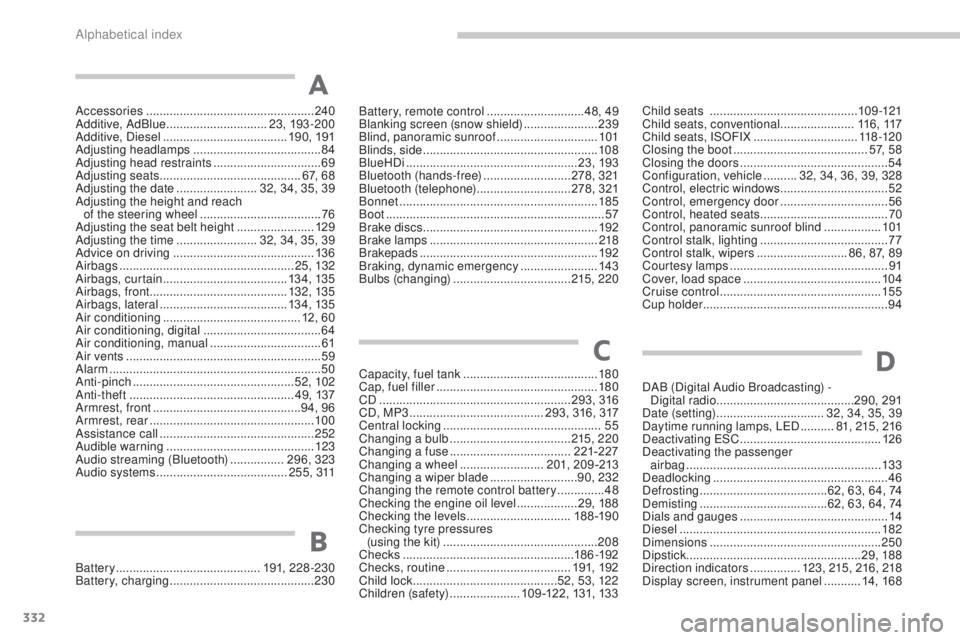
Accessories .................................................. 240
Additive, AdBlue .............................. 23, 193 -200
Additive, Diesel
..................................... 19 0, 191
Adjusting headlamps
...................................... 84
Adjusting head restraints
................................69
Adjusting seats
.......................................... 67, 68
Adjusting the date
........................32, 34 , 35, 39
Adjusting the height and reach of the steering wheel
....................................76
Adjusting the seat belt height
.......................129
Adjusting the time
........................32, 34 , 35, 39
Advice on driving
.......................................... 13 6
Airbags
.................................................... 25, 132
Airbags, curtain
..................................... 13
4, 13 5
Airbags, front ......................................... 132, 13 5
Airbags, lateral
...................................... 13 4, 13 5
Air conditioning
......................................... 12, 60
Air conditioning, digital
...................................64
Air conditioning, manual
.................................61
Air vents
.......................................................... 59
Alarm
............................................................... 50
Anti-pinch
................................................ 52, 102
Anti-theft
................................................. 49, 137
Armrest, front
............................................ 94, 96
Armrest, rear
................................................. 10
0
Assistance call
.............................................. 252
Audible warning
............................................ 123
Audio streaming (Bluetooth)
................ 29
6, 323
Audio systems
....................................... 2 5 5 , 311Battery, remote control .............................
48,
49
Blanking screen (snow shield) ...................... 23
9
Blind, panoramic sunroof
..............................101
Blinds, side
....................................................108
BlueHDi
...................................................23, 193
Bluetooth (hands-free)
.......................... 2
78, 321
Bluetooth (telephone)
............................278, 321
Bonnet
...........................................................185
Boot
.................................................................57
Brake discs
.................................................... 19
2
Brake lamps
...............................
...................218
Brakepads
..................................................... 19
2
Braking, dynamic emergency
.......................143
Bulbs (changing)
...............................
....215 , 220
A
Child seats .............................. ..............109-121
Child seats, conventional ......................11 6, 117
Child seats, ISOFIX
...............................11
8 -12 0
Closing the boot
........................................ 57, 58
Closing the doors
............................................ 54
Configuration, vehicle
..........32, 34 , 36, 39, 328
Control, electric windows
................................52
Control, emergency door
................................56
Control, heated seats
...................................... 70
Control, panoramic sunroof blind
.................101
Control stalk, lighting
...................................... 77
C
ontrol stalk, wipers ...........................86, 87 , 89
Courtesy lamps
............................................... 91
Cover, load space
......................................... 10
4
Cruise control
................................................ 15
5
Cup holder
...............................
........................94
Capacity, fuel tank
..............................
.......... 180
Cap, fuel filler
................................................ 180
CD
......................................................... 293, 316
CD, MP3
........................................ 2
93, 316 , 317
Central locking
............................................... 55
Changing a bulb
.................................... 215, 220
Changing a fuse
.................................... 221-227
Changing a wheel
......................... 201, 20 9 -213
Changing a wiper blade
.......................... 90, 232
Changing the remote control battery
.............. 48
Checking the engine oil level
.................. 29, 188
Checking the levels
............................... 18 8 -19 0
Checking tyre pressures (using the kit)
..............................
................ 208
Checks
...............
.................................... 18 6-192
Checks, routine
..................................... 191, 192
Child lock
...............................
............ 52, 53 , 12 2
Children (safety)
..................... 1
09 -122, 131, 133
C
Battery ........................................... 191, 228-230
Battery, charging ........................................... 230
B
D
DAB (Digital Audio Broadcasting) -
Digital radio ......................................... 290, 291
Date (setting)
...............................
.32 , 34 , 35, 39
Daytime running lamps, LED
..........81, 215 , 216
Deactivating ESC
.......................................... 126
Deactivating the passenger airbag
.......................................................... 13
3
Deadlocking
.................................................... 46
Defrosting
...................................... 62, 63, 64, 74
Demisting
...............................
.......62, 63, 64, 74
Dials and gauges
............................................ 14
Diesel
............................................................ 182
Dimensions
................................................... 250
Dipstick
................
.................................... 29, 188
Direction indicators
...............123, 215 , 216 , 218
Display screen, instrument panel
...........14, 168
Alphabetical index