change time Peugeot 308 2017 User Guide
[x] Cancel search | Manufacturer: PEUGEOT, Model Year: 2017, Model line: 308, Model: Peugeot 308 2017Pages: 392, PDF Size: 10.16 MB
Page 211 of 392
209
308_en_Chap06_conduite_ed01-2016
Under-inflation detection
the system monitors the pressures in the four
tyres, once the vehicle is moving.
It compares the information given by the four
wheel speed sensors with reference values,
which must be reinitialised ever y time the
tyre pressures are adjusted or a wheel
changed.
th
e system triggers an alert as soon as it
detects a drop in the inflation pressure of one
or more tyres.th e under-inflation detection system
does not replace the need for vigilance
on the part of the driver.
th
is system does not avoid the need to
check the tyre pressures (including the
spare wheel) every month as well as
before a long journey.
Driving with under-inflated tyres impairs
road holding, extends braking distances
and causes premature tyre wear,
particularly under arduous conditions
(high loading, high speed, long journey).
System which automatically checks the pressures of the tyres while driving.th
e inflation pressures defined for
your vehicle can be found on the tyre
pressure label.
For more information on the
Identification markings , refer to the
corresponding section.
ty
re pressures should be checked
when the tyres are "cold" (vehicle
stopped for 1 hour or after a journey of
less than 6 miles (10 km) at moderate
speeds).
Other wise (when hot), add 0.3 bar to
the pressures shown on the label.
Driving with under-inflated tyres
increases fuel consumption.
Snow chains
the system does not have to be
reinitialised after fitting or removing
snow chains.
6
Driving
Page 230 of 392
228
308_en_Chap07_info-pratiques_ed01-2016
Checking levels
take care when working under the bonnet, as certain areas of the engine may be extremely hot (risk of burns) and the cooling fan could start at
any time (even with the ignition off).
Engine oil level
the check is carried out either when
the ignition is switched on using the
oil level indicator in the instrument
panel for vehicles so equipped, or
using the dipstick.Checking using the dipstick
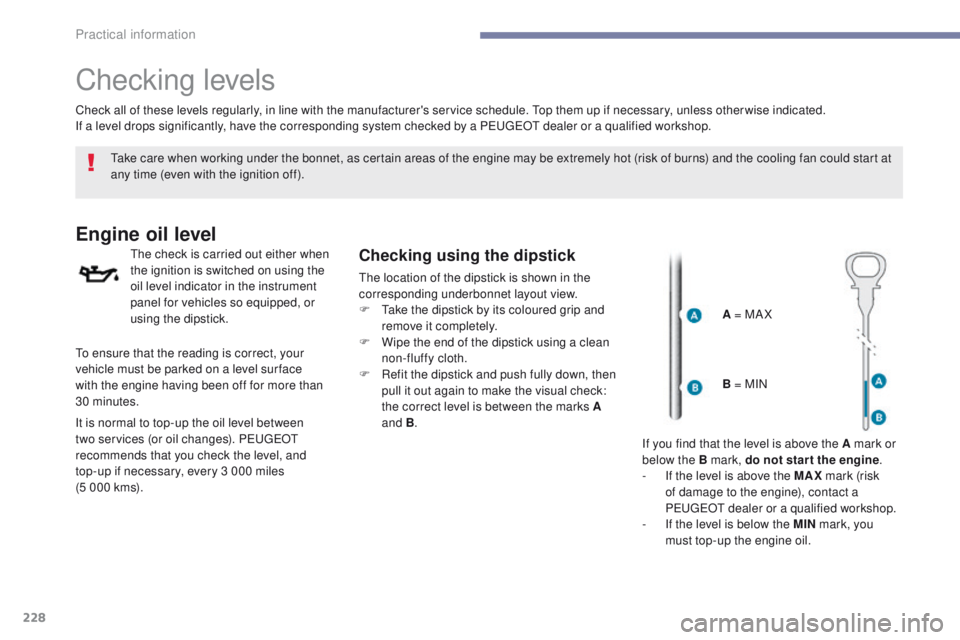
the location of the dipstick is shown in the
corresponding underbonnet layout view.
F t
a
ke the dipstick by its coloured grip and
remove it completely.
F
W
ipe the end of the dipstick using a clean
non-fluffy cloth.
F
R
efit the dipstick and push fully down, then
pull it out again to make the visual check:
the correct level is between the marks A
and B .
Check all of these levels regularly, in line with the manufacturer's service schedule.
t
o
p them up if necessary, unless other wise indicated.
If a level drops significantly, have the corresponding system checked by a P
e
uge
Ot
dealer or a qualified workshop.
A = MA X
to e
nsure that the reading is correct, your
vehicle must be parked on a level sur face
with
the engine having been off for more than
30 minutes.
It is normal to top-up the oil level between
two services (or oil changes). P
e
uge
Ot
recommends that you check the level, and
top-up if necessary, every 3 000 miles
(5 000 kms). B = MIN
If you find that the level is above the A mark or
below the B mark, do not star t the engine .
-
I
f the level is above the MAX mark (risk
of damage to the engine), contact a
P
e
uge
Ot
dealer or a qualified workshop.
-
I
f the level is below the MIN mark, you
must top-up the engine oil.
Practical information
Page 233 of 392
231
308_en_Chap07_info-pratiques_ed01-2016
Checks
12 V battery
the battery does not require any maintenance.
However, check regularly that the terminals
are correctly tightened (versions without quick
release terminals) and that the connections
are clean.Refer to the manufacturer's
service schedule for details of the
replacement intervals for these
components.
Air filter and passenger compartment filter
Replace the oil filter each time the
engine oil is changed.
Refer to the manufacturer's
service schedule for details of
the replacement interval for this
component.Oil filter
Versions equipped with Stop & Start are
fitted with a 12 V lead-acid battery of
specific technology and specification.
Its replacement should be carried
out only by a P
e
uge
Ot
dealer or a
qualified workshop.
Particle filter (Diesel)
the start of saturation of the particle
filter is indicated by the temporary
illumination of this warning lamp
accompanied by a message in the
multifunction screen.
As soon as the traffic conditions permit,
regenerate the filter by driving at a
speed of at least 40 mph (60 km/h) until
the warning lamp goes off.
If the warning lamp stays on, this
indicates a low additive level.
For more information on Checking
levels , refer to the corresponding
section.
On a new vehicle, the first particle
filter regeneration operations may be
accompanied by a "burning" smell,
which is per fectly normal.
Following prolonged operation of the
vehicle at very low speed or at idle,
you may, in exceptional circumstances,
notice the emission of water vapour at
the exhaust on acceleration.
t
h
is does
not affect the behaviour of the vehicle
or the environment.
un
less otherwise indicated, check these components in accordance with the manufacturer's
service schedule and according to your engine.
Other wise, have them checked by a Pe
ugeOt
dealer or a qualified workshop.
For more information and the precautions to
take before starting work on the 12 V batter y ,
refer to the corresponding section. Depending on the environment (e.g. dusty
atmosphere) and the use of the vehicle (e.g.
city driving), replace them twice as often if
necessary
.
A clogged passenger compartment filter may
have an adverse effect on the per formance
of the air conditioning system and generate
undesirable odours.
7
Practical information
Page 256 of 392
254
308_en_Chap08_en-cas-de-panne_ed01-2016
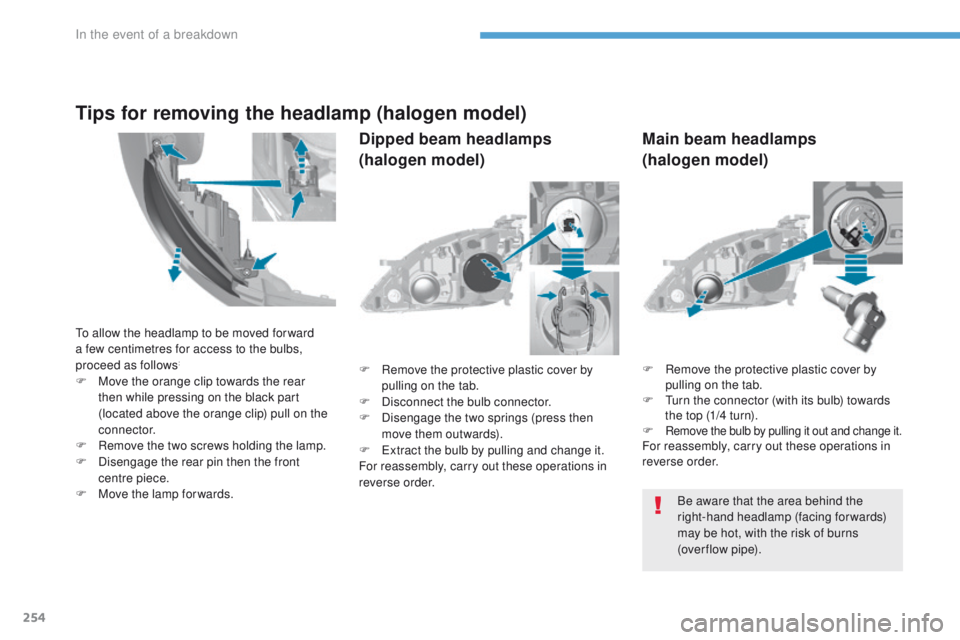
F Remove the protective plastic cover by
pulling on the tab.
F
t
u
rn the connector (with its bulb) towards
the top (1/4 turn).
F
Remove the bulb by pulling it out and change it.For reassembly, carry out these operations in
reverse order.
F
R
emove the protective plastic cover by
pulling on the tab.
F
D
isconnect the bulb connector.
F
D
isengage the two springs (press then
move them outwards).
F
ex
tract the bulb by pulling and change it.
For reassembly, carry out these operations in
reverse order.
Be aware that the area behind the
right-hand headlamp (facing forwards)
may be hot, with the risk of burns
(over flow
pipe).
to a
llow the headlamp to be moved for ward
a few centimetres for access to the bulbs,
proceed as follows
:
F Move the orange clip towards the rear then while pressing on the black part
(located above the orange clip) pull on the
connector.
F
R
emove the two screws holding the lamp.
F
D
isengage the rear pin then the front
centre piece.
F
M
ove the lamp for wards.
Tips for removing the headlamp (halogen model)
Dipped beam headlamps
(halogen model) Main beam headlamps
(halogen model)
In the event of a breakdown
Page 313 of 392
311
308_en_Chap10b_SMegplus_ed01-2016
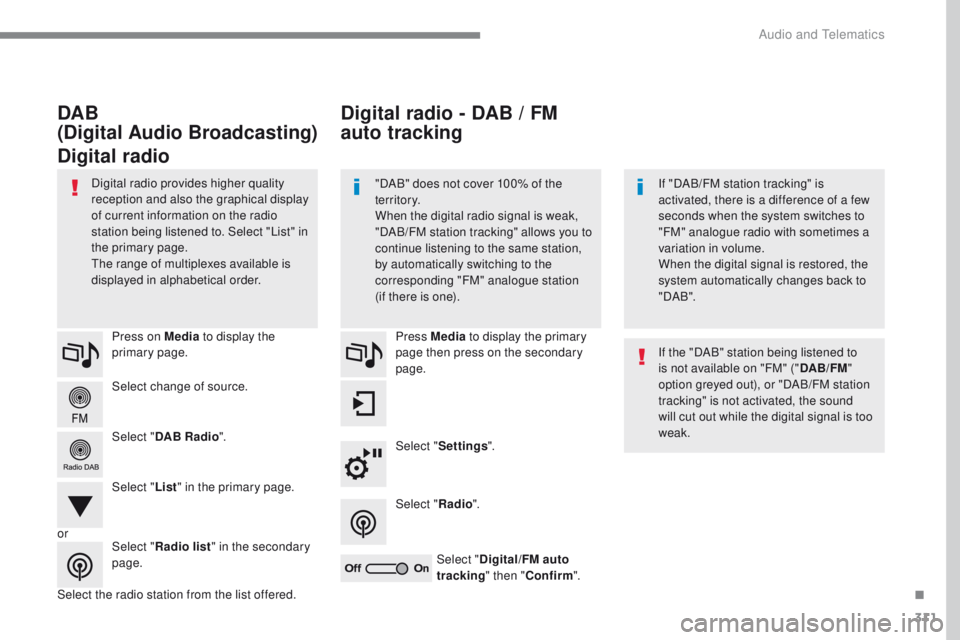
Select change of source. Press on Media to display the
primary page.
Select " DAB Radio ".
Select " List" in the primary page.
Select the radio station from the list offered. Press Media
to display the primary
page then press on the secondary
page.
Select " Settings ".
Select " Radio".
Select " Digital/FM auto
tracking " then "Confirm ".
Digital radio - DAB / FM
auto tracking
DAB
(Digital Audio Broadcasting)
Digital radio
"DAB" does not cover 100% of the
te r r i to r y.
When the digital radio signal is weak,
"DAB/FM station tracking" allows you to
continue listening to the same station,
by automatically switching to the
corresponding "FM" analogue station
(if there is one). If "DAB/FM station tracking" is
activated, there is a difference of a few
seconds when the system switches to
"FM" analogue radio with sometimes a
variation in volume.
When the digital signal is restored, the
system automatically changes back to
" DA B ".
Digital radio provides higher quality
reception and also the graphical display
of current information on the radio
station being listened to. Select "List" in
the primary page.
th
e range of multiplexes available is
displayed in alphabetical order.
If the "DAB" station being listened to
is not available on "FM" ("DAB/FM"
option greyed out), or "DAB/FM station
tracking" is not activated, the sound
will cut out while the digital signal is too
weak.
or Select "Radio list " in the secondary
page.
.
Audio and telematics
Page 314 of 392
312
308_en_Chap10b_SMegplus_ed01-2016
Music
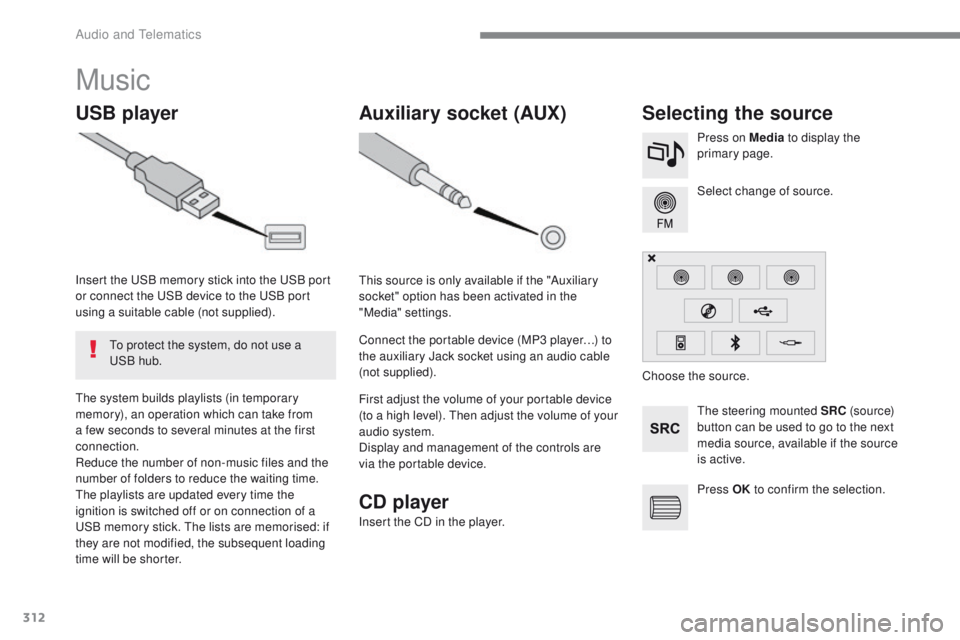
USB playerSelecting the source
the steering mounted SRC (s o u r c e)
button can be used to go to the next
media source, available if the source
is active. Select change of source. Press on Media to display the
primary page.th
e system builds playlists (in temporary
memory), an operation which can take from
a few seconds to several minutes at the first
connection.
Reduce the number of non-music files and the
number of folders to reduce the waiting time.
th
e playlists are updated every time the
ignition is switched off or on connection of a
uS
B memory stick.
t
h
e lists are memorised: if
they are not modified, the subsequent loading
time will be shorter. Insert the
u
S
B memory stick into the
u
S
B port
or connect the
u
S
B device to the
u
S
B port
using a suitable cable (not supplied).
to p
rotect the system, do not use a
uS
B hub.
Auxiliary socket (AUX)
this source is only available if the "Auxiliary
socket" option has been activated in the
"Media" settings.
Connect the portable device (MP3 player…) to
the auxiliary Jack socket using an audio cable
(not supplied).
First adjust the volume of your portable device
(to a high level).
t
h
en adjust the volume of your
audio system.
Display and management of the controls are
via the portable device. Choose the source.
Press OK to confirm the selection.
CD player
Insert the CD in the player.
Audio and telematics
Page 340 of 392
338
308_en_Chap10b_SMegplus_ed01-2016
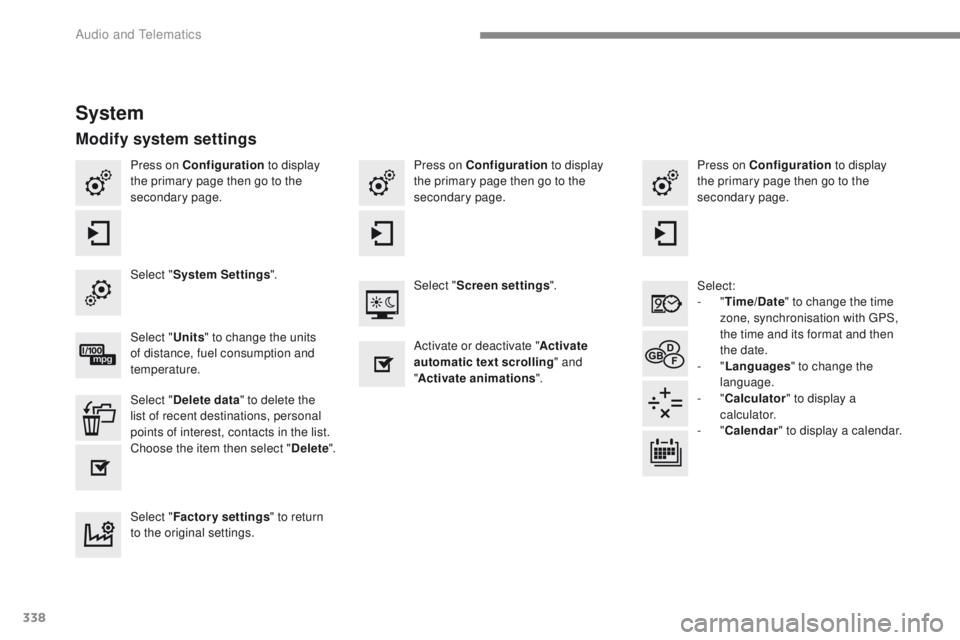
Press on Configuration to display
the primary page then go to the
secondary page. Press on Configuration
to display
the primary page then go to the
secondary page.
Press on Configuration
to display
the primary page then go to the
secondary page.
Select:
-
"Time/Date " to change the time
zone, synchronisation with
g
P
S,
the time and its format and then
the date.
-
"Languages " to change the
language.
-
"Calculator " to display a
calculator.
-
"Calendar " to display a calendar.
Select "
System Settings ".
Select "Screen settings ".
Select " Units" to change the units
of distance, fuel consumption and
temperature. Activate or deactivate "
Activate
automatic text scrolling " and
" Activate animations ".
Select " Delete data " to delete the
list of recent destinations, personal
points of interest, contacts in the list.
Choose the item then select " Delete".
Select " Factory settings " to return
to the original settings.
System
Modify system settings
Audio and telematics
Page 367 of 392
365
308_en_Chap10c_RD45_ed01-2016
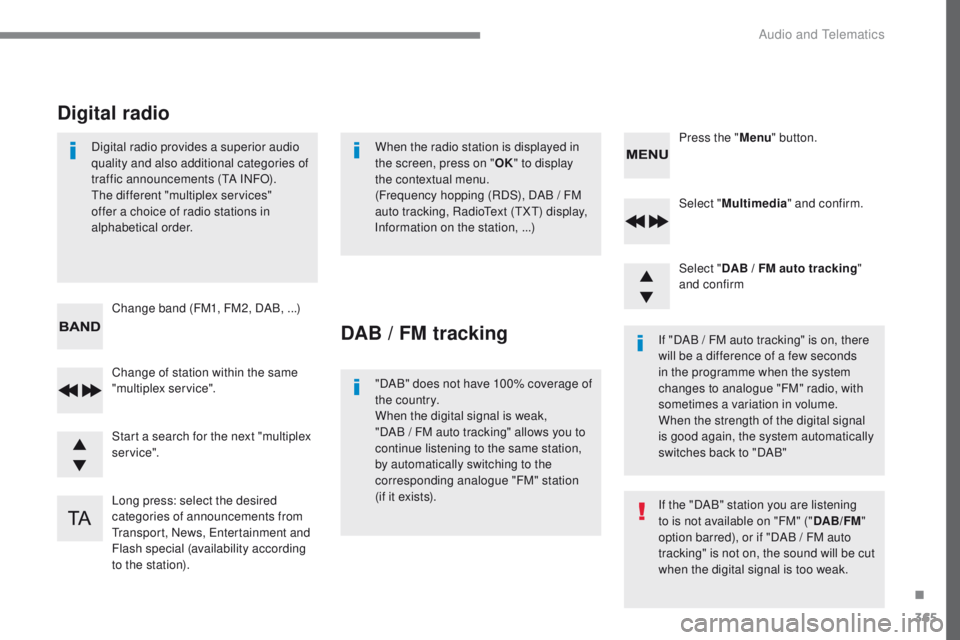
Select "Multimedia " and confirm.
Select " DAB / FM auto tracking "
and confirm
Long press: select the desired
categories of announcements from
tr
ansport, News,
e
n
tertainment and
Flash special (availability according
to the station). Change of station within the same
"multiplex service". Press the "
Menu" button.
Start a search for the next "multiplex
service". Change band (FM1, FM2, DAB,
...)
Digital radio provides a superior audio
quality and also additional categories of
traffic announcements (
tA I
NFO).the
different "multiplex services"
offer a choice of radio stations in
alphabetical order.
Digital radio
When the radio station is displayed in
the screen, press on " OK" to display
the contextual menu.
(Frequency hopping (RDS), DAB
/ FM
auto tracking, Radio
te
xt (
tXt) d
isplay,
Information on the station, ...)
DAB / FM tracking
"DAB" does not have 100% coverage of
the country.
When the digital signal is weak,
"DAB
/ FM auto tracking" allows you to
continue listening to the same station,
by automatically switching to the
corresponding analogue "FM" station
(if it exists). If "DAB / FM auto tracking" is on, there
will be a difference of a few seconds
in the programme when the system
changes to analogue "FM" radio, with
sometimes a variation in volume.
When the strength of the digital signal
is good again, the system automatically
switches back to "DAB"
If the "DAB" station you are listening
to is not available on "FM" ("
DAB/FM"
option barred), or if "DAB / FM auto
tracking" is not on, the sound will be cut
when the digital signal is too weak.
.
Audio and telematics
Page 368 of 392
366
308_en_Chap10c_RD45_ed01-2016
Media
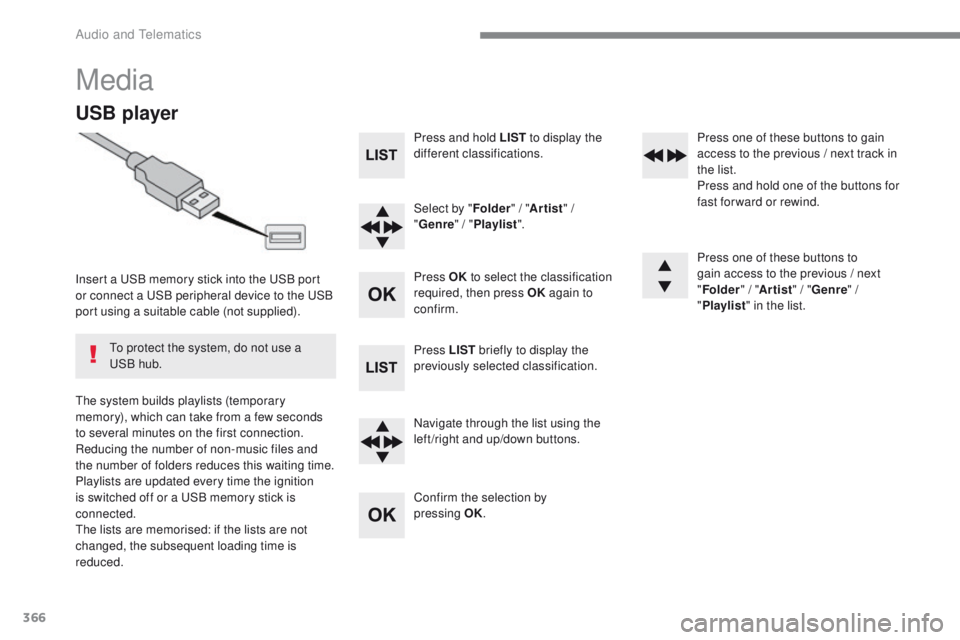
USB player
Insert a uSB memory stick into the uS B port
or connect a uS B peripheral device to the uS B
port using a suitable cable (not supplied).
th
e system builds playlists (temporary
memory), which can take from a few seconds
to several minutes on the first connection.
Reducing the number of non-music files and
the number of folders reduces this waiting time.
Playlists are updated every time the ignition
is switched off or a
u
S
B memory stick is
connected.
th
e lists are memorised: if the lists are not
changed, the subsequent loading time is
reduced.
to p
rotect the system, do not use a
uS
B hub. Press and hold LIST
to display the
different classifications.
Select by " Folder" / "Artist " /
" Genre " / "Playlist ".
Press OK to select the classification
required, then press OK again to
confirm.
Press LIST briefly to display the
previously selected classification.
Navigate through the list using the
left /right and up/down buttons.
Confirm the selection by
pressing
OK.Press one of these buttons to gain
access to the previous / next track in
the list.
Press and hold one of the buttons for
fast for ward or rewind.
Press one of these buttons to
gain access to the previous / next
"
Folder " / "Artist " / "Genre " /
" Playlist " in the list.
Audio and telematics