remote control Peugeot 308 2017 Owner's Guide
[x] Cancel search | Manufacturer: PEUGEOT, Model Year: 2017, Model line: 308, Model: Peugeot 308 2017Pages: 392, PDF Size: 10.16 MB
Page 72 of 392

70
308_en_Chap02_ouvertures_ed01-2016
electric windows
1. Front left.
2. Front right
3.
R
ear right.
4.
R
ear left.
5.
D
eactivating the rear electric window
switches.
Manual operation
to open or close the window, press or pull
the switch fully: the window opens or closes
completely when the switch is released.
Pressing the switch again stops the movement
of the window.
Safety anti-pinch
(depending on version)
Automatic one-touch operation
(depending on version)
to open or close the window, press or pull the
switch gently. th e window stops as soon as the
switch is released. When the window rises and meets an obstacle,
it stops and immediately partially lowers again.
Maintaining the locking action (on the
key or the remote control) closes the
windows automatically.
the
electric window switches remain
operational for approximately one minute after
the key has been removed.
Once this time has elapsed, the electric
windows will not operate.
t
o r
eactivate them,
switch the ignition on again. In the event of unwanted opening of the window
when closing automatically, press the switch
until the window opens completely, then pull
the switch immediately until the window closes.
Continue to hold the switch for approximately
one second after the window has closed.
th
e safety anti-pinch function is not active
during this operation.
Access
Page 105 of 392
103
308_en_Chap03_ergonomie-et-confort_ed01-2016
Courtesy lamps
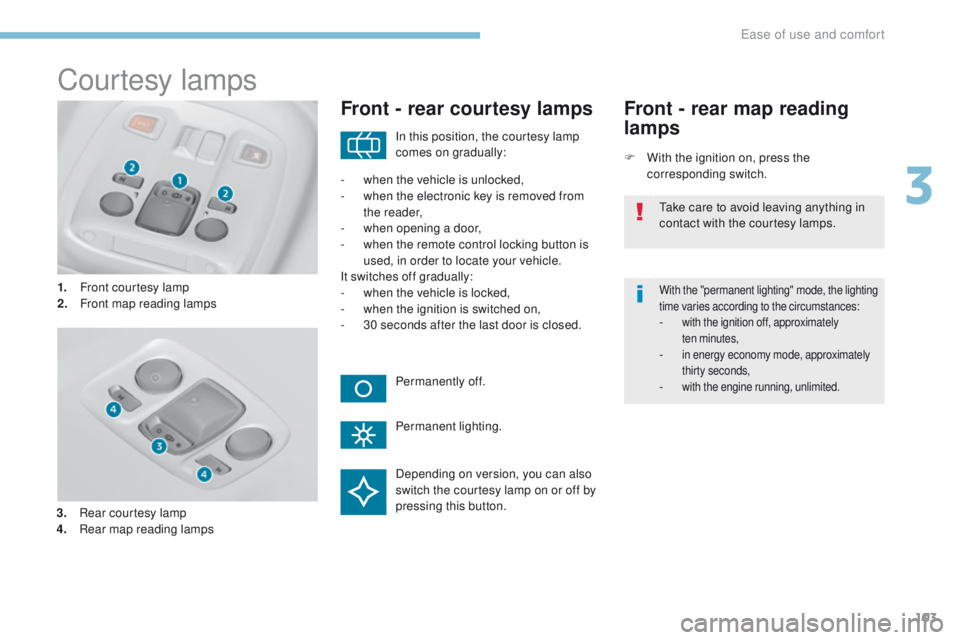
1. Front courtesy lamp
2. Front map reading lamps
Front - rear courtesy lamps
F With the ignition on, press the corresponding switch.
Front - rear map reading
lamps
With the "permanent lighting" mode, the lighting
time varies according to the circumstances:
- with the ignition off, approximately ten minutes,
- in energy economy mode, approximately thirty seconds,
- with the engine running, unlimited.
In this position, the courtesy lamp
comes on gradually:
Permanently off.
Permanent lighting.
-
w
hen the vehicle is unlocked,
-
w
hen the electronic key is removed from
the reader,
-
w
hen opening a door,
-
w
hen the remote control locking button is
used, in order to locate your vehicle.
It switches off gradually:
-
w
hen the vehicle is locked,
-
w
hen the ignition is switched on,
-
3
0 seconds after the last door is closed.
ta
ke care to avoid leaving anything in
contact with the courtesy lamps.
Depending on version, you can also
switch the courtesy lamp on or off by
pressing this button.
3.
R
ear courtesy lamp
4.
R
ear map reading lamps
3
ease of use and comfort
Page 107 of 392
105
308_en_Chap04_eclairage-et-visibilite_ed01-2016
Mirrors
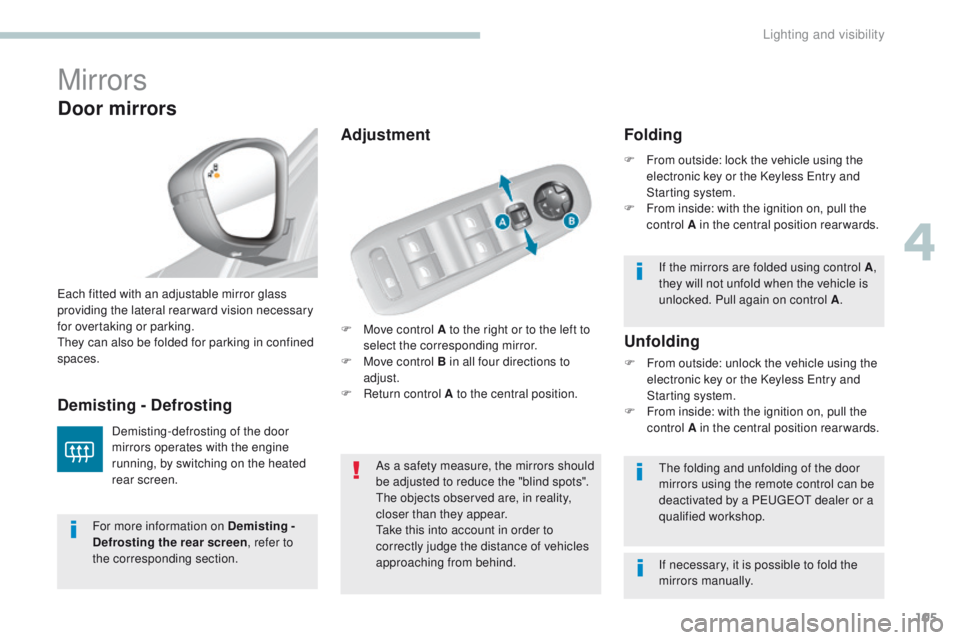
F Move control A to the right or to the left to select the corresponding mirror.
F
M
ove control B in all four directions to
adjust.
F
R
eturn control A to the central position.
ea
ch fitted with an adjustable mirror glass
providing the lateral rear ward vision necessary
for overtaking or parking.th
ey can also be folded for parking in confined
spaces.
Demisting - Defrosting
Door mirrors
Demisting-defrosting of the door
mirrors operates with the engine
running, by switching on the heated
rear screen. As a safety measure, the mirrors should
be adjusted to reduce the "blind spots".
th
e objects observed are, in reality,
closer than they appear.
ta
ke this into account in order to
correctly judge the distance of vehicles
approaching from behind.
th
e folding and unfolding of the door
mirrors using the remote control can be
deactivated by a P
e
uge
Ot
dealer or a
qualified workshop.
Unfolding
F From outside: unlock the vehicle using the electronic key or the Keyless en try and
Starting system.
F
F
rom inside: with the ignition on, pull the
control A in the central position rearwards.
Folding
F From outside: lock the vehicle using the electronic key or the Keyless en try and
Starting system.
F
F
rom inside: with the ignition on, pull the
control A in the central position rearwards.
If the mirrors are folded using control A ,
they will not unfold when the vehicle is
unlocked. Pull again on control A .
For more information on Demisting -
Defrosting the rear screen , refer to
the corresponding section. If necessary, it is possible to fold the
mirrors manually.
Adjustment
4
Lighting and visibility
Page 109 of 392
107
308_en_Chap04_eclairage-et-visibilite_ed01-2016
Lighting control stalk
Main lightingAdditional lightingAutomatic lighting functions
In some weather conditions (e.g. low
temperature or humidity), the presence
of misting on the internal sur face of the
glass of the headlamps and rear lamps
is normal; it disappears after the lamps
have been on for a few minutes.
Selection and control of the various front and rear lamps providing the vehicle's lighting and signalling.
th
ere are various lamps on the vehicle:
-
s
idelamps, to be seen,
-
d
ipped beam headlamps to see without
dazzling other drivers,
-
m
ain beam headlamps to see clearly when
the road is clear,
-
d
aytime running lamps at the front, to be
seen during the day. Other lamps are installed to fulfil the
requirements of particular driving conditions:
-
r
ear foglamps, to better signal the
presence of the vehicle in foggy conditions,
-
f
ront foglamps, for better visibility in foggy
conditions and to improve lighting at
intersections and when parking, Various automatic lighting functions are also
available depending on options:
-
gu
ide-me-home lighting (remotely),
-
w
elcome lighting,
-
d
aytime running lamps,
-
a
utomatic illumination of headlamps.
Programming
You can adjust the settings of certain functions:
- gu
ide-me-home lighting (remotely),
-
w
elcome lighting.
Travelling abroad
Halogen headlamps
If using your vehicle in a country that
drives on the other side of the road, the
headlamps must be adjusted to avoid
dazzling on-coming drivers.
Contact a P
e
uge
Ot
dealer or a qualified
workshop.
LED headlamps
the design of the LeD h eadlamps allows
you to use your vehicle in a country that
drives on the other side of the road without
any adjustment.
4
Lighting and visibility
Page 114 of 392
112
308_en_Chap04_eclairage-et-visibilite_ed01-2016
Automatic
When the automatic illumination of headlamps
function is activated (lighting control stalk
in the "AUTO" position), under low ambient
light the dipped beams headlamps come on
automatically when the ignition is switched off.
Activation or deactivation, as well
as the duration of the guide-me-
home lighting, is set in the " Driving
assistance " menu, then " Vehicle
settings " in the secondary page.
Exterior welcome
lighting
the remote switching on of the lighting makes
your approach to the vehicle easier in poor
light. It is activated when the lighting control
is in the " AUTO" position and the level of light
detected by the sunshine sensor is low.
Switching on
F Press the open padlock on the remote control or one of the front
door handles with Keyless
e
n
try
and Starting.
Switching offthe exterior welcome lighting switches off
automatically after a set time, when the ignition
is switched on or on locking the vehicle.
Programmingthe activation, deactivation and
choice of welcome lighting duration
are done in the " Driving assistance "
menu then " Vehicle settings ".
th
e dipped beam headlamps and sidelamps
come on; your vehicle is also unlocked.
Direction
indicators
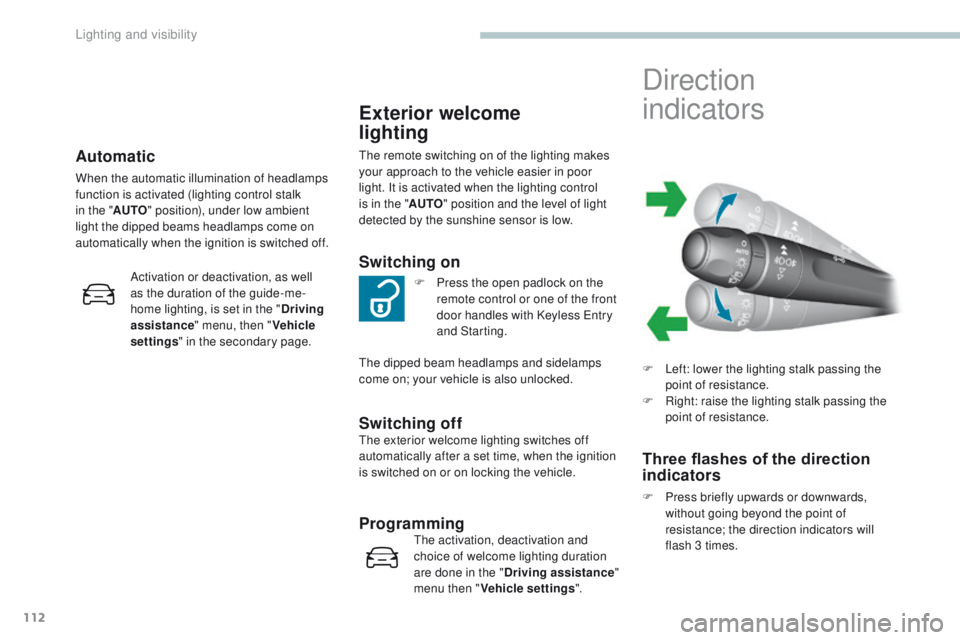
F Left: lower the lighting stalk passing the point of resistance.
F
R
ight: raise the lighting stalk passing the
point of resistance.
Three flashes of the direction
indicators
F Press briefly upwards or downwards, without going beyond the point of
resistance; the direction indicators will
flash 3 times.
Lighting and visibility
Page 115 of 392
113
308_en_Chap04_eclairage-et-visibilite_ed01-2016
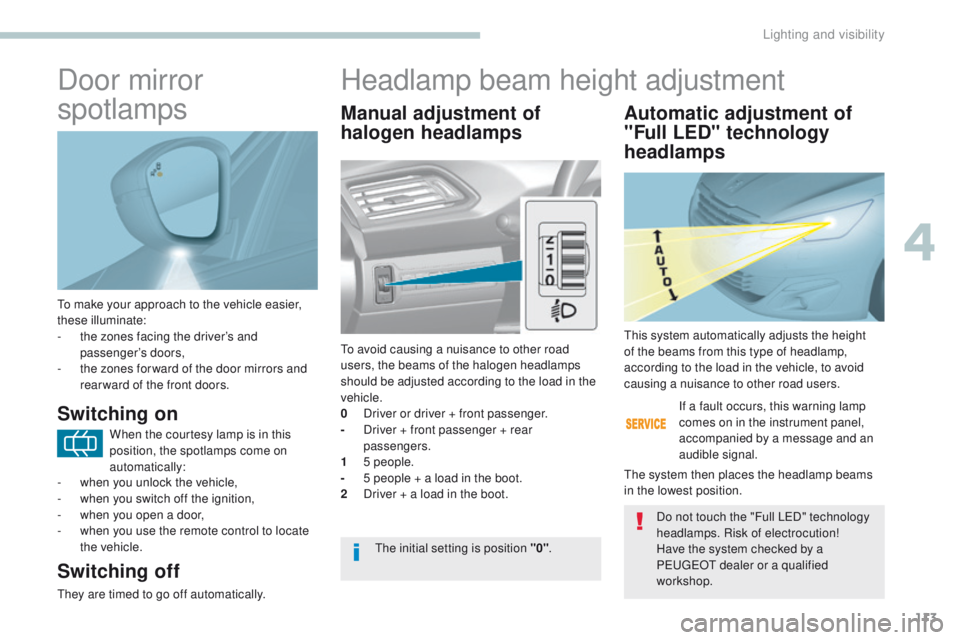
to make your approach to the vehicle easier,
these illuminate:
-
t
he zones facing the driver’s and
passenger’s doors,
-
t
he zones for ward of the door mirrors and
rear ward of the front doors.
Door mirror
spotlamps
Switching on
Switching off
they are timed to go off automatically.
Manual adjustment of
halogen headlamps Automatic adjustment of
"Full LED" technology
headlamps
to avoid causing a nuisance to other road
users, the beams of the halogen headlamps
should be adjusted according to the load in the
vehicle.
0
D
river or driver + front passenger.
-
D
river + front passenger + rear
passengers.
1
5
people.
-
5 p
eople + a load in the boot.
2
D
river + a load in the boot. If a fault occurs, this warning lamp
comes on in the instrument panel,
accompanied by a message and an
audible signal.th
is system automatically adjusts the height
of the beams from this type of headlamp,
according to the load in the vehicle, to avoid
causing a nuisance to other road users.
th
e system then places the headlamp beams
in the lowest position.
th
e initial setting is position "0" .Do not touch the "Full L
eD
" technology
headlamps. Risk of electrocution!
Have the system checked by a
P
e
uge
Ot
dealer or a qualified
workshop.
Headlamp beam height adjustment
When the courtesy lamp is in this
position, the spotlamps come on
automatically:
-
w
hen you unlock the vehicle,
-
w
hen you switch off the ignition,
-
w
hen you open a door,
-
w
hen you use the remote control to locate
the vehicle.
4
Lighting and visibility
Page 150 of 392
148
308_en_Chap06_conduite_ed01-2016
Starting-switching off the engine, remote control
Put the gear lever into neutral.
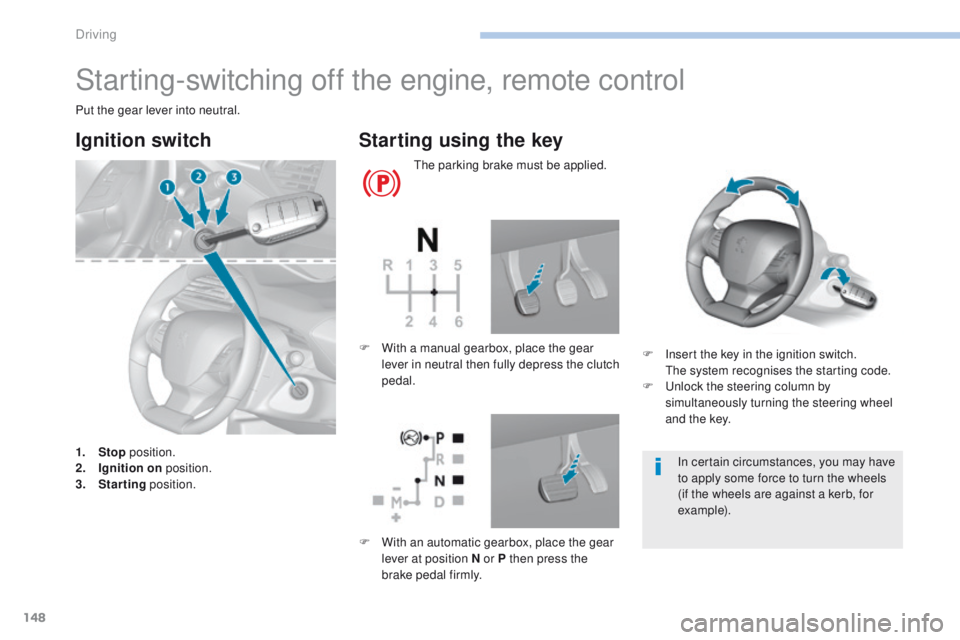
Ignition switch
1. Stop position.
2. I gnition on position.
3.
S
tarting position.
Starting using the key
the parking brake must be applied.
F
I
nsert the key in the ignition switch.
t
h
e system recognises the starting code.
F
u
n
lock the steering column by
simultaneously turning the steering wheel
and the key.
F
W
ith a manual gearbox, place the gear
lever in neutral then fully depress the clutch
pedal.
In certain circumstances, you may have
to apply some force to turn the wheels
(if the wheels are against a kerb, for
example).
F
W
ith an automatic gearbox, place the gear
lever at position N or P then press the
brake pedal firmly.
Driving
Page 152 of 392
150
308_en_Chap06_conduite_ed01-2016
Avoid attaching heavy objects to the
key or the remote control, which would
weigh down on its blade in the ignition
switch and could cause a malfunction.
It could adversely affect the deployment
of the front airbag.
Switching off the engine leads to a loss
of braking assistance.
Key left in the "Ignition on"
position
If the key has been left in the ignition switch
at position 2 (Ignition on)
, the ignition will
be switched off automatically after one hour.
to s
witch the ignition back on, turn the
key to position 1 (Stop) , then back to
position
2
(Ignition on) .
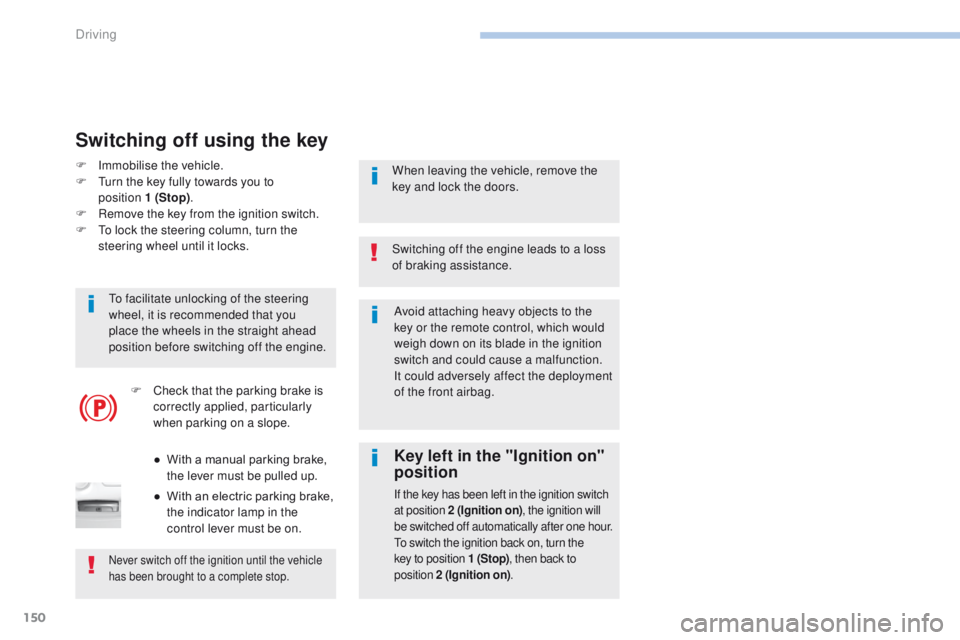
F Immobilise the vehicle.
F
tu rn the key fully towards you to
position
1
(Stop).
F
R
emove the key from the ignition switch.
F
t
o l
ock the steering column, turn the
steering wheel until it locks.
Switching off using the key
to facilitate unlocking of the steering
wheel, it is recommended that you
place the wheels in the straight ahead
position before switching off the engine.
Never switch off the ignition until the vehicle
has been brought to a complete stop.
When leaving the vehicle, remove the
key and lock the doors.
F
C
heck that the parking brake is
correctly applied, particularly
when parking on a slope.
●
W
ith a manual parking brake,
the lever must be pulled up.
●
W
ith an electric parking brake,
the indicator lamp in the
control lever must be on.
Driving
Page 154 of 392
152
308_en_Chap06_conduite_ed01-2016
If the vehicle is not immobilised, the
engine will not stop.
Switching off
F Immobilise the vehicle.F
W
ith the electronic key inside
the vehicle, press the " S TA R T/
STOP " button.
th
e engine stops and the steering column is
locked.
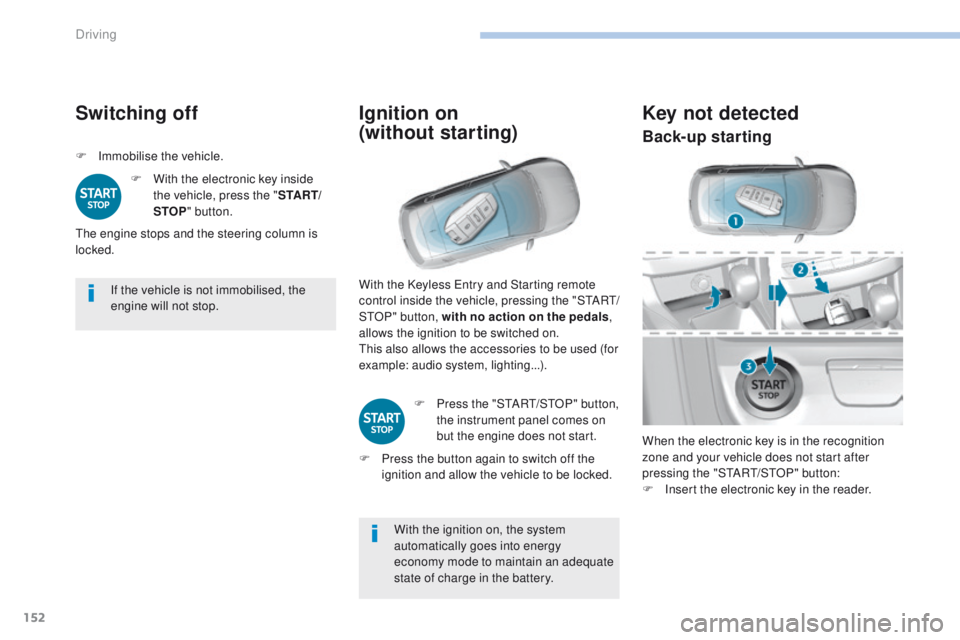
Ignition on
(without starting)
With the ignition on, the system
automatically goes into energy
economy mode to maintain an adequate
state of charge in the battery.
With the Keyless
e
n
try and Starting remote
control inside the vehicle, pressing the "S
tA
R
t/
StO
P" button, with no action on the pedals
,
allows the ignition to be switched on.
th
is also allows the accessories to be used (for
example: audio system, lighting...).
F
P
ress the "S
tA
R
t/
S
tO
P" button,
the instrument panel comes on
but the engine does not start.
F
P
ress the button again to switch off the
ignition and allow the vehicle to be locked.
Key not detected
When the electronic key is in the recognition
zone and your vehicle does not start after
pressing the "S
tA
R
t/
S
tO
P" button:
F
I
nsert the electronic key in the reader.
Back-up starting
Driving
Page 231 of 392
229
308_en_Chap07_info-pratiques_ed01-2016
Oil grade
Before topping-up the oil or changing the oil,
check that the oil is the correct grade for your
engine and conforms to the manufacturer's
recommendations.
Topping-up the engine oil level
the location of the oil filler cap is shown in the
corresponding underbonnet layout view.
F u
n
screw the oil filler cap to reveal the filler
aperture.
F
A
dd oil in small quantities, avoiding any
spills on engine components (risk of fire).
F
W
ait a few minutes before checking the
level again using the dipstick.
F
A
dd more oil if necessary.
F
A
fter checking the level, carefully refit the
oil filler cap and the dipstick in its tube. After topping-up the oil, the check when
switching on the ignition with the oil
level indicator in the instrument panel
is not valid during the 30 minutes after
topping-up.
Engine oil change
Refer to the manufacturer's service schedule
for details of the interval for this operation.
In order to maintain the reliability of the engine
and emission control system, never use
additives in the engine oil.th
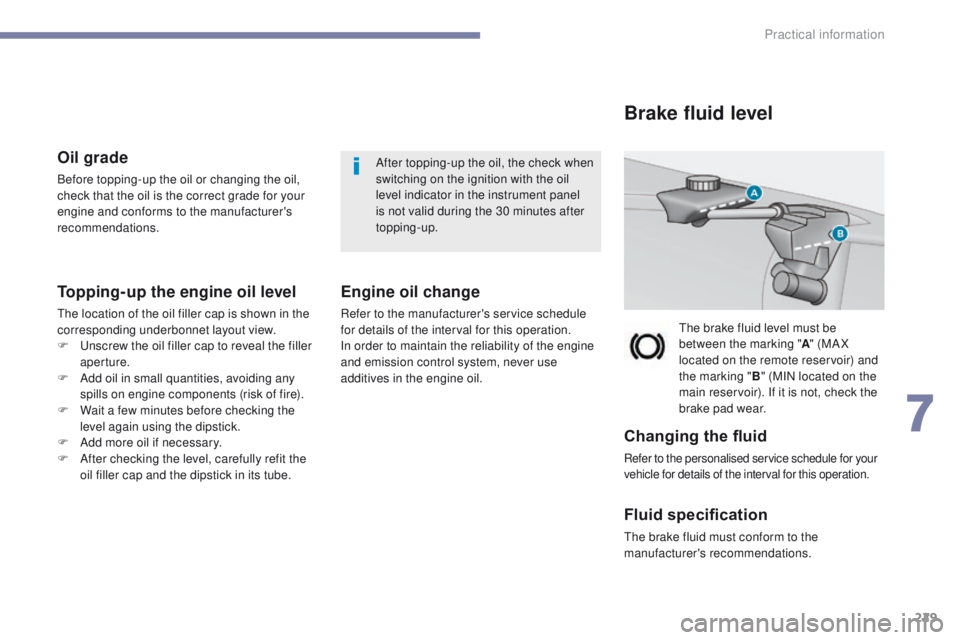
e brake fluid level must be
between the marking " A" (MA X
located on the remote reservoir) and
the marking " B" (MIN located on the
main reservoir). If it is not, check the
brake pad wear.
Brake fluid level
Changing the fluid
Refer to the personalised service schedule for your
vehicle for details of the interval for this operation.
Fluid specification
the brake fluid must conform to the
manufacturer's recommendations.
7
Practical information