window Peugeot 308 2017 Owner's Manual
[x] Cancel search | Manufacturer: PEUGEOT, Model Year: 2017, Model line: 308, Model: Peugeot 308 2017Pages: 392, PDF Size: 10.16 MB
Page 4 of 392
.
.
308_en_Chap00a_sommaire_ed01-2016
Over view
Instrument panel 12
Indicator and warning lamps
1
3
ga
uges and indicators
2
8
Distance recorders
3
5
tr
ip computer
3
7
to
uch screen
4
0
Setting the date and time
4
7Remote control key
5
0
"Keyless e
n
try and Starting" with remote
control 56
"Keyless e
n
try and Starting"
5
8
Boot
61
Alarm
6
7
el
ectric windows
7
0
P
e
uge
Ot
i- Cockpit
7
2
Steering wheel adjustment
7
2
Front seats
7
3
Rear seats (hatchback)
7
9
Rear seats (SW)
8
0
Interior fittings 8 2
Front armrest
8
4
Boot fittings (hatchback)
87
B
oot fittings (SW)
8
8
Heating and Ventilation
9
1
Manual air conditioning
9
3
Manual air conditioning (
to
uch screen)
9
4
Dual-zone digital air conditioning (
to
uch screen)
9
5
Front demist - defrost
1
00
Rear screen demist - defrost
1
01
Panoramic sunroof
1
02
Courtesy lamps
1
03
Interior mood lighting
1
04Mirrors
105
Lighting control stalk
1
07
Daytime running lamps
1
10
Automatic illumination of headlamps
1
11
Direction indicators
1
12
Side spotlamps
1
13
Headlamp beam height adjustment
1
13
Wiper control stalk
1
14
Automatic rain sensitive wipers
1
16
Hazard warning lamps
1
18em
ergency or assistance 1 19
H or n 121
el
ectronic stability control (
e
SC)
1
21
Seat belts
1
24
Airbags
127
Carrying children
1
31
Deactivating the passenger front airbag
1
34
ISOFIX mountings and child seats
1
40
Child lock
1
44
eco-driving
In struments Access
ea
se of use and comfort Lighting and visibility
Safety
Contents
Page 6 of 392
4
308_en_Chap00b_vue-densemble_ed01-2016
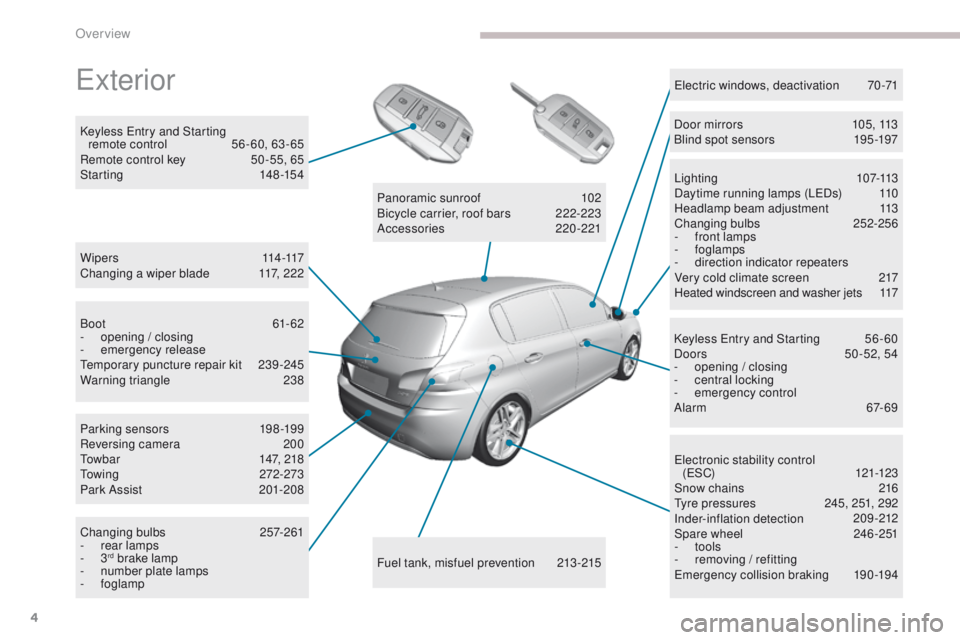
exterior
W i p e r s 114 -117
Changing a wiper blade 1 17, 222
Keyless
e
n
try and Starting
remote control
5
6 - 60, 63 - 65
Remote control key
5
0 -55, 65
Starting
1
48-154
ele
ctronic stability control
(
eS
C)
121-123
Snow chains
2
16
ty
re pressures
2
45, 251, 292
Inder-inflation detection
20
9-212
Spare wheel
2
46 -251
-
tools
-
r
emoving / refitting
em
ergency collision braking
1
90-194
Lighting
1
07-113
Daytime running lamps (L
eD
s)
1
10
Headlamp beam adjustment
1
13
Changing bulbs
2
52-256
-
f
ront lamps
- foglamps
- d irection indicator repeaters
Very cold climate screen
2
17
Heated windscreen and washer jets
1
17
el
ectric windows, deactivation
7
0-71
Keyless e
n
try and Starting
5
6 - 60
Doors
5
0 -52, 54
-
ope
ning / closing
-
c
entral locking
-
em
ergency control
Alarm
6
7-69
Fuel tank, misfuel prevention
2
13-215
Panoramic sunroof
1
02
Bicycle carrier, roof bars
2
22-223
Accessories
2
20-221
Boot
61-62
-
ope
ning / closing
-
em
ergency release
te
mporary puncture repair kit
2
39-245
Warning triangle
2
38
Parking sensors
1
98-199
Reversing camera
2
00
to
wbar
1
47, 218
to
wing
272-273
Park Assist
2
01-208
Changing bulbs
2
57-261
-
r
ear lamps
-
3
rd brake lamp
-
n
umber plate lamps
-
foglamp Door mirrors
1
05, 113
Blind spot sensors
1
95 -197
Over view
Page 12 of 392
10
308_en_Chap00c_eco-conduite_ed01-2016
Optimise the use of your gearbox
With a manual gearbox, move off gently and change up without waiting.
During acceleration change up early.
With an automatic or electronic gearbox, give preference to automatic
mode and avoid pressing the accelerator pedal heavily or suddenly.
Control the use of your electrical
equipment
Before moving off, if the passenger compartment is too warm, ventilate it
by opening the windows and air vents before using the air conditioning.
Above 30 mph (50 km/h), close the windows and leave the air vents
open.
Remember to make use of equipment that can help keep the
temperature in the passenger compartment down (sunroof and window
blinds...).
Switch off the air conditioning, unless it has automatic regulation, as
soon as the desired temperature is attained.
Switch off the demisting and defrosting controls, if not automatic.
Switch off the heated seat as soon as possible.
Switch off the headlamps and front foglamps when the level of light
does not require their use.
Avoid running the engine before moving off, particularly in winter; your
vehicle will warm up much faster while driving.
As a passenger, if you avoid connecting your multimedia devices
(film, music, video game...), you will contribute towards limiting the
consumption of electrical energy, and so of fuel.
Disconnect your portable devices before leaving the vehicle.
eco-driving
eco-driving is a range of everyday practices that allow the motorist to optimise their fuel consumption and CO2 emissions.
Drive smoothly
Maintain a safe distance between vehicles, use engine braking rather
than the brake pedal, and press the accelerator progressively. th ese
practices contribute towards a reduction in fuel consumption and
CO
2 emissions and also help to reduce the background traffic noise.
I
f your vehicle has cruise control, make use of the system at speeds
above 25 mph (40 km/h) when the traffic is flowing well.
th
e gear shift indicator invites you to engage the most suitable gear:
as soon as the indication is displayed in the instrument panel, follow it
straight away.
For vehicles fitted with an electronic or automatic gearbox, this
indicator appears only in manual mode.
eco-driving
Page 40 of 392
38
tr i p c o m p u t e r
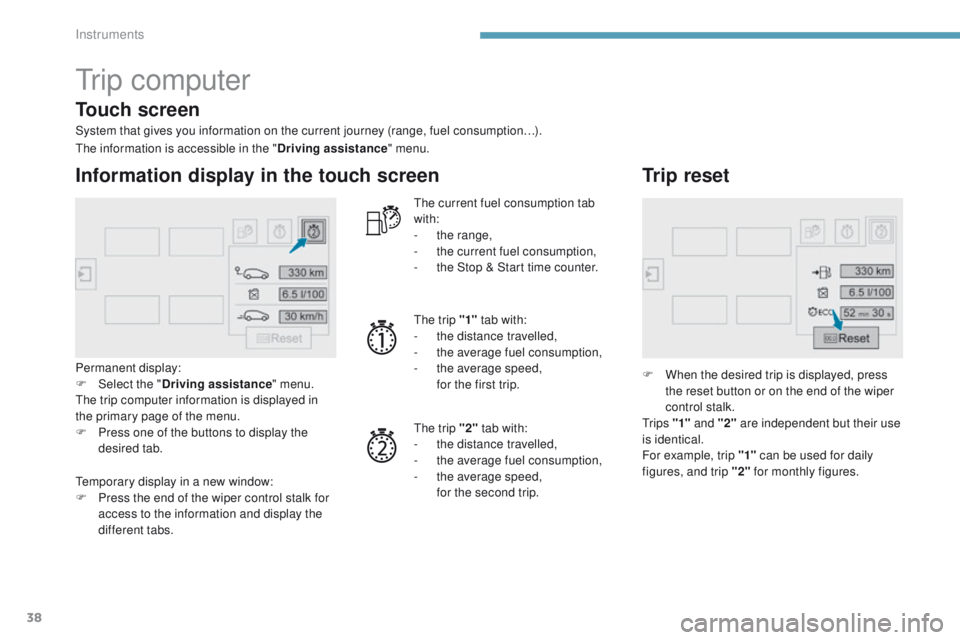
System that gives you information on the current journey (range, fuel consumption…).
Information display in the touch screen
Permanent display:
F Sel ect the " Driving assistance " menu.
th
e trip computer information is displayed in
the primary page of the menu.
F
P
ress one of the buttons to display the
desired tab.
th
e current fuel consumption tab
with:
-
t
he range,
-
t
he current fuel consumption,
-
t
he Stop & Start time counter.
th
e trip "1"
tab with:
-
t
he distance travelled,
- t he average fuel consumption,
- t he average speed,
f
or the first trip.
th
e trip "2" tab with:
-
t
he distance travelled,
-
t
he average fuel consumption,
-
t
he average speed,
f
or the second trip.
Trip reset
F When the desired trip is displayed, press the reset button or on the end of the wiper
control stalk.
t
r i p s "1" and "2" are independent but their use
is identical.
For example, trip "1" can be used for daily
figures, and trip "2" for monthly figures.
th
e information is accessible in the "
Driving assistance" menu.
te
mporary display in a new window:
F
P
ress the end of the wiper control stalk for
access to the information and display the
different tabs.
Touch screen
Instruments
Page 53 of 392
51
308_en_Chap02_ouvertures_ed01-2016
Selective unlocking
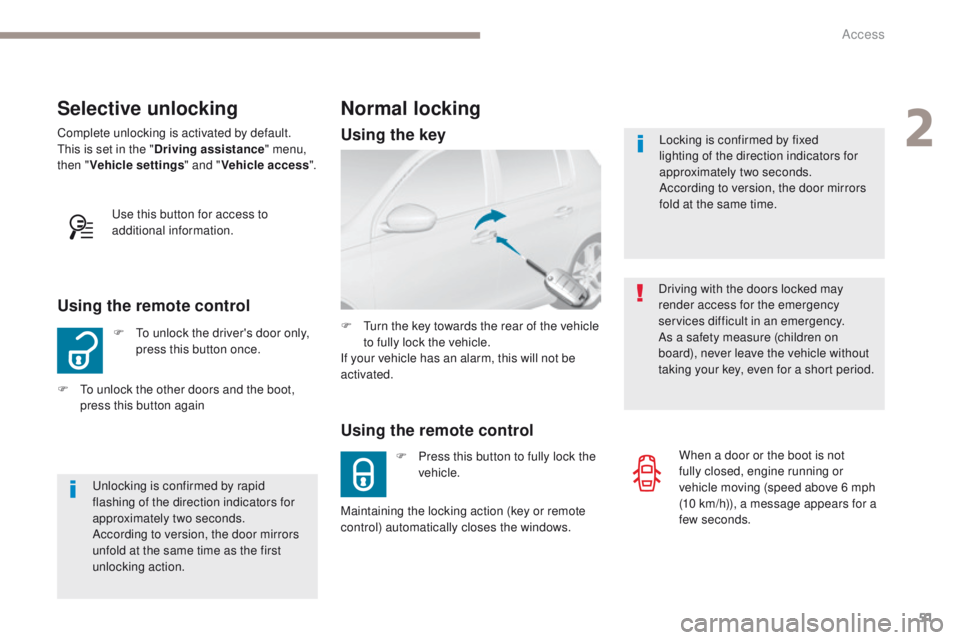
F to unlock the driver's door only, press this button once.
Using the remote control
Complete unlocking is activated by default.this is set in the " Driving assistance " menu,
then " Vehicle settings " and "Vehicle access ".
un
locking is confirmed by rapid
flashing of the direction indicators for
approximately two seconds.
According to version, the door mirrors
unfold at the same time as the first
unlocking action.
F
t
o u
nlock the other doors and the boot,
press this button again
us
e this button for access to
additional information. Locking is confirmed by fixed
lighting of the direction indicators for
approximately two seconds.
According to version, the door mirrors
fold at the same time.
Driving with the doors locked may
render access for the emergency
services difficult in an emergency.
As a safety measure (children on
board), never leave the vehicle without
taking your key, even for a short period.
Normal locking
Using the remote control
F Press this button to fully lock the vehicle.
F
t
u
rn the key towards the rear of the vehicle
to fully lock the vehicle.
If your vehicle has an alarm, this will not be
activated.
Maintaining the locking action (key or remote
control) automatically closes the windows. When a door or the boot is not
fully closed, engine running or
vehicle moving (speed above 6 mph
(10
km/h)), a message appears for a
few seconds.
Using the key
2
Access
Page 58 of 392
56
308_en_Chap02_ouvertures_ed01-2016
"Keyless entry and Starting" with remote control
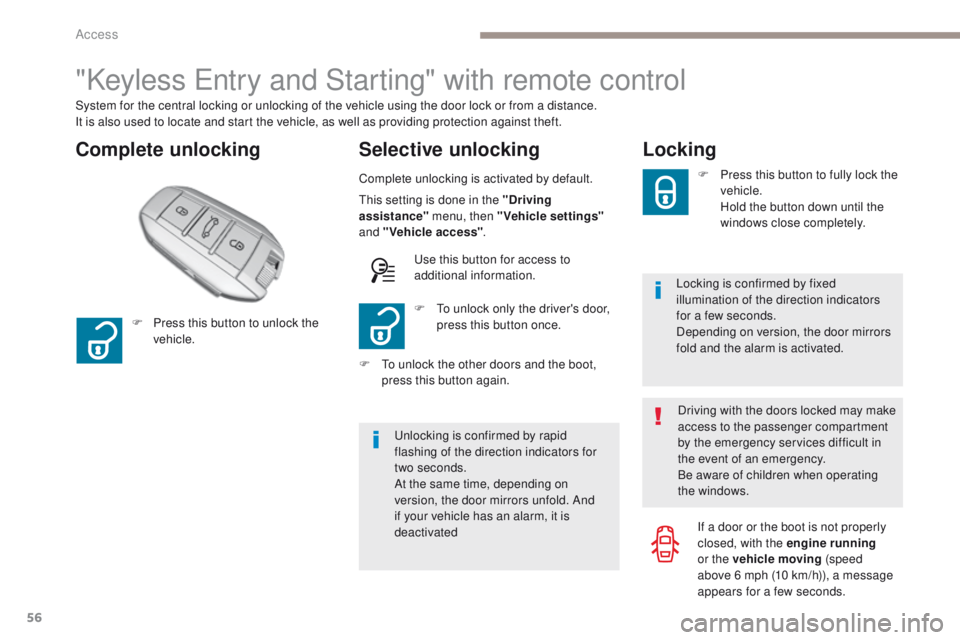
Complete unlocking Selective unlocking
System for the central locking or unlocking of the vehicle using the door lock or from a distance.
It is also used to locate and start the vehicle, as well as providing protection against theft.
Complete unlocking is activated by default.
un
locking is confirmed by rapid
flashing of the direction indicators for
two
seconds.
At the same time, depending on
version, the door mirrors unfold. And
if your vehicle has an alarm, it is
deactivated F
t
o u
nlock only the driver's door,
press this button once.
F
P
ress this button to unlock the
vehicle.
F
t
o u
nlock the other doors and the boot,
press this button again.
th
is setting is done in the "Driving
assistance" menu, then "Vehicle settings"
and "Vehicle access" .
us
e this button for access to
additional information.
Locking
Locking is confirmed by fixed
illumination of the direction indicators
for a few seconds.
Depending on version, the door mirrors
fold and the alarm is activated. F
P
ress this button to fully lock the
vehicle.
H
old the button down until the
windows close completely.
Driving with the doors locked may make
access to the passenger compartment
by the emergency services difficult in
the event of an emergency.
Be aware of children when operating
the windows. If a door or the boot is not properly
closed, with the engine running
or the vehicle moving (speed
above 6
mph (10 km/h)), a message
appears for a few seconds.
Access
Page 61 of 392
59
308_en_Chap02_ouvertures_ed01-2016
Locking
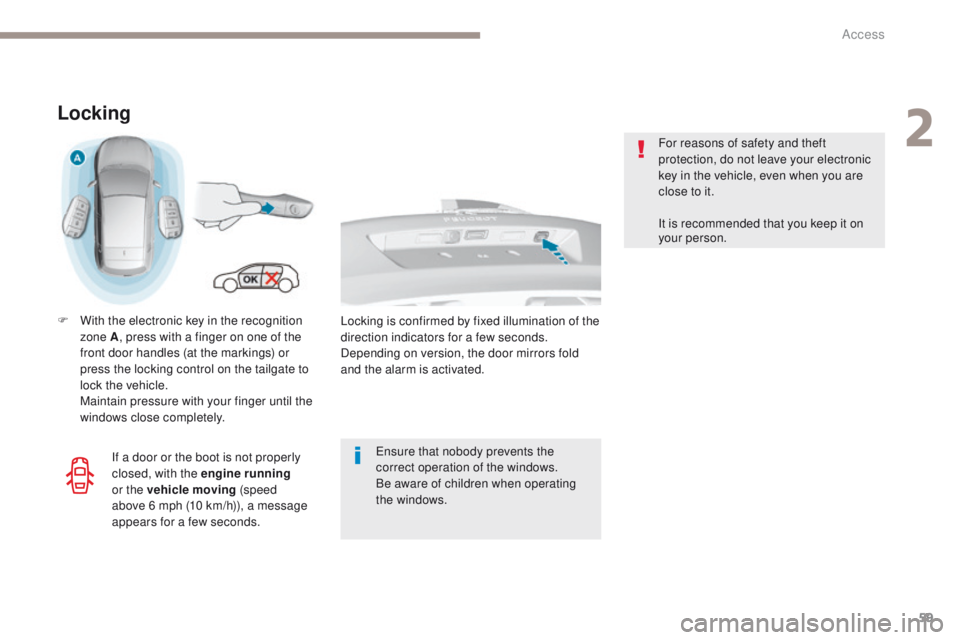
F With the electronic key in the recognition zone A , press with a finger on one of the
front door handles (at the markings) or
press the locking control on the tailgate to
lock the vehicle.
M
aintain pressure with your finger until the
windows close completely.
en
sure that nobody prevents the
correct operation of the windows.
Be aware of children when operating
the windows. For reasons of safety and theft
protection, do not leave your electronic
key in the vehicle, even when you are
close to it.
It is recommended that you keep it on
your person.
If a door or the boot is not properly
closed, with the engine running
or the vehicle moving (speed
above 6
mph (10 km/h)), a message
appears for a few seconds. Locking is confirmed by fixed illumination of the
direction indicators for a few seconds.
Depending on version, the door mirrors fold
and the alarm is activated.
2
Access
Page 62 of 392
60
308_en_Chap02_ouvertures_ed01-2016
Deadlocking
Deadlocking renders the exterior and
interior door controls inoperative.
It also deactivates the manual central
locking button.
You must therefore never leave
anyone inside the vehicle when it is
deadlocked.
Using the remote control
F Press this button to lock the vehicle completely.
Maintain pressure with your finger to
close the windows.
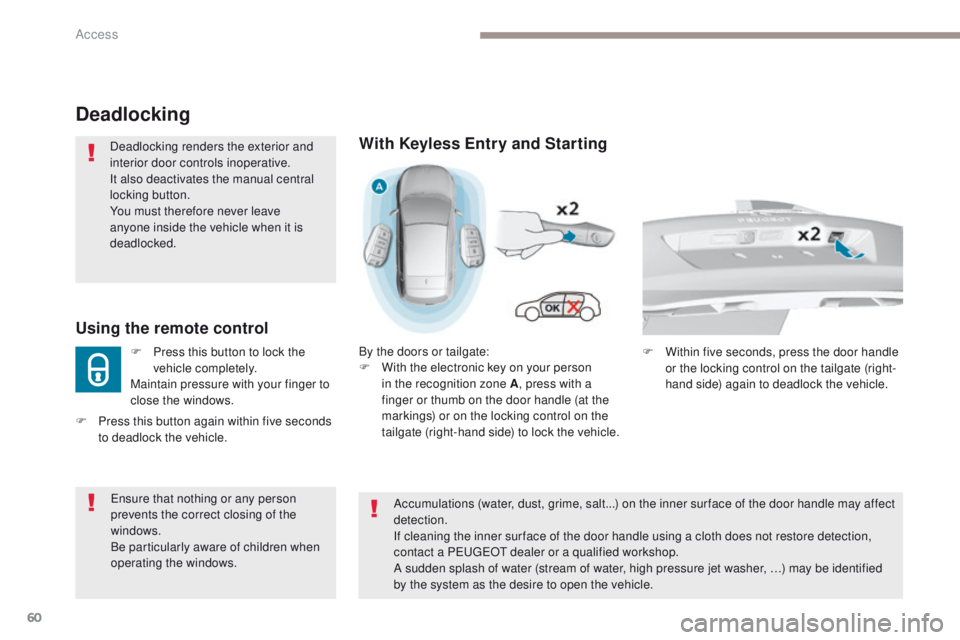
With Keyless Entry and Starting
By the doors or tailgate:
F W ith the electronic key on your person
in the recognition zone A , press with a
finger or thumb on the door handle (at the
markings) or on the locking control on the
tailgate (right-hand side) to lock the vehicle.
en
sure that nothing or any person
prevents the correct closing of the
windows.
Be particularly aware of children when
operating the windows.
F
P
ress this button again within five seconds
to deadlock the vehicle.
Accumulations (water, dust, grime, salt...) on the inner sur face of the door handle may affect
detection.
If cleaning the inner sur face of the door handle using a cloth does not restore detection,
contact a P
e
uge
Ot
dealer or a qualified workshop.
A sudden splash of water (stream of water, high pressure jet washer, …) may be identified
by the system as the desire to open the vehicle. F
W ithin five seconds, press the door handle
or the locking control on the tailgate (right-
hand side) again to deadlock the vehicle.
Access
Page 69 of 392
67
308_en_Chap02_ouvertures_ed01-2016
F Lock the vehicle using the "Keyless en try
and Starting" system.
Locking the vehicle with full
alarm system
Activation
F Lock the vehicle using the remote control.
or
th
e monitoring system is active: the indicator
lamp in the button flashes once per second
and the direction indicators come on for about
2 seconds.
After an instruction to lock the vehicle using
the remote control or the Keyless
e
n
try
and Starting system, the exterior perimeter
monitoring is activated after a delay of
5
seconds, the interior volumetric monitoring
after 45 seconds.
If an opening (door, boot, bonnet...) is not
closed fully, the vehicle is not locked but
monitoring will be activated after a delay of
45
seconds.
F
Switch off the ignition and get out of the vehicle.
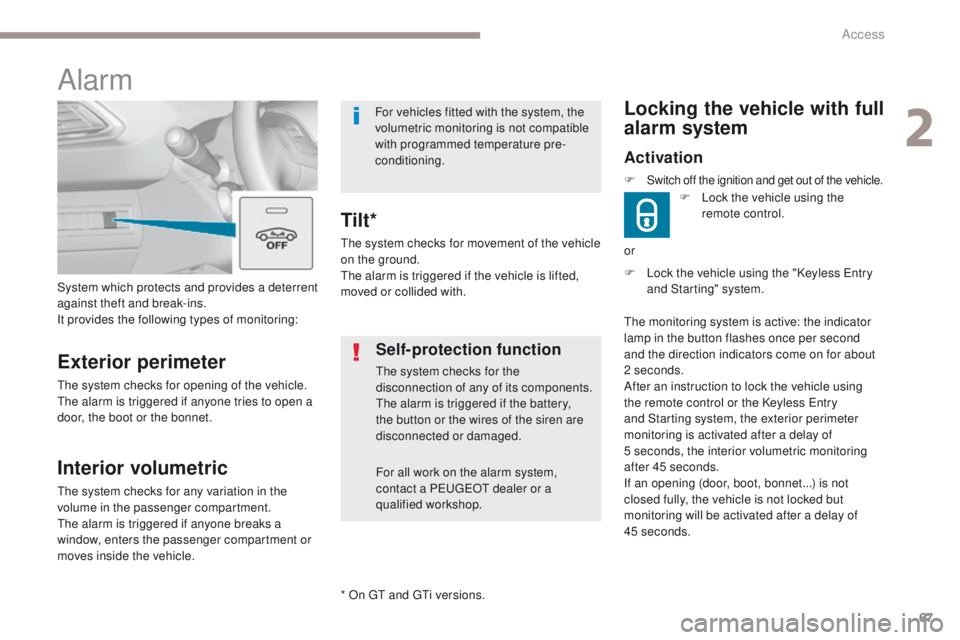
System which protects and provides a deterrent
against theft and break-ins.
It provides the following types of monitoring:
Alarm
Exterior perimeter
the system checks for opening of the vehicle.th
e alarm is triggered if anyone tries to open a
door, the boot or the bonnet.
Self-protection function
the system checks for the
disconnection of any of its components.
th
e alarm is triggered if the battery,
the button or the wires of the siren are
disconnected or damaged.
For all work on the alarm system,
contact a P
e
uge
Ot
dealer or a
qualified workshop.
Interior volumetric
the system checks for any variation in the
volume in the passenger compartment.
th
e alarm is triggered if anyone breaks a
window, enters the passenger compartment or
moves inside the vehicle.
th
e system checks for movement of the vehicle
on the ground.
th
e alarm is triggered if the vehicle is lifted,
moved or collided with.
Tilt*
For vehicles fitted with the system, the
volumetric monitoring is not compatible
with programmed temperature pre-
conditioning.
* On
gt and gt
i v
ersions.
2
Access
Page 70 of 392
68
308_en_Chap02_ouvertures_ed01-2016
Deactivation
F Press this unlocking button on the remote control.
or
F
u
n
lock the vehicle using the "Keyless e
n
try
and Starting" system.
If the vehicle self-locks automatically
(occurs after 30 seconds if a door or
the boot is not opened), the monitoring
system is not reactivated automatically.
to r
eactivate the system, it is necessary
to unlock and then lock the vehicle
again, using the remote control or the
"Keyless
e
n
try and Starting" system.
th
e monitoring system is deactivated: the
indicator lamp in the button goes off and the
direction indicators flash for about 2 seconds.
Locking the vehicle with exterior perimeter monitoring
only
Deactivate the interior volumetric monitoring
(and tilt monitoring if your vehicle has it) to
avoid unwanted triggering of the alarm in
certain cases such as:
-
o
ccupant(s) present in the vehicle,
-
l
eaving a window partially open,
-
w
ashing your vehicle,
-
c
hanging a wheel,
-
t
owing your vehicle,
-
t
ransport on a ferry.Deactivating the volumetric
monitoring
the tilt alarm is deactivated as well, if your
vehicle has it. F
S
witch of the ignition and within
ten seconds press this button
until its indicator lamp is on fixed.
F
g
e
t out of the vehicle.F
I
mmediately lock the vehicle
using the remote control or the
"Keyless
e
n
try and Starting"
system.
Only the exterior perimeter protection system is
active: the indicator lamp in the button flashes
once per second.
to b
e taken into account, this deactivation must
be done every time the ignition is switched off.
Access