wiper Peugeot 308 2017 Owner's Manual
[x] Cancel search | Manufacturer: PEUGEOT, Model Year: 2017, Model line: 308, Model: Peugeot 308 2017Pages: 392, PDF Size: 10.16 MB
Page 4 of 392
.
.
308_en_Chap00a_sommaire_ed01-2016
Over view
Instrument panel 12
Indicator and warning lamps
1
3
ga
uges and indicators
2
8
Distance recorders
3
5
tr
ip computer
3
7
to
uch screen
4
0
Setting the date and time
4
7Remote control key
5
0
"Keyless e
n
try and Starting" with remote
control 56
"Keyless e
n
try and Starting"
5
8
Boot
61
Alarm
6
7
el
ectric windows
7
0
P
e
uge
Ot
i- Cockpit
7
2
Steering wheel adjustment
7
2
Front seats
7
3
Rear seats (hatchback)
7
9
Rear seats (SW)
8
0
Interior fittings 8 2
Front armrest
8
4
Boot fittings (hatchback)
87
B
oot fittings (SW)
8
8
Heating and Ventilation
9
1
Manual air conditioning
9
3
Manual air conditioning (
to
uch screen)
9
4
Dual-zone digital air conditioning (
to
uch screen)
9
5
Front demist - defrost
1
00
Rear screen demist - defrost
1
01
Panoramic sunroof
1
02
Courtesy lamps
1
03
Interior mood lighting
1
04Mirrors
105
Lighting control stalk
1
07
Daytime running lamps
1
10
Automatic illumination of headlamps
1
11
Direction indicators
1
12
Side spotlamps
1
13
Headlamp beam height adjustment
1
13
Wiper control stalk
1
14
Automatic rain sensitive wipers
1
16
Hazard warning lamps
1
18em
ergency or assistance 1 19
H or n 121
el
ectronic stability control (
e
SC)
1
21
Seat belts
1
24
Airbags
127
Carrying children
1
31
Deactivating the passenger front airbag
1
34
ISOFIX mountings and child seats
1
40
Child lock
1
44
eco-driving
In struments Access
ea
se of use and comfort Lighting and visibility
Safety
Contents
Page 5 of 392
.
308_en_Chap00a_sommaire_ed01-2016
Driving recommendations 146
Starting-switching off the engine
1
48
Manual parking brake
1
54
el
ectric parking brake
1
55
Hill start assist
1
62
5-speed manual gearbox
1
63
6-speed manual gearbox
1
63
ge
ar shift indicator
1
64
Automatic gearbox
1
65
Dynamic pack (Driver Sport Pack)
1
69
Stop & Start
1
70
Memorising speeds
1
73
Speed limiter
1
74
Cruise control
1
77
Dynamic cruise control
1
80
Display of inter-vehicle time
1
87
em
ergency collision alert system,
emergency collision braking system
1
90
Blind spot monitoring system
1
95
Parking sensors
1
98
Reversing camera
2
00
Park Assist
2
01
Under-inflation detection
20
9Fuel tank
2 13
Diesel misfuel prevention
2
14
Snow chains
2
16
Very cold climate screen
2
17
to
wing a trailer
2
18
en
ergy economy mode
2
19
Accessories
2
20
Changing a wiper blade
2
22
Fitting roof bars
2
23
Bonnet
2
25
Petrol engine
2
26
Diesel engine
2
27
Checking levels
2
28
Checks
231
AdBlue
® and SCR system
(BlueHDi Diesel) 23 3
Warning triangle (stowing)
238
te
mporary puncture
repair kit
2
39
Spare wheel
2
46
Changing a bulb
2
52
Changing a fuse
2
62
12 V battery
2
68
to
w i n g
2 7 2
Running out of fuel (Diesel)
2
74Petrol engines
2
75
Petrol weights
2
78
Diesel engines
2
81
Diesel weights
2
85
Dimensions
2
89
Identification markings
2
92
Driving
Practical information
In the event of a breakdownte chnical data
DeNON equipment 2 93
7-inch touch screen
2
95
Peugeot Connect Sound (RD5)
3
59
Audio equipment and telematics
Alphabetical index
Contents
Page 6 of 392
4
308_en_Chap00b_vue-densemble_ed01-2016
exterior
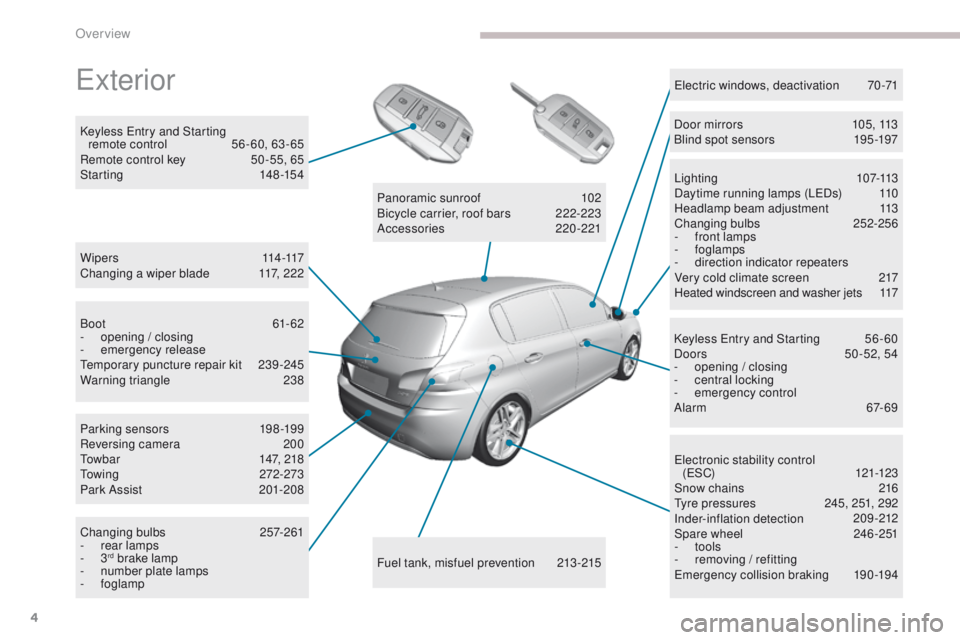
W i p e r s 114 -117
Changing a wiper blade 1 17, 222
Keyless
e
n
try and Starting
remote control
5
6 - 60, 63 - 65
Remote control key
5
0 -55, 65
Starting
1
48-154
ele
ctronic stability control
(
eS
C)
121-123
Snow chains
2
16
ty
re pressures
2
45, 251, 292
Inder-inflation detection
20
9-212
Spare wheel
2
46 -251
-
tools
-
r
emoving / refitting
em
ergency collision braking
1
90-194
Lighting
1
07-113
Daytime running lamps (L
eD
s)
1
10
Headlamp beam adjustment
1
13
Changing bulbs
2
52-256
-
f
ront lamps
- foglamps
- d irection indicator repeaters
Very cold climate screen
2
17
Heated windscreen and washer jets
1
17
el
ectric windows, deactivation
7
0-71
Keyless e
n
try and Starting
5
6 - 60
Doors
5
0 -52, 54
-
ope
ning / closing
-
c
entral locking
-
em
ergency control
Alarm
6
7-69
Fuel tank, misfuel prevention
2
13-215
Panoramic sunroof
1
02
Bicycle carrier, roof bars
2
22-223
Accessories
2
20-221
Boot
61-62
-
ope
ning / closing
-
em
ergency release
te
mporary puncture repair kit
2
39-245
Warning triangle
2
38
Parking sensors
1
98-199
Reversing camera
2
00
to
wbar
1
47, 218
to
wing
272-273
Park Assist
2
01-208
Changing bulbs
2
57-261
-
r
ear lamps
-
3
rd brake lamp
-
n
umber plate lamps
-
foglamp Door mirrors
1
05, 113
Blind spot sensors
1
95 -197
Over view
Page 18 of 392
16
Warning / indicator lamp State Cause Action / Observations
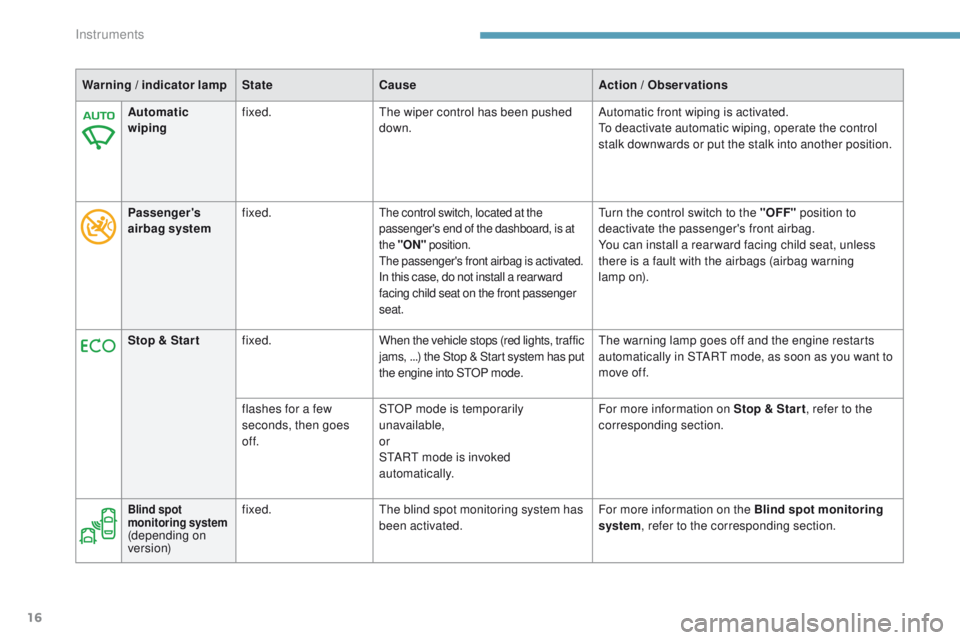
Automatic
wiping fixed.
th
e wiper control has been pushed
down. Automatic front wiping is activated.
to d
eactivate automatic wiping, operate the control
stalk downwards or put the stalk into another position.
Passenger 's
airbag system fixed.
the control switch, located at the
passenger's end of the dashboard, is at
the
"ON " position.
the
passenger's front airbag is activated.
In this case, do not install a rear ward
facing child seat on the front passenger
seat.
turn the control switch to the " OFF" position to
deactivate the passenger's front airbag.
You can install a rear ward facing child seat, unless
there is a fault with the airbags (airbag warning
lamp
on).
Stop & Star t fixed. When the vehicle stops (red lights, traffic
jams,
...) the Stop & Start system has put
the engine into S
tO
P mode.
th
e warning lamp goes off and the engine restarts
automatically in S
tA
R
t
mode, as soon as you want to
move off.
flashes for a few
seconds, then goes
of f. S
tO
P mode is temporarily
unavailable,
or
S
tA
R
t
mode is invoked
automatically. For more information on Stop & Star t
, refer to the
corresponding section.
Blind spot
monitoring system
(depending on
ve r s i o n) fixed.
th
e blind spot monitoring system has
been activated. For more information on the Blind spot monitoring
system, refer to the corresponding section.
Instruments
Page 39 of 392
37
308_en_Chap01_instruments-de-bord_ed01-2016
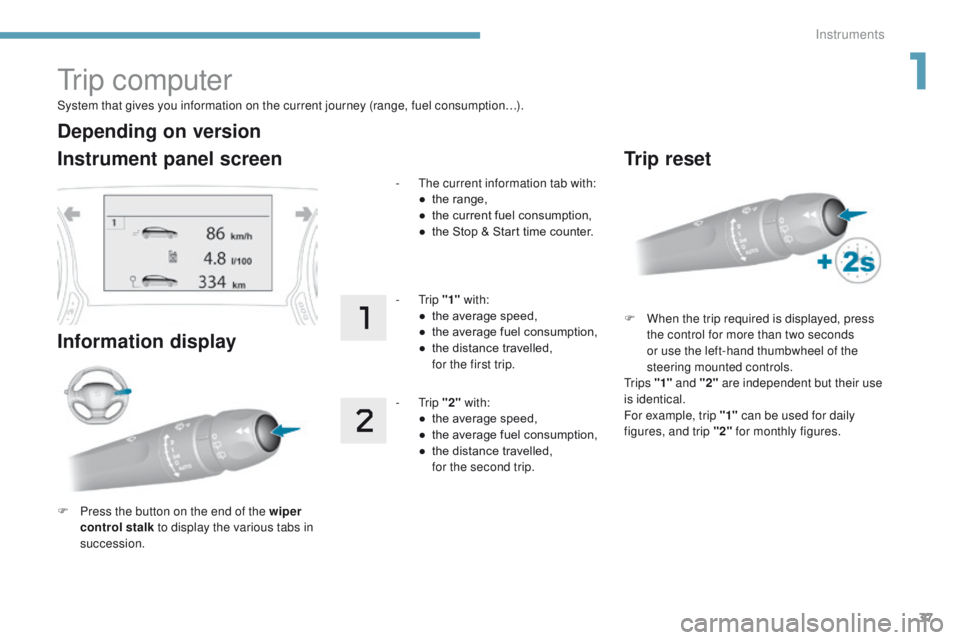
System that gives you information on the current journey (range, fuel consumption…).
tr i p c o m p u t e r
Instrument panel screen
Information display
F Press the button on the end of the wiper control stalk to display the various tabs in
succession. -
t
h
e current information tab with:
●
t
he range,
●
t
he current fuel consumption,
●
t
he Stop & Start time counter.
- t
r
ip
"1" with:
●
t
he average speed,
●
t
he average fuel consumption,
●
t
he distance travelled,
f
or the first trip.
- t
r
ip
"2" with:
●
t
he average speed,
●
t
he average fuel consumption,
●
t
he distance travelled,
f
or the second trip.
Depending on version
Trip reset
F When the trip required is displayed, press the control for more than two seconds
or use the left-hand thumbwheel of the
steering mounted controls.
t
r i p s "1" and "2" are independent but their use
is identical.
For example, trip "1" can be used for daily
figures, and trip "2" for monthly figures.
1
Instruments
Page 40 of 392
38
tr i p c o m p u t e r
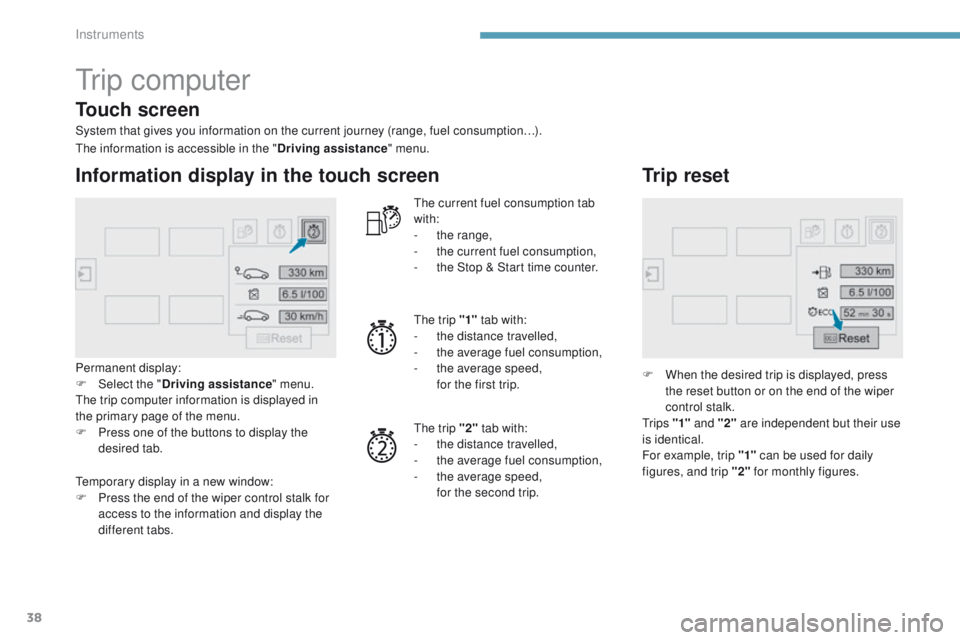
System that gives you information on the current journey (range, fuel consumption…).
Information display in the touch screen
Permanent display:
F Sel ect the " Driving assistance " menu.
th
e trip computer information is displayed in
the primary page of the menu.
F
P
ress one of the buttons to display the
desired tab.
th
e current fuel consumption tab
with:
-
t
he range,
-
t
he current fuel consumption,
-
t
he Stop & Start time counter.
th
e trip "1"
tab with:
-
t
he distance travelled,
- t he average fuel consumption,
- t he average speed,
f
or the first trip.
th
e trip "2" tab with:
-
t
he distance travelled,
-
t
he average fuel consumption,
-
t
he average speed,
f
or the second trip.
Trip reset
F When the desired trip is displayed, press the reset button or on the end of the wiper
control stalk.
t
r i p s "1" and "2" are independent but their use
is identical.
For example, trip "1" can be used for daily
figures, and trip "2" for monthly figures.
th
e information is accessible in the "
Driving assistance" menu.
te
mporary display in a new window:
F
P
ress the end of the wiper control stalk for
access to the information and display the
different tabs.
Touch screen
Instruments
Page 45 of 392
43
308_en_Chap01_instruments-de-bord_ed01-2016
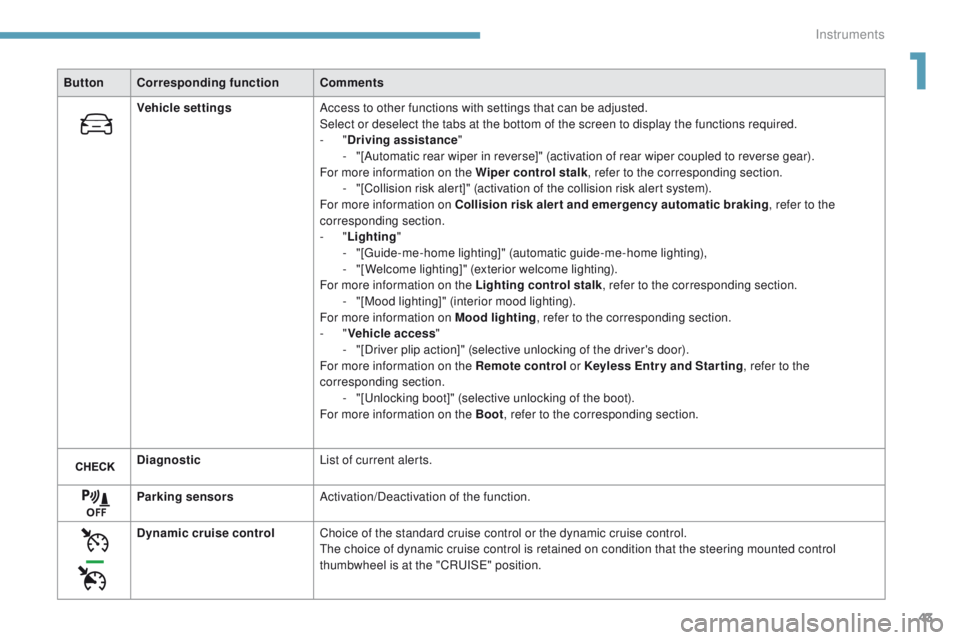
ButtonCorresponding function Comments
Vehicle settings Access to other functions with settings that can be adjusted.
Select or deselect the tabs at the bottom of the screen to display the functions required.
-
"Driving assistance "
-
"
[Automatic rear wiper in reverse]" (activation of rear wiper coupled to reverse gear).
For more information on the Wiper control stalk , refer to the corresponding section.
-
"
[Collision risk alert]" (activation of the collision risk alert system).
For more information on Collision risk alert and emergency automatic braking , refer to the
corresponding section.
-
"Lighting "
-
"
[
gu
ide-me-home lighting]" (automatic guide-me-home lighting),
-
"
[Welcome lighting]" (exterior welcome lighting).
For more information on the Lighting control stalk , refer to the corresponding section.
-
"
[Mood lighting]" (interior mood lighting).
For more information on Mood lighting , refer to the corresponding section.
-
"Vehicle access "
-
"
[Driver plip action]" (selective unlocking of the driver's door).
For more information on the Remote control or Keyless Entr y and Star ting, refer to the
corresponding section. -
"
[
un
locking boot]" (selective unlocking of the boot).
For more information on the Boot , refer to the corresponding section.
Diagnostic List of current alerts.
Parking sensors Activation/Deactivation of the function.
Dynamic cruise control Choice of the standard cruise control or the dynamic cruise control.
th
e choice of dynamic cruise control is retained on condition that the steering mounted control
thumbwheel is at the "CR
uI
S
e" p
osition.
1
Instruments
Page 113 of 392
111
308_en_Chap04_eclairage-et-visibilite_ed01-2016
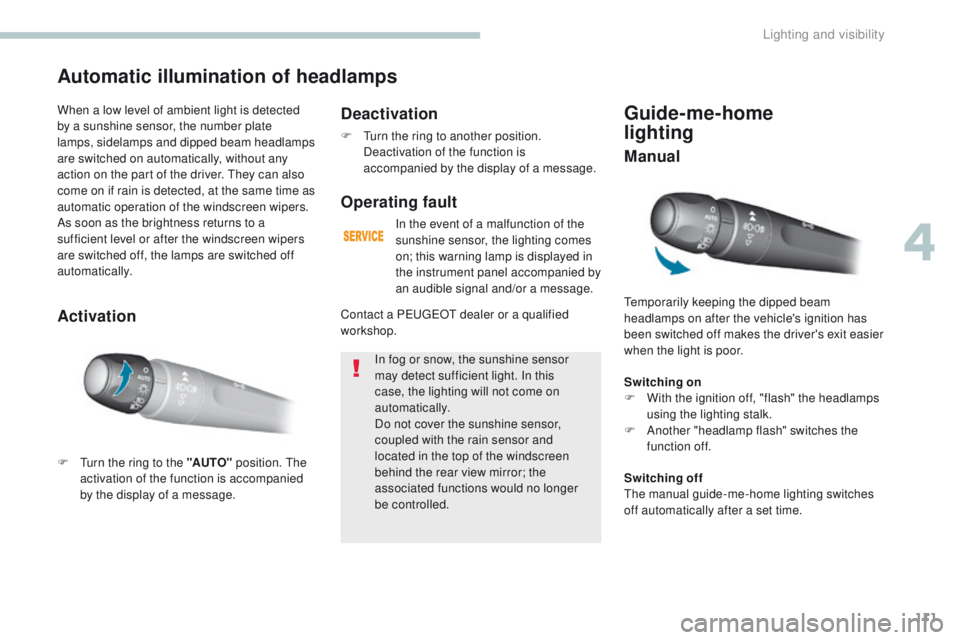
Guide-me-home
lighting
temporarily keeping the dipped beam
headlamps on after the vehicle's ignition has
been switched off makes the driver's exit easier
when the light is poor.
Switching on
F
W
ith the ignition off, "flash" the headlamps
using the lighting stalk.
F
A
nother "headlamp flash" switches the
function off.
Automatic illumination of headlamps
F turn the ring to the "AUTO" position. th e
activation of the function is accompanied
by the display of a message.
When a low level of ambient light is detected
by a sunshine sensor, the number plate
lamps,
sidelamps and dipped beam headlamps
are switched on automatically, without any
action on the part of the driver. t
h
ey can also
come on if rain is detected, at the same time as
automatic operation of the windscreen wipers.
As soon as the brightness returns to a
sufficient level or after the windscreen wipers
are switched off, the lamps are switched off
automatically.
Deactivation
F turn the ring to another position. Deactivation of the function is
accompanied by the display of a message.
Operating fault
In the event of a malfunction of the
sunshine sensor, the lighting comes
on; this warning lamp is displayed in
the instrument panel accompanied by
an audible signal and/or a message.
In fog or snow, the sunshine sensor
may detect sufficient light. In this
case, the lighting will not come on
automatically.
Do not cover the sunshine sensor,
coupled with the rain sensor and
located in the top of the windscreen
behind the rear view mirror; the
associated functions would no longer
be controlled.
Contact a P
e
uge
Ot
dealer or a qualified
workshop.
Activation Manual
Switching offth
e manual guide-me-home lighting switches
off automatically after a set time.
4
Lighting and visibility
Page 116 of 392
114
308_en_Chap04_eclairage-et-visibilite_ed01-2016
Wiper control stalk
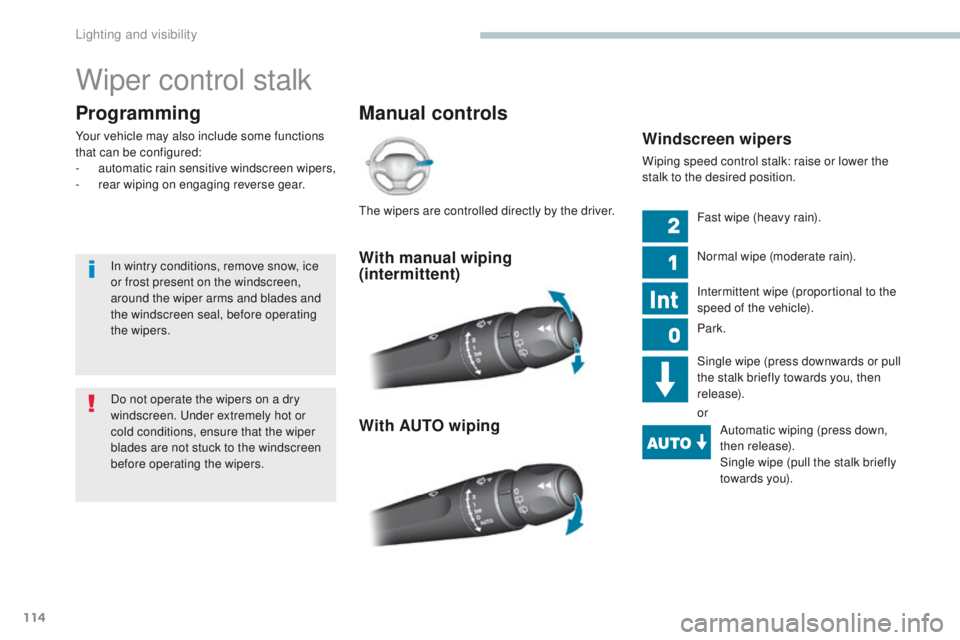
Manual controls
Programming
Your vehicle may also include some functions
that can be configured:
-
a
utomatic rain sensitive windscreen wipers,
-
r
ear wiping on engaging reverse gear.Windscreen wipers
Wiping speed control stalk: raise or lower the
stalk to the desired position.
With manual wiping
(intermittent)
With AUTO wiping
Fast wipe (heavy rain).
Normal wipe (moderate rain).
Intermittent wipe (proportional to the
speed of the vehicle).
Park.
Single wipe (press downwards or pull
the stalk briefly towards you, then
release).
orAutomatic wiping (press down,
then release).
Single wipe (pull the stalk briefly
towards you).
Do not operate the wipers on a dry
windscreen.
u
n
der extremely hot or
cold conditions, ensure that the wiper
blades are not stuck to the windscreen
before operating the wipers.
In wintry conditions, remove snow, ice
or frost present on the windscreen,
around the wiper arms and blades and
the windscreen seal, before operating
the wipers.th
e wipers are controlled directly by the driver.
Lighting and visibility
Page 117 of 392
115
308_en_Chap04_eclairage-et-visibilite_ed01-2016
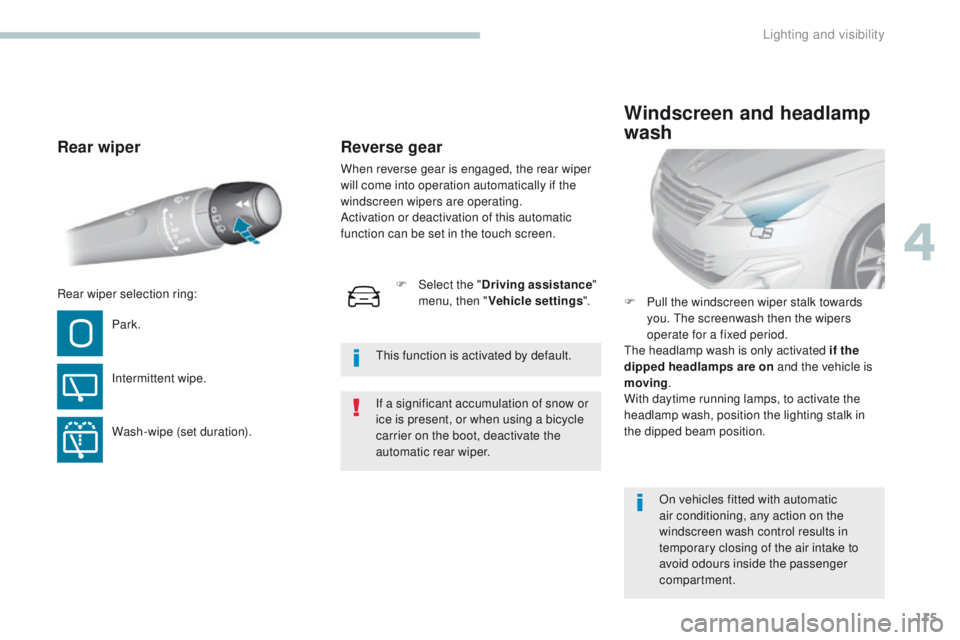
Rear wiper
Park.
Intermittent wipe.
Wash-wipe (set duration).F
P
ull the windscreen wiper stalk towards
you. the screenwash then the wipers
operate for a fixed period.
th
e headlamp wash is only activated if the
dipped headlamps are on and the vehicle is
moving .
With daytime running lamps, to activate the
headlamp wash, position the lighting stalk in
the dipped beam position.
Windscreen and headlamp
wash
On vehicles fitted with automatic
air conditioning, any action on the
windscreen wash control results in
temporary closing of the air intake to
avoid odours inside the passenger
compartment.
Rear wiper selection ring:
If a significant accumulation of snow or
ice is present, or when using a bicycle
carrier on the boot, deactivate the
automatic rear wiper.
th
is function is activated by default.
F
Sel
ect the "
Driving assistance "
menu, then " Vehicle settings ".
Reverse gear
When reverse gear is engaged, the rear wiper
will come into operation automatically if the
windscreen wipers are operating.
Activation or deactivation of this automatic
function can be set in the touch screen.
4
Lighting and visibility