audio PEUGEOT 308 2017 User Guide
[x] Cancel search | Manufacturer: PEUGEOT, Model Year: 2017, Model line: 308, Model: Peugeot 308 2017Pages: 566, PDF Size: 16.05 MB
Page 292 of 566
290
3008-2_en_Chap07_infos-pratiques_ed01-2016
Load reduction modeEnergy economy mode
Switching to economy mode
A message appears in the instrument panel
screen indicating that the vehicle has switched
to economy mode and the active functions are
put on standby.
Exiting economy mode
These functions are reactivated automatically
next time the vehicle is driven.
In order to restore the use of these functions
immediately, start the engine and let it run:
-
f
or less than ten minutes, to use the
equipment for approximately five minutes,
-
f
or more than ten minutes, to use the
equipment for up to approximately
thirty
minutes.
Let the engine run for the duration specified to
ensure that the battery charge is sufficient.
Do not repeatedly and continuously restart the
engine in order to charge the battery.
System which manages the use of certain
functions according to the level of charge
remaining in the battery.
When the vehicle is being driven, the load
reduction function temporarily deactivates
certain functions, such as the air conditioning,
the heated rear screen...
The deactivated functions are reactivated
automatically as soon as conditions permit.
System which manages the duration of use of certain functions to conserve a sufficient level of
charge in the battery.
After the engine has stopped, you can still use functions such as the audio and telematics
system,
windscreen wipers, dipped beam headlamps, courtesy lamps, etc. for a maximum
combined duration of about forty minutes.
A flat battery prevents the engine from
starting.
For more information on the 12 V
battery, refer to the corresponding
section.
If a telephone call is being made at this
time, it will be maintained for around
10
minutes with the Bluetooth hands-
free system of your audio system.
Practical information
Page 335 of 566
333
3008-2_en_Chap08_en cas-de-panne_ed01-2016
Starting using another battery
F Start the engine of the vehicle with the good battery and leave it running for a
few
minutes.
F
O
perate the starter on the broken down
vehicle and let the engine run.
I
f the engine does not start straight away,
switch off the ignition and wait a few
moments before trying again.
F
W
ait until the engine returns to idle then
disconnect the jump lead cables in the
reverse order.
F
R
efit the plastic cover to the (+) terminal,
if
your vehicle has one.
F
A
llow the engine to run for at least
30
minutes, by driving or with the vehicle
stationary, so that the battery reaches an
adequate state of charge.
When your vehicle's battery is discharged, the
engine can be started using a slave battery
(external or on another vehicle) and jump lead
cables or a battery booster.
Never try to start the engine by
connecting a battery charger.
Never use a 24 V or higher battery
b o o s t e r.
First check that the slave battery has a
nominal voltage of 12 V and a capacity
at least equal to that of the discharged
battery.
The two vehicles must not be in contact
with each other.
Switch off the electrical consumers on
both vehicles (audio system, wipers,
lighting, ...).
Ensure that the jump lead cables do
not pass close to moving parts of the
engine (cooling fan, belts, ...).
Do not disconnect the (+) terminal when
the engine is running. F
R
aise the plastic cover on the (+) terminal,
if your vehicle has one.
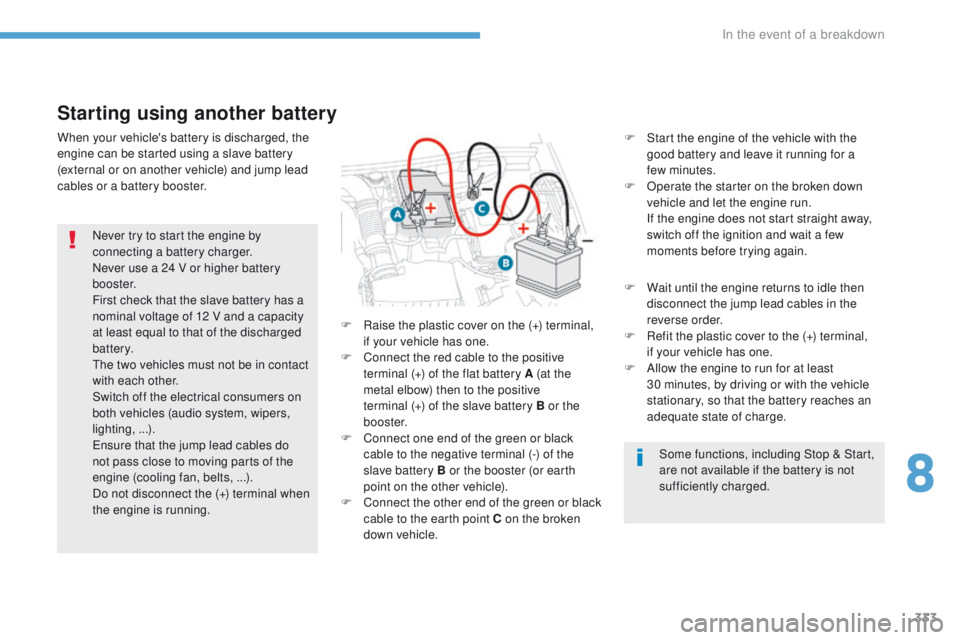
F
C
onnect the red cable to the positive
terminal (+) of the flat battery A (at
the
metal elbow) then to the positive
terminal
(+) of the slave battery B or the
b o o s t e r.
F
C
onnect one end of the green or black
cable to the negative terminal (-) of the
slave battery B or the booster (or earth
point on the other vehicle).
F
C
onnect the other end of the green or black
cable to the earth point C on the broken
down vehicle. Some functions, including Stop & Start,
are not available if the battery is not
sufficiently charged.
8
In the event of a breakdown
Page 336 of 566
334
3008-2_en_Chap08_en cas-de-panne_ed01-2016
Charging the battery using a battery charger
For optimum service life of the battery, it is
essential to maintain an adequate state of
charge.
In some circumstances it may be necessary to
charge the battery:
-
i
f you use your vehicle essentially for short
journeys,
-
i
f the vehicle is to be taken off the road for
several weeks.
Contact a PEUGEOT dealer or a qualified
workshop. F
S
witch off the ignition.
F
S
witch off all electrical consumers (audio
system, lighting, wipers, ...).
F
S
witch off the charger B before connecting
the cables to the battery, so as to avoid any
dangerous sparks.
F
E
nsure that the charger cables are in good
condition.
F
R
aise the plastic cover, if your vehicle has
one, on the (+) terminal.
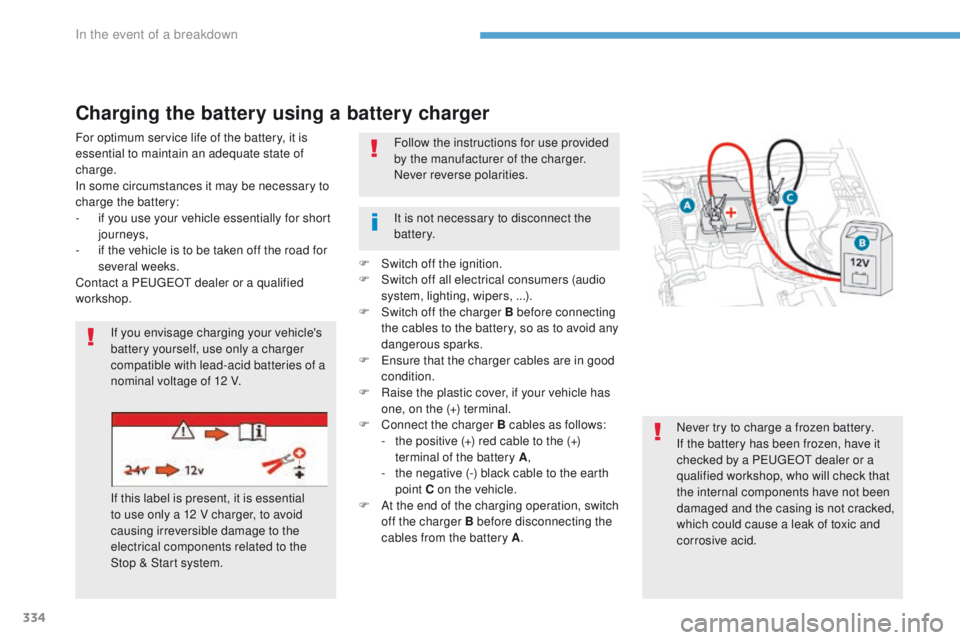
F
C
onnect the charger B cables as follows:
-
t
he positive (+) red cable to the (+)
terminal of the battery A ,
-
t
he negative (-) black cable to the earth
point C on the vehicle.
F
A
t the end of the charging operation, switch
off the charger B before disconnecting the
cables from the battery A .
If you envisage charging your vehicle's
battery yourself, use only a charger
compatible with lead-acid batteries of a
nominal voltage of 12 V.
If this label is present, it is essential
to use only a 12 V charger, to avoid
causing irreversible damage to the
electrical components related to the
Stop & Start system. Follow the instructions for use provided
by the manufacturer of the charger.
Never reverse polarities.
Never try to charge a frozen battery.
If the battery has been frozen, have it
checked by a PEUGEOT dealer or a
qualified workshop, who will check that
the internal components have not been
damaged and the casing is not cracked,
which could cause a leak of toxic and
corrosive acid.
It is not necessary to disconnect the
battery.
In the event of a breakdown
Page 337 of 566
335
3008-2_en_Chap08_en cas-de-panne_ed01-2016
Disconnecting the battery
The Stop & Start system may not be
operational during the trip following the
first engine start.
In this case, the system will only be
available again after a continuous
period of immobilisation of the vehicle,
a period which depends on the ambient
temperature and the state of charge of
the battery (up to about 8 hours).
In order to maintain an adequate state of charge
for starting the engine, it is recommended that
the battery be disconnected if the vehicle is
taken out of service for a long period.
Before disconnecting the battery:
F
c
lose all openings (doors, tailgate, windows,
sunroof),
F
s
witch off all electrical consumers (audio
system, wipers, lighting, ...),
F
s
witch off the ignition and wait for
four
minutes.
At the battery, it is only necessary to disconnect
the (+) terminal.
Following reconnection of the
battery
After reconnecting the battery, switch on the
ignition and wait 1 minute before starting to
allow initialisation of the electronic systems.
However, if minor problems persist following
this operation, contact a PEUGEOT dealer or a
qualified workshop.
Referring to the corresponding section, you
must yourself initialise or reset certain systems,
such as:
-
t
he remote control or electronic key
(depending on version),
-
t
he sunroof and its electric blind,
-
t
he electric windows,
-
t
he date and time,
-
t
he radio preset stations.
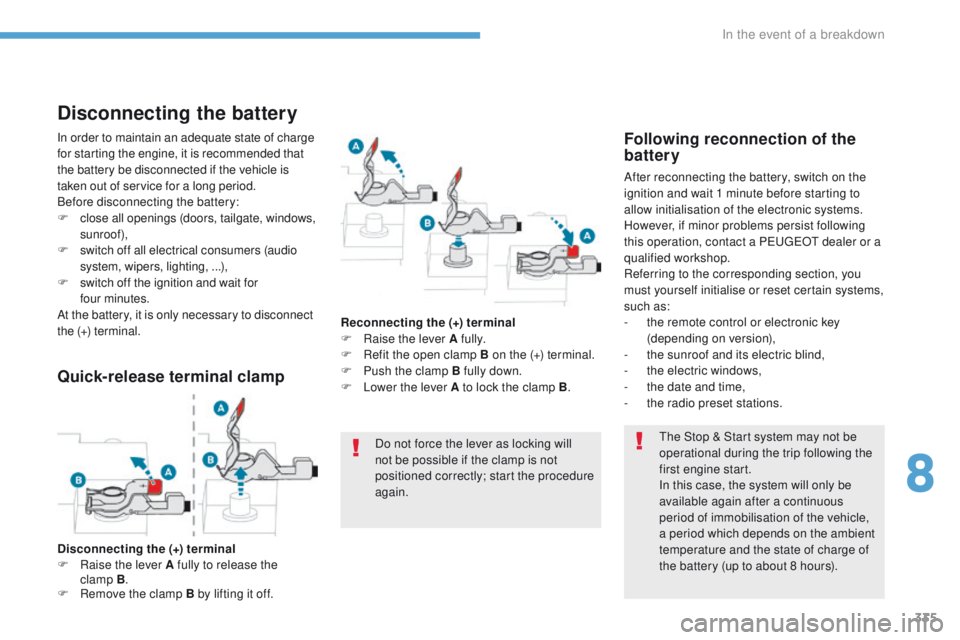
Quick-release terminal clamp
Disconnecting the (+) terminal
F Ra ise the lever A fully to release the
clamp
B.
F
R
emove the clamp B by lifting it off. Reconnecting the (+) terminal
F
Ra
ise the lever A fully.
F
R
efit the open clamp B on the (+) terminal.
F
P
ush the clamp B fully down.
F
L
ower the lever A to lock the clamp B
.
Do not force the lever as locking will
not be possible if the clamp is not
positioned correctly; start the procedure
again.
8
In the event of a breakdown
Page 348 of 566
346
3008-2_en_Chap11_index-alpha_ed01-2016
180° rear vision .............................................2 67Air intake .......................................................111
Air vents ........................................................104
Alarm
...............................................................70
Amplifier, audio
.............................................12 2
Anti-lock braking system (ABS)
......................................16
0, 161
Anti-theft
.......................................................197
Armrest, front
................................................124
Armrest, rear
................................................. 13
4
Assistance call
..............................................15 8
Assistance, emergency braking
...............
.................................160, 249
Audio system (r adi o)
............................................................45
C
Capacity, fuel tank .............................. ..........281
Cartridge, fragrance .............................125, 126
Central locking
.......................................... 60, 68
Changing a bulb
........................... 323, 328 , 330
Changing a fuse
............................................ 331
Changing a wheel
......................................... 309
Changing a wiper blade
................................15 4
Changing the remote control battery
........................................................... 66
C
harger, induction
......................................... 12 2
Charger, wireless
.......................................... 12 2
CHECK
................
............................................ 40
Checking the engine oil level
.......................................................... 36
Checking the levels
...............................2 97- 3 0 0
Checking tyre pressures (using the kit)
..............................
................312
Checks
...............
..................295, 296 , 301, 302
Checks, routine
..................................... 301, 302
Child lock
...............................
................193, 19 4
Children
...............................
..18 4 , 18 6 -188 , 19 0
Children (safety)
...............................
.....193 , 19 4
Backrest, folding
............................................. 92
Battery
................................... 290, 301 , 332-335
Battery, charging
........................................... 334
Battery, remote control
............................. 63,
66
Blanking screen
(snow shield)
...............................
................ 291
Blind
................................................................ 84
Blind spot monitoring system
......... 20, 260 , 262
Blind spot monitoring system, active ..................................................... 20, 262
Blind spot sensors
.................................. 20, 260
BlueHDi
..................................... 37, 40 , 303 , 308
Bonnet
........................................................... 294
Boot
..................................................... 75, 76 , 79
Brake discs
.................................................... 3
02
Brake lamps
.................................................. 328
B
Brakes ..................................................... 26, 302
Braking assistance system
......................................................... 160
Braking, automatic emergency
.............................. 21, 26 , 247 , 250
Braking, dynamic emergency
......................................... 203, 208
Bulbs (changing)
.......................... 32
3, 328 , 330
Accessories
.......................................... 15 6, 201
Active Safety Brake................... 21, 26 , 247 , 250
AdBlue
® ..................................... 3 0, 37 , 303 , 304
Additive, Diesel ............................................. 301
Adjusting headlamps
.................................... 145
Adjusting head restraints
................................ 93
Adjusting seat
..................................... 90, 91 , 94
Adjusting the air distribution
.........................111
Adjusting the air flow
..................................... 111
Adjusting the date
........................................... 45
Adjusting the height and reach of the steering wheel
.................................... 99
Adjusting the lumbar support
..............90, 91 , 94
Adjusting the seat belt height
.......................168
Adjusting the temperature
............................ 111
A
djusting the time
........................................... 45
Advanced Grip Control
................................. 16 4
Advice on driving
.................................. 195, 19 6
Airbags
.................................................... 28, 172
Airbags, curtain
..................................... 17
5, 176
Airbags, front ......................................... 173, 176
Airbags, lateral
...................................... 175, 176
Air conditioning
................................ 10, 107 , 11 0
Air conditioning, automatic
...........................105
Air conditioning, digital
.......................... 111, 11 6
Air conditioning, dual-zone automatic
............................................. 111,
11 6
Air conditioning, manual
...............105, 10 6 , 11 6
Air conditioning, mono-zone
.................108, 11 6
A
Alphabetical index
Page 361 of 566
1
.
Audio and Telematics
Transversal-Peugeot_en_Chap01_NAC-2-2-0_ed01-2016
PEUGEOT Connect Nav
GPS satellite navigation - Applications - Multimedia audio - Bluetooth ® GPS satellite navigation - Applications - Multimedia audio - Bluetooth ® GPS satellite navigation - Applications - Multimedia audio - Bluetooth telephone ® telephone ®
Contents First steps 2
Steering mounted controls 5
Menus 6
Voice commands 8
Navigation 14
Connected navigation 30
Applications 40
Radio Media 56
Telephone 68
Settings 80
Frequently asked questions 90
The system is protected in such a way that it will only operate in your vehicle. Displaying of the Energy Economy Mode message signals that a change to standby is imminent.
The different functions and settings described vary according to the version and configuration of your vehicle.
The link below gives access to OSS (Open Source Software) codes for the system. http://www.psa-peugeot-citroen.com/oss
As a safety measure and because it requires sustained attention by the driver, the pairing of a Bluetooth mobile telephone with the Bluetooth hands-free system of your audio system must be done with the vehicle stationaryand the ignition on.
Page 362 of 566
2
FM/87.5 MHz
87.5MHz
12:13
18,5 21,5
23 °C
Audio and Telematics
Transversal-Peugeot_en_Chap01_NAC-2-2-0_ed01-2016
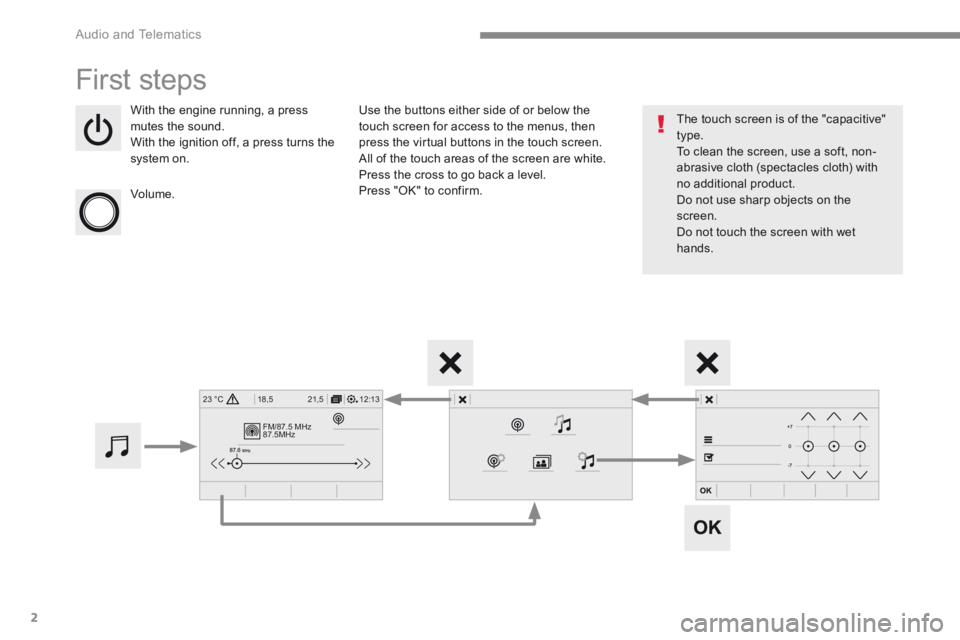
First steps
With the engine running, a press mutes the sound. With the ignition off, a press turns the system on.
Volume.
Use the buttons either side of or below the touch screen for access to the menus, then press the virtual buttons in the touch screen. All of the touch areas of the screen are white. Press the cross to go back a level. Press "OK" to confirm.
The touch screen is of the "capacitive" type. To clean the screen, use a soft, non-abrasive cloth (spectacles cloth) with no additional product. Do not use sharp objects on the screen. Do not touch the screen with wet hands.
Page 363 of 566
3
.
12:13
18,5 21,5
23 °C
Audio and Telematics
Transversal-Peugeot_en_Chap01_NAC-2-2-0_ed01-2016
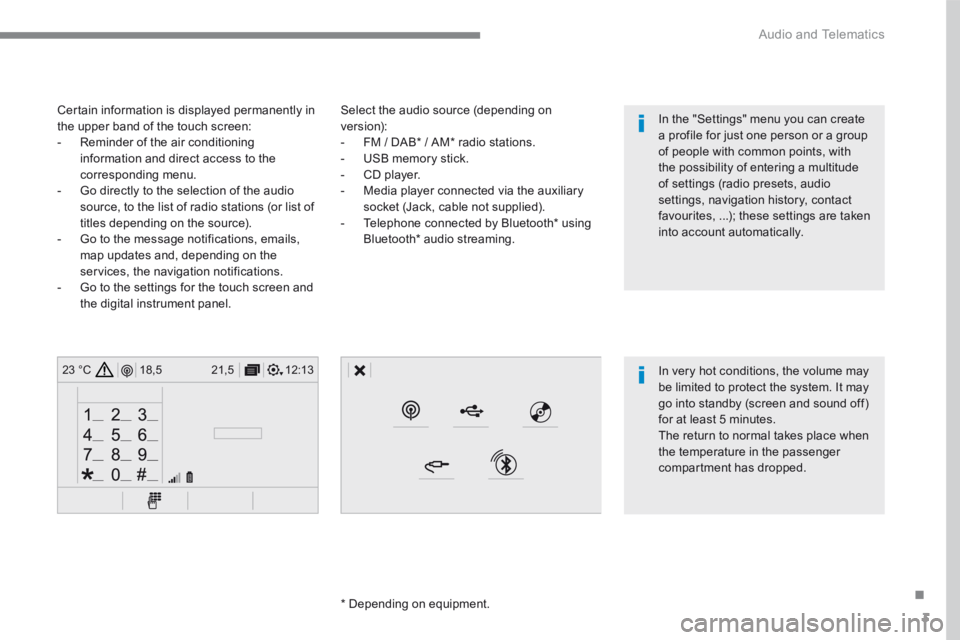
Select the audio source (depending on version): - FM / DAB * / AM * radio stations. - USB memory stick. - CD player. - Media player connected via the auxiliary socket (Jack, cable not supplied). - Telephone connected by Bluetooth * using
Bluetooth * audio streaming.
* Depending on equipment.
Certain information is displayed permanently in the upper band of the touch screen: - Reminder of the air conditioning information and direct access to the corresponding menu. - Go directly to the selection of the audio source, to the list of radio stations (or list of titles depending on the source).
- Go to the message notifications, emails, map updates and, depending on the services, the navigation notifications. - Go to the settings for the touch screen and the digital instrument panel.
In very hot conditions, the volume may be limited to protect the system. It may go into standby (screen and sound off) for at least 5 minutes.
The return to normal takes place when the temperature in the passenger compartment has dropped.
In the "Settings" menu you can create a profile for just one person or a group of people with common points, with the possibility of entering a multitude of settings (radio presets, audio settings, navigation history, contact favourites, ...); these settings are taken into account automatically.
Page 365 of 566
5
.
Audio and Telematics
Transversal-Peugeot_en_Chap01_NAC-2-2-0_ed01-2016
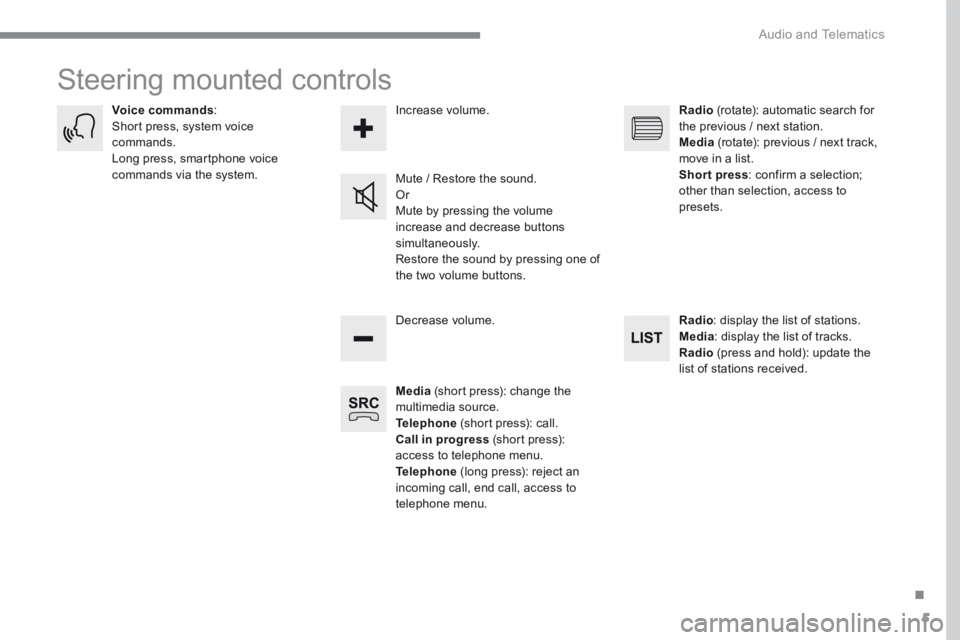
Steering mounted controls
Media (short press): change the multimedia source. Telephone (short press): call. Call in progress (short press): access to telephone menu. Telephone (long press): reject an incoming call, end call, access to telephone menu.
Decrease volume.
Voice commands : Short press, system voice commands. Long press, smartphone voice commands via the system. Mute / Restore the sound. Or Mute by pressing the volume
increase and decrease buttons simultaneously. Restore the sound by pressing one of the two volume buttons.
Radio (rotate): automatic search for the previous / next station. Media (rotate): previous / next track, move in a list. Short press : confirm a selection; other than selection, access to presets.
Radio : display the list of stations. Media : display the list of tracks. Radio (press and hold): update the list of stations received.
Increase volume.
Page 366 of 566
6
12:13
18,5 21,5
23 °C
21,518,5
12:1323 °C12:13
18,5 21,5
23 °C
12:13
18,5 21,5
23 °C
Audio and Telematics
Transversal-Peugeot_en_Chap01_NAC-2-2-0_ed01-2016
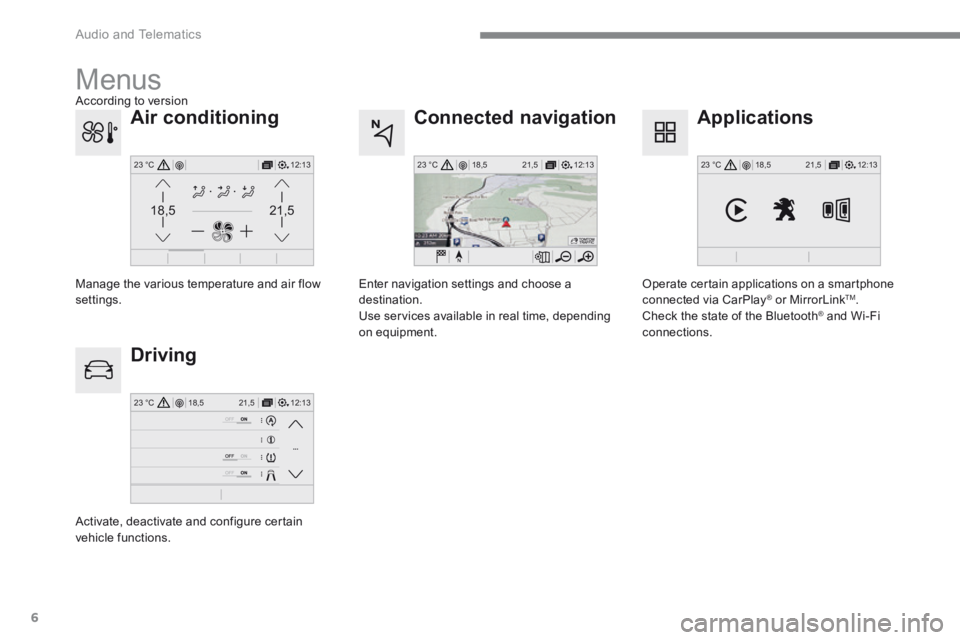
Connected navigation
Driving
Applications
Enter navigation settings and choose a destination. Use services available in real time, depending on equipment.
Activate, deactivate and configure certain vehicle functions.
Operate certain applications on a smartphone connected via CarPlay ® or MirrorLink ® or MirrorLink ®TM . Check the state of the Bluetooth ® and Wi-Fi ® and Wi-Fi ®
connections.
Menus
Air conditioning
Manage the various temperature and air flow settings.
According to version