buttons PEUGEOT 308 2017 User Guide
[x] Cancel search | Manufacturer: PEUGEOT, Model Year: 2017, Model line: 308, Model: Peugeot 308 2017Pages: 566, PDF Size: 16.05 MB
Page 106 of 566
104
3008-2_en_Chap03_ergonomie-et-confort_ed01-2016
Heating and Ventilation
Air intake
The air circulating in the passenger
compartment is filtered and originates either
from the outside via the grille located at the
base of the windscreen or from the inside in air
recirculation mode.
Controls
The incoming air follows various routes
depending on the controls selected by
the driver, the front passenger and rear
passengers, according to the level of
equipment.
The temperature control enables you to obtain
the level of comfort required by mixing the air of
the various circuits.
The air distribution control enables you to
select the air vents used in the passenger
compartment by the combined use of the
associated buttons.
The air flow control enables you to increase or
reduce the speed of the ventilation fan.
Depending on your vehicle, the controls are
accessible in the "Air conditioning" menu of
the touch screen or are grouped together on
control panel on the centre console.
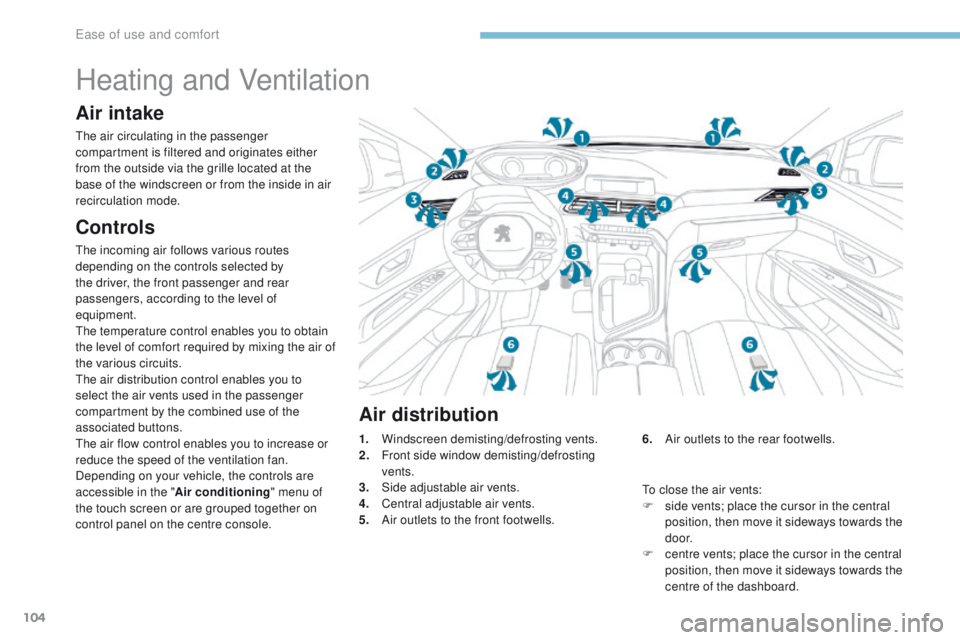
Air distribution
1. Windscreen demisting/defrosting vents.
2. F ront side window demisting/defrosting
vents.
3.
S
ide adjustable air vents.
4.
C
entral adjustable air vents.
5.
A
ir outlets to the front footwells. 6. A
ir outlets to the rear footwells.
To close the air vents:
F
s
ide vents; place the cursor in the central
position, then move it sideways towards the
d o o r.
F
c
entre vents; place the cursor in the central
position, then move it sideways towards the
centre of the dashboard.
Ease of use and comfort
Page 110 of 566
108
3008-2_en_Chap03_ergonomie-et-confort_ed01-2016
Semi-automatic mono-zone air conditioning
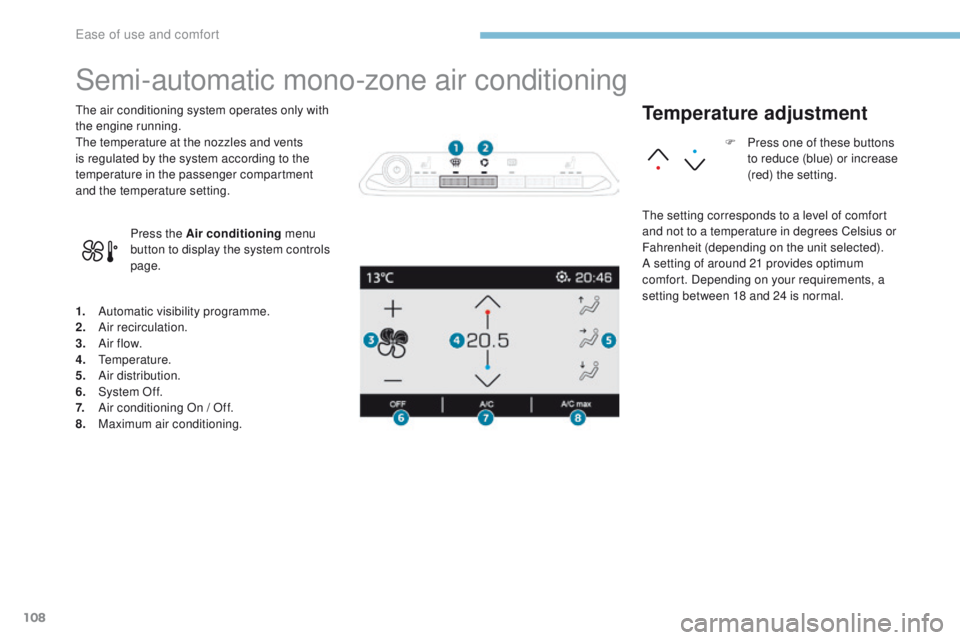
1. Automatic visibility programme.
2. Air recirculation.
3.
A
ir f low.
4.
T
emperature.
5.
A
ir distribution.
6.
S
ystem Of f.
7.
A
ir conditioning On / Off.
8.
M
aximum air conditioning.
The air conditioning system operates only with
the engine running.
The temperature at the nozzles and vents
is regulated by the system according to the
temperature in the passenger compartment
and the temperature setting.
Press the Air conditioning menu
button to display the system controls
page.
Temperature adjustment
The setting corresponds to a level of comfort
and not to a temperature in degrees Celsius or
Fahrenheit (depending on the unit selected).
A setting of around 21 provides optimum
comfort. Depending on your requirements, a
setting between 18 and 24 is normal. F
P
ress one of these buttons
to reduce (blue) or increase
(red) the setting.
Ease of use and comfort
Page 111 of 566
109
3008-2_en_Chap03_ergonomie-et-confort_ed01-2016
Air flow adjustment
Avoid driving too long without
ventilation - Risk of misting and
deterioration of air quality!
Air distribution adjustment Recirculation of interior air
Press one of these buttons to
increase (+) or decrease (-) the speed
of the booster fan.
The air flow symbol (a fan) fills progressively
according to the air flow wanted.
By reducing the air flow to minimum, you are
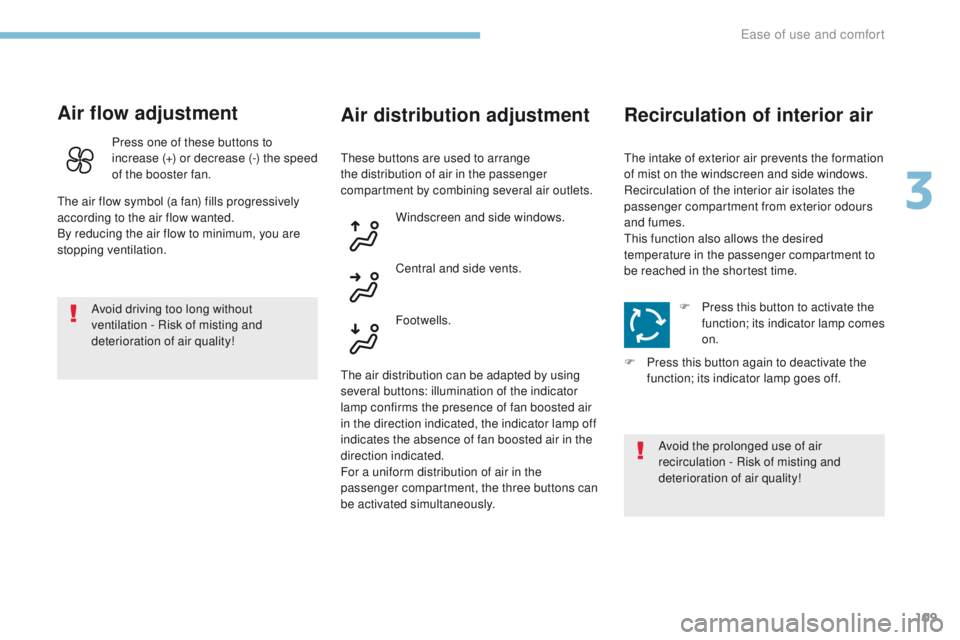
stopping ventilation. Windscreen and side windows.
Central and side vents.
Footwells.
The air distribution can be adapted by using
several buttons: illumination of the indicator
lamp confirms the presence of fan boosted air
in the direction indicated, the indicator lamp off
indicates the absence of fan boosted air in the
direction indicated.
For a uniform distribution of air in the
passenger compartment, the three buttons can
be activated simultaneously. These buttons are used to arrange
the distribution of air in the passenger
compartment by combining several air outlets.
F
P
ress this button to activate the
function; its indicator lamp comes
on.
F
P
ress this button again to deactivate the
function; its indicator lamp goes off.
Avoid the prolonged use of air
recirculation - Risk of misting and
deterioration of air quality!
The intake of exterior air prevents the formation
of mist on the windscreen and side windows.
Recirculation of the interior air isolates the
passenger compartment from exterior odours
and fumes.
This function also allows the desired
temperature in the passenger compartment to
be reached in the shortest time.
3
Ease of use and comfort
Page 113 of 566
111
3008-2_en_Chap03_ergonomie-et-confort_ed01-2016
Dual-zone automatic air conditioning
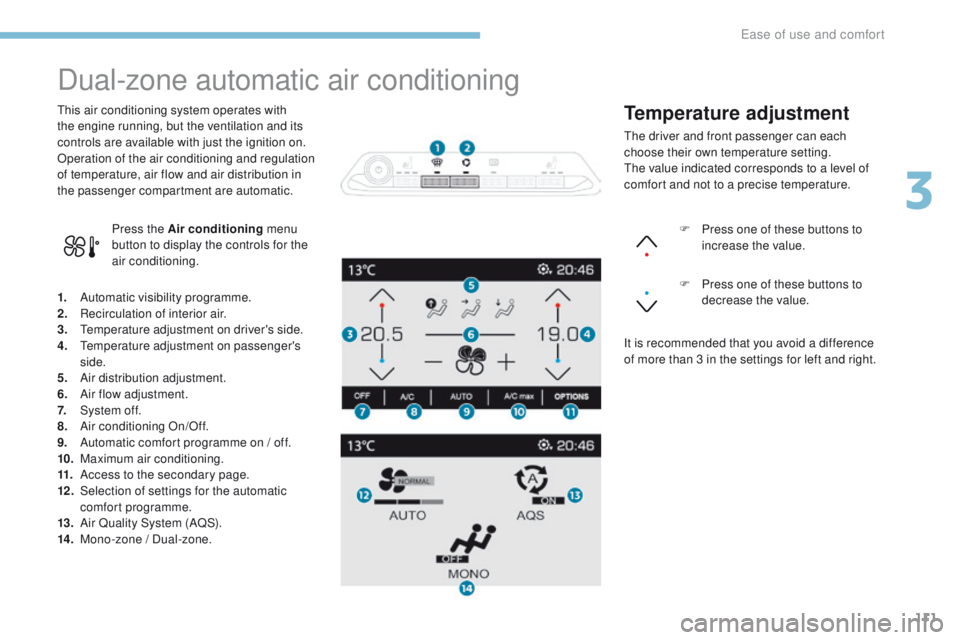
1. Automatic visibility programme.
2. Recirculation of interior air.
3.
T
emperature adjustment on driver's side.
4.
T
emperature adjustment on passenger's
side.
5.
A
ir distribution adjustment.
6.
A
ir flow adjustment.
7.
S
ystem of f.
8.
A
ir conditioning On/Off.
9.
A
utomatic comfort programme on / off.
10.
M
aximum air conditioning.
11.
A
ccess to the secondary page.
12 .
S
election of settings for the automatic
comfort programme.
13.
A
ir Quality System (AQS).
14 .
M
ono-zone / Dual-zone.
This air conditioning system operates with
the engine running, but the ventilation and its
controls are available with just the ignition on.
Operation of the air conditioning and regulation
of temperature, air flow and air distribution in
the passenger compartment are automatic.
Press the Air conditioning menu
button to display the controls for the
air conditioning. F
P
ress one of these buttons to
increase the value.
F P ress one of these buttons to
decrease the value.
It is recommended that you avoid a difference
of more than 3 in the settings for left and right.
Temperature adjustment
The driver and front passenger can each
choose their own temperature setting.
The value indicated corresponds to a level of
comfort and not to a precise temperature.
3
Ease of use and comfort
Page 115 of 566
113
3008-2_en_Chap03_ergonomie-et-confort_ed01-2016
Automatic visibility
programme
For more information on Front demisting /
defrosting, refer to the corresponding section.
"Air Quality System" (AQS)
function
Using a pollution sensor, this function
automatically activates recirculation of the
interior air once it detects a certain level of
polluting substances in the exterior air.
When the air quality returns to a satisfactory
level, recirculation of interior air is automatically
deactivated.
This function is not designed to detect
unpleasant odours.
The function is automatically activated when
the screenwash is used or when in reverse
g e a r.
The function does not operate if the ambient
temperature is below 5°C, to avoid the risk of
misting of the windscreen and side windows.
To activate or deactivate the function, go to the
secondary page by pressing the " OPTIONS"
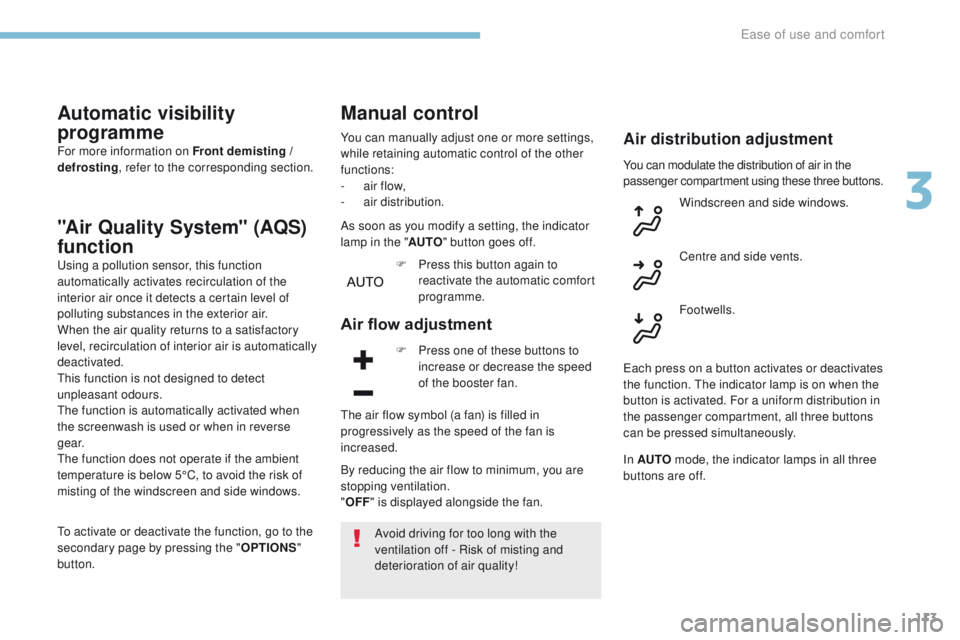
button. Windscreen and side windows.
Centre and side vents.
Footwells.
Manual control
You can manually adjust one or more settings,
while retaining automatic control of the other
functions:
-
a
ir flow,
-
a
ir distribution.
As soon as you modify a setting, the indicator
lamp in the " AUTO" button goes off.
F
P
ress this button again to
reactivate the automatic comfort
programme.
Air flow adjustment
F Press one of these buttons to increase or decrease the speed
of the booster fan.
The air flow symbol (a fan) is filled in
progressively as the speed of the fan is
increased.
By reducing the air flow to minimum, you are
stopping ventilation.
" OFF " is displayed alongside the fan.
Avoid driving for too long with the
ventilation off - Risk of misting and
deterioration of air quality!
Air distribution adjustment
You can modulate the distribution of air in the
passenger compartment using these three buttons.
Each press on a button activates or deactivates
the function. The indicator lamp is on when the
button is activated. For a uniform distribution in
the passenger compartment, all three buttons
can be pressed simultaneously.
In AUTO mode, the indicator lamps in all three
buttons are off.
3
Ease of use and comfort
Page 117 of 566
115
3008-2_en_Chap03_ergonomie-et-confort_ed01-2016
Mono-zone / Dual-zone
The passenger temperature setting can be
indexed to the driver's setting (mono-zone
function).
It is available in the secondary page by
pressing the "OPTIONS" button.
F
P
ress this button to activate the
" MONO " function; its " ON" status
is displayed.
The function is automatically deactivated if the
passenger uses their temperature adjustment
buttons (dual-zone function).
Ventilation with the ignition on
With the ignition on, you can use the ventilation
system, controlling the air flow and distribution
in the passenger compartment.
This function is also available for a few minutes
after switching off the ignition, depending on
the state of charge of the vehicle's battery.
You can also make use of the residual
heat in the engine to warm the passenger
compartment, using the temperature
adjustment buttons.
This function does not activate operation of the
air conditioning.
Switching off the system
F Press this button; its indicator lamp comes on and all other indicator
lamps for the system go off.
This action deactivates all functions of the air
conditioning system.
Temperature is no longer regulated. A slight air
flow can still be felt however, resulting from the
for ward movement of the vehicle.
Avoid driving for long periods with
the system off - Risk of misting and
deterioration of air quality!
Pressing any button reactivates the
system with the settings that were
previously in use.
3
Ease of use and comfort
Page 161 of 566
159
3008-2_en_Chap05_securite_ed01-2016
PEUGEOT Connect Assistance
If you purchased your vehicle outside
the PEUGEOT dealer network, we
invite you to have a dealer check the
configuration of these services and, if
desired, modified to suit your wishes.
In a multi-lingual country, configuration
is possible in the official national
language of your choice.
For technical reasons and in particular
to improve the quality of "PEUGEOT
CONNECT services" services to
customers, the manufacturer reserves
the right to carry out updates to the
vehicle's on-board telematic system.
A fault with the system does not
prevent the vehicle being driven. Press this button for more than
2
seconds to request assistance
if the vehicle breaks down.
A voice message confirms that
the call has been made**.
Pressing this button again immediately cancels
the request.
The cancellation is confirmed by a voice
message.
The red indicator lamp is on continuously:
replace the back-up battery.
The red indicator lamp flashes: replace the
back-up battery.Operation of the system
For all countries except Russia, Belarus
and Kazakhstan.
For Russia, Belarus and Kazakhstan. When the ignition is switched
on, the green LED comes on for
3 seconds indicating that the
system is operating correctly.
The red indicator lamp flashes
then goes off: there is a system
fault.
The red indicator lamp is on
continuously: there is a system
fault.
* *
D
epending on the geographical cover of
" P
E
UGEOT
C
onnect SOS", "P
E
UGEOT
C
onnect Assistance" and the official national
language selected by the owner of the vehicle. The list of countries covered and PEUGEOT
CONNECT services is available from dealers
or at www.peugeot.co.uk.
Geo-location
You can deactivate geo-location by
simultaneously pressing the " PE
UGEOT
C
onnect SOS" and " P
E
UGEOT
C
onnect
Assistance" buttons, followed by a press on
" P
E
UGEOT
C
onnect Assistance" to confirm.
To reactivate geo-location, simultaneously
press the " P
E
UGEOT
C
onnect SOS" and
" P
E
UGEOT
C
onnect Assistance" buttons
again, followed by a press on " P
E
UGEOT
C
onnect Assistance" to confirm.
In either case, the emergency and assistance
calls may not function.
Contact a qualified repairer as soon as
possible.
5
Safety
Page 242 of 566
240
3008-2_en_Chap06_conduite_ed01-2016
Switching on
The cruise control is switched on manually, it
requires a vehicle speed of between 18 and
112 mph (30 and 180 km/h).
An automatic gearbox must be in position D
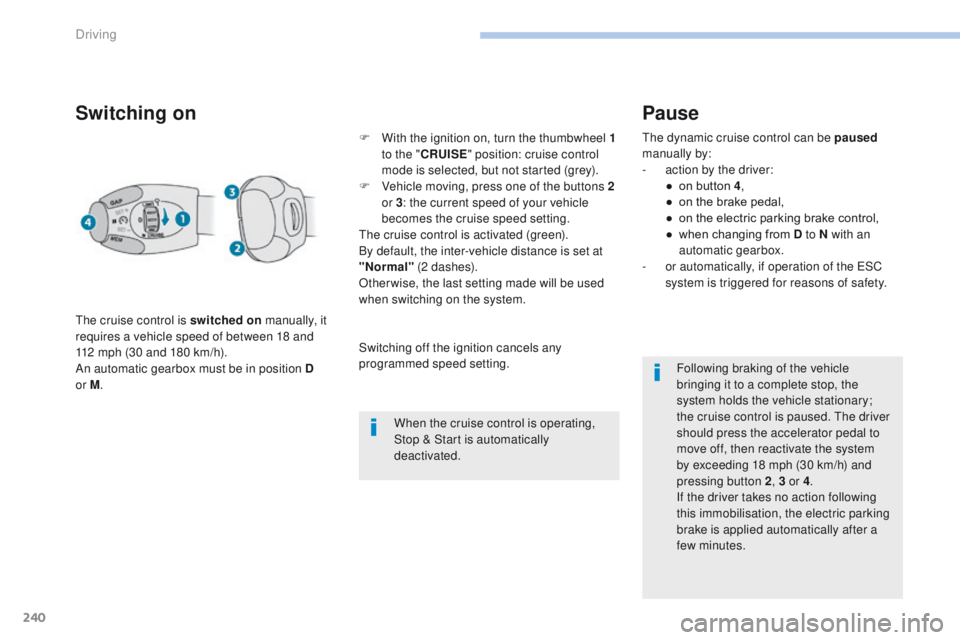
or M . F
W
ith the ignition on, turn the thumbwheel 1
to the " CRUISE " position: cruise control
mode is selected, but not started (grey).
F
V
ehicle moving, press one of the buttons 2
or 3 : the current speed of your vehicle
becomes the cruise speed setting.
The cruise control is activated (green).
By default, the inter-vehicle distance is set at
"Normal" (2 dashes).
Otherwise, the last setting made will be used
when switching on the system.
When the cruise control is operating,
Stop & Start is automatically
deactivated.
Pause
The dynamic cruise control can be paused
manually by:
-
a
ction by the driver:
●
o
n button 4 ,
●
o
n the brake pedal,
●
o
n the electric parking brake control,
●
w
hen changing from D to N with an
automatic gearbox.
-
o
r automatically, if operation of the ESC
system is triggered for reasons of safety.
Following braking of the vehicle
bringing it to a complete stop, the
system holds the vehicle stationary;
the cruise control is paused. The driver
should press the accelerator pedal to
move off, then reactivate the system
by exceeding 18
mph (30 km/h) and
pressing button
2, 3 or 4 .
If the driver takes no action following
this immobilisation, the electric parking
brake is applied automatically after a
few minutes.
Switching off the ignition cancels any
programmed speed setting.
Driving
Page 362 of 566
2
FM/87.5 MHz
87.5MHz
12:13
18,5 21,5
23 °C
Audio and Telematics
Transversal-Peugeot_en_Chap01_NAC-2-2-0_ed01-2016
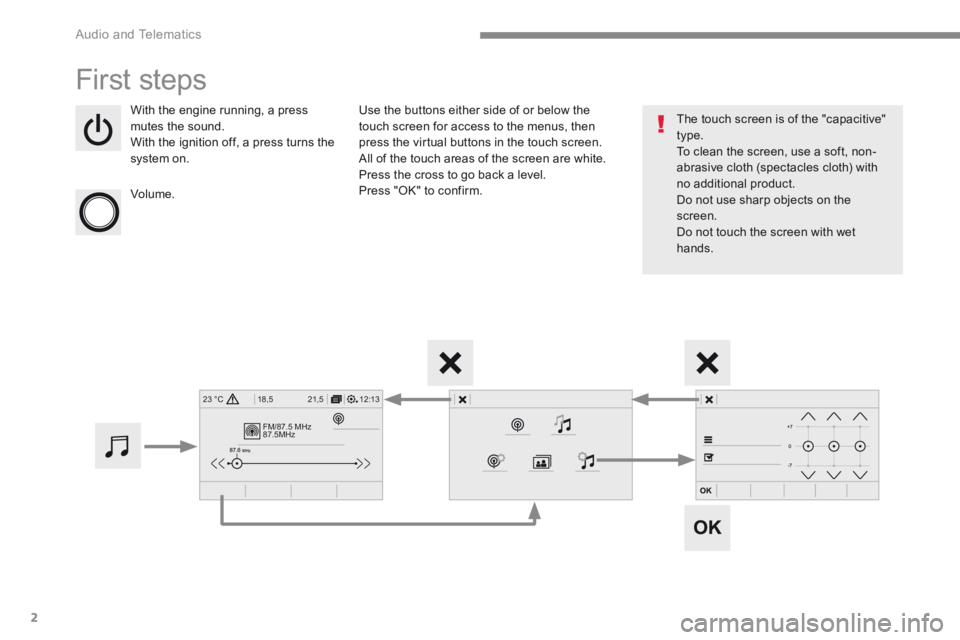
First steps
With the engine running, a press mutes the sound. With the ignition off, a press turns the system on.
Volume.
Use the buttons either side of or below the touch screen for access to the menus, then press the virtual buttons in the touch screen. All of the touch areas of the screen are white. Press the cross to go back a level. Press "OK" to confirm.
The touch screen is of the "capacitive" type. To clean the screen, use a soft, non-abrasive cloth (spectacles cloth) with no additional product. Do not use sharp objects on the screen. Do not touch the screen with wet hands.
Page 365 of 566
5
.
Audio and Telematics
Transversal-Peugeot_en_Chap01_NAC-2-2-0_ed01-2016
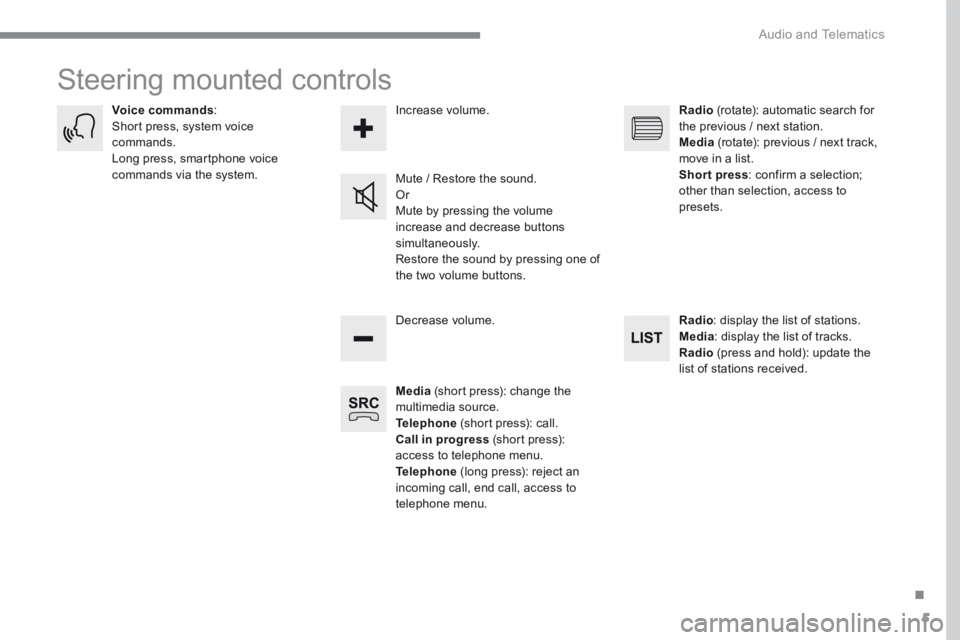
Steering mounted controls
Media (short press): change the multimedia source. Telephone (short press): call. Call in progress (short press): access to telephone menu. Telephone (long press): reject an incoming call, end call, access to telephone menu.
Decrease volume.
Voice commands : Short press, system voice commands. Long press, smartphone voice commands via the system. Mute / Restore the sound. Or Mute by pressing the volume
increase and decrease buttons simultaneously. Restore the sound by pressing one of the two volume buttons.
Radio (rotate): automatic search for the previous / next station. Media (rotate): previous / next track, move in a list. Short press : confirm a selection; other than selection, access to presets.
Radio : display the list of stations. Media : display the list of tracks. Radio (press and hold): update the list of stations received.
Increase volume.