change time PEUGEOT 308 2017 User Guide
[x] Cancel search | Manufacturer: PEUGEOT, Model Year: 2017, Model line: 308, Model: Peugeot 308 2017Pages: 566, PDF Size: 16.05 MB
Page 240 of 566
238
3008-2_en_Chap06_conduite_ed01-2016
Dynamic cruise control with Stop function
The dynamic cruise control is a driving
aid that cannot in any circumstances
replace the observation of speed limits
and safe distances, nor the need for
vigilance on the part of the driver.
It is recommended that you always keep
your feet close to the pedals.
The driver must be ready to take back
control of their vehicle at any time,
using the brake or accelerator pedal as
appropriate.
This system provides two functions:
-
a
utomatic regulation of the speed of the
vehicle to a value programmed by the driver,
-
a
utomatic adjustment of the distance
between your vehicle and the vehicle ahead.
It manages the acceleration and deceleration
of the vehicle by automatically acting on the
engine and the braking system.
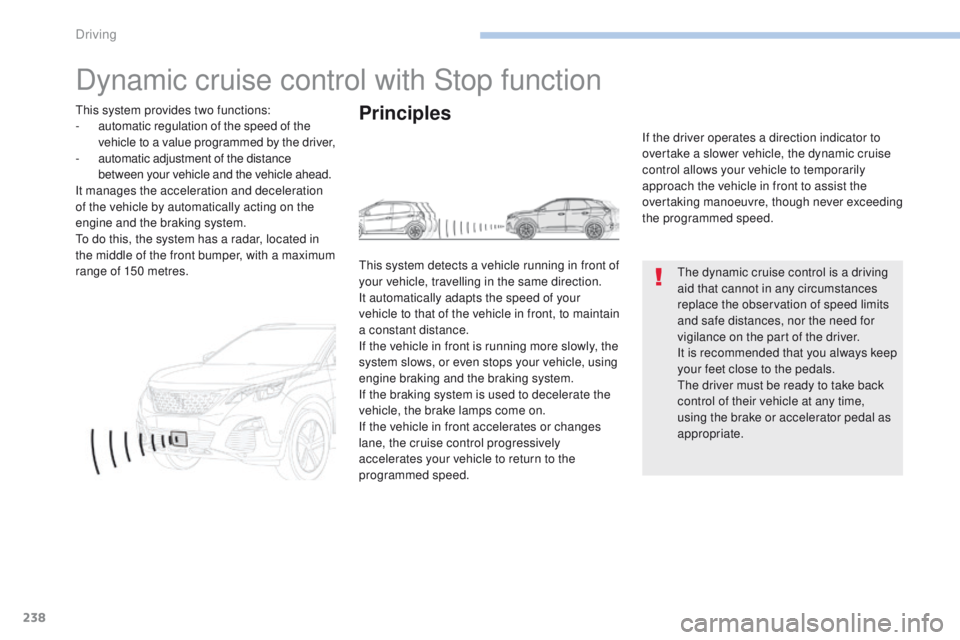
To do this, the system has a radar, located in
the middle of the front bumper, with a maximum
range of 150 metres.
Principles
This system detects a vehicle running in front of
your vehicle, travelling in the same direction.
It automatically adapts the speed of your
vehicle to that of the vehicle in front, to maintain
a constant distance.
If the vehicle in front is running more slowly, the
system slows, or even stops your vehicle, using
engine braking and the braking system.
If the braking system is used to decelerate the
vehicle, the brake lamps come on.
If the vehicle in front accelerates or changes
lane, the cruise control progressively
accelerates your vehicle to return to the
programmed speed. If the driver operates a direction indicator to
overtake a slower vehicle, the dynamic cruise
control allows your vehicle to temporarily
approach the vehicle in front to assist the
overtaking manoeuvre, though never exceeding
the programmed speed.
Driving
Page 267 of 566
265
3008-2_en_Chap06_conduite_ed01-2016
Panoramic vision
General points
Visiopark 1 - Visiopark 2
With the engine running, this system allows
views of the vehicle's surroundings to be
displayed in the touch screen, using one
camera for Visiopark 1, and two cameras for
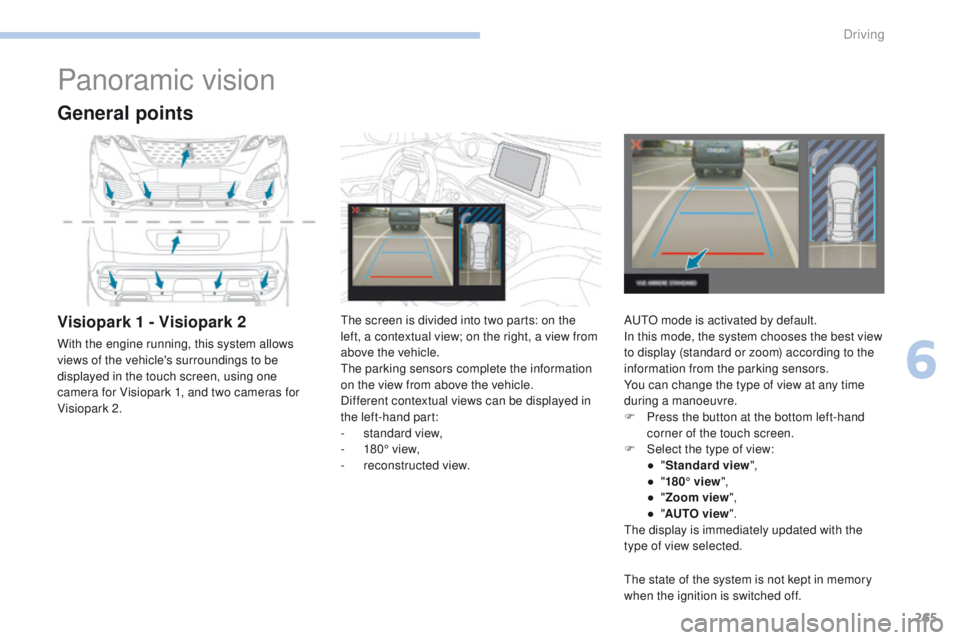
Visiopark 2.The screen is divided into two parts: on the
left, a contextual view; on the right, a view from
above the vehicle.
The parking sensors complete the information
on the view from above the vehicle.
Different contextual views can be displayed in
the left-hand part:
-
s
tandard view,
-
1
80° view,
-
r
econstructed view.AUTO mode is activated by default.
In this mode, the system chooses the best view
to display (standard or zoom) according to the
information from the parking sensors.
You can change the type of view at any time
during a manoeuvre.
F
P
ress the button at the bottom left-hand
corner of the touch screen.
F
Sel
ect the type of view:
●
"St
andard view",
●
"1
80° view",
●
"Z
oom view",
●
"AU
TO view".
The display is immediately updated with the
type of view selected.
The state of the system is not kept in memory
when the ignition is switched off.
6
Driving
Page 274 of 566
272
3008-2_en_Chap06_conduite_ed01-2016
Park Assist
This system provides active assistance with
parking. It detects a parking space then
operates the steering to park in the space.
It operates the steering while the driver
manages the accelerator, brakes, gears and
clutch (manual gearbox). During phases of
entry into and exit from a parking space, the
system provides visual and audible information
to the driver in order to make the manoeuvres
safe. It may be necessary to move for wards
and backwards more than once.During a manoeuvre, the steering
wheel turns quickly: do not hold the
steering wheel, do not place your
hands between the spokes of the
steering wheel and take care with
loose and bulky clothing (scarves, ties,
handbags...) - Risk of injury!
When Park Assist is activated, it
prevents a change to STOP mode of
Stop & Start. In STOP mode, activation
of Park Assist restarts the engine.
This manoeuvring assistance system
cannot, in any circumstances, replace
the need for vigilance on the part of the
driver.
The driver must remain in control of their
vehicle ensuring that the space remains
clear throughout the manoeuvre.
In some circumstances, the sensors may
not detect small obstacles located in
their blind spots.
The driver can take control at any time by
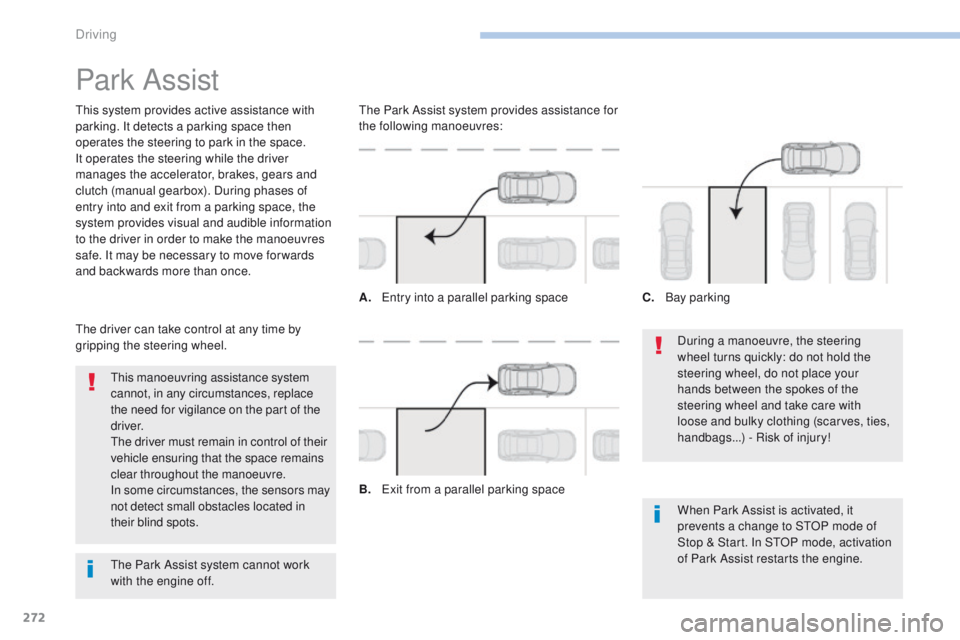
gripping the steering wheel. The Park Assist system provides assistance for
the following manoeuvres:
A.
E
ntry into a parallel parking space
B.
E
xit from a parallel parking spaceC.
B
ay parking
The Park Assist system cannot work
with the engine off.
Driving
Page 299 of 566
297
3008-2_en_Chap07_infos-pratiques_ed01-2016
Checking levels
The check is carried out either when
the ignition is switched on using the
oil level indicator in the instrument
panel for vehicles so equipped, or
using the dipstick.
Engine oil level
Checking using the dipstick
Check all of these levels regularly, in line with the manufacturer's service schedule. Top them up if necessary, unless other wise indicated.
If a level drops significantly, have the corresponding system checked by a PEUGEOT dealer or a qualified workshop.
It is normal to top-up the oil level between
two services (or oil changes). PEUGEOT
recommends that you check the level, and top-
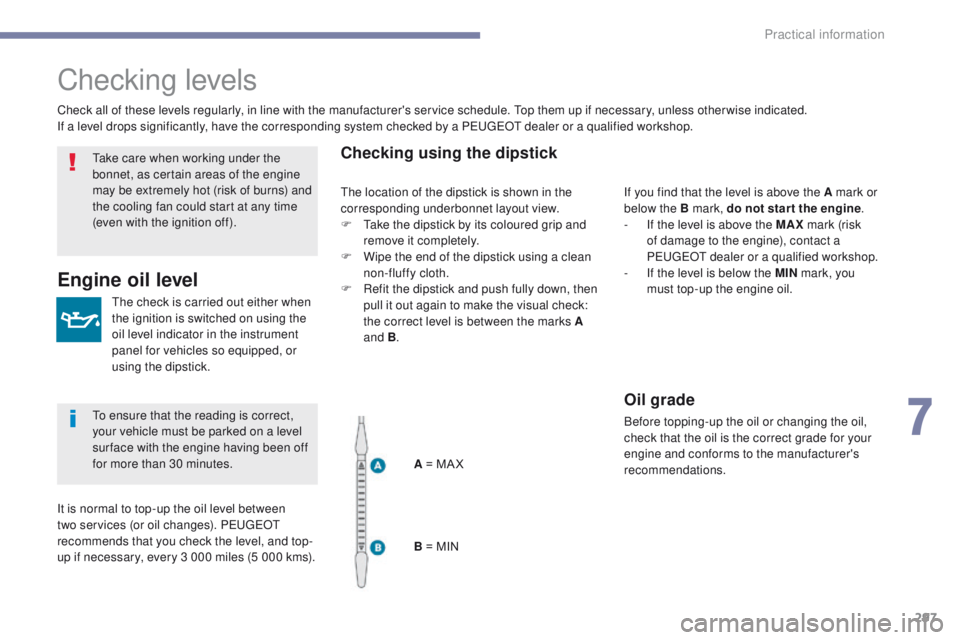
up if necessary, every 3 000 miles (5 000 kms).A = MA X
B = MINIf you find that the level is above the A mark or
below the B mark, do not star t the engine
.
-
I
f the level is above the MAX mark (risk
of damage to the engine), contact a
PEUGEOT dealer or a qualified workshop.
-
I
f the level is below the MIN mark, you
must top-up the engine oil.
Oil grade
Before topping-up the oil or changing the oil,
check that the oil is the correct grade for your
engine and conforms to the manufacturer's
recommendations.
Take care when working under the
bonnet, as certain areas of the engine
may be extremely hot (risk of burns) and
the cooling fan could start at any time
(even with the ignition off).
To ensure that the reading is correct,
your vehicle must be parked on a level
sur face with the engine having been off
for more than 30 minutes.
The location of the dipstick is shown in the
corresponding underbonnet layout view.
F
T
ake the dipstick by its coloured grip and
remove it completely.
F
W
ipe the end of the dipstick using a clean
non-fluffy cloth.
F
R
efit the dipstick and push fully down, then
pull it out again to make the visual check:
the correct level is between the marks A
and B .
7
Practical information
Page 303 of 566
301
3008-2_en_Chap07_infos-pratiques_ed01-2016
Checks
Particle filter (Diesel)
illumination of this warning lamp accompanied
by a message in the multifunction screen.
As soon as the traffic conditions permit,
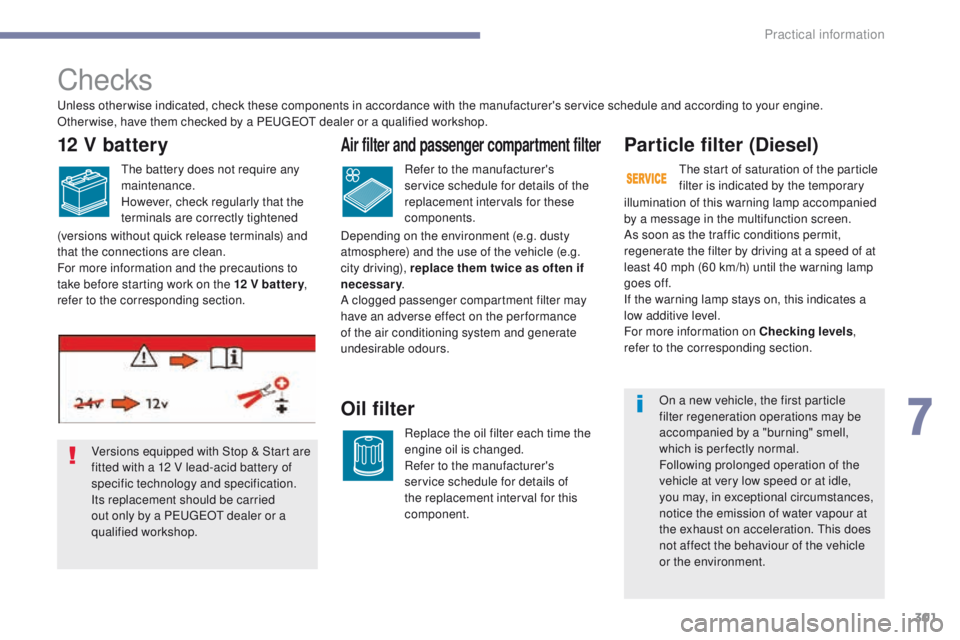
Versions equipped with Stop & Start are
fitted with a 12 V lead-acid battery of
specific technology and specification.
Its replacement should be carried
out only by a PEUGEOT dealer or a
qualified workshop. regenerate the filter by driving at a speed of at
least 40 mph (60 km/h) until the warning lamp
goes off.
If the warning lamp stays on, this indicates a
low additive level.
For more information on Checking levels
,
refer to the corresponding section.
Unless otherwise indicated, check these components in accordance with the manufacturer's service schedule and according to your engine.
Other wise, have them checked by a PEUGEOT dealer or a qualified workshop.
Air filter and passenger compartment filter
Refer to the manufacturer's
service schedule for details of the
replacement intervals for these
components.
Oil filter
Replace the oil filter each time the
engine oil is changed.
Refer to the manufacturer's
service schedule for details of
the replacement interval for this
component.
12 V battery
The battery does not require any
maintenance.
However, check regularly that the
terminals are correctly tightened
(versions without quick release terminals) and
that the connections are clean.
For more information and the precautions to
take before starting work on the 12 V batter y ,
refer to the corresponding section. Depending on the environment (e.g. dusty
atmosphere) and the use of the vehicle (e.g.
city driving), replace them twice as often if
necessary
.
A clogged passenger compartment filter may
have an adverse effect on the per formance
of the air conditioning system and generate
undesirable odours. The start of saturation of the particle
filter is indicated by the temporary
On a new vehicle, the first particle
filter regeneration operations may be
accompanied by a "burning" smell,
which is per fectly normal.
Following prolonged operation of the
vehicle at very low speed or at idle,
you may, in exceptional circumstances,
notice the emission of water vapour at
the exhaust on acceleration. This does
not affect the behaviour of the vehicle
or the environment.
7
Practical information
Page 326 of 566
324
3008-2_en_Chap08_en cas-de-panne_ed01-2016
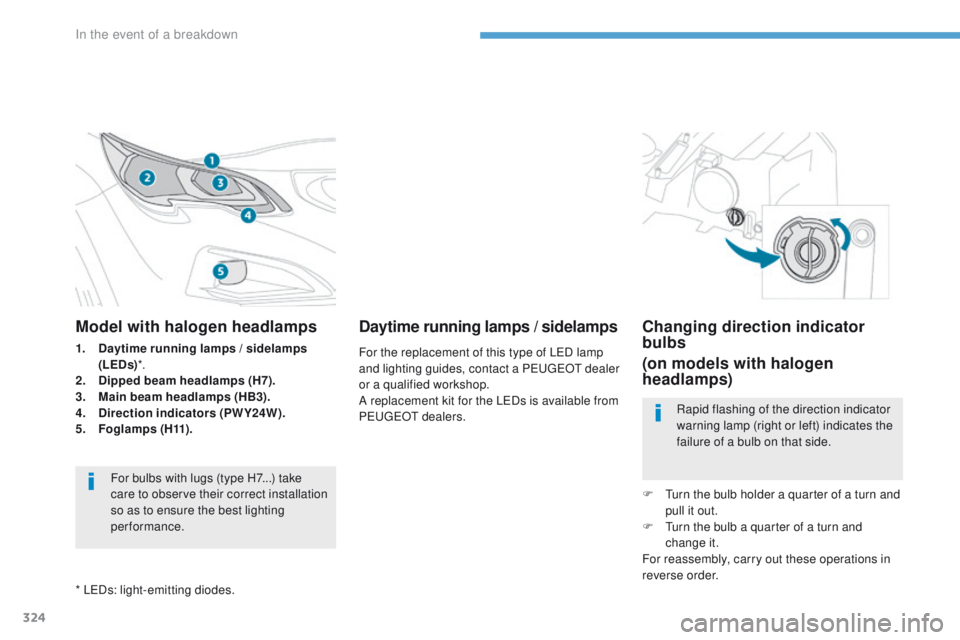
Model with halogen headlamps
1. Daytime running lamps / sidelamps (LEDs) *.
2.
D
ipped beam headlamps (H7).
3.
M
ain beam headlamps (HB3).
4.
D
irection indicators (PWY24W).
5.
Fo
glamps ( H11) .
For bulbs with lugs (type H7...) take
care to observe their correct installation
so as to ensure the best lighting
performance.
* LEDs: light-emitting diodes.
Daytime running lamps / sidelamps
For the replacement of this type of LED lamp
and lighting guides, contact a PEUGEOT dealer
or a qualified workshop.
A replacement kit for the LEDs is available from
PEUGEOT dealers.
Changing direction indicator
bulbs
(on models with halogen
headlamps)
Rapid flashing of the direction indicator
warning lamp (right or left) indicates the
failure of a bulb on that side.
F
T
urn the bulb holder a quarter of a turn and
pull it out.
F
T
urn the bulb a quarter of a turn and
change it.
For reassembly, carry out these operations in
reverse order.
In the event of a breakdown
Page 361 of 566
1
.
Audio and Telematics
Transversal-Peugeot_en_Chap01_NAC-2-2-0_ed01-2016
PEUGEOT Connect Nav
GPS satellite navigation - Applications - Multimedia audio - Bluetooth ® GPS satellite navigation - Applications - Multimedia audio - Bluetooth ® GPS satellite navigation - Applications - Multimedia audio - Bluetooth telephone ® telephone ®
Contents First steps 2
Steering mounted controls 5
Menus 6
Voice commands 8
Navigation 14
Connected navigation 30
Applications 40
Radio Media 56
Telephone 68
Settings 80
Frequently asked questions 90
The system is protected in such a way that it will only operate in your vehicle. Displaying of the Energy Economy Mode message signals that a change to standby is imminent.
The different functions and settings described vary according to the version and configuration of your vehicle.
The link below gives access to OSS (Open Source Software) codes for the system. http://www.psa-peugeot-citroen.com/oss
As a safety measure and because it requires sustained attention by the driver, the pairing of a Bluetooth mobile telephone with the Bluetooth hands-free system of your audio system must be done with the vehicle stationaryand the ignition on.
Page 365 of 566
5
.
Audio and Telematics
Transversal-Peugeot_en_Chap01_NAC-2-2-0_ed01-2016
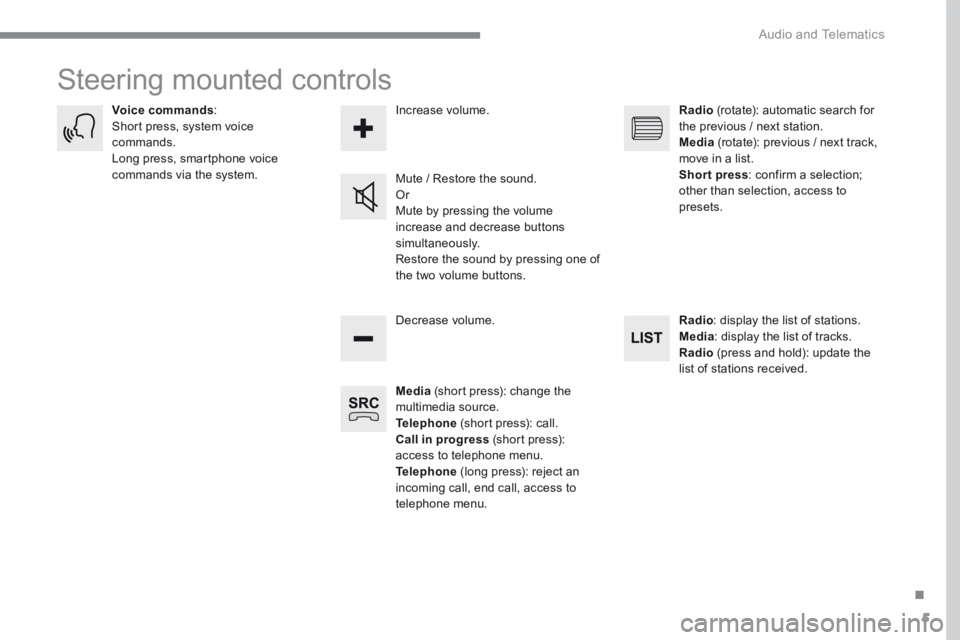
Steering mounted controls
Media (short press): change the multimedia source. Telephone (short press): call. Call in progress (short press): access to telephone menu. Telephone (long press): reject an incoming call, end call, access to telephone menu.
Decrease volume.
Voice commands : Short press, system voice commands. Long press, smartphone voice commands via the system. Mute / Restore the sound. Or Mute by pressing the volume
increase and decrease buttons simultaneously. Restore the sound by pressing one of the two volume buttons.
Radio (rotate): automatic search for the previous / next station. Media (rotate): previous / next track, move in a list. Short press : confirm a selection; other than selection, access to presets.
Radio : display the list of stations. Media : display the list of tracks. Radio (press and hold): update the list of stations received.
Increase volume.
Page 393 of 566
33
.
7
28
27
26
29
30
Audio and Telematics
Transversal-Peugeot_en_Chap01_NAC-2-2-0_ed01-2016
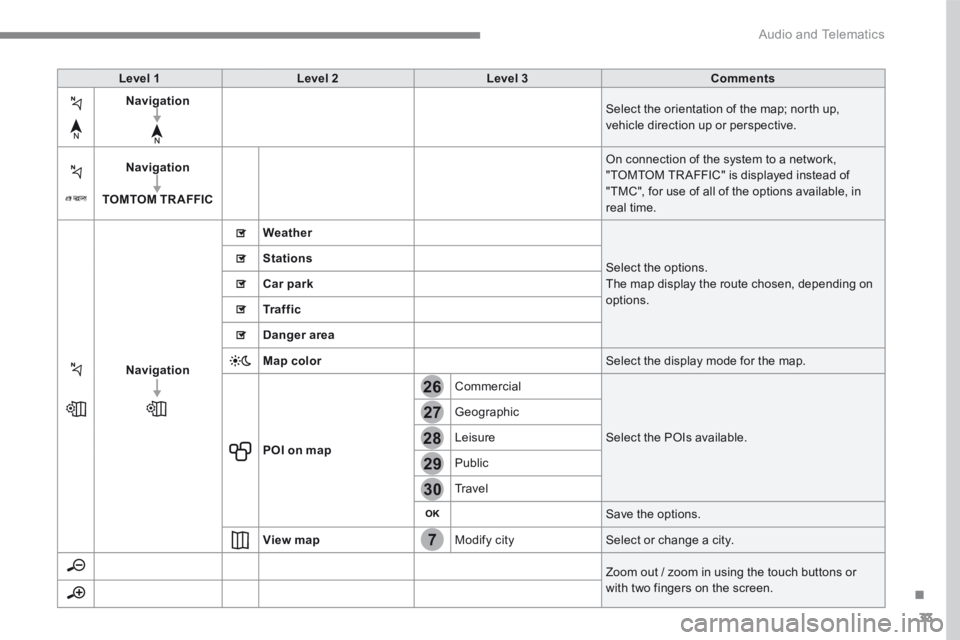
Level 1Level 2Level 3Comments
Navigation Select the orientation of the map; north up, vehicle direction up or perspective.
Navigation
TOMTOM TR AFFIC
On connection of the system to a network, "TOMTOM TR AFFIC" is displayed instead of "TMC", for use of all of the options available, in real time.
Navigation
Weather
Select the options. The map display the route chosen, depending on options.
Stations
Car park
Tr a f f i c
Danger area
Map color Select the display mode for the map.
POI on map
Commercial
Select the POIs available.
Geographic
Leisure
Public
Travel
Save the options.
View map Modify city Select or change a city.
Zoom out / zoom in using the touch buttons or with two fingers on the screen.
Page 425 of 566
65
.
1
10
3
Audio and Telematics
Transversal-Peugeot_en_Chap01_NAC-2-2-0_ed01-2016
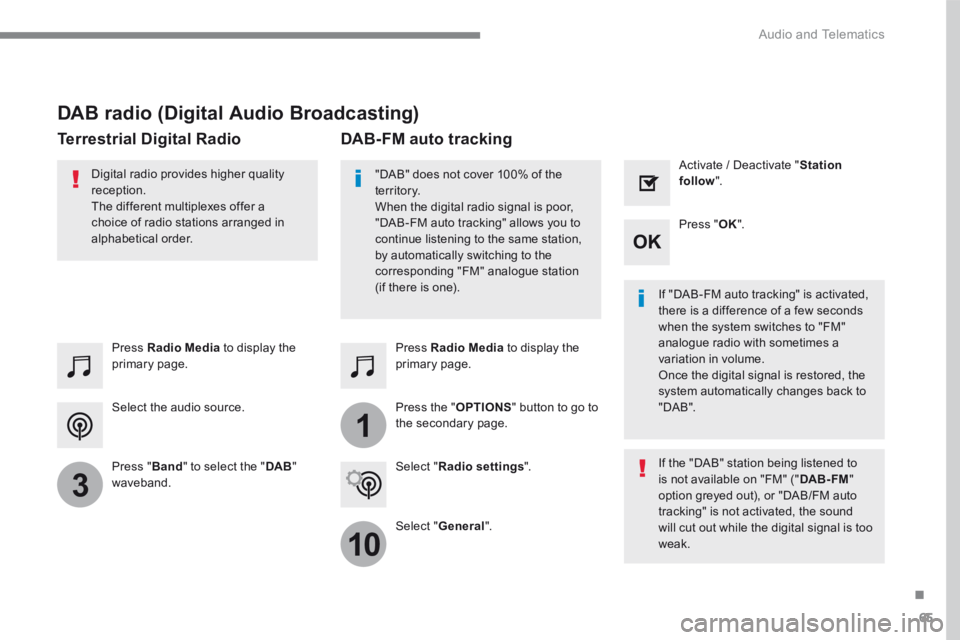
Select the audio source.
Press Radio Media to display the primary page.
Press " Band " to select the " DAB " waveband.
Press Radio Media to display the primary page.
Press the " OPTIONS " button to go to the secondary page.
DAB-FM auto tracking
"DAB" does not cover 100% of the te r r i to r y. When the digital radio signal is poor, "DAB-FM auto tracking" allows you to continue listening to the same station, by automatically switching to the corresponding "FM" analogue station (if there is one). If "DAB-FM auto tracking" is activated, there is a difference of a few seconds when the system switches to "FM" analogue radio with sometimes a variation in volume. Once the digital signal is restored, the system automatically changes back to " DA B ".
Digital radio provides higher quality reception. The different multiplexes offer a choice of radio stations arranged in
alphabetical order.
If the "DAB" station being listened to is not available on "FM" (" DAB- FM " option greyed out), or "DAB/FM auto tracking" is not activated, the sound will cut out while the digital signal is too weak.
Select " Radio settings ".
Select " General ".
Activate / Deactivate " Station follow ".
Press " OK ".
DAB radio (Digital Audio Broadcasting)
Terrestrial Digital Radio