ECO mode PEUGEOT 308 2017 Owner's Guide
[x] Cancel search | Manufacturer: PEUGEOT, Model Year: 2017, Model line: 308, Model: Peugeot 308 2017Pages: 566, PDF Size: 16.05 MB
Page 220 of 566
218
3008-2_en_Chap06_conduite_ed01-2016
Gear shift indicator*
Depending on the driving situation and your
vehicle's equipment, the system may advise
you to skip one (or more) gear(s). You can
follow this instruction without engaging the
intermediate gears.
The gear engagement recommendations must
not be considered compulsory. In fact, the
configuration of the road, the amount of traffic
and safety remain determining factors when
choosing the best gear. Therefore, the driver
remains responsible for deciding whether or not
to follow the advice given by the system.
This function cannot be deactivated.-
Y
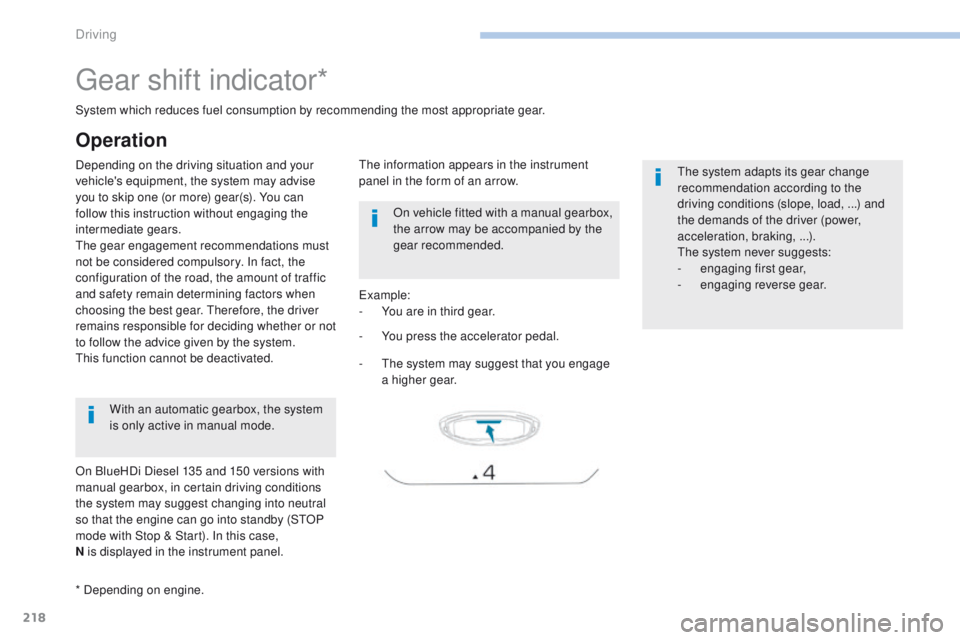
ou press the accelerator pedal.
Example:
-
Y
ou are in third gear.
-
T
he system may suggest that you engage
a higher gear.
The information appears in the instrument
panel in the form of an arrow.
System which reduces fuel consumption by recommending the most appropriate gear.
With an automatic gearbox, the system
is only active in manual mode.
* Depending on engine. On vehicle fitted with a manual gearbox,
the arrow may be accompanied by the
gear recommended.
The system adapts its gear change
recommendation according to the
driving conditions (slope, load,
...) and
the demands of the driver (power,
acceleration, braking,
...).
The system never suggests:
-
e
ngaging first gear,
-
enga
ging reverse gear.
Operation
On BlueHDi Diesel 135 and 150 versions with
manual gearbox, in certain driving conditions
the system may suggest changing into neutral
so that the engine can go into standby (STOP
mode with Stop & Start). In this case,
N is displayed in the instrument panel.
Driving
Page 221 of 566
219
3008-2_en_Chap06_conduite_ed01-2016
Stop & Start
Operation
Going into engine STOP mode
This indicator lamp comes on in the
instrument panel and the engine
goes into standby automatically:
-
w
ith a manual gearbox , at speeds below
12 mph (20 km/h) or vehicle stationary with
the PureTech 130 petrol and BlueHDi 115
and 120 Diesel versions, when you place
the gear lever in neutral and you release
the clutch pedal,
A time counter calculates the sum of the
periods in STOP mode during a journey. It
resets itself to zero every time the ignition is
switched on with the key or the START/STOP
button. -
w
ith an automatic gearbox , vehicle
stationary, when you press the brake pedal
or put the gear selector in N mode.
The Stop & Start
system puts the engine
temporarily into standby - STOP mode
-
during stops in the traffic (red lights,
traffic jams,
...). The engine restarts
automatically
-
START
mode - as soon as
you want to move off. The restart takes place
instantly, quickly and silently.
Per fect for urban use, the Stop & Start system
reduces fuel consumption and exhaust
emissions as well as the noise level when
stationary.
Never refuel with the engine in
STOP
mode; you must switch off the
ignition with the key or the S TA R T/
STOP button.
For your comfort, during parking
manoeuvres, STOP mode is not
available for a few seconds after
coming out of reverse gear.
Stop & Start does not affect the
operation of vehicle systems such as
braking, power steering...
6
Driving
Page 222 of 566
220
3008-2_en_Chap06_conduite_ed01-2016
Going into engine START mode Special cases: START invoked automatically
This indicator lamp goes off and the
engine starts automatically:
-
w
ith a manual gearbox , when you fully
depress the clutch pedal,
-
w
ith an automatic gearbox:
●
g
ear selector in D or M mode, when you
release the brake pedal,
●
o
r gear selector in N mode and brake
pedal released, when you place the gear
selector in D or M mode,
●
o
r when you engage reverse. As a safety measure or to maintain comfort
levels in the vehicle, START mode is invoked
automatically when:
-
y
ou open the driver's door,
-
y
ou unfasten the driver's seat belt,
-
t
he speed of the vehicle exceeds 15 mph
(25 km/h) with a manual gearbox (2 mph
(3 km/h) with PureTech 130 petrol and
BlueHDi 115 and 120 Diesel versions),
or 2 mph (3 km/h) with an automatic
gearbox.
-
t
he electric parking brake is being applied,
-
s
ome special conditions (battery charge,
engine temperature, braking assistance,
ambient temperature...) where the engine is
needed for control of a system.
In this case, this indicator lamp flashes
for a few seconds, then goes off.
This operation is perfectly normal.
Special cases: STOP mode not
available
STOP mode is not invoked when:
- t he vehicle is on a steep slop (rising or
falling),
-
t
he driver's door is open,
-
t
he driver's seat belt is not fastened,
-
t
he vehicle has not exceeded 6 mph
(10
km/h) since the last engine start (with
the key or the START/STOP b ut to n),
-
t
he electric parking brake is applied or
being applied,
-
t
he engine is needed to maintain a
comfortable temperature in the passenger
compartment,
-
d
emisting is active,
-
s
ome special conditions (battery charge,
engine temperature, braking assistance,
ambient temperature...) where the engine is
needed to assure control of a system.
In this case, this indicator lamp flashes
for a few seconds then goes off.
This operation is perfectly normal.
Driving
Page 223 of 566
221
3008-2_en_Chap06_conduite_ed01-2016
Deactivation / Reactivation
In certain circumstances, such as the need
to maintain the temperature in the passenger
compartment, it may be useful to deactivate the
Stop & Start system.
The system can be deactivated at any time,
once the ignition is switched on.
If the engine is in STOP mode, it then restarts.
The Stop & Start system is reactivated
automatically every time the ignition is
switched
on.
Opening the bonnet
Before doing anything under the
bonnet, deactivate the Stop & Start
system to avoid the risk of injury
related to an automatic change to
S TA R T
m o d e .
Driving on flooded roads
Before driving through a flooded road,
it is strongly recommended that you
deactivate the Stop & Start system.
For more information on Driving
advice , particularly on flooded roads,
refer to the corresponding section.With the button on the
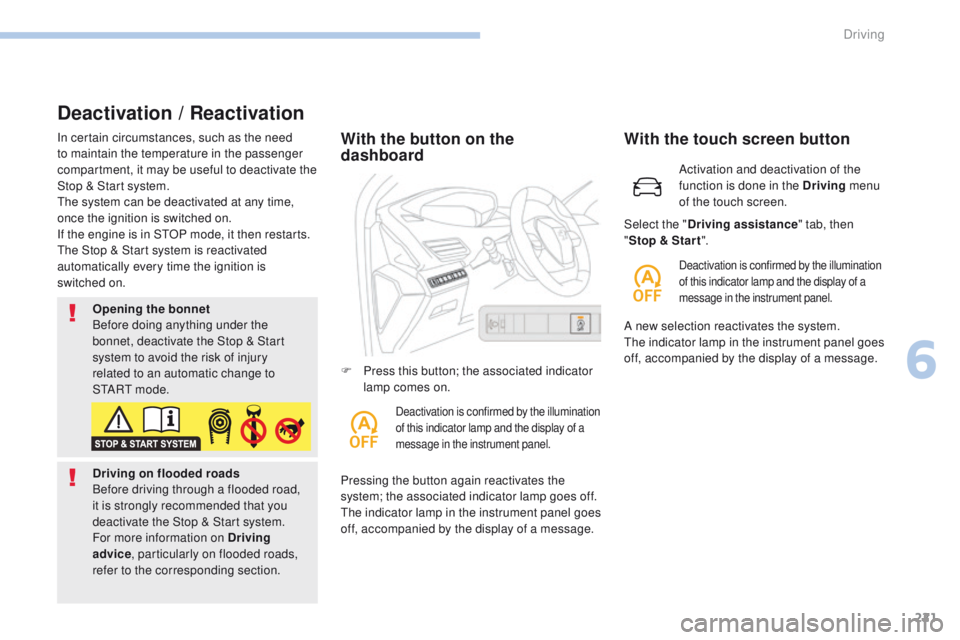
dashboard
Pressing the button again reactivates the
system; the associated indicator lamp goes off.
The indicator lamp in the instrument panel goes
off, accompanied by the display of a message. F
P
ress this button; the associated indicator
lamp comes on.
Deactivation is confirmed by the illumination
of this indicator lamp and the display of a
message in the instrument panel.
Activation and deactivation of the
function is done in the Driving menu
of the touch screen.
With the touch screen button
Deactivation is confirmed by the illumination
of this indicator lamp and the display of a
message in the instrument panel.
Select the " Driving assistance " tab, then
" Stop & Star t ".
A new selection reactivates the system.
The indicator lamp in the instrument panel goes
off, accompanied by the display of a message.
6
Driving
Page 231 of 566
229
3008-2_en_Chap06_conduite_ed01-2016
Memorising the speed
setting
This memorisation is in addition to the display
of Speed limit recognition.
The driver can choose to adapt the speed
setting to the speed limit suggested, by
pressing the memorisation button for the speed
limiter, the standard cruise control and the
dynamic cruise control with Stop function.
This speed setting then replaces the previous
speed setting for the speed limiter and/or cruise
control. For more information on the Speed
limiter, Cruise control , or Dynamic
cruise control with Stop function ,
refer to the corresponding sections.
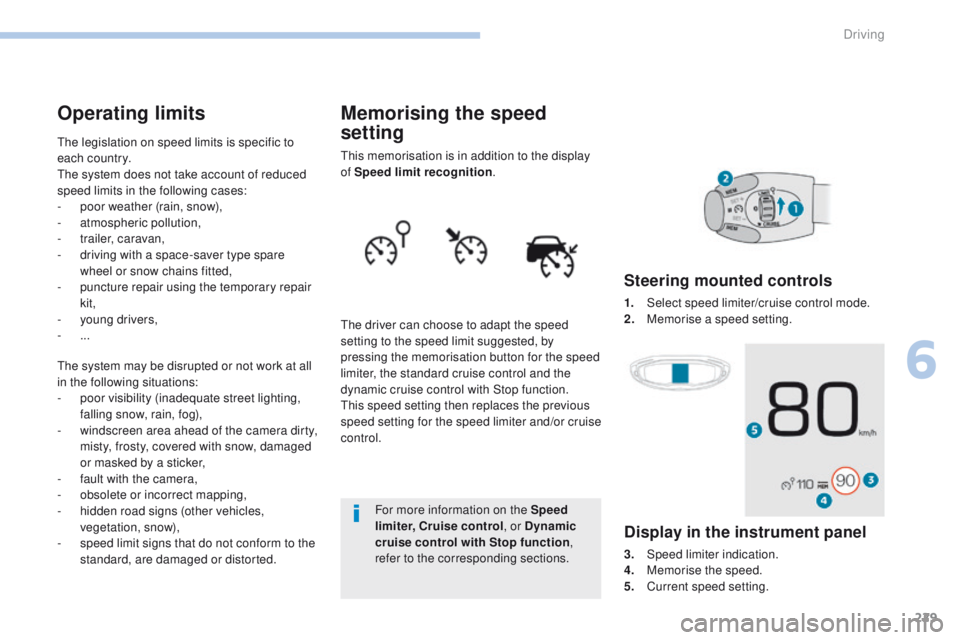
Steering mounted controls
1. Select speed limiter/cruise control mode.
2. M emorise a speed setting.
Operating limits
The legislation on speed limits is specific to
each country.
The system does not take account of reduced
speed limits in the following cases:
-
p
oor weather (rain, snow),
-
a
tmospheric pollution,
-
t
railer, caravan,
-
d
riving with a space-saver type spare
wheel or snow chains fitted,
-
p
uncture repair using the temporary repair
kit,
-
y
oung drivers,
-
...
The system may be disrupted or not work at all
in the following situations:
-
p
oor visibility (inadequate street lighting,
falling snow, rain, fog),
-
w
indscreen area ahead of the camera dirty,
misty, frosty, covered with snow, damaged
or masked by a sticker,
-
f
ault with the camera,
-
o
bsolete or incorrect mapping,
-
h
idden road signs (other vehicles,
vegetation, snow),
-
s
peed limit signs that do not conform to the
standard, are damaged or distorted.
Display in the instrument panel
3. Speed limiter indication.
4. M emorise the speed.
5.
C
urrent speed setting.
6
Driving
Page 233 of 566
231
3008-2_en_Chap06_conduite_ed01-2016
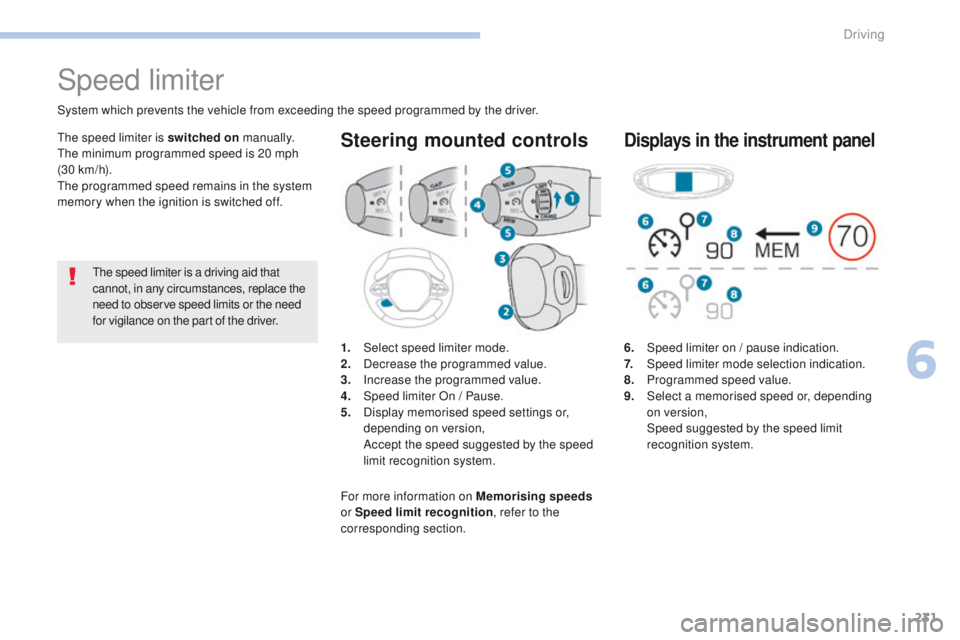
6. Speed limiter on / pause indication.
7. Speed limiter mode selection indication.
8.
P
rogrammed speed value.
9.
S
elect a memorised speed or, depending
on version,
Spe
ed suggested by the speed limit
recognition system.
Displays in the instrument panel
Speed limiter
1. Select speed limiter mode.
2. D ecrease the programmed value.
3.
In
crease the programmed value.
4.
S
peed limiter On / Pause.
5.
D
isplay memorised speed settings or,
depending on version,
A
ccept the speed suggested by the speed
limit recognition system.
Steering mounted controls
System which prevents the vehicle from exceeding the speed programmed by the driver.
The speed limiter is a driving aid that
cannot, in any circumstances, replace the
need to observe speed limits or the need
for vigilance on the part of the driver.
The speed limiter is switched on
manually.
The minimum programmed speed is 20 mph
(30 km/h).
The programmed speed remains in the system
memory when the ignition is switched off.
For more information on Memorising speeds
or Speed limit recognition , refer to the
corresponding section.
6
Driving
Page 236 of 566
234
3008-2_en_Chap06_conduite_ed01-2016
Cruise control
1. Select cruise control mode selection.
2. Set the current speed of the vehicle as the
cruise setting or lower the cruise setting.
3.
S
et the current speed of the vehicle as the
cruise setting or raise the cruise setting.
4.
P
ause / Resume cruise control.
5.
D
isplay memorised speed settings or,
depending on version,
A
ccept the speed suggested by the speed
limit recognition system.
Steering mounted controls
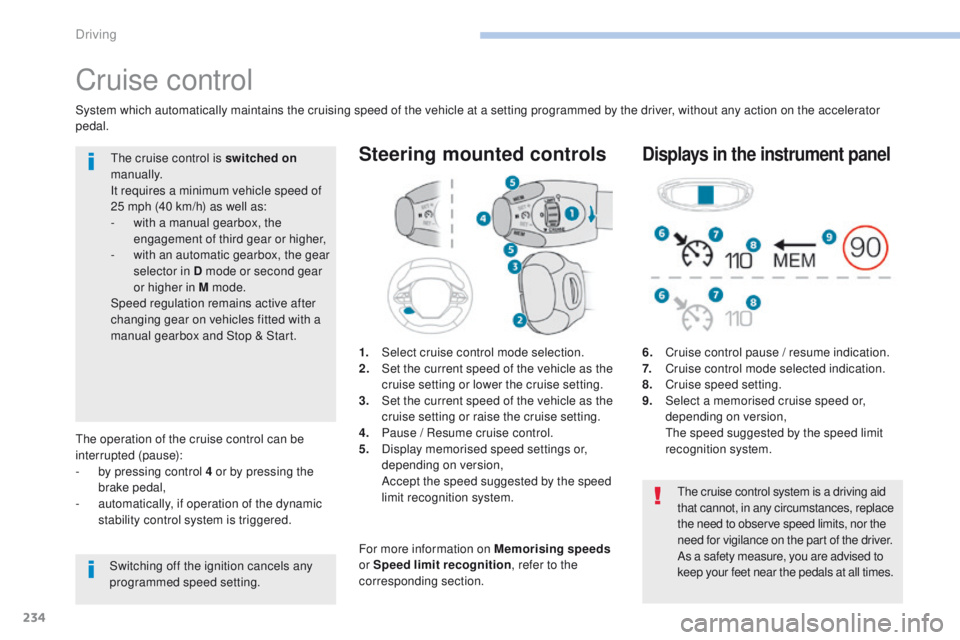
6. Cruise control pause / resume indication.
7. C ruise control mode selected indication.
8.
C
ruise speed setting.
9.
S
elect a memorised cruise speed or,
depending on version,
T
he speed suggested by the speed limit
recognition system.
Displays in the instrument panel
The operation of the cruise control can be
interrupted (pause):
-
b
y pressing control 4 or by pressing the
brake pedal,
-
a
utomatically, if operation of the dynamic
stability control system is triggered.
Switching off the ignition cancels any
programmed speed setting.The cruise control is switched on
manually.
It requires a minimum vehicle speed of
25 mph (40 km/h) as well as:
-
w
ith a manual gearbox, the
engagement of third gear or higher,
-
w
ith an automatic gearbox, the gear
selector in D mode or second gear
or higher in M mode.
Speed regulation remains active after
changing gear on vehicles fitted with a
manual gearbox and Stop & Start.
System which automatically maintains the cruising speed of the vehicle at a setting programmed by the driver, without any action on the accelerator
pedal.
The cruise control system is a driving aid
that cannot, in any circumstances, replace
the need to observe speed limits, nor the
need for vigilance on the part of the driver.
As a safety measure, you are advised to
keep your feet near the pedals at all times.
For more information on Memorising speeds
or Speed limit recognition , refer to the
corresponding section.
Driving
Page 237 of 566
235
3008-2_en_Chap06_conduite_ed01-2016
Switching on
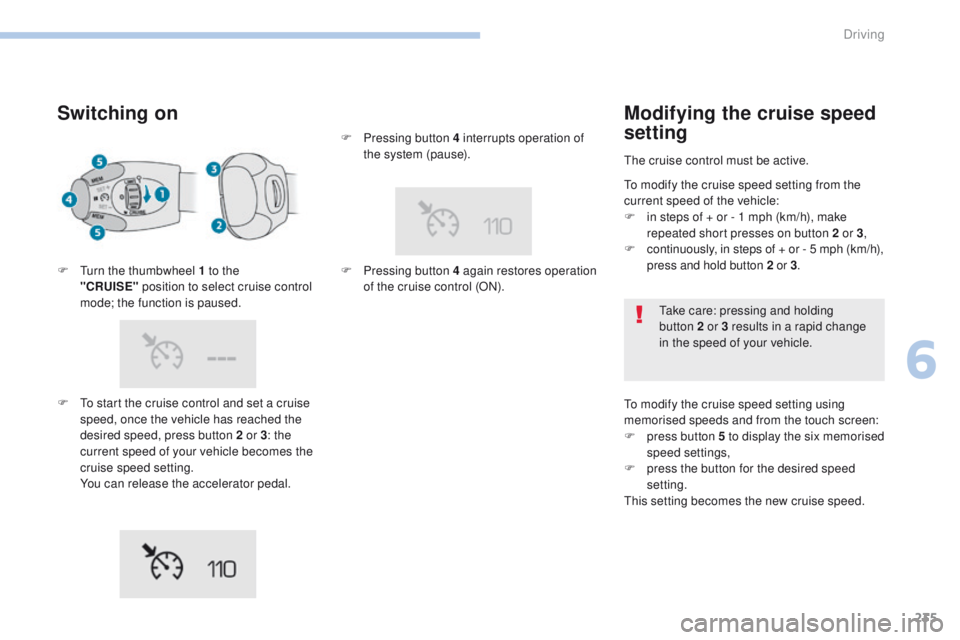
F To start the cruise control and set a cruise speed, once the vehicle has reached the
desired speed, press button 2 or 3 : the
current speed of your vehicle becomes the
cruise speed setting.
Y
ou can release the accelerator pedal.
F
T
urn the thumbwheel 1 to the
"CRUISE"
position to select cruise control
mode; the function is paused. F
P
ressing button 4 interrupts operation of
the system (pause).
F
P
ressing button 4 again restores operation
of the cruise control (ON).
Modifying the cruise speed
setting
The cruise control must be active.
To modify the cruise speed setting using
memorised speeds and from the touch screen:
F
p
ress button 5 to display the six memorised
speed settings,
F
p
ress the button for the desired speed
setting.
This setting becomes the new cruise speed. Take care: pressing and holding
button
2 or 3 results in a rapid change
in the speed of your vehicle.
To modify the cruise speed setting from the
current speed of the vehicle:
F
i
n steps of + or - 1 mph (km/h), make
repeated short presses on button 2 or 3 ,
F
c
ontinuously, in steps of + or - 5 mph (km/h),
press and hold button 2 or 3.
6
Driving
Page 241 of 566
239
3008-2_en_Chap06_conduite_ed01-2016
Steering mounted controls
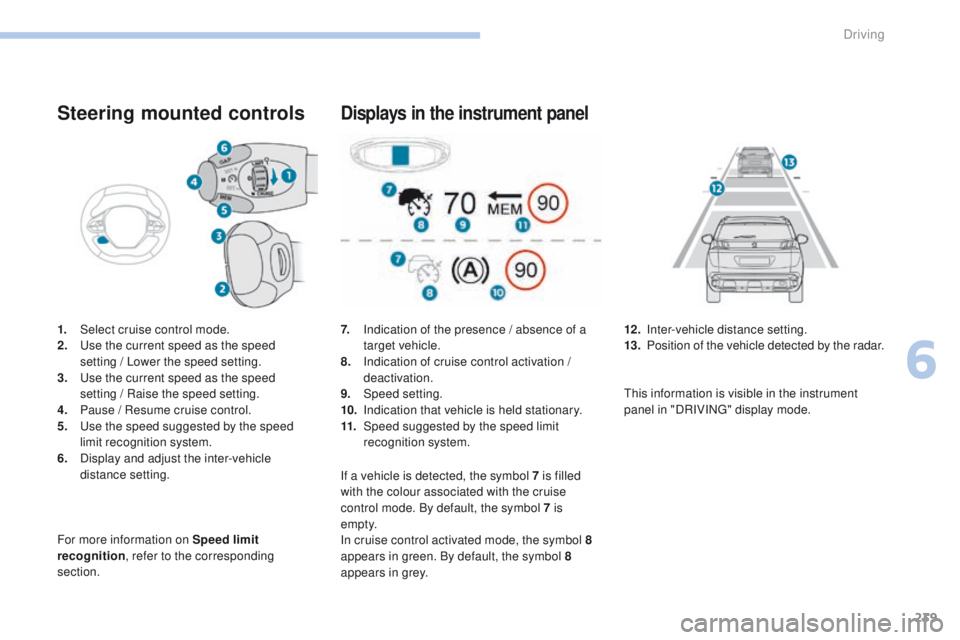
1. Select cruise control mode.
2. Use the current speed as the speed
setting
/ Lower the speed setting.
3.
U
se the current speed as the speed
setting
/ Raise the speed setting.
4.
P
ause / Resume cruise control.
5.
U
se the speed suggested by the speed
limit recognition system.
6.
D
isplay and adjust the inter-vehicle
distance setting.
For more information on Speed limit
recognition , refer to the corresponding
section.
Displays in the instrument panel
7. Indication of the presence / absence of a target vehicle.
8.
I
ndication of cruise control activation /
deactivation.
9.
Spe
ed setting.
10.
I
ndication that vehicle is held stationary.
11.
Spe
ed suggested by the speed limit
recognition system. 12 . I
nter-vehicle distance setting.
13. P osition of the vehicle detected by the radar.
If a vehicle is detected, the symbol 7
is filled
with the colour associated with the cruise
control mode. By default, the symbol 7 is
e m pt y.
In cruise control activated mode, the symbol
8
appears in green. By default, the symbol 8
appears in grey. This information is visible in the instrument
panel in "DRIVING" display mode.
6
Driving
Page 242 of 566
240
3008-2_en_Chap06_conduite_ed01-2016
Switching on
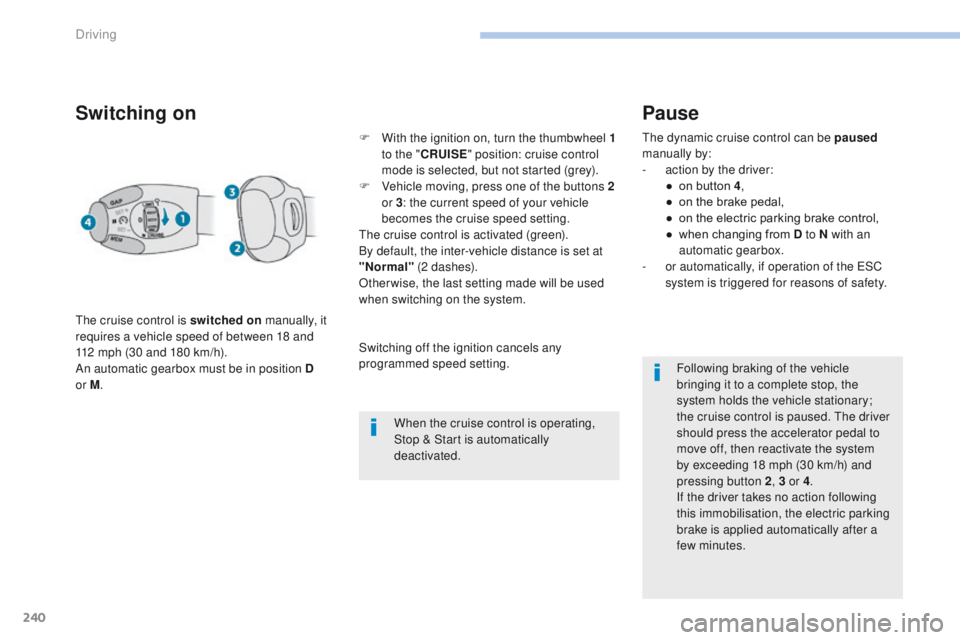
The cruise control is switched on manually, it
requires a vehicle speed of between 18 and
112 mph (30 and 180 km/h).
An automatic gearbox must be in position D
or M . F
W
ith the ignition on, turn the thumbwheel 1
to the " CRUISE " position: cruise control
mode is selected, but not started (grey).
F
V
ehicle moving, press one of the buttons 2
or 3 : the current speed of your vehicle
becomes the cruise speed setting.
The cruise control is activated (green).
By default, the inter-vehicle distance is set at
"Normal" (2 dashes).
Otherwise, the last setting made will be used
when switching on the system.
When the cruise control is operating,
Stop & Start is automatically
deactivated.
Pause
The dynamic cruise control can be paused
manually by:
-
a
ction by the driver:
●
o
n button 4 ,
●
o
n the brake pedal,
●
o
n the electric parking brake control,
●
w
hen changing from D to N with an
automatic gearbox.
-
o
r automatically, if operation of the ESC
system is triggered for reasons of safety.
Following braking of the vehicle
bringing it to a complete stop, the
system holds the vehicle stationary;
the cruise control is paused. The driver
should press the accelerator pedal to
move off, then reactivate the system
by exceeding 18
mph (30 km/h) and
pressing button
2, 3 or 4 .
If the driver takes no action following
this immobilisation, the electric parking
brake is applied automatically after a
few minutes.
Switching off the ignition cancels any
programmed speed setting.
Driving