key PEUGEOT 308 2017 Repair Manual
[x] Cancel search | Manufacturer: PEUGEOT, Model Year: 2017, Model line: 308, Model: Peugeot 308 2017Pages: 566, PDF Size: 16.05 MB
Page 446 of 566
86
3
4
5
6
7
1
19
Audio and Telematics
Transversal-Peugeot_en_Chap01_NAC-2-2-0_ed01-2016
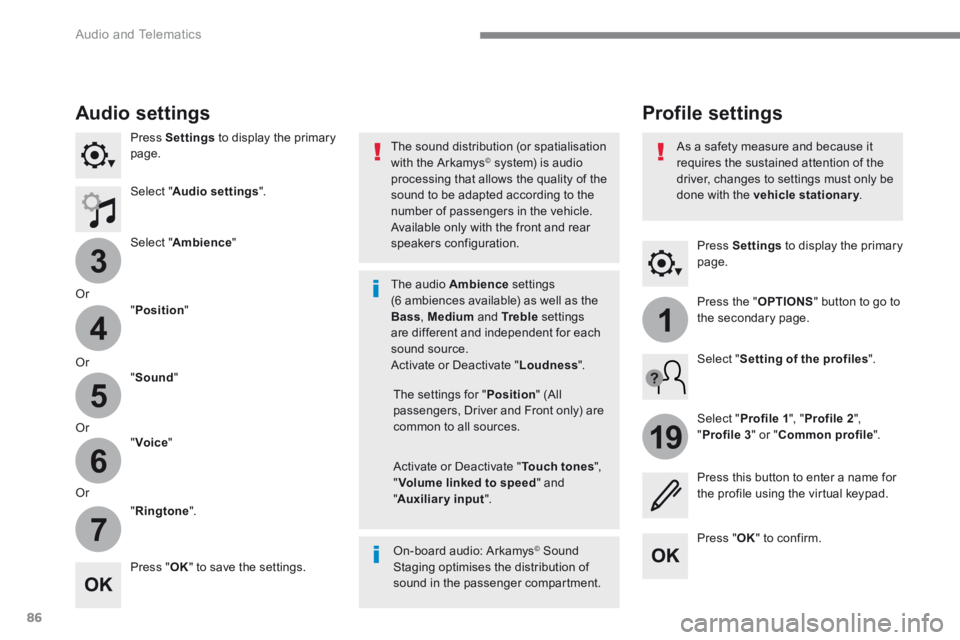
Press Settings to display the primary page.
Profile settings Audio settings
Press Settings to display the primary page.
Select " Audio settings ".
Select " Ambience "
Or
" Position "
Or " Sound "
Or " Voice "
Or
" Ringtone ".
On-board audio: Arkamys © Sound © Sound ©
Staging optimises the distribution of sound in the passenger compartment.
The settings for " Position " (All passengers, Driver and Front only) are common to all sources.
Activate or Deactivate " Touch tones ", " Volume linked to speed " and " Auxiliary input ".
The sound distribution (or spatialisation with the Arkamys © system) is audio processing that allows the quality of the sound to be adapted according to the number of passengers in the vehicle.
Available only with the front and rear speakers configuration.
The audio Ambience settings (6 ambiences available) as well as the Bass , Medium and Tr e b l e settings are different and independent for each sound source. Activate or Deactivate " Loudness ".
Press " OK " to save the settings.
Press " OK " to confirm.
Press the " OPTIONS " button to go to the secondary page.
Select " Profile 1 ", " Profile 2 ",
" Profile 3 " or " Common profile ".
Select " Setting of the profiles ".
Press this button to enter a name for the profile using the virtual keypad.
As a safety measure and because it requires the sustained attention of the driver, changes to settings must only be done with the vehicle stationary . vehicle stationary . vehicle stationary
Page 449 of 566
89
.
1
17
18
Audio and Telematics
Transversal-Peugeot_en_Chap01_NAC-2-2-0_ed01-2016
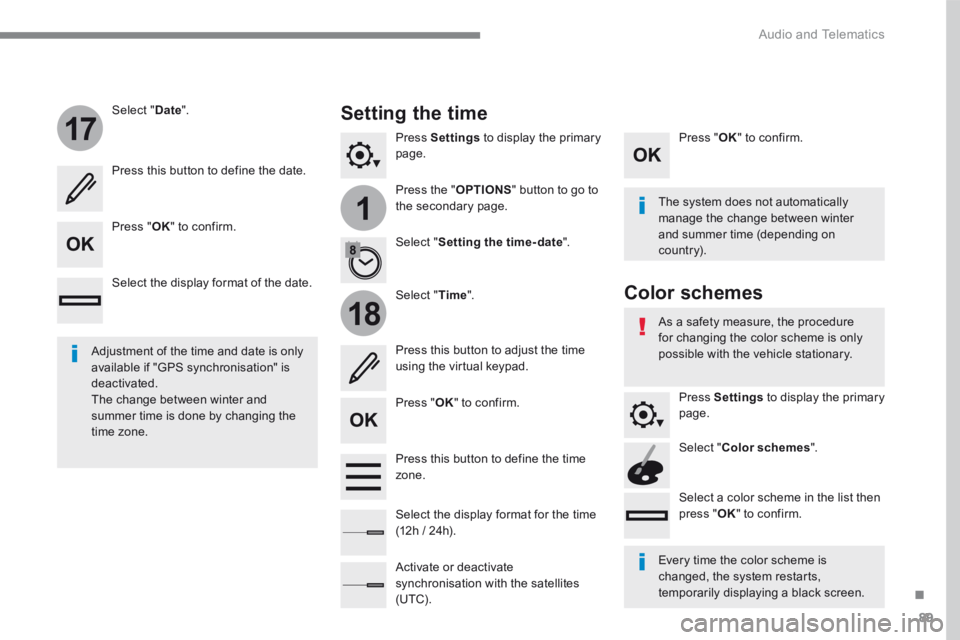
Press Settings to display the primary page.
Press the " OPTIONS " button to go to the secondary page.
Select " Date ".
Select " Time ".
Select " Setting the time- date ".
Adjustment of the time and date is only available if "GPS synchronisation" is deactivated. The change between winter and summer time is done by changing the time zone.
The system does not automatically manage the change between winter and summer time (depending on c ountr y).
Setting the time
Press this button to define the date.
Press this button to adjust the time using the virtual keypad.
Press " OK " to confirm.
Press " OK " to confirm.
Press " OK " to confirm.
Press this button to define the time zone.
Select the display format of the date.
Select the display format for the time (12h / 24h).
Activate or deactivate synchronisation with the satellites (UTC).
Every time the color scheme is changed, the system restarts, temporarily displaying a black screen.
As a safety measure, the procedure for changing the color scheme is only possible with the vehicle stationary.
Press Settings to display the primary page.
Select " Color schemes ".
Select a color scheme in the list then press " OK " to confirm.
Color schemes
Page 473 of 566
113
.
1
2
3
4
5
Audio and Telematics
Transversal-Peugeot_en_Chap02_RCC-2-2-0_ed01-2016
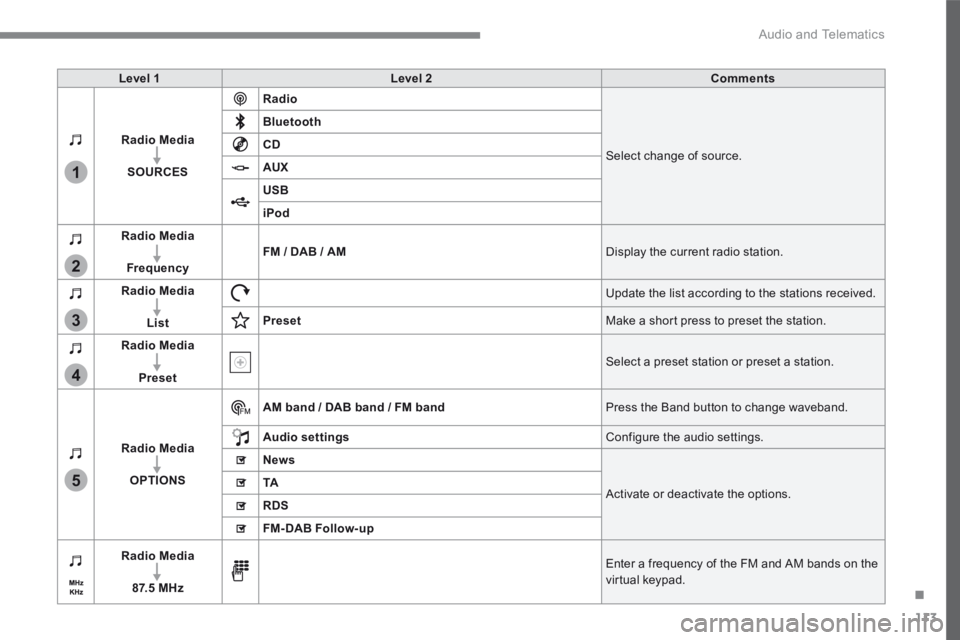
Level 1Level 2Comments
Radio Media
SOURCES
Radio
Select change of source.
Bluetooth
CD
AUX
USB
iPod
Radio Media
FrequencyFM / DAB / AM Display the current radio station.
Radio Media
List
Update the list according to the stations received.
Preset Make a short press to preset the station.
Radio Media
Preset Select a preset station or preset a station.
Radio Media
OPTIONS
AM band / DAB band / FM band Press the Band button to change waveband.
Audio settings Configure the audio settings.
News
Activate or deactivate the options. TA
RDS
FM-DAB Follow-up
Radio Media
8 7. 5 M H z
Enter a frequency of the FM and AM bands on the virtual keypad.
Page 478 of 566
118
4
5
Audio and Telematics
Transversal-Peugeot_en_Chap02_RCC-2-2-0_ed01-2016
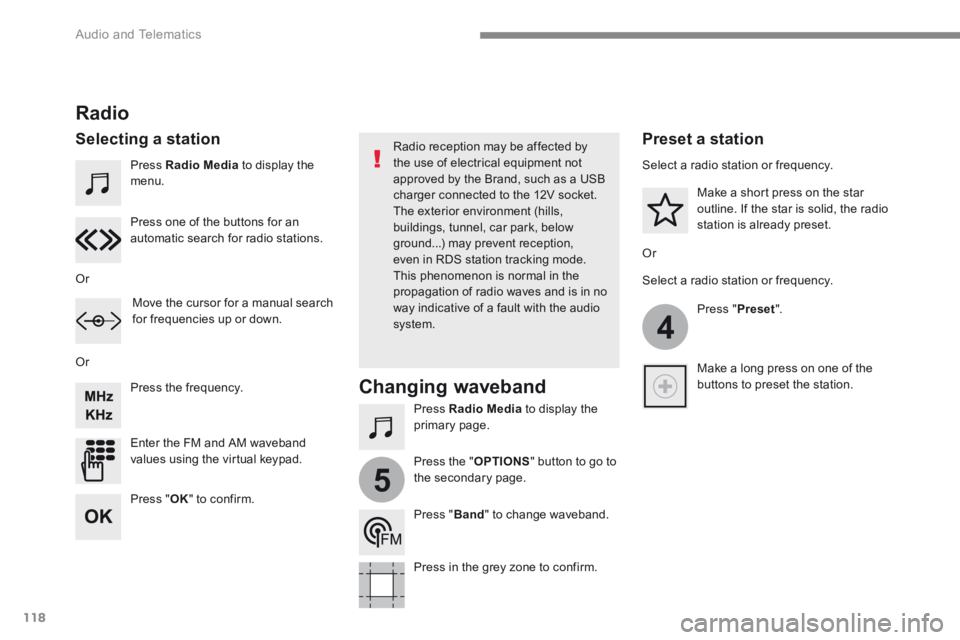
Press Radio Media to display the menu.
Press Radio Media to display the primary page.
Press the frequency.
Enter the FM and AM waveband values using the virtual keypad.
Press one of the buttons for an automatic search for radio stations.
Radio
Selecting a station Radio reception may be affected by the use of electrical equipment not approved by the Brand, such as a USB charger connected to the 12V socket. The exterior environment (hills,
buildings, tunnel, car park, below ground...) may prevent reception, even in RDS station tracking mode. This phenomenon is normal in the propagation of radio waves and is in no way indicative of a fault with the audio system.
Or
Or
Or
Move the cursor for a manual search for frequencies up or down.
Select a radio station or frequency.
Select a radio station or frequency.
Press " Preset ".
Press the " OPTIONS " button to go to the secondary page.
Make a short press on the star outline. If the star is solid, the radio station is already preset.
Make a long press on one of the buttons to preset the station.
Press " Band " to change waveband.
Press in the grey zone to confirm.
Preset a station
Changing waveband
Press " OK " to confirm.
Page 485 of 566
125
.
1
2
3
4
Audio and Telematics
Transversal-Peugeot_en_Chap02_RCC-2-2-0_ed01-2016
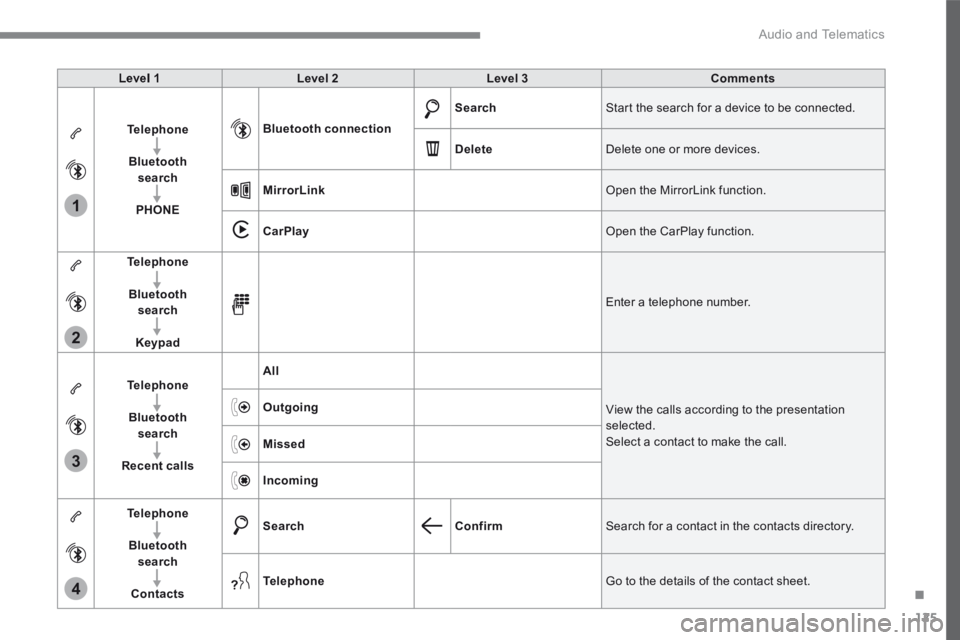
Level 1Level 2Level 3Comments
Telephone
Bluetooth search
PHONE
Bluetooth connection
Search Start the search for a device to be connected.
Delete Delete one or more devices.
MirrorLink Open the MirrorLink function.
CarPlay Open the CarPlay function.
Telephone
Bluetooth search
Keypad
Enter a telephone number.
Telephone
Bluetooth search
Recent calls
All
View the calls according to the presentation selected. Select a contact to make the call.
Outgoing
Missed
Incoming
Telephone
Bluetooth search
Contacts
SearchConfirm Search for a contact in the contacts directory.
Telephone Go to the details of the contact sheet.
Page 496 of 566
136
1
Audio and Telematics
Transversal-Peugeot_en_Chap02_RCC-2-2-0_ed01-2016
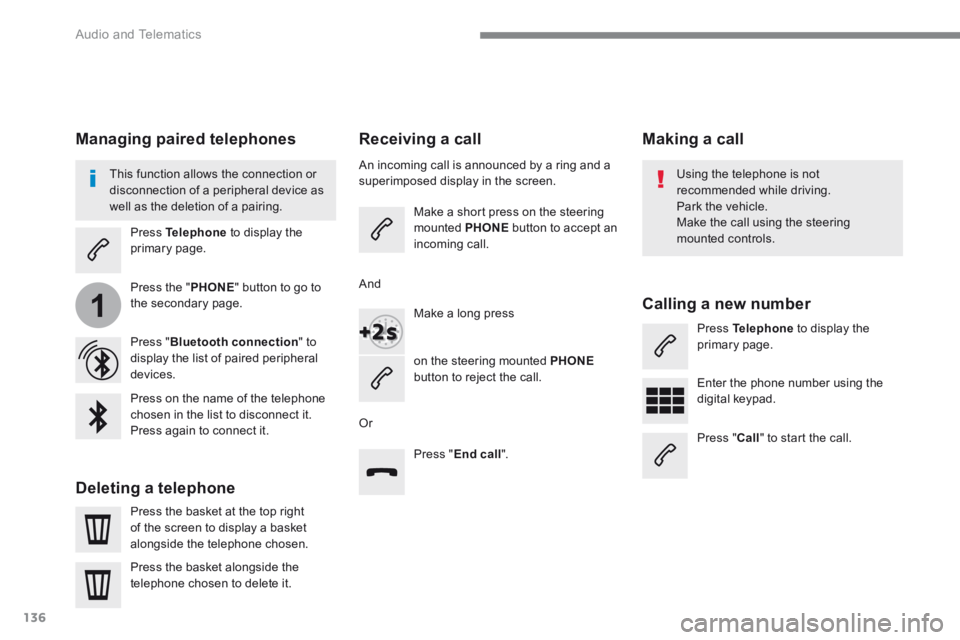
Receiving a call
An incoming call is announced by a ring and a superimposed display in the screen.
Make a short press on the steering mounted PHONE button to accept an incoming call.
Make a long press
on the steering mounted PHONEbutton to reject the call.
Or
And
Press " End call ".
Press on the name of the telephone chosen in the list to disconnect it. Press again to connect it.
Press the basket at the top right of the screen to display a basket
alongside the telephone chosen.
Press the basket alongside the telephone chosen to delete it.
Managing paired telephones
This function allows the connection or disconnection of a peripheral device as well as the deletion of a pairing.
Press Telephone to display the primary page.
Press the " PHONE " button to go to the secondary page.
Press " Bluetooth connection " to display the list of paired peripheral devices.
Deleting a telephone
Using the telephone is not recommended while driving. Park the vehicle. Make the call using the steering
mounted controls.
Making a call
Calling a new number
Press Telephone to display the primary page.
Enter the phone number using the digital keypad.
Press " Call " to start the call.
Page 506 of 566
146
1
Audio and Telematics
Transversal-Peugeot_en_Chap02_RCC-2-2-0_ed01-2016
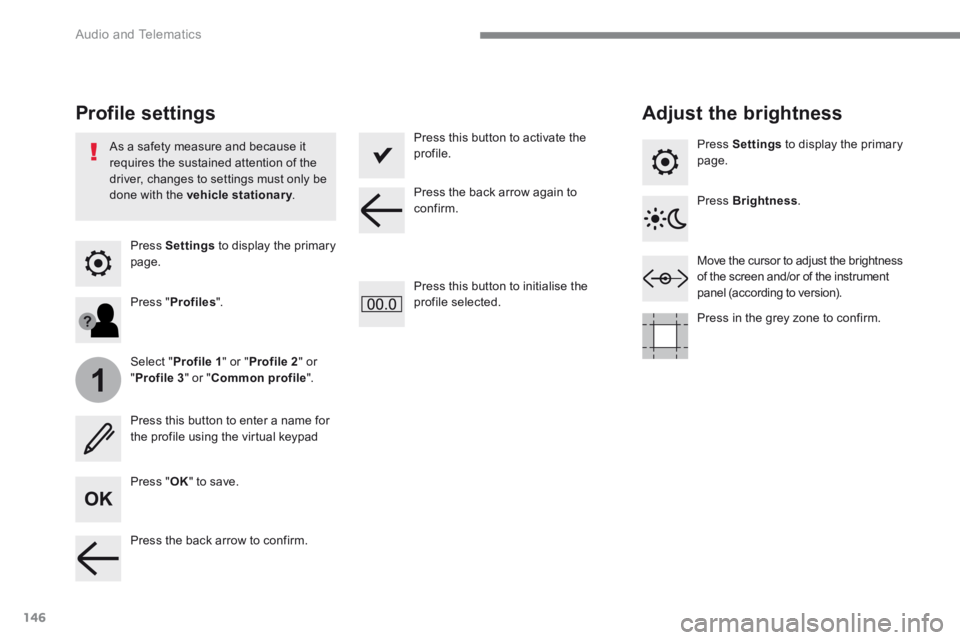
Press Settings to display the primary page.
Profile settings Adjust the brightness
Press " OK " to save.
Select " Profile 1 " or " Profile 2 " or " Profile 3 " or " Common profile ".
Press " Profiles ".
Press this button to enter a name for the profile using the virtual keypad
As a safety measure and because it requires the sustained attention of the driver, changes to settings must only be done with the vehicle stationary . vehicle stationary . vehicle stationary
Press this button to activate the profile.
Press this button to initialise the profile selected.
Press Settings to display the primary page.
Move the cursor to adjust the brightness of the screen and/or of the instrument panel (according to version).
Press Brightness .
Press in the grey zone to confirm.
Press the back arrow to confirm.
Press the back arrow again to confirm.
Page 508 of 566
148
15
14
Audio and Telematics
Transversal-Peugeot_en_Chap02_RCC-2-2-0_ed01-2016
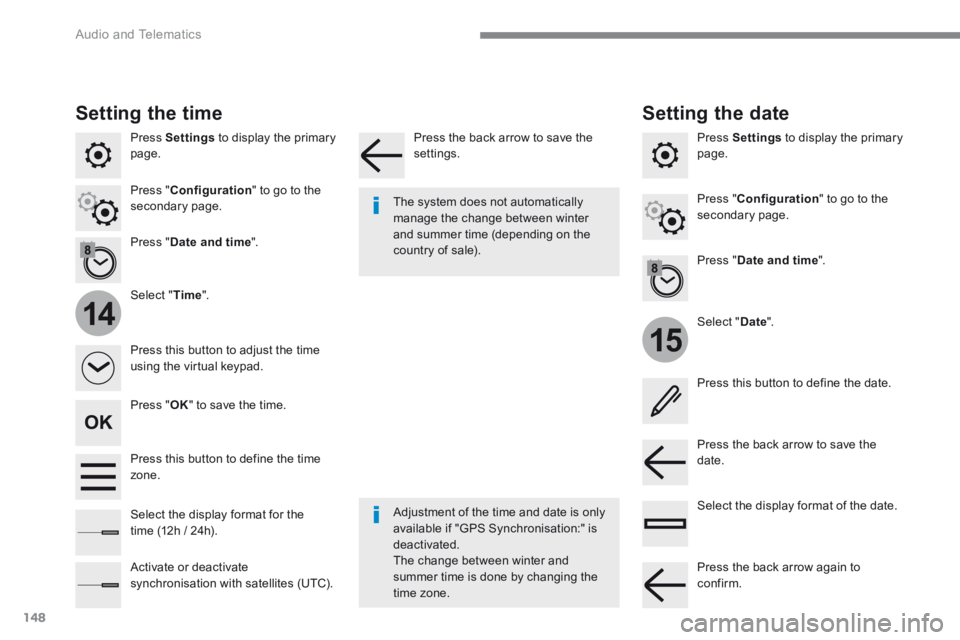
Press Settings to display the primary page.
Select " Date ".
Select " Time ".
Press " Date and time ".
Adjustment of the time and date is only available if "GPS Synchronisation:" is deactivated. The change between winter and summer time is done by changing the
time zone.
The system does not automatically manage the change between winter and summer time (depending on the country of sale).
Setting the time
Press this button to define the date.
Press this button to adjust the time using the virtual keypad.
Press the back arrow to save the date. Press this button to define the time zone.
Select the display format of the date. Select the display format for the time (12h / 24h).
Activate or deactivate synchronisation with satellites (UTC).
Press Settings to display the primary page.
Press " Date and time ".
Setting the date
Press " Configuration " to go to the secondary page. Press " Configuration " to go to the secondary page.
Press " OK " to save the time.
Press the back arrow to save the settings.
Press the back arrow again to confirm.
Page 527 of 566
165
.
Audio and Telematics
Transversal-Peugeot_en_Chap03_RD6_ed01-2016
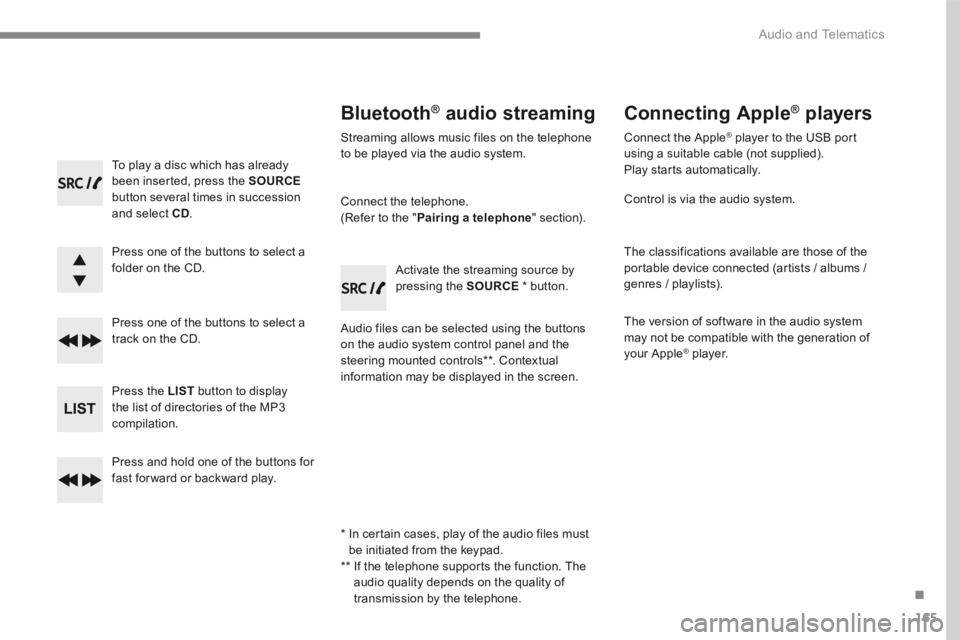
To play a disc which has already been inserted, press the SOURCEbutton several times in succession and select CD.
Press one of the buttons to select a folder on the CD.
Press one of the buttons to select a track on the CD.
Press the LIST button to display the list of directories of the MP3 compilation.
Press and hold one of the buttons for fast for ward or backward play.
Bluetooth ®Bluetooth ®Bluetooth audio streaming ® audio streaming ®
Streaming allows music files on the telephone to be played via the audio system.
Connect the telephone. (Refer to the " Pairing a telephone " section).
Audio files can be selected using the buttons on the audio system control panel and the steering mounted controls ** . Contextual information may be displayed in the screen.
Activate the streaming source by pressing the SOURCE * button.
Connecting Apple ®Connecting Apple ®Connecting Apple players ® players ®
Connect the Apple ® player to the USB port ® player to the USB port ®
using a suitable cable (not supplied). Play starts automatically.
Control is via the audio system.
The classifications available are those of the portable device connected (artists / albums / genres / playlists).
The version of software in the audio system may not be compatible with the generation of your Apple ® player. ® player. ®
* In certain cases, play of the audio files must be initiated from the keypad. ** If the telephone supports the function. The audio quality depends on the quality of transmission by the telephone.
Page 532 of 566
170
Audio and Telematics
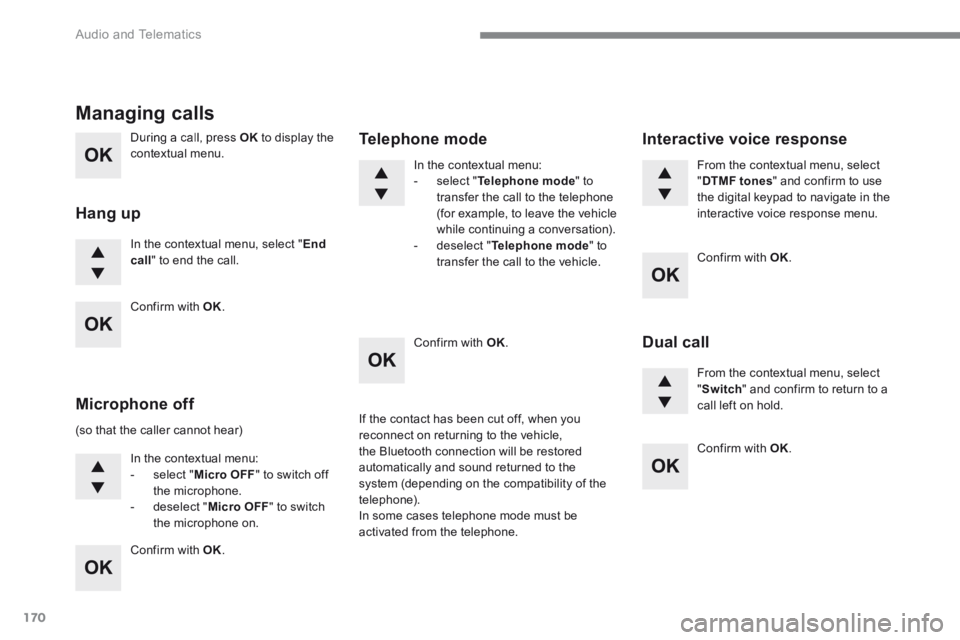
During a call, press OK to display the contextual menu.
In the contextual menu, select " End call " to end the call.
Managing calls
Hang up
(so that the caller cannot hear)
In the contextual menu: - select " Micro OFF " to switch off the microphone. - deselect " Micro OFF " to switch the microphone on.
In the contextual menu: - select " Telephone mode " to transfer the call to the telephone (for example, to leave the vehicle while continuing a conversation). - deselect " Telephone mode " to transfer the call to the vehicle.
Microphone off
Telephone mode
If the contact has been cut off, when you reconnect on returning to the vehicle, the Bluetooth connection will be restored automatically and sound returned to the system (depending on the compatibility of the telephone). In some cases telephone mode must be activated from the telephone.
From the contextual menu, select " DTMF tones " and confirm to use the digital keypad to navigate in the interactive voice response menu.
From the contextual menu, select " Switch " and confirm to return to a call left on hold.
Interactive voice response
Dual call
Confirm with OK .
Confirm with OK .
Confirm with OK .
Confirm with OK .
Confirm with OK .