park assist PEUGEOT 308 2017 Owners Manual
[x] Cancel search | Manufacturer: PEUGEOT, Model Year: 2017, Model line: 308, Model: Peugeot 308 2017Pages: 566, PDF Size: 16.05 MB
Page 5 of 566
.
3008-2_en_Chap00a_sommaire_ed01-2016
For the audio and telematic systems,
refer to the supplement to the handbook
or go to the following internet address:
http://public.servicebox.peugeot.com/ddb/
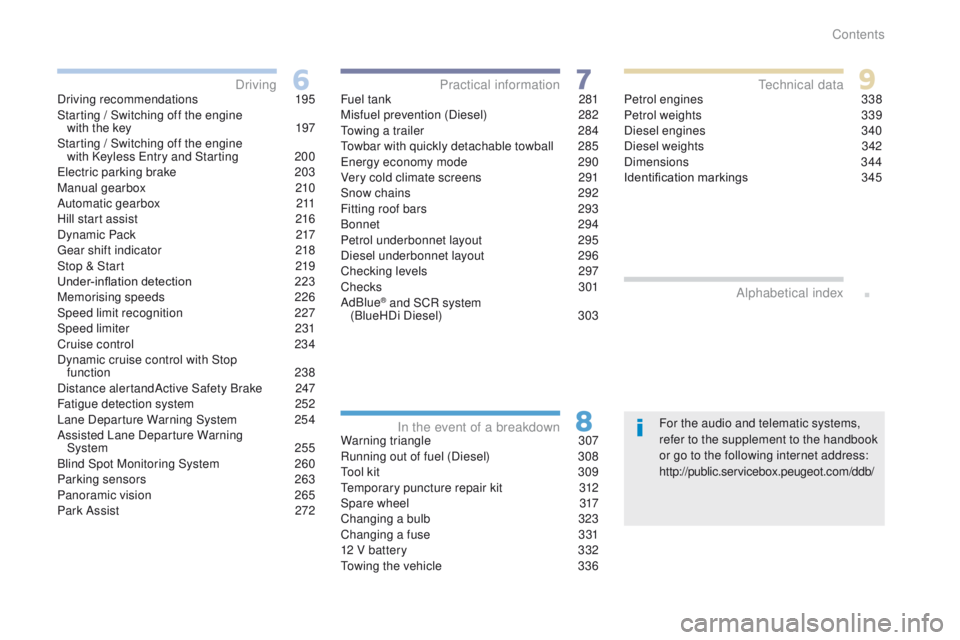
Driving recommendations
1
95
Starting / Switching off the engine with the key
1
97
Starting / Switching off the engine with Keyless Entry and Starting
2
00
Electric parking brake
2
03
Manual gearbox
2
10
Automatic gearbox
2
11
Hill start assist
2
16
Dynamic Pack
2
17
Gear shift indicator
2
18
Stop & Start
2
19
Under-inflation detection
2
23
Memorising speeds
2
26
Speed limit recognition
2
27
Speed limiter
23
1
Cruise control
2
34
Dynamic cruise control with Stop function
238
Distance alertandActive Safety Brake
2
47
Fatigue detection system
2
52
Lane Departure Warning System 2
54
Assisted Lane Departure Warning System
25
5
Blind Spot Monitoring System
2
60
Parking sensors
2
63
Panoramic vision
2
65
Park Assist
2
72 Fuel tank
2
81
Misfuel prevention (Diesel)
2
82
Towing a trailer
2
84
Towbar with quickly detachable towball
2
85
Energy economy mode
2
90
Very cold climate screens
2
91
Snow chains
2
92
Fitting roof bars
2
93
Bonnet
294
Petrol underbonnet layout
2
95
Diesel underbonnet layout
2
96
Checking levels
2
97
Checks
301
AdBlue
® and SCR system
(BlueHDi Diesel) 3 03
Warning triangle
3
07
Running out of fuel (Diesel)
3
08
Tool kit
3
09
Temporary puncture repair kit
3
12
Spare wheel
3
17
Changing a bulb
3
23
Changing a fuse
3
31
12 V battery
3
32
Towing the vehicle
3
36Petrol engines
3
38
Petrol weights
3
39
Diesel engines
3
40
Diesel weights
3
42
Dimensions
3
44
Identification markings
3
45
Driving
Practical information
In the event of a breakdown Technical data
Alphabetical index
Contents
Page 6 of 566
4
3008-2_en_Chap00b_vue-ensemble_ed01-2016
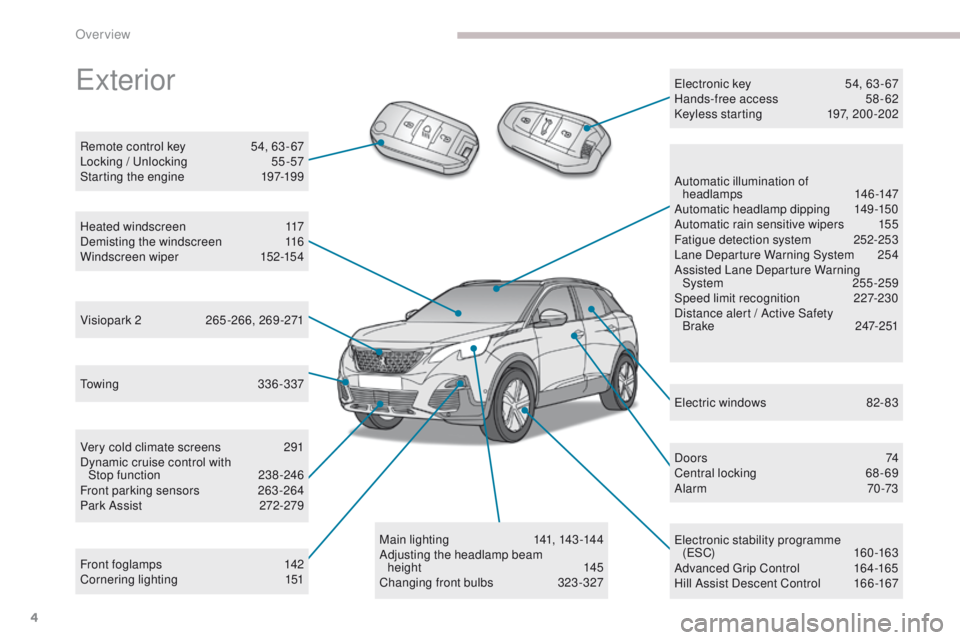
Towing 336-337
Very cold climate screens
2
91
Dynamic cruise control with Stop
function
23
8-246
Front parking sensors
2
63 -264
Park Assist
2
72-279
Front foglamps
1
42
Cornering lighting
1
51
Remote control key
5
4, 63 - 67
Locking / Unlocking
5
5 -57
Starting the engine
1
97-199
Automatic illumination of
headlamps
14
6 -147
Automatic headlamp dipping
1
49-150
Automatic rain sensitive wipers
1
55
Fatigue detection system
2
52-253
Lane Departure Warning System
2
54
Assisted Lane Departure Warning System
255-259
Speed limit recognition
2
27-230
Distance alert / Active Safety B r a ke
2
47- 2 51
Electric windows
8
2- 83
D o o r s
74
C
entral locking
6
8 - 69
Alarm
70-73
Electronic stability programme (ESC)
160 -163
Advanced Grip Control
1
64-165
Hill Assist Descent Control
1
66 -167
Main lighting
14
1, 143 -14 4
Adjusting the headlamp beam height
1
45
Changing front bulbs
3
23-327
Heated windscreen
1
17
Demisting the windscreen
1
16
Windscreen wiper
1
52-154
Visiopark 2
26
5-266, 269-271 Electronic key
5
4, 63 - 67
Hands-free access
5
8 - 62
Keyless starting
1
97, 200 -202
Exterior
Over view
Page 7 of 566
5
3008-2_en_Chap00b_vue-ensemble_ed01-2016
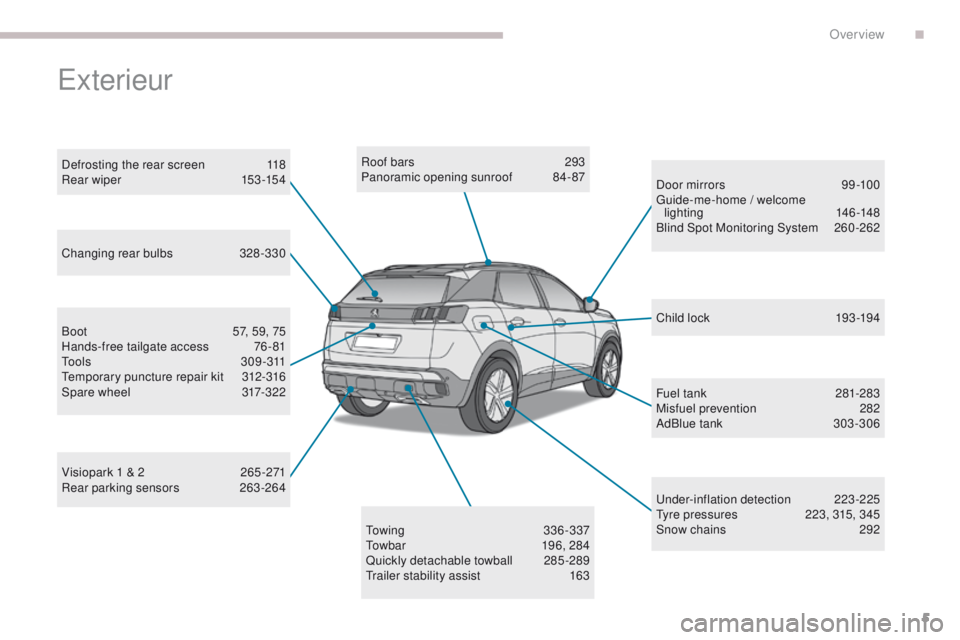
Roof bars 293
Panoramic opening sunroof 8 4- 87
Under-inflation detection
2
23-225
Tyre pressures
2
23, 315, 345
Snow chains
2
92
Visiopark 1 & 2
2
65 -271
Rear parking sensors
2
63-264 Child lock
19
3 -19 4
Towing
336-337
Towbar
1
96, 284
Quickly detachable towball
2
85 -289
Trailer stability assist
1
63Fuel tank
28
1-283
Misfuel prevention
2
82
AdBlue tank
3
03 -306
Door mirrors
9
9 -100
Guide-me-home / welcome lighting
14
6 -148
Blind Spot Monitoring System
26
0-262
Changing rear bulbs
3
28-330
Defrosting the rear screen
1
18
Rear wiper
15
3 -15 4
Boot
5
7, 59, 75
Hands-free tailgate access
7
6 - 81
Tools
309-311
Temporary puncture repair kit
3
12-316
Spare wheel
3
17-322
Exterieur
.
Over view
Page 9 of 566
7
3008-2_en_Chap00b_vue-ensemble_ed01-2016
Instruments and controls
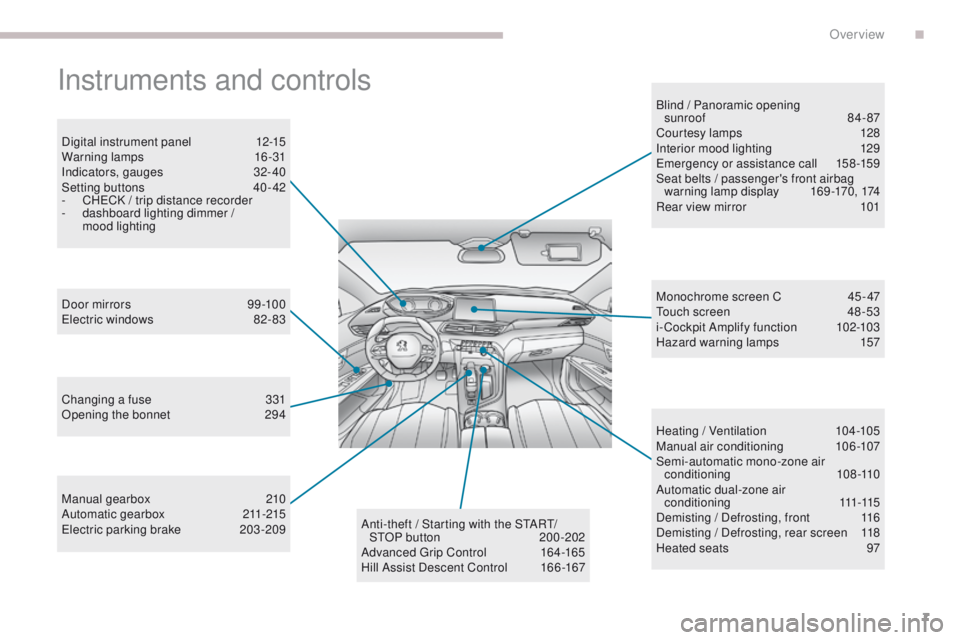
Digital instrument panel 12-15
Warning lamps 1 6-31
Indicators, gauges
3
2- 40
Setting buttons
4
0 - 42
-
C
HECK / trip distance recorder
-
d
ashboard lighting dimmer /
mood lighting
Door mirrors
9
9 -100
Electric windows
8
2- 83
Changing a fuse
3
31
Opening the bonnet
2
94
Manual gearbox
2
10
Automatic gearbox
21
1-215
Electric parking brake
20
3-209 Blind / Panoramic opening
sunroof 84- 87
Courtesy lamps 1 28
Interior mood lighting 1 29
Emergency or assistance call
1
58 -159
Seat belts / passenger's front airbag warning lamp display
1
69-170, 174
Rear view mirror
1
01
Heating / Ventilation
1
04-105
Manual air conditioning
1
06-107
Semi-automatic mono-zone air conditioning
108 -110
Automatic dual-zone air c o n d i t i o n i n g
111
-115
Demisting / Defrosting, front
1
16
Demisting / Defrosting, rear screen
1
18
Heated seats
9
7
Monochrome screen C
4
5-47
Touch screen
4
8 -53
i- Cockpit Amplify function
1
02-103
Hazard warning lamps
1
57
Anti-theft / Starting with the START/ STOP button
20
0-202
Advanced Grip Control
1
64-165
Hill Assist Descent Control
1
66 -167
.
Over view
Page 48 of 566
46
3008-2_en_Chap01_instruments-de-bord_ed01-2016
"Telephone" menu
"Connections" menu
With the audio system on, this menu allows
a Bluetooth device (telephone, media player)
to be paired and the connection mode to be
defined (hands-free, playing audio files).
For more information on the "Connections"
application, refer to the "Audio equipment and
telematics" section. With the audio system switched on, this menu
allows you to make a call, view the calls log or
the various telephone directories.
For more information on the "Telephone"
application, refer to the "Audio equipment and
telematics" section.This menu gives access to the following
functions:
-
"
Define the vehicle parameters",
-
"
Choice of language",
-
"
Display configuration",
-
"
Comfort"
:
●
"
Rear wipe in reverse gear".
F
or more information on the Wipers
,
refer to the "Lighting and visibility"
section.
●
"
Parking assistance".
F
or more information on Parking
assistance , refer to the "Driving"
section.
●
"
Fatigue Detection System".
F
or more information on the Fatigue
detection system , refer to the "Driving"
section.
Define the vehicle parameters
This menu allows the activation or deactivation
of the following equipment, depending on
version:
-
"
Lighting" :
●
"
Follow-me-home headlamps".
●
"
Welcome lighting".
For more information on Exterior lighting ,
refer to the "Lighting and visibility" section.
"Personalisation-configuration" menu
- "Access to the vehicle" :
● " Plip action".
For more information on the Remote control
and selective door unlocking in particular, refer
to the "Access" section. -
"
Driving assistance"
:
●
"
Auto. emergency braking".
F
or more information on the Active
Safety Brake , refer to the "Driving"
section.
● " Speed recommendation".
F
or more information on Speed limit
recognition , refer to the "Driving"
section.
●
"
Tyre inflation".
F
or more information on Under-
inflation detection and reinitialisation in
particular, refer to the "Driving" section.
Instruments
Page 50 of 566
48
3008-2_en_Chap01_instruments-de-bord_ed01-2016
Touch screen
This system gives access to:
- t he permanent display of the time and
the ambient temperature (a blue symbol
appears when there is a risk of ice),
-
t
he heating/air conditioning controls,
-
m
enus for adjusting settings for vehicle
functions and systems,
-
a
udio system and telephone controls and
the display of associated information,
-
t
he display of visual parking aids (visual
parking sensor information, Park Assist, ...),
-
I
nternet services, and the display of
associated information.General operation
and, depending on equipment, allows:
- a ccess to the navigation system controls
and the display of associated information. As a safety measure, the driver
should only carr y out operations
that require close attention with the
vehicle stationary.
Some functions are not accessible
when driving.
Recommendations
This screen is of the capacitive type.
Use is possible in all temperatures.
Do not use pointed objects on the touch
screen.
Do not touch the touch screen with wet hands.
Uses a soft clean cloth to clean the touch
screen.
Principles
Use the buttons below the touch screen for
access to the menus, then press the virtual
buttons in the touch screen.
Certain menus may be displayed over two
pages. Press the "
OPTIONS" button to go to
the second page.
To deactivate or activate a function,
select
"OFF " or " ON".
To modify a setting or access additional
information, press the symbol for the function.
Use this button to confirm.
Use this button to return to the
previous page.
After a few moments with no action
on the second page, the first page is
displayed automatically.
For the audio and telematic systems,
refer to the supplement to the handbook
or go to the following internet address:
http://public.servicebox.peugeot.com/ddb/
Instruments
Page 53 of 566

51
3008-2_en_Chap01_instruments-de-bord_ed01-2016
"Driving assistance" tab
Corresponding function"Comments"
"Speed settings" Memorisation of speed settings for the speed limiter or cruise control.
"Under-inflation initialization "Reinitialization of the under-inflation detection system.
"Lane departure detection assistance. "Activation/deactivation of the function.
"Help staying in lane" Activation/deactivation of the function.
Parking sensors Activation/deactivation of the function.
"Park Assist" Activation/deactivation of the function.
"Automatic headlamp dip "Activation/deactivation of the function.
"Stop & Star t" Activation/deactivation of the function.
" Blind spot monitoring " Activation/deactivation of the function.
"Panoramic visual aid" Activation of the Visiopark 2 function.
"Wheel anti-slip regulation" Activation/deactivation of the function
For more information on one of these functions, refer to the corresponding section.
1
Instruments
Page 201 of 566
199
3008-2_en_Chap06_conduite_ed01-2016
Switching off the engine
Energy economy mode
After switching off the engine (position 1- Stop),
for a maximum of 30 minutes you can still use
functions such as the audio and telematic
system, the wipers, dipped beam headlamps,
courtesy lamps, ...
F
C
heck that the parking brake is correctly
applied, particularly on sloping ground.
Never switch off the ignition before the
vehicle is at a complete stop. With the
engine off, the braking and steering
assistance systems are also cut off: risk
of loss of control of the vehicle. To facilitate unlocking of the steering
column, it is recommended that the
wheels be returned to the straight ahead
position before switching off the engine.
When you leave the vehicle, keep the
key with you and lock the vehicle. For more information on Energy
economy mode
, refer to the
corresponding section.Key left in the "Ignition on"
position
If the key has been left in the ignition switch
at position 2 (Ignition on) , the ignition will
be switched off automatically after one hour.
To switch the ignition back on, turn the key
to position 1 (Stop) , then back to position 2
(Ignition on) .
F Stop the vehicle.
F
W ith the engine running at idle, turn the key
to position 1 .
F
R
emove the key from the ignition switch.
F
T
o lock the steering column, turn the
steering until it locks.
6
Driving
Page 218 of 566
216
3008-2_en_Chap06_conduite_ed01-2016
Hill start assist
On an ascending slope, with the vehicle
stationary, the vehicle is held for a momentarily
when you release the brake pedal:
- provided you are in first gear or neutral with a manual gearbox,
-
p
rovided you are in position D or M with an
automatic gearbox.
Operation
On a descending slope, with the vehicle
stationary and reverse gear engaged, the
vehicle is held momentarily when you
release the brake pedal.
Operating fault
If a fault in the system occurs, these warning
lamps come on. Contact a PEUGEOT dealer
or a qualified workshop to have the system
checked.
System which keeps your vehicle immobilised
temporarily (approximately 2 seconds) when
starting on a gradient, the time it takes to
move your foot from the brake pedal to the
accelerator pedal.
This system only operates when:
-
t
he vehicle is completely stationary, with
your foot on the brake pedal,
-
c
ertain gradient conditions are met,
-
w
ith the driver’s door closed.
The hill start assist system cannot be
deactivated.
Do not leave the vehicle while it is being
held in the hill start assist phase.
If you need to leave the vehicle with the
engine running, apply the parking brake
manually then ensure that the parking
brake warning lamp and the warning
lamp P in the lever of the electric
parking brake control are on fixed (not
flashing).
Driving
Page 219 of 566
SPORT
217
3008-2_en_Chap06_conduite_ed01-2016
Dynamic Pack
This pack adapts:
- t he display colour for the instrument panel,
-
t
he acoustic ambience of the engine,
-
t
he level of power assistance for the steering,
-
acceleration,
-
t
he management of gear changes with an
automatic gearbox,
-
t
he display in the instrument panel of
information on the vehicle's dynamic
parameters.
Activation
F Press and hold this button until
the instrument panel colour
changes (red); the indicator lamp
in the button comes on.
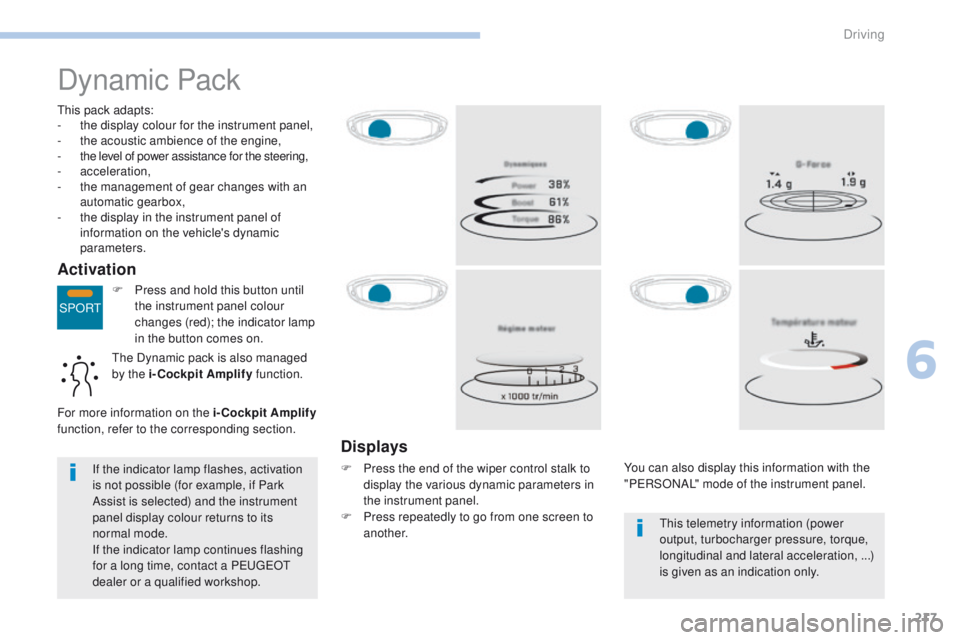
Displays
F Press the end of the wiper control stalk to display the various dynamic parameters in
the instrument panel.
F
P
ress repeatedly to go from one screen to
another. You can also display this information with the
"PERSONAL" mode of the instrument panel.
If the indicator lamp flashes, activation
is not possible (for example, if Park
Assist is selected) and the instrument
panel display colour returns to its
normal mode.
If the indicator lamp continues flashing
for a long time, contact a PEUGEOT
dealer or a qualified workshop. This telemetry information (power
output, turbocharger pressure, torque,
longitudinal and lateral acceleration, ...)
is given as an indication only.
The Dynamic pack is also managed
by the i-Cockpit Amplify
function.
For more information on the i-Cockpit Amplify
function, refer to the corresponding section.
6
Driving