above 3 Peugeot 308 2018 User Guide
[x] Cancel search | Manufacturer: PEUGEOT, Model Year: 2018, Model line: 308, Model: Peugeot 308 2018Pages: 324, PDF Size: 10.72 MB
Page 142 of 324
140
When the cruise control is paused, it
can only be reactivated when all of the
safety conditions are met. The "Activation
denied, conditions unsuitable" message is
displayed if reactivation is not possible.
Reactivating the function
With a manual gearbox
To reactivate the function, the driver must
accelerate to reach at least 19 mph (30 km/h),
then press one of the buttons 2 , 3 or 4.
With the EAT8 gearbox or with the BlueHDi
150 S&S EAT6 engine
Following braking of the vehicle bringing it to
a complete stop, the system holds the vehicle
stationary; the cruise control is paused.
The driver should press the accelerator pedal
to move off, then reactivate the system above
19
mph (30 km/h) by pressing button 2 , 3 or 4.
If the driver takes no action following this
immobilisation, the electric parking brake is
applied automatically after a while (approx. five
minutes).
As a safety measure, wait until the current
speed approaches the speed setting to
reactivate the function by pressing button 4 .
Modification of the speed
setting
With the engine running and cruise control on
(green), you can modify the speed setting.
Modification from the current
speed
F By successive short presses on button 2
or 3 , to lower or raise the setting in steps of
1
mph (km/h),
F
B
y a maintained press on button 2 or 3 , to
lower or raise the setting in steps of 5
mph
(km/h).
Take care: pressing and holding button 2
or 3
results in a rapid change in the speed
of your vehicle.
Modification from the speed Limit
recognition and recommendation
system
F The suggested speed is displayed in the instrument panel.
F
M
ake an initial press on button 5 ; a
message is displayed to confirm the
memorisation request.
F
P
ress button 5 again to save the suggested
speed.
The speed displays immediately in the
instrument panel as the new speed setting. For more information on the Speed Limit
recognition and recommendation
, refer to
the corresponding section.
As a precaution, it is recommended
that you select a cruise speed close to
the current speed of your vehicle, so
as to avoid any sudden acceleration or
deceleration of the vehicle.
Modification of the programmed
inter-vehicle distance
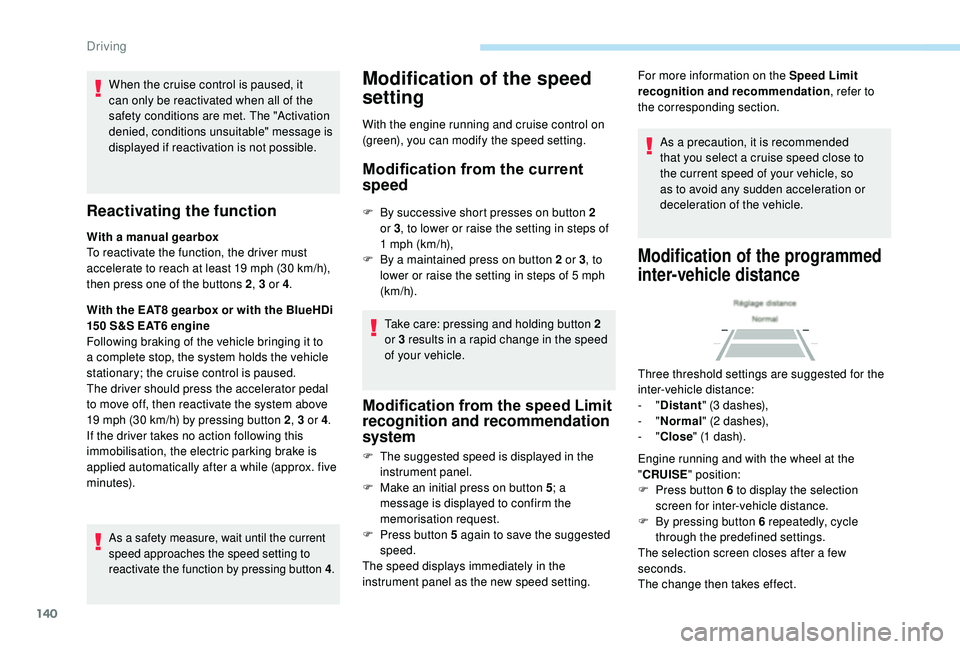
Three threshold settings are suggested for the
inter-vehicle distance:
- "Distant " (3 dashes),
-
"Normal " (2 dashes),
-
"Close " (1 dash).
Engine running and with the wheel at the
" CRUISE " position:
F
P
ress button 6 to display the selection
screen for inter-vehicle distance.
F
B
y pressing button 6 repeatedly, cycle
through the predefined settings.
The selection screen closes after a few
seconds.
The change then takes effect.
Driving
Page 151 of 324
149
Malfunction
In the event of a fault with the system,
you are alerted by the continuous
illumination of this warning lamp,
accompanied by the display of a
message and an audible signal.
Fatigue detection system
Take a break as soon as you feel tired or at
least every two hours.
These systems cannot in any circumstances
replace the need for vigilance on the part
of the driver who must remain in control
of their decisions. In no case can these
systems keep the driver awake or prevent
them from falling asleep at the wheel.
It is the driver’s responsibility to stop if they
feel tired.
Activation/Deactivation
The system is activated or deactivated via the
vehicle configuration menu.
For more information on the menu, refer to the
part covering your screen in the "Instruments"
section.
The state of the system stays in the memory
when the ignition is switched off.
Driver Attention Warning
The system triggers an alert once it
detects that the driver has not taken
a break after two hours of driving at
a speed above 40 mph (65 km/h).
This alert is issued via the display of a
message encouraging you to take a break,
accompanied by an audible signal.
If the driver does not follow this advice, the
alert is repeated hourly until the vehicle is
stopped.
The system resets itself if one of the following
conditions is met:
-
e
ngine running, the vehicle has been
stationary for more than 15
minutes,
-
t
he ignition has been switched off for a few
minutes,
-
t
he driver's seat belt is unfastened and their
door is open.
As soon as the speed of the vehicle drops
below 40
mph (65 km/h), the system goes
into standby.
The driving time is counted again once the
speed is above 40
mph (65 km/h).
Driver Attention Alert
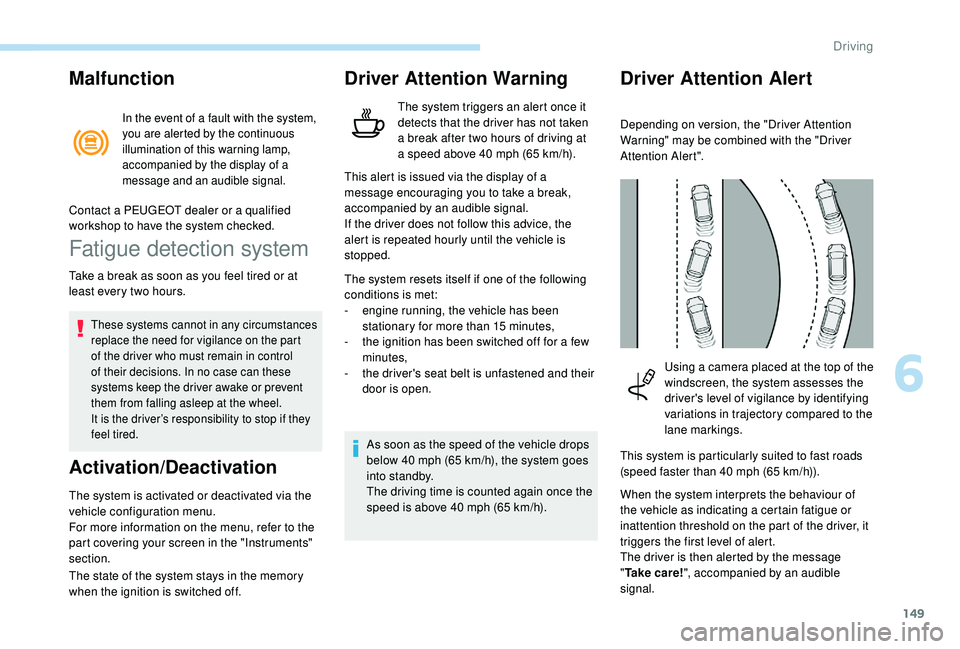
Depending on version, the "Driver Attention
Warning" may be combined with the "Driver
Attention Alert".
Contact a PEUGEOT dealer or a qualified
workshop to have the system checked.
Using a camera placed at the top of the
windscreen, the system assesses the
driver's level of vigilance by identifying
variations in trajectory compared to the
lane markings.
This system is particularly suited to fast roads
(speed faster than 40
mph (65 km/h)).
When the system interprets the behaviour of
the vehicle as indicating a certain fatigue or
inattention threshold on the part of the driver, it
triggers the first level of alert.
The driver is then alerted by the message
" Ta k e c a r e ! ", accompanied by an audible
signal.
6
Driving
Page 154 of 324
152
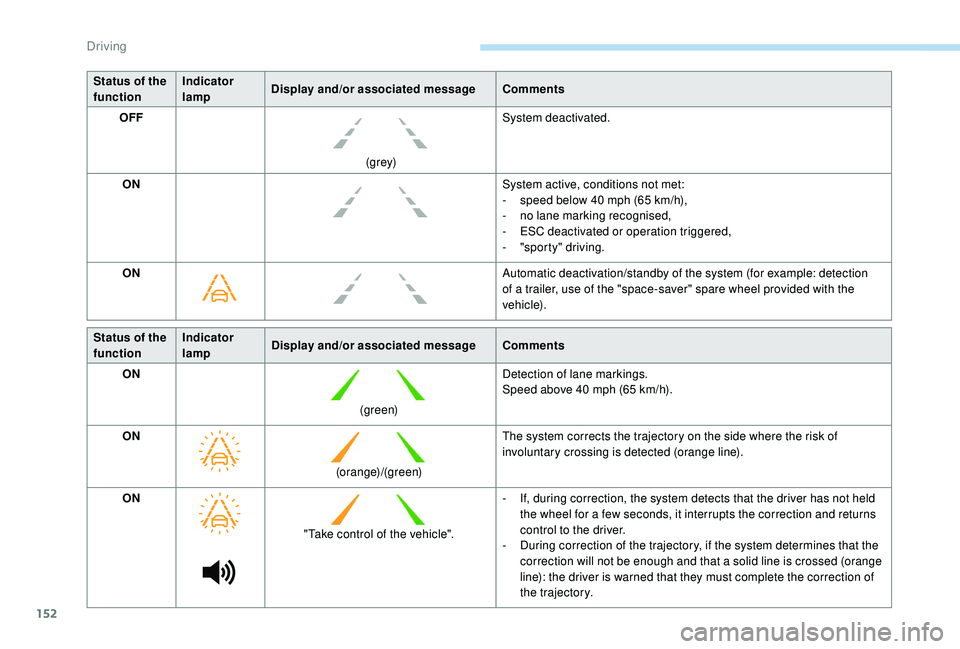
Status of the
functionIndicator
lamp
Display and/or associated message
Comments
OFF
(grey)System deactivated.
ON System active, conditions not met:
-
s
peed below 40 mph (65 km/h),
-
n
o lane marking recognised,
-
E
SC deactivated or operation triggered,
-
"
sporty" driving.
ON Automatic deactivation/standby of the system (for example: detection
of a trailer, use of the "space-saver" spare wheel provided with the
vehicle).
Status of the
function Indicator
lamp
Display and/or associated message
Comments
ON
(green)Detection of lane markings.
Speed above 40
mph (65 km/h).
ON (orange)/(green)The system corrects the trajectory on the side where the risk of
involuntary crossing is detected (orange line).
ON "Take control of the vehicle". -
I
f, during correction, the system detects that the driver has not held
the wheel for a few seconds, it interrupts the correction and returns
control to the driver.
-
D
uring correction of the trajectory, if the system determines that the
correction will not be enough and that a solid line is crossed (orange
line): the driver is warned that they must complete the correction of
the trajectory.
Driving
Page 160 of 324
158
Reversing camera
The reversing camera cannot, in any
circumstances, replace the need for
vigilance on the part of the driver.They are represented as lines marked
"on the ground" and do not indicate the
position of tall obstacles (for example:
other vehicles, etc.) relative to the vehicle.
Some distortion of the image is normal.
It is normal to have a part of the number
plate showing in the bottom of the screen.
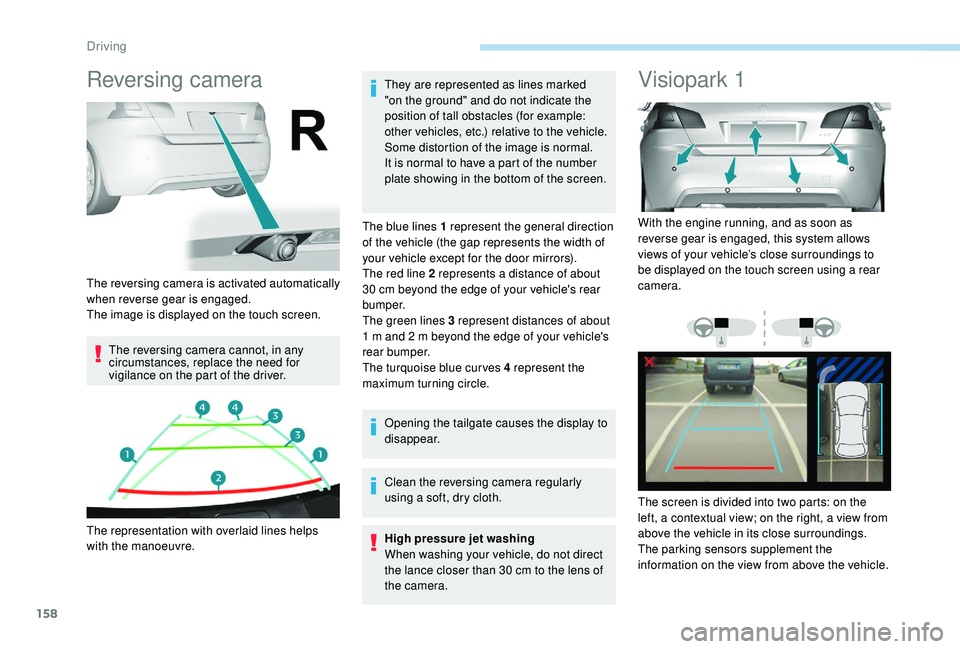
The blue lines 1 represent the general direction
of the vehicle (the gap represents the width of
your vehicle except for the door mirrors).
The red line 2 represents a distance of about
30 cm beyond the edge of your vehicle's rear
b u m p e r.
The green lines 3 represent distances of about
1 m and 2 m beyond the edge of your vehicle's
rear bumper.
The turquoise blue curves 4 represent the
maximum turning circle.
Opening the tailgate causes the display to
disappear.
Clean the reversing camera regularly
using a soft, dry cloth.
High pressure jet washing
When washing your vehicle, do not direct
the lance closer than 30
cm to the lens of
the camera.
Visiopark 1
The reversing camera is activated automatically
when reverse gear is engaged.
The image is displayed on the touch screen.
The representation with overlaid lines helps
with the manoeuvre. With the engine running, and as soon as
reverse gear is engaged, this system allows
views of your vehicle’s close surroundings to
be displayed on the touch screen using a rear
camera.
The screen is divided into two parts: on the
left, a contextual view; on the right, a view from
above the vehicle in its close surroundings.
The parking sensors supplement the
information on the view from above the vehicle.
Driving
Page 161 of 324
159
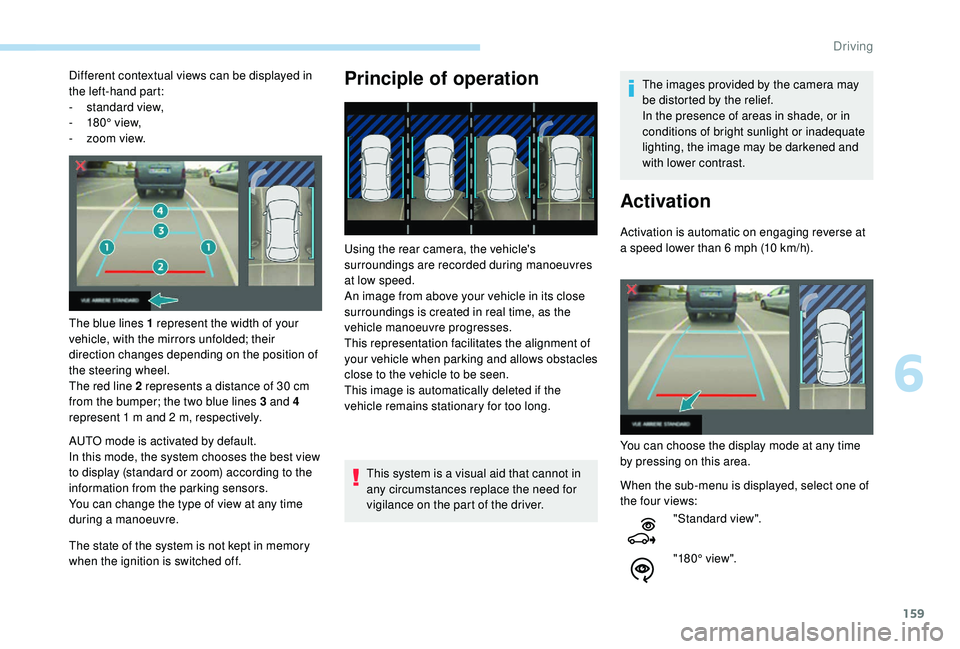
Different contextual views can be displayed in
the left-hand part:
-
s
tandard view,
-
1
80° view,
-
z
oom view.
The blue lines 1 represent the width of your
vehicle, with the mirrors unfolded; their
direction changes depending on the position of
the steering wheel.
The red line 2 represents a distance of 30
cm
from the bumper; the two blue lines 3 and 4
represent 1
m and 2 m, respectively.
AUTO mode is activated by default.
In this mode, the system chooses the best view
to display (standard or zoom) according to the
information from the parking sensors.
You can change the type of view at any time
during a manoeuvre.
The state of the system is not kept in memory
when the ignition is switched off.Principle of operation
Using the rear camera, the vehicle's
surroundings are recorded during manoeuvres
at low speed.
An image from above your vehicle in its close
surroundings is created in real time, as the
vehicle manoeuvre progresses.
This representation facilitates the alignment of
your vehicle when parking and allows obstacles
close to the vehicle to be seen.
This image is automatically deleted if the
vehicle remains stationary for too long.
This system is a visual aid that cannot in
any circumstances replace the need for
vigilance on the part of the driver. The images provided by the camera may
be distorted by the relief.
In the presence of areas in shade, or in
conditions of bright sunlight or inadequate
lighting, the image may be darkened and
with lower contrast.
Activation
Activation is automatic on engaging reverse at
a speed lower than 6
mph (10 km/h).
You can choose the display mode at any time
by pressing on this area.
When the sub-menu is displayed, select one of
the four views: "Standard view".
"180° view".
6
Driving
Page 162 of 324
160
The function will be deactivated:
- I f a trailer is attached or a bicycle
carrier is fitted on a towbar (vehicle
fitted with a towbar installed in line with
the manufacturer's recommendations).
-
A
bove about 6 mph (10 km/h).
-
O
n opening the tailgate.
-
W
hen shifting out of reverse (the image
remains displayed for 7
seconds).
-
B
y pressing the red cross in the top
left-hand corner of the touch screen.
Check the cleanliness of the camera lens
regularly.
Clean the reversing camera regularly
using a soft, dry cloth.
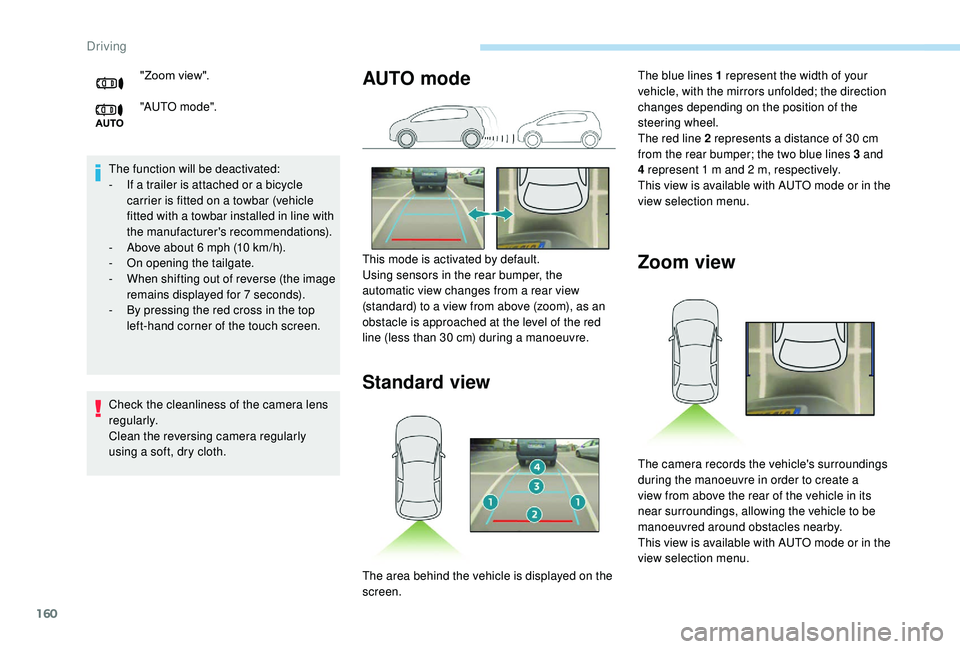
AUTO mode
Standard view Zoom view"Zoom view".
"AUTO m o de".
This mode is activated by default.
Using sensors in the rear bumper, the
automatic view changes from a rear view
(standard) to a view from above (zoom), as an
obstacle is approached at the level of the red
line (less than 30
cm) during a manoeuvre.The blue lines 1 represent the width of your
vehicle, with the mirrors unfolded; the direction
changes depending on the position of the
steering wheel.
The red line 2 represents a distance of 30
cm
from the rear bumper; the two blue lines 3 and
4 represent 1
m and 2 m, respectively.
This view is available with AUTO mode or in the
view selection menu.
The area behind the vehicle is displayed on the
screen. The camera records the vehicle's surroundings
during the manoeuvre in order to create a
view from above the rear of the vehicle in its
near surroundings, allowing the vehicle to be
manoeuvred around obstacles nearby.
This view is available with AUTO mode or in the
view selection menu.
Driving
Page 168 of 324
166
During a bay parking manoeuvre, the Park
Assist system is automatically deactivated
once the rear of the vehicle is within 20
inches (50 cm) of an obstacle.
During parking and exit from parking
manoeuvres, the Reversing Camera
function may come into operation. It
facilitates monitoring of the surroundings
of the vehicle, by displaying additional
information in the instrument panel.
For more information on the Reversing
Camera , refer to the corresponding
section.
Deactivation
The system is deactivated by pressing the
control.
The system is deactivated automatically:
-
o
n switching off the ignition,
-
i
f the engine stalls,
-
i
f no manoeuvre is per formed within
5
minutes of selecting the type of
manoeuvre
-
a
fter a prolonged stop of the vehicle during
a manoeuvre,
-
i
f the wheel anti-slip regulation (ASR) is
triggered, This symbol is displayed on the touch
screen and a message appears,
accompanied by an audible signal.
The driver should then take back control of the
vehicle's steering.
If the system is deactivated during a
manoeuvre, the driver should reactivate it to
repeat the measurement.
Deactivation
The system is switched off automatically:
- w hen towing a trailer,
-
i
f the driver's door is opened,
-
i
f the speed of the vehicle is above 43 mph
(70
km/h).
To switch the system off for a prolonged period,
contact a PEUGEOT dealer or a qualified
workshop.
Operating faults
Depending on version:
This warning lamp comes on in the
instrument panel and a message appears,
accompanied by an audible signal.
In the event of a fault with the
power steering, this warning lamp
comes on in the instrument panel,
accompanied by a message.
If the lateral distance between your vehicle and the
space is too great, the system may not be able to
measure the space.
Anything projecting beyond the dimensions of the
vehicle (long or wide load) is not taken into account
by the Park Assist system during a manoeuvre.
In bad weather or in winter, ensure that
the sensors are not covered by road dirt,
ice or snow.
In the event of a fault, have the system
checked by a PEUGEOT dealer or a
qualified workshop.
Contact a PEUGEOT dealer or a qualified
workshop.
Tyre under-inflation
detection
This system automatically monitors the tyre
pressure while driving.
The system monitors the pressure in all four
tyres, once the vehicle is moving.
-
i
f the speed of the vehicle exceeds the
stated limit,
-
w
hen the driver interrupts movement of the
steering wheel,
-
a
fter 4
manoeuvre cycles,
-
o
n opening the driver's door,
-
i
f one of the front wheels encounters an
obstacle.
Driving
Page 176 of 324
174
Removing
F Use a screwdriver as a lever to release each fixing clip.
Do not forget to remove the very cold
climate screen:
-
w
hen the external temperature is greater
than 10°C (example: in summer, etc.),
-
i
n the event of towing,
-
a
t speeds above 75 mph (120 km/h).
Towing device
Load distribution
F D istribute the load in the trailer so that the
heaviest items are as close as possible to
the axle and the nose weight approaches
the maximum permitted without
exceeding it.
Air density decreases with altitude, thus
reducing engine performance. The maximum
load which can be towed must be reduced by
10% per 1,000
metres of altitude. Use towing devices and their genuine
harnesses approved by PEUGEOT. It
is recommended that the installation be
per formed by a PEUGEOT dealer or a
qualified workshop.
If the towing device is not fitted by
a PEUGEOT dealer, it must still be
fitted in accordance with the vehicle
manufacturer's instructions.
Certain driving assistance or manoeuvring
assistance functions are automatically
disabled if an approved towing device is
used.
Obser ve the maximum authorised towable
weight, indicated on your vehicle's
registration certificate, the manufacturer's
label as well as in the Technical data
section of this guide.
Complying with the maximum
authorised nose weight (towball)
also includes the use of accessories
(bicycle carriers, tow boxes, etc.).
Obser ve the legislation in force in the
country in which you are driving.
GTi towing
Your vehicle cannot be fitted with a towing
device.
Towing device with towball
Before each use
Check that the towball is correctly fitted,
verifying the follow points:
Hatchback:
-
t
he green mark on the locking wheel
is in line with the green mark on the
towball,
-
t
he locking wheel is in contact with the
towball (position A ).
-
t
he safety lock is on and the key
removed; the locking wheel can no
longer be operated,
-
t
he towball must not be able to move in
its carrier; test by shaking it with your
hand.
SW:
-
t
he towball is correctly engaged
(position A ),
-
t
he safety lock is on and the key
removed; the trigger can no longer be
operated,
-
t
he towball must not be able to move in
its carrier; test by shaking it with your
hand.
If the towball is not locked, the trailer can
detach – accident risk!
Practical information
Page 187 of 324
185
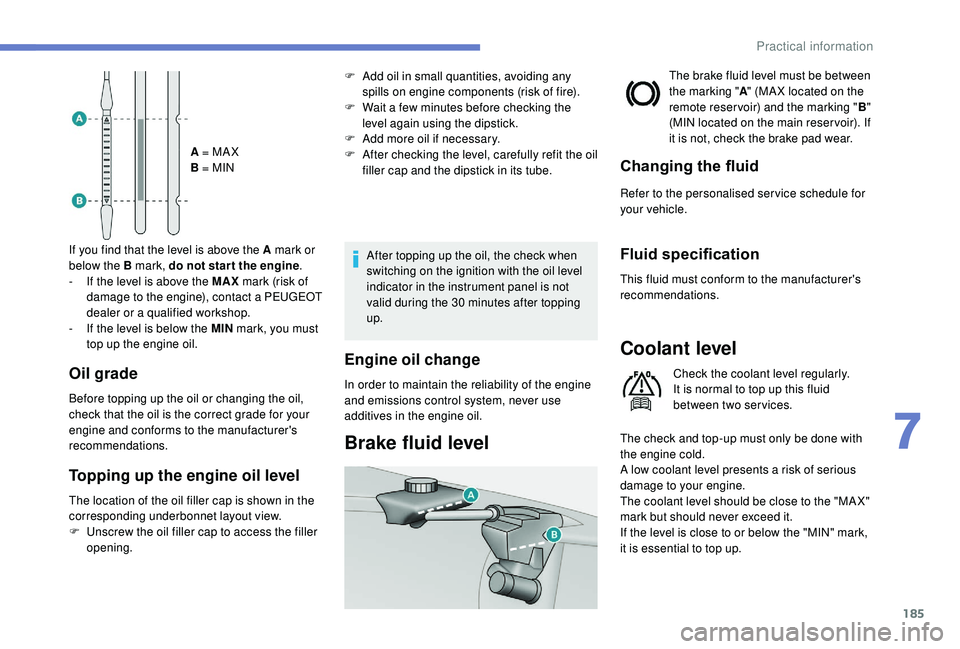
A = MA X
B = MIN
If you find that the level is above the A mark or
below the B mark, do not star t the engine .
-
I
f the level is above the MAX mark (risk of
damage to the engine), contact a PEUGEOT
dealer or a qualified workshop.
-
I
f the level is below the MIN mark, you must
top up the engine oil.
Oil grade
Before topping up the oil or changing the oil,
check that the oil is the correct grade for your
engine and conforms to the manufacturer's
recommendations.
The location of the oil filler cap is shown in the
corresponding underbonnet layout view.
F
U
nscrew the oil filler cap to access the filler
opening.
Topping up the engine oil level
After topping up the oil, the check when
switching on the ignition with the oil level
indicator in the instrument panel is not
valid during the 30
minutes after topping
up.
Engine oil change
In order to maintain the reliability of the engine
and emissions control system, never use
additives in the engine oil.
Brake fluid level
The brake fluid level must be between
the marking " A" (MA X located on the
remote reservoir) and the marking " B"
(MIN located on the main reser voir). If
it is not, check the brake pad wear.
Changing the fluid
Refer to the personalised ser vice schedule for
your vehicle.
Fluid specification
This fluid must conform to the manufacturer's
recommendations.
Coolant level
Check the coolant level regularly.
It is normal to top up this fluid
between two services.
The check and top-up must only be done with
the engine cold.
A low coolant level presents a risk of serious
damage to your engine.
The coolant level should be close to the "MA X"
mark but should never exceed it.
If the level is close to or below the "MIN" mark,
it is essential to top up.
F
A
dd oil in small quantities, avoiding any
spills on engine components (risk of fire).
F
W
ait a few minutes before checking the
level again using the dipstick.
F
A
dd more oil if necessary.
F
A
fter checking the level, carefully refit the oil
filler cap and the dipstick in its tube.
7
Practical information
Page 191 of 324
189
The AdBlue® is contained in
a special tank holding about
17
litres.
An alert system is triggered automatically once
the reser ve level is reached: you can then drive
for a further 1,500
miles (2,400 km) before the
tank is empty.
Once the AdBlue
® tank is empty, a system
r
equired by regulations prevents starting
of the engine.
If the SCR system is faulty, the level of
emissions from your vehicle will no longer
meet the Euro 6 standard: your vehicle
becomes polluting.
In the event of a confirmed fault with the
SCR system, you must go to a PEUGEOT
dealer or a qualified workshop as soon
as possible: after travelling the distance
of 685
miles (1,100 km), a system will be
triggered automatically to prevent the
engine from starting.
In either case, a range indicator gives you
the distance you can travel before the
vehicle is immobilised. For more information on the Warning
and indicator lamps
and the associated
alerts, refer to the corresponding section.
Freezing of the AdBlue
®
AdBlue® freezes at temperatures below
around -11°C.
The SCR system includes a heater for the
AdBlue
® tank, allowing you to continue
driving in very cold conditions.
Supply of AdBlue®
It is recommended that the AdBlue® is
topped up as soon as the first alert is
issued indicating that the reser ve level has
been reached.
In order to ensure that the SCR system
operates correctly:
-
U
se only AdBlue
® fluid that meets the
ISO 22241 standard.
-
N
ever transfer AdBlue
® to another
container: it would lose its purity.
-
N
ever dilute AdBlue
® with water.
You can obtain AdBlue
® from a PEUGEOT
dealer or a qualified workshop. You can also visit a ser vice station
equipped with AdBlue
® pumps specially
designed for passenger vehicles (for those
versions with access to the AdBlue
® tank
via the fuel filler flap).
Never top up from an AdBlue
® dispenser
reserved for heavy goods vehicles.
Recommendations on
storage
AdBlue® freezes at about -11°C and
deteriorates above 25°C. It should be stored in
a cool place and protected from direct sunlight.
Under these conditions, the fluid can be kept
for at least a year.
If the additive has frozen, it can be used once it
has completely thawed out.
Never keep AdBlue
® containers in your
vehicle.
Precautions for use
AdBlue® is a urea-based solution. This liquid
is non-flammable, colourless and odourless
(when kept in a cool place).
7
Practical information