audio Peugeot 308 2018 User Guide
[x] Cancel search | Manufacturer: PEUGEOT, Model Year: 2018, Model line: 308, Model: Peugeot 308 2018Pages: 324, PDF Size: 10.72 MB
Page 90 of 324
88
When changing wheels (tyres and rims),
ensure that these are approved for your
vehicle.
Normal operation of the ABS may make
itself felt by slight vibration of the brake
pedal.
If you need to brake in an emergency,
press the brake pedal ver y firmly and
keep the pressure applied.
After an impact, have these systems
checked by a PEUGEOT dealer or a
qualified workshop.
Dynamic stability control (DSC)/
Anti-slip regulation (ASR)
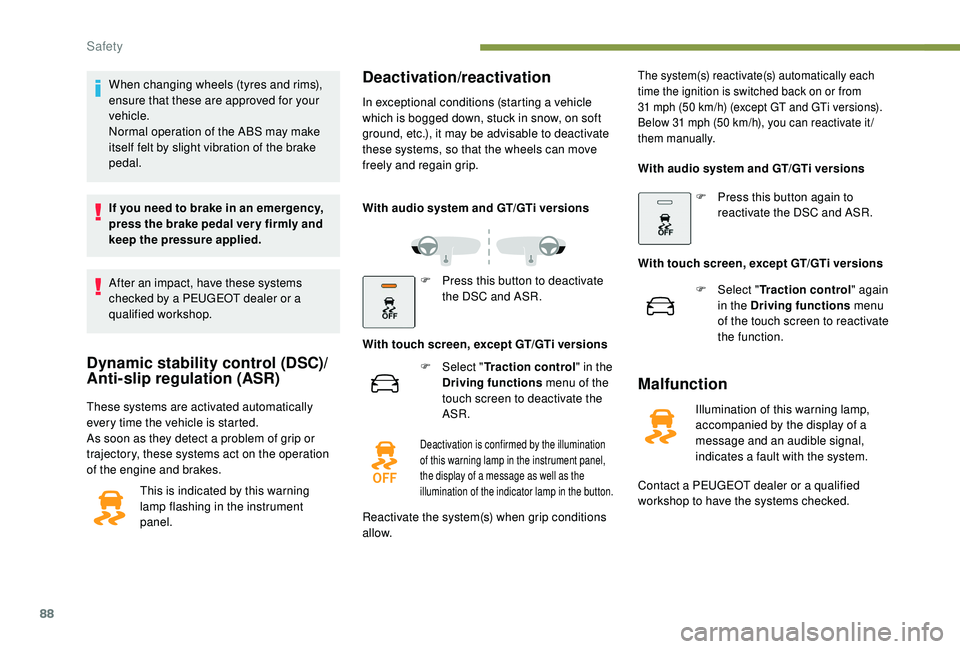
These systems are activated automatically
every time the vehicle is started.
As soon as they detect a problem of grip or
trajectory, these systems act on the operation
of the engine and brakes.This is indicated by this warning
lamp flashing in the instrument
panel.
Deactivation/reactivation
In exceptional conditions (starting a vehicle
which is bogged down, stuck in snow, on soft
ground, etc.), it may be advisable to deactivate
these systems, so that the wheels can move
freely and regain grip.
With audio system and GT/GTi versions
F
P
ress this button to deactivate
the DSC and ASR.
With touch screen, except GT/GTi versions F
Sel
ect "Traction control" in the
Driving functions menu of the
touch screen to deactivate the
ASR.
Malfunction
Illumination of this warning lamp,
accompanied by the display of a
message and an audible signal,
indicates a fault with the system.
Contact a PEUGEOT dealer or a qualified
workshop to have the systems checked.
Deactivation is confirmed by the illumination
of this warning lamp in the instrument panel,
the display of a message as well as the
illumination of the indicator lamp in the button.
Reactivate the system(s) when grip conditions
allow.
The system(s) reactivate(s) automatically each
time the ignition is switched back on or from
31
mph (50 km/h) (except GT and GTi versions).
Below 31
mph (50 km/h), you can reactivate it /
them manually.
With audio system and GT/GTi versions
F
P
ress this button again to
reactivate the DSC and ASR.
With touch screen, except GT/GTi versions F
Sel
ect "Traction control" again
in the Driving functions menu
of the touch screen to reactivate
the function.
Safety
Page 115 of 324
113
Switching off
F Immobilise the vehicle.
F W ith the electronic key inside the vehicle,
press the " START/STOP " button.
The engine stops and the steering column
locks.
If the vehicle is not immobilised, the
engine will not stop.
Switching the ignition on
(without starting)
With the Keyless Entry and Starting electronic
key inside the vehicle, pressing the " S TA R T/
STOP " button, without pressing any of the
pedals , allows the ignition to be switched on.
This also allows the accessories to be used (for
example: audio system, lighting, etc.).
F
P
ress the " START/STOP " button, the
instrument panel comes on but the engine
does not start.
F
P
ress the button again to switch off the
ignition and allow the vehicle to be locked.
With the ignition on, the system
automatically goes into energy economy
mode to maintain an adequate state of
charge in the battery.
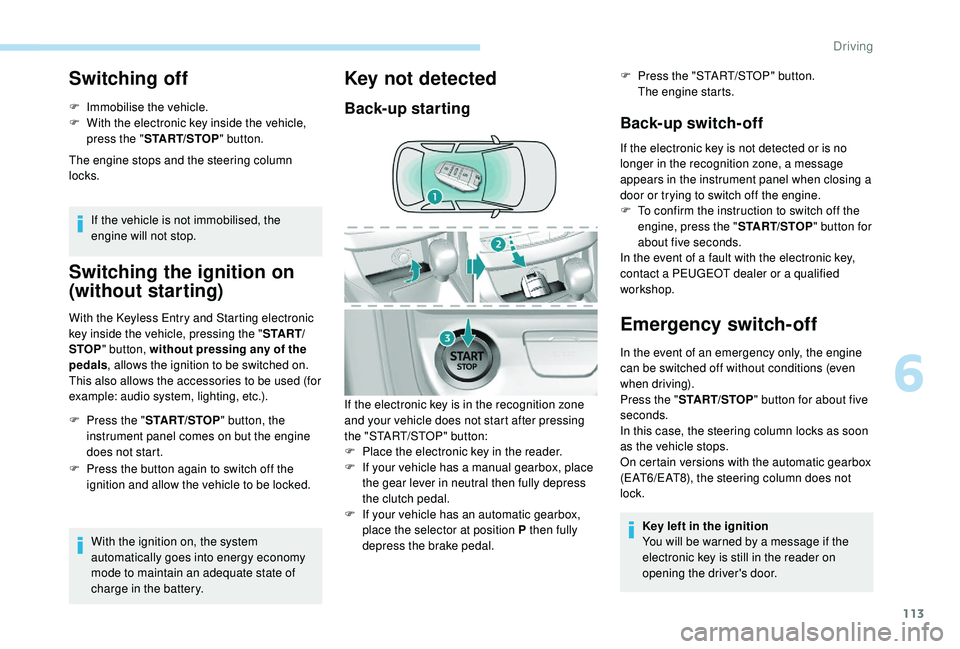
Key not detected
Back-up starting Back-up switch-off
If the electronic key is not detected or is no
longer in the recognition zone, a message
appears in the instrument panel when closing a
door or trying to switch off the engine.
F
T
o confirm the instruction to switch off the
engine, press the " START/STOP" button for
about five seconds.
In the event of a fault with the electronic key,
contact a PEUGEOT dealer or a qualified
workshop.
Emergency switch-off
In the event of an emergency only, the engine
can be switched off without conditions (even
when driving).
Press the " START/STOP " button for about five
seconds.
In this case, the steering column locks as soon
as the vehicle stops.
On certain versions with the automatic gearbox
(EAT6/EAT8), the steering column does not
lock.
Key left in the ignition
You will be warned by a message if the
electronic key is still in the reader on
opening the driver's door.
If the electronic key is in the recognition zone
and your vehicle does not start after pressing
the "START/STOP" button:
F
P
lace the electronic key in the reader.
F
I
f your vehicle has a manual gearbox, place
the gear lever in neutral then fully depress
the clutch pedal.
F
I
f your vehicle has an automatic gearbox,
place the selector at position P then fully
depress the brake pedal. F
P
ress the "START/STOP" button.
The engine starts.
6
Driving
Page 183 of 324
181
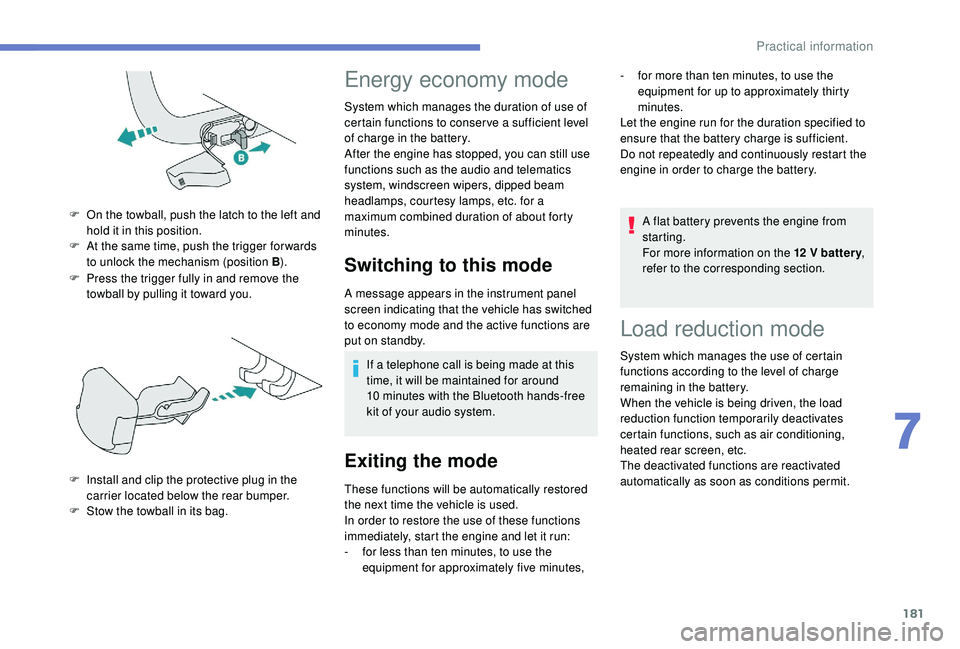
F Press the trigger fully in and remove the towball by pulling it toward you.
F
O
n the towball, push the latch to the left and
hold it in this position.
F
A
t the same time, push the trigger for wards
to unlock the mechanism (position B ).
F
I
nstall and clip the protective plug in the
carrier located below the rear bumper.
F
S
tow the towball in its bag.
Energy economy mode
System which manages the duration of use of
certain functions to conser ve a sufficient level
of charge in the battery.
After the engine has stopped, you can still use
functions such as the audio and telematics
system, windscreen wipers, dipped beam
headlamps,
courtesy lamps, etc. for a
maximum combined duration of about forty
minutes.
Switching to this mode
A message appears in the instrument panel
screen indicating that the vehicle has switched
to economy mode and the active functions are
put on standby.
If a telephone call is being made at this
time, it will be maintained for around
10
minutes with the Bluetooth hands-free
kit of your audio system.
Exiting the mode
These functions will be automatically restored
the next time the vehicle is used.
In order to restore the use of these functions
immediately, start the engine and let it run:
-
f
or less than ten minutes, to use the
equipment for approximately five minutes, A flat battery prevents the engine from
starting.
For more information on the 12
V batter y
,
refer to the corresponding section.
Load reduction mode
System which manages the use of certain
functions according to the level of charge
remaining in the battery.
When the vehicle is being driven, the load
reduction function temporarily deactivates
certain functions, such as air conditioning,
heated rear screen, etc.
The deactivated functions are reactivated
automatically as soon as conditions permit. -
f
or more than ten minutes, to use the
equipment for up to approximately thirty
minutes.
Let the engine run for the duration specified to
ensure that the battery charge is sufficient.
Do not repeatedly and continuously restart the
engine in order to charge the battery.
7
Practical information
Page 215 of 324
213
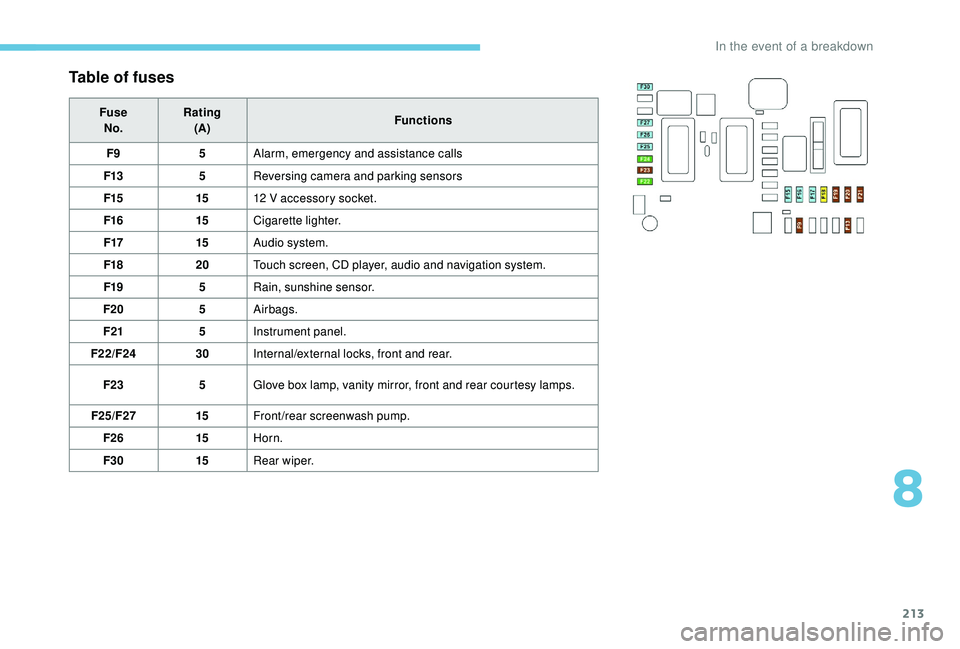
Table of fuses
FuseNo. Rating
(A) Functions
F9 5Alarm, emergency and assistance calls
F13 5Reversing camera and parking sensors
F15 1512
V accessory socket.
F16 15Cigarette lighter.
F17 15Audio system.
F18 20Touch screen, CD player, audio and navigation system.
F19 5Rain, sunshine sensor.
F20 5Airbags.
F21 5Instrument panel.
F22/F24 30Internal/external locks, front and rear.
F23 5Glove box lamp, vanity mirror, front and rear courtesy lamps.
F25/F27 15Front/rear screenwash pump.
F26 15Horn.
F30 15Rear wiper.
8
In the event of a breakdown
Page 217 of 324
215
12 V battery
Procedure for starting the engine using another
battery or charging a discharged battery.
General points
Lead-acid starter batteries
Batteries contain harmful substances
such as sulphuric acid and lead.
They must be disposed of in accordance
with regulations and must not, in any
circumstances, be discarded with
household waste.
Take used remote control batteries and
vehicle batteries to a special collection
point.
Protect your eyes and face before
handling the battery.
All operations on the battery must be
carried out in a well ventilated area and
away from naked flames and sources of
sparks, so as to avoid the risk of explosion
or fire.
Wash your hands afterwards. Versions equipped with Stop & Start are
fitted with a 12
V lead-acid battery of
specific technology and specification.
Its replacement should be carried out
only by a PEUGEOT dealer or a qualified
workshop.
Before doing any work
Immobilise the vehicle: apply the parking
brake, put the gearbox in neutral, then
switch off the ignition.
Check that all electrical equipment is
switched off.
Access to the battery
F Remove the plastic cover to access the the (+) terminal.
The battery (-) terminal is not accessible. A
remote earth point is located on the engine
mounting.
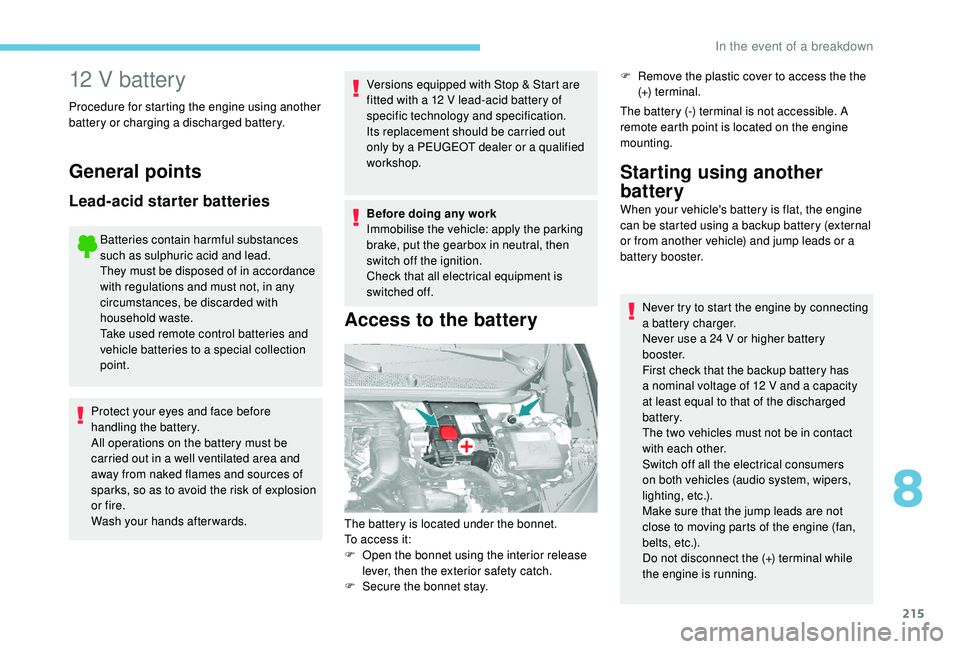
The battery is located under the bonnet.
To access it:
F
O
pen the bonnet using the interior release
lever, then the exterior safety catch.
F
S
ecure the bonnet stay.
Starting using another
battery
When your vehicle's battery is flat, the engine
can be started using a backup battery (external
or from another vehicle) and jump leads or a
battery booster. Never try to start the engine by connecting
a battery charger.
Never use a 24
V or higher battery
b o o s t e r.
First check that the backup battery has
a nominal voltage of 12
V and a capacity
at least equal to that of the discharged
battery.
The two vehicles must not be in contact
with each other.
Switch off all the electrical consumers
on both vehicles (audio system, wipers,
lighting, etc.).
Make sure that the jump leads are not
close to moving parts of the engine (fan,
belts, etc.).
Do not disconnect the (+) terminal while
the engine is running.
8
In the event of a breakdown
Page 218 of 324
216
F Start the engine of the vehicle with the good battery and leave it running for a few
minutes.
F
O
perate the starter on the broken down
vehicle and let the engine run.
If the engine does not start straight away,
switch off the ignition and wait a few moments
before trying again.
F
W
ait for it to return to idle.
F
D
isconnect the jump lead cables in reverse
order .
F
R
efit the plastic cover to the (+) terminal, if
your vehicle has one.
F
A
llow the engine to run for at least
30
minutes, by driving or with the vehicle
stationary, so that the battery reaches an
adequate state of charge.
Some functions, including Stop & Start,
are not available if the battery is not
sufficiently charged.Charging the battery using
a battery charger
For optimum ser vice life of the battery, it is
essential to maintain an adequate state of
charge.
In some circumstances it may be necessary to
charge the battery:
-
I
f you use your vehicle essentially for short
journeys.
-
I
f the vehicle is to be taken off the road for
several weeks.
Contact a PEUGEOT dealer or a qualified
workshop.
If you wish to charge your vehicle's battery
yourself, use only a charger compatible
with lead-acid batteries with a nominal
voltage of 12
V.
Follow the instructions provided by the
manufacturer of the charger.
Never reverse polarities.
It is not necessary to disconnect the
battery.
F
S
witch off the ignition.
F
S
witch off all electrical consumers (audio
system, lighting, wipers, etc.).
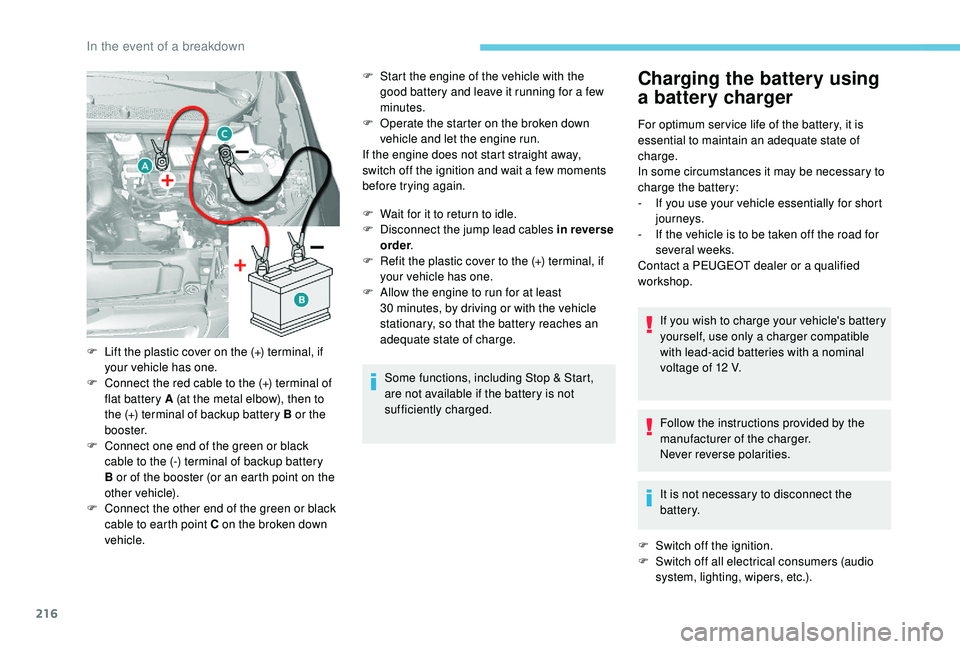
F
L
ift the plastic cover on the (+) terminal, if
your vehicle has one.
F
C
onnect the red cable to the (+) terminal of
flat battery A (at the metal elbow), then to
the (+) terminal of backup battery B or the
b o o s t e r.
F
C
onnect one end of the green or black
cable to the (-) terminal of backup battery
B or of the booster (or an earth point on the
other vehicle).
F
C
onnect the other end of the green or black
cable to earth point C on the broken down
vehicle.
In the event of a breakdown
Page 219 of 324
217
Never try to charge a frozen battery – risk
of explosion!
If the battery has frozen, have it checked
by a PEUGEOT dealer or by a qualified
workshop who will check that the internal
components have not been damaged and
that the container has not cracked, which
would mean a risk of toxic and corrosive
acid leaking.
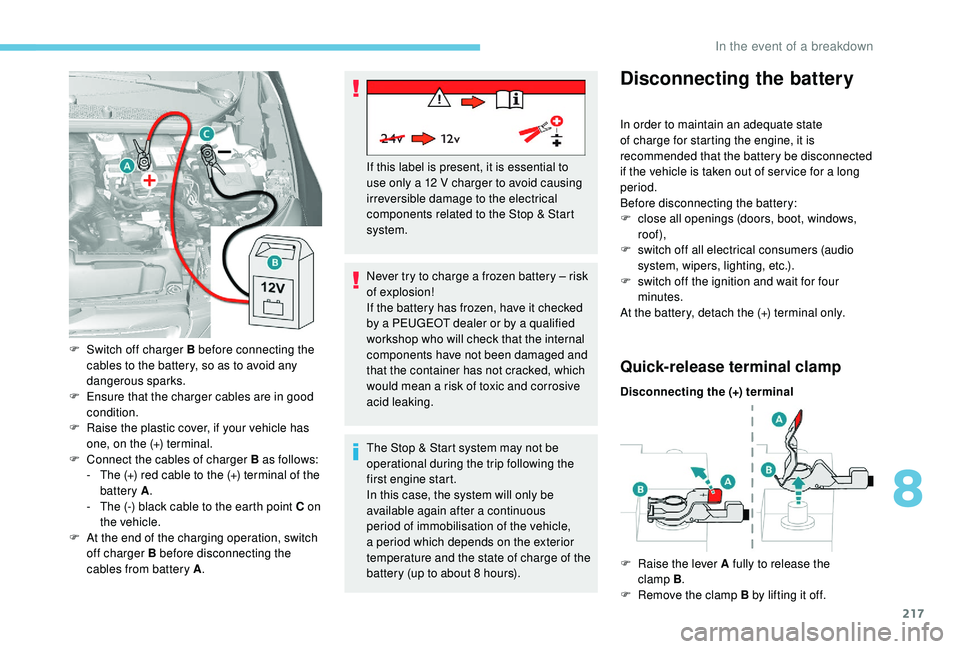
F
S
witch off charger B before connecting the
cables to the battery, so as to avoid any
dangerous sparks.
F
E
nsure that the charger cables are in good
condition.
F
R
aise the plastic cover, if your vehicle has
one, on the (+) terminal.
F
C
onnect the cables of charger B as follows:
-
T
he (+) red cable to the (+) terminal of the
battery A .
-
T
he (-) black cable to the earth point C on
the vehicle.
F
A
t the end of the charging operation, switch
off charger B before disconnecting the
cables from battery A . If this label is present, it is essential to
use only a 12
V charger to avoid causing
irreversible damage to the electrical
components related to the Stop & Start
system.
The Stop & Start system may not be
operational during the trip following the
first engine start.
In this case, the system will only be
available again after a continuous
period of immobilisation of the vehicle,
a period which depends on the exterior
temperature and the state of charge of the
battery (up to about 8
hours).
Disconnecting the battery
In order to maintain an adequate state
of charge for starting the engine, it is
recommended that the battery be disconnected
if the vehicle is taken out of ser vice for a long
period.
Before disconnecting the battery:
F
c
lose all openings (doors, boot, windows,
roof),
F
s
witch off all electrical consumers (audio
system, wipers, lighting, etc.).
F
s
witch off the ignition and wait for four
minutes.
At the battery, detach the (+) terminal only.
Quick-release terminal clamp
Disconnecting the (+) terminal
F
Ra
ise the lever A fully to release the
clamp B .
F
R
emove the clamp B by lifting it off.
8
In the event of a breakdown
Page 237 of 324
1
Bluetooth® audio system
Contents
First steps
2
S
teering mounted controls
2
M
enus
4
R
adio 4
DAB (Digital Audio Broadcasting) radio
6
M
edia 7
Telephone
9
Frequently asked questions
1
3 The different functions and settings
described vary according to the version
and configuration of your vehicle.
As a safety measure and because it
requires sustained attention by the
driver, the pairing of a Bluetooth mobile
telephone with the Bluetooth hands-free
system of your audio system must be
done with the vehicle stationary
and the
ignition on.
Your audio system is coded in such a way
that it will only operate in your vehicle.
All work on the system must be
carried out exclusively by a dealer or
qualified workshop, to avoid any risk of
electrocution, fire or mechanical faults.
To avoid discharging the battery, the audio
system may switch off after a few minutes
if the engine is not running.
.
Bluetooth® audio system
Page 238 of 324
2
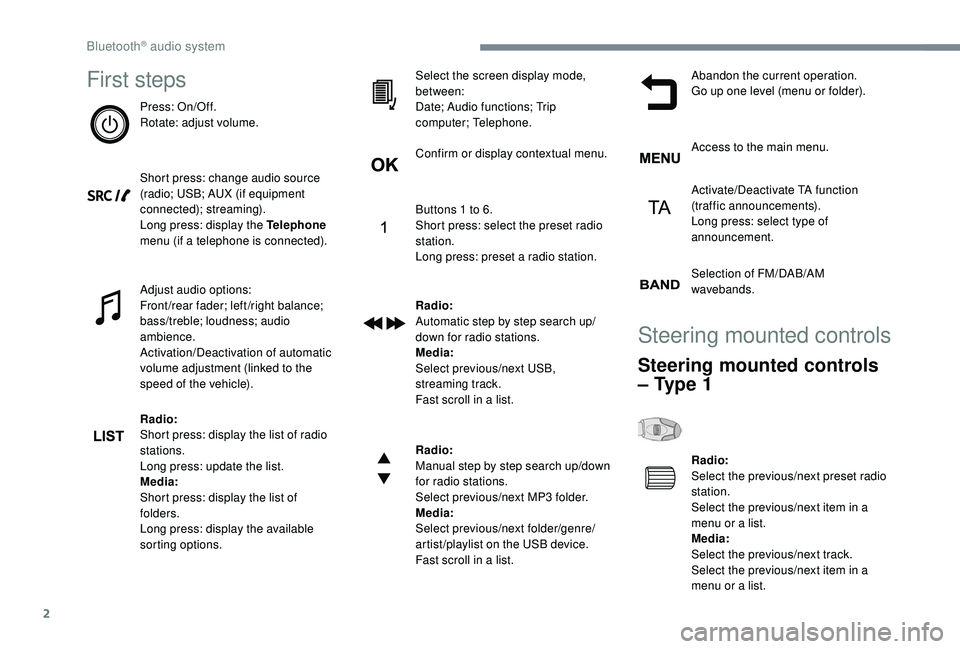
First steps
Press: On/Off.
Rotate: adjust volume.
Short press: change audio source
(radio; USB; AUX (if equipment
connected); streaming).
Long press: display the Telephone
menu (if a telephone is connected).
Adjust audio options:
Front/rear fader; left/right balance;
bass/treble; loudness; audio
ambience.
Activation/Deactivation of automatic
volume adjustment (linked to the
speed of the vehicle).
Radio:
Short press: display the list of radio
stations.
Long press: update the list.
Media:
Short press: display the list of
folders.
Long press: display the available
sorting options.Select the screen display mode,
between:
Date; Audio functions; Trip
computer; Telephone.
Confirm or display contextual menu.
Buttons 1 to 6.
Short press: select the preset radio
station.
Long press: preset a radio station.
Radio:
Automatic step by step search up/
down for radio stations.
Media:
Select previous/next USB,
streaming track.
Fast scroll in a list.
Radio:
Manual step by step search up/down
for radio stations.
Select previous/next MP3 folder.
Media:
Select previous/next folder/genre/
artist/playlist on the USB device.
Fast scroll in a list.Abandon the current operation.
Go up one level (menu or folder).
Access to the main menu.
Activate/Deactivate TA function
(traffic announcements).
Long press: select type of
announcement.
Selection of FM/DAB/AM
wavebands.
Steering mounted controls
Steering mounted controls
– Type 1
Radio:
Select the previous/next preset radio
station.
Select the previous/next item in a
menu or a list.
Media:
Select the previous/next track.
Select the previous/next item in a
menu or a list.
Bluetooth® audio system
Page 239 of 324
3
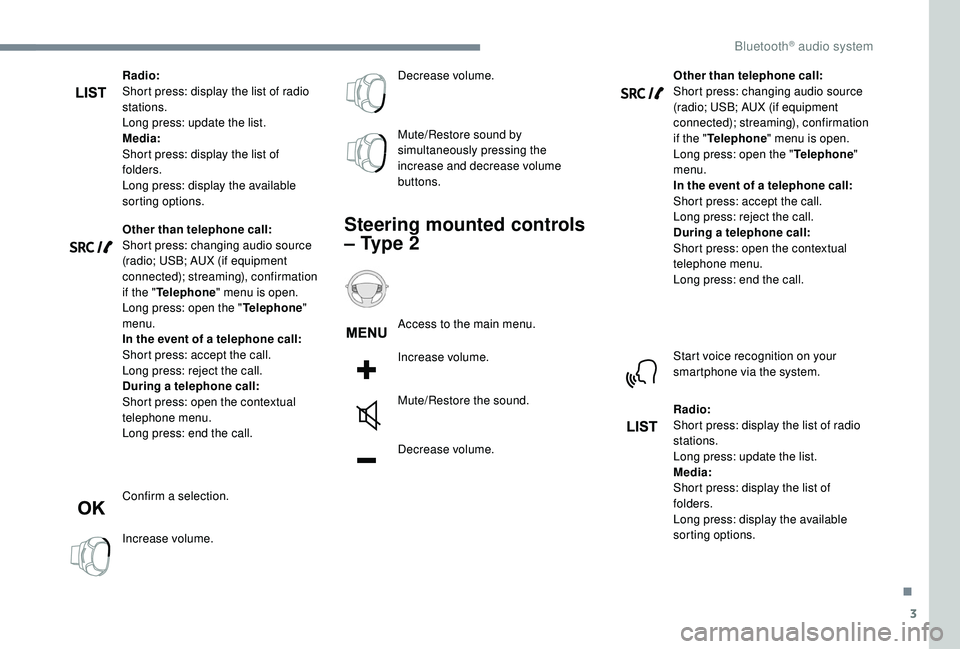
Radio:
Short press: display the list of radio
stations.
Long press: update the list.
Media:
Short press: display the list of
folders.
Long press: display the available
sorting options.
Other than telephone call:
Short press: changing audio source
(radio; USB; AUX (if equipment
connected); streaming), confirmation
if the "Telephone " menu is open.
Long press: open the " Telephone"
menu.
In the event of a telephone call:
Short press: accept the call.
Long press: reject the call.
During a telephone call:
Short press: open the contextual
telephone menu.
Long press: end the call.
Confirm a selection.
Increase volume. Decrease volume.
Mute/Restore sound by
simultaneously pressing the
increase and decrease volume
buttons.
Steering mounted controls
– Type 2
Access to the main menu.
Increase volume.
Mute/Restore the sound.
Decrease volume.
Other than telephone call:
Short press: changing audio source
(radio; USB; AUX (if equipment
connected); streaming), confirmation
if the "
Telephone " menu is open.
Long press: open the " Telephone"
menu.
In the event of a telephone call:
Short press: accept the call.
Long press: reject the call.
During a telephone call:
Short press: open the contextual
telephone menu.
Long press: end the call.
Start voice recognition on your
smartphone via the system.
Radio:
Short press: display the list of radio
stations.
Long press: update the list.
Media:
Short press: display the list of
folders.
Long press: display the available
sorting options.
.
Bluetooth® audio system