mirrors Peugeot 308 2018 User Guide
[x] Cancel search | Manufacturer: PEUGEOT, Model Year: 2018, Model line: 308, Model: Peugeot 308 2018Pages: 324, PDF Size: 10.72 MB
Page 160 of 324
158
Reversing camera
The reversing camera cannot, in any
circumstances, replace the need for
vigilance on the part of the driver.They are represented as lines marked
"on the ground" and do not indicate the
position of tall obstacles (for example:
other vehicles, etc.) relative to the vehicle.
Some distortion of the image is normal.
It is normal to have a part of the number
plate showing in the bottom of the screen.
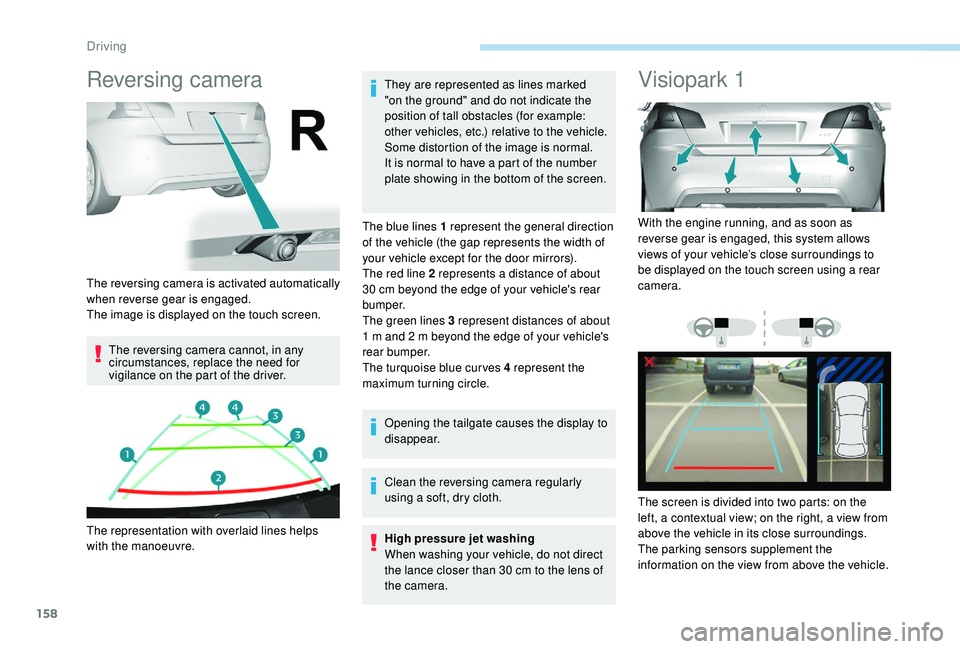
The blue lines 1 represent the general direction
of the vehicle (the gap represents the width of
your vehicle except for the door mirrors).
The red line 2 represents a distance of about
30 cm beyond the edge of your vehicle's rear
b u m p e r.
The green lines 3 represent distances of about
1 m and 2 m beyond the edge of your vehicle's
rear bumper.
The turquoise blue curves 4 represent the
maximum turning circle.
Opening the tailgate causes the display to
disappear.
Clean the reversing camera regularly
using a soft, dry cloth.
High pressure jet washing
When washing your vehicle, do not direct
the lance closer than 30
cm to the lens of
the camera.
Visiopark 1
The reversing camera is activated automatically
when reverse gear is engaged.
The image is displayed on the touch screen.
The representation with overlaid lines helps
with the manoeuvre. With the engine running, and as soon as
reverse gear is engaged, this system allows
views of your vehicle’s close surroundings to
be displayed on the touch screen using a rear
camera.
The screen is divided into two parts: on the
left, a contextual view; on the right, a view from
above the vehicle in its close surroundings.
The parking sensors supplement the
information on the view from above the vehicle.
Driving
Page 161 of 324
159
Different contextual views can be displayed in
the left-hand part:
-
s
tandard view,
-
1
80° view,
-
z
oom view.
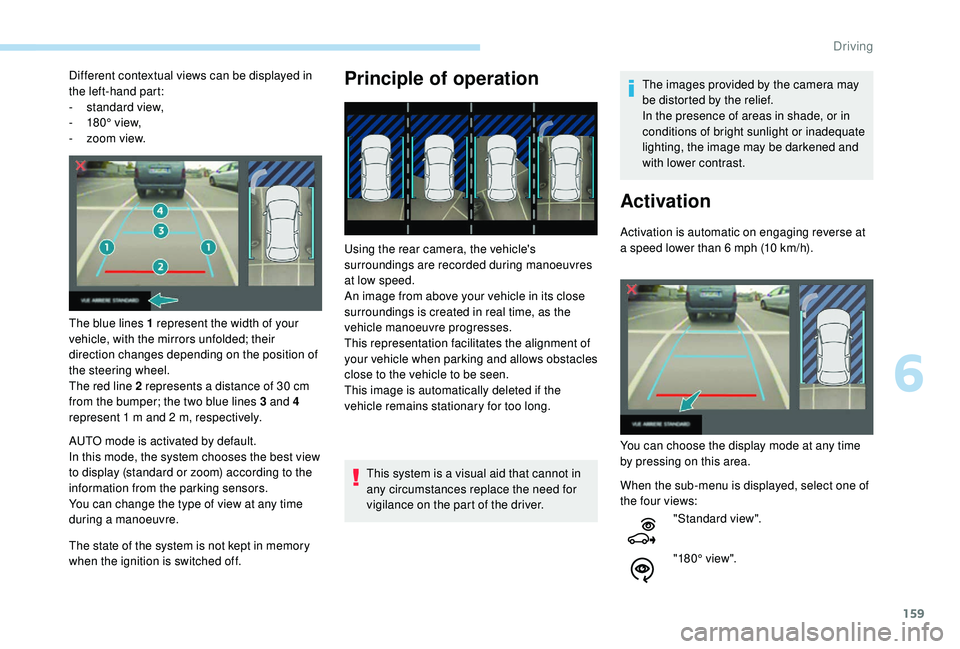
The blue lines 1 represent the width of your
vehicle, with the mirrors unfolded; their
direction changes depending on the position of
the steering wheel.
The red line 2 represents a distance of 30
cm
from the bumper; the two blue lines 3 and 4
represent 1
m and 2 m, respectively.
AUTO mode is activated by default.
In this mode, the system chooses the best view
to display (standard or zoom) according to the
information from the parking sensors.
You can change the type of view at any time
during a manoeuvre.
The state of the system is not kept in memory
when the ignition is switched off.Principle of operation
Using the rear camera, the vehicle's
surroundings are recorded during manoeuvres
at low speed.
An image from above your vehicle in its close
surroundings is created in real time, as the
vehicle manoeuvre progresses.
This representation facilitates the alignment of
your vehicle when parking and allows obstacles
close to the vehicle to be seen.
This image is automatically deleted if the
vehicle remains stationary for too long.
This system is a visual aid that cannot in
any circumstances replace the need for
vigilance on the part of the driver. The images provided by the camera may
be distorted by the relief.
In the presence of areas in shade, or in
conditions of bright sunlight or inadequate
lighting, the image may be darkened and
with lower contrast.
Activation
Activation is automatic on engaging reverse at
a speed lower than 6
mph (10 km/h).
You can choose the display mode at any time
by pressing on this area.
When the sub-menu is displayed, select one of
the four views: "Standard view".
"180° view".
6
Driving
Page 162 of 324
160
The function will be deactivated:
- I f a trailer is attached or a bicycle
carrier is fitted on a towbar (vehicle
fitted with a towbar installed in line with
the manufacturer's recommendations).
-
A
bove about 6 mph (10 km/h).
-
O
n opening the tailgate.
-
W
hen shifting out of reverse (the image
remains displayed for 7
seconds).
-
B
y pressing the red cross in the top
left-hand corner of the touch screen.
Check the cleanliness of the camera lens
regularly.
Clean the reversing camera regularly
using a soft, dry cloth.
AUTO mode
Standard view Zoom view"Zoom view".
"AUTO m o de".
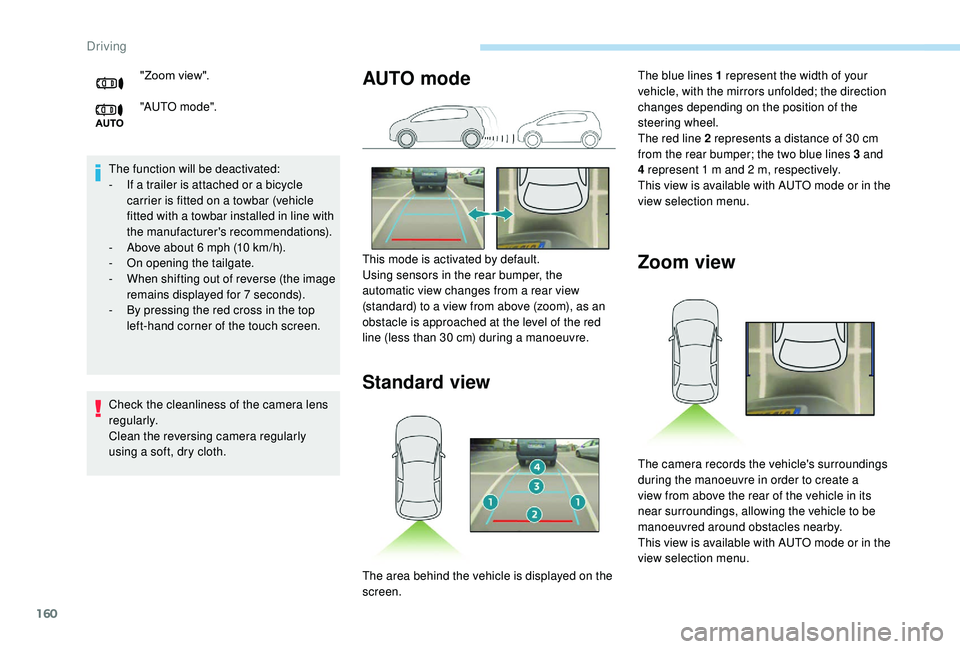
This mode is activated by default.
Using sensors in the rear bumper, the
automatic view changes from a rear view
(standard) to a view from above (zoom), as an
obstacle is approached at the level of the red
line (less than 30
cm) during a manoeuvre.The blue lines 1 represent the width of your
vehicle, with the mirrors unfolded; the direction
changes depending on the position of the
steering wheel.
The red line 2 represents a distance of 30
cm
from the rear bumper; the two blue lines 3 and
4 represent 1
m and 2 m, respectively.
This view is available with AUTO mode or in the
view selection menu.
The area behind the vehicle is displayed on the
screen. The camera records the vehicle's surroundings
during the manoeuvre in order to create a
view from above the rear of the vehicle in its
near surroundings, allowing the vehicle to be
manoeuvred around obstacles nearby.
This view is available with AUTO mode or in the
view selection menu.
Driving
Page 163 of 324
161
Obstacles may appear further away than
they actually are in reality.
It is important to check the sides of the
vehicle during the manoeuvre, using the
mirrors.
The rear parking sensors also provide
information on the vehicle's surroundings.
180° viewRecommendations on care
In bad or wintry weather, ensure that the
sensors and camera are not covered with mud,
ice or snow.
Check the cleanliness of the camera lens
regularly.
If necessary, clean the camera with a soft, dry
cloth.
When washing your vehicle at high pressure,
direct the lance at least 30
cm away from the
camera and parking sensors.
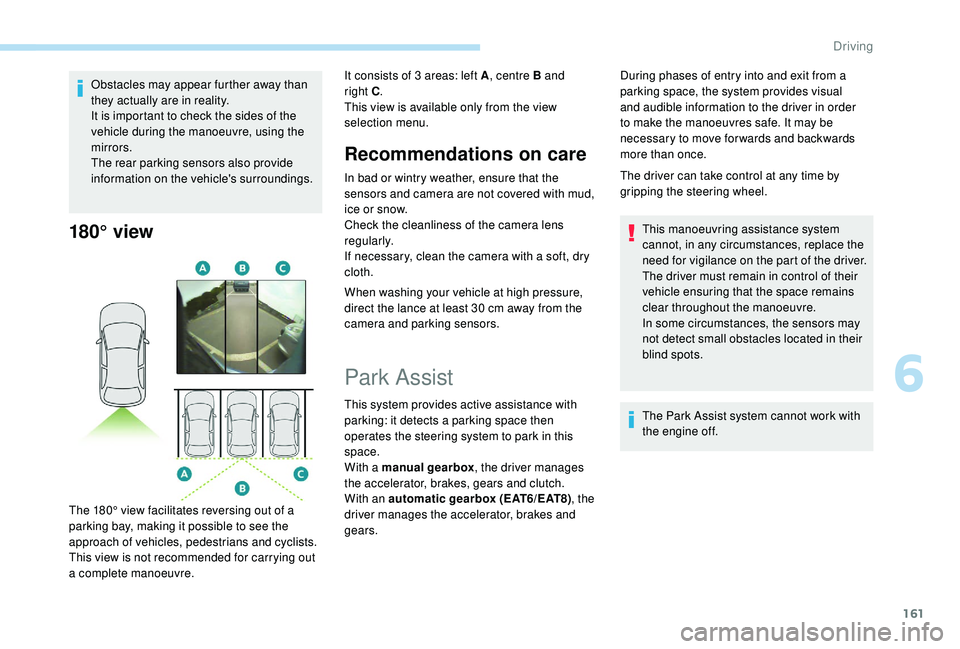
The 180° view facilitates reversing out of a
parking bay, making it possible to see the
approach of vehicles, pedestrians and cyclists.
This view is not recommended for carrying out
a complete manoeuvre. It consists of 3 areas: left A
, centre B and
right C .
This view is available only from the view
selection menu.
Park Assist
This system provides active assistance with
parking: it detects a parking space then
operates the steering system to park in this
space.
With a manual gearbox , the driver manages
the accelerator, brakes, gears and clutch.
With an automatic gearbox (EAT6/EAT8) , the
driver manages the accelerator, brakes and
gears. During phases of entry into and exit from a
parking space, the system provides visual
and audible information to the driver in order
to make the manoeuvres safe. It may be
necessary to move for wards and backwards
more than once.
The driver can take control at any time by
gripping the steering wheel.
This manoeuvring assistance system
cannot, in any circumstances, replace the
need for vigilance on the part of the driver.
The driver must remain in control of their
vehicle ensuring that the space remains
clear throughout the manoeuvre.
In some circumstances, the sensors may
not detect small obstacles located in their
blind spots.
The Park Assist system cannot work with
the engine off.
6
Driving
Page 315 of 324
237
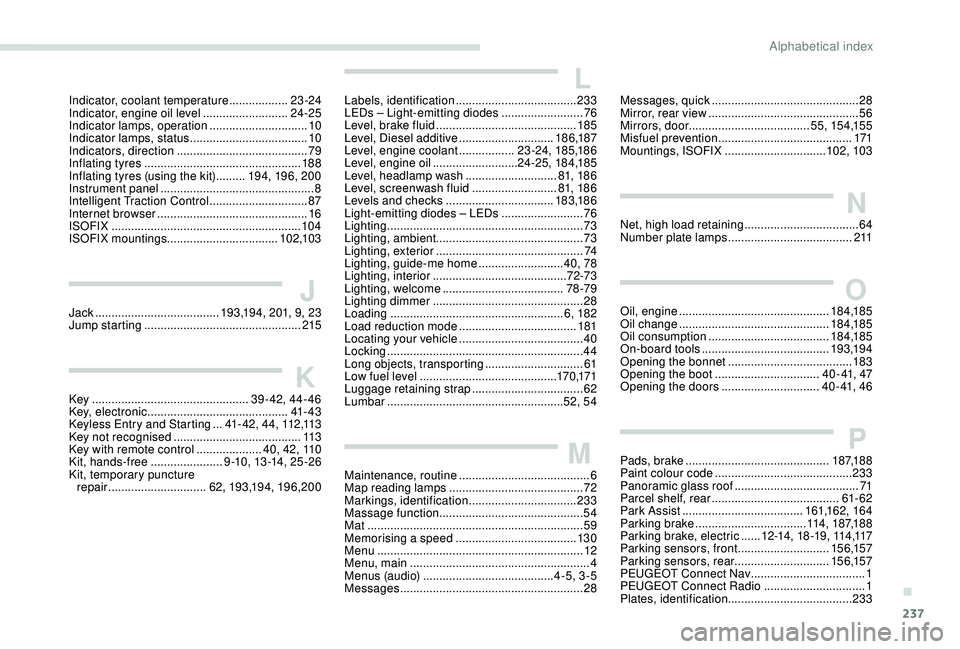
Indicator, coolant temperature ..................23 -24
Indicator, engine oil level ..........................24-25
Indicator lamps, operation
.............................. 10
In
dicator lamps, status
.................................... 10
I
ndicators, direction
........................................ 79
Inflating tyres
................................................ 188
Inflating tyres (using the kit)
......... 19
4, 19 6, 20 0
Instrument panel
............................................... 8
Intelligent Traction Control
..............................87
Internet browser
.............................................. 16
I
SOFIX
.......................................................... 104
ISOFIX mountings .................................. 102,103
JJack ............................... .......193,194, 201, 9, 23
Jump starting ................................................ 215
KKey ................................................ 39-42, 44-46
Key, electronic ........................................... 41- 4 3
Keyless Entry and Starting
...4
1 - 4 2 , 4 4 , 112 ,113
Key not recognised
....................................... 11
3
Key with remote control
....................4
0, 42, 110
Kit, hands-free
...................... 9
-10, 13 -14, 25 -2 6
Kit, temporary puncture repair
.............................. 62, 193,19 4, 19 6, 20 0
LLabels, identification ..................................... 233
LEDs – Light-emitting diodes ......................... 76
L
evel, brake fluid ........................................... 185
Level, Diesel additive
.............................18 6,187
Level, engine coolant
.................23 -24, 185,18 6
Level, engine oil
..........................24 -25, 18 4,185
Level, headlamp wash
............................81, 18 6
Level, screenwash fluid
..........................8
1, 18 6
Levels and checks
..............................
...183,18 6
Light-emitting diodes – LEDs
......................... 76
L
ighting
............................................................ 73
Lighting, ambient ............................................. 73
Lighting, exterior
............................................. 74
Lighting, guide-me home
..........................40, 78
Lighting, interior
...............................
..........72-73
Lighting, welcome
..................................... 78 -79
Lighting dimmer
.............................................. 28
Loading
..................................................... 6, 182
Load reduction mode
.................................... 181
Locating your vehicle
...................................... 40
Locking
...............................
.............................44
Long objects, transporting
..............................61
Low fuel level
.......................................... 17
0,171
Luggage retaining strap
.................................. 62
Lu
mbar
...................................................... 52, 54
MMaintenance, routine ........................................ 6
Map reading lamps ......................................... 72
M
arkings, identification
.................................233
Massage function
............................................ 54
Mat
.................................................................. 59
Memorising a speed
..................................... 13
0
Menu
............................................................... 12
Menu, main
....................................................... 4
M
enus (audio)
........................................ 4-5, 3-5
Messages
........................................................ 28
Messages, quick .............................................28
M irror, rear view .............................................. 56
Mirrors, door ..................................... 5 5, 15 4,15 5
Misfuel prevention
......................................... 171
Mountings, ISOFIX
...............................102, 103
NNet, high load retaining ...................................64
Number plate lamps ...................................... 2 11
OOil, engine .............................................. 18 4,185
Oil change .............................................. 18
4,185
Oil consumption
..................................... 18 4,185
On-board tools
....................................... 193,19 4
Opening the bonnet
...................................... 183
Opening the boot
................................ 4 0 - 41, 47
Opening the doors
..............................4 0 - 41, 4 6
PPads, brake ............................................ 187,188
Paint colour code .......................................... 233
Panoramic glass roof
...................................... 71
Parcel shelf, rear
....................................... 61- 62
Park Assist
...............................
......161,162, 16 4
Parking brake
.................................. 114, 187,188
Parking brake, electric
...... 1
2 -14 , 1 8 -1 9 , 114 ,117
Parking sensors, front
............................15 6,157
Parking sensors, rear .............................15 6,157
PEUGEOT Connect Nav
...................................1
PEUGEOT Connect Radio
...............................1
P
lates, identification ...................................... 233
.
Alphabetical index