instrument panel Peugeot 308 2018 Workshop Manual
[x] Cancel search | Manufacturer: PEUGEOT, Model Year: 2018, Model line: 308, Model: Peugeot 308 2018Pages: 324, PDF Size: 10.72 MB
Page 142 of 324
140
When the cruise control is paused, it
can only be reactivated when all of the
safety conditions are met. The "Activation
denied, conditions unsuitable" message is
displayed if reactivation is not possible.
Reactivating the function
With a manual gearbox
To reactivate the function, the driver must
accelerate to reach at least 19 mph (30 km/h),
then press one of the buttons 2 , 3 or 4.
With the EAT8 gearbox or with the BlueHDi
150 S&S EAT6 engine
Following braking of the vehicle bringing it to
a complete stop, the system holds the vehicle
stationary; the cruise control is paused.
The driver should press the accelerator pedal
to move off, then reactivate the system above
19
mph (30 km/h) by pressing button 2 , 3 or 4.
If the driver takes no action following this
immobilisation, the electric parking brake is
applied automatically after a while (approx. five
minutes).
As a safety measure, wait until the current
speed approaches the speed setting to
reactivate the function by pressing button 4 .
Modification of the speed
setting
With the engine running and cruise control on
(green), you can modify the speed setting.
Modification from the current
speed
F By successive short presses on button 2
or 3 , to lower or raise the setting in steps of
1
mph (km/h),
F
B
y a maintained press on button 2 or 3 , to
lower or raise the setting in steps of 5
mph
(km/h).
Take care: pressing and holding button 2
or 3
results in a rapid change in the speed
of your vehicle.
Modification from the speed Limit
recognition and recommendation
system
F The suggested speed is displayed in the instrument panel.
F
M
ake an initial press on button 5 ; a
message is displayed to confirm the
memorisation request.
F
P
ress button 5 again to save the suggested
speed.
The speed displays immediately in the
instrument panel as the new speed setting. For more information on the Speed Limit
recognition and recommendation
, refer to
the corresponding section.
As a precaution, it is recommended
that you select a cruise speed close to
the current speed of your vehicle, so
as to avoid any sudden acceleration or
deceleration of the vehicle.
Modification of the programmed
inter-vehicle distance
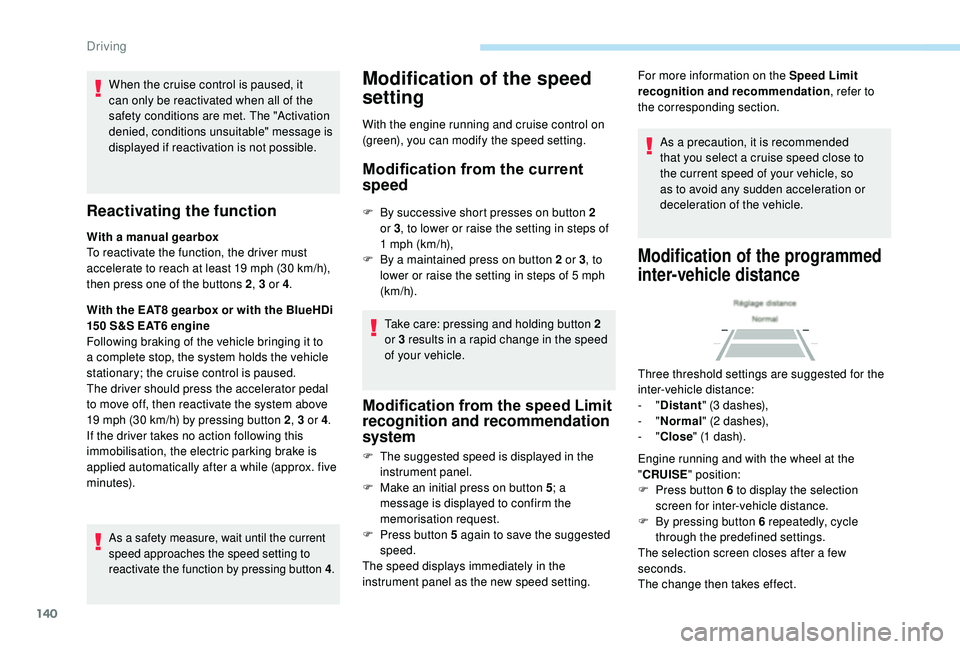
Three threshold settings are suggested for the
inter-vehicle distance:
- "Distant " (3 dashes),
-
"Normal " (2 dashes),
-
"Close " (1 dash).
Engine running and with the wheel at the
" CRUISE " position:
F
P
ress button 6 to display the selection
screen for inter-vehicle distance.
F
B
y pressing button 6 repeatedly, cycle
through the predefined settings.
The selection screen closes after a few
seconds.
The change then takes effect.
Driving
Page 143 of 324
141
This setting remains in memory, whatever the state
of the system and when the ignition is switched off.
The selection also applies to the stopping
distance (with EAT6 and EAT8 automatic
gearbox).
Exceeding the programmed
setting
It is possible to exceed the speed setting
temporarily by depressing the accelerator
pedal.
The cruise control no longer manages the
braking system during this period.
Simply release the accelerator pedal to return
to the programmed speed.
If the programmed speed setting is exceeded,
the display of the speed setting disappears
and a message "Cruise control suspended"
is displayed until the accelerator pedal is
released.
Driving situations and
associated alerts
The table below describes the alerts and
messages displayed depending on the driving
situation.
The display of these alerts is not sequential.
The instrument panel "Driving aids" display
screen tab must have been selected first.
6
Driving
Page 149 of 324
147
Clean the windscreen regularly,
particularly the area in front of the camera.
The internal sur face of the windscreen can
also become misted around the camera.
In humid and cold weather, demist the
windscreen regularly.
Do not allow snow to accumulate on the
bonnet or roof of the vehicle as this could
conceal the detection camera.
In the following cases, deactivating the system
via the vehicle's configuration menu is advised:
-
t
owing a trailer,
-
c
arrying long objects on roof bars or roof
rack,
-
w
ith snow chains fitted,
-
b
efore using an automatic car wash, with
the engine running,
-
b
efore placing the vehicle on a rolling road
in a workshop,
-
t
owed vehicle, engine running,
-
d
amaged front bumper,
-
f
ollowing impact to the windscreen close to
the detection camera. The system is automatically deactivated
after the use of the "space-saver" type
spare wheel is detected, or if a fault with
the lateral brake lamps is detected.
It is possible that warnings are not given,
are given too late or seem unjustified.
Consequently, always stay in control of
your vehicle and be prepared to react at
any time to avoid an accident.
After an impact, the function automatically
stops operating. Contact a PEUGEOT
dealer or a qualified workshop to have the
system checked.
Distance Alert
It warns the driver if their vehicle is at risk of
collision with the vehicle in front or a pedestrian
present in their traffic lane.
Modifying the alert trigger
threshold
This threshold determines how you wish to be
warned of the presence of a vehicle moving
or stationary in front of you, or a pedestrian
present in your traffic lane.
You can select one of three predefined
thresholds:
-
"Distant ",
-
"Normal ",
-
"Close ".
The last threshold selected is kept in memory
when the ignition is switched off.
Operation
Depending on the degree of risk of collision
detected by the system and the alert threshold
chosen by the driver, different levels of alert can be
triggered and displayed in the instrument panel.
They take account of the vehicle dynamics,
the speed of your vehicle and the one in front,
the environmental conditions, the operation of
the vehicle (cornering, pedals pressed, etc.) to
trigger the alert at the best moment.
6
Driving
Page 153 of 324
151
Operation
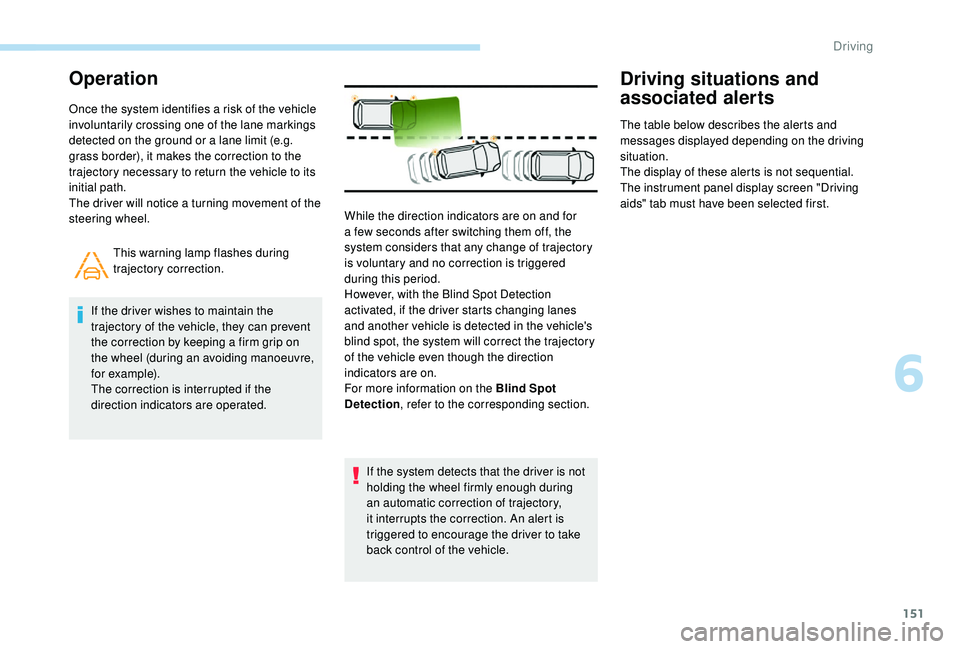
Once the system identifies a risk of the vehicle
involuntarily crossing one of the lane markings
detected on the ground or a lane limit (e.g.
grass border), it makes the correction to the
trajectory necessary to return the vehicle to its
initial path.
The driver will notice a turning movement of the
steering wheel.This warning lamp flashes during
trajectory correction.
If the driver wishes to maintain the
trajectory of the vehicle, they can prevent
the correction by keeping a firm grip on
the wheel (during an avoiding manoeuvre,
for example).
The correction is interrupted if the
direction indicators are operated.
If the system detects that the driver is not
holding the wheel firmly enough during
an automatic correction of trajectory,
it interrupts the correction. An alert is
triggered to encourage the driver to take
back control of the vehicle.
Driving situations and
associated alerts
The table below describes the alerts and
messages displayed depending on the driving
situation.
The display of these alerts is not sequential.
The instrument panel display screen "Driving
aids" tab must have been selected first.
While the direction indicators are on and for
a few seconds after switching them off, the
system considers that any change of trajectory
is voluntary and no correction is triggered
during this period.
However, with the Blind Spot Detection
activated, if the driver starts changing lanes
and another vehicle is detected in the vehicle's
blind spot, the system will correct the trajectory
of the vehicle even though the direction
indicators are on.
For more information on the Blind Spot
Detection , refer to the corresponding section.
6
Driving
Page 155 of 324
153
Operating limits
The system goes into standby automatically in
the following cases:
-
E
SC deactivated or operation triggered,
-
s
peed below 40 mph (65 km/h) or greater
than 112
mph (180 km/h),
-
c
onnected electrically to a trailer,
-
u
se of the "space-saver" spare
wheel detected (as detection is not
immediate, deactivation of the system is
recommended),
-
d
ynamic driving style detected, pressure on
the brake or accelerator pedal,
-
d
riving beyond lane markings,
-
a
ctivation of the direction indicators,
-
c
rossing the inside line on a bend,
-
d
riving in a tight corner,
-
i
nactivity by the driver detected during
correction. The following situations may interfere with
the operation of the system or prevent it
working:
-
c
onditions of poor visibility (inadequate
street lighting, snowfall, rain, fog),
-
d
azzle (headlamps of an oncoming
vehicle, low sun, reflections on a damp
road, leaving a tunnel, alternating
shade and light),
-
w
indscreen area located in front of the
camera: dirty, misted, frost-covered,
snow-covered, damaged or covered by
a s t i c ke r,
-
l
ane markings worn, hidden (snow,
mud) or multiple (roadworks, etc.),
-
r
unning close to the vehicle in front
(the lane markings may not be
detected),
-
r
oads that are narrow, winding, etc.
Risk of undesirable operation
Deactivation of the system is recommended in
the following situations:
-
d
riving on a road sur face in poor condition,
-
u
nfavourable climatic conditions,
-
d
riving on slippery sur faces (ice). The system is not intended for driving in the
following situations:
-
d
riving on a speed circuit,
-
d
riving with a trailer,
-
d
riving on a rolling road,
-
d
riving on unstable sur faces.
Deactivation/Activation
Without touch screen
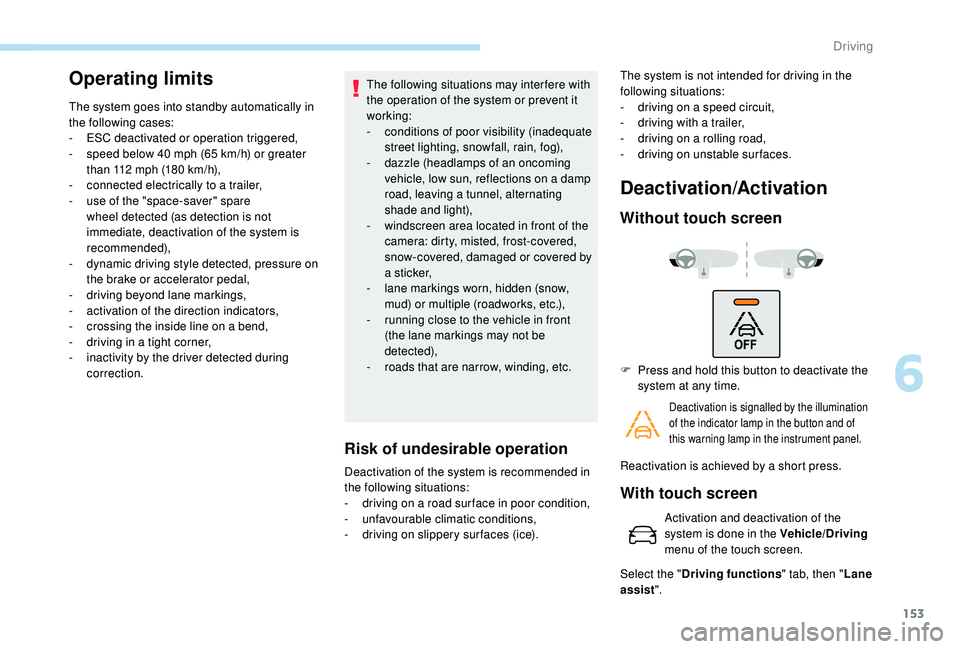
F Press and hold this button to deactivate the
system at any time.
Deactivation is signalled by the illumination
of the indicator lamp in the button and of
this warning lamp in the instrument panel.
Reactivation is achieved by a short press.
With touch screen
Activation and deactivation of the
system is done in the Vehicle/Driving
menu of the touch screen.
Select the " Driving functions " tab, then "Lane
assist ".
6
Driving
Page 156 of 324
154
Malfunction
Blind Spot Detection
This system is designed to improve safety
when driving and is in no circumstances
a substitute for the use of the interior
rear view mirror and door mirrors. It is
the driver's responsibility to constantly
check the traffic, to assess the distances
and relative speeds of other vehicles
and to anticipate their movements before
deciding whether to change lane.
The Blind Spot Detection system does not
avoid the need for vigilance on the part of
the driver.
Operation
The function is activated and
deactivated in the Vehicle/Driving
menu, then the Driving functions tab
of the touch screen.
The state of the system stays in memory when
switching off the ignition.
The system is automatically deactivated
when towing with a towing device
approved by PEUGEOT.
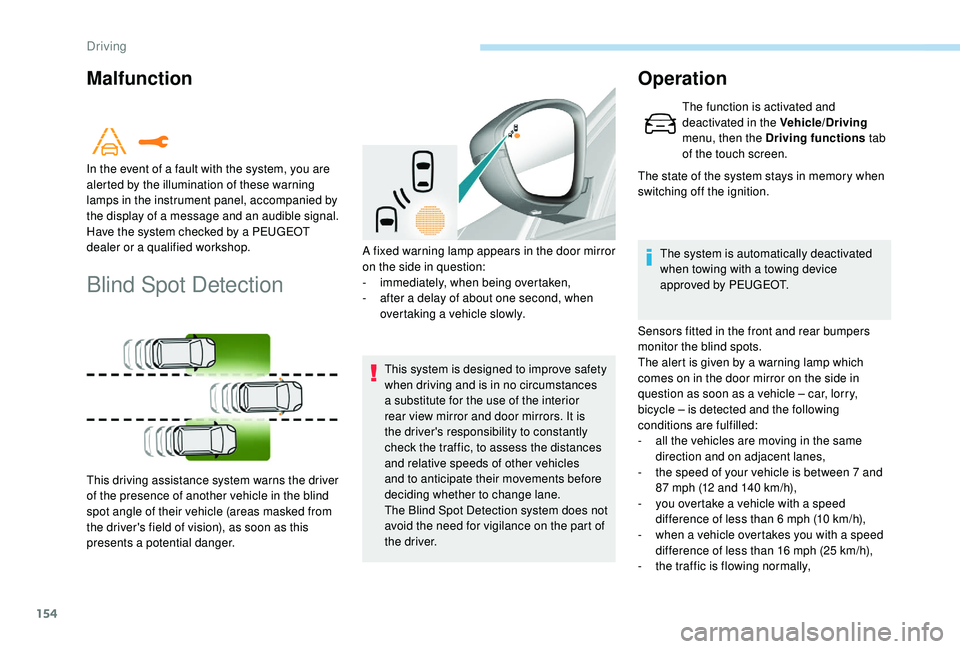
Sensors fitted in the front and rear bumpers
monitor the blind spots.
The alert is given by a warning lamp which
comes on in the door mirror on the side in
question as soon as a vehicle – car, lorry,
bicycle – is detected and the following
conditions are fulfilled:
-
a
ll the vehicles are moving in the same
direction and on adjacent lanes,
-
t
he speed of your vehicle is between 7 and
87
mph (12 and 140 km/h),
-
y
ou overtake a vehicle with a speed
difference of less than 6
mph (10 km/h),
-
w
hen a vehicle overtakes you with a speed
difference of less than 16
mph (25 km/h),
-
t
he traffic is flowing normally,
In the event of a fault with the system, you are
alerted by the illumination of these warning
lamps in the instrument panel, accompanied by
the display of a message and an audible signal.
Have the system checked by a PEUGEOT
dealer or a qualified workshop.
This driving assistance system warns the driver
of the presence of another vehicle in the blind
spot angle of their vehicle (areas masked from
the driver's field of vision), as soon as this
presents a potential danger.
A fixed warning lamp appears in the door mirror
on the side in question:
-
i
mmediately, when being overtaken,
-
a
fter a delay of about one second, when
overtaking a vehicle slowly.
Driving
Page 159 of 324
157
The sound emitted by the speaker (front or
rear) locates the obstacle in relation to the
vehicle, in front or behind.
Deactivation/activation of
the front and rear parking
sensors
The system is deactivated in the
Vehicle/Driving menu, then the
Driving functions tab of the touch
screen.
F
P
ress this button. The indicator
lamp in the button comes on.
Pressing this button again reactivates the function.
The indicator lamp in the button goes off.
The function will be automatically
deactivated when connecting a trailer or a
bicycle carrier on a towing device installed
in accordance with the manufacturer's
recommendations.
The parking sensors are deactivated while the
Park Assist system is measuring a space.
For more information on Park Assist , refer to
the corresponding section.
Operating limits
- Certain obstacles located in the sensors’ blind spots may not be detected or no
longer be detected during the manoeuvre.
-
S
ounds such as those emitted by noisy
vehicles and machinery (e.g. lorries,
pneumatic drills, etc.) may inter fere with the
vehicle's sensors.
-
C
ertain materials (fabrics) absorb sound
waves: pedestrians may not be detected.
-
A
ccumulated snow or dead leaves on the
road sur face can inter fere with the vehicle's
sensors.
-
A f
ront or rear impact to the vehicle can
distort the settings of the sensors, which is
not always detected by the system: distance
measurements may be incorrect.
-
T
he tilting of the vehicle if the boot is
very loaded can affect the distance
measurements.
-
T
he sensors may be affected by poor
weather conditions (heavy rain, thick fog,
snowfall, etc.).
Maintenance
recommendations
In bad or wintry weather, ensure that the
sensors are not covered with mud, ice or
snow. When reverse gear is engaged, an
audible signal (long beep) indicates that
the sensors may be dirty.
High pressure jet wash
When washing your vehicle, keep the
lance at least 12 inches (30
cm) away from
the sensors.
Operating fault
On engaging reverse gear:
This warning lamp comes on in the
instrument panel and/or a message
appears, accompanied by an audible
signal.
Contact a PEUGEOT dealer or a qualified
workshop.
6
Driving
Page 166 of 324
164
Assistance in exiting from a
parallel parking space
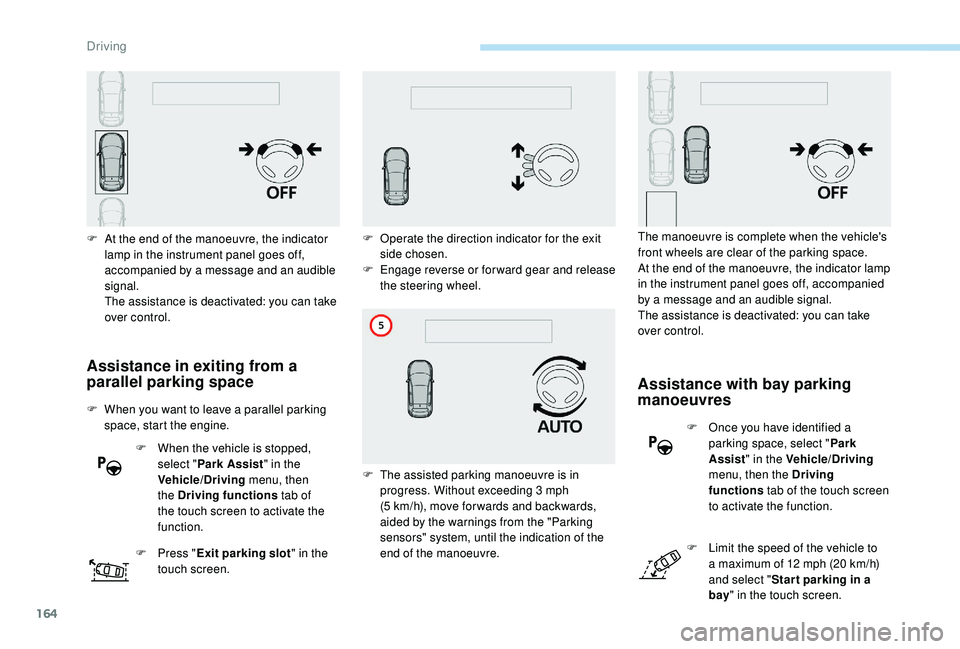
F When you want to leave a parallel parking space, start the engine.
F
W
hen the vehicle is stopped,
select " Park Assist " in the
Vehicle/Driving menu, then
the Driving functions tab of
the touch screen to activate the
function.
F
P
ress "Exit parking slot " in the
touch screen.
F
A
t the end of the manoeuvre, the indicator
lamp in the instrument panel goes off,
accompanied by a message and an audible
signal.
The assistance is deactivated: you can take
over control.
Assistance with bay parking
manoeuvres
F Once you have identified a parking space, select " Park
Assist " in the Vehicle/Driving
menu, then the Driving
functions tab of the touch screen
to activate the function.
F
L
imit the speed of the vehicle to
a maximum of 12
mph (20 km/h)
and select " Star t parking in a
bay " in the touch screen.
F
O
perate the direction indicator for the exit
side chosen.
F
E
ngage reverse or forward gear and release
the steering wheel.
F
T
he assisted parking manoeuvre is in
progress. Without exceeding 3
mph
(5
km/h), move for wards and backwards,
aided by the warnings from the "Parking
sensors" system, until the indication of the
end of the manoeuvre. The manoeuvre is complete when the vehicle's
front wheels are clear of the parking space.
At the end of the manoeuvre, the indicator lamp
in the instrument panel goes off, accompanied
by a message and an audible signal.
The assistance is deactivated: you can take
over control.
Driving
Page 167 of 324
165
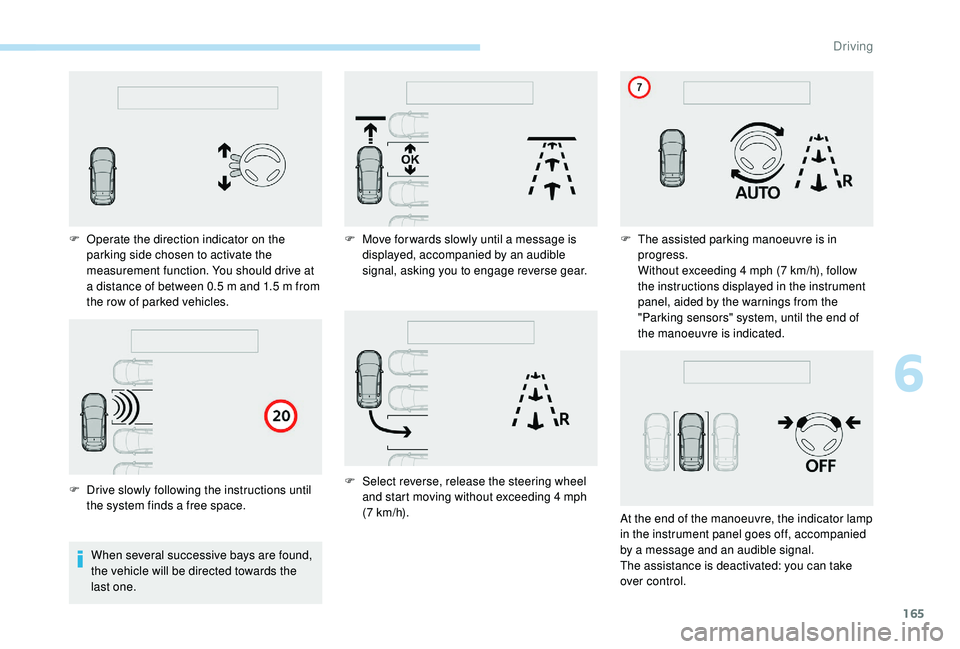
When several successive bays are found,
the vehicle will be directed towards the
last one.
F
O
perate the direction indicator on the
parking side chosen to activate the
measurement function. You should drive at
a distance of between 0.5 m and 1.5 m from
the row of parked vehicles.
F
D
rive slowly following the instructions until
the system finds a free space. F
M
ove for wards slowly until a message is
displayed, accompanied by an audible
signal, asking you to engage reverse gear.
F
S
elect reverse, release the steering wheel
and start moving without exceeding 4 mph
(7
km/h).F
T
he assisted parking manoeuvre is in
progress.
Without exceeding 4 mph (7 km/h), follow
the instructions displayed in the instrument
panel, aided by the warnings from the
"Parking sensors" system, until the end of
the manoeuvre is indicated.
At the end of the manoeuvre, the indicator lamp
in the instrument panel goes off, accompanied
by a message and an audible signal.
The assistance is deactivated: you can take
over control.
6
Driving
Page 168 of 324
166
During a bay parking manoeuvre, the Park
Assist system is automatically deactivated
once the rear of the vehicle is within 20
inches (50 cm) of an obstacle.
During parking and exit from parking
manoeuvres, the Reversing Camera
function may come into operation. It
facilitates monitoring of the surroundings
of the vehicle, by displaying additional
information in the instrument panel.
For more information on the Reversing
Camera , refer to the corresponding
section.
Deactivation
The system is deactivated by pressing the
control.
The system is deactivated automatically:
-
o
n switching off the ignition,
-
i
f the engine stalls,
-
i
f no manoeuvre is per formed within
5
minutes of selecting the type of
manoeuvre
-
a
fter a prolonged stop of the vehicle during
a manoeuvre,
-
i
f the wheel anti-slip regulation (ASR) is
triggered, This symbol is displayed on the touch
screen and a message appears,
accompanied by an audible signal.
The driver should then take back control of the
vehicle's steering.
If the system is deactivated during a
manoeuvre, the driver should reactivate it to
repeat the measurement.
Deactivation
The system is switched off automatically:
- w hen towing a trailer,
-
i
f the driver's door is opened,
-
i
f the speed of the vehicle is above 43 mph
(70
km/h).
To switch the system off for a prolonged period,
contact a PEUGEOT dealer or a qualified
workshop.
Operating faults
Depending on version:
This warning lamp comes on in the
instrument panel and a message appears,
accompanied by an audible signal.
In the event of a fault with the
power steering, this warning lamp
comes on in the instrument panel,
accompanied by a message.
If the lateral distance between your vehicle and the
space is too great, the system may not be able to
measure the space.
Anything projecting beyond the dimensions of the
vehicle (long or wide load) is not taken into account
by the Park Assist system during a manoeuvre.
In bad weather or in winter, ensure that
the sensors are not covered by road dirt,
ice or snow.
In the event of a fault, have the system
checked by a PEUGEOT dealer or a
qualified workshop.
Contact a PEUGEOT dealer or a qualified
workshop.
Tyre under-inflation
detection
This system automatically monitors the tyre
pressure while driving.
The system monitors the pressure in all four
tyres, once the vehicle is moving.
-
i
f the speed of the vehicle exceeds the
stated limit,
-
w
hen the driver interrupts movement of the
steering wheel,
-
a
fter 4
manoeuvre cycles,
-
o
n opening the driver's door,
-
i
f one of the front wheels encounters an
obstacle.
Driving