dashboard PEUGEOT 308 2018 User Guide
[x] Cancel search | Manufacturer: PEUGEOT, Model Year: 2018, Model line: 308, Model: Peugeot 308 2018Pages: 360, PDF Size: 12.38 MB
Page 151 of 360
149
Manual child lock
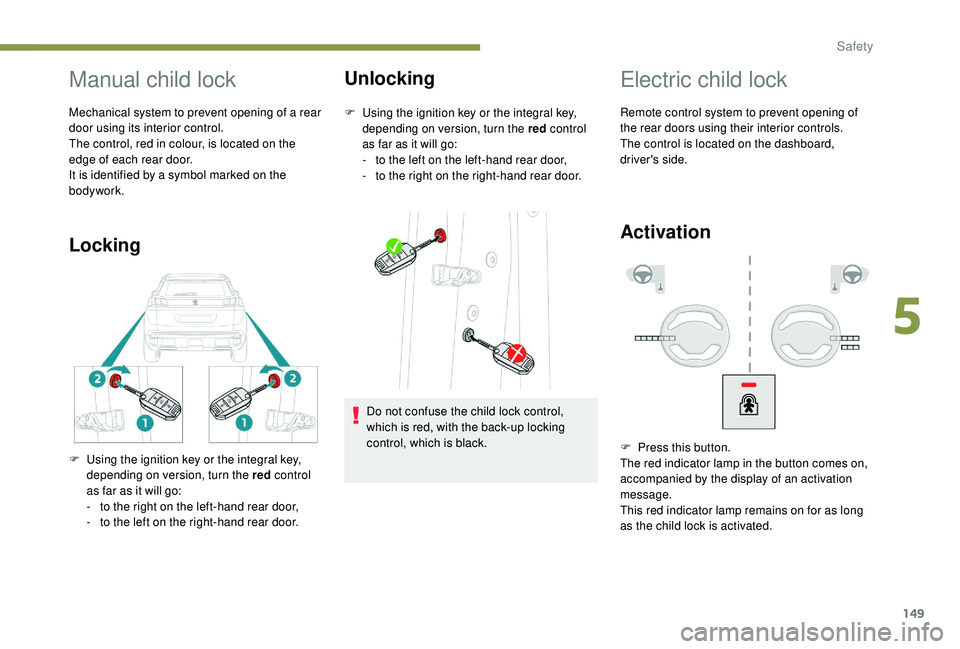
Mechanical system to prevent opening of a rear
door using its interior control.
The control, red in colour, is located on the
edge of each rear door.
It is identified by a symbol marked on the
bodywork.
LockingUnlocking
F Using the ignition key or the integral key,
depending on version, turn the red control
as far as it will go:
-
t
o the left on the left-hand rear door,
-
t
o the right on the right-hand rear door.
F
U
sing the ignition key or the integral key,
depending on version, turn the red control
as far as it will go:
-
t
o the right on the left-hand rear door,
-
t
o the left on the right-hand rear door. Do not confuse the child lock control,
which is red, with the back-up locking
control, which is black.
Electric child lock
Remote control system to prevent opening of
the rear doors using their interior controls.
The control is located on the dashboard,
driver's side.
Activation
F Press this button.
The red indicator lamp in the button comes on,
accompanied by the display of an activation
message.
This red indicator lamp remains on for as long
as the child lock is activated.
5
Safety
Page 171 of 360
169
Deactivation / Reactivation
In certain circumstances, such as the need
to maintain the temperature in the passenger
compartment, it may be useful to deactivate
the Stop & Start system.
The system can be deactivated at any time,
once the ignition is switched on.
If the engine is in STOP mode, it restarts
immediately.
The Stop & Start system is reactivated
automatically every time the ignition is
switched on.
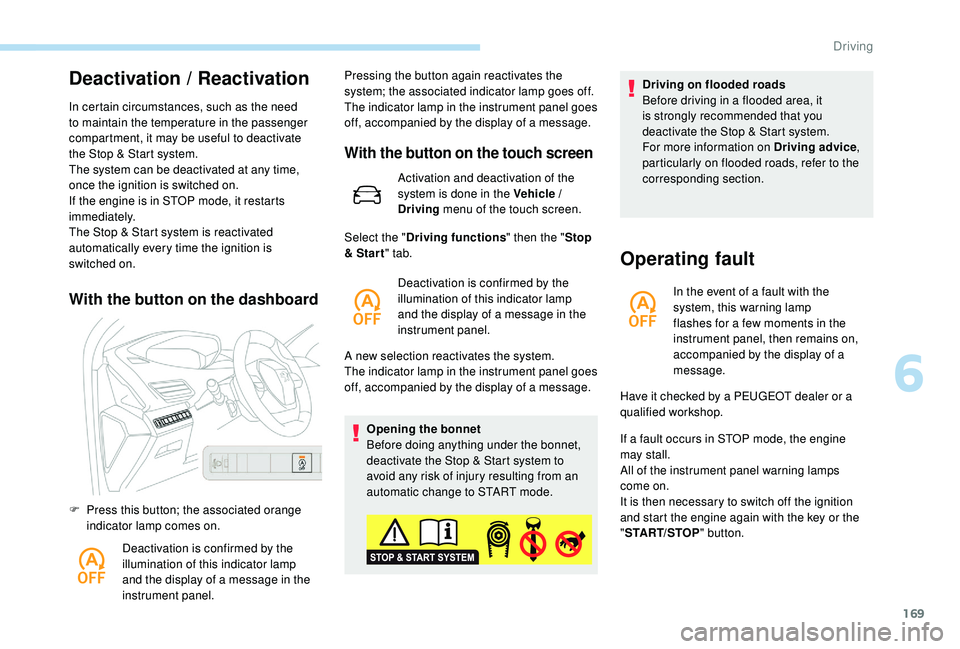
With the button on the dashboard
F Press this button; the associated orange indicator lamp comes on.
Deactivation is confirmed by the
illumination of this indicator lamp
and the display of a message in the
instrument panel. Pressing the button again reactivates the
system; the associated indicator lamp goes off.
The indicator lamp in the instrument panel goes
off, accompanied by the display of a message.
With the button on the touch screen
Activation and deactivation of the
system is done in the Vehicle /
Driving
menu of the touch screen.
A new selection reactivates the system.
The indicator lamp in the instrument panel goes
off, accompanied by the display of a message. Opening the bonnet
Before doing anything under the bonnet,
deactivate the Stop & Start system to
avoid any risk of injury resulting from an
automatic change to START mode.
Select the "
Driving functions " then the "Stop
& Star t " tab.
Deactivation is confirmed by the
illumination of this indicator lamp
and the display of a message in the
instrument panel. Driving on flooded roads
Before driving in a flooded area, it
is strongly recommended that you
deactivate the Stop & Start system.
For more information on Driving advice
,
particularly on flooded roads, refer to the
corresponding section.
Operating fault
In the event of a fault with the
system, this warning lamp
flashes for a few moments in the
instrument panel, then remains on,
accompanied by the display of a
message.
If a fault occurs in STOP mode, the engine
may stall.
All of the instrument panel warning lamps
come on.
It is then necessary to switch off the ignition
and start the engine again with the key or the
" START/STOP " button.
Have it checked by a PEUGEOT dealer or a
qualified workshop.
6
Driving
Page 256 of 360
254
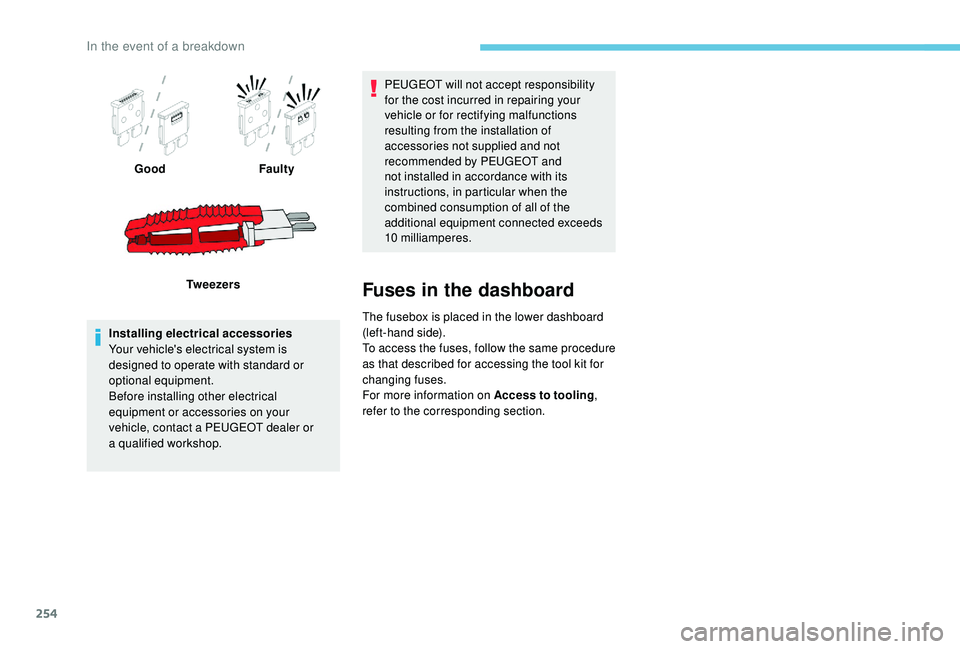
GoodFaulty
Tw e e z e r s
Installing electrical accessories
Your vehicle's electrical system is
designed to operate with standard or
optional equipment.
Before installing other electrical
equipment or accessories on your
vehicle, contact a PEUGEOT dealer or
a
qualified workshop. PEUGEOT will not accept responsibility
for the cost incurred in repairing your
vehicle or for rectifying malfunctions
resulting from the installation of
accessories not supplied and not
recommended by PEUGEOT and
not installed in accordance with its
instructions, in particular when the
combined consumption of all of the
additional equipment connected exceeds
10
milliamperes.
Fuses in the dashboard
The fusebox is placed in the lower dashboard
(left-hand side).
To access the fuses, follow the same procedure
as that described for accessing the tool kit for
changing fuses.
For more information on Access to tooling,
refer to the corresponding section.
In the event of a breakdown
Page 271 of 360
269
Identification markings
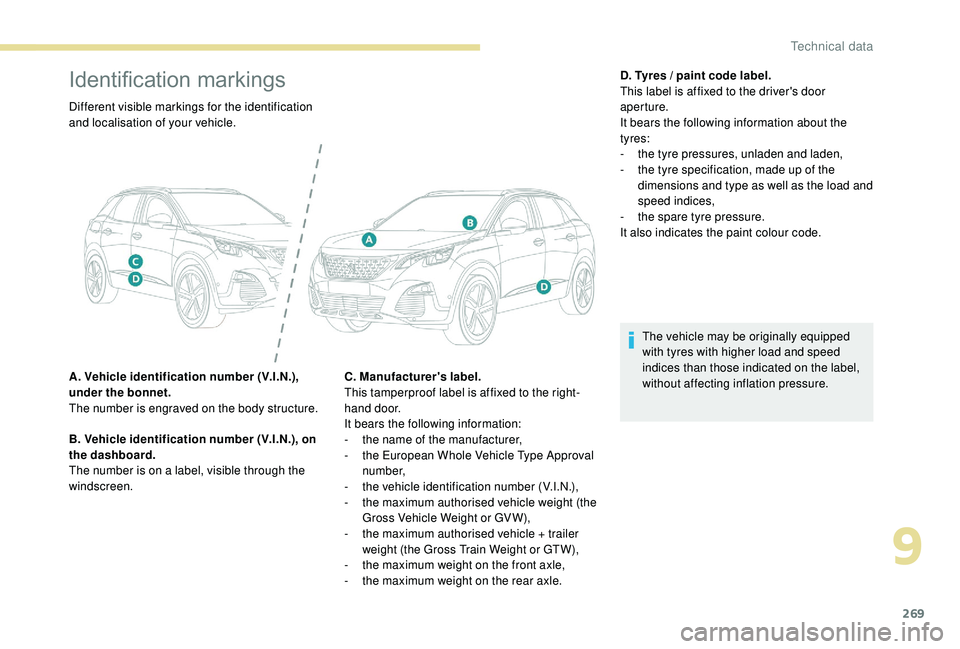
Different visible markings for the identification
and localisation of your vehicle.
A. Vehicle identification number (V.I.N.),
under the bonnet.
The number is engraved on the body structure.
B. Vehicle identification number (V.I.N.), on
the dashboard.
The number is on a label, visible through the
windscreen.C. Manufacturer's label.
This tamperproof label is affixed to the right-
hand door.
It bears the following information:
-
t
he name of the manufacturer,
-
t
he European Whole Vehicle Type Approval
number,
-
t
he vehicle identification number (V.I.N.),
-
t
he maximum authorised vehicle weight (the
Gross Vehicle Weight or GV W),
-
t
he maximum authorised vehicle + trailer
weight (the Gross Train Weight or GTW),
-
t
he maximum weight on the front axle,
-
t
he maximum weight on the rear axle.D. Tyres / paint code label.
This label is affixed to the driver's door
aperture.
It bears the following information about the
tyres:
-
t
he tyre pressures, unladen and laden,
-
t
he tyre specification, made up of the
dimensions and type as well as the load and
speed indices,
-
t
he spare tyre pressure.
It also indicates the paint colour code.
The vehicle may be originally equipped
with tyres with higher load and speed
indices than those indicated on the label,
without affecting inflation pressure.
9
Technical data