light PEUGEOT 308 2018 User Guide
[x] Cancel search | Manufacturer: PEUGEOT, Model Year: 2018, Model line: 308, Model: Peugeot 308 2018Pages: 360, PDF Size: 12.38 MB
Page 35 of 360
33
Pressing this button temporarily
displays the driving range.
Remaining range between 1,500
and
500
miles (2,400 and 800 km)
(with 1.5
BlueHDi 130 S&S and 2.0 BlueHDi
180
S&S engines) Remaining range between 1,500
and
375
miles (2,400 and 600 km)
(with 1.6
BlueHDi 100 S&S, 1.6 BlueHDi
115
S&S, 1.6 BlueHDi 120 S&S and
2.0
BlueHDi 150 S&S engines)
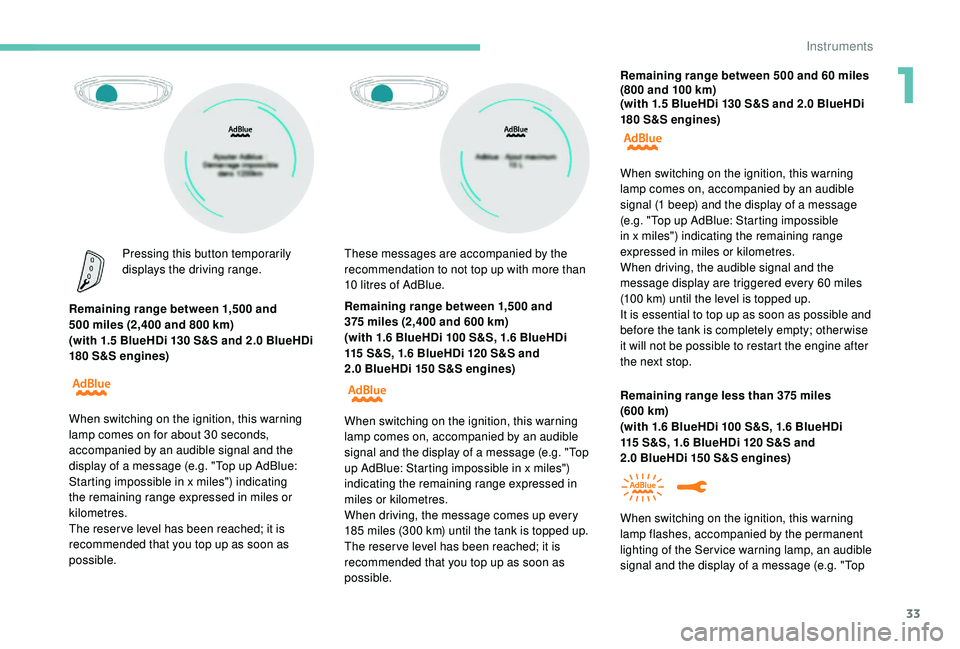
When switching on the ignition, this warning
lamp comes on for about 30
seconds,
accompanied by an audible signal and the
display of a message (e.g. "Top up AdBlue:
Starting impossible in x miles") indicating
the remaining range expressed in miles or
kilometres.
The reser ve level has been reached; it is
recommended that you top up as soon as
possible. These messages are accompanied by the
recommendation to not top up with more than
10
litres of AdBlue.
When switching on the ignition, this
warning
lamp comes on, accompanied by an audible
signal and the display of a message (e.g. "Top
up AdBlue: Starting impossible in x miles")
indicating the remaining range expressed in
miles or kilometres.
When driving, the message comes up every
185
miles (300 km) until the tank is topped up.
The reser ve level has been reached; it is
recommended that you top up as soon as
possible. Remaining range between 500
and 60 miles
(800 and 100 km)
(with 1.5 BlueHDi 130 S&S and 2.0 BlueHDi
180 S&S engines)
Remaining range less than 375 miles
(600
km)
(with 1.6
BlueHDi 100 S&S, 1.6 BlueHDi
115
S&S, 1.6 BlueHDi 120 S&S and
2.0
BlueHDi 150 S&S engines)
When switching on the ignition, this
warning
lamp comes on, accompanied by an audible
signal (1 beep) and the display of a message
(e.g. "Top up AdBlue: Starting impossible
in x miles") indicating the remaining range
expressed in miles or kilometres.
When driving, the audible signal and the
message display are triggered every 60
miles
(100
km) until the level is topped up.
It is essential to top up as soon as possible and
before the tank is completely empty; other wise
it will not be possible to restart the engine after
the next stop.
When switching on the ignition, this
warning
lamp flashes, accompanied by the permanent
lighting of the Ser vice warning lamp, an audible
signal and the display of a message (e.g. "Top
1
Instruments
Page 38 of 360
36
Distance recorders
The total and trip distances are displayed for
thirty seconds when the ignition is switched off,
when the driver's door is opened and when the
vehicle is locked or unlocked.When travelling abroad, you may have to
change the distance unit: the display of
road speed must be in the official units
(miles or km) for the country.
The change of units is done via the
screen configuration menu, with the
vehicle stationary.
Total distance recorder
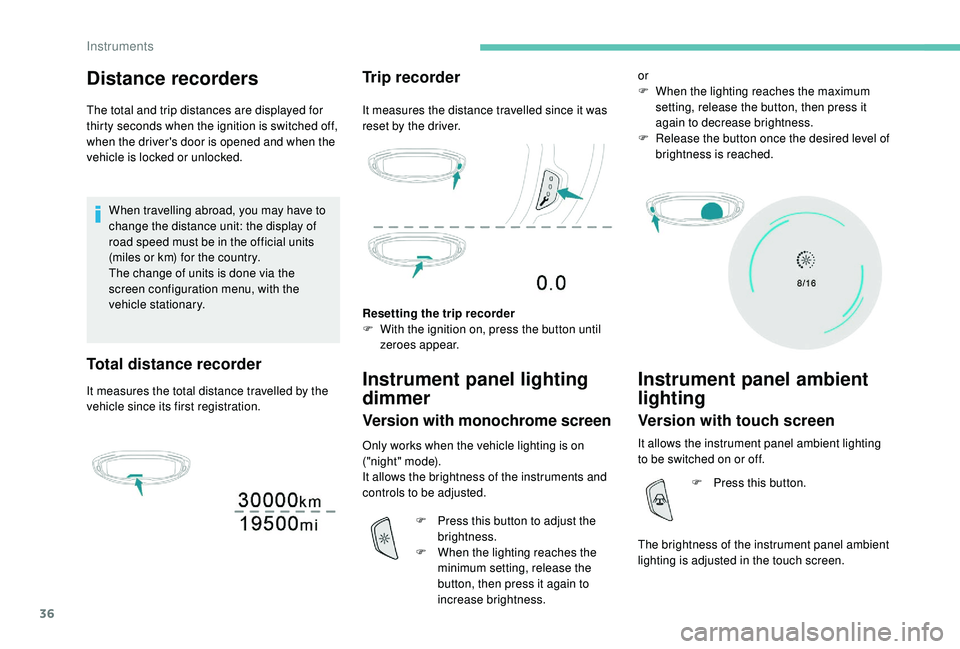
It measures the total distance travelled by the
vehicle since its first registration.
Trip recorder
It measures the distance travelled since it was
reset by the driver.
Resetting the trip recorder
F
W
ith the ignition on, press the button until
zeroes appear.
Instrument panel lighting
dimmer
Version with monochrome screen
Only works when the vehicle lighting is on
("night" mode).
It allows the brightness of the instruments and
controls to be adjusted.
F
P
ress this button to adjust the
brightness.
F
W
hen the lighting reaches the
minimum setting, release the
button, then press it again to
increase brightness. or
F
W
hen the lighting reaches the maximum
setting, release the button, then press it
again to decrease brightness.
F
R
elease the button once the desired level of
brightness is reached.
Instrument panel ambient
lighting
Version with touch screen
It allows the instrument panel ambient lighting
to be switched on or off.
The brightness of the instrument panel ambient
lighting is adjusted in the touch screen. F
P
ress this button.
Instruments
Page 42 of 360
40
Touch screen
Define the vehicle parameters
This menu allows the activation or deactivation
of the following equipment, depending on
version:
-
"
Access to the vehicle" :
•
"
Remote control action".
For more information on the Remote control
and driver door selective unlocking in
particular, refer to the "Access" section.
-
"
Comfort" :
•
"
Rear wipe in reverse gear".
For more information on the Wipers ,
refer to the "Lighting and visibility"
section.
•
"
Parking assistance".
For more information on Parking
assistance , refer to the "Driving"
section.
•
"
Fatigue Detection System".
For more information on the Fatigue
detection system , refer to the "Driving"
section.
-
"
Driving assistance" :
•
"
Auto. emergency braking".
For more information on the Active
Safety Brake , refer to the "Driving"
section.
•
"
Speed recommendation".
For more information on Speed limit
recognition , refer to the "Driving"
section. •
"
Tyre inflation".
For more information on Under-
inflation detection and reinitialisation in
particular, refer to the "Driving" section.
Choice of language
This menu allows selection of the language
used by the screen and the instrument panel.
Display configuration
This menu gives access to the following
settings:
-
"
Choice of units",
-
"
Date and time adjustment",
-
"
Display parameters",
-
"Brightness".
Adjusting the date and time
F
P
ress the " 7" or " 8" button to display the
"Display configuration" menu, then press
OK.
F
P
ress the " 5" or " 6" button to select the
"Date and time adjustment" button, then
press OK.
F
P
ress the " 7" or " 8" button to select the
setting to modify. Confirm by pressing OK,
then modify the setting and confirm again to
save the modification.
F
A
djust the settings one by one, confirming
with the OK button. F
P
ress the "
5" or " 6" button, then the OK
button to select the OK box and confirm or
the Back button to cancel.
As a safety measure, the driver must only
carry out operations that require sustained
attention when stationary.
This system gives access to:
-
t
he permanent display of the time and
the exterior temperature (a blue symbol
appears when there is a risk of ice),
-
t
he heating/air conditioning controls,
-
m
enus for adjusting settings for vehicle
functions and systems,
-
a
udio system and telephone controls and
the display of associated information,
-
t
he display of visual parking aids (visual
parking sensor information, Park Assist,
e t c .),
-
I
nternet ser vices and the display of
associated information.
and, depending on equipment, allows:
-
a
ccess to the navigation system controls
and the display of associated information.
Instruments
Page 45 of 360
43
Vehicle / Driving menu
"Vehicle settings" tab
PEUGEOT Connect Nav
FamiliesFunctions
"Driving lighting" -
"
Directional headlamps": activation / deactivation of cornering lighting.
"Vehicle access" -
"
Remote control action: Unlock driver's door": activation / deactivation of
selective unlocking of the driver's door.
-
"
Unlock boot only": activation / deactivation of selective unlocking at the
tailgate.
-
"
Motorised tailgate": activation / deactivation of motorised operation of
the tailgate.
-
"
Hands-Free Tailgate Access": activation / deactivation of the hands-free
tailgate access system.
"Comfort lighting" -
"
Rear wiper in reverse": activation / deactivation of the rear wiper on with
reverse gear.
-
"
Mirror adaptation in reverse": activation / deactivation of the automatic
door mirror tilt when engaging reverse gear.
-
"
Guide-me-home lighting": activation / deactivation of automatic guide-
me-home lighting.
-
"
Welcome lighting": activation / deactivation of exterior welcome lighting.
-
"
Ambient lighting": activation / deactivation of ambient lighting and
adjustment of brightness.
"Security" -
"
Collision risk alert": activation / deactivation of the collision risk alert and
automatic emergency braking.
-
"
Recommended speed display": activation / deactivation of speed limit
sign recognition.
-
"
Fatigue Detection System": activation / deactivation of the driver fatigue
detection system.
1
Instruments
Page 46 of 360
44
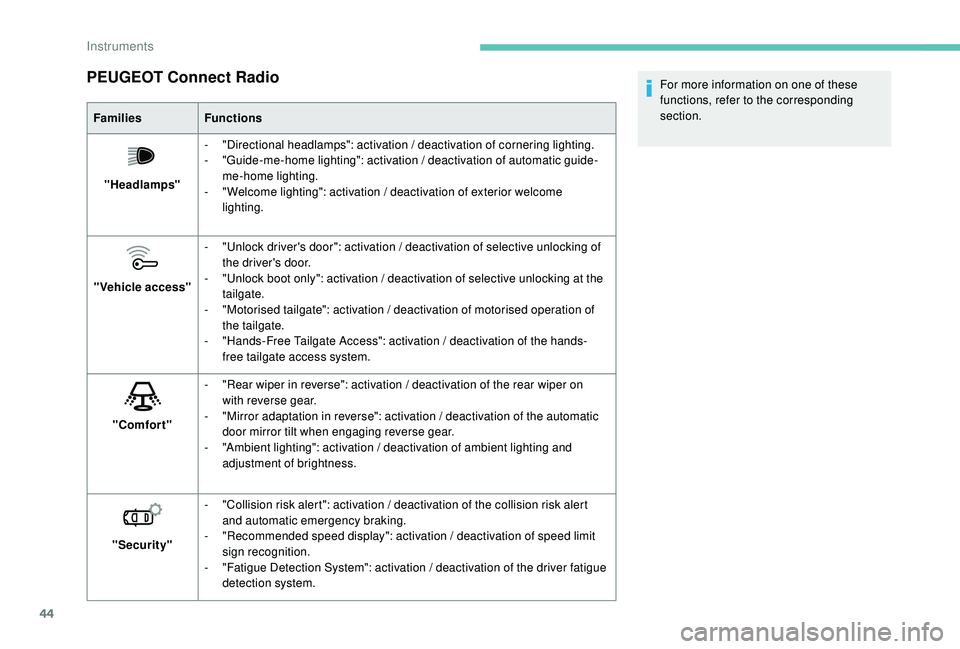
PEUGEOT Connect Radio
FamiliesFunctions
"Headlamps" -
"
Directional headlamps": activation / deactivation of cornering lighting.
-
"
Guide-me-home lighting": activation / deactivation of automatic guide-
me-home lighting.
-
"
Welcome lighting": activation / deactivation of exterior welcome
lighting.
"Vehicle access" -
"
Unlock driver's door": activation / deactivation of selective unlocking of
the driver's door.
-
"
Unlock boot only": activation / deactivation of selective unlocking at the
tailgate.
-
"
Motorised tailgate": activation / deactivation of motorised operation of
the tailgate.
-
"
Hands-Free Tailgate Access": activation / deactivation of the hands-
free tailgate access system.
"Comfort" -
"
Rear wiper in reverse": activation / deactivation of the rear wiper on
with reverse gear.
-
"
Mirror adaptation in reverse": activation / deactivation of the automatic
door mirror tilt when engaging reverse gear.
-
"
Ambient lighting": activation / deactivation of ambient lighting and
adjustment of brightness.
"Security" -
"
Collision risk alert": activation / deactivation of the collision risk alert
and automatic emergency braking.
-
"
Recommended speed display": activation / deactivation of speed limit
sign recognition.
-
"
Fatigue Detection System": activation / deactivation of the driver fatigue
detection system. For more information on one of these
functions, refer to the corresponding
section.
Instruments
Page 48 of 360
46
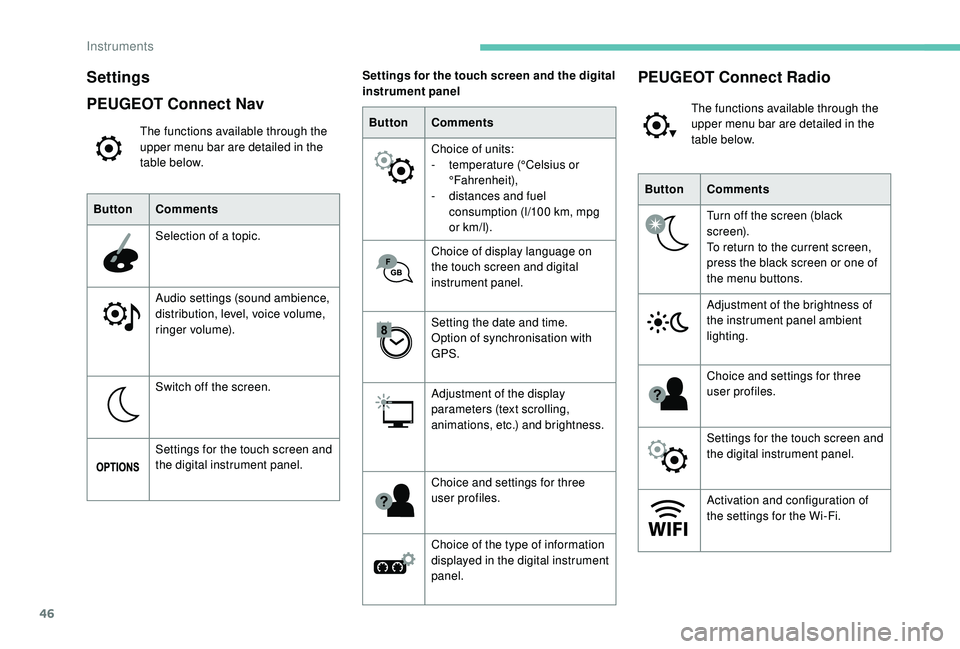
Settings
PEUGEOT Connect Nav
The functions available through the
upper menu bar are detailed in the
table below.
Button Comments
Selection of a topic.
Audio settings (sound ambience,
distribution, level, voice volume,
ringer volume).
Switch off the screen.
Settings for the touch screen and
the digital instrument panel. Button
Comments
Choice of units:
-
t
emperature (°Celsius or
°Fahrenheit),
-
d
istances and fuel
consumption (l/100
km, mpg
or km/l).
Choice of display language on
the touch screen and digital
instrument panel.
Setting the date and time.
Option of synchronisation with
GPS.
Adjustment of the display
parameters (text scrolling,
animations, etc.) and brightness.
Choice and settings for three
user profiles.
Choice of the type of information
displayed in the digital instrument
panel.
Settings for the touch screen and the digital
instrument panel
ButtonComments
Turn off the screen (black
screen).
To return to the current screen,
press the black screen or one of
the menu buttons.
Adjustment of the brightness of
the instrument panel ambient
lighting.
Choice and settings for three
user profiles.
Settings for the touch screen and
the digital instrument panel.
Activation and configuration of
the settings for the Wi-Fi.
PEUGEOT Connect Radio
The functions available through the
upper menu bar are detailed in the
table below.
Instruments
Page 50 of 360
48
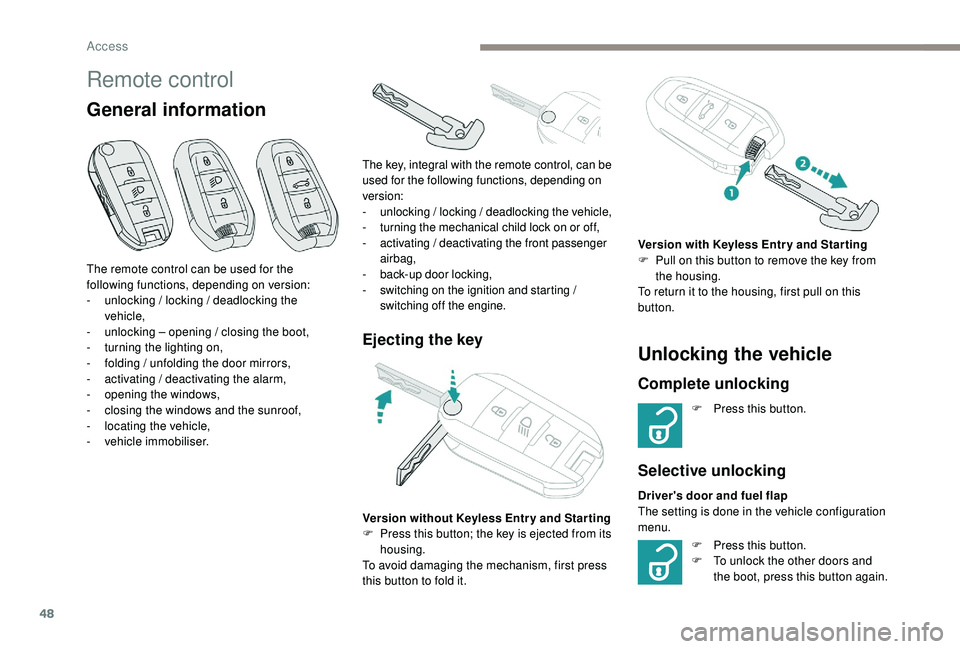
Remote control
General information
Ejecting the keyUnlocking the vehicle
Complete unlocking
F Press this button.
Selective unlocking
F Press this button.
F T o unlock the other doors and
the boot, press this button again.
The remote control can be used for the
following functions, depending on version:
-
u
nlocking / locking / deadlocking the
vehicle,
-
u
nlocking – opening / closing the boot,
-
t
urning the lighting on,
-
f
olding / unfolding the door mirrors,
-
a
ctivating / deactivating the alarm,
-
o
pening the windows,
-
c
losing the windows and the sunroof,
-
l
ocating the vehicle,
-
v
ehicle immobiliser.
Version without
K
eyless Entr y and Star ting
F
P
ress this button; the key is ejected from its
housing.
To avoid damaging the mechanism, first press
this button to fold it.
The key, integral with the remote control, can be
used for the following functions, depending on
version:
-
u
nlocking / locking / deadlocking the vehicle,
-
t
urning the mechanical child lock on or off,
-
a
ctivating / deactivating the front passenger
airbag,
-
b
ack-up door locking,
-
s
witching on the ignition and starting /
switching off the engine.
Version with K eyless Entr y and Star ting
F P ull on this button to remove the key from
the housing.
To return it to the housing, first pull on this
button.
Driver's door and fuel flap
The setting is done in the vehicle configuration
menu.
Access
Page 52 of 360
50
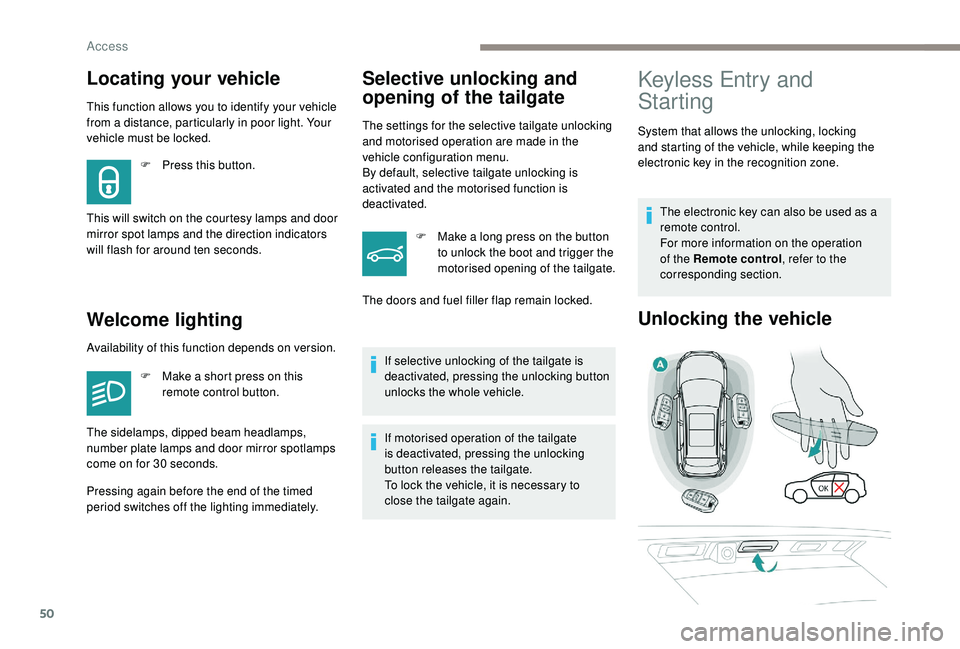
This function allows you to identify your vehicle
from a distance, particularly in poor light. Your
vehicle must be locked.
Welcome lightingSelective unlocking and
opening of the tailgate
The settings for the selective tailgate unlocking
and motorised operation are made in the
vehicle configuration menu.
By default, selective tailgate unlocking is
activated and the motorised function is
deactivated.
F
M
ake a long press on the button
to unlock the boot and trigger the
motorised opening of the tailgate.
If selective unlocking of the tailgate is
deactivated, pressing the unlocking button
unlocks the whole vehicle.
If motorised operation of the tailgate
is deactivated, pressing the unlocking
button releases the tailgate.
To lock the vehicle, it is necessary to
close the tailgate again.
Locating your vehicle
F Press this button.
This will switch on the courtesy lamps and door
mirror spot lamps and the direction indicators
will flash for around ten seconds.
Keyless Entry and
Starting
System that allows the unlocking, locking
and starting of the vehicle, while keeping the
electronic key in the recognition zone. The electronic key can also be used as a
remote control.
For more information on the operation
of the Remote control , refer to the
corresponding section.
Unlocking the vehicle
The doors and fuel filler flap remain locked.
Availability of this function depends on version. F
M
ake a short press on this
remote control button.
The sidelamps, dipped beam headlamps,
number plate lamps and door mirror spotlamps
come on for 30
seconds.
Pressing again before the end of the timed
period switches off the lighting immediately.
Access
Page 72 of 360
70
Driving position
Adopting a good driving position helps improve
your comfort and protection.
It also optimises interior and exterior visibility
as well as access to controls.
Sitting comfortably
Whether or not your vehicle has certain seat
adjustments described in this section depends
on the trim level and country of sale.
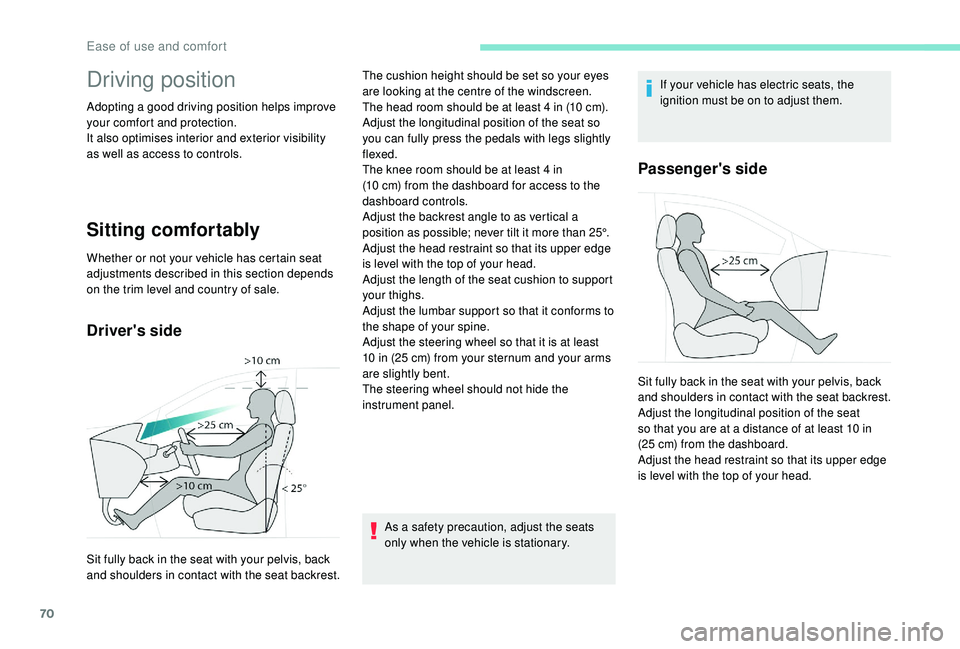
Driver's side
As a safety precaution, adjust the seats
only when the vehicle is stationary.If your vehicle has electric seats, the
ignition must be on to adjust them.
Passenger's side
Sit fully back in the seat with your pelvis, back
and shoulders in contact with the seat backrest.The cushion height should be set so your eyes
are looking at the centre of the windscreen.
The head room should be at least 4
in (10 cm).
Adjust the longitudinal position of the seat so
you can fully press the pedals with legs slightly
flexed.
The knee room should be at least 4 in
(10 cm) from the dashboard for access to the
dashboard controls.
Adjust the backrest angle to as vertical a
position as possible; never tilt it more than 25°.
Adjust the head restraint so that its upper edge
is level with the top of your head.
Adjust the length of the seat cushion to support
your thighs.
Adjust the lumbar support so that it conforms to
the shape of your spine.
Adjust the steering wheel so that it is at least
10 in (25 cm) from your sternum and your arms
are slightly bent.
The steering wheel should not hide the
instrument panel. Sit fully back in the seat with your pelvis, back
and shoulders in contact with the seat backrest.
Adjust the longitudinal position of the seat
so that you are at a distance of at least 10 in
(25 cm) from the dashboard.
Adjust the head restraint so that its upper edge
is level with the top of your head.
Ease of use and comfort
Page 80 of 360
78
Manual model
Adjustment
F A djust the mirror so that the glass is
directed correctly in the "day" position.
Day / night position
F
P
ull the lever to change to the "night" anti-
dazzle position.
F
P
ush the lever to change to the normal
"day" position.
Automatic "electrochrome"
model
In order to ensure optimum visibility
during your manoeuvres, the mirror
lightens automatically when reverse gear
is engaged.
This system automatically and progressively
changes between day and night use by means
of a sensor measuring the light coming from the
rear of the vehicle.
Rear seats
Bench seat with a fixed cushion and split
folding backrests (2/3 -1/3) to adapt the boot
load space.
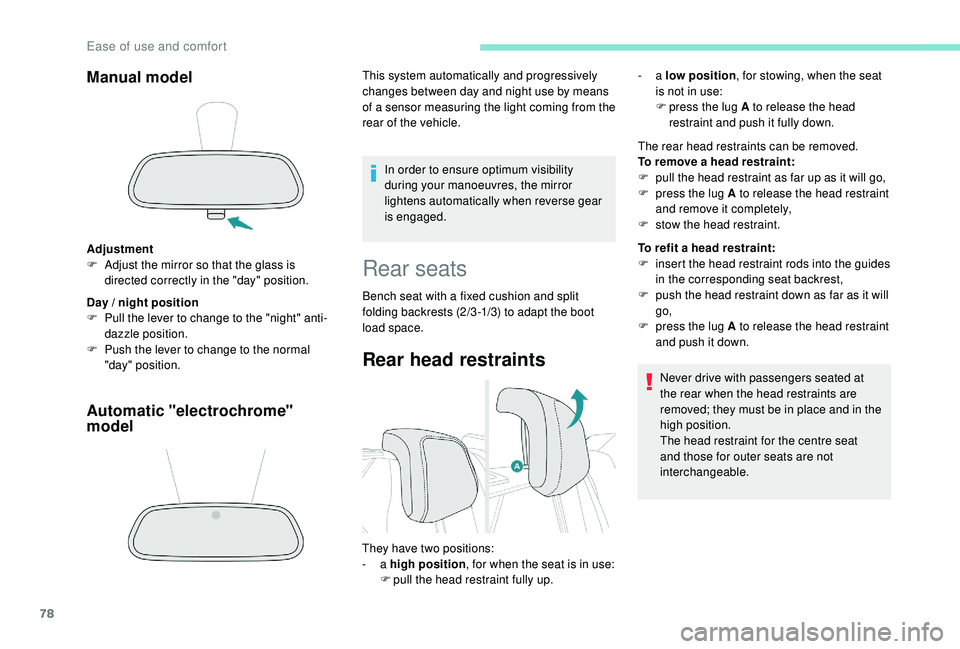
Rear head restraints
The rear head restraints can be removed.
To remove a head restraint:
F
p
ull the head restraint as far up as it will go,
F
p
ress the lug A to release the head restraint
and remove it completely,
F
s
tow the head restraint.
To refit a head restraint:
F
i
nsert the head restraint rods into the guides
in the corresponding seat backrest,
F
p
ush the head restraint down as far as it will
go,
F
p
ress the lug A to release the head restraint
and push it down.
Never drive with passengers seated at
the rear when the head restraints are
removed; they must be in place and in the
high position.
The head restraint for the centre seat
and those for outer seats are not
interchangeable.
They have two positions:
-
a high position , for when the seat is in use:
F
p
ull the head restraint fully up. -
a
low position , for stowing, when the seat
is not in use:
F
p
ress the lug A to release the head
restraint and push it fully down.
Ease of use and comfort