sunroof PEUGEOT 308 2018 User Guide
[x] Cancel search | Manufacturer: PEUGEOT, Model Year: 2018, Model line: 308, Model: Peugeot 308 2018Pages: 360, PDF Size: 12.38 MB
Page 106 of 360
104
- illuminated bezels for the front cup holders,
- a l ight source for each of the front door
pockets,
-
i
lluminated rails along the panoramic
sunroof blind.
The ambient lighting switches off automatically
when the sidelamps are switched off. The interior ambient lighting can
be activated or deactivated and its
brightness adjusted in the Vehicle /
Driving menu of the touch screen.
The interior ambient lighting is also
managed by the i- Cockpit Amplify
function.
For more information on the
i-Cockpit Amplify function , refer
to the corresponding section.Rear fittings
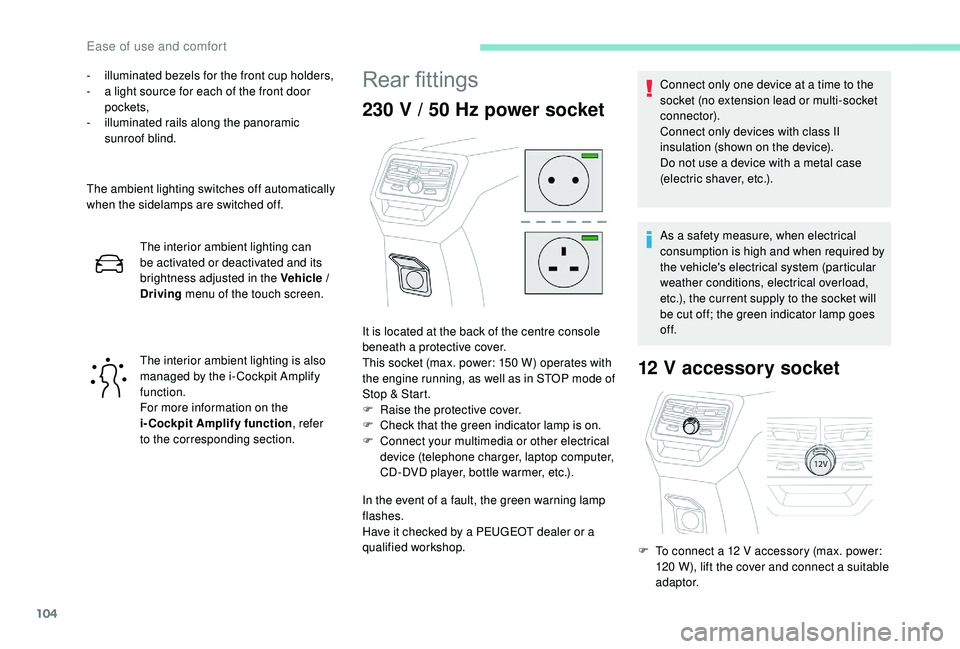
230 V / 50 Hz power socket
In the event of a fault, the green warning lamp
flashes.
Have it checked by a PEUGEOT dealer or a
qualified workshop.
12 V accessory socket
It is located at the back of the centre console
beneath a protective cover.
This socket (max. power: 150
W) operates with
the engine running, as well as in STOP mode of
Stop & Start.
F
Ra
ise the protective cover.
F
C
heck that the green indicator lamp is on.
F
C
onnect your multimedia or other electrical
device (telephone charger, laptop computer,
CD-DVD player, bottle warmer, etc.). Connect only one device at a time to the
socket (no extension lead or multi-socket
connector).
Connect only devices with class II
insulation (shown on the device).
Do not use a device with a metal case
(electric shaver, etc.).
As a safety measure, when electrical
consumption is high and when required by
the vehicle's electrical system (particular
weather conditions, electrical overload,
etc.), the current supply to the socket will
be cut off; the green indicator lamp goes
of f.
F
T
o connect a 12 V accessory (max. power:
120
W), lift the cover and connect a suitable
adaptor.
Ease of use and comfort
Page 228 of 360
226
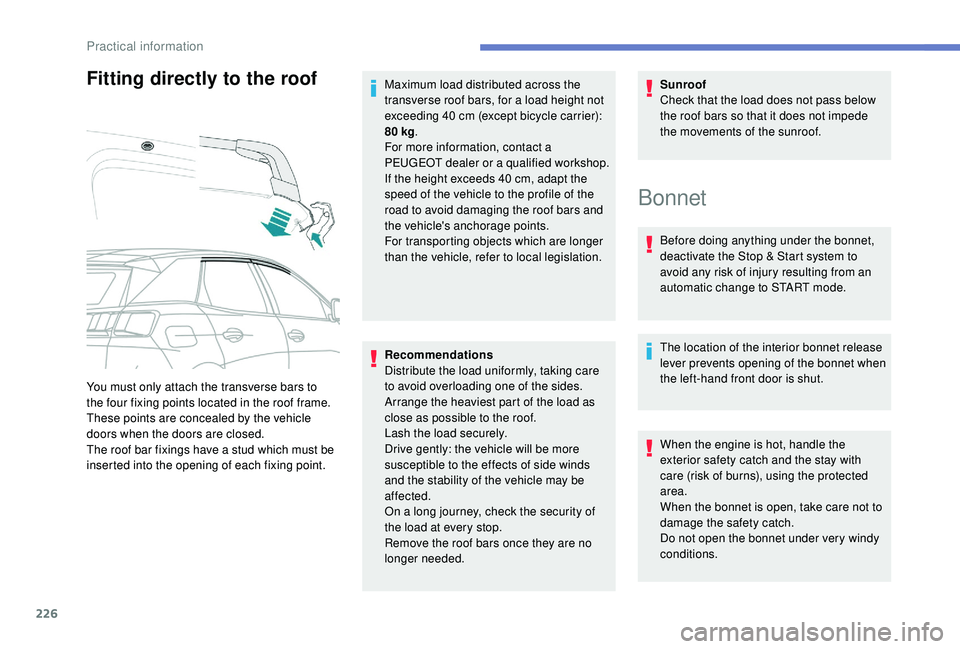
Fitting directly to the roof
Recommendations
Distribute the load uniformly, taking care
to avoid overloading one of the sides.
Arrange the heaviest part of the load as
close as possible to the roof.
Lash the load securely.
Drive gently: the vehicle will be more
susceptible to the effects of side winds
and the stability of the vehicle may be
affected.
On a long journey, check the security of
the load at every stop.
Remove the roof bars once they are no
longer needed.Sunroof
Check that the load does not pass below
the roof bars so that it does not impede
the movements of the sunroof.
You must only attach the transverse bars to
the four fixing points located in the roof frame.
These points are concealed by the vehicle
doors when the doors are closed.
The roof bar fixings have a stud which must be
inserted into the opening of each fixing point. Maximum load distributed across the
transverse roof bars, for a load height not
exceeding 40
cm (except bicycle carrier):
80 kg
.
For more information, contact a
PEUGEOT dealer or a qualified workshop.
If the height exceeds 40 cm, adapt the
speed of the vehicle to the profile of the
road to avoid damaging the roof bars and
the vehicle's anchorage points.
For transporting objects which are longer
than the vehicle, refer to local legislation.
Bonnet
Before doing anything under the bonnet,
deactivate the Stop & Start system to
avoid any risk of injury resulting from an
automatic change to START mode.
The location of the interior bonnet release
lever prevents opening of the bonnet when
the left-hand front door is shut.
When the engine is hot, handle the
exterior safety catch and the stay with
care (risk of burns), using the protected
area.
When the bonnet is open, take care not to
damage the safety catch.
Do not open the bonnet under very windy
conditions.
Practical information
Page 262 of 360
260
Some functions, including Stop & Start,
are not available if the battery is not
sufficiently charged.
Disconnecting the battery
In order to maintain an adequate state
of charge for starting the engine, it is
recommended that the battery be disconnected
if the vehicle is taken out of ser vice for a long
period.
Before disconnecting the battery:
F
c
lose all openings (doors, tailgate, windows,
sunroof),
F
s
witch off all electrical consumers (audio
system, wipers, lighting, etc.),
F
s
witch off the ignition and wait for four
minutes.
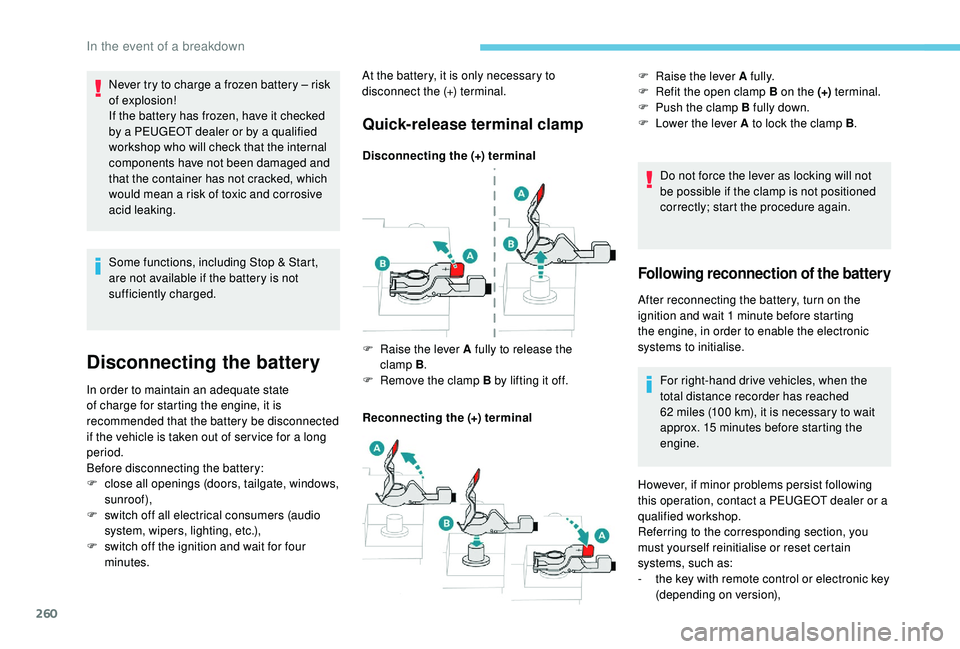
Quick-release terminal clamp
Disconnecting the (+) terminal
Reconnecting the (+) terminal Do not force the lever as locking will not
be possible if the clamp is not positioned
correctly; start the procedure again.
F
Ra
ise the lever A fully to release the
clamp
B.
F
R
emove the clamp B by lifting it off. F
Ra
ise the lever A fully.
F
R
efit the open clamp B on the (+)
terminal.
F
P
ush the clamp B fully down.
F
L
ower the lever A to lock the clamp B
.
Following reconnection of the battery
After reconnecting the battery, turn on the
ignition and wait 1
minute before starting
the engine, in order to enable the electronic
systems to initialise.
For right-hand drive vehicles, when the
total distance recorder has reached
62
miles (100 km), it is necessary to wait
approx. 15
minutes before starting the
engine.
Never try to charge a frozen battery
– risk
of explosion!
If the battery has frozen, have it checked
by a PEUGEOT dealer or by a qualified
workshop who will check that the internal
components have not been damaged and
that the container has not cracked, which
would mean a risk of toxic and corrosive
acid leaking. At the battery, it is only necessary to
disconnect the (+) terminal.
However, if minor problems persist following
this operation, contact a PEUGEOT dealer or a
qualified workshop.
Referring to the corresponding section, you
must yourself reinitialise or reset certain
systems, such as:
-
t
he key with remote control or electronic key
(depending on version),
In the event of a breakdown
Page 263 of 360
261
The Stop & Start system may not be
operational during the trip following the
first engine start.
In this case, the system will only be
available again after a continuous
period of immobilisation of the vehicle,
a period which depends on the exterior
temperature and the state of charge of
the battery (up to about 8 hours).
-
t
he sunroof and its electric blind,
-
t
he electric windows,
-
t
he date and time,
-
t
he preset radio stations.
Towing the vehicle
Procedure for having your vehicle towed or
for towing another vehicle using a removable
towing eye.
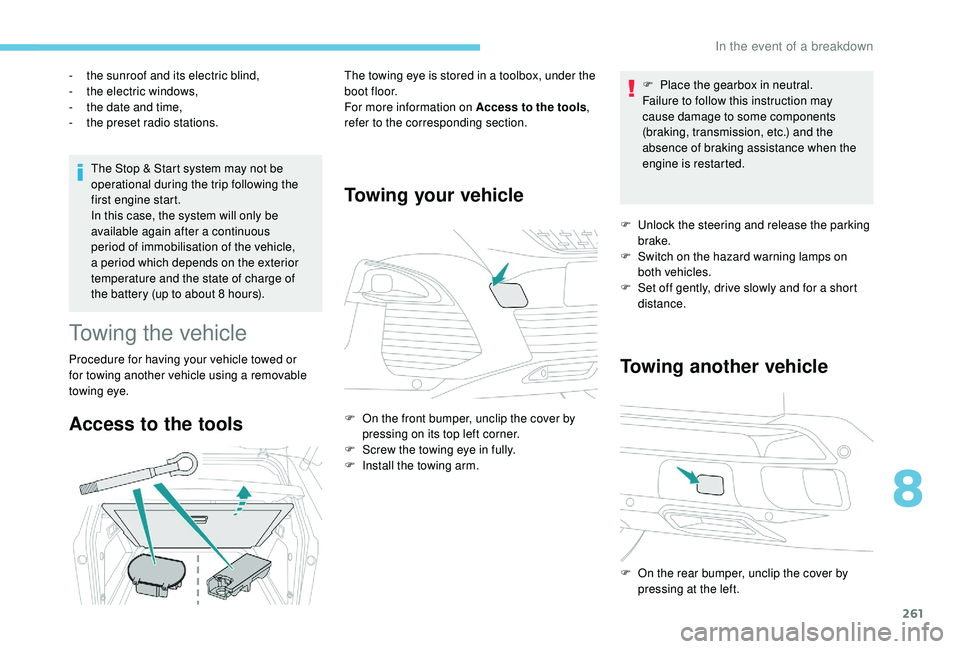
Access to the tools
The towing eye is stored in a toolbox, under the
boot floor.
For more information on Access to the tools
,
refer to the corresponding section.
Towing your vehicle
F On the front bumper, unclip the cover by pressing on its top left corner.
F
S
crew the towing eye in fully.
F
I
nstall the towing arm. F
P
lace the gearbox in neutral.
Failure to follow this instruction may
cause damage to some components
(braking, transmission, etc.) and the
absence of braking assistance when the
engine is restarted.
F
U
nlock the steering and release the parking
brake.
F
S
witch on the hazard warning lamps on
both vehicles.
F
S
et off gently, drive slowly and for a short
distance.
Towing another vehicle
F On the rear bumper, unclip the cover by pressing at the left.
8
In the event of a breakdown
Page 277 of 360
5
12:13
18,5 21,5
23 °C
12:13
18,5 21,5
23 °C
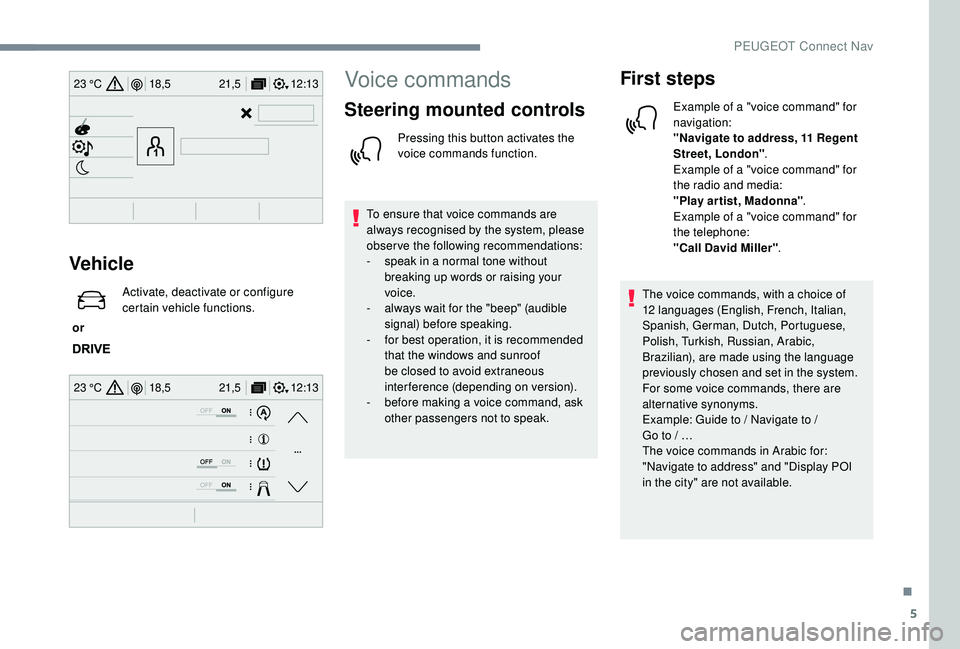
Vehicle
or Activate, deactivate or configure
certain vehicle functions.
Voice commands
Steering mounted controls
Pressing this button activates the
voice commands function.
To ensure that voice commands are
always recognised by the system, please
observe the following recommendations:
-
s
peak in a normal tone without
breaking up words or raising your
voice.
-
a
lways wait for the "beep" (audible
signal) before speaking.
-
f
or best operation, it is recommended
that the windows and sunroof
be closed to avoid extraneous
interference (depending on version).
-
b
efore making a voice command, ask
other passengers not to speak.
First steps
Example of a "voice command" for
navigation:
"Navigate to address, 11 Regent
Street, London" .
Example of a "voice command" for
the radio and media:
"Play ar tist, Madonna" .
Example of a "voice command" for
the telephone:
"Call David Miller" .
The voice commands, with a choice of
12
languages (English, French, Italian,
Spanish, German, Dutch, Portuguese,
Polish, Turkish, Russian, Arabic,
Brazilian), are made using the language
previously chosen and set in the system.
For some voice commands, there are
alternative synonyms.
Example: Guide to / Navigate to /
Go
to
/ …
The voice commands in Arabic for:
"Navigate to address" and "Display POI
in the city" are not available.
.
PEUGEOT Connect Nav
Page 355 of 360
271
W
Warning and indicator lamps ..........................11
W arning lamp, braking system ..................14 -15
Warning lamp, Diesel engine pre-heater
.......23
Warning lamp, driver's seat belt not fastened
...............................
..........13 0
Warning lamps
.................................... 11, 14 , 35
Warning lamp, seat belts
..............................13 0
Warning lamp, Service ....................................16
Weights
...............
..........................263-265, 267
Welcome lighting ..................................... 50, 114
Wheel, spare
................. 23
3, 238-240 , 243 -244
Window controls
............................................. 65
Windscreen, heated
........................................ 91
Wiper blades (changing)
................11 9, 252-253
Wiper, rear ..................................................... 11 8
Wipers
....................................... 24, 117 , 11 9 -12 0
Wipers, automatic rain sensitive
.....117 , 11 9 -12 0Storage wells ........................................ 105, 108
Storing driving positions ............................ 74
-75
Stowing rings
................................................ 105
Sunroof, panoramic
........................................ 67
S
un visor
...............................
..........................97
Switching off the engine
...............................152
Synchronising the remote control
...................56
T
Table position ............................................. 72-73
Tables of fuses .............................................. 256
Tailgate
................
............................................ 61
Ta n k , f u e l
................................................ 216 -217
Technical data
............................... 26
4-265, 267
Telephone
.......... 98
-99, 25 -29 , 13 -16, 1 0 -11, 13
Telephone, Bluetooth with voice recognition
...14
Temperature, coolant
...................................... 32
Third brake lamp
........................................... 252
Three flashes (direction indicators)
.............. 111
T
icket holder
................................................... 96
Time (setting)
................................ 38-40, 31, 17
TMC (Traffic info)
............................................ 13
T
ool box
................
......................................... 108
To o l s
...................................... 238-239, 238-240
Total distance recorder
...................................36
Touch screen ........................................... 98, 1, 1
Touch screen ~ Touch screen tablet
.........................40, 43 , 46
Towball, quickly detachable
..................220-223
To w b a r
...............................
.....126 , 151-152 , 219
Towed loads
.................................. 263-265, 267
Towing another vehicle
.................................261
Traction control (ASR)
...........................124 -128
Traffic information (TA)
.....................................5
Traffic information (TMC)
................................13
Tr a i l e r
...............
......................126, 151-152 , 219
Trailer stability assist (TSA) .......................... 12 6
Trajectory control systems ............................12
4
Triangle, warning ........................................... 237
Trip computer
............................................. 37- 3 8
Trip distance recorder
..................................... 36
T
y r e s
.............................................................. 233
Tyre under-inflation detection
.........18, 170 , 243
U
Under-inflation (detection) ............................170
Unlocking .................................................. 48, 51
Unlocking from the inside
...............................57
Unlocking the boot
...............................
.....5 0 - 51
Unlocking the doors
........................................ 62
U
nlocking the tailgate
............................... 5
0 - 51
Updating the date
...................................... 31,
18
Updating the time
...............................
.......31, 17
USB
................................................... 23 -24, 9, 7
V
Ventilation ........................................... 81- 8 6, 90
Very cold climate screen (snow shield) ........224
Visibility
...............
............................................ 90
Vision, 180° for ward
..................................... 207
Visiopark
....................................................... 20
4
Visiopark 1
– Visiopark 2
..............................2
07
Voice commands
......................................... 5 -10
.
Alphabetical index