brake PEUGEOT 308 2018 Owner's Guide
[x] Cancel search | Manufacturer: PEUGEOT, Model Year: 2018, Model line: 308, Model: Peugeot 308 2018Pages: 360, PDF Size: 12.38 MB
Page 165 of 360
163
SPORT
Dynamic pack
The orange indicator lamp in the
button is on while the Dynamic pack
is activated.
Displays in the instrument
panel
If the driver's door is opened with the
ignition on, a message is displayed asking
you to put the gearbox into mode P .
The state of the gearbox is displayed in
the instrument panel for a few moments
after switching off the ignition.
Operation
You can activate or deactivate the function:
- b y pressing this button,
or
-
v
ia the i-Cockpit Amplify function, by
modifying the setting for an ambience in the
touch screen.
For more information on the Dynamic Pack
and the i-Cockpit Amplify function, refer to
the corresponding section.
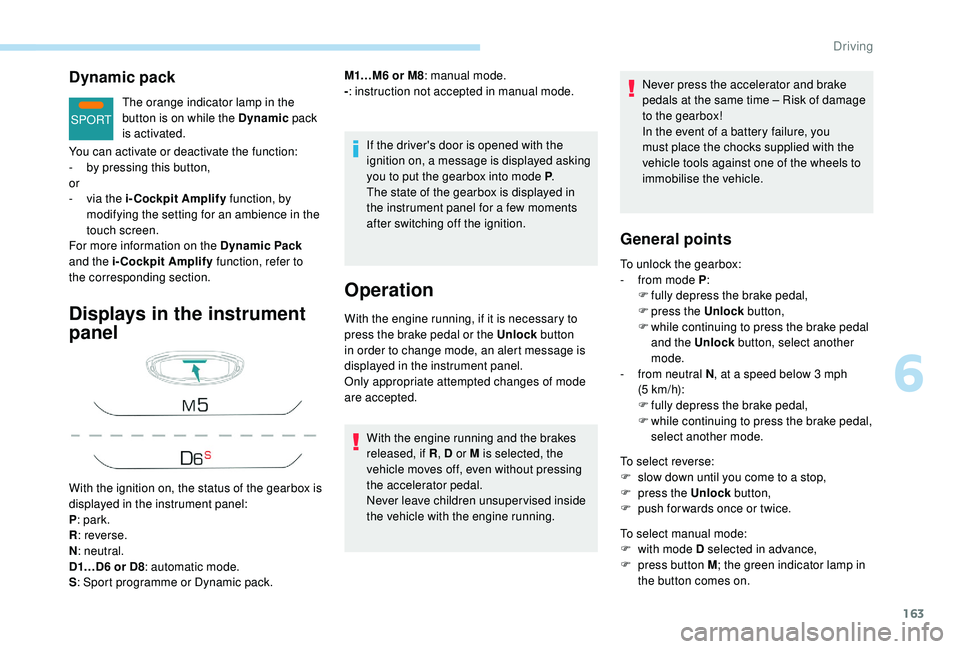
With the ignition on, the status of the gearbox is
displayed in the instrument panel:
P : park.
R : reverse.
N : neutral.
D1…D6 or D8 : automatic mode.
S : Sport programme or Dynamic pack. M1…M6 or M8
: manual mode.
- : instruction not accepted in manual mode.
With the engine running, if it is necessary to
press the brake pedal or the Unlock button
in order to change mode, an alert message is
displayed in the instrument panel.
Only appropriate attempted changes of mode
are accepted.
With the engine running and the brakes
released, if R , D or M is selected, the
vehicle moves off, even without pressing
the accelerator pedal.
Never leave children unsuper vised inside
the vehicle with the engine running. Never press the accelerator and brake
pedals at the same time
– Risk of damage
to the gearbox!
In the event of a battery failure, you
must place the chocks supplied with the
vehicle tools against one of the wheels to
immobilise the vehicle.
General points
To unlock the gearbox:
- f rom mode P :
F
f
ully depress the brake pedal,
F
press the Unlock button,
F
w
hile continuing to press the brake pedal
and the Unlock button, select another
mode.
-
f
rom neutral N , at a speed below 3
mph
(5
km/h):
F
f
ully depress the brake pedal,
F
w
hile continuing to press the brake pedal,
select another mode.
To select reverse:
F
s
low down until you come to a stop,
F
p
ress the Unlock button,
F
p
ush forwards once or twice.
To select manual mode:
F
w
ith mode D selected in advance,
F
p
ress button M ; the green indicator lamp in
the button comes on.
6
Driving
Page 166 of 360
164
To switch off the ignition, the vehicle must be
stationary.
To put the vehicle in free-wheeling mode,
engine off:
F
w
ith the vehicle stationary, engine running,
select N ,
F
s
witch off the engine,
F
w
ithin five seconds, switch the ignition on
again,
F
w
ith your foot on the brake pedal, push the
selector for wards or backwards once to
confirm N and manually release the electric
parking brake,
F
s
witch off the ignition.
If you exceed the time limit of five seconds,
the gearbox engages mode P ; you must then
restart the procedure.
If you open the driver's door when mode
N is engaged, an audible signal will
sound. It will stop when you close the
driver's door again.
Special aspects of automatic
mode
The gearbox selects the gear that offers
optimum per formance, taking account of the
exterior temperature, the profile of the road, the
load on the vehicle and the style of driving.
For maximum acceleration without touching
the selector, press the accelerator fully down
(kick-down). The gearbox changes down
automatically or holds the gear selected until
the maximum engine speed is reached.
When braking, the gearbox changes down
automatically to provide effective engine
braking.
The steering mounted controls allow the driver
to temporarily select a gear, if the road and
engine speed permit.
Special aspects of manual mode
The change from one gear to another takes
place only if the road speed and engine speed
permit.
If the engine speed is too high or too low, the
gear selected flashes for a few seconds, then
the gear actually engaged is displayed.
Moving off
From mode P :
F P ress the brake pedal firmly.
F
S
tart the engine.
F
M
aintaining pressure on the brake pedal,
press the Unlock button.
F
P
ush once or twice rear ward to select the
automatic mode D , or for ward to engage
reverse R .
From neutral N :
F
P
ress the brake pedal firmly.
F
S
tart the engine.
F
M
aintaining pressure on the brake pedal,
push rear ward to select the automatic
mode
D, or for ward, while pressing the
Unlock
button to engage reverse R .
Then, from P or N :
F
R
elease the brake pedal.
F
A
ccelerate progressively to automatically
release the electric parking brake.
F
W
ith the parking brake released, the vehicle
then moves off.
To quit manual mode:
F
p
ush for wards once to go back to D
.
or
F
p
ress button M ; the indicator lamp in the
button goes off.
Driving
Page 167 of 360
165
In severe wintry conditions (temperature
below -23°C), it is recommended that the
engine be allowed to run for a few minutes
before moving off, to ensure the correct
operation and durability of the engine and
gearbox.
Stopping the vehicle
Whatever the state of the gearbox when the
ignition is switched off, mode P is engaged
automatically, with the exception of N, in
which case mode P
will be engaged after a
delay of 5
seconds (allowing the change to
free-wheel).
Check that mode P has been engaged and
that the electric parking brake was applied
automatically; if not, apply it manually.
The corresponding indicator lamps
for the selector panel and the
electric parking brake control lever
must be on, as well as the ones in
the instrument panel.
Operating faults
Malfunction of the gearbox
This is signalled by the illumination
of this warning lamp, accompanied
by the display of a message and an
audible signal, when the ignition is
switched on.
Malfunction of the selector
In the event of a minor fault In the event of a serious fault
Stop as soon as it is safe to do so, away
from the traffic, and call a PEUGEOT
dealer or a qualified workshop.
When the ignition is switched off, the
gearbox goes into mode P automatically.
The gearbox switches to back-up mode: drive
mode
D is locked in third gear, the steering-
mounted control paddles are inoperative,
mode M is no longer available. You may feel a
pronounced jolt when engaging reverse. This
does not present any risk for the gearbox.
Do not drive faster than 62 mph (100 km/h),
keeping to the speed limit.
Go to a PEUGEOT dealer or a qualified
workshop.
You are alerted by this warning
lamp lighting up, accompanied by
the display of a message and an
audible signal.
In certain cases, the selector lamps may not
come on, but the state of the gearbox is still
displayed in the instrument panel. You are alerted by the illumination of
this warning lamp.
Hill start assist
System which keeps your vehicle immobilised
temporarily (approximately 2
seconds) when
starting on a gradient, the time it takes to
move your foot from the brake pedal to the
accelerator pedal.
This system only operates when:
-
t
he vehicle has been brought to a complete
stop, with your foot on the brake pedal,
-
c
ertain slope conditions are met,
-
w
ith the driver's door closed.
Drive cautiously and go to a PEUGEOT or a
qualified workshop.
6
Driving
Page 168 of 360
166
SPORT
The hill start assist function cannot be
deactivated. However, use of the parking
brake to immobilise the vehicle interrupts
its function.
Operation
On an ascending slope, with the vehicle
stationar y, the vehicle is held for a shor t
time when you release the brake pedal:
-
i
f you are in first gear or in neutral with a
manual gearbox,
-
p
rovided you are in mode D or M with an
automatic gearbox.
On a descending slope, with the vehicle
stationary and reverse gear engaged, the
vehicle is held for a shor t time when you
release the brake pedal.
Malfunction
Do not leave the vehicle while it is being
held temporarily by hill start assist.
If you need to leave the vehicle with the
engine running, apply the parking brake
manually then ensure that the parking
brake warning lamp and the indicator lamp
P in the lever of the electric parking brake
control are on fixed (not flashing).
If a fault in the system occurs, these warning
lamps come on. Contact a PEUGEOT dealer
or a qualified workshop to have the system
checked.Dynamic pack
This pack influences:
- t he acoustic ambience of the engine,
-
t
he level of power assistance for the steering,
-
acceleration.
-
han
dling gear transitions with the automatic
gearbox,
-
t
he display on the instrument panel of
information about the dynamic parameters of
the vehicle ("PERSONAL" mode).
Activation/Deactivation
F Press this button; the orange indicator lamp in the button
comes on to confirm activation
of the function.
The Dynamic pack is also managed
by the i-Cockpit Amplify function.
For more information on the i-Cockpit Amplify
function, refer to the corresponding section.
If the orange indicator lamp flashes,
activation is not available (e.g. if Park
Assist is selected).
If the indicator lamp continues flashing
for a long time, contact a PEUGEOT
dealer or a qualified workshop.
Driving
Page 170 of 360
168
when you place the gear lever in neutral and
release the clutch pedal,
-
w
ith an automatic gearbox, at a speed
below 12
mph (20 km/h) for 1.5 BlueHDi
and 2.0
BlueHDi 180 versions, or with the
vehicle stationary for other versions, when
you depress the brake pedal or place the
gear selector to mode N .
A time counter calculates the time spent in
STOP mode during the journey. It is reset to
zero every time the ignition is switched on with
the key or the " START/STOP" button.
For your comfort, during parking
manoeuvres, STOP mode is not available
for a few seconds after coming out of
reverse gear.
The Stop & Start does not affect the
operation of vehicle systems such as
braking, power steering, etc.
Special cases: STOP mode not
available
- the driver's seat belt is not fastened,
- t he vehicle has not exceeded 6 mph
(10
km/h) since the last engine start (with
the key or the " START/STOP" b u t to n),
-
t
he electric parking brake is applied or
being applied,
-
t
he engine is needed to maintain a
comfortable temperature in the passenger
compartment,
-
d
emisting is active,
-
s
ome temporary conditions (battery charge,
engine temperature, braking assistance,
exterior temperature, etc.) make this
necessary to ensure control of a system.
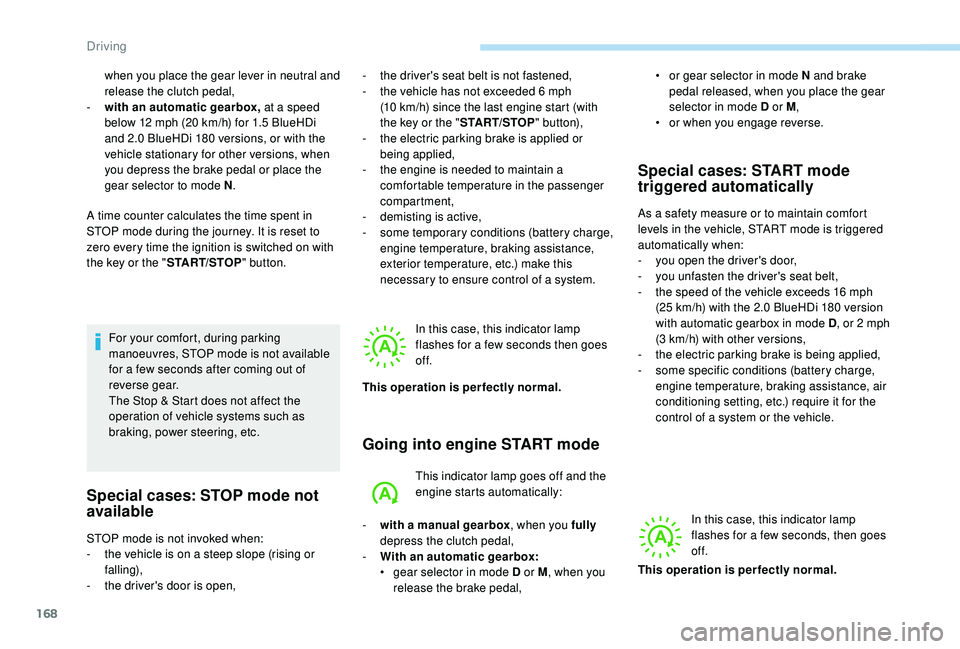
Going into engine START mode
This indicator lamp goes off and the
engine starts automatically:
Special cases: START mode
triggered automatically
As a safety measure or to maintain comfort
levels in the vehicle, START mode is triggered
automatically when:
-
y
ou open the driver's door,
-
y
ou unfasten the driver's seat belt,
-
t
he speed of the vehicle exceeds 16 mph
(25
km/h) with the 2.0 BlueHDi 180 version
with automatic gearbox in mode D , or 2
mph
(3
km/h) with other versions,
-
t
he electric parking brake is being applied,
-
s
ome specific conditions (battery charge,
engine temperature, braking assistance, air
conditioning setting, etc.) require it for the
control of a system or the vehicle.
In this case, this indicator lamp
flashes for a few seconds, then goes
of f.
STOP mode is not invoked when:
-
t
he vehicle is on a steep slope (rising or
falling),
-
t
he driver's door is open, In this case, this indicator lamp
flashes for a few seconds then goes
of f.
This operation is perfectly normal.
-
w
ith a manual gearbox , when you fully
depress the clutch pedal,
-
W
ith an automatic gearbox:
•
g
ear selector in mode D or M , when you
release the brake pedal, •
o
r gear selector in mode N and brake
pedal released, when you place the gear
selector in mode D or M ,
•
o
r when you engage reverse.
This operation is perfectly normal.
Driving
Page 180 of 360
178
Cruise control
System which automatically
maintains the cruising speed of the
vehicle at a setting programmed by
the driver, without any action on the
accelerator pedal.
The cruise control is switched on manually.
It requires a minimum vehicle speed of 25
mph
(40
km/h).
With a manual gearbox, it requires the
engagement of third gear or higher.
With an automatic gearbox, it requires the
engagement of the selector in mode D or of
second gear or higher in mode M .
Speed regulation remains active after
changing gear on vehicles fitted with a
manual gearbox and Stop & Start.
The operation of the cruise control can be
interrupted (pause):
-
b
y pressing control 4 or by pressing the
brake pedal,
-
a
utomatically, if operation of the dynamic
stability control system is triggered. Switching off the ignition cancels any
programmed speed setting.
The cruise control system is a driving aid
that cannot, in any circumstances, replace
the need to obser ve speed limits, nor the
need for vigilance on the part of the driver.
As a safety measure, you are advised to
keep your feet near the pedals at all times.
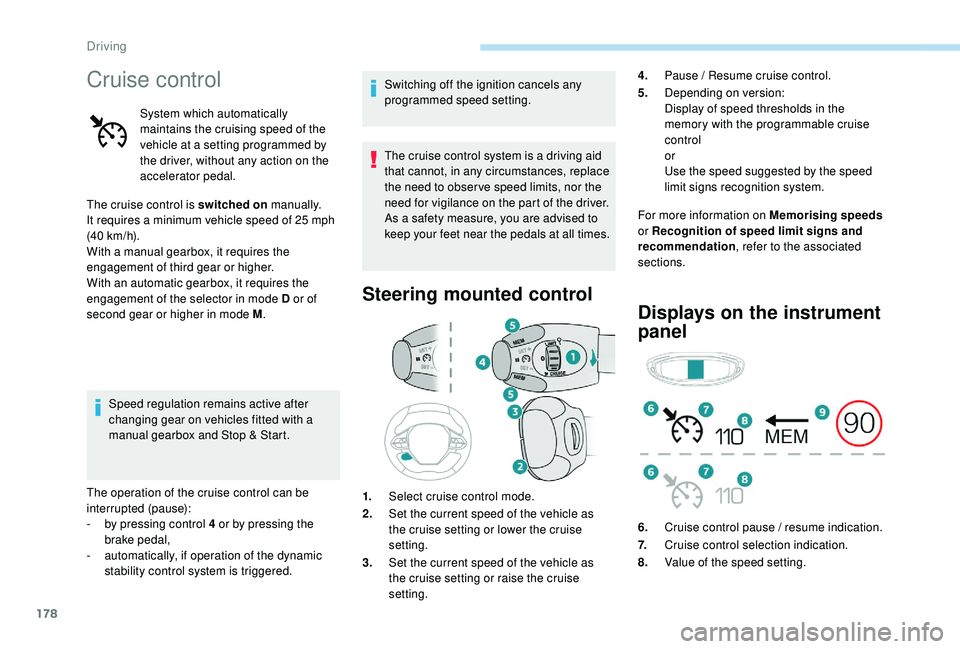
Steering mounted control
For more information on Memorising speeds
or Recognition of speed limit signs and
recommendation , refer to the associated
sections.
Displays on the instrument
panel
1. Select cruise control mode.
2. Set the current speed of the vehicle as
the cruise setting or lower the cruise
setting.
3. Set the current speed of the vehicle as
the cruise setting or raise the cruise
setting. 4.
Pause / Resume cruise control.
5. Depending on version:
Display of speed thresholds in the
memory with the programmable cruise
control
or
Use the speed suggested by the speed
limit signs recognition system.
6. Cruise control pause / resume indication.
7. Cruise control selection indication.
8. Value of the speed setting.
Driving
Page 182 of 360
180
When descending a steep hill, the cruise
control system cannot prevent the vehicle
from exceeding the programmed speed.
You may have to brake to control the speed of
your vehicle. In this case, the cruise control is
automatically paused.
To activate the system again, with the speed
of the vehicle above 25
mph (40 km/h), press
button 4 .
Switching off
F Turn the thumbwheel 1 to the " 0" position:
the cruise control information disappears
from the screen.
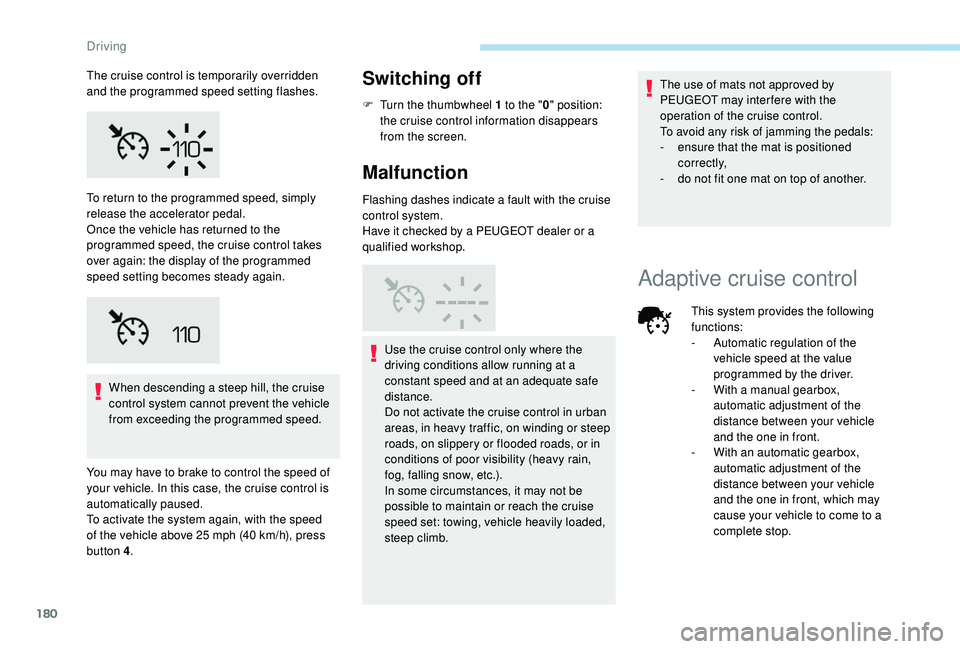
Malfunction
Flashing dashes indicate a fault with the cruise
control system.
Have it checked by a PEUGEOT dealer or a
qualified workshop.
Use the cruise control only where the
driving conditions allow running at a
constant speed and at an adequate safe
distance.
Do not activate the cruise control in urban
areas, in heavy traffic, on winding or steep
roads, on slippery or flooded roads, or in
conditions of poor visibility (heavy rain,
fog, falling snow, etc.).
In some circumstances, it may not be
possible to maintain or reach the cruise
speed set: towing, vehicle heavily loaded,
steep climb. The use of mats not approved by
PEUGEOT may inter fere with the
operation of the cruise control.
To avoid any risk of jamming the pedals:
-
e
nsure that the mat is positioned
c o r r e c t l y,
-
d
o not fit one mat on top of another.
To return to the programmed speed, simply
release the accelerator pedal.
Once the vehicle has returned to the
programmed speed, the cruise control takes
over again: the display of the programmed
speed setting becomes steady again.
Adaptive cruise control
The cruise control is temporarily overridden
and the programmed speed setting flashes.
This system provides the following
functions:
-
A
utomatic regulation of the
vehicle speed at the value
programmed by the driver.
-
W
ith a manual gearbox,
automatic adjustment of the
distance between your vehicle
and the one in front.
-
W
ith an automatic gearbox,
automatic adjustment of the
distance between your vehicle
and the one in front, which may
cause your vehicle to come to a
complete stop.
Driving
Page 183 of 360
181
Principle of operation
The system automatically adapts the speed of
your vehicle to that of the vehicle in front, to
maintain a constant distance.
If the vehicle in front is driving more slowly, the
system slows, or even stops your vehicle, using
engine braking and the braking system (for
versions fitted with an automatic gearbox).The brake lamps illuminate as soon as
the braking system is activated with
deceleration of the vehicle.
Primarily designed for driving on main
roads and motor ways, this system only
works on moving vehicles
, driving in the
same direction as your vehicle. If the vehicle in front accelerates or changes
lane, the cruise control progressively
accelerates your vehicle to return to the
programmed speed.
If the driver operates a direction indicator to
overtake a slower vehicle, the cruise control
allows your vehicle to temporarily approach
the vehicle in front to assist the overtaking
manoeuvre, though never exceeding the
programmed speed.
The adaptive cruise control system
is a driving aid that cannot, in any
circumstances, replace the need to obser ve
speed limits and safety distances, nor the
need for vigilance on the part of the driver.
It is recommended that you always keep
your feet close to the pedals.
The driver must be ready to take back
control of their vehicle at any time,
using the brake or accelerator pedal as
appropriate.
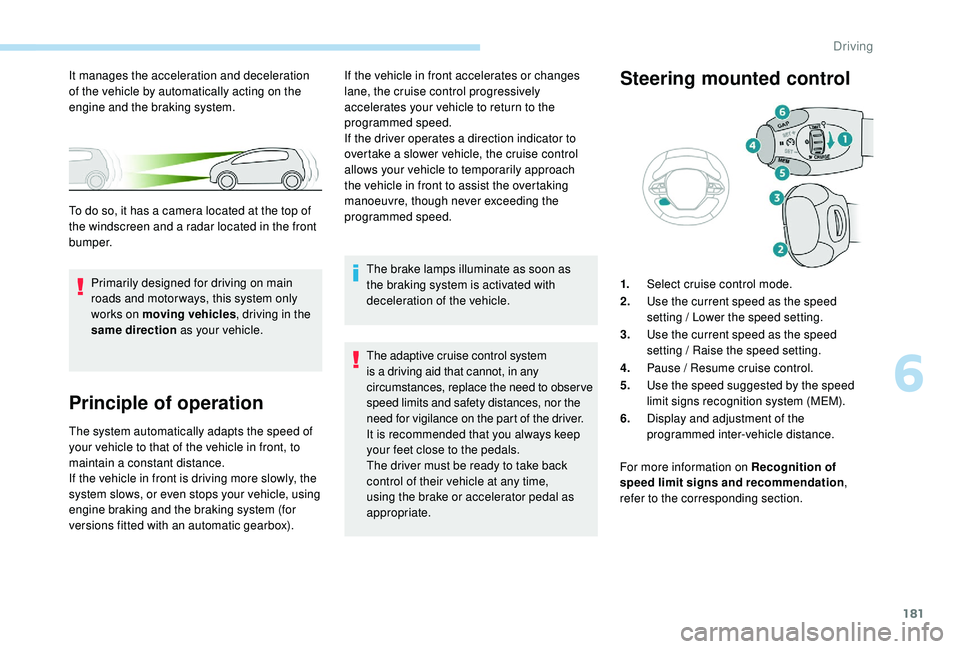
Steering mounted control
1.
Select cruise control mode.
2. Use the current speed as the speed
setting / Lower the speed setting.
3. Use the current speed as the speed
setting / Raise the speed setting.
4. Pause / Resume cruise control.
5. Use the speed suggested by the speed
limit signs recognition system (MEM).
6. Display and adjustment of the
programmed inter-vehicle distance.
For more information on Recognition of
speed limit signs and recommendation ,
refer to the corresponding section.
It manages the acceleration and deceleration
of the vehicle by automatically acting on the
engine and the braking system.
To do so, it has a camera located at the top of
the windscreen and a radar located in the front
b u m p e r.
6
Driving
Page 184 of 360
182
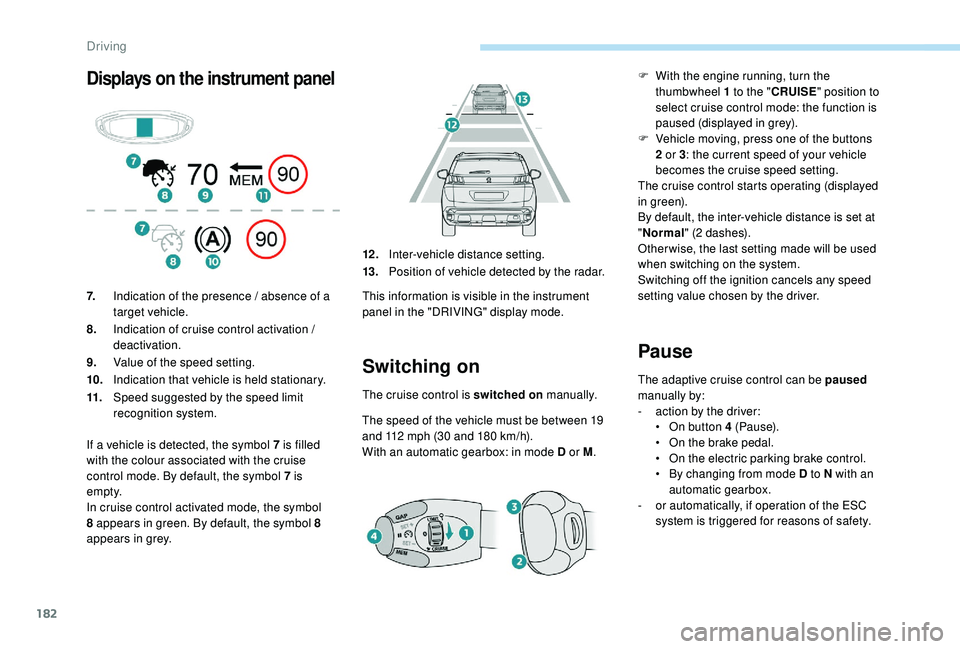
Displays on the instrument panel
Switching on
The cruise control is switched on manually.
The speed of the vehicle must be between 19
and 112
mph (30 and 180 km/h).
With an automatic gearbox: in mode D or M .
Pause
The adaptive cruise control can be paused
manually by:
-
a
ction by the driver:
•
O
n button 4 (Pause).
•
O
n the brake pedal.
•
O
n the electric parking brake control.
•
B
y changing from mode D to N with an
automatic gearbox.
-
o
r automatically, if operation of the ESC
system is triggered for reasons of safety.
7.
Indication of the presence / absence of a
target vehicle.
8. Indication of cruise control activation /
deactivation.
9. Value of the speed setting.
10. Indication that vehicle is held stationary.
11. Speed suggested by the speed limit
recognition system. 12 .
Inter-vehicle distance setting.
13. Position of vehicle detected by the radar.
This information is visible in the instrument
panel in the "DRIVING" display mode.
If a vehicle is detected, the symbol 7
is filled
with the colour associated with the cruise
control mode. By default, the symbol 7 is
e m pt y.
In cruise control activated mode, the symbol
8 appears in green. By default, the symbol 8
appears in grey. F
W
ith the engine running, turn the
thumbwheel 1 to the " CRUISE" position to
select cruise control mode: the function is
paused (displayed in grey).
F
V
ehicle moving, press one of the buttons
2 or 3 : the current speed of your vehicle
becomes the cruise speed setting.
The cruise control starts operating (displayed
in green).
By default, the inter-vehicle distance is set at
" Normal " (2 dashes).
Other wise, the last setting made will be used
when switching on the system.
Switching off the ignition cancels any speed
setting value chosen by the driver.
Driving
Page 185 of 360
183
When the cruise control is paused, it
can only be reactivated when all of the
safety conditions are met. The message
"Activation not possible, conditions
unsuitable" is displayed while reactivation
is not possible.
To reactivate the function, the driver
must accelerate to reach at least 19 mph
(30
km/h), then press one of the buttons
2 , 3 or 4 .
As a safety measure, wait until the
current speed reaches the speed setting
to reactivate the function by pressing
button
4.
Versions fitted with an automatic
gearbox
Following braking of the vehicle bringing it
to a complete stop, the system holds the
vehicle stationary; the cruise control is
paused.
The driver should press the accelerator
pedal to move off, then reactivate the
system above 19
mph (30 km/h) by
pressing button 2 , 3 or 4.
If the driver takes no action following
this immobilisation, the electric parking
brake is applied automatically after a few
minutes.Modification of the speed
setting
Modification from the current
speed
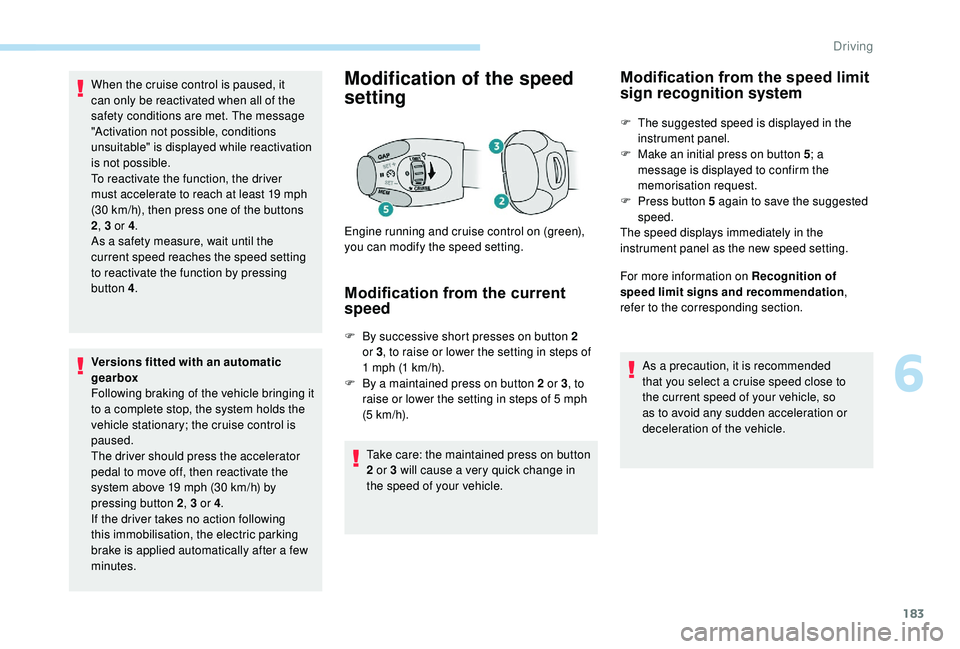
F By successive short presses on button 2 or 3 , to raise or lower the setting in steps of
1
mph (1 km/h).
F
B
y a maintained press on button 2 or 3 , to
raise or lower the setting in steps of 5
mph
(5
km/h).
Take care: the maintained press on button
2 or 3 will cause a very quick change in
the speed of your vehicle.
Engine running and cruise control on (green),
you can modify the speed setting.
Modification from the speed limit
sign recognition system
F The suggested speed is displayed in the
instrument panel.
F
M
ake an initial press on button 5 ; a
message is displayed to confirm the
memorisation request.
F
P
ress button 5 again to save the suggested
speed.
The speed displays immediately in the
instrument panel as the new speed setting.
For more information on Recognition of
speed limit signs and recommendation ,
refer to the corresponding section.
As a precaution, it is recommended
that you select a cruise speed close to
the current speed of your vehicle, so
as to avoid any sudden acceleration or
deceleration of the vehicle.
6
Driving