heating PEUGEOT 308 2018 Owners Manual
[x] Cancel search | Manufacturer: PEUGEOT, Model Year: 2018, Model line: 308, Model: Peugeot 308 2018Pages: 360, PDF Size: 12.38 MB
Page 4 of 360
2
.
.
Head-up digital screen 8
W arning and indicator lamps 1 1
Indicators
29
Manual test
3
5
Distance recorders
3
6
Lighting dimmer
3
6
Ambient lighting
3
6
Trip computer
3
7
Monochrome screen C
3
8
Touch screen
4
0
Remote control
4
8
K
eyless Entry and Starting
5
0
Back-up procedures
5
4
Central locking
5
7
Anti-intrusion security
5
8
Alarm
5
8
Doors
60
Boot
6
1
Hands-free tailgate
62
E
lectric windows
6
5
Panoramic opening sunroof
6
7Driving position
7
0
Front seats
7
1
Steering wheel adjustment
7
6
Mirrors
76
R
ear seats
7
8
i- Cockpit Amplify function
8
0
Heating and Ventilation
8
1
Manual air conditioning 8 4
Semi-automatic mono-zone air conditioning 8 4
Automatic dual-zone air conditioning
8
6
Recirculation of the interior air
9
0
Front demist – defrost
9
0
Heated windscreen
9
1
Rear screen demist – defrost
9
1
Programmable heating
9
2
Front fittings
9
6
Courtesy lamps
1
02
Interior ambient lighting
1
03
Rear fittings
1
04
Boot fittings
1
05Exterior lighting control stalk
1
09
Direction indicators
1
11
Headlamp adjustment
1
12
Automatic illumination of headlamps
1
12
Automatic headlamp dipping
1
14
Cornering lighting
1
16
Wiper control stalk
1
17
Automatic windscreen wipers 1 19
General safety recommendations
1
21
Hazard warning lamps
1
22
H or n
12
2
Emergency or assistance call
1
22
Electronic stability control (ESC)
1
24
Advanced Grip Control
1
27
Hill Assist Descent Control
1
28
Seat belts
1
29
Airbags
133
Child seats
1
37
Deactivating the front passenger airbag
1
38
ISOFIX mountings and child seats
1
43
i-Size child seats
1
46
Child lock
1
49
InstrumentsAccess
Over view
Ease of use and comfort
Lighting and visibility
Safety
Eco-driving
Instruments and controls 4
Contents
Page 7 of 360
5
Steering mounted controlsSide switch panelCentral switch panel
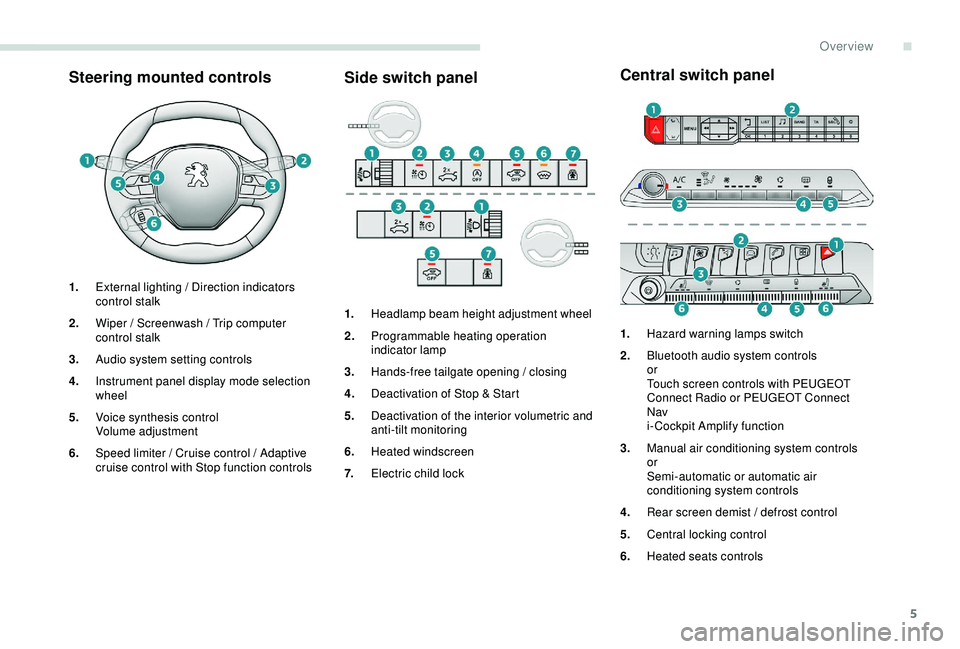
1.
External lighting / Direction indicators
control stalk
2. Wiper / Screenwash / Trip computer
control stalk
3. Audio system setting controls
4. Instrument panel display mode selection
wheel
5. Voice synthesis control
Volume adjustment
6. Speed limiter / Cruise control / Adaptive
cruise control with Stop function controls 1.
Headlamp beam height adjustment wheel
2. Programmable heating operation
indicator lamp
3. Hands-free tailgate opening / closing
4. Deactivation of Stop & Start
5. Deactivation of the interior volumetric and
anti-tilt monitoring
6. Heated windscreen
7. Electric child lock 1.
Hazard warning lamps switch
2. Bluetooth audio system controls
or
Touch screen controls with PEUGEOT
Connect Radio or PEUGEOT Connect
Nav
i- Cockpit Amplify function
3. Manual air conditioning system controls
or
Semi-automatic or automatic air
conditioning system controls
4. Rear screen demist / defrost control
5. Central locking control
6. Heated seats controls
.
Over view
Page 25 of 360
23
Warning / indicator lampStateCause Action / Observations
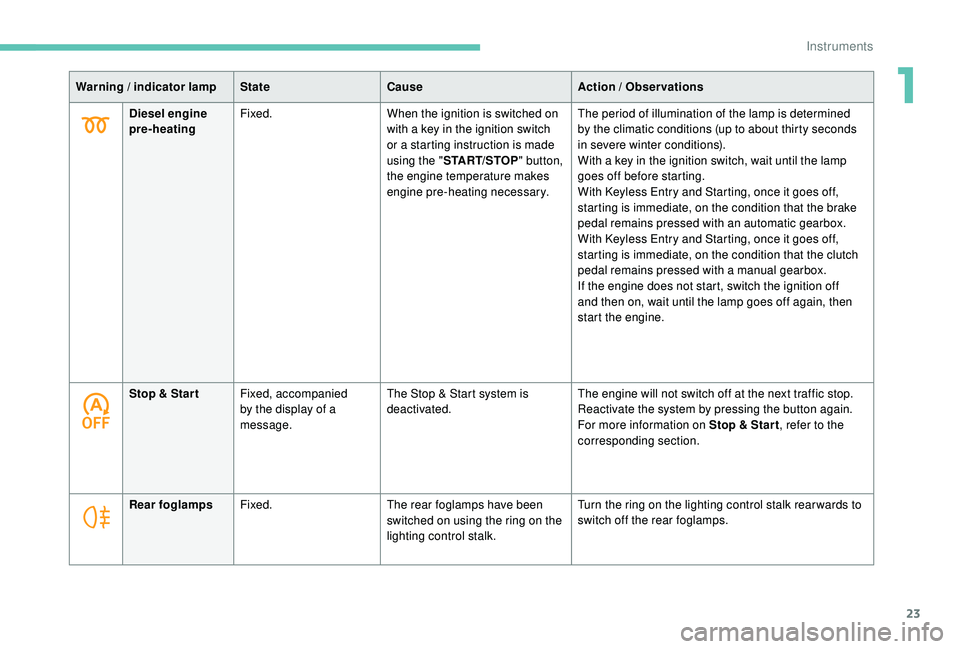
Diesel engine
pre-heating Fixed.
When the ignition is switched on
with a key in the ignition switch
or a starting instruction is made
using the "START/STOP " button,
the engine temperature makes
engine pre-heating necessary. The period of illumination of the lamp is determined
by
the climatic conditions (up to about thirty seconds
in severe winter conditions).
With a key in the ignition switch, wait until the lamp
goes off before starting.
With
K
eyless Entry and Starting, once it goes off,
starting is immediate, on the condition that the brake
pedal remains pressed with an automatic gearbox.
With
K
eyless Entry and Starting, once it goes off,
starting is immediate, on the condition that the clutch
pedal remains pressed with a manual gearbox.
If the engine does not start, switch the ignition off
and then on, wait until the lamp goes off again, then
start the engine.
Stop & Star t Fixed, accompanied
by the display of a
message. The Stop & Start system is
deactivated.
The engine will not switch off at the next traffic stop.
Reactivate the system by pressing the button again.
For more information on Stop & Star t
, refer to the
corresponding section.
Rear foglamps Fixed. The rear foglamps have been
switched on using the ring on the
lighting control stalk. Turn the ring on the lighting control stalk rear wards to
switch off the rear foglamps.
1
Instruments
Page 42 of 360
40
Touch screen
Define the vehicle parameters
This menu allows the activation or deactivation
of the following equipment, depending on
version:
-
"
Access to the vehicle" :
•
"
Remote control action".
For more information on the Remote control
and driver door selective unlocking in
particular, refer to the "Access" section.
-
"
Comfort" :
•
"
Rear wipe in reverse gear".
For more information on the Wipers ,
refer to the "Lighting and visibility"
section.
•
"
Parking assistance".
For more information on Parking
assistance , refer to the "Driving"
section.
•
"
Fatigue Detection System".
For more information on the Fatigue
detection system , refer to the "Driving"
section.
-
"
Driving assistance" :
•
"
Auto. emergency braking".
For more information on the Active
Safety Brake , refer to the "Driving"
section.
•
"
Speed recommendation".
For more information on Speed limit
recognition , refer to the "Driving"
section. •
"
Tyre inflation".
For more information on Under-
inflation detection and reinitialisation in
particular, refer to the "Driving" section.
Choice of language
This menu allows selection of the language
used by the screen and the instrument panel.
Display configuration
This menu gives access to the following
settings:
-
"
Choice of units",
-
"
Date and time adjustment",
-
"
Display parameters",
-
"Brightness".
Adjusting the date and time
F
P
ress the " 7" or " 8" button to display the
"Display configuration" menu, then press
OK.
F
P
ress the " 5" or " 6" button to select the
"Date and time adjustment" button, then
press OK.
F
P
ress the " 7" or " 8" button to select the
setting to modify. Confirm by pressing OK,
then modify the setting and confirm again to
save the modification.
F
A
djust the settings one by one, confirming
with the OK button. F
P
ress the "
5" or " 6" button, then the OK
button to select the OK box and confirm or
the Back button to cancel.
As a safety measure, the driver must only
carry out operations that require sustained
attention when stationary.
This system gives access to:
-
t
he permanent display of the time and
the exterior temperature (a blue symbol
appears when there is a risk of ice),
-
t
he heating/air conditioning controls,
-
m
enus for adjusting settings for vehicle
functions and systems,
-
a
udio system and telephone controls and
the display of associated information,
-
t
he display of visual parking aids (visual
parking sensor information, Park Assist,
e t c .),
-
I
nternet ser vices and the display of
associated information.
and, depending on equipment, allows:
-
a
ccess to the navigation system controls
and the display of associated information.
Instruments
Page 66 of 360
64
At any point, It is possible to interrupt the
operation of the tailgate.
Pressing one of these controls again
interrupts the movement that is under way.
Following the interruption of a movement,
pressing one of these controls again
reverses the movement.
Hands-Free Tailgate Access
Activation and deactivation of the
"Hands-Free Tailgate Access"
function is done in the Vehicle /
Driving menu of the touch screen.
Ensure that you are steady on your
feet before per forming the quick foot
movement.
Take care not to touch the exhaust system
which may be hot – Risk of burns!
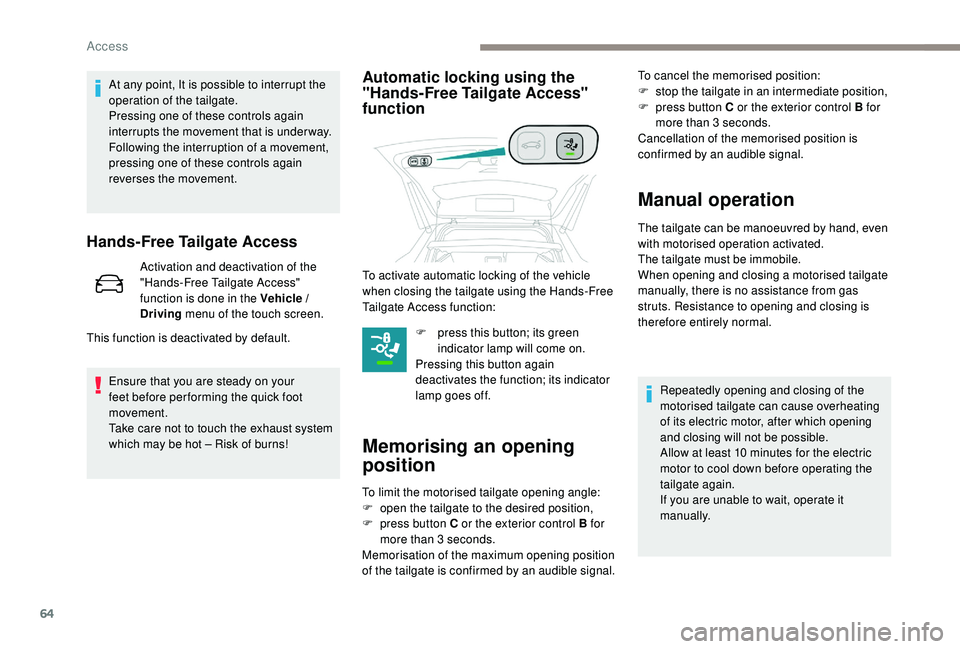
Automatic locking using the
"Hands-Free Tailgate Access"
function
F press this button; its green indicator lamp will come on.
Pressing this button again
deactivates the function; its indicator
lamp goes off.
Memorising an opening
position
To limit the motorised tailgate opening angle:
F o pen the tailgate to the desired position,
F
p
ress button C or the exterior control B for
more than 3
seconds.
Memorisation of the maximum opening position
of the tailgate is confirmed by an audible signal. To cancel the memorised position:
F
s
top the tailgate in an intermediate position,
F
p
ress button C or the exterior control B for
more than 3 seconds.
Cancellation of the memorised position is
confirmed by an audible signal.
Manual operation
The tailgate can be manoeuvred by hand, even
with motorised operation activated.
The tailgate must be immobile.
When opening and closing a motorised tailgate
manually, there is no assistance from gas
struts. Resistance to opening and closing is
therefore entirely normal.
This function is deactivated by default. To activate automatic locking of the vehicle
when closing the tailgate using the Hands-Free
Tailgate Access function:
Repeatedly opening and closing of the
motorised tailgate can cause overheating
of its electric motor, after which opening
and closing will not be possible.
Allow at least 10
minutes for the electric
motor to cool down before operating the
tailgate again.
If you are unable to wait, operate it
manually.
Access
Page 67 of 360
65
Reinitialising the
motorised tailgate
This operation is necessary where there is no
movement – after detection of an obstacle,
connecting or recharging the battery, etc.
F
O
pen the tailgate manually, if necessary.
F
F
ully close the tailgate manually.
If the problem persists, contact a PEUGEOT
dealer or a qualified workshop.
Precautions in use
In wintry conditions
In the event of an accumulation of snow
on the tailgate, clear the snow before
commanding a motorised opening of the
tailgate.
The formation of ice can block the tailgate
and prevent its opening: wait until the ice
melts with the heating of the passenger
compartment.
When washing
When washing the vehicle in an automatic
car wash, do not forget to lock your vehicle
to avoid the risk of unexpected opening.
Recommendations related
to the "Hands-Free Tailgate
Access" function
If several kicking movements to operate the
tailgate have no effect, wait a few seconds
before trying again.
The function automatically deactivates in heavy
rain or following a build-up of snow.
If it does not work, check that the electronic key
is not exposed to a source of electromagnetic
pollution (smartphone, etc.).
The function may not work correctly with a
prosthetic leg.
The function may not work correctly if your
vehicle is fitted with a towbar. -
y
our vehicle is being serviced,
-
y
ou are accessing the spare wheel
(depending on version).
To avoid such operating problems, keep the
electronic key away from the recognition
zone or deactivate the "Hands-Free Tailgate
Access" function.
In some circumstances, the tailgate may open
or close by itself, particularly if:
-
y
ou hitch or unhitch a trailer,
-
y
ou fit or remove a bicycle carrier,
-
y
ou load or unload bicycles from a bicycle
c a r r i e r,
-
y
ou place or lift something behind the
vehicle,
-
an
animal approaches the rear bumper,
-
y
ou are washing your vehicle,
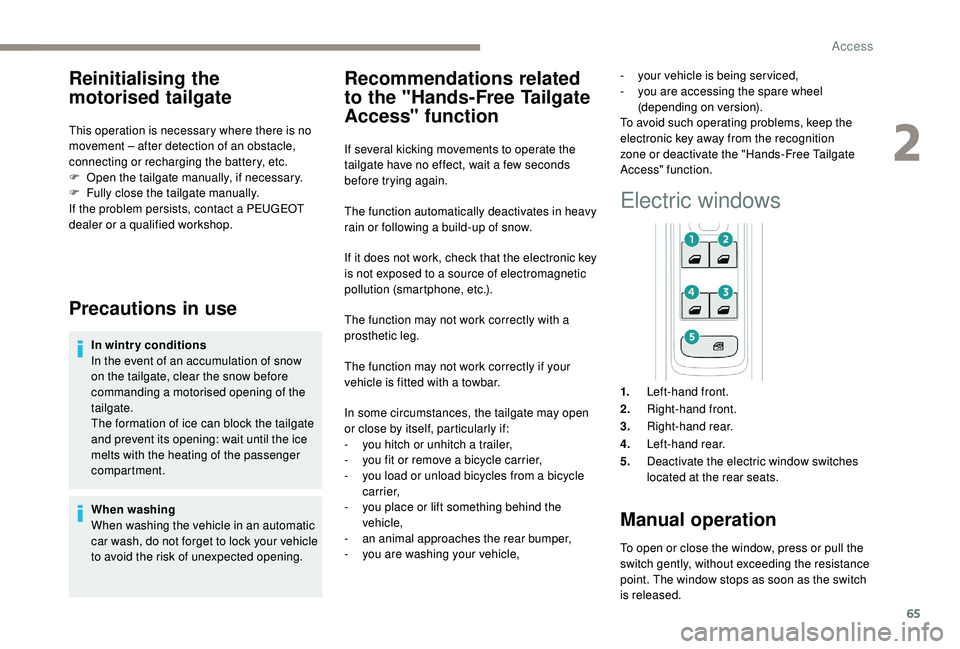
Electric windows
1. Left-hand front.
2. Right-hand front.
3. Right-hand rear.
4. Left-hand rear.
5. Deactivate the electric window switches
located at the rear seats.
Manual operation
To open or close the window, press or pull the
switch gently, without exceeding the resistance
point. The window stops as soon as the switch
is released.
2
Access
Page 77 of 360
75
Recalling a stored position
Ignition on or engine running
F P ress button 1 or 2 to recall the
corresponding position.
An audible signal confirms that adjustment is
complete.
You can interrupt the current movement
by pressing button M , 1 or 2 or by using
one of the seat controls.
A stored position cannot be recalled
while driving.
Recalling stored positions is deactivated
45
seconds after switching off the
ignition.
Heated seats
The function is active only with the engine
running.
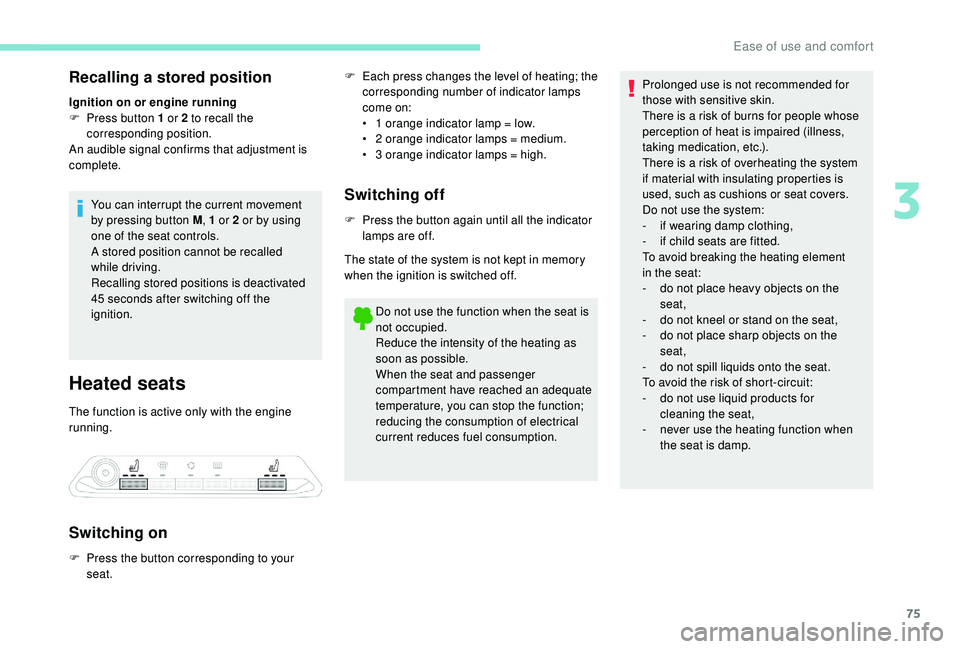
Switching on
F Each press changes the level of heating; the corresponding number of indicator lamps
come on:
•
1
orange indicator lamp = low.
•
2
orange indicator lamps = medium.
•
3
orange indicator lamps = high.
Switching off
F Press the button again until all the indicator lamps are off.
The state of the system is not kept in memory
when the ignition is switched off.
Do not use the function when the seat is
not occupied.
Reduce the intensity of the heating as
soon as possible.
When the seat and passenger
compartment have reached an adequate
temperature, you can stop the function;
reducing the consumption of electrical
current reduces fuel consumption.
F
P
ress the button corresponding to your
seat. Prolonged use is not recommended for
those with sensitive skin.
There is a risk of burns for people whose
perception of heat is impaired (illness,
taking medication, etc.).
There is a risk of overheating the system
if material with insulating properties is
used, such as cushions or seat covers.
Do not use the system:
-
i f wearing damp clothing,
-
i
f child seats are fitted.
To avoid breaking the heating element
in the seat:
-
d
o not place heavy objects on the
seat,
-
d
o not kneel or stand on the seat,
-
d
o not place sharp objects on the
seat,
-
d
o not spill liquids onto the seat.
To avoid the risk of short-circuit:
-
d
o not use liquid products for
cleaning the seat,
-
n
ever use the heating function when
the seat is damp.
3
Ease of use and comfort
Page 83 of 360
81
Access to the i-Cockpit
Amplify system home page
Direct access by this button
Access via the Applications menu
F
Sel
ect "i-Cockpit Amplify ".
Activating an ambience
From the home page:
F
Sel ect an ambience: " Relax" or "Boost ".
Depending on the settings made for the
ambience, the systems are activated
immediately.
Deactivating an ambience
From the home page:
F P ress " Deactivate ambience ".
or
F
Sel
ect another ambience.
The ambience is automatically deactivated
when the ignition is switched off.
Personalising an ambience
From the home page:
F S elect an ambience to activate it. It is possible to temporarily modify an
ambience at any time, by modifying
the settings for one or more of the
systems managed in the ambience,
without going via the i- Cockpit Amplify
function.
For example, you can deactivate or
modify the intensity of the current
massage by pressing the massage
activation button on your seat or
activate
/ deactivate the ambient
lighting in the passenger compartment
from the Vehicle / Driving menu.
In this case, the new settings
will not be saved as part of the
current ambience.
F
P
ress "
Settings " to display the settings
page for the ambience.
F
S
elect a system for which you wish to
modify the settings.
F
A
fter making the modifications, press any
area of the screen outside the system
settings window to return to the ambience
settings page.
F
A
fter making all of the desired modifications
to settings, press " Save settings".
The modifications are taken into account
immediately.
Air intake
The air circulating in the passenger
compartment is filtered and originates either
from the outside via the grille located at the
base of the windscreen or from the inside in air
recirculation mode.
Controls
The incoming air follows various routes
depending on the controls selected by
the driver, the front passenger and rear
passengers, according to the level of
equipment .
The temperature control enables you to obtain
the level of comfort required by mixing the air of
the various circuits.
The air distribution control enables you to
select the air vents used in the passenger
compartment by the combined use of the
associated buttons.
The air flow control enables you to increase or
reduce the speed of the ventilation fan.
Depending on your vehicle, the controls are
accessible in the Air conditioning menu of the
touch screen or are grouped together on the
control panel of the centre console.
Heating and Ventilation
3
Ease of use and comfort
Page 85 of 360
83
Recommendations for ventilation and
air conditioning
In order for these systems to be fully
effective, follow the operation and
maintenance guidelines below:
F
T
o ensure that the air is distributed
evenly, keep the external air intake
grilles at the base of the windscreen,
the nozzles, the vents, the air outlets
and the air extractor in the boot free
from obstructions.
F
D
o not cover the sunshine sensor,
located on the dashboard; this is used
for regulation of the automatic air
conditioning system.
F
O
perate the air conditioning system for
at least 5 to 10
minutes once or twice
a month to keep it in per fect working
o r d e r.
F
E
nsure that the passenger
compartment filter is in good condition
and have the filter elements replaced
regularly. We recommend the use of
a combined passenger compartment
filter. Thanks to its special active
additive, it contributes to the purification
of the air breathed by the occupants
and the cleanliness of the passenger
compartment (reduction of allergic
symptoms, bad odours and greasy
deposits). If after an extended stop in sunshine,
the interior temperature is very high,
first air the passenger compartment for
a few moments.
Put the air flow control at a setting high
enough to quickly change the air in the
passenger compartment.
The condensation created by the air
conditioning results in a discharge of
water under the vehicle which is per fectly
normal.
Stop & Star t
The heating and air conditioning systems
only work when the engine is running.
To maintain a comfortable temperature
in the passenger compartment, you may
temporarily deactivate the Stop & Start
system.
For more information on Stop & Star t ,
refer to the corresponding section.
F
T o ensure correct operation of the
air conditioning system, you are also
advised to have it checked regularly
as recommended in the Warranty and
Maintenance Record.
F
I
f the system does not produce cold air,
switch it off and contact a PEUGEOT
dealer or a qualified workshop.
When towing the maximum load on a steep
gradient in high temperatures, switching off
the air conditioning increases the available
engine power and so improves the towing
ability.
3
Ease of use and comfort
Page 94 of 360
92
Programmable heating
The programmable heating operates
independently of the engine.
With the engine off, it preheats the coolant
circuit to ensure optimal engine operating
temperature as soon as it is started up.
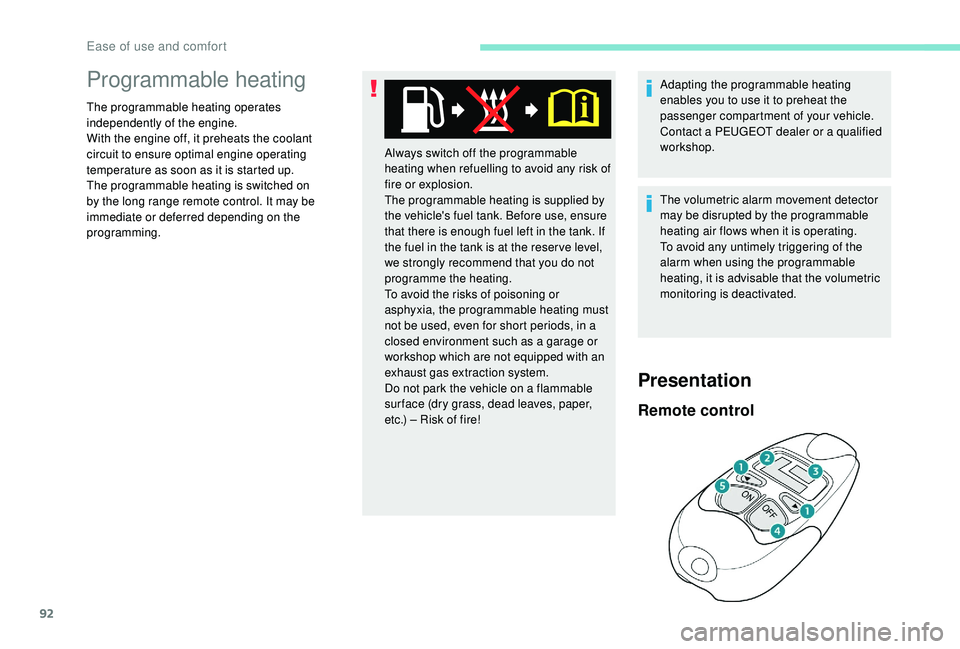
The programmable heating is switched on
by the long range remote control. It may be
immediate or deferred depending on the
programming.The volumetric alarm movement detector
may be disrupted by the programmable
heating air flows when it is operating.
To avoid any untimely triggering of the
alarm when using the programmable
heating, it is advisable that the volumetric
monitoring is deactivated. Adapting the programmable heating
enables you to use it to preheat the
passenger compartment of your vehicle.
Contact a PEUGEOT dealer or a qualified
workshop.
Presentation
Remote control
Always switch off the programmable
heating when refuelling to avoid any risk of
fire or explosion.
The programmable heating is supplied by
the vehicle's fuel tank. Before use, ensure
that there is enough fuel left in the tank. If
the fuel in the tank is at the reser ve level,
we strongly recommend that you do not
programme the heating.
To avoid the risks of poisoning or
asphyxia, the programmable heating must
not be used, even for short periods, in a
closed environment such as a garage or
workshop which are not equipped with an
exhaust gas extraction system.
Do not park the vehicle on a flammable
sur face (dry grass, dead leaves, paper,
etc.) – Risk of fire!
Ease of use and comfort