engine Peugeot 308 2021 Owners Manual
[x] Cancel search | Manufacturer: PEUGEOT, Model Year: 2021, Model line: 308, Model: Peugeot 308 2021Pages: 244, PDF Size: 8.21 MB
Page 181 of 244
179
Technical data
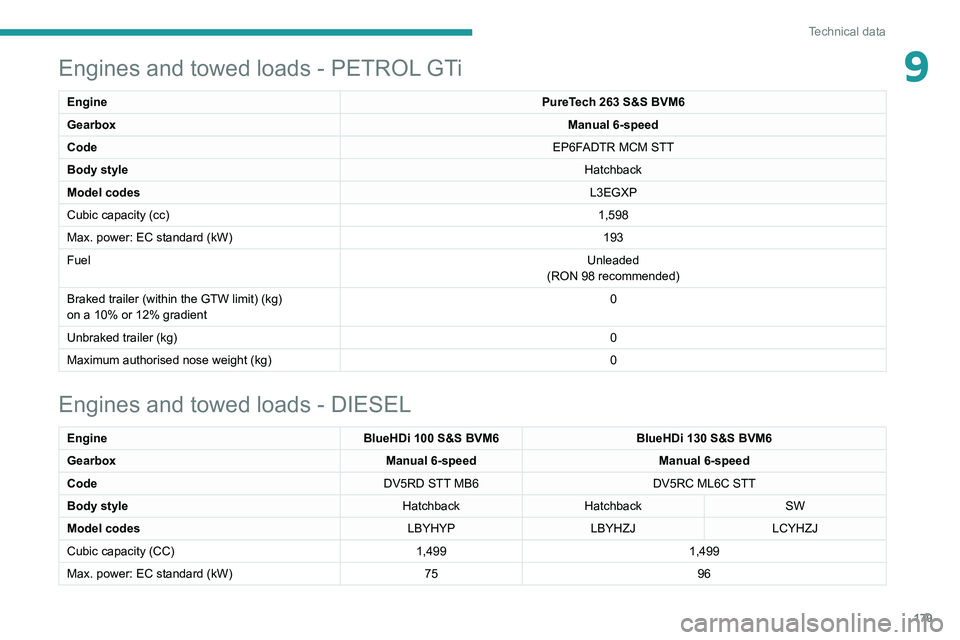
9Engines and towed loads - PETROL GTi
Engine PureTech 263 S&S BVM6
Gearbox Manual 6-speed
Code EP6FADTR MCM STT
Body style Hatchback
Model codes L3EGXP
Cubic capacity (cc) 1,598
Max. power: EC standard (kW) 193
Fuel Unleaded
(RON 98 recommended)
Braked trailer (within the GTW limit) (kg)
on a 10% or 12% gradient 0
Unbraked trailer (kg) 0
Maximum authorised nose weight (kg) 0
Engines and towed loads - DIESEL
EngineBlueHDi 100 S&S BVM6BlueHDi 130 S&S BVM6
Gearbox Manual 6-speedManual 6-speed
Code DV5RD STT MB6DV5RC ML6C STT
Body style HatchbackHatchback SW
Model codes LBYHYPLBYHZJLCYHZJ
Cubic capacity (CC) 1,4991,499
Max. power: EC standard (kW) 7596
Page 182 of 244
180
Technical data
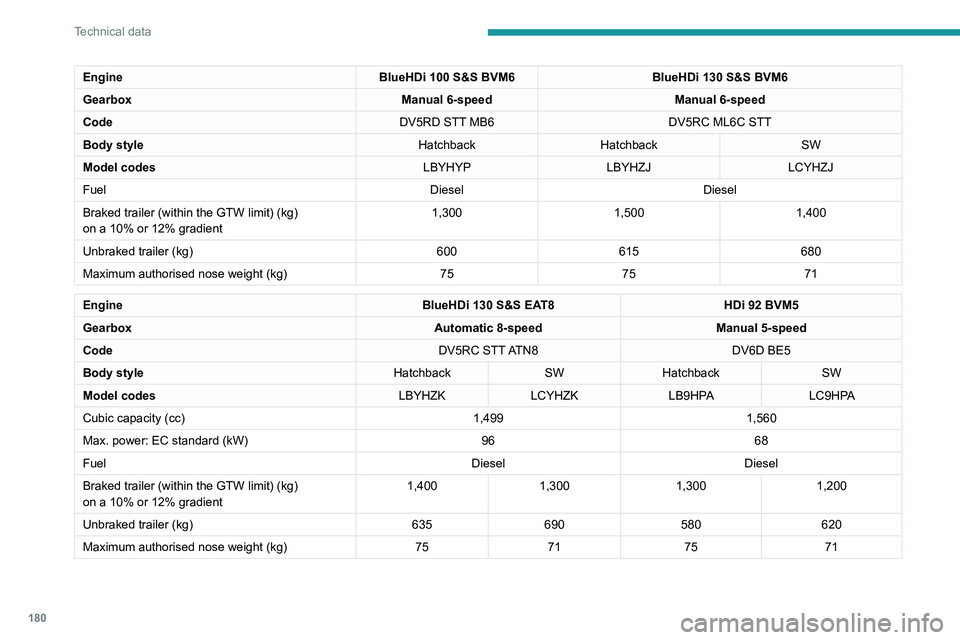
EngineBlueHDi 100 S&S BVM6BlueHDi 130 S&S BVM6
Gearbox Manual 6-speedManual 6-speed
Code DV5RD STT MB6DV5RC ML6C STT
Body style HatchbackHatchback SW
Model codes LBYHYPLBYHZJLCYHZJ
Fuel DieselDiesel
Braked trailer (within the GTW limit) (kg)
on a 10% or 12% gradient 1,300
1,5001,400
Unbraked trailer (kg) 600615680
Maximum authorised nose weight (kg) 757571
Engine BlueHDi 130 S&S EAT8HDi 92 BVM5
Gearbox Automatic 8-speedManual 5-speed
Code DV5RC STT ATN8DV6D BE5
Body style HatchbackSWHatchback SW
Model codes LBYHZKLCYHZK LB9HPA LC9HPA
Cubic capacity (cc) 1,4991,560
Max. power: EC standard (kW) 9668
Fuel DieselDiesel
Braked trailer (within the GTW limit) (kg)
on a 10% or 12% gradient 1,400
1,300 1,300 1,200
Unbraked trailer (kg) 635690 580 620
Maximum authorised nose weight (kg) 7571 75 71
Dimensions (mm)
These dimensions have been measured on an
unladen vehicle.
Hatchback
Page 186 of 244
184
PEUGEOT Connect Radio
PEUGEOT Connect
Radio
Multimedia audio system -
Applications - Bluetooth
®
telephone
The functions and settings described
vary according to the vehicle version and
configuration.
For safety reasons and because they
require sustained attention by the driver,
the following operations must be carried out
with the vehicle stationary and the ignition
on:
–
Pairing the smartphone with the system in
Bluetooth mode.
–
Using the smartphone.
–
Connection to the CarPlay®, MirrorLinkTM
or Android Auto applications (certain
applications interrupt their display while the
vehicle is moving).
–
Changing the system settings and
configuration.
The system is protected in such a way that it will only operate in the vehicle.
The Energy Economy Mode message is
displayed when the system is about to enter
the corresponding mode.
The system’s Open Source Software (OSS) source codes are available at the
following addresses:
https://www.groupe-psa.com/fr/oss/
https://www.groupe-psa.com/en/oss/
First steps
With the engine running, a press mutes
the sound.
With the ignition off, a press turns the system on.
Increase or decrease the volume using
the wheel or the "plus" or "minus" buttons
(depending on the equipment).
Use the buttons on either side of or below the
touch screen for access to the menus, then
press the virtual buttons in the touch screen.
Depending on the model, use the "Source" or
"Menu" buttons on the left of the touch screen
for access to the menus, then press the virtual
buttons in the touch screen.
At all times it is possible to display the rolling
menus by pressing the screen briefly with three
fingers.
All of the touch areas of the screen are white.
For pages with multiple tabs at the bottom of the
screen, it is possible to switch between pages
either by tapping the tab for the desired page, or
by using a finger, sliding the pages to the left or
to the right.
Press in the grey zone to go back up a level or
to confirm.
Press the back arrow to go back a level or
confirm.
The touch screen is of the "capacitive" type.
To clean the screen, use a soft, non-abrasive
cloth (e.g. spectacles cloth) with no additional
product.
Do not use sharp objects on the screen.
Do not touch the screen with wet hands.
Certain information is displayed permanently in
the upper bar of the touch screen:
–
Air conditioning status information (depending
on version), and direct access to the
corresponding menu.
–
Radio Media and
Telephone menu status
information.
–
Privacy status information.
–
Access to the touch screen and digital
instrument panel settings.
Audio source selection (depending on
equipment):
Page 199 of 244
197
PEUGEOT Connect Radio
10Some telephones offer display options.
Depending on the settings chosen, contacts can
be transferred in a specific order.
►
Modify the telephone directory display
settings.
Settings
When the treble and bass settings are
changed, the ambience is deselected.
When the ambience is changed, the treble
and bass settings are reset.
Selecting an ambience imposes the treble and
bass settings, and vice versa.
►
Modify the treble and bass or ambience
settings to obtain the desired musical ambience.
When the balance settings are changed, the
distribution is deselected.
When the distribution setting is changed, the
balance settings are deselected.
Selecting a distribution setting imposes the
balance settings, and vice versa.
►
Modify the balance setting or the distribution
setting to obtain the desired sound quality
.
There is a difference in sound quality
between audio sources.
To allow for optimal listening quality, the sound
settings can be tailored to different audio
sources, which can generate audible differences
when changing source.
►
Check that the sound settings are appropriate
to the sources listened to.
Adjust the sound
functions to the middle position. When the engine is off, the system switches
off after several minutes of use.
When the engine is switched off, the system's
operating time depends on the state of charge of
the battery.
The switch-off is normal: the system
automatically goes into energy economy mode
and switches off to maintain an adequate charge
in the battery.
►
Start the vehicle’
s engine to increase the
charge of the battery.
Page 200 of 244
198
PEUGEOT Connect Nav
PEUGEOT Connect Nav
GPS navigation -
Applications - Multimedia
audio system - Bluetooth
®
telephone
The functions and settings described
vary according to the vehicle version and
configuration.
For safety reasons and because they
require sustained attention by the driver,
the following operations must be carried out
with the vehicle stationary and the ignition
on:
–
Pairing the smartphone with the system in
Bluetooth mode.
–
Using the smartphone.
–
Connection to the CarPlay®, MirrorLinkTM
or Android Auto applications (certain
applications interrupt their display while the
vehicle is moving).
–
W
atching a video (the video stops when the
vehicle starts to move again).
–
Changing the system settings and
configuration.
The system is protected in such a way that it will only operate in the vehicle.
The Energy Economy Mode message is
displayed when the system is about to enter
the corresponding mode.
System and map updates can be
downloaded from the Brand’s website.
The update procedure is also available on the
website.
The system’s Open Source Software (OSS) source codes are available at the
following addresses:
https://www.groupe-psa.com/fr/oss/
https://www.groupe-psa.com/en/oss/
First steps
With the engine running, a press mutes
the sound.
With the ignition off, a press turns the system on.
Increase or decrease the volume using
the wheel or the "plus" or "minus" buttons
(depending on the equipment).
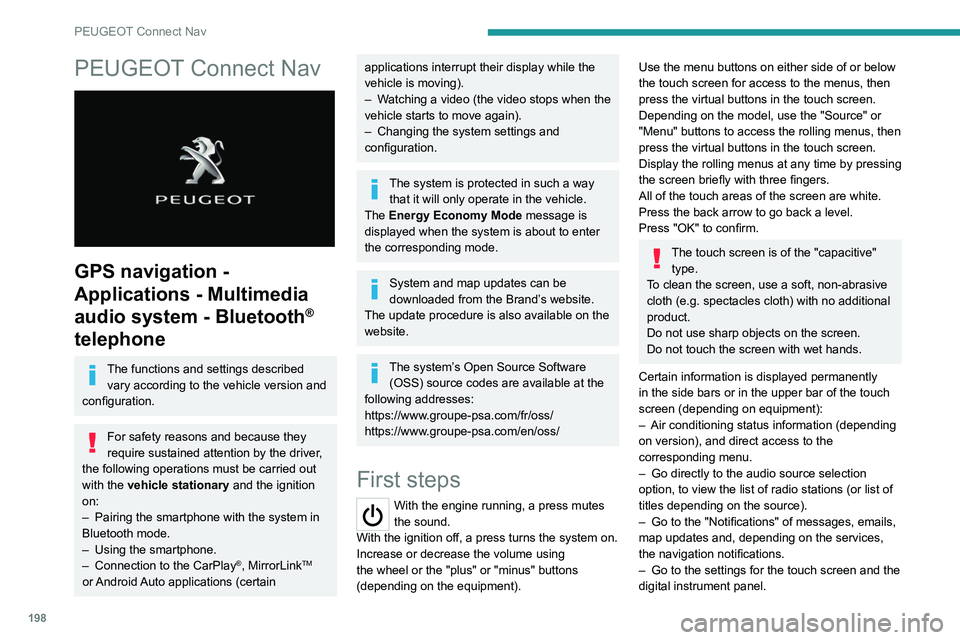
Use the menu buttons on either side of or below
the touch screen for access to the menus, then
press the virtual buttons in the touch screen.
Depending on the model, use the "Source" or
"Menu" buttons to access the rolling menus, then
press the virtual buttons in the touch screen.
Display the rolling menus at any time by pressing
the screen briefly with three fingers.
All of the touch areas of the screen are white.
Press the back arrow to go back a level.
Press "OK" to confirm.
The touch screen is of the "capacitive" type.
To clean the screen, use a soft, non-abrasive
cloth (e.g. spectacles cloth) with no additional
product.
Do not use sharp objects on the screen.
Do not touch the screen with wet hands.
Certain information is displayed permanently
in the side bars or in the upper bar of the touch
screen (depending on equipment):
–
Air conditioning status information (depending
on version), and direct access to the
corresponding menu.
–
Go directly to the audio source selection
option, to view the list of radio stations (or list of
titles depending on the source).
–
Go to the "Notifications" of messages, emails,
map updates and, depending on the services,
the navigation notifications.
–
Go to the settings for the touch screen and the
digital instrument panel.
Page 223 of 244
221
PEUGEOT Connect Nav
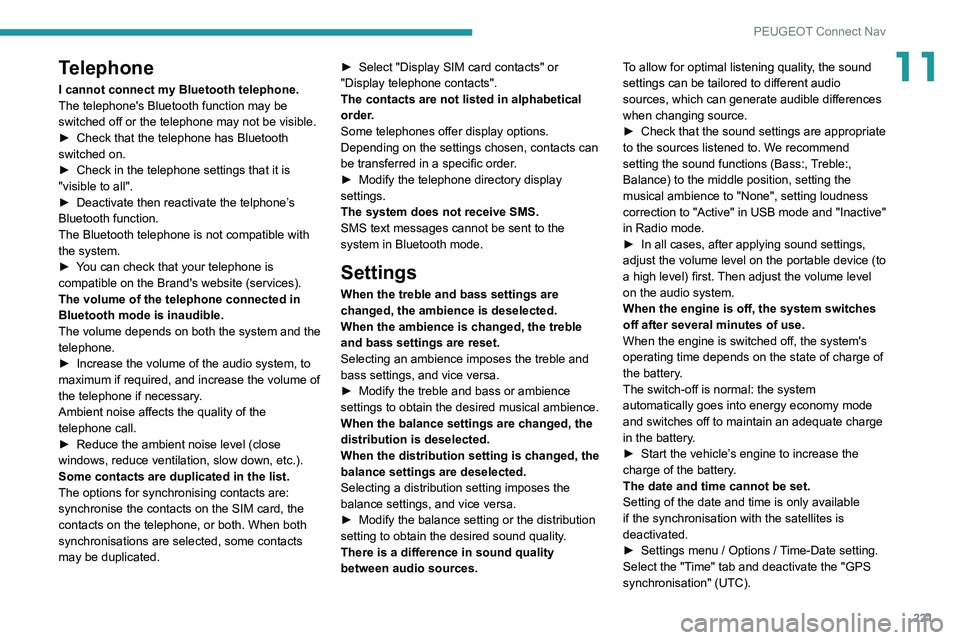
11Telephone
I cannot connect my Bluetooth telephone.
The telephone's Bluetooth function may be
switched off or the telephone may not be visible.
►
Check that the telephone has Bluetooth
switched on.
►
Check in the telephone settings that it is
"visible to all".
►
Deactivate then reactivate the telphone’
s
Bluetooth function.
The Bluetooth telephone is not compatible with
the system.
►
Y
ou can check that your telephone is
compatible on the Brand's website (services).
The volume of the telephone connected in
Bluetooth mode is inaudible.
The volume depends on both the system and the
telephone.
►
Increase the volume of the audio system, to
maximum if required, and increase the volume of
the telephone if necessary
.
Ambient noise affects the quality of the
telephone call.
►
Reduce the ambient noise level (close
windows, reduce ventilation, slow down, etc.).
Some contacts are duplicated in the list.
The options for synchronising contacts are:
synchronise the contacts on the SIM card, the
contacts on the telephone, or both. When both
synchronisations are selected, some contacts
may be duplicated. ►
Select "Display SIM card contacts" or
"Display telephone contacts".
The contacts are not listed in alphabetical
order
.
Some telephones offer display options.
Depending on the settings chosen, contacts can
be transferred in a specific order.
►
Modify the telephone directory display
settings.
The system does not receive SMS.
SMS text messages cannot be sent to the
system in Bluetooth mode.
Settings
When the treble and bass settings are
changed, the ambience is deselected.
When the ambience is changed, the treble
and bass settings are reset.
Selecting an ambience imposes the treble and
bass settings, and vice versa.
►
Modify the treble and bass or ambience
settings to obtain the desired musical ambience.
When the balance settings are changed, the
distribution is deselected.
When the distribution setting is changed, the
balance settings are deselected.
Selecting a distribution setting imposes the
balance settings, and vice versa.
►
Modify the balance setting or the distribution
setting to obtain the desired sound quality
.
There is a difference in sound quality
between audio sources. To allow for optimal listening quality, the sound
settings can be tailored to different audio
sources, which can generate audible differences
when changing source.
►
Check that the sound settings are appropriate
to the sources listened to. W
e recommend
setting the sound functions (Bass:, Treble:,
Balance) to the middle position, setting the
musical ambience to "None", setting loudness
correction to "Active" in USB mode and "Inactive"
in Radio mode.
►
In all cases, after applying sound settings,
adjust the volume level on the portable device (to
a high level) first.
Then adjust the volume level
on the audio system.
When the engine is off, the system switches
off after several minutes of use.
When the engine is switched off, the system's
operating time depends on the state of charge of
the battery.
The switch-off is normal: the system
automatically goes into energy economy mode
and switches off to maintain an adequate charge
in the battery.
►
Start the vehicle’
s engine to increase the
charge of the battery.
The date and time cannot be set.
Setting of the date and time is only available
if the synchronisation with the satellites is
deactivated.
►
Settings menu / Options /
Time-Date setting.
Select the "Time" tab and deactivate the "GPS
synchronisation" (UTC).
Page 225 of 244
223
Alphabetical index
Checking the engine oil level 14
Checking the levels
142–143
Checking tyre pressures
(using the kit)
151, 153–156
Checks
141–142, 144–146
Checks, routine
144–146
Child lock
79
Children
65, 74–76
Children (safety)
79
Child seats
65, 68–72, 79
Child seats, conventional
71
Child seats, ISOFIX
74–76
Cleaning (advice)
148–149
Closing the boot
20, 25
Closing the doors
20–22, 25
Collision Risk Alert
112–113
Commercial
182
Connected applications
210
Connection, Bluetooth
192–193,
210–211, 214–215
Connection, MirrorLink
191–192
Connection, Wi-Fi network
2 11
Connectivity
209
Container, AdBlue®
147
Control, electric windows
28–29
Control, emergency boot release
26
Control, emergency door
23
Control, heated seats
32
Controls, steering mounted
93–96
Control stalk, lighting
50
Control stalk, wipers
54–57
Courtesy lamps
48–49Cover, load space 40–42
Cruise control
103, 105–110, 112
Cruise control, adaptive
107–108
Cruise control by speed limit recognition
103
Cruise control, dynamic with
Stop function
103, 108–110
Cup holder
37
D
DAB (Digital Audio Broadcasting) -
Digital radio
189, 213
Date (setting)
195, 218
Daytime running lamps
51, 161–162
Deactivating the passenger airbag
67, 70
Deactivation of DSC (ESC)
62
Deadlocking
20, 22
Defrosting
47
Demisting
47
Demisting, rear
33–34
Demisting, rear screen
33–34
Denon (audio system)
41–42
Dials and gauges
7
Digital instrument panel
7
Dimensions
181–182
Dipstick
14, 142
Direction indicators
53, 161–166
Display screen, instrument panel
97
Doors
25
Driver’s attention warning
11 5
Driver Sport Pack
96–97
Driving 81
Driving abroad
51
Driving aids camera (warnings)
101
Driving aids (recommendations)
100
Driving economically
6
Driving positions (storing)
32
Dynamic pack
96–97
Dynamic (sport)
96–97
Dynamic stability control (DSC)
62
E
EBFD 62
Eco-driving (advice)
6
Economy mode
139
Electric windows
28
Electronic brake force distribution (EBFD)
62
Emergency braking assistance (EBA)
62
Emergency call
59–60
Emergency switching off
85
Emergency warning lamps
41, 58
Emissions control system, SCR
16, 146
Energy economy mode
139
Engine compartment
141–142
Engine, Diesel
131, 142, 174, 179
Engine, petrol
141, 177, 179
Engines
176–177, 179
Environment
6, 24
ESC (electronic stability control)
62
Page 226 of 244
224
Alphabetical index
F
Fatigue detection 114–115
Filling the AdBlue® tank
147
Filling the fuel tank
131–132
Filter, air
144
Filter, oil
144
Filter, particle
144
Filter, passenger compartment
43, 144
Fitting a wheel
158–160
Fitting roof bars
140
Fittings, boot
40
Fittings, interior
37
Flap, fuel filler
131–132
Flashing indicators
53
Fluid, brake
143
Fluid, engine coolant
143
Foglamp, rear
50, 164–166
Foglamps, front
50, 163
Foglamps, rear
50
Folding the rear seats
35–36
Frequency (radio)
212
Fuel
6, 131
Fuel consumption
6
Fuel tank
131
Fusebox, dashboard
166
Fusebox, engine compartment
166, 168
Fuses
166–168
G
Gauge, fuel 131–132
Gearbox, automatic
89–91, 93–99, 145, 170
Gearbox, manual
89–90, 98–99, 145
Gear lever, automatic gearbox
91, 95
Gear lever, manual gearbox
89–90
Gear shift indicator ~ Gear efficiency
indicator
97
Glove box, refrigerated
37
G.P.S.
206
H
Hazard warning lamps 41, 58
headlamp adjustment
54
Headlamp adjustment
54
Headlamps, automatic dipping
52–53
Headlamps, automatic illumination
51
Headlamps, dipped beam
161–162
Headlamps, halogen
54, 161
Headlamps, main beam
161–162
Headlamp wash
55
Head restraints, front
30
Head restraints, rear
35–37
Heating
42–44
Hill start assist
89
Horn
61
I
Ignition 46, 84, 216
Ignition on
84
Immobiliser, electronic
23, 82
Indicator, AdBlue® range
15
Indicator, coolant temperature
15
Indicator, engine oil level
14
Indicators, direction
53
Inflating tyres
145, 183
Inflating tyres and accessories
(using the kit)
151, 153–156
Infrared camera
101
Instrument panel
7, 17–18, 102
Instrument panels
7
Internet browser
207, 210
ISOFIX
76
ISOFIX mountings
74–75
J
Jack 150–151, 157, 213
Jump starting
170
K
Key 19–21, 23, 25
Key, electronic
21–22
Keyless Entry and Starting
21–23, 84–85
Key not recognised
85
Page 227 of 244
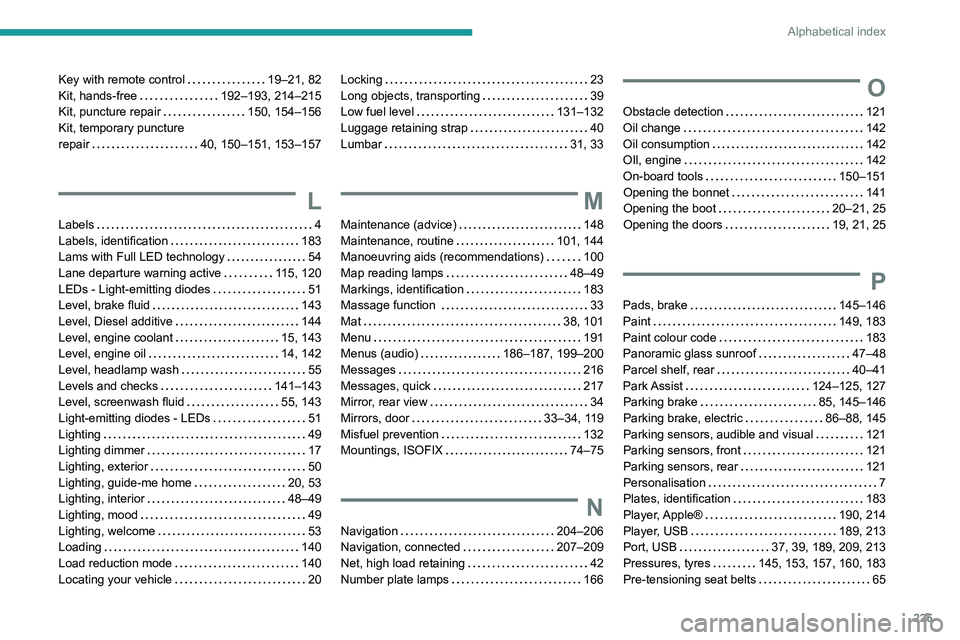
225
Alphabetical index
Key with remote control 19–21, 82
Kit, hands-free
192–193, 214–215
Kit, puncture repair
150, 154–156
Kit, temporary puncture
repair
40, 150–151, 153–157
L
Labels 4
Labels, identification
183
Lams with Full LED technology
54
Lane departure warning active
115, 120
LEDs - Light-emitting diodes
51
Level, brake fluid
143
Level, Diesel additive
144
Level, engine coolant
15, 143
Level, engine oil
14, 142
Level, headlamp wash
55
Levels and checks
141–143
Level, screenwash fluid
55, 143
Light-emitting diodes - LEDs
51
Lighting
49
Lighting dimmer
17
Lighting, exterior
50
Lighting, guide-me home
20, 53
Lighting, interior
48–49
Lighting, mood
49
Lighting, welcome
53
Loading
140
Load reduction mode
140
Locating your vehicle
20
Locking 23
Long objects, transporting
39
Low fuel level
131–132
Luggage retaining strap
40
Lumbar
31, 33
M
Maintenance (advice) 148
Maintenance, routine
101, 144
Manoeuvring aids (recommendations)
100
Map reading lamps
48–49
Markings, identification
183
Massage function
33
Mat
38, 101
Menu
191
Menus (audio)
186–187, 199–200
Messages
216
Messages, quick
217
Mirror, rear view
34
Mirrors, door
33–34, 119
Misfuel prevention
132
Mountings, ISOFIX
74–75
N
Navigation 204–206
Navigation, connected
207–209
Net, high load retaining
42
Number plate lamps
166
O
Obstacle detection 121
Oil change
142
Oil consumption
142
OIl, engine
142
On-board tools
150–151
Opening the bonnet
141
Opening the boot
20–21, 25
Opening the doors
19, 21, 25
P
Pads, brake 145–146
Paint
149, 183
Paint colour code
183
Panoramic glass sunroof
47–48
Parcel shelf, rear
40–41
Park Assist
124–125, 127
Parking brake
85, 145–146
Parking brake, electric
86–88, 145
Parking sensors, audible and visual
121
Parking sensors, front
121
Parking sensors, rear
121
Personalisation
7
Plates, identification
183
Player, Apple®
190, 214
Player, USB
189, 213
Port, USB
37, 39, 189, 209, 213
Pressures, tyres
145, 153, 157, 160, 183
Pre-tensioning seat belts
65
Page 228 of 244
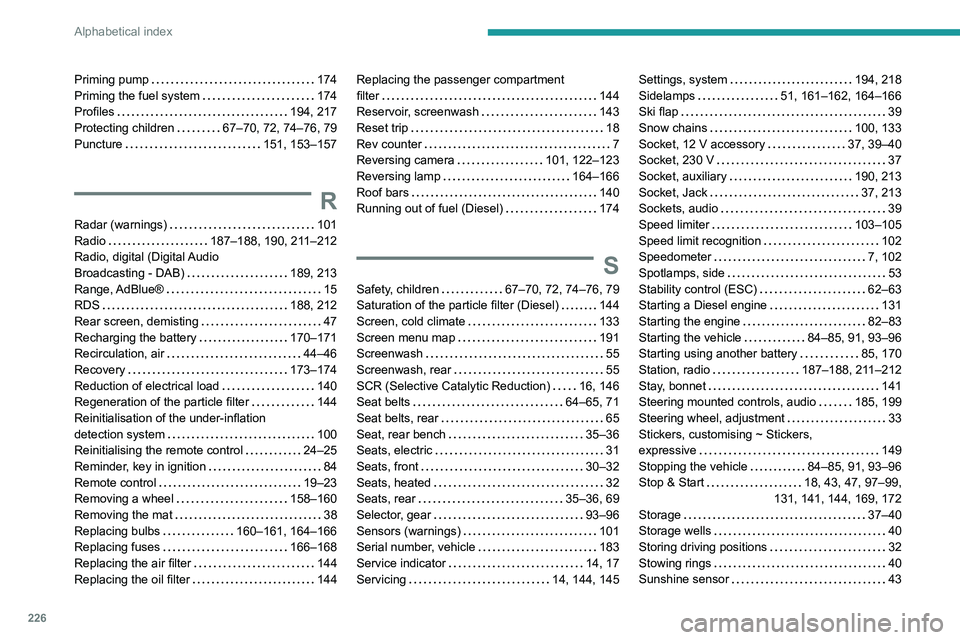
226
Alphabetical index
Priming pump 174
Priming the fuel system
174
Profiles
194, 217
Protecting children
67–70, 72, 74–76, 79
Puncture
151, 153–157
R
Radar (warnings) 101
Radio
187–188, 190, 211–212
Radio, digital (Digital Audio
Broadcasting - DAB)
189, 213
Range, AdBlue®
15
RDS
188, 212
Rear screen, demisting
47
Recharging the battery
170–171
Recirculation, air
44–46
Recovery
173–174
Reduction of electrical load
140
Regeneration of the particle filter
144
Reinitialisation of the under-inflation
detection system
100
Reinitialising the remote control
24–25
Reminder, key in ignition
84
Remote control
19–23
Removing a wheel
158–160
Removing the mat
38
Replacing bulbs
160–161, 164–166
Replacing fuses
166–168
Replacing the air filter
144
Replacing the oil filter
144
Replacing the passenger compartment
filter
144
Reservoir, screenwash
143
Reset trip
18
Rev counter
7
Reversing camera
101, 122–123
Reversing lamp
164–166
Roof bars
140
Running out of fuel (Diesel)
174
S
Safety, children 67–70, 72, 74–76, 79
Saturation of the particle filter (Diesel)
144
Screen, cold climate
133
Screen menu map
191
Screenwash
55
Screenwash, rear
55
SCR (Selective Catalytic Reduction)
16, 146
Seat belts
64–65, 71
Seat belts, rear
65
Seat, rear bench
35–36
Seats, electric
31
Seats, front
30–32
Seats, heated
32
Seats, rear
35–36, 69
Selector, gear
93–96
Sensors (warnings)
101
Serial number, vehicle
183
Service indicator
14, 17
Servicing
14, 144, 145
Settings, system 194, 218
Sidelamps
51, 161–162, 164–166
Ski flap
39
Snow chains
100, 133
Socket, 12 V accessory
37, 39–40
Socket, 230 V
37
Socket, auxiliary
190, 213
Socket, Jack
37, 213
Sockets, audio
39
Speed limiter
103–105
Speed limit recognition
102
Speedometer
7, 102
Spotlamps, side
53
Stability control (ESC)
62–63
Starting a Diesel engine
131
Starting the engine
82–83
Starting the vehicle
84–85, 91, 93–96
Starting using another battery
85, 170
Station, radio
187–188, 211–212
Stay, bonnet
141
Steering mounted controls, audio
185, 199
Steering wheel, adjustment
33
Stickers, customising ~ Stickers,
expressive
149
Stopping the vehicle
84–85, 91, 93–96
Stop & Start
18, 43, 47, 97–99,
131, 141, 144, 169, 172
Storage
37–40
Storage wells
40
Storing driving positions
32
Stowing rings
40
Sunshine sensor
43