engine Peugeot 308 2021 User Guide
[x] Cancel search | Manufacturer: PEUGEOT, Model Year: 2021, Model line: 308, Model: Peugeot 308 2021Pages: 244, PDF Size: 8.21 MB
Page 16 of 244
14
Instruments
Indicators
Service indicator
The servicing information is expressed in terms
of distance (kilometres or miles) and time
(months or days).
The alert is given at whichever of these two
terms is reached first.
The servicing information is displayed in the
instrument panel. Depending on the version of
the vehicle:
–
The distance recorder display line indicates
the distance remaining before the next service
is due, or the distance travelled since it was due
preceded by the "-" sign.
–
An alert message indicates the distance
remaining, as well as the period before the next
service is due or how long it is overdue.
The value indicated is calculated according to the distance covered and
the time elapsed since the last service.
The alert may also be triggered close to a
due date.
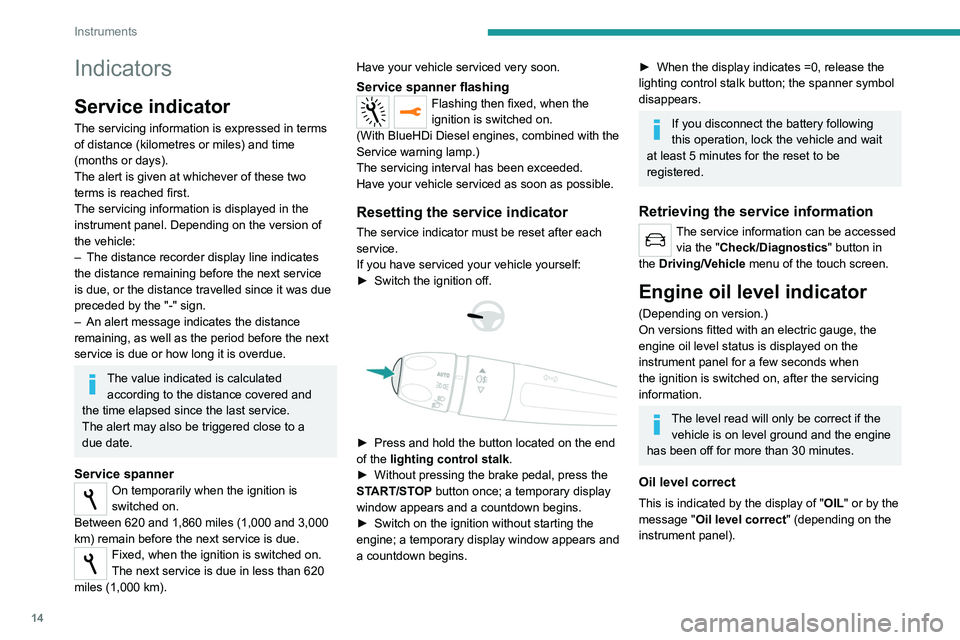
Service spannerOn temporarily when the ignition is
switched on.
Between 620 and 1,860 miles (1,000 and 3,000
km) remain before the next service is due.
Fixed, when the ignition is switched on.
The next service is due in less than 620
miles (1,000 km). Have your vehicle serviced very soon.
Service spanner flashingFlashing then fixed, when the
ignition is switched on.
(With BlueHDi Diesel engines, combined with the
Service warning lamp.)
The servicing interval has been exceeded.
Have your vehicle serviced as soon as possible.
Resetting the service indicator
The service indicator must be reset after each
service.
If you have serviced your vehicle yourself:
►
Switch the ignition off.
► Press and hold the button located on the end
of the lighting control stalk .
►
Without pressing the brake pedal, press the
ST
ART/STOP button once; a temporary display
window appears and a countdown begins.
►
Switch on the ignition without starting the
engine; a temporary
display window appears and
a countdown begins.
► When the display indicates =0, release the
lighting control stalk button; the spanner symbol
disappears.
If you disconnect the battery following
this operation, lock the vehicle and wait
at least 5 minutes for the reset to be
registered.
Retrieving the service information
The service information can be accessed via the "Check/Diagnostics" button in
the Driving/Vehicle menu of the touch screen.
Engine oil level indicator
(Depending on version.)
On versions fitted with an electric gauge, the
engine oil level status is displayed on the
instrument panel for a few seconds when
the ignition is switched on, after the servicing
information.
The level read will only be correct if the vehicle is on level ground and the engine
has been off for more than 30 minutes.
Oil level correct
This is indicated by the display of " OIL" or by the
message "Oil level correct" (depending on the
instrument panel).
Page 17 of 244
15
Instruments
1Low oil level
This is indicated by the message "Oil
level incorrect" on the instrument panel,
accompanied by the lighting of the Service
warning lamp and an audible signal.
If the low oil level is confirmed by a check using
the dipstick, the level must be topped up to avoid
damage to the engine.
For more information on Checking levels, refer
to the corresponding section.
Gauge fault
This is indicated by the display of " OIL_ _"
or by the message "Oil level measurement
invalid " (depending on the instrument panel),
accompanied by the lighting of the Service
warning lamp and an audible signal.
Contact a PEUGEOT dealer or a qualified
workshop.
In the event of a fault with the electric
gauge, the oil level is no longer
monitored.
If the system is faulty, you must check the
engine oil level using the manual dipstick
located under the bonnet.
For more information on Checking levels,
refer to the corresponding section.
Coolant temperature
indicator
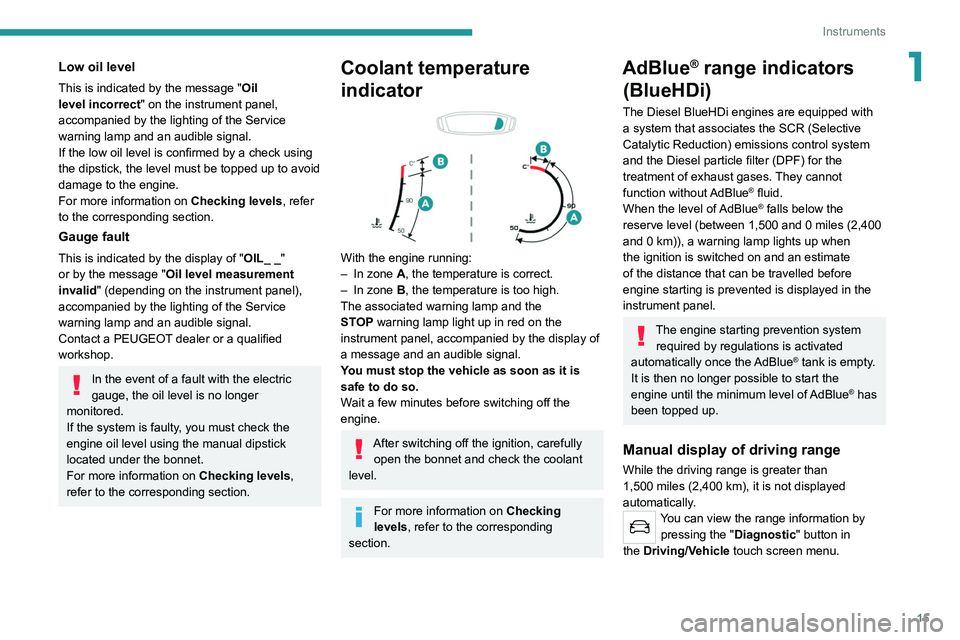
With the engine running:
– In zone A, the temperature is correct.
–
In zone
B, the temperature is too high.
The associated warning lamp and the
STOP
warning lamp light up in red on the
instrument panel, accompanied by the display of
a message and an audible signal.
You must stop the vehicle as soon as it is
safe to do so.
Wait a few minutes before switching off the
engine.
After switching off the ignition, carefully open the bonnet and check the coolant
level.
For more information on Checking
levels, refer to the corresponding
section.
AdBlue® range indicators
(BlueHDi)
The Diesel BlueHDi engines are equipped with
a system that associates the SCR (Selective
Catalytic Reduction) emissions control system
and the Diesel particle filter (DPF) for the
treatment of exhaust gases. They cannot
function without AdBlue
® fluid.
When the level of AdBlue® falls below the
reserve level (between 1,500 and 0 miles (2,400
and 0
km)), a warning lamp lights up when
the ignition is switched on and an estimate
of the distance that can be travelled before
engine starting is prevented is displayed in the
instrument panel.
The engine starting prevention system required by regulations is activated
automatically once the AdBlue
® tank is empty.
It is then no longer possible to start the
engine until the minimum level of AdBlue
® has
been topped up.
Manual display of driving range
While the driving range is greater than
1,500 miles (2,400 km), it is not displayed
automatically.
You can view the range information by pressing the " Diagnostic" button
in
the
Driving/Vehicle touch screen menu.
Page 18 of 244
16
Instruments
To be able to restart the engine, contact a PEUGEOT dealer or a qualified
workshop.
Manual test
This function allows you to check certain
indicators and display the alerts log.
It can be accessed via the "Diagnostic"
button in the Driving/Vehicle touch
screen menu.
The following information is displayed on the
instrument panel:
– Engine oil level.
– Next service due.
– Tyre pressures.
– Driving range associated with the AdBlue and
the SCR system (BlueHDi Diesel).
– Current alerts.
This information is also displayed
automatically every time the ignition is
switched on.
Total distance recorder
The total distance recorder measures the total
distance travelled by the vehicle since its initial
registration.
With the ignition on, the total distance is
displayed at all times. It remains displayed for
30 seconds after switching off the ignition. It is
Actions required related to a lack of AdBlue®
The following warning lamps light up when the
quantity of AdBlue® is lower than the reserve
level corresponding to a range of 1,500 miles
(2,400 km).
Together with the warning lamps, messages
regularly remind you of the need to top up to
avoid engine starting being prevented. Refer to
the Warning and indicator lamps section for
details of the messages displayed.
For more information on AdBlue®
(BlueHDi engines), and in particular on
topping up, refer to the corresponding section.
Warning/ indicator lamps lit Action Remaining
range
Top up. Between 1,500 miles
and 500
miles (2,400
km and 800
km)
Top up as
soon as
possible.Between
500 miles
and 62
miles (800
km and
100
km)
Warning/indicator lamps lit Action Remaining
range
A top-up is
vital, there is
the risk that
the engine will
be prevented
from starting.Between 62
miles and 0
miles (100
km and 0
km)
To be able
to restart the
engine, add at
least 5 litres of
AdBlue
® to the
tank. 0 miles (km)
Malfunction of the SCR emissions
control system
Malfunction detection
If a malfunction is detected,
these warning lamps come
on, accompanied by an
audible signal and an
"Emissions fault” or “NO
START IN” message.
The alert is triggered while driving, when the
fault is detected for the first time, and thereafter
when switching on the ignition for subsequent
journeys, while the cause of the fault persists.
If the fault is temporary, the alert
disappears during the next journey, after
self-diagnostic checks of the SCR emissions
control system.
Malfunction confirmed during the
permitted driving phase (between 685
miles and 0
miles (1,100 km and 0 km))
If the fault indication is still displayed
permanently after 31 miles (50 km) of driving, the
fault in the SCR system is confirmed.
The AdBlue warning lamp flashes, and an
"Emissions fault: Starting prevented in X
miles" or "NO START IN X miles" message is
displayed, indicating the driving range in miles or
kilometres.
While driving, the message is displayed every 30
seconds. The alert is repeated when switching
on the ignition.
You can continue driving for up to 685 miles
(1,100
km) before the engine starting
prevention system is triggered.
Have the system checked by a
PEUGEOT dealer or a qualified
workshop as soon as possible.
Starting prevented
Whenever the ignition is switched on, the
"Emissions fault: Starting prevented" or "NO
START IN" message is displayed.
Page 19 of 244
17
Instruments
1To be able to restart the engine, contact a PEUGEOT dealer or a qualified
workshop.
Manual test
This function allows you to check certain
indicators and display the alerts log.
It can be accessed via the "Diagnostic"
button in the Driving/Vehicle touch
screen menu.
The following information is displayed on the
instrument panel:
–
Engine oil level.
–
Next service due.
–
T
yre pressures.
–
Driving range associated with the
AdBlue and
the SCR system (BlueHDi Diesel).
–
Current alerts.
This information is also displayed automatically every time the ignition is
switched on.
Total distance recorder
The total distance recorder measures the total
distance travelled by the vehicle since its initial
registration.
With the ignition on, the total distance is
displayed at all times. It remains displayed for
30
seconds after switching off the ignition. It is
displayed when the driver's door is opened, and
when the vehicle is locked or unlocked.
When travelling abroad, you may have to
change the distance units (km or miles):
the road speed must be displayed in the local
country’s official unit (km/h or mph).
The unit is changed via the screen
configuration menu, with the vehicle
stationary.
Lighting dimmer
This system allows the brightness of the central
screen (and the instrument panel, by night) to be
adjusted manually.
With PEUGEOT Connect
Radio
► Press this button to select the
Settings menu.
► Select " Brightness".
► Adjust the brightness by pressing the
arrows or moving the slider .
The settings are applied immediately.
►
Press outside the settings window to exit.
Y
ou can also switch off the screen:
► Press this button to select the
Settings menu.
► Select " Dark". The screen goes off completely.
►
Press the screen again (anywhere on its
surface) to turn it on.
WithPEUGEOT Connect Nav
► Press this button to select the
Settings menu.
►
Select "
OPTIONS".
► Select " Screen configuration".
►
Select the "
Brightness" tab.
► Adjust the brightness by pressing the
arrows or moving the slider .
► Press this button to save and exit.
You can also switch off the screen:
► Press this button to select the
Settings menu.
► Select " Turn off screen".
The screen goes off completely.
►
Press the screen again (anywhere on its
surface) to activate it.
Page 21 of 244
19
Access
2Electronic key with
remote control function
and built-in key,
Remote control function
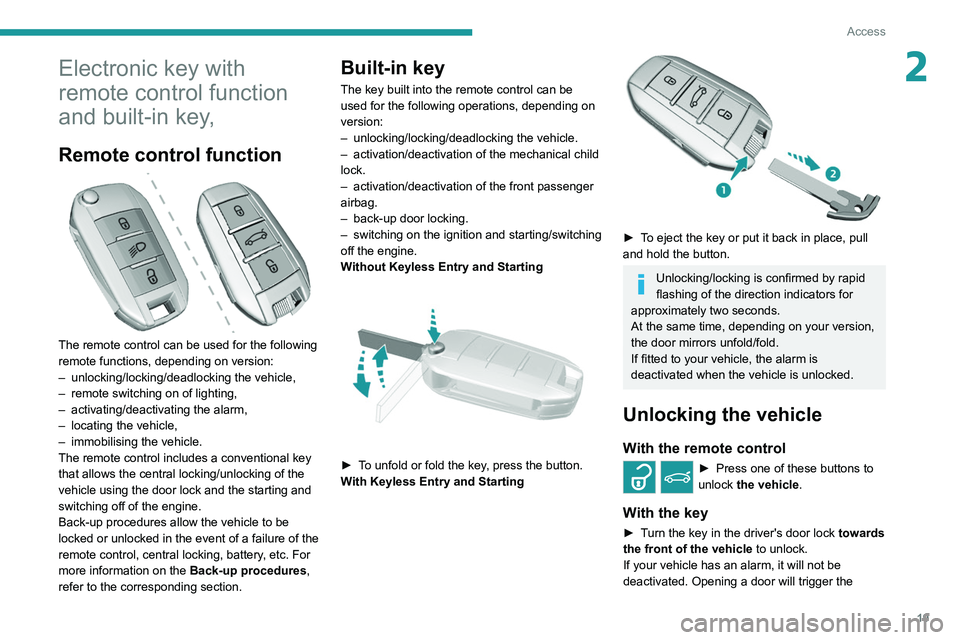
The remote control can be used for the following
remote functions, depending on version:
–
unlocking/locking/deadlocking the vehicle,
–
remote switching on of lighting,
–
activating/deactivating the alarm,
–
locating the vehicle,
–
immobilising the vehicle.
The remote control includes a conventional key
that allows the central locking/unlocking of the
vehicle using the door lock and the starting and
switching off of the engine.
Back-up procedures allow the vehicle to be
locked or unlocked in the event of a failure of the
remote control, central locking, battery
, etc. For
more information on the Back-up procedures,
refer to the corresponding section.
Built-in key
The key built into the remote control can be
used for the following operations, depending on
version:
–
unlocking/locking/deadlocking the vehicle.
–
activation/deactivation of the mechanical child
lock.
–
activation/deactivation of the front passenger
airbag.
–
back-up door locking.
–
switching on the ignition and starting/switching
off the engine.
W
ithout Keyless Entry and Starting
► To unfold or fold the key, press the button.
With Keyless Entry and Starting
► To eject the key or put it back in place, pull
and hold the button.
Unlocking/locking is confirmed by rapid
flashing of the direction indicators for
approximately two seconds.
At the same time, depending on your version,
the door mirrors unfold/fold.
If fitted to your vehicle, the alarm is
deactivated when the vehicle is unlocked.
Unlocking the vehicle
With the remote control
► Press one of these buttons to
unlock the vehicle.
With the key
► Turn the key in the driver's door lock towards
the front of the vehicle to unlock.
If your vehicle has an alarm, it will not be
deactivated. Opening a door will trigger the
Page 27 of 244
25
Access
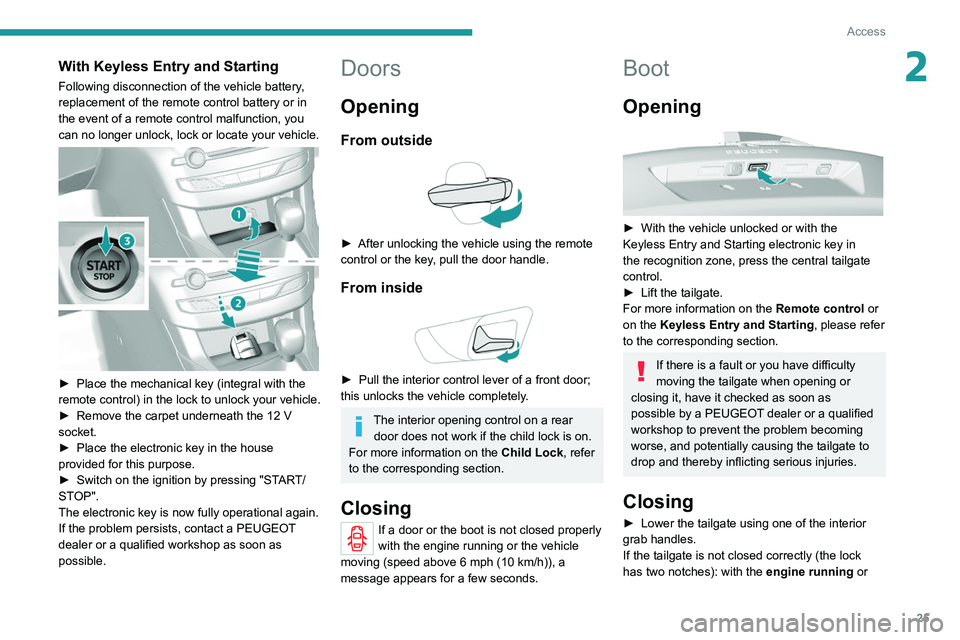
2With Keyless Entry and Starting
Following disconnection of the vehicle battery,
replacement of the remote control battery or in
the event of a remote control malfunction, you
can no longer unlock, lock or locate your vehicle.
► Place the mechanical key (integral with the
remote control) in the lock to unlock your vehicle.
►
Remove the carpet underneath the 12
V
socket.
►
Place the electronic key in the house
provided for this purpose.
►
Switch on the ignition by pressing "ST
ART/
STOP".
The electronic key is now fully operational again.
If the problem persists, contact a PEUGEOT
dealer or a qualified workshop as soon as
possible.
Doors
Opening
From outside
► After unlocking the vehicle using the remote
control or the key , pull the door handle.
From inside
► Pull the interior control lever of a front door;
this unlocks the vehicle completely .
The interior opening control on a rear door does not work if the child lock is on.
For more information on the Child Lock, refer
to the corresponding section.
Closing
If a door or the boot is not closed properly
with the engine running or the vehicle
moving
(speed above 6 mph (10 km/h)), a
message appears for a few seconds.
Boot
Opening
► With the vehicle unlocked or with the Keyless Entry and Starting electronic key in
the recognition zone, press the central tailgate
control.
►
Lift the tailgate.
For more information on the Remote control
or
on the
Keyless Entry and Starting
, please refer
to the corresponding section.
If there is a fault or you have difficulty
moving the tailgate when opening or
closing it, have it checked as soon as
possible by a PEUGEOT dealer or a qualified
workshop to prevent the problem becoming
worse, and potentially causing the tailgate to
drop and thereby inflicting serious injuries.
Closing
► Lower the tailgate using one of the interior
grab handles.
If the tailgate is not closed correctly (the lock
has two notches): with the
engine running or
Page 28 of 244
26
Access
For all work on the alarm system, contact a
PEUGEOT dealer or a qualified workshop.
Locking the vehicle with full
alarm system
Activation
► Switch off the engine and exit the vehicle.► Lock the vehicle using the remote
control.
or
► Lock the vehicle with the " Keyless Entry and
Starting" system.
The monitoring system is active: the indicator
lamp in the button flashes once per second and
the direction indicators come on for about 2
seconds.
After an instruction to lock the vehicle using
the remote control or the " Keyless Entry
and Starting" system, the exterior perimeter
monitoring is activated after 5 seconds, the
interior volumetric monitoring after 45 seconds.
If a door, boot, bonnet, etc. is not properly
closed, the vehicle is not locked but monitoring
will be activated after 45 seconds.
Deactivation
► Press this unlocking button on the
remote control.
or
* Only cases valid for GTi vehicles fitted with just the anti-tilt alarm.
when moving (speed above 6 mph (10 km/h)), a
message appears for a few seconds.
In the event of a fault or difficulties felt in
manoeuvring the tailgate when opening
or closing it, have it quickly checked by a
PEUGEOT dealer or a qualified workshop to
stop this issue getting worse and so as to not
cause the tailgate to drop, and serious
injuries.
Back-up control
System allowing the mechanical unlocking of the
boot in the event of a battery or central locking
system malfunction.
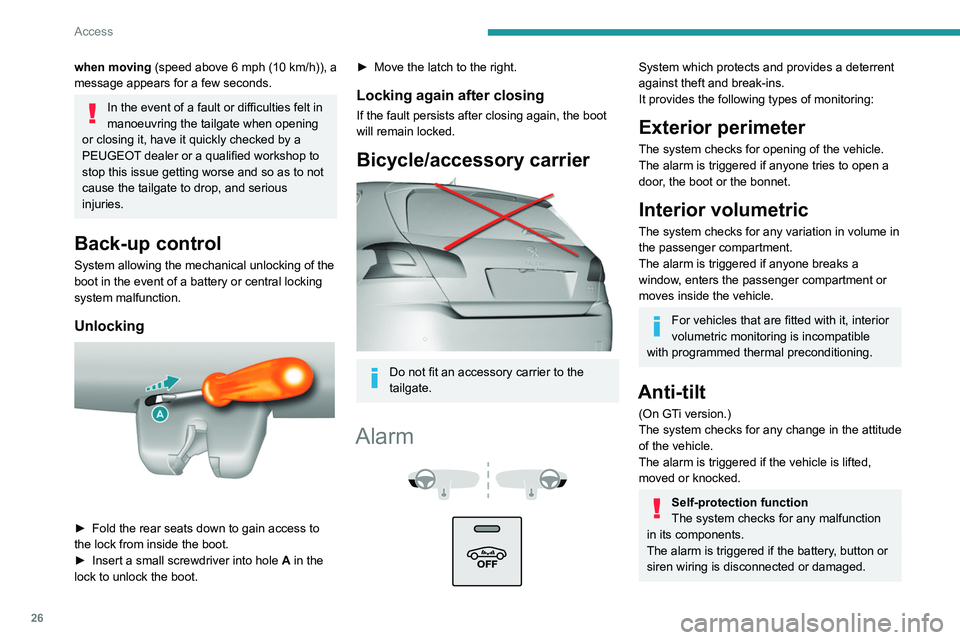
Unlocking
► Fold the rear seats down to gain access to
the lock from inside the boot.
►
Insert a small screwdriver into hole A
in the
lock to unlock the boot.
► Move the latch to the right.
Locking again after closing
If the fault persists after closing again, the boot
will remain locked.
Bicycle/accessory carrier
Do not fit an accessory carrier to the
tailgate.
Alarm
System which protects and provides a deterrent
against theft and break-ins.
It provides the following types of monitoring:
Exterior perimeter
The system checks for opening of the vehicle.
The alarm is triggered if anyone tries to open a
door, the boot or the bonnet.
Interior volumetric
The system checks for any variation in volume in
the passenger compartment.
The alarm is triggered if anyone breaks a
window, enters the passenger compartment or
moves inside the vehicle.
For vehicles that are fitted with it, interior
volumetric monitoring is incompatible
with programmed thermal preconditioning.
Anti-tilt
(On GTi version.)
The system checks for any change in the attitude
of the vehicle.
The alarm is triggered if the vehicle is lifted,
moved or knocked.
Self-protection function
The system checks for any malfunction
in its components.
The alarm is triggered if the battery, button or
siren wiring is disconnected or damaged.
Page 29 of 244
27
Access
2For all work on the alarm system, contact a
PEUGEOT dealer or a qualified workshop.
Locking the vehicle with full
alarm system
Activation
► Switch off the engine and exit the vehicle.► Lock the vehicle using the remote
control.
or
►
Lock the vehicle with the "
Keyless Entry and
Starting" system.
The monitoring system is active: the indicator
lamp in the button flashes once per second and
the direction indicators come on for about 2
seconds.
After an instruction to lock the vehicle using
the remote control or the "
Keyless Entry
and Starting" system, the exterior perimeter
monitoring is activated after 5 seconds, the
interior volumetric monitoring after 45 seconds.
If a door
, boot, bonnet, etc. is not properly
closed, the vehicle is not locked but monitoring
will be activated after 45 seconds.
Deactivation
► Press this unlocking button on the
remote control.
or
* Only cases valid for GT i vehicles fitted with just the anti-tilt alarm.
► Unlock the vehicle with the " Keyless Entry
and Starting" system.
The monitoring system is deactivated: the
indicator lamp in the button goes off and the
direction indicators flash for about 2 seconds.
Where the vehicle locks itself again
automatically (occurs 30 seconds after
unlocking, if a door or the boot is not opened),
the monitoring system is not reactivated
automatically.
To reactivate it, the vehicle must be unlocked
and locked again, using the remote control
key or the "
Keyless Entry and Starting"
system.
Locking the vehicle
with exterior perimeter
monitoring only
Deactivate the interior volumetric monitoring
(and anti-tilt monitoring if fitted to your vehicle) to
avoid unwanted triggering of the alarm in cases
such as:
–
Passengers are inside the vehicle.
–
Leaving a window partially open.
–
W
ashing your vehicle.
–
Changing a wheel*.
–
Having your vehicle towed*.
–
T
ransport by ship or ferry*.
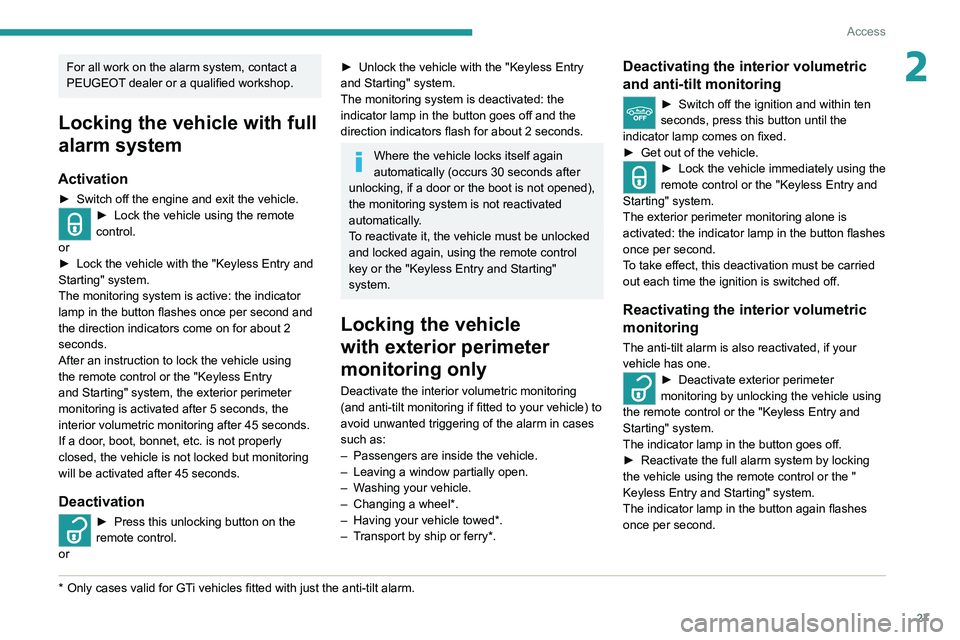
Deactivating the interior volumetric
and anti-tilt monitoring
► Switch off the ignition and within ten
seconds, press this button until the
indicator lamp comes on fixed.
►
Get out of the vehicle.
► Lock the vehicle immediately using the
remote control or the " Keyless Entry and
Starting" system.
The exterior perimeter monitoring alone is
activated: the indicator lamp in the button flashes
once per second.
T
o take effect, this deactivation must be carried
out each time the ignition is switched off.
Reactivating the interior volumetric
monitoring
The anti-tilt alarm is also reactivated, if your
vehicle has one.
► Deactivate exterior perimeter
monitoring by unlocking the vehicle using
the remote control or the "
Keyless Entry and
Starting" system.
The indicator lamp in the button goes off.
►
Reactivate the full alarm system by locking
the vehicle using the remote control or the "
Keyless Entry and Starting" system.
The indicator lamp in the button again flashes
once per second.
Page 33 of 244
31
Ease of use and comfort
3Before moving the seat backwards,
ensure that there is nothing that might
prevent the full travel of the seat.
There is a risk of trapping or pinching
passengers if present in the rear seats or
jamming the seat if large objects are placed
on the floor behind the seat.
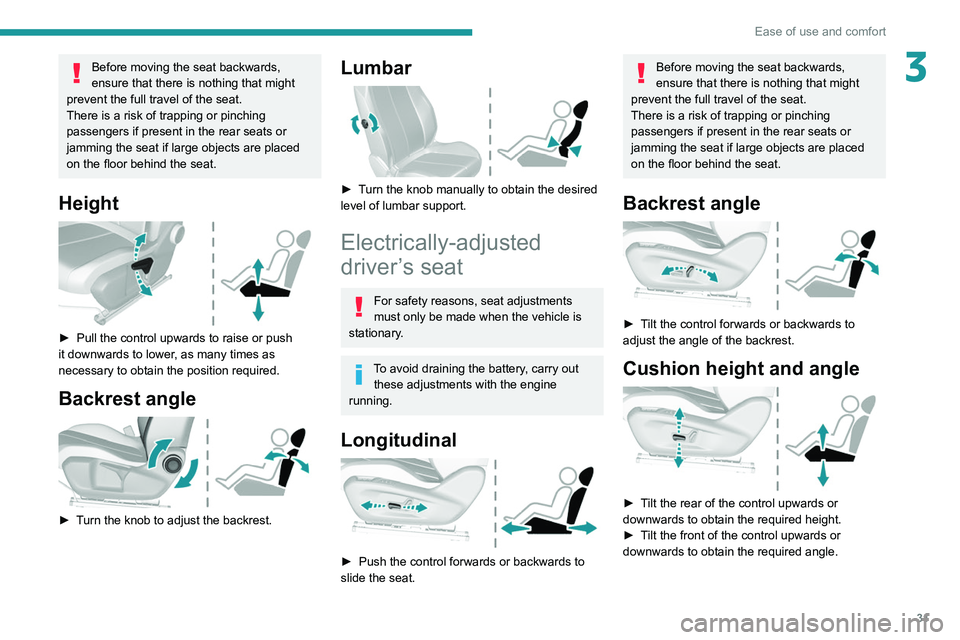
Height
► Pull the control upwards to raise or push
it downwards to lower , as many times as
necessary to obtain the position required.
Backrest angle
► Turn the knob to adjust the backrest.
Lumbar
► Turn the knob manually to obtain the desired
level of lumbar support.
Electrically-adjusted
driver’s seat
For safety reasons, seat adjustments
must only be made when the vehicle is
stationary.
To avoid draining the battery, carry out these adjustments with the engine
running.
Longitudinal
► Push the control forwards or backwards to
slide the seat.
Before moving the seat backwards,
ensure that there is nothing that might
prevent the full travel of the seat.
There is a risk of trapping or pinching
passengers if present in the rear seats or
jamming the seat if large objects are placed
on the floor behind the seat.
Backrest angle
► Tilt the control forwards or backwards to
adjust the angle of the backrest.
Cushion height and angle
► Tilt the rear of the control upwards or
downwards to obtain the required height.
►
T
ilt the front of the control upwards or
downwards to obtain the required angle.
Page 34 of 244
32
Ease of use and comfort
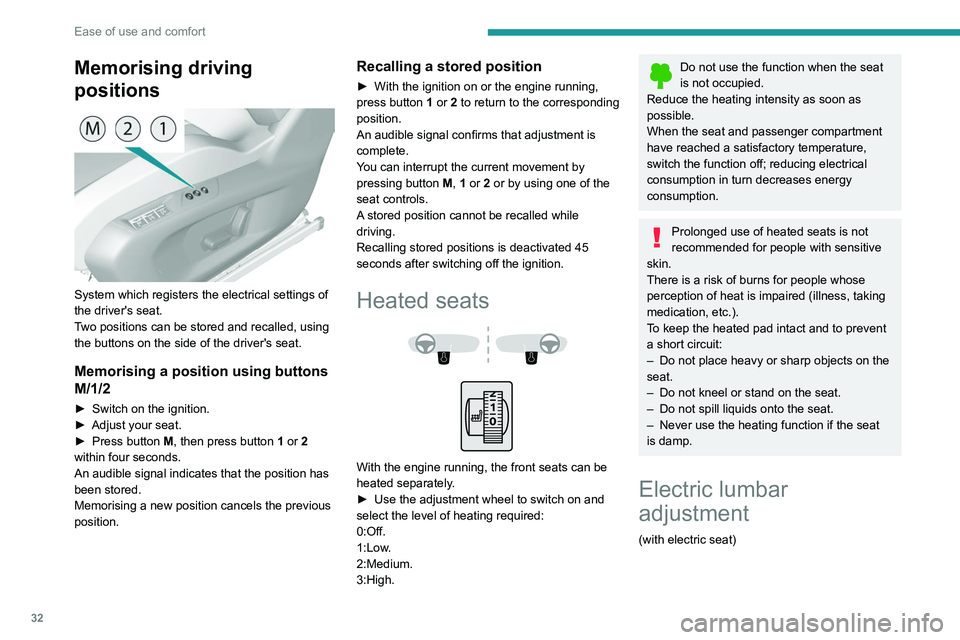
Memorising driving
positions
System which registers the electrical settings of
the driver's seat.
Two positions can be stored and recalled, using
the buttons on the side of the driver's seat.
Memorising a position using buttons
M/1/2
► Switch on the ignition.
► Adjust your seat.
►
Press button
M, then press button 1 or 2
within four seconds.
An audible signal indicates that the position has
been stored.
Memorising a new position cancels the previous
position.
Recalling a stored position
► With the ignition on or the engine running,
press button 1 or 2 to return to the corresponding
position.
An audible signal confirms that adjustment is
complete.
You can interrupt the current movement by
pressing button M, 1 or 2 or by using one of the
seat controls.
A stored position cannot be recalled while
driving.
Recalling stored positions is deactivated 45
seconds after switching off the ignition.
Heated seats
With the engine running, the front seats can be
heated separately.
►
Use the adjustment wheel to switch on and
select the level of heating required:
0:Off.
1:Low
.
2:Medium.
3:High.
Do not use the function when the seat
is not occupied.
Reduce the heating intensity as soon as
possible.
When the seat and passenger compartment
have reached a satisfactory temperature,
switch the function off; reducing electrical
consumption in turn decreases energy
consumption.
Prolonged use of heated seats is not
recommended for people with sensitive
skin.
There is a risk of burns for people whose
perception of heat is impaired (illness, taking
medication, etc.).
To keep the heated pad intact and to prevent
a short circuit:
–
Do not place heavy or sharp objects on the
seat.
–
Do not kneel or stand on the seat.
–
Do not spill liquids onto the seat.
–
Never use the heating function if the seat
is damp.
Electric lumbar
adjustment
(with electric seat)