fuel Peugeot 308 2021 Owner's Guide
[x] Cancel search | Manufacturer: PEUGEOT, Model Year: 2021, Model line: 308, Model: Peugeot 308 2021Pages: 244, PDF Size: 8.21 MB
Page 177 of 244
175
In the event of a breakdown
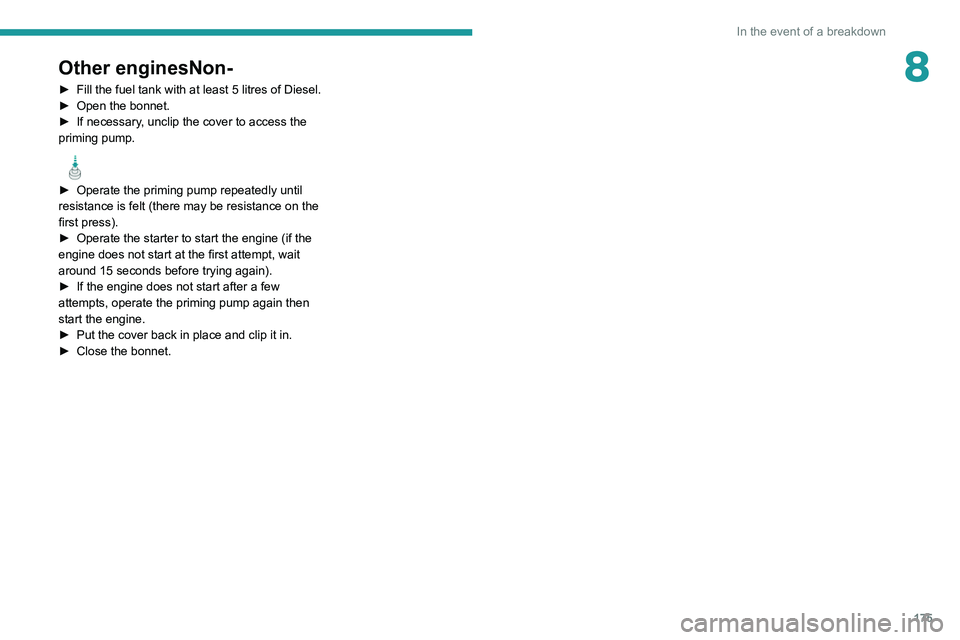
8Other enginesNon-
► Fill the fuel tank with at least 5 litres of Diesel.
► Open the bonnet.
►
If necessary
, unclip the cover to access the
priming pump.
► Operate the priming pump repeatedly until
resistance is felt (there may be resistance on the
first press).
►
Operate the starter to start the engine (if the
engine does not start at the first attempt, wait
around 15 seconds before trying again).
►
If the engine does not start after a few
attempts, operate the priming pump again then
start the engine.
►
Put the cover back in place and clip it in.
►
Close the bonnet.
Page 178 of 244
176
Technical data
Engine technical data and
towed loads
Engines
The engine characteristics are given in the
vehicle's registration document, as well as in
sales brochures.
The maximum power corresponds to the value type-approved on a test bed, under
conditions defined in European legislation
(Directive 1999/99/EC).
For more information, contact a PEUGEOT
dealer or a qualified workshop.
Weights and towed loads
The weights and towed loads relating to
the vehicle are indicated on the registration
document, as well as in sales brochures.
These values are also indicated on the
manufacturer's plate or label.
For more information, contact a PEUGEOT
dealer or a qualified workshop.
The GTW (Gross Train Weight) and towed load
values indicated are valid up to a maximum
altitude of 1,000 metres. The towed load value
must be reduced by 10% for each additional
1,000 metres of altitude.
The maximum authorised nose weight
corresponds to the weight permitted on the
towball.
When exterior temperatures are high, the
vehicle performance may be limited in
order to protect the engine. When the exterior
temperature is higher than 37°C, reduce the
towed weight.
Towing even with a lightly loaded vehicle can adversely affect its road holding.
Braking distances are increased when towing
a trailer.
When using a vehicle to tow, never exceed
a speed of 62 mph (100
km/h) (observe the
local legislation in force).
If the exterior temperature is high, it is
recommended that the engine is allowed
to idle for 1 to 2 minutes after the vehicle
comes to a stop, to facilitate its cooling.
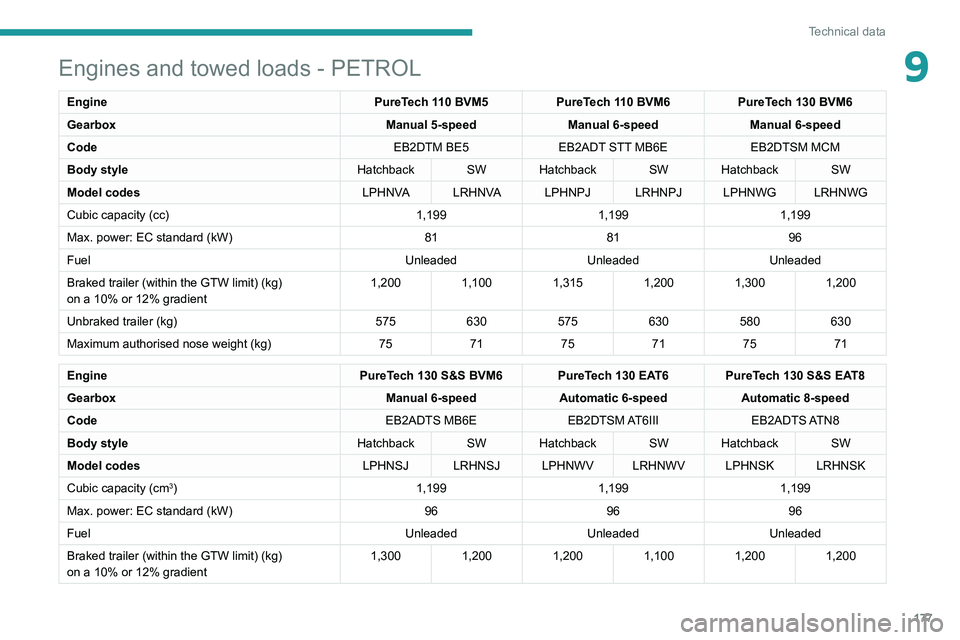
Engines and towed loads - PETROL
Engine PureTech 110 BVM5PureTech 110 BVM6PureTech 130 BVM6
Gearbox Manual 5-speedManual 6-speedManual 6-speed
Code EB2DTM BE5EB2ADT STT MB6E EB2DTSM MCM
Body style Hatchback SW Hatchback SW Hatchback SW
Model codes LPHNVA LRHNVA LPHNPJ LRHNPJ LPHNWG LRHNWG
Cubic capacity (cc) 1,1991,1991,199
Max. power: EC standard (kW) 818196
Fuel UnleadedUnleadedUnleaded
Braked trailer (within the GTW limit) (kg)
on a 10% or 12% gradient 1,200
1,1001,3151,2001,3001,200
Unbraked trailer (kg) 575630575630580630
Maximum authorised nose weight (kg) 757175717571
Engine PureTech 130 S&S BVM6 PureTech 130 EAT6 PureTech 130 S&S EAT8
Gearbox Manual 6-speedAutomatic 6-speed Automatic 8-speed
Code EB2ADTS MB6EEB2DTSM AT6III EB2ADTS ATN8
Body style Hatchback SW Hatchback SW Hatchback SW
Model codes LPHNSJ LRHNSJ LPHNWV LRHNWV LPHNSK LRHNSK
Cubic capacity (cm
3) 1,1991,1991,199
Max. power: EC standard (kW) 969696
Fuel UnleadedUnleadedUnleaded
Braked trailer (within the GTW limit) (kg)
on a 10% or 12% gradient 1,300
1,2001,2001,1001,2001,200
Page 179 of 244
177
Technical data
9Engines and towed loads - PETROL
EnginePureTech 110 BVM5PureTech 110 BVM6PureTech 130 BVM6
Gearbox Manual 5-speedManual 6-speedManual 6-speed
Code EB2DTM BE5EB2ADT STT MB6E EB2DTSM MCM
Body style Hatchback SW Hatchback SW Hatchback SW
Model codes LPHNVA LRHNVA LPHNPJ LRHNPJ LPHNWG LRHNWG
Cubic capacity (cc) 1,1991,1991,199
Max. power: EC standard (kW) 818196
Fuel UnleadedUnleadedUnleaded
Braked trailer (within the GTW limit) (kg)
on a 10% or 12% gradient 1,200
1,1001,3151,2001,3001,200
Unbraked trailer (kg) 575630575630580630
Maximum authorised nose weight (kg) 757175717571
Engine PureTech 130 S&S BVM6 PureTech 130 EAT6 PureTech 130 S&S EAT8
Gearbox Manual 6-speedAutomatic 6-speed Automatic 8-speed
Code EB2ADTS MB6EEB2DTSM AT6III EB2ADTS ATN8
Body style Hatchback SW Hatchback SW Hatchback SW
Model codes LPHNSJ LRHNSJ LPHNWV LRHNWV LPHNSK LRHNSK
Cubic capacity (cm
3) 1,1991,1991,199
Max. power: EC standard (kW) 969696
Fuel UnleadedUnleadedUnleaded
Braked trailer (within the GTW limit) (kg)
on a 10% or 12% gradient 1,300
1,2001,2001,1001,2001,200
Page 180 of 244
178
Technical data
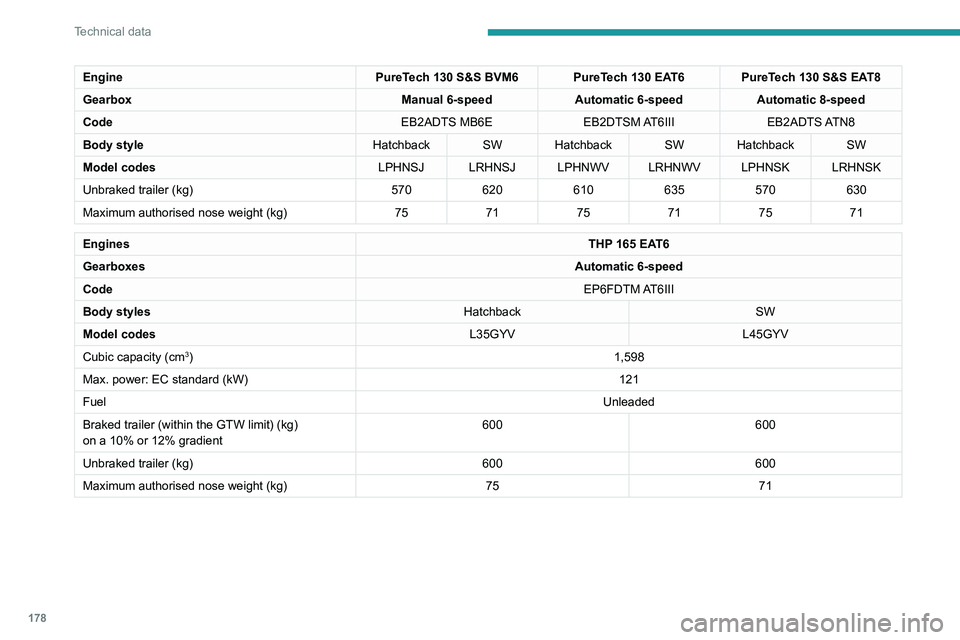
EnginePureTech 130 S&S BVM6 PureTech 130 EAT6 PureTech 130 S&S EAT8
Gearbox Manual 6-speedAutomatic 6-speed Automatic 8-speed
Code EB2ADTS MB6EEB2DTSM AT6III EB2ADTS ATN8
Body style Hatchback SW Hatchback SW Hatchback SW
Model codes LPHNSJ LRHNSJ LPHNWV LRHNWV LPHNSK LRHNSK
Unbraked trailer (kg) 570620610635570630
Maximum authorised nose weight (kg) 757175717571
Engines THP 165 EAT6
Gearboxes Automatic 6-speed
Code EP6FDTM AT6III
Body styles HatchbackSW
Model codes L35GYVL45GYV
Cubic capacity (cm
3) 1,598
Max. power: EC standard (kW) 121
Fuel Unleaded
Braked trailer (within the GTW limit) (kg)
on a 10% or 12% gradient 600
600
Unbraked trailer (kg) 600600
Maximum authorised nose weight (kg) 7571
Engines and towed loads - PETROL GTi
Engine PureTech 263 S&S BVM6
Gearbox Manual 6-speed
Code EP6FADTR MCM STT
Body style Hatchback
Model codes L3EGXP
Cubic capacity (cc) 1,598
Max. power: EC standard (kW) 193
Fuel Unleaded
(RON 98 recommended)
Braked trailer (within the GTW limit) (kg)
on a 10% or 12% gradient 0
Unbraked trailer (kg) 0
Maximum authorised nose weight (kg) 0
Engines and towed loads - DIESEL
EngineBlueHDi 100 S&S BVM6BlueHDi 130 S&S BVM6
Gearbox Manual 6-speedManual 6-speed
Code DV5RD STT MB6DV5RC ML6C STT
Body style HatchbackHatchback SW
Model codes LBYHYPLBYHZJLCYHZJ
Cubic capacity (CC) 1,4991,499
Max. power: EC standard (kW) 7596
Page 181 of 244
179
Technical data
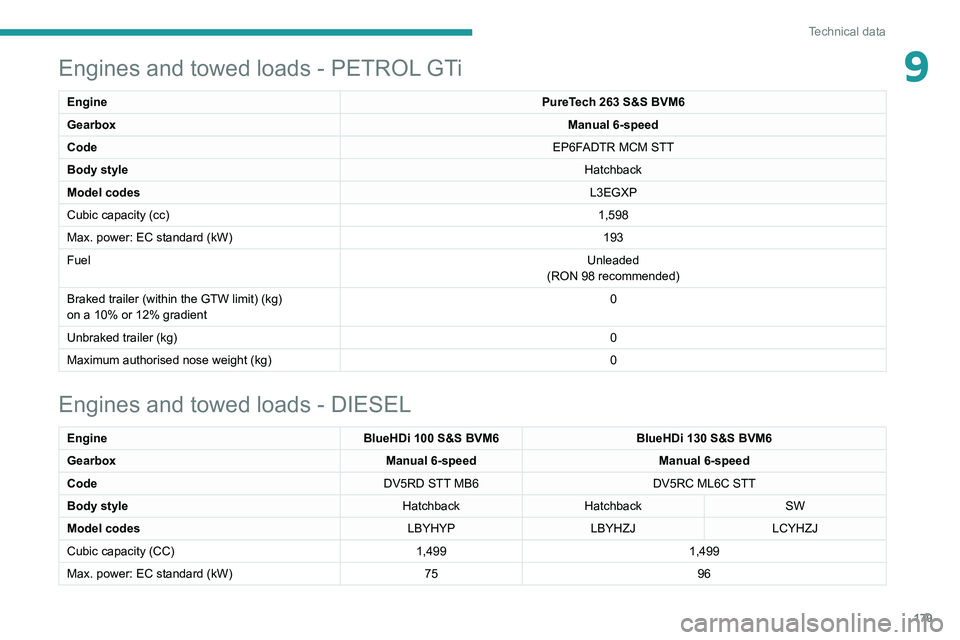
9Engines and towed loads - PETROL GTi
Engine PureTech 263 S&S BVM6
Gearbox Manual 6-speed
Code EP6FADTR MCM STT
Body style Hatchback
Model codes L3EGXP
Cubic capacity (cc) 1,598
Max. power: EC standard (kW) 193
Fuel Unleaded
(RON 98 recommended)
Braked trailer (within the GTW limit) (kg)
on a 10% or 12% gradient 0
Unbraked trailer (kg) 0
Maximum authorised nose weight (kg) 0
Engines and towed loads - DIESEL
EngineBlueHDi 100 S&S BVM6BlueHDi 130 S&S BVM6
Gearbox Manual 6-speedManual 6-speed
Code DV5RD STT MB6DV5RC ML6C STT
Body style HatchbackHatchback SW
Model codes LBYHYPLBYHZJLCYHZJ
Cubic capacity (CC) 1,4991,499
Max. power: EC standard (kW) 7596
Page 182 of 244
180
Technical data
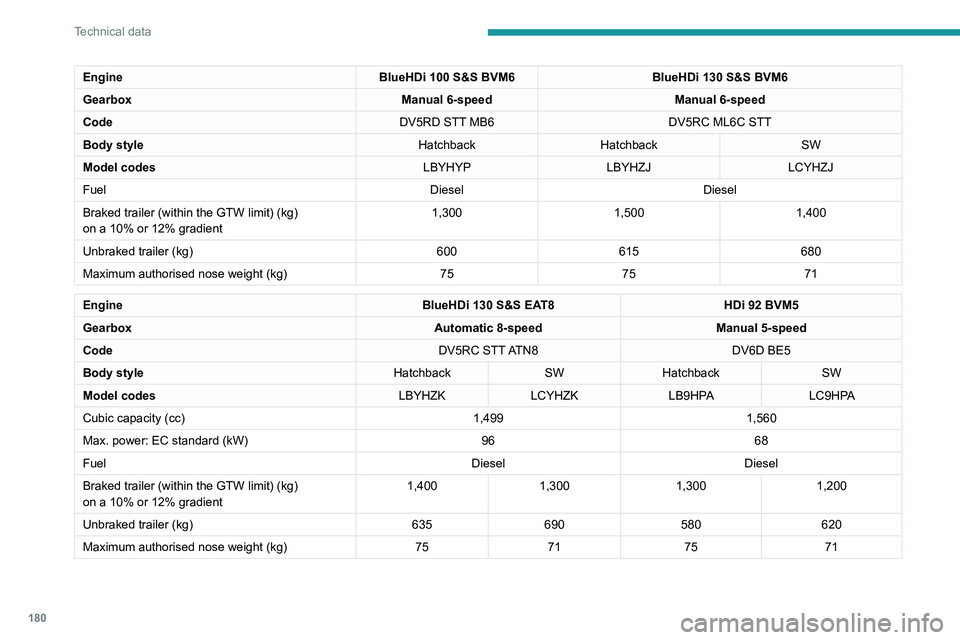
EngineBlueHDi 100 S&S BVM6BlueHDi 130 S&S BVM6
Gearbox Manual 6-speedManual 6-speed
Code DV5RD STT MB6DV5RC ML6C STT
Body style HatchbackHatchback SW
Model codes LBYHYPLBYHZJLCYHZJ
Fuel DieselDiesel
Braked trailer (within the GTW limit) (kg)
on a 10% or 12% gradient 1,300
1,5001,400
Unbraked trailer (kg) 600615680
Maximum authorised nose weight (kg) 757571
Engine BlueHDi 130 S&S EAT8HDi 92 BVM5
Gearbox Automatic 8-speedManual 5-speed
Code DV5RC STT ATN8DV6D BE5
Body style HatchbackSWHatchback SW
Model codes LBYHZKLCYHZK LB9HPA LC9HPA
Cubic capacity (cc) 1,4991,560
Max. power: EC standard (kW) 9668
Fuel DieselDiesel
Braked trailer (within the GTW limit) (kg)
on a 10% or 12% gradient 1,400
1,300 1,300 1,200
Unbraked trailer (kg) 635690 580 620
Maximum authorised nose weight (kg) 7571 75 71
Dimensions (mm)
These dimensions have been measured on an
unladen vehicle.
Hatchback
Page 196 of 244
194
PEUGEOT Connect Radio
Calling a new number
Press Telephone to display the main
page.
Enter the phone number using the digital
keypad.
Press "Call" to start the call.
Calling a contact
Press Telephone to display the main
page.
Or press and hold
the steering mounted PHONE button.
Press "Contacts".
Select the desired contact from the displayed list.
Press "Call".
Calling a recently used
number
Press Telephone to display the main
page.
Or
Press and hold
the steering mounted button.
Press "Recent calls".
Select the desired contact from the displayed list.
It is always possible to make a call
directly from the telephone; as a safety
measure, first park the vehicle.
Setting the ringtone
Press Telephone to display the main
page.
Press the "OPTIONS " button to access the
secondary page.
Press "Ring volume" to display the
volume bar.
Press the arrows or move the slider to set
the ring volume.
Settings
Configuring profiles
Press Settings to display the main page.
Press "Profiles".
Select "Profile 1", "Profile 2", "Profile 3” or
"Common profile ".
Press this button to enter a name for the
profile using the virtual keypad.
Press "OK" to save.
Press the back arrow to confirm.
Press this button to activate the profile.
Press the back arrow again to confirm.
Press this button to reset the selected
profile.
Adjusting the brightness
Press Settings to display the main page.
Press Brightness.
Move the slider to adjust the brightness of
the screen and/or the instrument panel
(depending on version).
Press in the shaded area to confirm.
Modifying system settings
Press Settings to display the main page.
Press "Configuration" to access the
secondary page.
Press "System configuration".
Press the "Units" tab to change the units of
distance, fuel consumption and temperature.
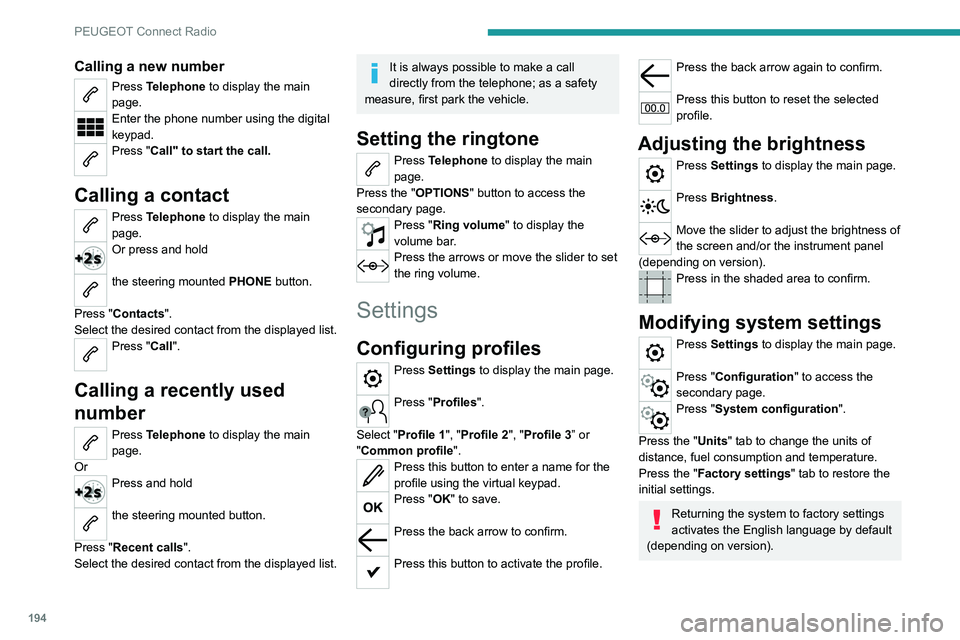
Press the "Factory settings" tab to restore the
initial settings.
Returning the system to factory settings
activates the English language by default
(depending on version).
Page 210 of 244
208
PEUGEOT Connect Nav
Press "Private mode".
THEN
Activate or deactivate:
–
"No sharing (data, vehicle position) ".
–
“Only data sharing "
–
"Sharing data and vehicle position "
Settings specific to
connected navigation
Press Navigation to display the main
page.
Press the "MENU" button to access the
secondary page.
Select "Settings".
Select the "Map” tab.
Activate or deactivate: – "Allow declaration of danger zones ".
–
"Guidance to final destination on foot ".
These settings must be configured for each
profile.
Press “OK” to confirm your selection.
Select the "Alerts” tab.
Activate or deactivate:
–
"Advise of car park nearby ".
–
"Filling station alert ".
– “Risk areas alert" then press the warning icon
(triangle) to configure alerts.
–
"Give an audible warning ".
–
"Advise proximity of POI 1 ".
–
"Advise proximity of POI 2 ".
Press “OK” to confirm your selection.
The "Notifications", in the upper bar, can
be accessed at any time.
Danger zone alerts may or may not be
displayed, depending on the applicable
legislation and subscription to the
corresponding service.
When "TOMTOM TRAFFIC” appears, the
services are available.
The services offered with connected navigation are as follows.
A Connected Services pack:
–
Weather,
–
Filling stations,
–
Car park,
–
T
raffic,
–
POI local search.
A
Danger area pack (optional).
Declaration: "Risk areas
alert"
To send information about danger zones, select the option:Allow declaration of
danger zones
Press Navigation to display the main
page.
Press the "Declare a new danger zone"
button located in the side bars or the
upper bar of the touch screen (depending on
equipment).
Select the "Type” option to select the type
of "Danger area".
Select the ""Speed" option and enter it
using the virtual keypad.
Press "OK" to save and send the
information.
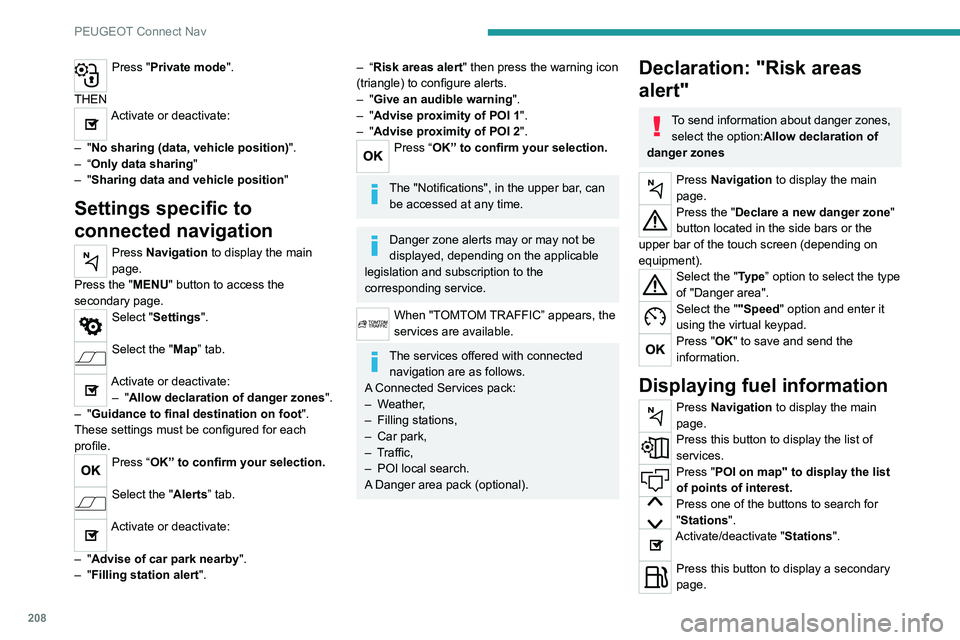
Displaying fuel information
Press Navigation to display the main
page.
Press this button to display the list of
services.
Press "POI on map" to display the list
of points of interest.
Press one of the buttons to search for
"Stations".
Activate/deactivate "Stations".
Press this button to display a secondary
page.
Page 211 of 244
209
PEUGEOT Connect Nav
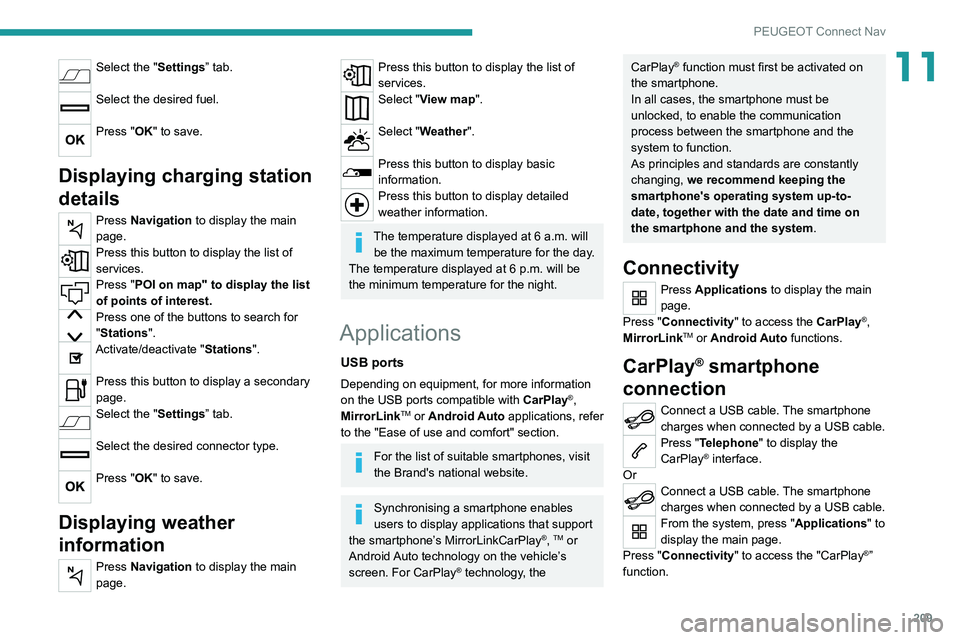
11Select the "Settings” tab.
Select the desired fuel.
Press "OK" to save.
Displaying charging station
details
Press Navigation to display the main
page.
Press this button to display the list of
services.
Press "POI on map" to display the list
of points of interest.
Press one of the buttons to search for
"Stations".
Activate/deactivate "Stations".
Press this button to display a secondary
page.
Select the "Settings” tab.
Select the desired connector type.
Press "OK" to save.
Displaying weather
information
Press Navigation to display the main
page.
Press this button to display the list of
services.
Select "View map".
Select "Weather".
Press this button to display basic
information.
Press this button to display detailed
weather information.
The temperature displayed at 6 a.m. will be the maximum temperature for the day.
The temperature displayed at 6 p.m. will be
the minimum temperature for the night.
Applications
USB ports
Depending on equipment, for more information
on the USB ports compatible with CarPlay®,
MirrorLinkTM or Android Auto applications, refer
to the "Ease of use and comfort" section.
For the list of suitable smartphones, visit
the Brand's national website.
Synchronising a smartphone enables
users to display applications that support
the smartphone’s MirrorLinkCarPlay
®, TM or
Android Auto
technology on the vehicle’s
screen. For CarPlay
® technology, the
CarPlay® function must first be activated on
the smartphone.
In all cases, the smartphone must be
unlocked, to enable the communication
process between the smartphone and the
system to function.
As principles and standards are constantly
changing, we recommend keeping the
smartphone's operating system up-to-
date, together with the date and time on
the smartphone and the system.
Connectivity
Press Applications to display the main
page.
Press "Connectivity" to access the CarPlay
®,
MirrorLinkTM or Android Auto functions.
CarPlay® smartphone
connection
Connect a USB cable. The smartphone
charges when connected by a USB cable.
Press "Telephone" to display the
CarPlay® interface.
Or
Connect a USB cable. The smartphone
charges when connected by a USB cable.
From the system, press "Applications " to
display the main page.
Press "Connectivity" to access the "CarPlay
®”
function.
Page 220 of 244
218
PEUGEOT Connect Nav
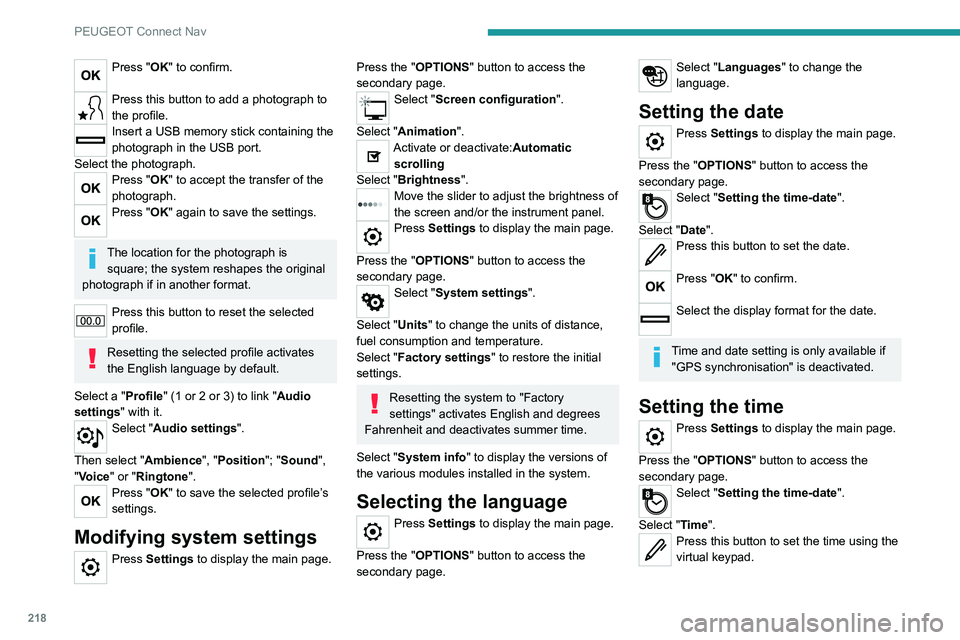
Press "OK" to confirm.
Press this button to add a photograph to
the profile.
Insert a USB memory stick containing the
photograph in the USB port.
Select the photograph.
Press "OK" to accept the transfer of the
photograph.
Press "OK" again to save the settings.
The location for the photograph is square; the system reshapes the original
photograph if in another format.
Press this button to reset the selected
profile.
Resetting the selected profile activates
the English language by default.
Select a "Profile" (1 or 2 or 3) to link "Audio
settings" with it.
Select "Audio settings".
Then select "Ambience", "Position"; "Sound ",
"Voice" or "Ringtone ".
Press "OK" to save the selected profile’s
settings.
Modifying system settings
Press Settings to display the main page.
Press the "OPTIONS" button to access the
secondary page.
Select "Screen configuration".
Select "Animation".
Activate or deactivate:Automatic scrolling
Select "Brightness".
Move the slider to adjust the brightness of
the screen and/or the instrument panel.
Press Settings to display the main page.
Press the "OPTIONS " button to access the
secondary page.
Select "System settings".
Select "Units" to change the units of distance,
fuel consumption and temperature.
Select "Factory settings" to restore the initial
settings.
Resetting the system to "Factory
settings" activates English and degrees
Fahrenheit and deactivates summer time.
Select "System info" to display the versions of
the various modules installed in the system.
Selecting the language
Press Settings to display the main page.
Press the "OPTIONS " button to access the
secondary page.
Select "Languages" to change the
language.
Setting the date
Press Settings to display the main page.
Press the "OPTIONS " button to access the
secondary page.
Select "Setting the time-date".
Select "Date".
Press this button to set the date.
Press "OK" to confirm.
Select the display format for the date.
Time and date setting is only available if "GPS synchronisation" is deactivated.
Setting the time
Press Settings to display the main page.
Press the "OPTIONS " button to access the
secondary page.
Select "Setting the time-date".
Select "Time".
Press this button to set the time using the
virtual keypad.