start stop button Peugeot 308 2021 Owner's Guide
[x] Cancel search | Manufacturer: PEUGEOT, Model Year: 2021, Model line: 308, Model: Peugeot 308 2021Pages: 244, PDF Size: 8.21 MB
Page 108 of 244
106
Driving
Modifying the cruise speed
setting
Cruise control must be active.
To modify the cruise speed setting, based on the
current speed of the vehicle:
► Briefly press button 2 or 3 to change the
value in steps of + or - 1 mph (km/h).
► Press and hold button 2 or 3 to change the
value in steps of + or - 5 mph (km/h).
Pressing and holding button 2 or
3 results in a rapid change in the speed
of the vehicle.
As a precaution, we recommend setting a cruise speed fairly close to the current
speed of your vehicle, to avoid any sudden
acceleration or deceleration of the vehicle.
To modify the cruise speed setting using memorised speed settings and from the touch
screen:
► press button 5 to display the memorised
speed settings,
► press the button for the desired speed
setting.
The selection screen closes after a few
moments.
This setting becomes the new cruise speed.
To modify the cruise speed setting using the speed suggested by the Speed Limit Recognition
and Recommendation shown on the instrument
panel:
– On winding or steep roads.
– On slippery or flooded roads.
–
In poor weather conditions.
–
Driving on a speed circuit.
–
Driving on a rolling road.
–
When using snow chains, non-slip covers
or studded tyres.
Cruise control
Refer to the General recommendations on the
use of driving and manoeuvring aids and to
Cruise control - particular recommendations.
This system automatically keeps the vehicle’s speed at the cruise value
programmed by the driver (speed setting),
without using the accelerator pedal.
Cruise control is switched on manually.
It requires a minimum vehicle speed of 19 mph
(30
km/h).
With a manual gearbox, third gear or higher must
be engaged.
With an automatic gearbox, mode
D
or second
gear or higher in mode
M
must be engaged.
Depending on engine, cruise control is
paused manually (button 4) or by
pressing the brake or clutch pedal or if the
electronic stability control (ESC) system is
triggered for safety reasons.
Depending on engine, with a manual gearbox
and Stop & Start, cruise control remains
active after changing gear.
Switching off the ignition cancels any
speed setting.
Steering mounted control
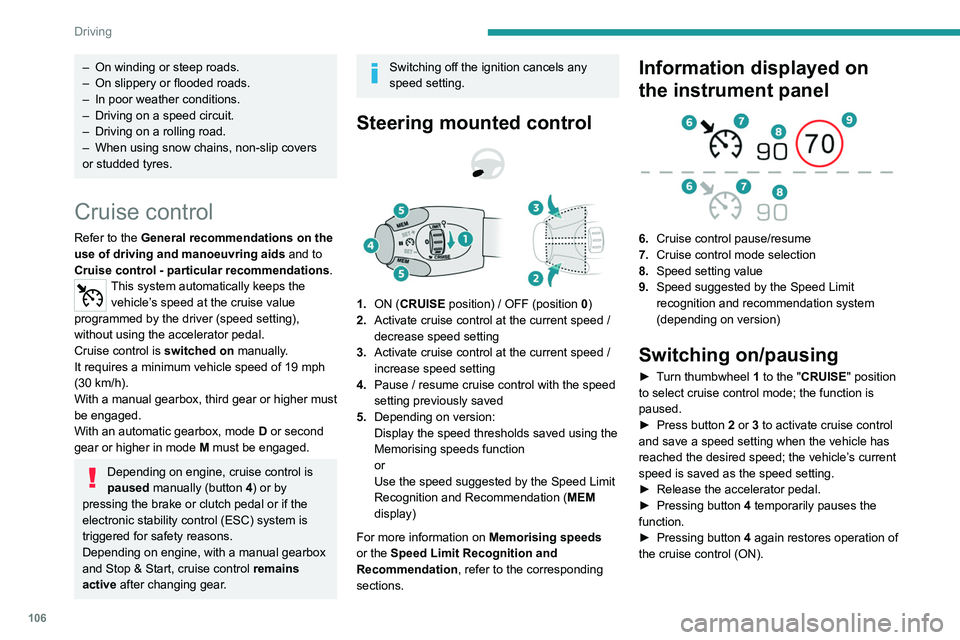
1. ON (CRUISE position) / OFF (position 0)
2. Activate cruise control at the current speed /
decrease speed setting
3. Activate cruise control at the current speed /
increase speed setting
4. Pause / resume cruise control with the speed
setting previously saved
5. Depending on version:
Display the speed thresholds saved using the
Memorising speeds function
or
Use the speed suggested by the Speed Limit
Recognition and Recommendation ( MEM
display)
For more information on Memorising speeds
or the Speed Limit Recognition and
Recommendation, refer to the corresponding
sections.
Information displayed on
the instrument panel
6. Cruise control pause/resume
7. Cruise control mode selection
8. Speed setting value
9. Speed suggested by the Speed Limit
recognition and recommendation system
(depending on version)
Switching on/pausing
► Turn thumbwheel 1 to the "CRUISE" position
to select cruise control mode; the function is
paused.
►
Press button
2 or 3 to activate cruise control
and save a speed setting when the vehicle has
reached the desired speed; the vehicle’s current
speed is saved as the speed setting.
►
Release the accelerator pedal.
►
Pressing button 4
temporarily pauses the
function.
►
Pressing button 4
again restores operation of
the cruise control (ON).
Page 111 of 244
109
Driving
6Mode D or M must be selected.
► With the vehicle moving, press one of the
buttons
2 or 3: the current speed of your vehicle
becomes the cruise speed setting.
–
the current speed of your vehicle, if it is over
19 mph (30 km/h),
–
19 mph (30
km/h), if it is below 19 mph
(30
km/h).
Saving your settings
Switching off the ignition cancels any speed
setting value chosen by the driver.
The inter-vehicle distance is set at " Normal"
(2 dashes) by default. Otherwise, the last
value selected will be used when the system is
switched on.
Pause
The cruise control can be paused manually:
– either by action by the driver:
•
On the button
4 (Pause).
•
On the brake pedal.
•
On the electric parking brake control.
•
On the clutch pedal, by pressing for
approximately 10 seconds or more.
•
When changing from mode
D
to N with an
automatic gearbox.
–
or automatically:
•
If the ESC system is activated, for safety
reasons.
•
When the speed of the vehicle goes below
19 mph (30
km/h) (1,100 rpm) with a manual
gearbox.
When cruise control is paused, it can
only be restarted when all the safety
conditions are satisfied once again. The
message "Activation not possible, conditions
unsuitable" is displayed until the system can
be restarted.
Reactivating the function
With a manual gearbox
To reactivate the function, the driver must
accelerate and reach at least 19 mph (30 km/h),
then press one of the buttons 2, 3 or 4.
With EAT8 automatic gearbox
Following braking of the vehicle bringing it to
a complete stop, the system holds the vehicle
stationary; the cruise control is paused.
The driver must press the accelerator pedal
to move off, then reactivate the function when
above 19 mph (30
km/h) by pressing one of the
buttons 2, 3 or 4.
If the driver takes no action after becoming
stationary, the electric parking brake is applied
automatically after a while (approximately 5
minutes).
As a safety measure, wait until the current speed approaches the speed
setting before reactivating the function by
pressing button 4.
Modification of the speed
setting
With the engine running and cruise control on
(green), you can modify the speed setting.
Modification using the current speed
► By successive short presses on button 2 or
3, the setting is raised or lowered in steps of 1
mph (km/h).
►
By pressing and holding button 2
or 3, the
setting is raised or lowered in steps of 5 mph
(km/h).
Take care: pressing and holding button 2
or 3 for an extended period of time will
result in a rapid change in the speed of your
vehicle.
Modification using the speed limit
sign recognition system
► The suggested speed is displayed on the
instrument panel.
►
Press button
5; a message is displayed
to confirm the request to save the suggested
speed.
►
Press button
5 again to save the suggested
speed.
This value is then immediately shown as the new
speed setting on the instrument panel.
For more information on the Speed Limit
Recognition and Recommendation , refer to
the corresponding section.
Page 155 of 244
153
In the event of a breakdown
8The sealant product is harmful if swallowed and causes irritation to the
eyes.
Keep this product out of the reach of children.
The use-by date of the fluid is marked on the
bottle.
After use, do not discard the bottle in
standard waste, take it to a PEUGEOT dealer
or an authorised waste disposal site.
Do not forget to obtain a new bottle of
sealant, available from a PEUGEOT dealer or
a qualified workshop.
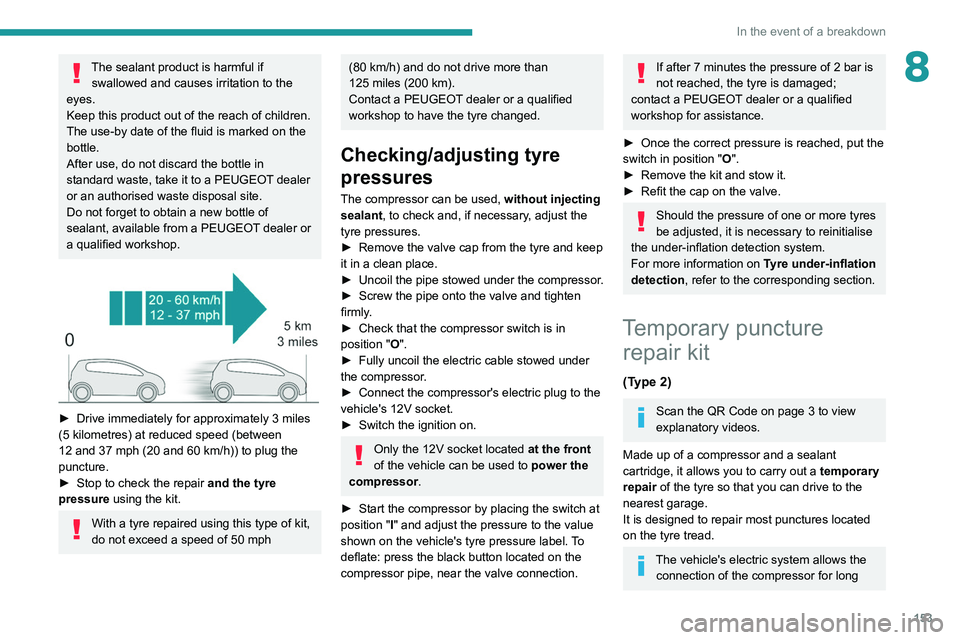
► Drive immediately for approximately 3 miles
(5 kilometres) at reduced speed (between
12 and 37 mph (20 and 60
km/h)) to plug the
puncture.
►
Stop to check the repair
and the tyre
pressure using the kit.
With a tyre repaired using this type of kit,
do not exceed a speed of 50
mph
(80 km/h) and do not drive more than
125 miles (200 km).
Contact a PEUGEOT dealer or a qualified
workshop to have the tyre changed.
Checking/adjusting tyre
pressures
The compressor can be used, without injecting
sealant, to check and, if necessary, adjust the
tyre pressures.
►
Remove the valve cap from the tyre and keep
it in a clean place.
►
Uncoil
the pipe stowed under the compressor.
►
Screw the pipe onto the valve and tighten
firmly
.
►
Check that the compressor switch is in
position " O
".
►
Fully uncoil the electric cable stowed under
the compressor
.
►
Connect the compressor's electric plug to the
vehicle's 12V socket.
►
Switch the ignition on.
Only the 12V socket located at the front
of the vehicle can be used to power the
compressor .
►
Start the compressor by placing the switch at
position " I
" and adjust the pressure to the value
shown on the vehicle's tyre pressure label. To
deflate: press the black button located on the
compressor pipe, near the valve connection.
If after 7 minutes the pressure of 2 bar is
not reached, the tyre is damaged;
contact a PEUGEOT dealer or a qualified
workshop for assistance.
►
Once the correct pressure is reached, put the
switch in position " O
".
►
Remove the kit and stow it.
►
Refit the cap on the valve.
Should the pressure of one or more tyres
be adjusted, it is necessary to reinitialise
the under-inflation detection system.
For more information on Tyre under-inflation
detection, refer to the corresponding section.
Temporary puncture repair kit
(Type 2)
Scan the QR Code on page 3 to view
explanatory videos.
Made up of a compressor and a sealant
cartridge,
it allows you to carry out a temporary
repair of the tyre so that you can drive to the
nearest garage.
It is designed to repair most punctures located
on the tyre tread.
The vehicle's electric system allows the connection of the compressor for long
Page 157 of 244
155
In the event of a breakdown
8Tyre inflation pressures are indicated on this label.
► Start the vehicle and leave the engine
running.
Do not start the compressor before
connecting the white pipe to the tyre
valve: this would cause the sealant product to
be expelled through the pipe.
►
Switch on the compressor by moving switch
B
to position I and inflate the tyre until its
pressure reaches 2.0 bars. The sealant product
is injected under pressure into the tyre; do not
disconnect the pipe from the valve during this
operation (risk of blowback).
If, after approximately seven minutes,
this pressure is not reached, this
indicates that the tyre is irreparable; contact a
PEUGEOT dealer or a qualified workshop for
assistance.
►
Remove the kit and screw the cap back on to
the white pipe. Be careful not to leave traces of
fluid on your vehicle. Keep the kit within reach.
Please note, the sealant product is
harmful if swallowed and causes irritation
to the eyes.
Keep this product out of the reach of children.
► Drive immediately for approximately 3 miles
(5 kilometres) at reduced speed (between
12 and 37 mph (20 and 60
km/h)) to plug the
puncture.
►
Stop to check the repair
and the tyre
pressure using the kit.
2. Inflation
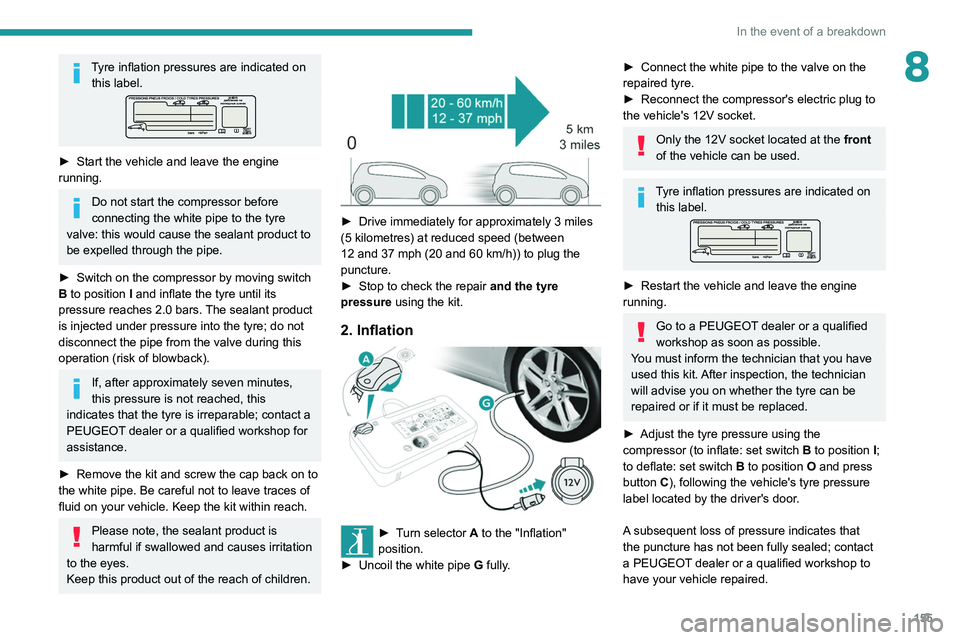
► Turn selector A to the "Inflation"
position.
►
Uncoil the white pipe G
fully.
► Connect the white pipe to the valve on the
repaired tyre.
►
Reconnect the compressor's electric plug to
the vehicle's 12V socket.
Only the 12V socket located at the front
of the vehicle can be used.
Tyre inflation pressures are indicated on this label.
► Restart the vehicle and leave the engine
running.
Go to a PEUGEOT dealer or a qualified
workshop as soon as possible.
You must inform the technician that you have
used this kit. After inspection, the technician
will advise you on whether the tyre can be
repaired or if it must be replaced.
►
Adjust the tyre pressure using the
compressor (to inflate: set switch
B to position I;
to deflate: set switch B to position O and press
button C), following the vehicle's tyre pressure
label located by the driver's door.
A subsequent loss of pressure indicates that
the puncture has not been fully sealed; contact
a PEUGEOT dealer or a qualified workshop to
have your vehicle repaired.
Page 200 of 244
198
PEUGEOT Connect Nav
PEUGEOT Connect Nav
GPS navigation -
Applications - Multimedia
audio system - Bluetooth
®
telephone
The functions and settings described
vary according to the vehicle version and
configuration.
For safety reasons and because they
require sustained attention by the driver,
the following operations must be carried out
with the vehicle stationary and the ignition
on:
–
Pairing the smartphone with the system in
Bluetooth mode.
–
Using the smartphone.
–
Connection to the CarPlay®, MirrorLinkTM
or Android Auto applications (certain
applications interrupt their display while the
vehicle is moving).
–
W
atching a video (the video stops when the
vehicle starts to move again).
–
Changing the system settings and
configuration.
The system is protected in such a way that it will only operate in the vehicle.
The Energy Economy Mode message is
displayed when the system is about to enter
the corresponding mode.
System and map updates can be
downloaded from the Brand’s website.
The update procedure is also available on the
website.
The system’s Open Source Software (OSS) source codes are available at the
following addresses:
https://www.groupe-psa.com/fr/oss/
https://www.groupe-psa.com/en/oss/
First steps
With the engine running, a press mutes
the sound.
With the ignition off, a press turns the system on.
Increase or decrease the volume using
the wheel or the "plus" or "minus" buttons
(depending on the equipment).
Use the menu buttons on either side of or below
the touch screen for access to the menus, then
press the virtual buttons in the touch screen.
Depending on the model, use the "Source" or
"Menu" buttons to access the rolling menus, then
press the virtual buttons in the touch screen.
Display the rolling menus at any time by pressing
the screen briefly with three fingers.
All of the touch areas of the screen are white.
Press the back arrow to go back a level.
Press "OK" to confirm.
The touch screen is of the "capacitive" type.
To clean the screen, use a soft, non-abrasive
cloth (e.g. spectacles cloth) with no additional
product.
Do not use sharp objects on the screen.
Do not touch the screen with wet hands.
Certain information is displayed permanently
in the side bars or in the upper bar of the touch
screen (depending on equipment):
–
Air conditioning status information (depending
on version), and direct access to the
corresponding menu.
–
Go directly to the audio source selection
option, to view the list of radio stations (or list of
titles depending on the source).
–
Go to the "Notifications" of messages, emails,
map updates and, depending on the services,
the navigation notifications.
–
Go to the settings for the touch screen and the
digital instrument panel.
Page 216 of 244
214
PEUGEOT Connect Nav
Press Radio Media to display the main
page.
Select "SOURCES".
Select Video to start the video.
To remove the USB memory stick, press the pause button to stop the video, then
remove the memory stick.
The system can play video files in the MPEG-4
Part 2, MPEG-2, MPEG-1, H.264, H.263, VP8,
WMV and RealVideo formats.
Streaming Bluetooth®
Streaming allows you to listen to the audio feed
from your smartphone.
The Bluetooth profile must be activated.
First adjust the volume on the portable device (to
a high level).
Then adjust the volume of the audio system.
If play does not start automatically, it may be
necessary to start the audio playback from the
smartphone.
Control is from the portable device or by using
the system's touch buttons.
Once connected in streaming mode, the
smartphone is considered to be a media
source.
Connecting Apple® players
Connect the Apple® player to the USB port using
a suitable cable (not supplied).
Play starts automatically.
Control is via the audio system.
The classifications available are those of the portable device connected (artists/
albums/genres/playlists/audio books/
podcasts).
The default classification used is by artist. To
modify the classification used, return to the
first level of the menu then select the desired
classification (playlists for example) and
confirm to go down through the menu to the
desired track.
The version of software in the audio system may
not be compatible with the generation of the
Apple
® player.
Information and advice
The system supports USB mass storage
devices, BlackBerry® devices and Apple® players
via the USB ports. The adapter cable is not
supplied.
Devices are managed using the audio system
controls.
Other devices, not recognised on connection,
must be connected to the auxiliary socket using
a jack cable (not supplied) or via Bluetooth
streaming, if compatible.
The audio system will only play audio files with
".wma", ".aac", ".flac", ".ogg" and ".mp3" file
extensions, at bit rates between 32 Kbps and
320 Kbps.
It also supports VBR (Variable Bit Rate) mode.
No other file types (".mp4", etc.) can be read.
All ".wma" files must be standard WMA 9 files.
The supported sampling rates are 32, 44 and
48 KHz.
To avoid reading and display problems, we
recommend choosing file names less than 20
characters long that do not contain any special
characters (e.g. “ ? .
; ù).
Use only USB memory sticks in FAT32 format
(File Allocation Table).
We recommend using the original USB
cable for the portable device.
Telephone
Pairing a Bluetooth®
telephone
The services available depend on the
network, the SIM card and the
compatibility of the Bluetooth devices used.
Consult the telephone user guide and the
service provider to check which services are
available.
The Bluetooth function must be activated and the telephone configured as "Visible
to all” (in the telphone settings).
To complete the pairing, whichever procedure is
used (from the telephone or from the system),
Page 221 of 244
219
PEUGEOT Connect Nav
11Press "OK" to confirm.
Press this button to set the time zone.
Select the display format for the time
(12h/24h).
Activate or deactivate summer time (+1 hour).
Activate or deactivate GPS synchronisation (UTC).
Press "OK" to confirm.
The system may not automatically manage the change between winter and
summer time (depending on the country of
sale).
Colour schemes
Depending on equipment/Depending on version.
As a safety measure, the procedure for changing the colour scheme is only
possible when the vehicle is stationary.
Press Settings to display the main page.
Select "Color schemes ".
Select a colour scheme in the list then
press "OK" to confirm.
Whenever the colour scheme is
changed, the system restarts, temporarily
displaying a black screen.
Frequently asked
questions
The following information groups together the answers to the most frequently asked questions
concerning the system.
Navigation
I cannot enter the navigation address.
The address is not recognised.
►
Use the "intuitive method" by pressing
the "Search…" button at the bottom of the
"Navigation” page.
The route calculation is not successful.
The route settings may conflict with the current
location (for example, if toll roads are excluded
but the vehicle is on a toll road).
►
Check the route settings in the "Navigation"
menu.
I do not receive "Danger zone” alerts.
Y
ou have not subscribed to the online services
option.
►
If you have subscribed to the option:
- a few days may elapse before the service is
activated,
- services may not be selected in the system
menu, - online services are not active ("T
OMTOM
TRAFFIC" not shown on the map).
The POIs do not appear.
The POIs have not been selected.
►
Set the zoom level to 600 ft (200 m) or select
POIs in the POI list.
The "Danger zone" audible warning feature is
not working.
The audible warning is not active or the volume
is too low
.
►
Activate the audible warning in the
"Navigation" menu and check the voice volume
in the sound settings.
The system does not suggest a detour
around an incident on the route.
The route settings do not take account of
TMC
messages.
►
Configure the "T
raffic info " function in
the route settings list (Without, Manual or
Automatic).
I receive a warning about a "Danger area"
that is not on my route.
As well as providing guided navigation, the
system announces all "Danger areas" positioned
in a cone located in front of the vehicle. It may
provide an alert for "Danger areas" located on
nearby or parallel roads.
►
Zoom the map to show the exact location
of the "Danger area".
You can select "On the
route" to stop receiving warnings or decrease the
warning duration.
Certain traffic jams along the route are not
indicated in real time.