warning Peugeot 308 2021 Service Manual
[x] Cancel search | Manufacturer: PEUGEOT, Model Year: 2021, Model line: 308, Model: Peugeot 308 2021Pages: 244, PDF Size: 8.21 MB
Page 116 of 244
11 4
Driving
Driver Attention Alert
The system triggers an alert as soon as it detects that the driver has not taken a
break after two hours of driving at a speed above
40 mph (65 km/h).
This alert is issued via the display of a message
encouraging the driver to take a break,
accompanied by an audible signal.
If the driver does not follow this advice, the alert
is repeated hourly until the vehicle is stopped.
The system resets itself if one of the following
conditions is met:
– With the engine running, the vehicle has been
stationary for more than 15 minutes.
– The ignition has been switched off for a few
minutes.
– The driver's seat belt is unfastened and their
door is opened.
As soon as the speed of the vehicle drops below 40 mph (65 km/h), the
system goes into standby.
Driving time starts being counted again once
the speed reaches above 40 mph (65 km/h).
Driver Attention Alert by
camera
Depending on version, the "Driver Attention Alert"
may be combined with the "Driver Attention Alert
by camera".
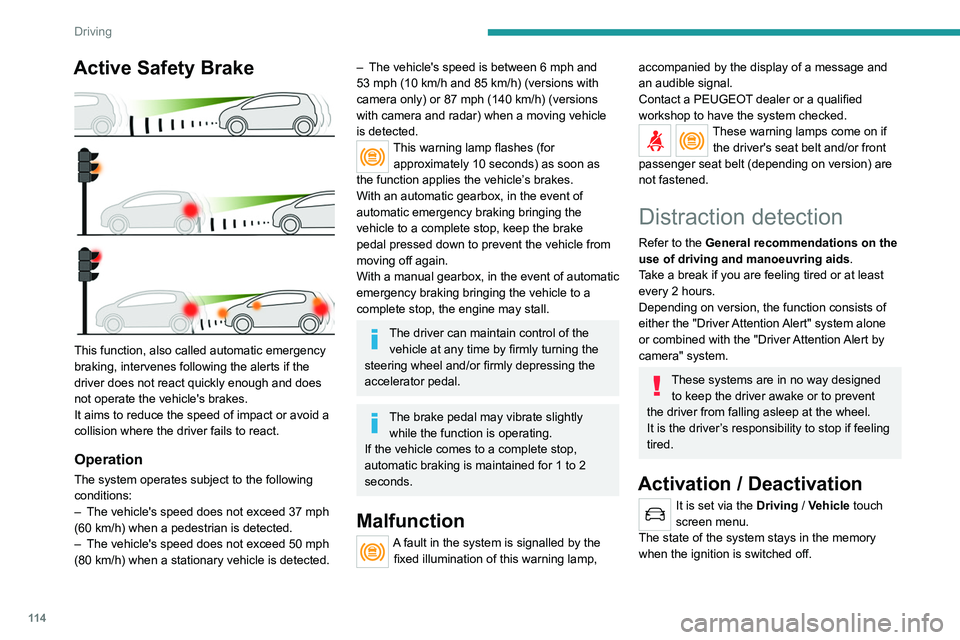
Active Safety Brake
This function, also called automatic emergency
braking, intervenes following the alerts if the
driver does not react quickly enough and does
not operate the vehicle's brakes.
It aims to reduce the speed of impact or avoid a
collision where the driver fails to react.
Operation
The system operates subject to the following
conditions:
–
The vehicle's speed does not exceed 37 mph
(60 km/h) when a pedestrian is detected.
–
The vehicle's speed does not exceed 50 mph
(80 km/h) when a stationary vehicle is detected.
– The vehicle's speed is between 6 mph and
53 mph (10 km/h and 85 km/h) (versions with
camera only) or 87 mph (140 km/h) (versions
with camera and radar) when a moving vehicle
is detected.
This warning lamp flashes (for approximately 10 seconds) as soon as
the function applies the vehicle’s brakes.
With an automatic gearbox, in the event of
automatic emergency braking bringing the
vehicle to a complete stop, keep the brake
pedal pressed down to prevent the vehicle from
moving off again.
With a manual gearbox, in the event of automatic
emergency braking bringing the vehicle to a
complete stop, the engine may stall.
The driver can maintain control of the vehicle at any time by firmly turning the
steering wheel and/or firmly depressing the
accelerator pedal.
The brake pedal may vibrate slightly while the function is operating.
If the vehicle comes to a complete stop,
automatic braking is maintained for 1 to 2
seconds.
Malfunction
A fault in the system is signalled by the fixed illumination of this warning lamp,
accompanied by the display of a message and
an audible signal.
Contact a PEUGEOT dealer or a qualified
workshop to have the system checked.
These warning lamps come on if the driver's seat belt and/or front
passenger seat belt (depending on version) are
not fastened.
Distraction detection
Refer to the General recommendations on the
use of driving and manoeuvring aids .
Take a break if you are feeling tired or at least
every 2 hours.
Depending on version, the function consists of
either the "Driver Attention Alert" system alone
or combined with the "Driver Attention Alert by
camera" system.
These systems are in no way designed to keep the driver awake or to prevent
the driver from falling asleep at the wheel.
It is the driver’s responsibility to stop if feeling
tired.
Activation / Deactivation
It is set via the Driving / Vehicle touch
screen menu.
The state of the system stays in the memory
when the ignition is switched off.
Page 118 of 244
11 6
Driving
Driving situations and related alerts
The table below describes the alerts and messages displayed in different driving situations.
These alerts are not displayed sequentially.
The "Driving aids" tab on the instrument panel display must have been selected.Function status Indicator lamp Display and/or associated
messageComments
OFF
(grey)
Function deactivated.
ON
(grey) System active, conditions not met:
–
speed below 44 mph (70 km/h),
– no lane marking recognised,
– ASR/DSC systems deactivated or operation of ESC
system triggered,
– "sport" driving.
ON
(grey)
Automatic deactivation/standby of the function (for
example, due to detection of a trailer or use of the "space-
saver" spare wheel provided with the vehicle).
ON
(green) Lane marking detected.
Speed above 44 mph (70 km/h).
ON
(orange)/(green)
The system corrects the trajectory on the side where the
risk of unintentional crossing is detected (orange line).
– Direction indicators not activated.
– ESC system activated and operational.
The system helps the driver only if there is a risk of the vehicle unintentionally
wandering from the lane it is being driven in. It
does not manage the safe driving distance,
vehicle speed or braking.
The driver must hold the steering wheel
with both hands in a way that allows control
to be maintained in circumstances where
the system is not able to intervene (if lane
markings disappear, for example).
Operation
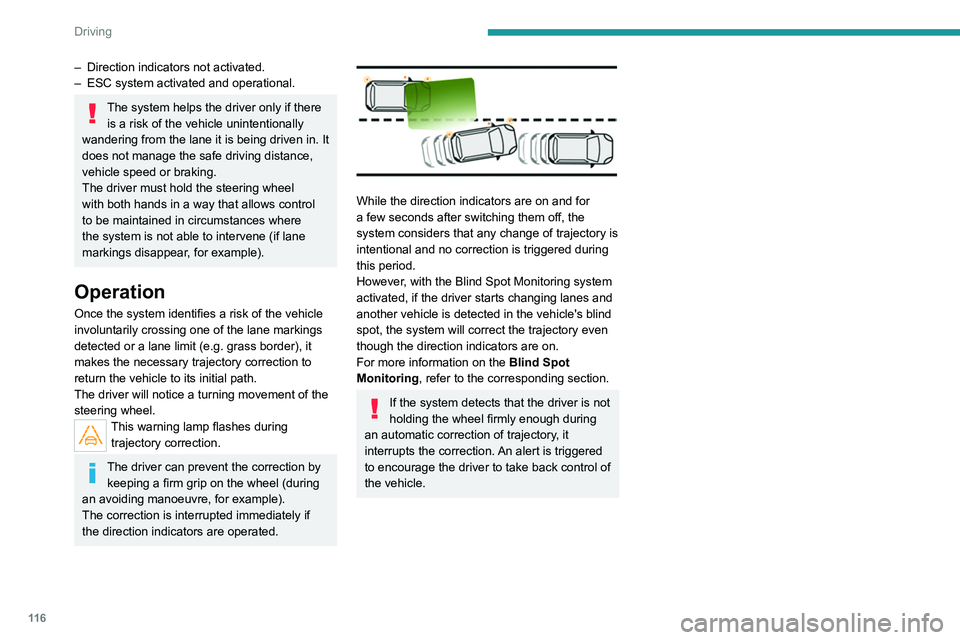
Once the system identifies a risk of the vehicle
involuntarily crossing one of the lane markings
detected or a lane limit (e.g. grass border), it
makes the necessary trajectory correction to
return the vehicle to its initial path.
The driver will notice a turning movement of the
steering wheel.
This warning lamp flashes during trajectory correction.
The driver can prevent the correction by keeping a firm grip on the wheel (during
an avoiding manoeuvre, for example).
The correction is interrupted immediately if
the direction indicators are operated.
While the direction indicators are on and for
a few seconds after switching them off, the
system considers that any change of trajectory is
intentional and no correction is triggered during
this period.
However, with the Blind Spot Monitoring system
activated, if the driver starts changing lanes and
another vehicle is detected in the vehicle's blind
spot, the system will correct the trajectory even
though the direction indicators are on.
For more information on the Blind Spot
Monitoring , refer to the corresponding section.
If the system detects that the driver is not
holding the wheel firmly enough during
an automatic correction of trajectory, it
interrupts the correction. An alert is triggered
to encourage the driver to take back control of
the vehicle.
Page 120 of 244
11 8
Driving
Deactivation/Activation
► Press this button to deactivate/reactivate the
system at any time.
Deactivation is signalled by the lighting of the
indicator lamp in the button.
Malfunction
In the event of a system
malfunction, these warning lamps
come on on the instrument panel, accompanied
by an onscreen message and an audible signal.
Have the system checked by a PEUGEOT
dealer or a qualified workshop.
Blind Spot Monitoring
Refer to the General recommendations on the
use of driving and manoeuvring aids .
Function statusIndicator lamp Display and/or associated
messageComments
ON
(orange)/(green)
"Hold the wheel" –
If, while correcting the trajectory
, the system detects
that the driver has not held the steering wheel for a few
seconds, it stops correcting and returns control to the
driver.
– If, while correcting the trajectory , the system determines
that the correction will not be enough and that a solid line
will be crossed (orange line): the driver is warned that they
must provide additional trajectory adjustment.
The duration of audible warnings will increase if multiple
corrections are performed in quick succession. The
warning will become continuous, persisting until the driver
responds.
This message may also be displayed if you have your
hands on the steering wheel.
Operating limits
The system goes into standby automatically in
the following cases:
–
ESC deactivated or operation triggered.
–
Speed below 43 mph (70
km/h) or greater
than 112 mph (180
km/h),
–
Electrical connection of a trailer
.
–
Use of a"space-saver" spare wheel detected
(as detection is not immediate, deactivation of
the system is recommended).
–
Dynamic driving style detected, pressure on
the brake or accelerator pedal.
–
Driving where there are no lane markings.
–
Activation of the direction indicators.
– Crossing the inside line on a bend.
– Driving in a tight corner .
–
Inactivity by the driver detected during
correction.
The following situations may interfere with the operation of the system or
prevent it from working:
–
Insufficient contrast between the road
surface and the side of the road (e.g. shade).
–
Lane markings worn, hidden (snow
, mud)
or multiple (roadworks, etc.),
–
Running close to the vehicle in front (the
lane markings may not be detected).
–
Roads that are narrow
, winding.
Risk of undesirable operation
We recommend deactivating the system in the
following driving situations:
–
driving on damaged, unstable or very slippery
(ice) road surfaces,
–
unfavourable weather conditions,
–
driving on a speed circuit,
–
driving on a rolling road.
Page 121 of 244
11 9
Driving
6Deactivation/Activation
► Press this button to deactivate/reactivate the
system at any time.
Deactivation is signalled by the lighting of the
indicator lamp in the button.
Malfunction
In the event of a system
malfunction, these warning lamps
come on on the instrument panel, accompanied
by an onscreen message and an audible signal.
Have the system checked by a PEUGEOT
dealer or a qualified workshop.
Blind Spot Monitoring
Refer to the General recommendations on the
use of driving and manoeuvring aids .
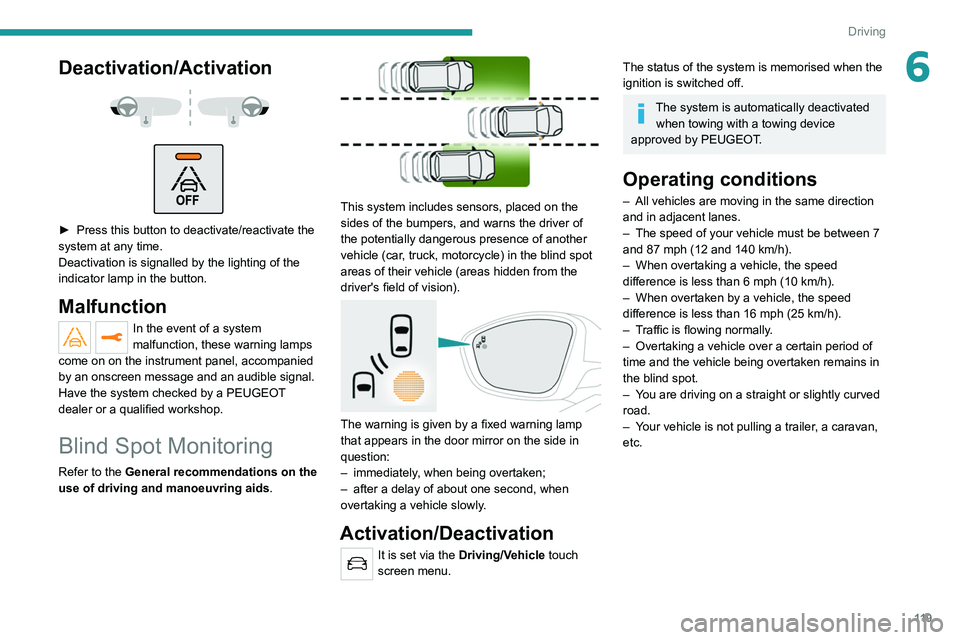
This system includes sensors, placed on the
sides of the bumpers, and warns the driver of
the potentially dangerous presence of another
vehicle (car, truck, motorcycle) in the blind spot
areas of their vehicle (areas hidden
from the
driver's field of vision).
The warning is given by a fixed warning lamp
that appears in the door mirror on the side in
question:
–
immediately
, when being overtaken;
–
after a delay of about one second, when
overtaking a vehicle slowly
.
Activation/Deactivation
It is set via the Driving/Vehicle touch
screen menu.
The status of the system is memorised when the
ignition is switched off.
The system is automatically deactivated when towing with a towing device
approved by PEUGEOT.
Operating conditions
– All vehicles are moving in the same direction
and in adjacent lanes.
–
The speed of your vehicle must be between 7
and 87 mph (12 and 140
km/h).
–
When overtaking a vehicle, the speed
difference is less than 6
mph (10 km/h).
–
When overtaken by a vehicle, the speed
difference is less than 16
mph (25 km/h).
–
T
raffic is flowing normally.
–
Overtaking a vehicle over a certain period of
time and the vehicle being overtaken remains in
the blind spot.
–
Y
ou are driving on a straight or slightly curved
road.
–
Y
our vehicle is not pulling a trailer, a caravan,
etc.
Page 122 of 244
120
Driving
Parking sensors
Refer to the General recommendations on the
use of driving and manoeuvring aids.
Using sensors located in the bumper, this
system signals the proximity of obstacles
(e.g. pedestrian, vehicle, tree, barrier) present in
their field of detection.
Rear parking sensors
The system is switched on by engaging reverse
gear, which is confirmed by an audible signal.
The system is switched off when disengaging
reverse gear.
Audible assistance
The system signals the presence of obstacles
within the sensors’ detection zone.
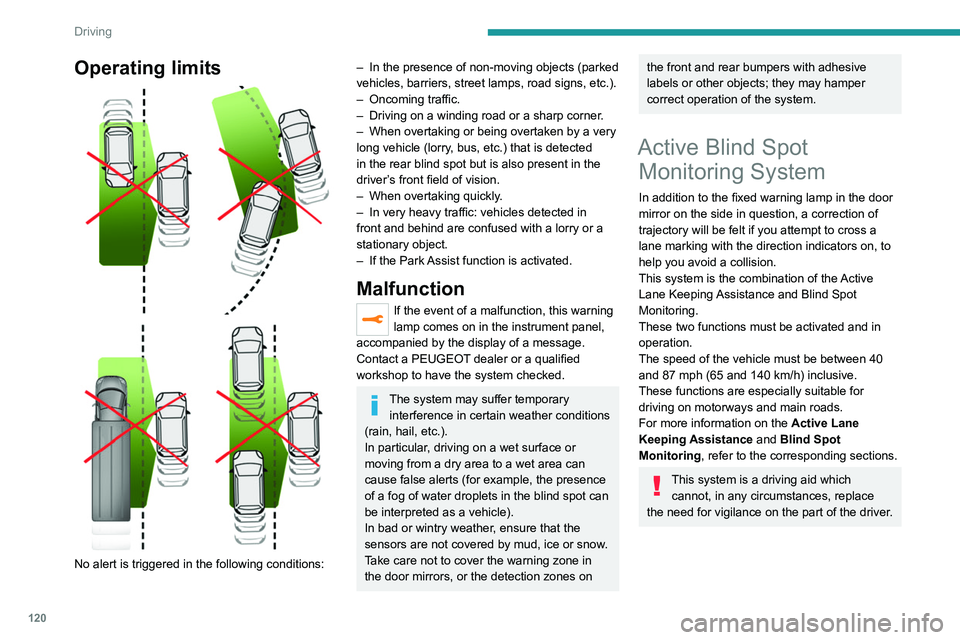
Operating limits
No alert is triggered in the following conditions:
– In the presence of non-moving objects (parked
vehicles, barriers, street lamps, road signs, etc.).
–
Oncoming traffic.
–
Driving on a winding road or a sharp corner
.
–
When overtaking or being overtaken by a very
long vehicle (lorry
, bus, etc.) that is detected
in the rear blind spot but is also present in the
driver’s front field of vision.
–
When overtaking quickly
.
–
In very heavy traffic: vehicles detected in
front and behind are confused with a lorry or a
stationary object.
–
If the Park
Assist function is activated.
Malfunction
If the event of a malfunction, this warning
lamp comes on in the instrument panel,
accompanied by the display of a message.
Contact a PEUGEOT dealer or a qualified
workshop to have the system checked.
The system may suffer temporary interference in certain weather conditions
(rain, hail, etc.).
In particular, driving on a wet surface or
moving from a dry area to a wet area can
cause false alerts (for example, the presence
of a fog of water droplets in the blind spot can
be interpreted as a vehicle).
In bad or wintry weather, ensure that the
sensors are not covered by mud, ice or snow.
Take care not to cover the warning zone in
the door mirrors, or the detection zones on
the front and rear bumpers with adhesive
labels or other objects; they may hamper
correct operation of the system.
Active Blind Spot Monitoring System
In addition to the fixed warning lamp in the door
mirror on the side in question, a correction of
trajectory will be felt if you attempt to cross a
lane marking with the direction indicators on, to
help you avoid a collision.
This system is the combination of the Active
Lane Keeping Assistance and Blind Spot
Monitoring.
These two functions must be activated and in
operation.
The speed of the vehicle must be between 40
and 87 mph (65 and 140
km/h) inclusive.
These functions are especially suitable for
driving on motorways and main roads.
For more information on the Active Lane
Keeping Assistance and Blind Spot
Monitoring , refer to the corresponding sections.
This system is a driving aid which
cannot, in any circumstances, replace
the need for vigilance on the part of the driver.
Page 124 of 244
122
Driving
Rear view
To activate the camera located on the tailgate,
engage reverse gear and do not exceed a speed
of 6 mph (10 km/h).
The system is deactivated:
– If a trailer is attached or a bicycle carrier
is fitted on a towing device (vehicle fitted
with a towing device installed in line with the
manufacturer's recommendations).
– Automatically, at speeds above approximately
6 mph (10 km/h),
– Automatically, if the tailgate is opened.
– Upon changing out of reverse gear (the image
remains displayed for 7 seconds).
– By pressing the white arrow in the upper-left
corner of the touch screen.
Malfunction
In the event of a malfunction when
changing into reverse, this warning lamp
comes on on the instrument panel, accompanied
by an onscreen message and an audible signal
(short beep).
Contact a PEUGEOT dealer or a qualified
workshop to have the system checked.
Visiopark 1
Refer to the General recommendations on the
use of driving and manoeuvring aids .
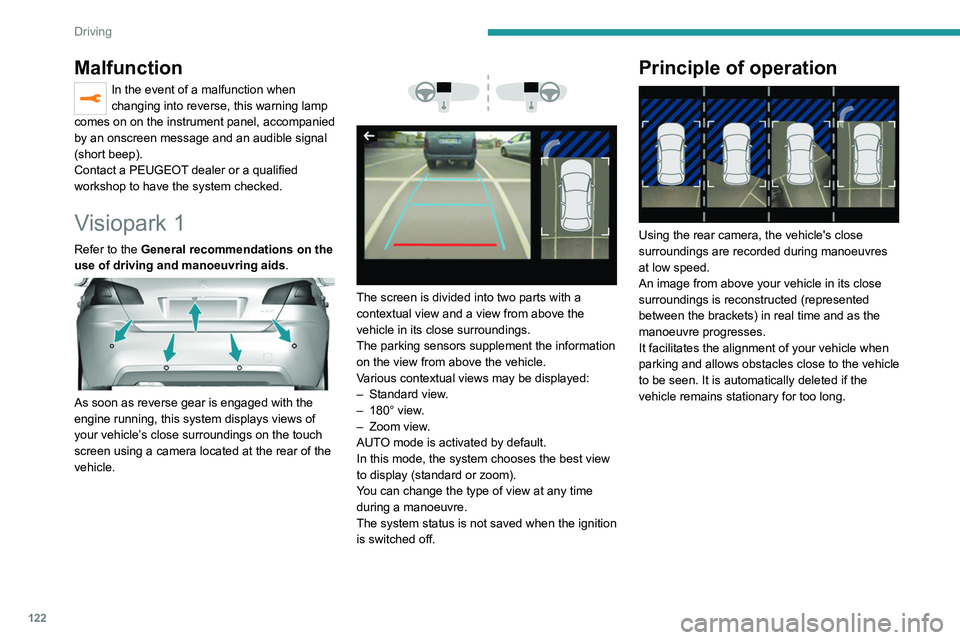
As soon as reverse gear is engaged with the
engine running, this system displays views of
your vehicle’s close surroundings on the touch
screen using a camera located at the rear of the
vehicle.
The screen is divided into two parts with a
contextual view and a view from above the
vehicle in its close surroundings.
The parking sensors supplement the information
on the view from above the vehicle.
Various contextual views may be displayed:
–
Standard view
.
–
180° view
.
–
Zoom view
.
AUTO mode is activated by default.
In this mode, the system chooses the best view
to display
(standard or zoom).
You can change the type of view at any time
during a manoeuvre.
The system status is not saved when the ignition
is switched off.
Principle of operation
Using the rear camera, the vehicle's close
surroundings are recorded during manoeuvres
at low speed.
An image from above your vehicle in its close
surroundings is reconstructed (represented
between the brackets) in real time and as the
manoeuvre progresses.
It facilitates the alignment of your vehicle when
parking and allows obstacles close to the vehicle
to be seen. It is automatically deleted if the
vehicle remains stationary for too long.
Page 128 of 244
126
Driving
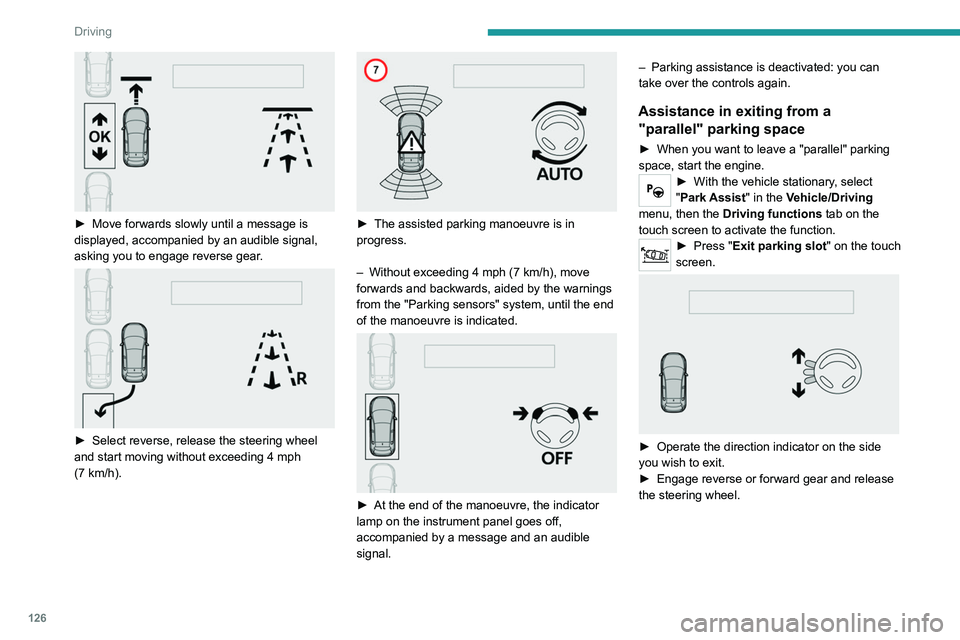
► Move forwards slowly until a message is
displayed, accompanied by an audible signal,
asking you to engage reverse gear
.
► Select reverse, release the steering wheel
and start moving without exceeding 4 mph
(7
km/h).
► The assisted parking manoeuvre is in
progress.
–
Without exceeding 4 mph (7
km/h), move
forwards and backwards, aided by the warnings
from the "Parking sensors" system, until the end
of the manoeuvre is indicated.
► At the end of the manoeuvre, the indicator
lamp on the instrument panel goes off,
accompanied by a message and an audible
signal. –
Parking assistance is deactivated: you can
take over the controls again.
Assistance in exiting from a
"parallel" parking space
► When you want to leave a "parallel" parking
space, start the engine.
► With the vehicle stationary , select
"Park Assist" in the Vehicle/Driving
menu, then the Driving functions tab on the
touch screen to activate the function.
► Press " Exit parking slot " on the touch
screen.
► Operate the direction indicator on the side
you wish to exit.
►
Engage reverse or forward gear and release
the steering wheel.
Page 129 of 244
127
Driving
6
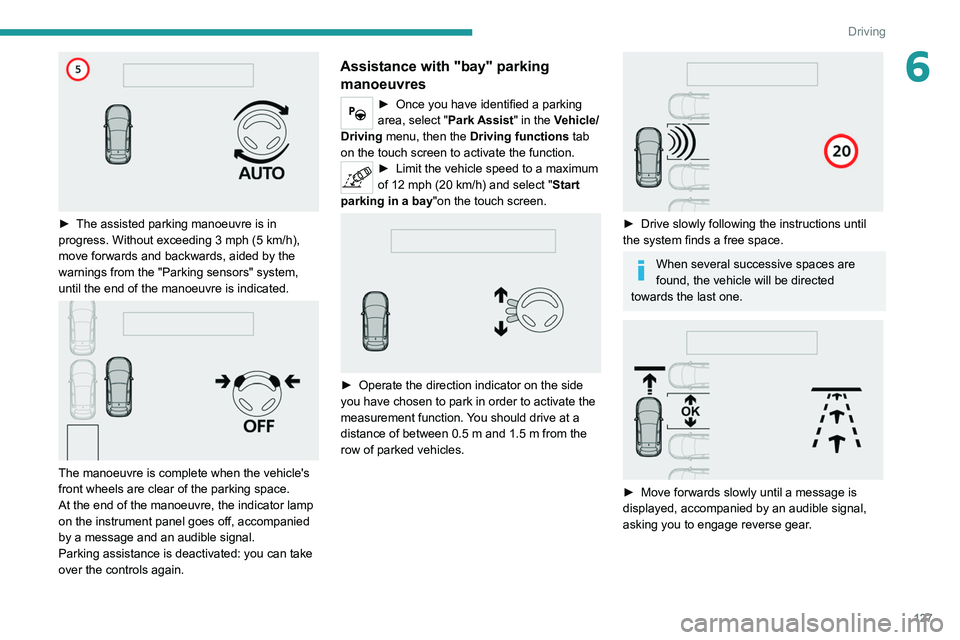
► The assisted parking manoeuvre is in
progress. Without exceeding 3 mph (5 km/h),
move forwards and backwards, aided by the
warnings from the "Parking sensors" system,
until the end of the manoeuvre is indicated.
The manoeuvre is complete when the vehicle's
front wheels are clear of the parking space.
At the end of the manoeuvre, the indicator lamp
on the instrument panel goes off, accompanied
by a message and an audible signal.
Parking assistance is deactivated: you can take
over the controls again.
Assistance with "bay" parking manoeuvres
► Once you have identified a parking
area, select " Park Assist" in the Vehicle/
Driving menu, then the Driving functions tab
on the touch screen to activate the function.
► Limit the vehicle speed to a maximum
of 12 mph (20 km/h) and select " Start
parking in a bay "on the touch screen.
► Operate the direction indicator on the side
you have chosen to park in order to activate the
measurement function.
You should drive at a
distance of between 0.5
m and 1.5 m from the
row of parked vehicles.
► Drive slowly following the instructions until
the system finds a free space.
When several successive spaces are
found, the vehicle will be directed
towards the last one.
► Move forwards slowly until a message is
displayed, accompanied by an audible signal,
asking you to engage reverse gear
.
Page 130 of 244
128
Driving
To switch the system off for a prolonged period,
contact a PEUGEOT dealer or a qualified
workshop.
Malfunctions
This warning lamp lights up on the instrument panel and a message appears,
accompanied by an audible signal.
If the lateral distance between your
vehicle and the space is too great, the
system may not be able to measure the
space.
Any object exceeding the dimensions of the
vehicle is not taken into account by the Park
Assist system during a manoeuvre.
In bad weather or in winter, ensure that
the sensors are not covered by dirt, ice
or snow.
In the event of a fault, have the system
checked by a PEUGEOT dealer or a qualified
workshop.
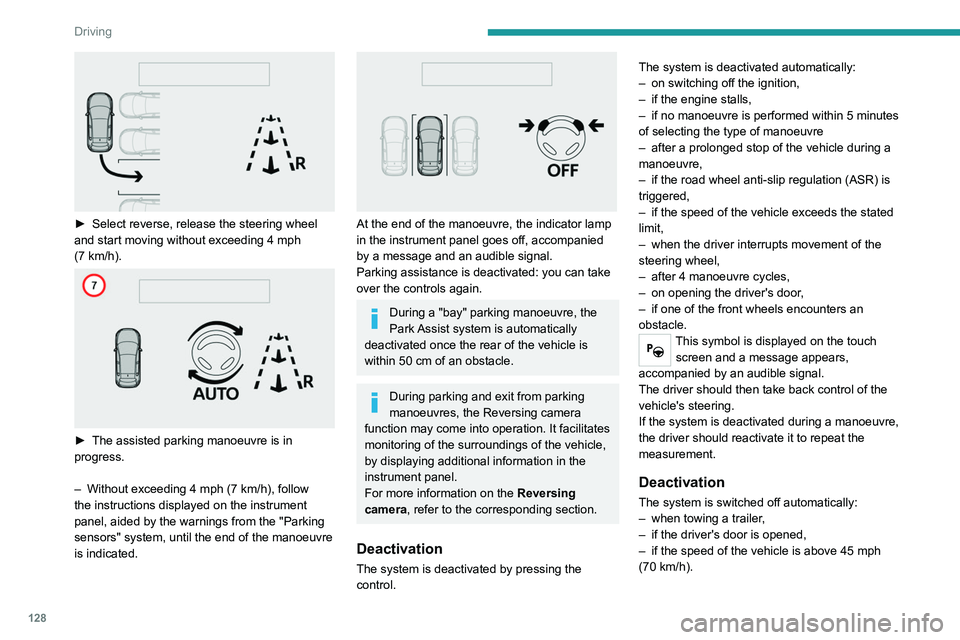
► Select reverse, release the steering wheel
and start moving without exceeding 4 mph
(7
km/h).
► The assisted parking manoeuvre is in
progress.
–
Without exceeding 4 mph (7
km/h), follow
the instructions displayed on the instrument
panel, aided by the warnings from the "Parking
sensors" system, until the end of the manoeuvre
is indicated.
At the end of the manoeuvre, the indicator lamp
in the instrument panel goes off, accompanied
by a message and an audible signal.
Parking assistance is deactivated: you can take
over the controls again.
During a "bay" parking manoeuvre, the
Park Assist system is automatically
deactivated once the rear of the vehicle is
within 50
cm of an obstacle.
During parking and exit from parking
manoeuvres, the Reversing camera
function may come into operation. It facilitates
monitoring of the surroundings of the vehicle,
by displaying additional information in the
instrument panel.
For more information on the Reversing
camera , refer to the corresponding section.
Deactivation
The system is deactivated by pressing the
control. The system is deactivated automatically:
–
on switching off the ignition,
–
if the engine stalls,
–
if no manoeuvre is performed within 5 minutes
of selecting the type of manoeuvre
–
after a prolonged stop of the vehicle during a
manoeuvre,
–
if the road wheel anti-slip regulation (ASR) is
triggered,
–
if the speed of the vehicle exceeds the stated
limit,
–
when the driver interrupts movement of the
steering wheel,
–
after 4 manoeuvre cycles,
–
on opening the driver's door
,
–
if one of the front wheels encounters an
obstacle.
This symbol is displayed on the touch screen and a message appears,
accompanied by an audible signal.
The driver should then take back control of the
vehicle's steering.
If the system is deactivated during a manoeuvre,
the driver should reactivate it to repeat the
measurement.
Deactivation
The system is switched off automatically:
– when towing a trailer ,
–
if the driver's door is opened,
–
if the speed of the vehicle is above 45 mph
(70 km/h).
Page 131 of 244
129
Driving
6To switch the system off for a prolonged period,
contact a PEUGEOT dealer or a qualified
workshop.
Malfunctions
This warning lamp lights up on the instrument panel and a message appears,
accompanied by an audible signal.
If the lateral distance between your
vehicle and the space is too great, the
system may not be able to measure the
space.
Any object exceeding the dimensions of the
vehicle is not taken into account by the Park
Assist system during a manoeuvre.
In bad weather or in winter, ensure that
the sensors are not covered by dirt, ice
or snow.
In the event of a fault, have the system
checked by a PEUGEOT dealer or a qualified
workshop.