bonnet PEUGEOT 308 2023 User Guide
[x] Cancel search | Manufacturer: PEUGEOT, Model Year: 2023, Model line: 308, Model: PEUGEOT 308 2023Pages: 260, PDF Size: 7.97 MB
Page 169 of 260
167
Practical information
7Diesel fuel system
This system is under very high pressure.
All work must be carried out only by a
PEUGEOT dealer or a qualified workshop
Checking levels
Check all of the following levels regularly in
accordance with the Manufacturer's service
schedule. Top them up if required, unless
otherwise indicated.
If a level drops significantly, have the
corresponding system checked by a PEUGEOT
dealer or a qualified workshop.
The fluids must comply with the Manufacturer's requirements and with
the vehicle's engine.
Take care when working under the bonnet, as certain areas of the engine
may be extremely hot (risk of burns) and the
cooling fan could start at any time (even with
the ignition off).
Used products
Avoid prolonged contact of used oil or fluids with the skin.
Most of these fluids are harmful to health and
very corrosive.
Do not discard used oil or fluids into
sewers or onto the ground.
Empty used oil into the containers reserved
for this purpose at a PEUGEOT dealer or a
qualified workshop.
Engine oil
The level is checked, with the engine having been switched off for at least 30
minutes and on level ground, either using the oil
level indicator in the instrument panel when the
ignition is switched on (for vehicles equipped
with an electric gauge), or using the dipstick.
It is normal to top up the oil level between two
services (or oil changes). It is recommended
that you check the level, and top up if necessary,
every 3,000 miles (5,000 km).
In order to maintain the reliability of the
engine and emissions control system,
never use additives in the engine oil.
Checking using the dipstick
For the location of the dipstick, please refer
to the illustration of the corresponding engine
compartment.
►
Grasp the dipstick by its coloured grip and
pull it out completely
.
►
Wipe the end of the dipstick using a clean,
lint-free cloth.
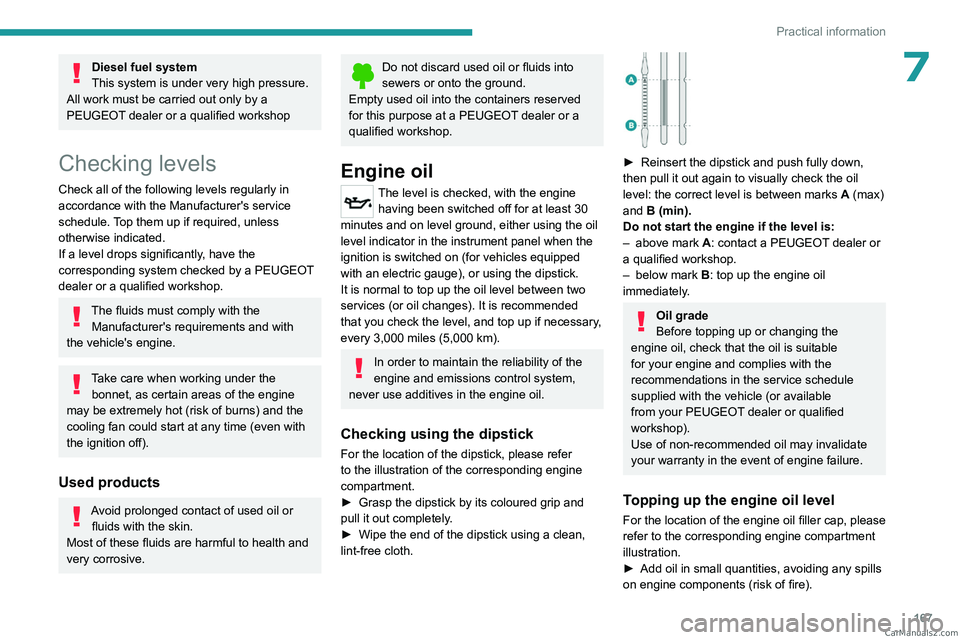
► Reinsert the dipstick and push fully down,
then pull it out again to visually check the oil
level: the correct level is between marks A
(max)
and B (min).
Do not start the engine if the level is:
–
above mark
A: contact a PEUGEOT dealer or
a qualified workshop.
–
below mark B
: top up the engine oil
immediately.
Oil grade
Before topping up or changing the
engine oil, check that the oil is suitable
for your engine and complies with the
recommendations in the service schedule
supplied with the vehicle (or available
from your PEUGEOT dealer or qualified
workshop).
Use of non-recommended oil may invalidate
your warranty in the event of engine failure.
Topping up the engine oil level
For the location of the engine oil filler cap, please
refer to the corresponding engine compartment
illustration.
►
Add oil in small quantities, avoiding any spills
on engine components (risk of fire). CarM an uals 2 .c o m
Page 189 of 260
187
In the event of a breakdown
8Frozen battery
Never try to charge a frozen battery - risk
of explosion!
If the battery has frozen, have it checked by a
PEUGEOT dealer or by a qualified workshop,
who will verify that the internal components
have not been damaged and that the case
has not cracked, which could lead to a risk of
leakage of toxic and corrosive acid.
Automatic gearbox
Never try to start the engine by pushing
the vehicle.
Symbols
No sparks or naked flames, no smoking.
Always protect your eyes. Explosive gases can cause blindness and injury.
Keep the vehicle's battery out of the reach
of children.
The vehicle's battery contains sulphuric acid which can make you go blind or
cause severe burns.
For more information, refer to the
handbook.
Explosive gases can be present close to
the battery.
With petrol/Diesel engines
Procedure for starting the engine using another
battery or for charging a discharged battery.
Accessing the battery
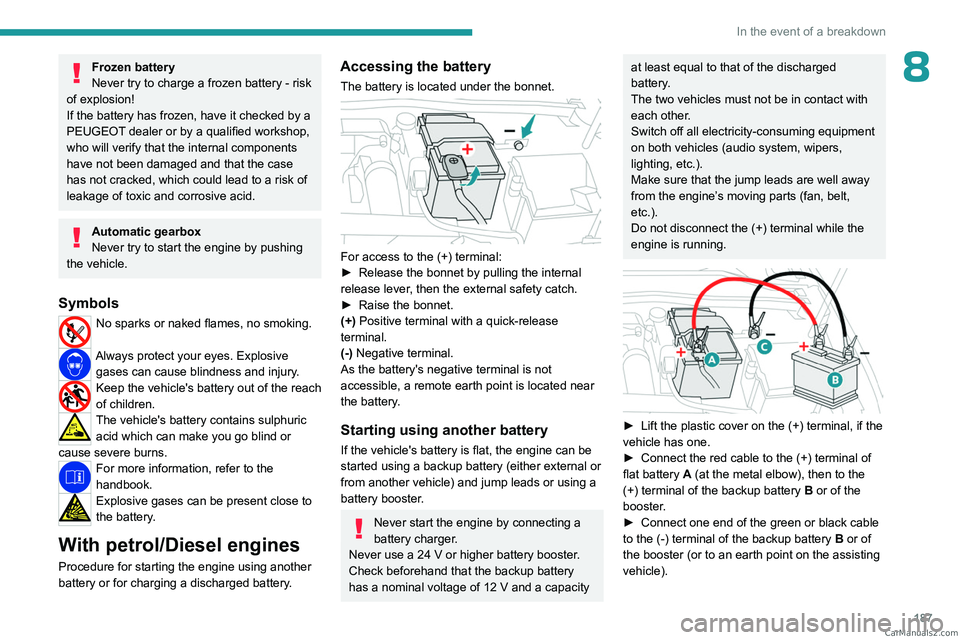
The battery is located under the bonnet.
For access to the (+) terminal:
► Release the bonnet by pulling the internal
release lever
, then the external safety catch.
►
Raise the bonnet.
(+)
Positive terminal with a quick-release
terminal.
(-) Negative terminal.
As the battery's negative terminal is not
accessible, a remote earth point is located near
the battery.
Starting using another battery
If the vehicle's battery is flat, the engine can be
started using a backup battery (either external or
from another vehicle) and jump leads or using a
battery booster.
Never start the engine by connecting a
battery charger.
Never use a 24
V or higher battery booster.
Check beforehand that the backup battery
has a nominal voltage of 12
V and a capacity
at least equal to that of the discharged
battery.
The two vehicles must not be in contact with
each other.
Switch off all electricity-consuming equipment
on both vehicles (audio system, wipers,
lighting, etc.).
Make sure that the jump leads are well away
from the engine’s moving parts (fan, belt,
etc.).
Do not disconnect the (+) terminal while the
engine is running.
► Lift the plastic cover on the (+) terminal, if the
vehicle has one.
►
Connect the red cable to the (+) terminal of
flat battery
A (at the metal elbow), then to the
(+) terminal of the backup battery
B or of the
booster.
►
Connect one end of the green or black cable
to the (-) terminal of the backup battery
B or of
the booster (or to an earth point on the assisting
vehicle). CarM an uals 2 .c o m
Page 191 of 260
189
In the event of a breakdown
8► Switch off the ignition and wait for 4 minutes.
After accessing the battery, it is only necessary
to disconnect the (+) terminal.
Quick-release terminal clamp
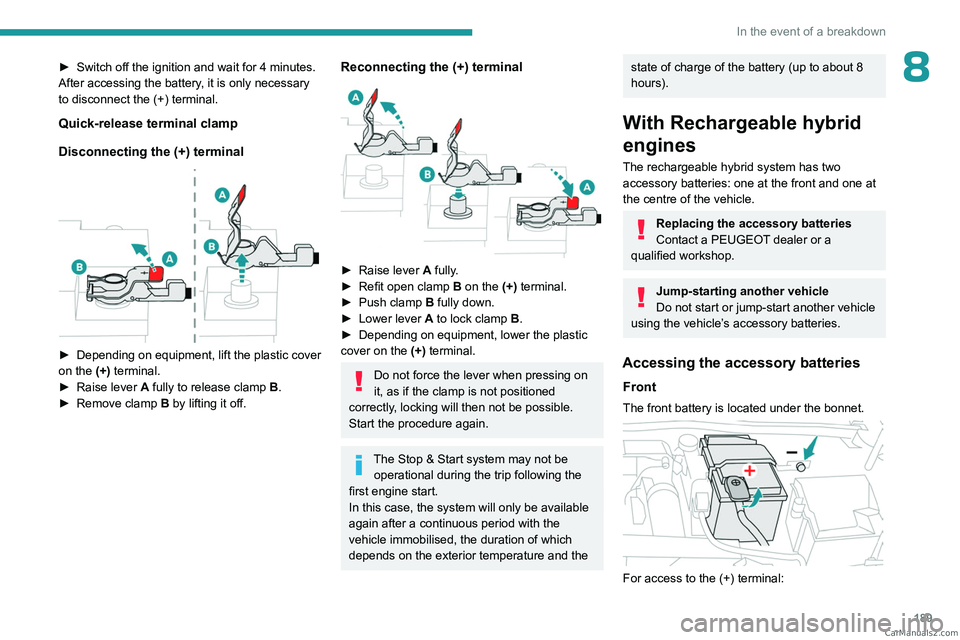
Disconnecting the (+) terminal
► Depending on equipment, lift the plastic cover
on the (+) terminal.
►
Raise lever
A
fully to release clamp
B
.
►
Remove clamp
B
by lifting it off.
Reconnecting the (+) terminal
► Raise lever A fully.
► Refit open clamp B on the (+) terminal.
►
Push clamp
B fully down.
►
Lower lever
A
to lock clamp B.
►
Depending on equipment, lower the plastic
cover on the
(+) terminal.
Do not force the lever when pressing on
it, as if the clamp is not positioned
correctly, locking will then not be possible.
Start the procedure again.
The Stop & Start system may not be operational during the trip following the
first engine start.
In this case, the system will only be available
again after a continuous period with the
vehicle immobilised, the duration of which
depends on the exterior temperature and the
state of charge of the battery (up to about 8
hours).
With Rechargeable hybrid
engines
The rechargeable hybrid system has two accessory batteries: one at the front and one at
the centre of the vehicle.
Replacing the accessory batteries
Contact a PEUGEOT dealer or a
qualified workshop.
Jump-starting another vehicle
Do not start or jump-start another vehicle
using the vehicle’s accessory batteries.
Accessing the accessory batteries
Front
The front battery is located under the bonnet.
For access to the (+) terminal: CarM an uals 2 .c o m
Page 192 of 260
190
In the event of a breakdown
► Release the bonnet by pulling the internal
release lever , then the external safety catch.
►
Raise the bonnet.
(+)
Positive terminal with a quick-release
terminal.
(-) Negative terminal.
As the battery's negative terminal is not
accessible, a remote earth point is located near
the battery.
Central
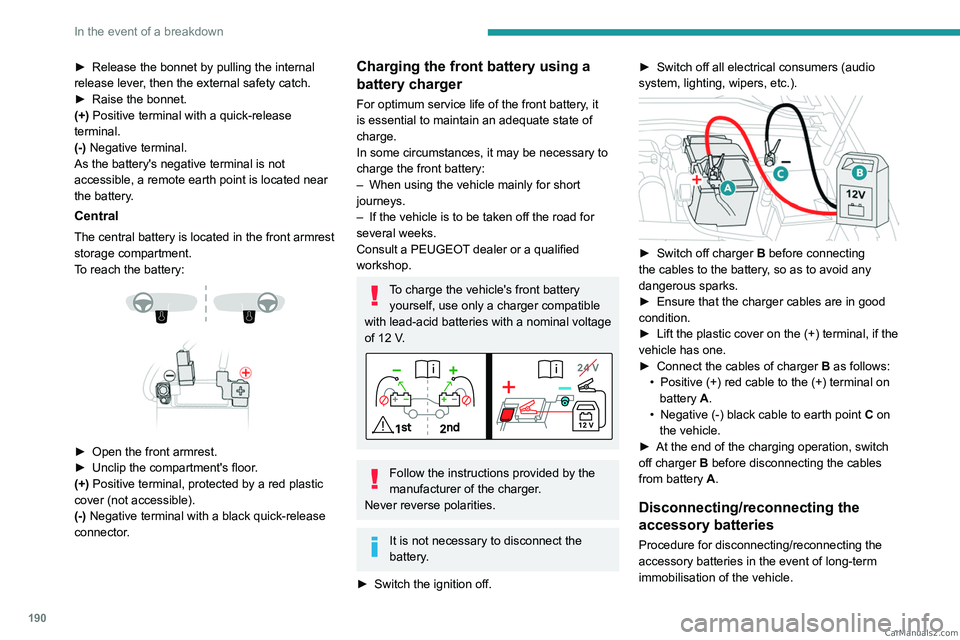
The central battery is located in the front armrest
storage compartment.
To reach the battery:
► Open the front armrest.
► Unclip the compartment's floor .
(+) Positive terminal, protected by a red plastic
cover (not accessible).
(-) Negative terminal with a black quick-release
connector.
Charging the front battery using a
battery charger
For optimum service life of the front battery, it
is essential to maintain an adequate state of
charge.
In some circumstances, it may be necessary to
charge the front battery:
–
When using the vehicle mainly for short
journeys.
–
If the vehicle is to be taken off the road for
several weeks.
Consult a PEUGEOT
dealer or a qualified
workshop.
To charge the vehicle's front battery yourself, use only a charger compatible
with lead-acid batteries with a nominal voltage
of 12
V.
Follow the instructions provided by the
manufacturer of the charger.
Never reverse polarities.
It is not necessary to disconnect the
battery.
►
Switch the ignition off. ►
Switch off all electrical consumers (audio
system, lighting, wipers, etc.).
► Switch off charger B before connecting
the cables to the battery, so as to avoid any
dangerous sparks.
►
Ensure that the charger cables are in good
condition.
►
Lift the plastic cover on the (+) terminal, if the
vehicle has one.
►
Connect the cables of charger B
as follows:
•
Positive (+) red cable to the (+) terminal on
battery
A.
•
Negative (-) black cable to earth point C
on
the vehicle.
►
At the end of the charging operation, switch
off charger B
before disconnecting the cables
from battery A.
Disconnecting/reconnecting the
accessory batteries
Procedure for disconnecting/reconnecting the
accessory batteries in the event of long-term
immobilisation of the vehicle. CarM an uals 2 .c o m
Page 202 of 260
200
Technical data
Identification markings
Various visible markings for vehicle identification
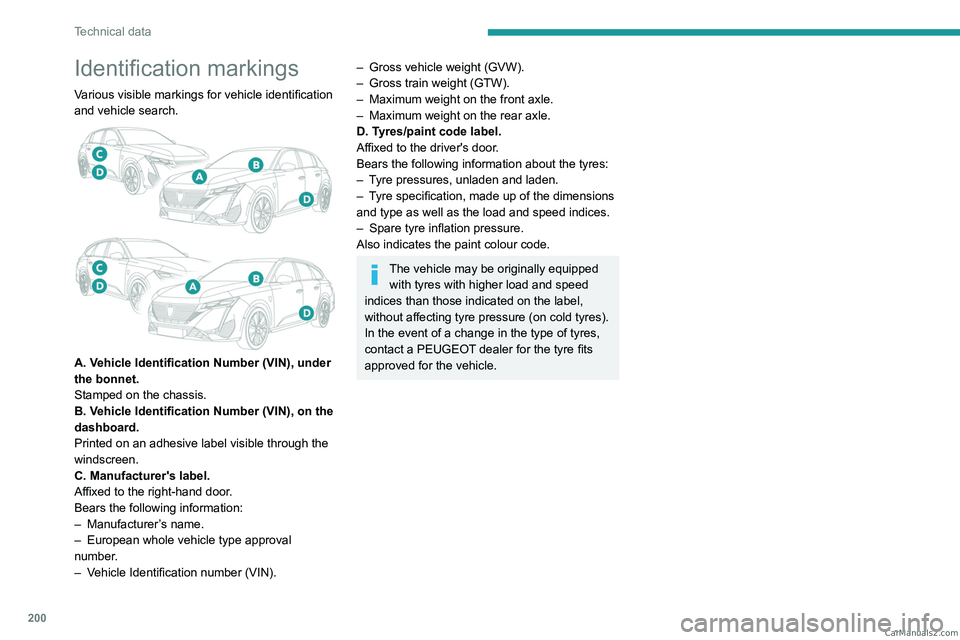
and vehicle search.
A. Vehicle Identification Number (VIN), under
the bonnet.
Stamped on the chassis.
B. Vehicle Identification Number (VIN), on the
dashboard.
Printed on an adhesive label visible through the
windscreen.
C. Manufacturer's label.
Affixed to the right-hand door.
Bears the following information:
–
Manufacturer
’s name.
–
European whole vehicle type approval
number
.
–
V
ehicle Identification number (VIN).
– Gross vehicle weight (GVW).
– Gross train weight (GTW).
–
Maximum weight on the front axle.
–
Maximum weight on the rear axle.
D. T
yres/paint code label.
Affixed to the driver's door.
Bears the following information about the tyres:
–
T
yre pressures, unladen and laden.
–
T
yre specification, made up of the dimensions
and type as well as the load and speed indices.
–
Spare tyre inflation pressure.
Also indicates the paint colour code.
The vehicle may be originally equipped with tyres with higher load and speed
indices than those indicated on the label,
without affecting tyre pressure (on cold tyres).
In the event of a change in the type of tyres,
contact a PEUGEOT dealer for the tyre fits
approved for the vehicle. CarM an uals 2 .c o m
Page 222 of 260
220
Alphabetical index
A
ABS 79
Accelerated charging unit (Wallbox)
151–152
Accessories
76
Active LED Vision
67, 69
Active Safety Brake
130–131, 133
AdBlue®
18, 170
AdBlue® tank
172
Additive, Diesel
168–169
Adjusting headlamps
66
Adjusting head restraints
43
Adjusting seat
43–44
Adjusting the air distribution
52–53
Adjusting the air flow
52–53
Adjusting the headlamp beam height
66
Adjusting the height and reach
of the steering wheel
47
Adjusting the lumbar support
44
Adjusting the seat angle
44
Adjusting the temperature
52
Adjusting the time
215
Advice on care and maintenance
149, 173
Advice on driving
8, 94–95
Airbags
84–87
Airbags, curtain
85–86
Airbags, front
84–85, 88
Airbags, lateral
85–86
Air conditioning
51–52, 54
Air conditioning, automatic
55
Air conditioning, dual-zone automatic
52
Air intake
54
Air vents 51
Alarm
37–38
Amplifier, audio
59
Anti-lock braking system (ABS)
79
Antitheft / Immobiliser
27
Applications
23–24
Armrest, front
58–59
Armrest, rear
60
Assistance call
77–78
Assistance, emergency braking
80, 132
Audio streaming (Bluetooth)
212
B
Battery, 12 V 165, 169, 186–190
Battery, ancillaries
186
Battery, charging
187–188, 190
Battery, remote control
31–32
Blanking screen (snow shield)
163
Blind
40
BlueHDi
18, 168, 176
Bluetooth (hands-free)
209
Bluetooth (telephone)
209–210
Bodywork
174
Bonnet
165–166
Boot
33, 36, 64
Brake discs
170
Brake lamps
185
Brakes
169–170
Braking
102
Braking assistance system
79–80
Braking, automatic emergency 130–131, 133
Braking, dynamic emergency
98–100
Bulbs (changing)
184–185
C
Capacity, fuel tank 147
Care of the bodywork
174
Central locking
29–30
Changing a bulb
184–185
Changing a fuse
186
Changing a wheel
177, 181
Changing a wiper blade
74
Changing the remote control battery
31
Changing to free-wheeling
172
Charge level indicator
(Rechargeable hybrid)
20
Charger, induction
57
Charger, wireless
57
Charging cable
153
Charging cable
(Rechargeable hybrid)
151–152, 157
Charging connector
(Rechargeable hybrid)
150, 155, 157
Charging flap
(Rechargeable hybrid)
150, 155, 157
Charging the traction battery
(Rechargeable hybrid)
20, 149, 155, 157
CHECK
20
Checking the engine oil level
18
Checking the levels
167–168 CarM an uals 2 .c o m
Page 225 of 260
223
Alphabetical index
J
Jack 177–178, 181
Jump starting
187
K
Key 26–27, 31
Key, electronic
28–29
Keyless Entry and Starting
26, 28–29, 95–96
Key not recognised
97
Key with remote control
26, 95
Kit, hands-free
209
Kit, puncture repair
177–178
Kit, temporary puncture repair
177–180
Klaxon
77
L
Labels, identification 200
Lamps, parking
66
Lamps, rear
185
Lamps with Full LED technology
67, 69
Lane assist
118, 123–124
Lane keeping assist
135
Leather (care)
175
LEDs - Light-emitting diodes
66, 185
Level, AdBlue®
168
Level, brake fluid
168
Level, Diesel additive
168–169
Level, engine coolant 18, 168
Level, engine oil
18, 167
Levels and checks
167–169
Level, screenwash fluid
72, 168
Light-emitting diodes - LEDs
66, 185
Lighting, boot
64
Lighting dimmer
21
Lighting, exterior
65, 68
Lighting, guide-me home
67
Lighting, interior
60–61
Lighting, mood
60
Lighting, welcome
67–68
Loading
162–163
Load reduction mode
165
Locating your vehicle
27
Locking
27, 29
Locking from the inside
30
Locking the doors
30
Log, alerts
20
Long-distance blind spot monitoring
138
Long objects, transporting
60
Lumbar
44
M
Mains socket (domestic network) 151–152
Maintenance (advice)
149, 173
Maintenance, routine
109, 168, 170
Manoeuvring aids (recommendations)
108
Map reading lamps
60
Markings, identification
200
Massage function 46
Massage, multi-point
46
Mat
59, 110
Menu, shortcuts
23
Mirror, rear view
48
Mirrors, door
47–48, 55, 138
Mirror, vanity
57
Misfuel prevention
148
Mobile application
24, 55, 155, 158
Motor, electric
104, 149, 198
Motorised tailgate
33–34, 36
Mountings, ISOFIX
89, 91–92
N
Net, high load retaining 62
Net, luggage retaining
61
O
Obstacle detection 139
Oil change
167
Oil consumption
167
Oil, engine
167
On-board tools
64, 176–178
Opening the bonnet
165–166
Opening the boot
28, 33
Opening the doors
28, 33 CarM an uals 2 .c o m
Page 227 of 260
225
Alphabetical index
Serial number, vehicle 200
Servicing
17, 168, 170
Settings, equipment
10, 23
Shield, snow
163
Sidelamps
66, 185
Silent vehicle warning sound
(Rechargeable hybrid)
77
Smartphone
24, 57
Snow chains
107, 164
Snow screen
163
Socket, 12 V
57
Socket, 12 V accessory
57, 63
Speakers
59
Speed limiter
113–115
Speed limit recognition
111 – 11 2
Speedometer
10, 110
Sport mode
103–104
Spotlamps, side
68
Stability control (ESC)
79, 81
Starting a Diesel engine
147
Starting/Stopping the vehicle
95
Starting the engine
95–96
Starting the vehicle
96, 102
Starting using another battery
97, 187
State of charge, battery
23
Station, radio
211–212
Stay, engine bonnet
166
Steering wheel
11 0
Steering wheel (adjustment)
47
Stickers, customising
174
Stopping the vehicle
96, 102
Stop & Start
22, 52, 55, 105–106, 147, 165, 169, 189Storage 56–61
Storage box
64
Storage wells
61, 64
Storing driving positions
45
Stowing rings
61
Sunshine sensor
51
Sun visor
57
Suspension
170
Switching off the engine
95
Synchronising the remote control
32
T
Tables of engines 195, 197–198
Tailgate
33
Tank, fuel
147–148
Technical data
195, 197–198
Telephone
209–210, 213–214
Temperature, coolant
18
Time (setting)
215
Tool box
64
Tools
176–178
Topping-up AdBlue®
172
Top Tether (fixing)
89, 91–92
Total distance recorder
21
Touch screen
22–24, 55
Towball, quickly detachable
159–162
Towbar
81, 158
Towbar with quickly
detachable towball
159–162
Towed loads
194–195, 197–198
Towing
192–193
Towing another vehicle 192–193
Towing the vehicle
192–193
Traction battery charge
153
Traction battery
(Rechargeable hybrid)
20, 149–150, 155
Traction control (ASR)
80
Trailer
81, 158
Trailer stability assist (TSA)
81
Trajectory control systems
79
Triangle, warning
176
Trip computer
21–22
Tyres
170, 200
Tyre under-inflation detection
107, 179
U
Under-inflation (detection) 107
Unlocking
26, 28
Unlocking from the inside
30
Unlocking the boot
26, 29
Unlocking the doors
30
Unlocking the tailgate
26, 29
Updating the time
215
V
Vehicle data recording and privacy 217
Ventilation
51
Visibility
55
Visiopark
142
Visiopark 1
140 CarM an uals 2 .c o m