battery PEUGEOT 308 2023 Owners Manual
[x] Cancel search | Manufacturer: PEUGEOT, Model Year: 2023, Model line: 308, Model: PEUGEOT 308 2023Pages: 260, PDF Size: 7.97 MB
Page 5 of 260
3
Contents
Cruise control 11 6
Drive Assist Plus 11 8
Drive Assist 2.0 11 8
Adaptive cruise control 11 9
Lane positioning assist 123
Semi-automatic lane changing 126
Active Safety Brake with Collision Risk Alert
and Intelligent emergency braking assistance
130
Distraction detection 134
Lane keeping assist 135
Long-distance blind spot monitoring 138
Parking sensors 139
Visiopark 1 140
Visiopark 3 142
Rear cross traffic alert 144
7Practical informationCompatibility of fuels 147
Refuelling 147
Misfuel prevention (Diesel) 148
Rechargeable hybrid system 149
Charging the traction battery
(Rechargeable hybrid)
155
Towing device 158
Towing device with quickly detachable towball 159
Roof bars 162
Very cold climate screens 163
Snow chains 164
Energy economy mode 165
Bonnet 165
Engine compartment 166
Checking levels 167
Checks 168
AdBlue® (BlueHDi) 170
Free-wheeling 172
Advice on care and maintenance 173
8In the event of a breakdownWarning triangle 176
Running out of fuel (Diesel) 176
Tool kit 176
Temporary puncture repair kit 178
Spare wheel 181
Changing a bulb 184
Fuses 186
12
V battery/Accessory batteries 186
Towing the vehicle 192
9Technical dataEngine technical data and towed loads 194
Petrol engines 195
Diesel engines 197
Rechargeable hybrid engines 198
Dimensions 199
Identification markings 200
10 PEUGEOT i-Connect Advanced -PEUGEOT i-Connect
First steps 201
Customisation 204
Steering mounted controls 205
Applications 206
Voice commands 206
Navigation 207
Connectivity 208
Mirror Screen 210
Media 2 11
Phone 213
Settings 214
Help 215
11Vehicle data recording and privacy
■
Alphabetical index
■
Appendix CarM an uals 2 .c o m
Page 8 of 260
6
Overview
Rechargeable hybrid
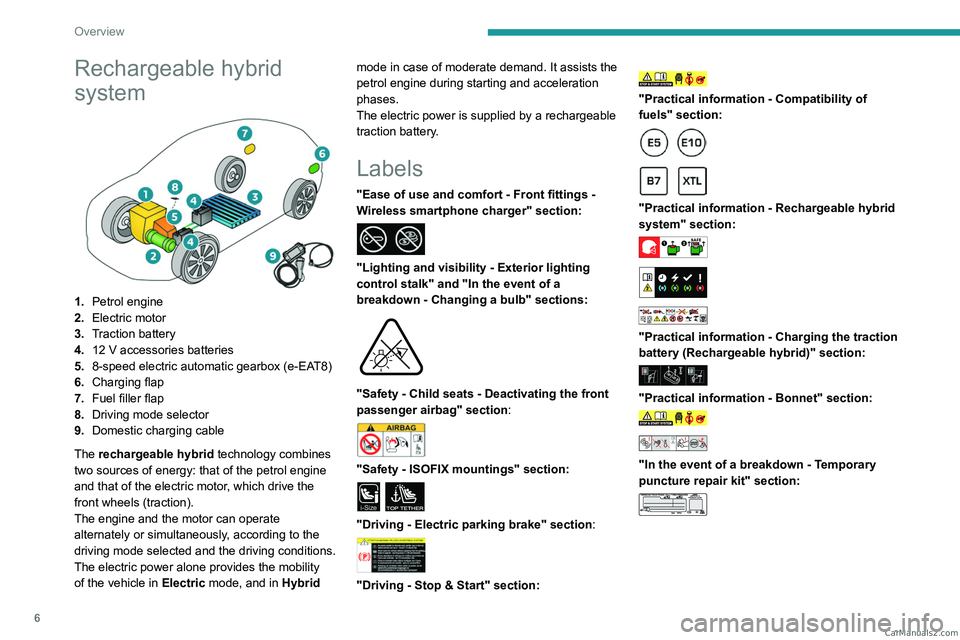
system
1.Petrol engine
2. Electric motor
3. Traction battery
4. 12 V accessories batteries
5. 8-speed electric automatic gearbox (e-EAT8)
6. Charging flap
7. Fuel filler flap
8. Driving mode selector
9. Domestic charging cable
The rechargeable hybrid technology combines
two sources of energy: that of the petrol engine
and that of the electric motor, which drive the
front wheels (traction).
The engine and the motor can operate
alternately or simultaneously, according to the
driving mode selected and the driving conditions.
The electric power alone provides the mobility
of the vehicle in Electric mode, and in Hybrid mode in case of moderate demand. It assists the
petrol engine during starting and acceleration
phases.
The electric power is supplied by a rechargeable
traction battery.
Labels
"Ease of use and comfort - Front fittings -
Wireless smartphone charger" section:
"Lighting and visibility - Exterior lighting
control stalk" and "In the event of a
breakdown - Changing a bulb" sections:
"Safety - Child seats - Deactivating the front
passenger airbag" section:
"Safety - ISOFIX mountings" section:
i-SizeTOP TETHER
"Driving - Electric parking brake" section:
"Driving - Stop & Start" section:
"Practical information - Compatibility of
fuels" section:
"Practical information - Rechargeable hybrid
system" section:
"Practical information - Charging the traction
battery (Rechargeable hybrid)" section:
"Practical information - Bonnet" section:
"In the event of a breakdown - Temporary
puncture repair kit" section:
CarM an uals 2 .c o m
Page 9 of 260
7
Overview
"In the event of a breakdown - Spare wheel"
section:
"In the event of a breakdown - 12 V battery/
Accessory batteries" section:
24V12V
CarM an uals 2 .c o m
Page 11 of 260
9
Eco-driving
You will only see the fuel consumption of your
new vehicle settle down to a consistent average
after the first 1,900 miles (3,000 kilometres).
Optimising the driving range
(rechargeable hybrid vehicles)
Connect the vehicle as soon as possible.
Favour the ECO zone of the power indicator by
driving smoothly and at a steady speed.
Anticipate slowing down as much as possible
and, if possible, favour decelerations with
regenerative braking mode activated (power
indicator in the CHARGE zone).
With the vehicle connected, carry out
temperature pre-conditioning before setting off.
To optimise consumption during a journey:
►
Programme a destination in the vehicle’
s
GPS navigation system.
►
Select the
Hybrid driving mode.
►
Make sure that the battery charge level is
close to maximum.
►
Do not use the e-Save function while driving.
►
Use the heating/air conditioning system
wisely
. CarM an uals 2 .c o m
Page 12 of 260
10
Dashboard instruments
Driver information
Instrument panel
The instrument panel displays all the information
the driver needs about the status of the vehicle's
various systems.
This information appears in the form of warning
and indicator lamps and messages.
The instrument panel is in the form of a fully
digital screen.
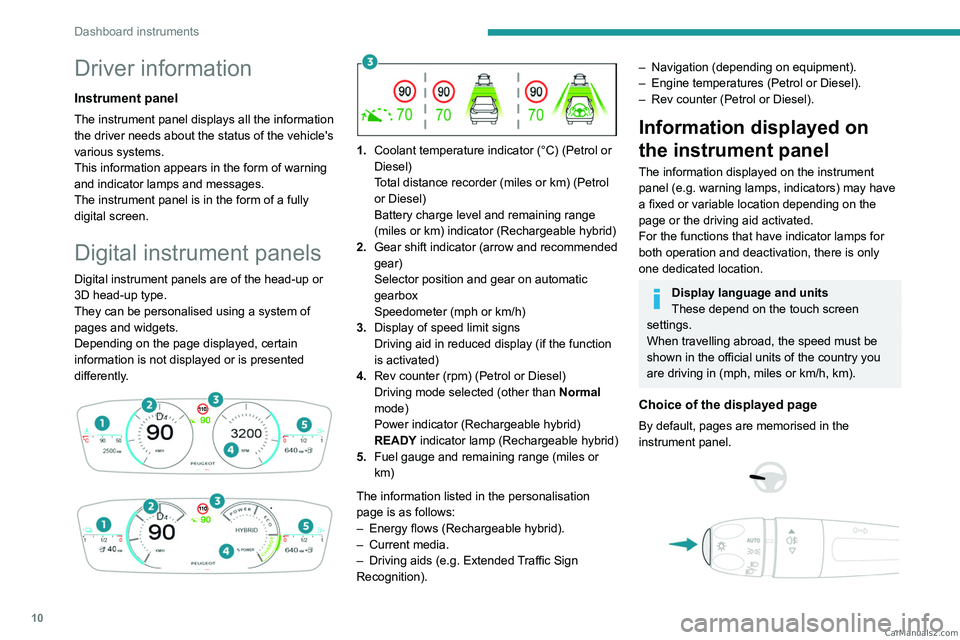
Digital instrument panels
Digital instrument panels are of the head-up or
3D head-up type.
They can be personalised using a system of
pages and widgets.
Depending on the page displayed, certain
information is not displayed or is presented
differently.
1. Coolant temperature indicator (°C) (Petrol or
Diesel)
Total distance recorder (miles or km) (Petrol
or Diesel)
Battery charge level and remaining range
(miles or km) indicator (Rechargeable hybrid)
2. Gear shift indicator (arrow and recommended
gear)
Selector position and gear on automatic
gearbox
Speedometer (mph or km/h)
3. Display of speed limit signs
Driving aid in reduced display (if the function
is activated)
4. Rev counter (rpm) (Petrol or Diesel)
Driving mode selected (other than Normal
mode)
Power indicator (Rechargeable hybrid)
READY indicator lamp (Rechargeable hybrid)
5. Fuel gauge and remaining range (miles or
km)
The information listed in the personalisation
page is as follows:
–
Energy flows (Rechargeable hybrid).
–
Current media.
–
Driving aids (e.g.
Extended Traffic Sign
Recognition).
– Navigation (depending on equipment).
– Engine temperatures (Petrol or Diesel).
–
Rev counter (Petrol or Diesel).
Information displayed on
the instrument panel
The information displayed on the instrument
panel (e.g. warning lamps, indicators) may have
a fixed or variable location depending on the
page or the driving aid activated.
For the functions that have indicator lamps for
both operation and deactivation, there is only
one dedicated location.
Display language and units
These depend on the touch screen
settings.
When travelling abroad, the speed must be
shown in the official units of the country you
are driving in (mph, miles or km/h, km).
Choice of the displayed page
By default, pages are memorised in the
instrument panel.
CarM an uals 2 .c o m
Page 14 of 260
12
Dashboard instruments
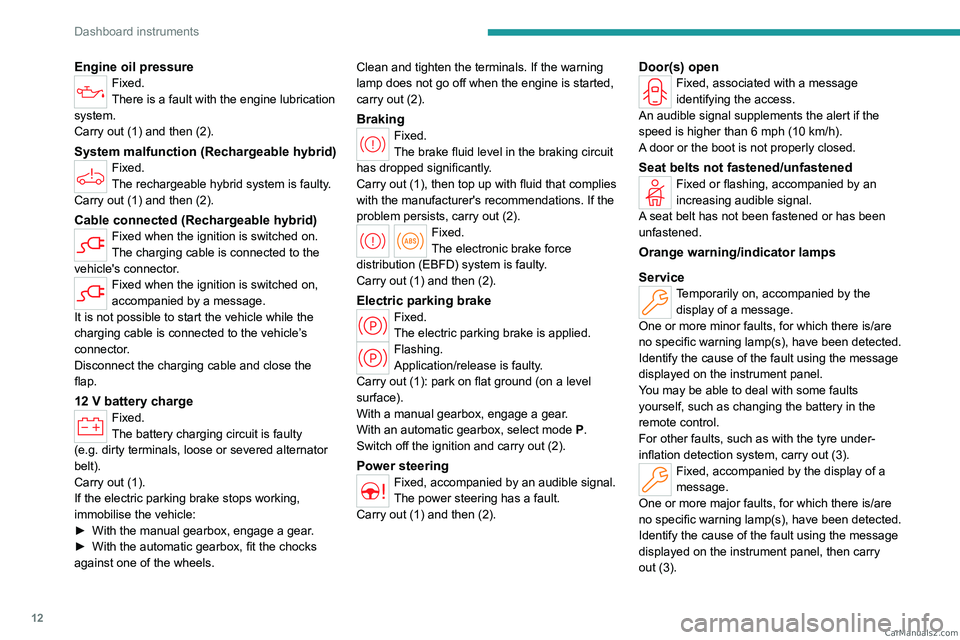
Engine oil pressureFixed.
There is a fault with the engine lubrication
system.
Carry out (1) and then (2).
System malfunction (Rechargeable hybrid)Fixed.
The rechargeable hybrid system is faulty.
Carry out (1) and then (2).
Cable connected (Rechargeable hybrid)Fixed when the ignition is switched on.
The charging cable is connected to the
vehicle's connector.
Fixed when the ignition is switched on,
accompanied by a message.
It is not possible to start the vehicle while the
charging cable is connected to the vehicle’s
connector.
Disconnect the charging cable and close the
flap.
12 V battery chargeFixed.
The battery charging circuit is faulty
(e.g.
dirty terminals, loose or severed alternator
belt).
Carry out (1).
If the electric parking brake stops working,
immobilise the vehicle:
►
With the manual gearbox, engage a gear
.
►
With the automatic gearbox, fit the chocks
against one of the wheels. Clean and tighten the terminals. If the warning
lamp does not go off when the engine is started,
carry out (2).
BrakingFixed.
The brake fluid level in the braking circuit
has dropped significantly.
Carry out (1), then top up with fluid that complies
with the manufacturer's recommendations. If the
problem persists, carry out (2).
Fixed.
The electronic brake force
distribution
(EBFD) system is faulty.
Carry out (1) and then (2).
Electric parking brakeFixed.
The electric parking brake is applied.
Flashing.
Application/release is faulty.
Carry out (1): park on flat ground (on a level
surface).
With a manual gearbox, engage a gear.
With an automatic gearbox, select mode
P
.
Switch off the ignition and carry out (2).
Power steeringFixed, accompanied by an audible signal.
The power steering has a fault.
Carry out (1) and then (2).
Door(s) openFixed, associated with a message
identifying the access.
An audible signal supplements the alert if the
speed is higher than 6 mph (10
km/h).
A door or the boot is not properly closed.
Seat belts not fastened/unfastenedFixed or flashing, accompanied by an
increasing audible signal.
A seat belt has not been fastened or has been
unfastened.
Orange warning/indicator lamps
Service
Temporarily on, accompanied by the display of a message.
One or more minor faults, for which there is/are
no specific warning lamp(s), have been detected.
Identify the cause of the fault using the message
displayed on the instrument panel.
You may be able to deal with some faults
yourself, such as changing the battery in the
remote control.
For other faults, such as with the tyre under-
inflation detection system, carry out (3).
Fixed, accompanied by the display of a
message.
One or more major faults, for which there is/are
no specific warning lamp(s), have been detected.
Identify the cause of the fault using the message
displayed on the instrument panel, then carry
out (3). CarM an uals 2 .c o m
Page 20 of 260
18
Dashboard instruments
► Switch on the ignition without starting the
engine; a temporary display window appears and
a countdown begins.
►
When the display indicates =0
, a confirmation
message appears; release the lighting control
stalk button and the spanner symbol disappears.
If you disconnect the battery following
this operation, lock the vehicle and wait
at least 5 minutes for the reset to be
registered.
Reminder of the servicing information
Servicing information is accessible using
the Settings > Vehicle application on the
touch screen.
►
Then select
Safety > Diagnostics.
Engine oil level indicator
(Depending on version)
The level read will only be correct if the vehicle is on level ground and the engine
has been off for more than 30 minutes.
Low oil level
This is indicated by the message " Oil
level incorrect" on the instrument panel,
accompanied by the lighting of the Service
warning lamp and an audible signal.
If a low oil level is confirmed by a check using
the dipstick, the level must be topped up to avoid
damage to the engine.
For more information on Checking levels, refer
to the corresponding section.
Oil gauge malfunction
This is indicated by the message " Oil level
measurement invalid" on the instrument panel.
Consult a PEUGEOT dealer or a qualified
workshop.
In the event of a malfunction of the
electric gauge, the oil level is no longer
monitored.
If the system is faulty, you must check the
engine oil level using the manual dipstick
located in the engine compartment.
For more information on Checking levels,
refer to the corresponding section.
Coolant temperature
indicator
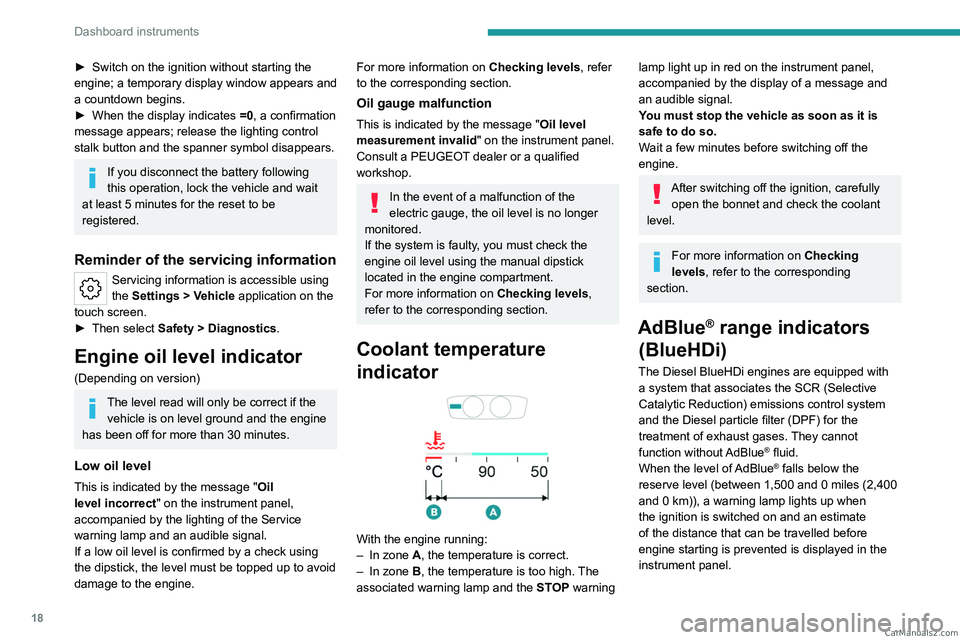
With the engine running:
– In zone A, the temperature is correct.
–
In zone
B, the temperature is too high. The
associated warning lamp and the STOP
warning
lamp light up in red on the instrument panel,
accompanied by the display of a message and
an audible signal.
You must stop the vehicle as soon as it is
safe to do so.
Wait a few minutes before switching off the
engine.
After switching off the ignition, carefully open the bonnet and check the coolant
level.
For more information on Checking
levels, refer to the corresponding
section.
AdBlue® range indicators
(BlueHDi)
The Diesel BlueHDi engines are equipped with
a system that associates the SCR (Selective
Catalytic Reduction) emissions control system
and the Diesel particle filter (DPF) for the
treatment of exhaust gases. They cannot
function without AdBlue
® fluid.
When the level of AdBlue® falls below the
reserve level (between 1,500 and 0 miles (2,400
and 0
km)), a warning lamp lights up when
the ignition is switched on and an estimate
of the distance that can be travelled before
engine starting is prevented is displayed in the
instrument panel. CarM an uals 2 .c o m
Page 22 of 260
20
Dashboard instruments
control fault: starting prevented in X miles
(kms) "), indicating the driving range in miles or
kilometres.
While driving, the message is displayed every 30
seconds. The alert is repeated when switching
on the ignition.
You can continue driving for up to 685 miles
(1,100
km) before the engine starting
prevention system is triggered.
Have it checked by a PEUGEOT dealer
or a qualified workshop.
Starting prevented
Every time the ignition is switched on, the
message "Emissions control fault: Starting
prevented" is displayed.
To restart the engine
Contact a PEUGEOT dealer or a
qualified workshop.
Power indicator
(Rechargeable hybrid)
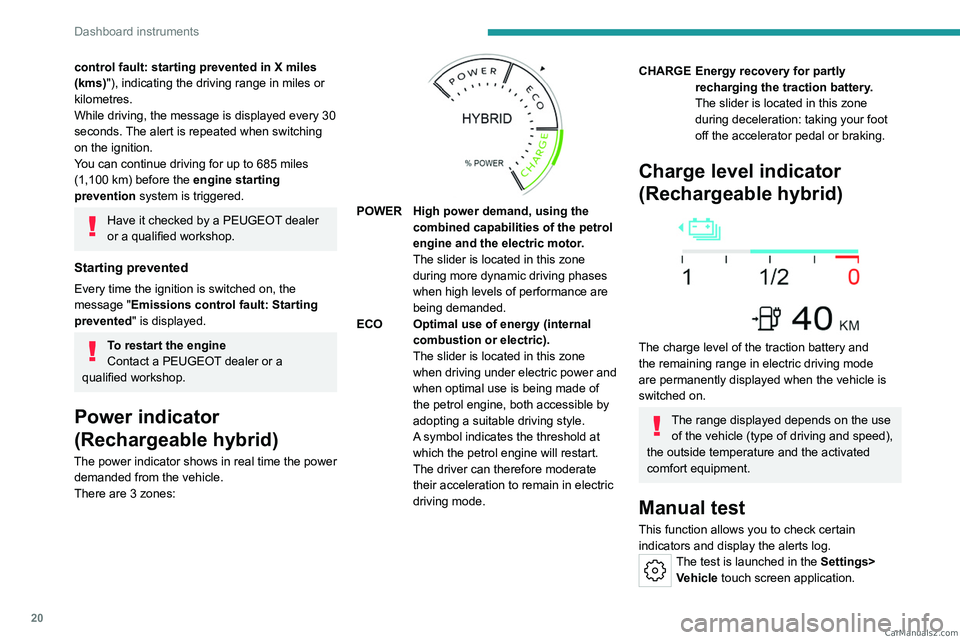
The power indicator shows in real time the power demanded from the vehicle.
There are 3 zones:
POWER High power demand, using the combined capabilities of the petrol
engine and the electric motor.
The slider is located in this zone
during more dynamic driving phases
when high levels of performance are
being demanded.
ECO Optimal use of energy (internal combustion or electric).
The slider is located in this zone
when driving under electric power and
when optimal use is being made of
the petrol engine, both accessible by
adopting a suitable driving style.
A symbol indicates the threshold at
which the petrol engine will restart.
The driver can therefore moderate
their acceleration to remain in electric
driving mode.
CHARGE Energy recovery for partly recharging the traction battery.
The slider is located in this zone
during deceleration: taking your foot
off the accelerator pedal or braking.
Charge level indicator
(Rechargeable hybrid)
The charge level of the traction battery and
the remaining range in electric driving mode
are permanently displayed when the vehicle is
switched on.
The range displayed depends on the use of the vehicle (type of driving and speed),
the outside temperature and the activated
comfort equipment.
Manual test
This function allows you to check certain
indicators and display the alerts log.
The test is launched in the Settings> Vehicle touch screen application. CarM an uals 2 .c o m
Page 25 of 260
23
Dashboard instruments
1► Depending on the pages displayed on the
screen, with or without the context menu, scroll
the text by swiping with your finger
, as with a
smartphone.
Show/Hide context menu
Return to the previous page
►
T
o change the status of a function, press the
description for the corresponding line (change
confirmed by the slider moving to the right/left:
function activated/deactivated).
Access additional information on the function
Access to function parameters
Adding/Removing shortcuts
Short press, ignition off: system on/off.
Short press, ignition on: mute/restore
sound.
Long press, ignition on: start standby mode
(mute sound, screens and clock display off).
Rotation: volume adjustment.
Applications
Press this button to access the
applications wall.
From any page, press the touch screen
with three fingers to display the
applications wall. To obtain information about the other
applications not listed here, refer to the sections
describing the audio and telematic systems.
ADAS
Activation/Deactivation and configuration
of the driving aid functions.
Climate
Settings for temperature, air flow, etc.
For more information on Dual-zone automatic
air conditioning , refer to the corresponding
section.
Activation/Deactivation of the heated steering
wheel.
For more information on the Heated steering
wheel, refer to the corresponding section.
Seats
Activation/Deactivation and configuration
of the seat comfort functions (heating and
massages).
For more information on the Heated seats
or on the Multi-point massages, refer to the
corresponding section.
Settings
Main settings for the audio system, touch
screen and digital instrument panel.
Activation/Deactivation and configuration of
the exterior lighting, vehicle access and safety
functions.
Energy
Access to the rechargeable hybrid system
features (energy flow, consumption statistics,
deferred charging, e
- SAVE function).
Energy application
Energy Flow
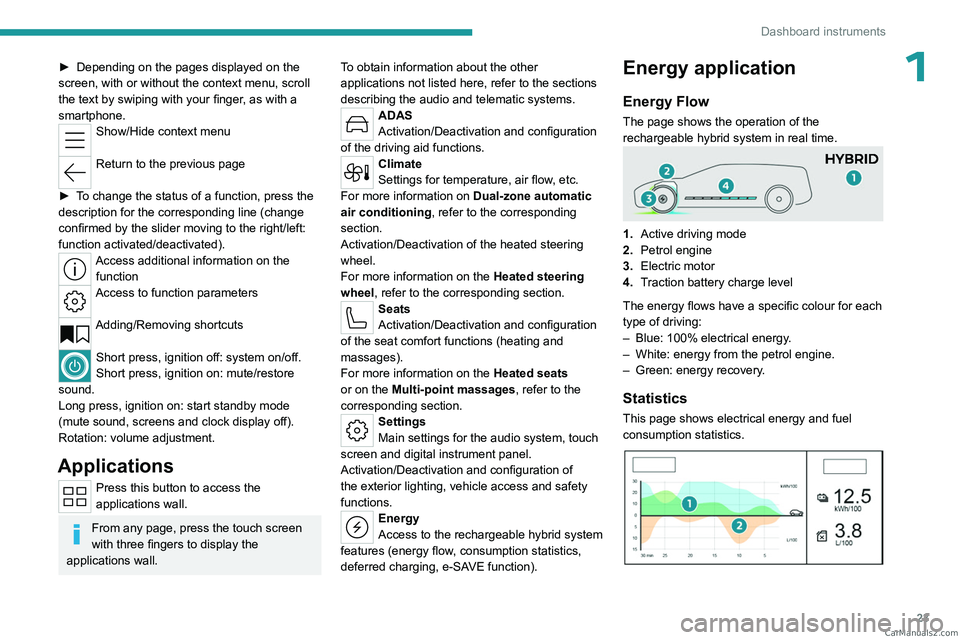
The page shows the operation of the
rechargeable hybrid system in real time.
1.Active driving mode
2. Petrol engine
3. Electric motor
4. Traction battery charge level
The energy flows have a specific colour for each
type of driving:
–
Blue: 100% electrical energy
.
–
White: energy from the petrol engine.
–
Green: energy recovery
.
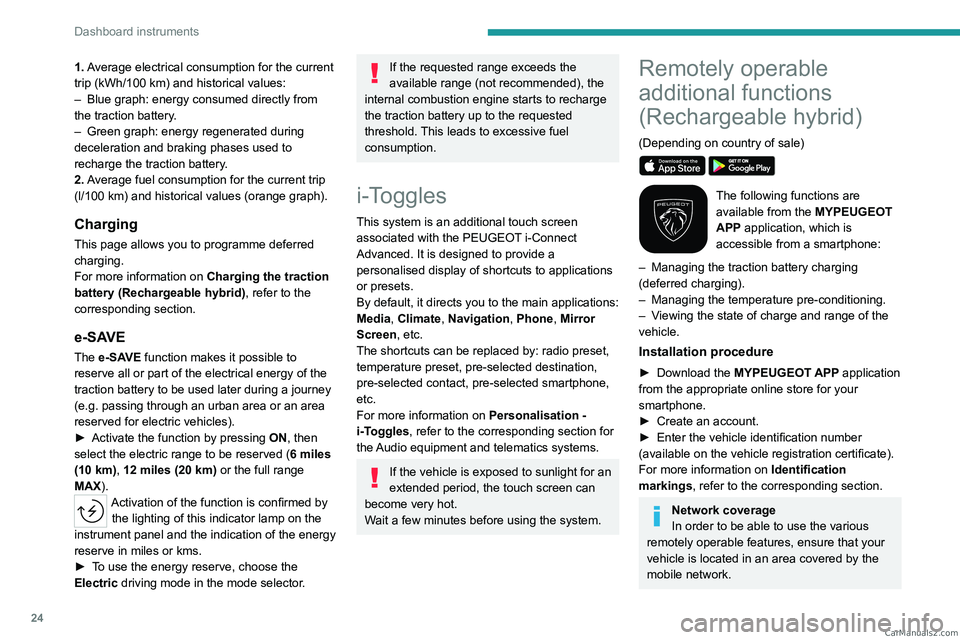
Statistics
This page shows electrical energy and fuel
consumption statistics.
CarM an uals 2 .c o m
Page 26 of 260
24
Dashboard instruments
1. Average electrical consumption for the current
trip (kWh/100 km) and historical values:
–
Blue graph: energy consumed directly from
the traction battery
.
–
Green graph: energy regenerated during
deceleration and braking phases used to
recharge the
traction battery.
2. Average fuel consumption for the current trip
(l/100
km) and historical values (orange graph).
Charging
This page allows you to programme deferred
charging.
For more information on Charging the traction
battery (Rechargeable hybrid), refer to the
corresponding section.
e-SAVE
The e-SAVE function makes it possible to
reserve all or part of the electrical energy of the
traction battery to be used later during a journey
(e.g.
passing through an urban area or an area
reserved for electric vehicles).
►
Activate the function by pressing ON
, then
select the electric range to be reserved ( 6 miles
(10 km), 12 miles (20 km) or the full range
MAX).
Activation of the function is confirmed by the lighting of this indicator lamp on the
instrument panel and the indication of the energy
reserve in miles or kms.
►
T
o use the energy reserve, choose the
Electric driving mode in the mode selector.
If the requested range exceeds the
available range (not recommended), the
internal combustion engine starts to recharge
the traction battery up to the requested
threshold. This leads to excessive fuel
consumption.
i-Toggles
This system is an additional touch screen
associated with the PEUGEOT i-Connect
Advanced. It is designed to provide a
personalised display of shortcuts to applications
or presets.
By default, it directs you to the main applications:
Media, Climate, Navigation, Phone, Mirror
Screen, etc.
The shortcuts can be replaced by: radio preset,
temperature preset, pre-selected destination,
pre-selected contact, pre-selected smartphone,
etc.
For more information on
Personalisation -
i-T
oggles, refer to the corresponding section for
the Audio equipment and telematics systems.
If the vehicle is exposed to sunlight for an
extended period, the touch screen can
become very hot.
Wait a few minutes before using the system.
Remotely operable
additional functions
(Rechargeable hybrid)
(Depending on country of sale)
The following functions are
available from the MYPEUGEOT
APP application, which is
accessible from a smartphone:
–
Managing the traction battery charging
(deferred charging).
–
Managing the temperature pre-conditioning.
–
V
iewing the state of charge and range of the
vehicle.
Installation procedure
► Download the MYPEUGEOT APP application
from the appropriate online store for your
smartphone.
►
Create an account.
►
Enter the vehicle identification number
(available on the vehicle registration certificate).
For more information on Identification
markings
, refer to the corresponding section.
Network coverage
In order to be able to use the various
remotely operable features, ensure that your
vehicle is located in an area covered by the
mobile network. CarM an uals 2 .c o m