ESP PEUGEOT 308 CC 2008 Owner's Guide
[x] Cancel search | Manufacturer: PEUGEOT, Model Year: 2008, Model line: 308 CC, Model: PEUGEOT 308 CC 2008Pages: 221, PDF Size: 8.69 MB
Page 114 of 221
7
i
102
SAFETY
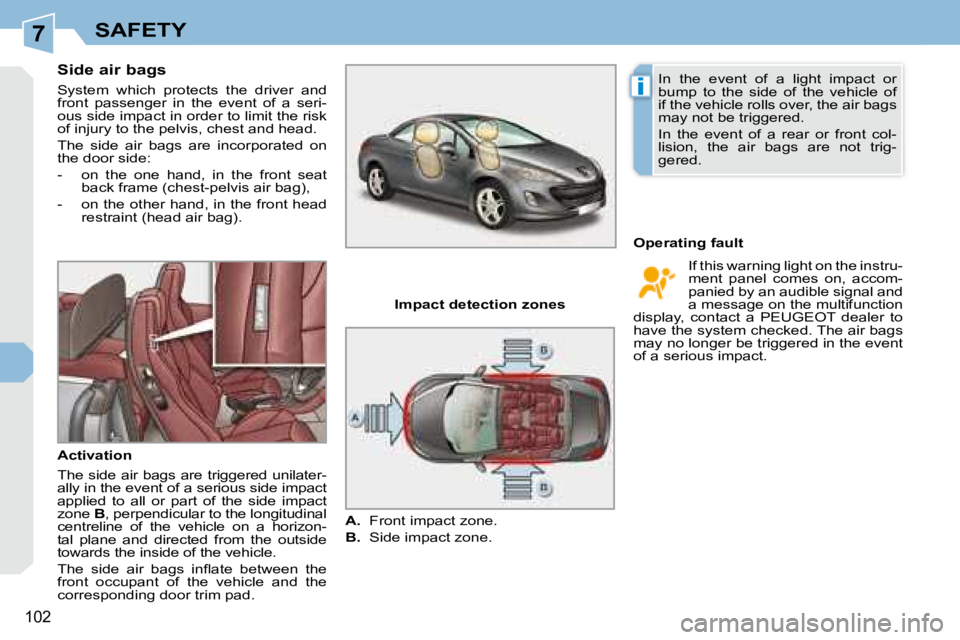
Side air bags
System which protects the driver and
front passenger in the event of a seri-
ous side impact in order to limit the risk
of injury to the pelvis, chest and head.
The side air bags are incorporated on
the door side:
- on the one hand, in the front seat back frame (chest-pelvis air bag),
- on the other hand, in the front head restraint (head air bag).
Activation
The side air bags are triggered unilater-
ally in the event of a serious side impact
applied to all or part of the side impact
zone B , perpendicular to the longitudinal
centreline of the vehicle on a horizon-
tal plane and directed from the outside
towards the inside of the vehicle.
The side air bags infl ate between the
front occupant of the vehicle and the
corresponding door trim pad. Operating fault
Impact detection zones
A. Front impact zone.
B. Side impact zone. If this warning light on the instru-
ment panel comes on, accom-
panied by an audible signal and
a message on the multifunction
display, contact a PEUGEOT dealer to
have the system checked. The air bags
may no longer be triggered in the event
of a serious impact.
In the event of a light impact or
bump to the side of the vehicle of
if the vehicle rolls over, the air bags
may not be triggered.
In the event of a rear or front col-
lision, the air bags are not trig-
gered.
Page 125 of 221
8DRIVING
"PORSCHE TIPTRONIC SYSTEM" AUTOMATIC GEARBOX
Four or six speed automatic gearbox
which offers a choice between the com-
fort of fully automatic operation, en-
hanced by sport and snow programmes,
or manual gear changing.
Therefore, four driving modes are of-
fered:
- automatic operation for electronic
management of the gears by the
gearbox,
- sport programme for a more dy-
namic style of driving,
- snow programme to improve driv-
ing when traction is poor,
- manual operation for sequential
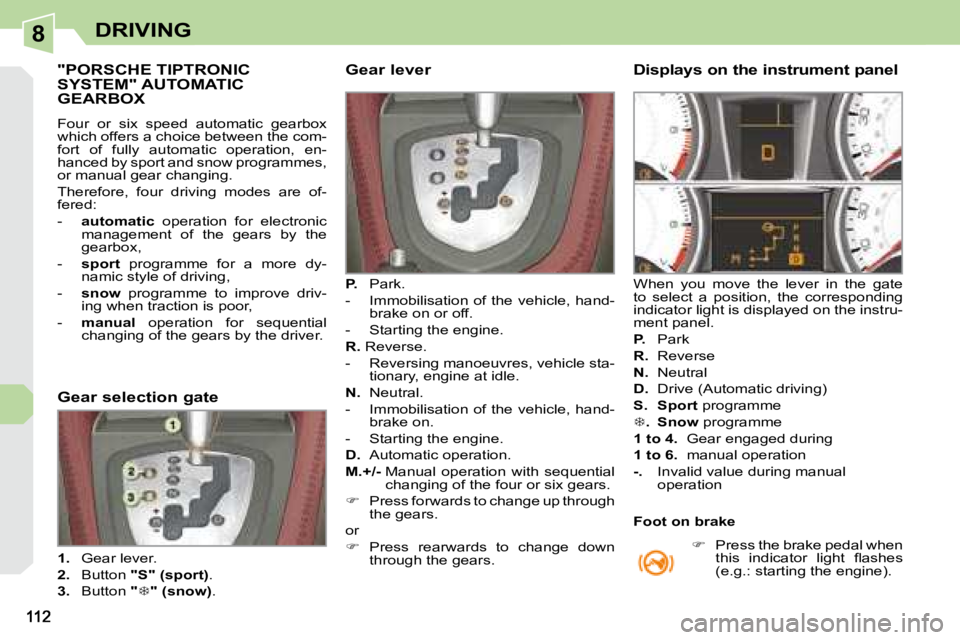
changing of the gears by the driver. Gear lever
P. Park.
- Immobilisation of the vehicle, hand- brake on or off.
- Starting the engine.
R. Reverse.
- Reversing manoeuvres, vehicle sta- tionary, engine at idle.
N. Neutral.
- Immobilisation of the vehicle, hand- brake on.
- Starting the engine.
D. Automatic operation.
M.+/- Manual operation with sequential
changing of the four or six gears.
Press forwards to change up through
the gears.
or
Press rearwards to change down
through the gears. Displays on the instrument panel
When you move the lever in the gate
to select a position, the corresponding
indicator light is displayed on the instru-
ment panel.
P. Park
R. Reverse
N. Neutral
D. Drive (Automatic driving)
S. Sport programme
. Snow programme
1 to 4. Gear engaged during
1 to 6. manual operation
-. Invalid value during manual
operation
Gear selection gate
1. Gear lever.
2. Button "S" (sport) .
3. Button
"
" (snow) .
Press the brake pedal when
this indicator light fl ashes
(e.g.: starting the engine).
Foot on brake
Page 128 of 221
8
i
115
DRIVING
SPEED LIMITER
System which prevents the vehicle from
exceeding the speed programmed by
the driver.
When the programmed speed limit is
reached, pressing the accelerator pedal
no longer has any effect.
The speed limiter is switched on man-
ually: it requires a programmed speed
of at least 20 mph (30 km/h).
The speed limiter is switched off by
manual operation of the control.
The programmed speed can be ex-
ceeded temporarily by pressing the ac-
celerator fi rmly.
To return to the programmed speed,
simply slow down to a speed below the
programmed speed.
The programmed speed remains in the
memory when the ignition is switched
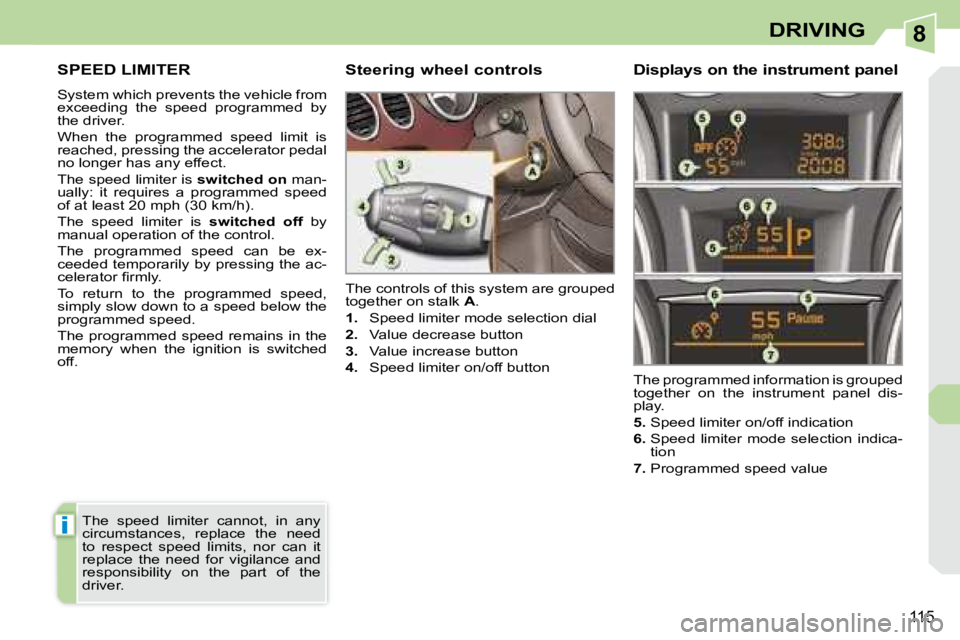
off. The controls of this system are grouped
together on stalk
A .
1. Speed limiter mode selection dial
2. Value decrease button
3. Value increase button
4. Speed limiter on/off button
The programmed information is grouped
together on the instrument panel dis-
play.
5. Speed limiter on/off indication
6. Speed limiter mode selection indica-
tion
7. Programmed speed value
Steering wheel controls Displays on the instrument
panel
The speed limiter cannot, in any
circumstances, replace the need
to respect speed limits, nor can it
replace the need for vigilance and
responsibility on the part of the
driver.
Page 130 of 221
8
i
117
DRIVING
CRUISE CONTROL
System which automatically maintains
the speed of the vehicle at the value
programmed by the driver, without any
action on the accelerator pedal.
The cruise control is switched on
manually: it requires a minimum vehicle
speed of 25 mph (40 km/h) and the en-
gaging:
- of fourth gear on the manual gearbox,
- of second gear on the automatic gearbox, in sequential driving mode,
- of position D on the automatic gear-
box.
The cruise control is switched off man-
ually or by pressing the brake or clutch
pedal or on triggering of the ESP sys-
tem for safety reasons.
It is possible to exceed the programmed
speed temporarily by pressing the ac-
celerator pedal.
To return to the programmed speed,
simply release the accelerator pedal.
Switching off the ignition cancels any
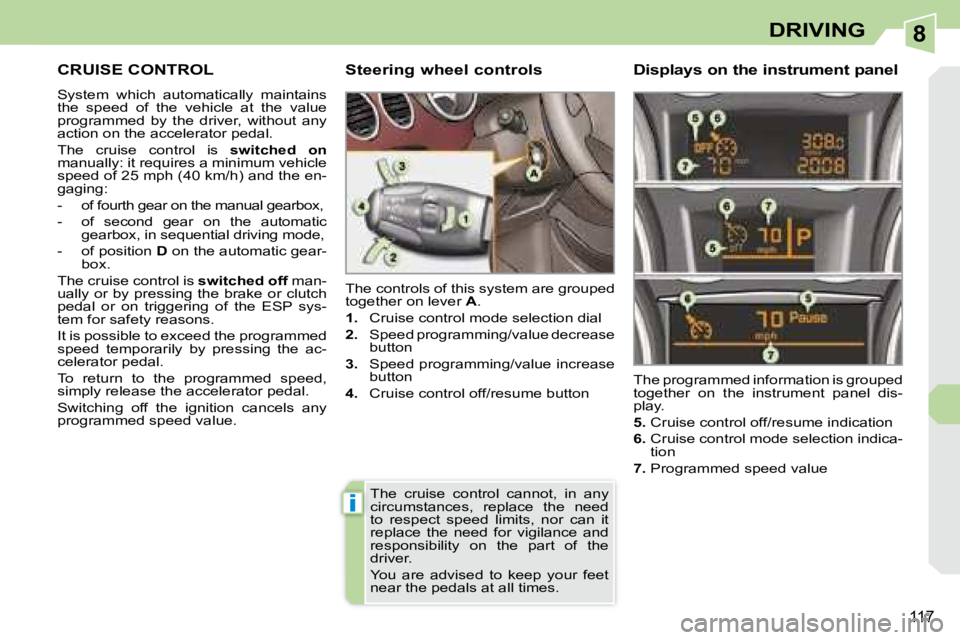
programmed speed value. The controls of this system are grouped
together on lever
A .
1. Cruise control mode selection dial
2. Speed programming/value decrease
button
3. Speed programming/value increase
button
4. Cruise control off/resume button The programmed information is grouped
together on the instrument panel dis-
play.
5. Cruise control off/resume indication
6. Cruise control mode selection indica-
tion
7. Programmed speed value
Steering wheel controls Displays on the instrument
panel
The cruise control cannot, in any
circumstances, replace the need
to respect speed limits, nor can it
replace the need for vigilance and
responsibility on the part of the
driver.
You are advised to keep your feet
near the pedals at all times.
Page 132 of 221
8
i
i
119
DRIVING
VISUAL AND AUDIBLE FRONT AND/OR REAR PARKING ASSISTANCE
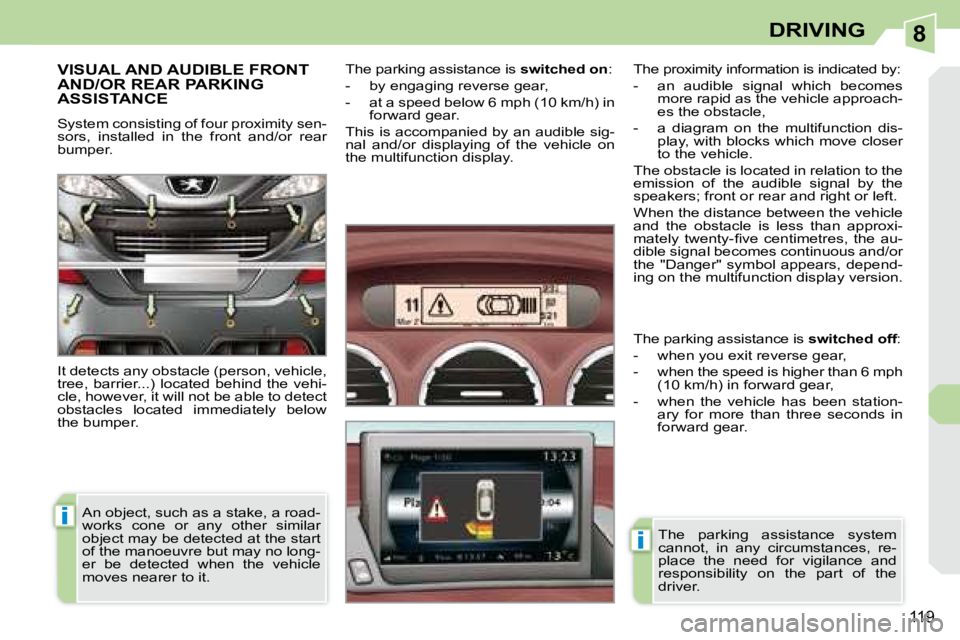
System consisting of four proximity sen-
sors, installed in the front and/or rear
bumper.
It detects any obstacle (person, vehicle,
tree, barrier...) located behind the vehi-
cle, however, it will not be able to detect
obstacles located immediately below
the bumper. The parking assistance is
switched on :
- by engaging reverse gear,
- at a speed below 6 mph (10 km/h) in forward gear.
This is accompanied by an audible sig-
nal and/or displaying of the vehicle on
the multifunction display.
An object, such as a stake, a road-
works cone or any other similar
object may be detected at the start
of the manoeuvre but may no long-
er be detected when the vehicle
moves nearer to it. The proximity information is indicated by:
- an audible signal which becomes
more rapid as the vehicle approach-
es the obstacle,
- a diagram on the multifunction dis- play, with blocks which move closer
to the vehicle.
The obstacle is located in relation to the
emission of the audible signal by the
speakers; front or rear and right or left.
When the distance between the vehicle
and the obstacle is less than approxi-
mately twenty-fi ve centimetres, the au-
dible signal becomes continuous and/or
the "Danger" symbol appears, depend-
ing on the multifunction display version.
The parking assistance system
cannot, in any circumstances, re-
place the need for vigilance and
responsibility on the part of the
driver.
The parking assistance is
switched off :
- when you exit reverse gear,
- when the speed is higher than 6 mph (10 km/h) in forward gear,
- when the vehicle has been station- ary for more than three seconds in
forward gear.
Page 135 of 221
9
i
123
CHECKS
RUNNING OUT OF FUEL (DIESEL)
If your vehicle is fi tted with an HDI en-
gine, the fuel circuit must be reprimed if
you run out of fuel.
This system consists of a repriming
pump, a transparent pipe and a degas
screw under the bonnet (refer to the
corresponding graphic). 2 litre Turbo HDI 16V engine
Fill the fuel tank with at least fi ve li-
tres of diesel.
Open the bonnet.
Unclip the style cover to gain access
to the repriming pump.
Slacken the degas screw.
Squeeze and release the repriming
pump until fuel appears in the trans-
parent pipe with the green connector.
Retighten the degas screw.
Operate the starter until the engine
starts.
Put the style cover back in position
and clip it in place.
Close the bonnet.
If the engine does not start at the
fi rst attempt, do not try again.
Operate the repriming pump again,
then the starter.
Page 138 of 221
9CHECKS
CHECKING LEVELS
Check all of these levels regularly and
top them up if necessary, unless other-
wise indicated.
If a level drops signifi cantly, have the
corresponding circuit checked by a
PEUGEOT dealer. Brake fluid level
In addition, as the cooling system is
pressurised, wait at least one hour after
switching off the engine before carrying
out any work.
To avoid any risk of scalding, unscrew
the cap by two turns to allow the pres-
sure to drop. When the pressure has
dropped, remove the cap and top up
the level.
Oil level The reading will only be correct
if the vehicle is on level ground
and the engine has been off for
more than 15 minutes.
The check is carried out either when the
ignition is switched on using the oil level
indicator on the instrument panel, or
using the dipstick.
Between two oil changes, the consump-
tion should not exceed 0.5 litre per
600 miles (1,000 km). The brake fl uid level should be
close to the "MAX" mark. If it is
not, check the brake pad wear.
Draining the circuit
Refer to the servicing booklet for details
of the interval for this operation.
Power steering fluid level The power steering fl uid level
should be close to the "MAX"
mark. Unscrew the cap, with the
engine cold, to check the level. Screenwash and headlamp
wash fluid
In the case of vehicles fi tted
with headlamp washers, the
minimum level of this fl uid is
indicated by an audible signal
and a message on the multi-
function display.
Top up the level when you stop the
vehicle.
Draining the engine
Refer to the servicing booklet for details
of the interval for this operation.
In order to maintain the reliability of the
engine and emission control system,
the use of additives in the engine oil is
prohibited.
Oil specifi cation
The oil must correspond to your engine
and conform to the manufacturer’s
recommendations. Fluid specifi cation
The brake fl uid must conform to the
manufacturer’s recommendations and
fulfi l the DOT4 standards.
Draining the circuit
The coolant does not have to be
changed.
Fluid specifi cation
For optimum cleaning and to avoid
freezing, this fl uid must not be topped
up or replaced with water.
Coolant level
The coolant level should be
close to the "MAX" mark but
should never exceed it.
When the engine is warm, the tempera-
ture of the coolant is regulated by the fan.
This can operate with the ignition off.
On vehicles which are fi tted with a
particle emission fi lter, the fan may
operate after the vehicle has been
switched off, even if the engine is
cold. Fluid specifi cation
The coolant must conform to the manu-
facturer’s recommendations.
Page 154 of 221
10
!
i
141
PRACTICAL INFORMATION
PEUGEOT will not accept responsi-
bility for the cost incurred in repairing
your vehicle or for rectifying malfunc-
tions resulting from the installation
of accessories not supplied and not
recommended by PEUGEOT and
not installed in accordance with its
instructions, in particular when the
combined consumption of all of the
additional equipment connected ex-
ceeds 10 milliamperes.
Installing electrical accessories
Your vehicle's electrical system is
designed to operate with standard
or optional equipment.
Before installing other electrical equip-
ment or accessories on your vehicle,
contact a PEUGEOT dealer.
CHANGING A FUSE
Procedure for replacing a faulty fuse
with a new fuse to rectify a failure of the
corresponding function.
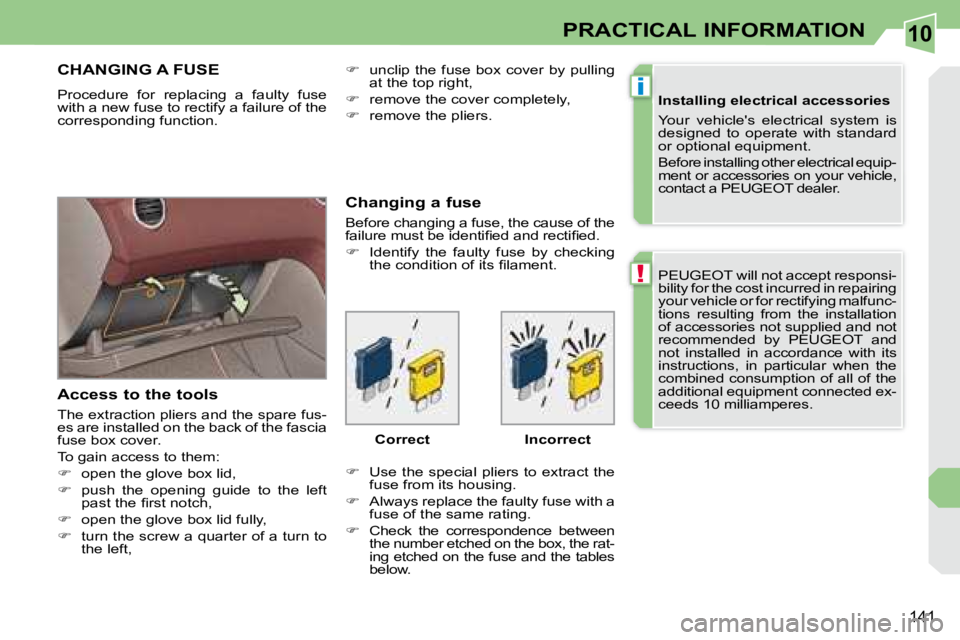
Access to the tools
The extraction pliers and the spare fus-
es are installed on the back of the fascia
fuse box cover.
To gain access to them:
open the glove box lid,
push the opening guide to the left
past the fi rst notch,
open the glove box lid fully,
turn the screw a quarter of a turn to
the left, Changing a fuse
Before changing a fuse, the cause of the
failure must be identifi ed and rectifi ed.
Identify the faulty fuse by checking
the condition of its fi lament.
Use the special pliers to extract the
fuse from its housing.
Always replace the faulty fuse with a
fuse of the same rating.
Check the correspondence between
the number etched on the box, the rat-
ing etched on the fuse and the tables
below.
Correct Incorrect
unclip the fuse box cover by pulling
at the top right,
remove the cover completely,
remove the pliers.
Page 157 of 221
10
144
PRACTICAL INFORMATION
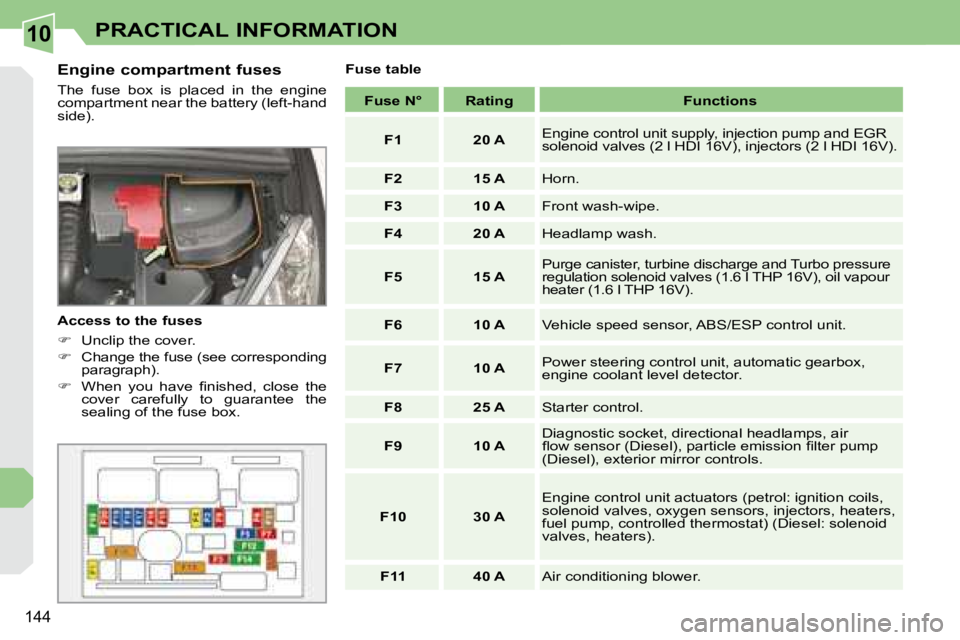
Engine compartment fuses
The fuse box is placed in the engine
compartment near the battery (left-hand
side).
Access to the fuses
Unclip the cover.
Change the fuse (see corresponding
paragraph).
When you have fi nished, close the
cover carefully to guarantee the
sealing of the fuse box. Fuse table
Fuse N° Rating Functions
F1 20 A Engine control unit supply, injection pump and EGR
solenoid valves (2 l HDI 16V), injectors (2 l HDI 1 6V).
F2 15 A Horn.
F3 10 A Front wash-wipe.
F4 20 A Headlamp wash.
F5 15 A Purge canister, turbine discharge and Turbo pressu
re
regulation solenoid valves (1.6 l THP 16V), oil vap our
heater (1.6 l THP 16V).
F6 10 A Vehicle speed sensor, ABS/ESP control unit.
F7 10 A Power steering control unit, automatic gearbox,
engine coolant level detector.
F8 25 A Starter control.
F9 10 A Diagnostic socket, directional headlamps, air
fl ow sensor (Diesel), particle emission fi lter pump
(Diesel), exterior mirror controls.
F10 30 A Engine control unit actuators (petrol: ignition coils,
solenoid valves, oxygen sensors, injectors, heaters,
fuel pump, controlled thermostat) (Diesel: solenoid
valves, heaters).
F11 40 A Air conditioning blower.
Page 161 of 221
10
!
!
i
148
PRACTICAL INFORMATION
Do not disconnect the terminals
while the engine is running.
Do not charge the batteries without
disconnecting the terminals fi rst.
The batteries contain harmful sub-
stances such as sulphuric acid and
lead. They must be disposed of in
accordance with regulations and
must not, in any circumstances, be
discarded with household waste.
Take used remote control batteries
and vehicle batteries to a special
collection point.
Charging the battery using a
battery charger
Disconnect the battery from the
vehicle.
Follow the instructions for use pro-
vided by the manufacturer of the
charger.
Reconnect starting with the negative
terminal (-).
Check that the terminals and connec-
tors are clean. If they are covered with
sulphate (whitish or greenish deposit),
remove them and clean them.
At the risk of discharging the battery,
the deactivated functions can be
reactivated manually. System which manages the use of certain
functions in relation to the level of charge
remaining in the battery.
When the vehicle is being driven, the
load reduction function temporarily de-
activates certain functions, such as the
air conditioning, the neck heaters, the
rear screen de-icing...
The deactivated functions are reactivated
automatically as soon as conditions
permit.
It is advisable to disconnect the
battery if the vehicle is to be left un-
used for more than one month. Before disconnecting the battery
Wait 2 minutes after switching off
the ignition before disconnecting
the battery.
Close the roof, the windows and
the doors before disconnecting the
battery.
Following reconnection of the
battery
Following reconnection of the bat-
tery, switch on the ignition and wait
1 minute before starting to permit
initialisation of the electronic systems.
However, if slight diffi culties are en-
countered following this operation,
contact a PEUGEOT dealer.
Referring to the corresponding sec-
tion, you must yourself reinitialise:
- the remote control key,
- the electric windows and the
automatic partial opening of the
door windows,
- the GPS satellite navigation system.