lock PEUGEOT 308 CC 2013 User Guide
[x] Cancel search | Manufacturer: PEUGEOT, Model Year: 2013, Model line: 308 CC, Model: PEUGEOT 308 CC 2013Pages: 268, PDF Size: 15.28 MB
Page 36 of 268
1
i
i
34
MONITORING
Following this operation, if you wish
to disconnect the battery, lock the
vehicle and wait at least fi ve minutes
for the zero reset to be registered.
Service indicator zero reset
After each service, the service indicator
must be reset to zero.
The procedure for resetting to zero is as
follows:
switch off the ignition,
press and hold the
".../000" button
on the right of the instrument panel,
switch on the ignition; the distance recorder display begins a count-
down,
when the instrument panel central screen indicates "=0" , release the
button; the spanner disappears from
the screen.
The distance remaining may be
weighted by the time factor, de-
pending on the type of motoring the
vehicle is used for.
Therefore, the spanner may also
come on if you have exceeded the
period since the last service speci-
fi ed in the warranty and mainte-
nance record.
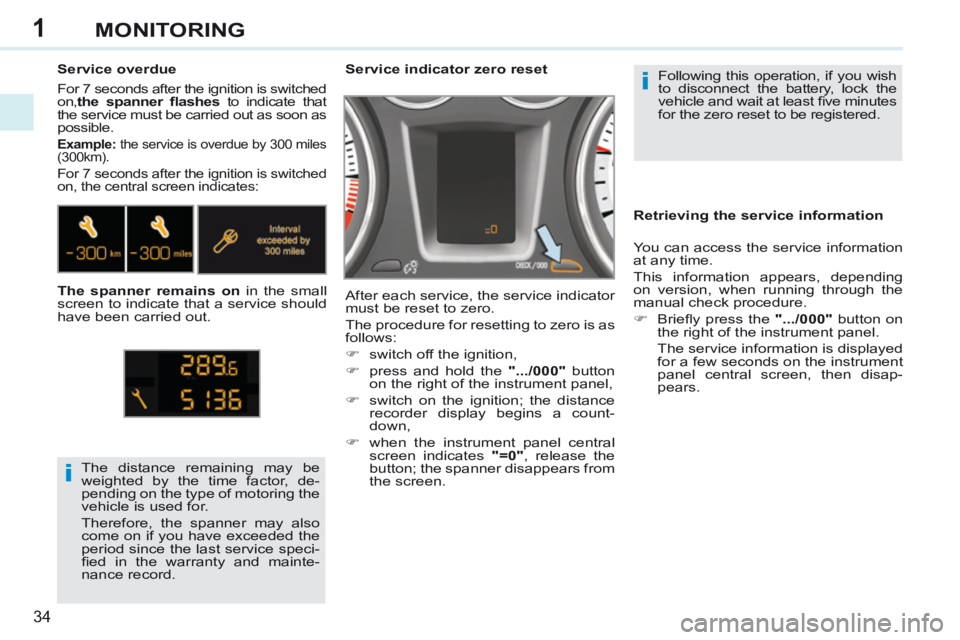
Service overdue For 7 seconds after the ignition is switched
on,
the spanner fl ashes to indicate that
the service must be carried out as soon as
possible.
Example: the service is overdue by 300 miles
(300km).
For 7 seconds after the ignition is switched
on, the central screen indicates:
The spanner remains on in the small
screen to indicate that a service should
have been carried out. Retrieving the service information
You can access the service information
at any time.
This information appears, depending
on version, when running through the
manual check procedure.
Briefl y press the
".../000" button on
the right of the instrument panel.
The service information is displayed for a few seconds on the instrument
panel central screen, then disap-
pears.
Page 37 of 268
1
35
MONITORING
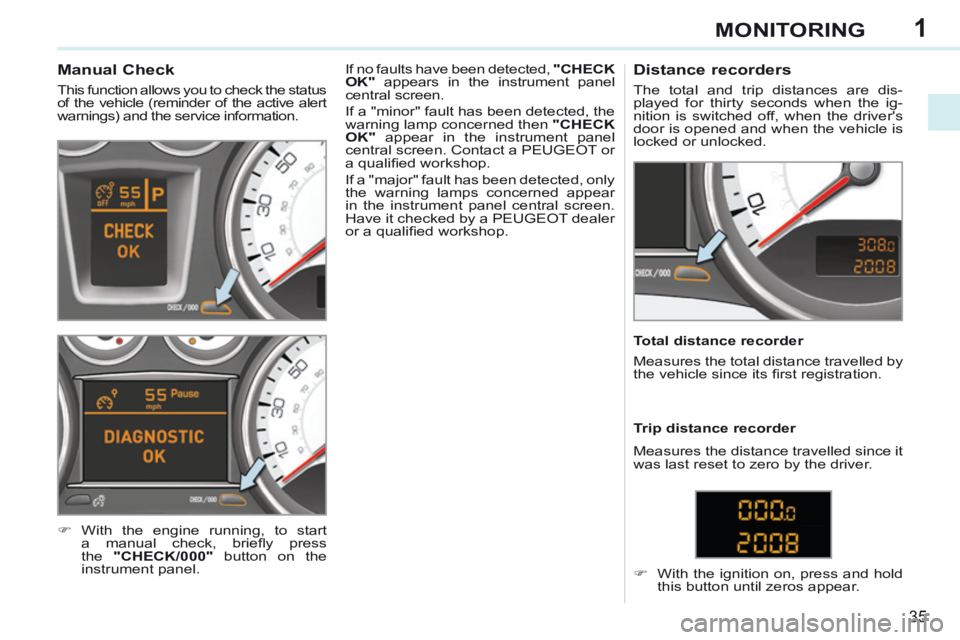
Manual Check
This function allows you to check the status
of the vehicle (reminder of the active alert
warnings) and the service information.
With the engine running, to start a manual check, briefl y press
the "CHECK/000" button on the
instrument panel. If no faults have been detected,
"CHECK
OK" appears in the instrument panel
central screen.
If a "minor" fault has been detected, the
warning lamp concerned then "CHECK
OK" appear in the instrument panel
central screen. Contact a PEUGEOT or
a qualifi ed workshop.
If a "major" fault has been detected, only
the warning lamps concerned appear
in the instrument panel central screen.
Have it checked by a PEUGEOT dealer
or a qualifi ed workshop.
Distance recorders
The total and trip distances are dis-
played for thirty seconds when the ig-
nition is switched off, when the driver's
door is opened and when the vehicle is
locked or unlocked.
Total distance recorder
Measures the total distance travelled by
the vehicle since its fi rst registration.
With the ignition on, press and hold this button until zeros appear.
Trip distance recorder
Measures the distance travelled since it
was last reset to zero by the driver.
Page 42 of 268
2
40
MULTIFUNCTION SCREENS
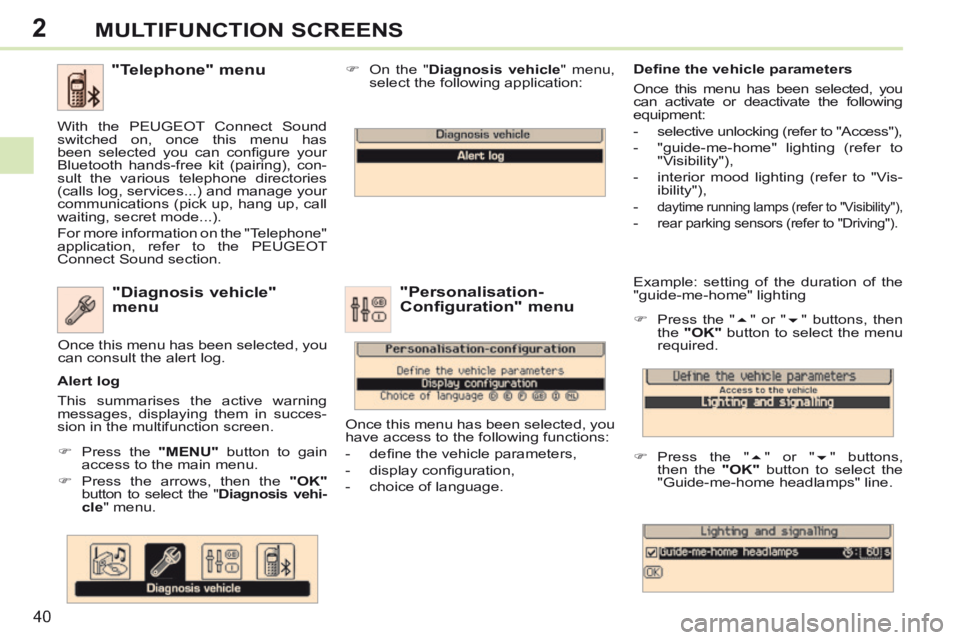
Example: setting of the duration of the
"guide-me-home" lighting
Press the " " or " " buttons, then
the "OK" button to select the menu
required.
Press the " " or " " buttons,
then the "OK" button to select the
"Guide-me-home headlamps" line. "Diagnosis vehicle"
menu
Press the "MENU" button to gain
access to the main menu.
Press the arrows, then the "OK"
button to select the " Diagnosis vehi-cle " menu. On the "
Diagnosis vehicle " menu,
select the following application:
Alert log
This summarises the active warning
messages, displaying them in succes-
sion in the multifunction screen. Once this menu has been selected, you
can consult the alert log.
Defi ne the vehicle parameters
Once this menu has been selected, you
can activate or deactivate the following
equipment:
- selective unlocking (refer to "Access"),
- "guide-me-home" lighting (refer to
"Visibility"),
- interior mood lighting (refer to "Vis- ibility"),
-
daytime running lamps (refer to "Visibility"),
- rear parking sensors (refer to "Driving").
"Personalisation-
Configuration" menu
Once this menu has been selected, you
have access to the following functions:
- defi ne the vehicle parameters,
- display confi guration,
- choice of language.
"Telephone" menu
With the PEUGEOT Connect Sound
switched on, once this menu has
been selected you can confi gure your
Bluetooth hands-free kit (pairing), con-
sult the various telephone directories
(calls log, services...) and manage your
communications (pick up, hang up, call
waiting, secret mode...).
For more information on the "Telephone"
application, refer to the PEUGEOT
Connect Sound section.
Page 57 of 268
3
!
i
55
COMFORT
Additional manual
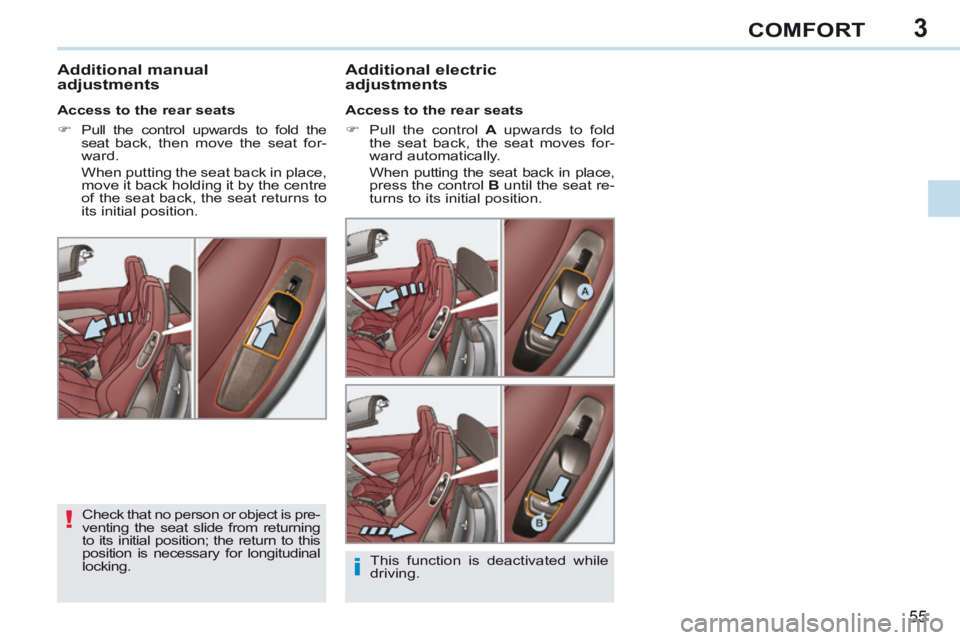
adjustments Additional electric
adjustments
Access to the rear seats
Pull the control
A upwards to fold
the seat back, the seat moves for-
ward automatically.
When putting the seat back in place, press the control B until the seat re-
turns to its initial position.
Access to the rear seats
Pull the control upwards to fold the
seat back, then move the seat for-
ward.
When putting the seat back in place, move it back holding it by the centre
of the seat back, the seat returns to
its initial position.
Check that no person or object is pre-
venting the seat slide from returning
to its initial position; the return to this
position is necessary for longitudinal
locking. This function is deactivated while
driving.
Page 60 of 268
3
!
i
i
!
58
COMFORT
The objects observed are, in reality,
closer than they appear.
Take this into account in order to
correctly judge the distance of ve-
hicles approaching from behind.
MIRRORS
Door mirrors
Each fi tted with an adjustable mirror
glass permitting the lateral rearward vi-
sion necessary for overtaking or park-
ing. They can also be folded for parking
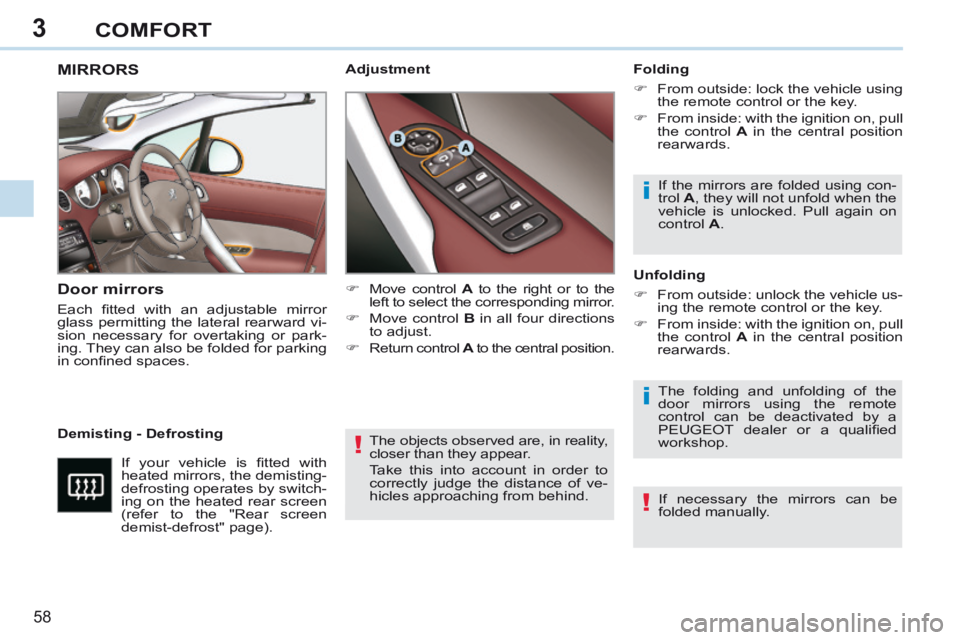
in confi ned spaces. Folding
From outside: lock the vehicle using
the remote control or the key.
From inside: with the ignition on, pull the control A in the central position
rearwards.
The folding and unfolding of the
door mirrors using the remote
control can be deactivated by a
PEUGEOT dealer or a qualifi ed
workshop.
Demisting - Defrosting Unfolding
From outside: unlock the vehicle us-
ing the remote control or the key.
From inside: with the ignition on, pull the control A in the central position
rearwards. If the mirrors are folded using con-
trol
A , they will not unfold when the
vehicle is unlocked. Pull again on
control A .
If your vehicle is fi tted with
heated mirrors, the demisting-
defrosting operates by switch-
ing on the heated rear screen
(refer to the "Rear screen
demist-defrost" page). Move control
A to the right or to the
left to select the corresponding mirror.
Move control B in all four directions
to adjust.
Return control A to the central position.
If necessary the mirrors can be
folded manually.
Adjustment
Page 62 of 268
3
!
i
!
60
COMFORT
STEERING WHEEL ADJUSTMENT
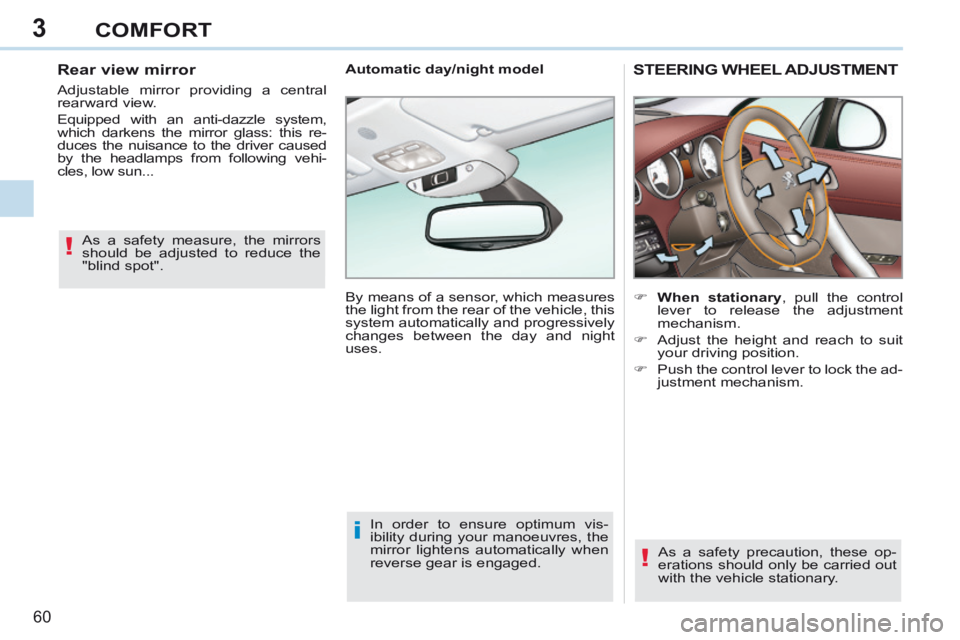
When stationary , pull the control lever to release the adjustment
mechanism.
Adjust the height and reach to suit your driving position.
Push the control lever to lock the ad- justment mechanism.
As a safety precaution, these op-
erations should only be carried out
with the vehicle stationary.
Automatic day/night model
By means of a sensor, which measures
the light from the rear of the vehicle, this
system automatically and progressively
changes between the day and night
uses.
In order to ensure optimum vis-
ibility during your manoeuvres, the
mirror lightens automatically when
reverse gear is engaged.
As a safety measure, the mirrors
should be adjusted to reduce the
"blind spot".
Rear view mirror
Adjustable mirror providing a central
rearward view.
Equipped with an anti-dazzle system,
which darkens the mirror glass: this re-
duces the nuisance to the driver caused
by the headlamps from following vehi-
cles, low sun...
Page 63 of 268
4
61
ACCESS
Unlocking and partial opening of the
boot Press this button for more than two seconds to un-
lock the boot. The boot
opens slightly.
This action unlocks the vehicle fi rst. Press the open padlock
once to unlock the driver's
door only.
Selective unlocking using the
remote control
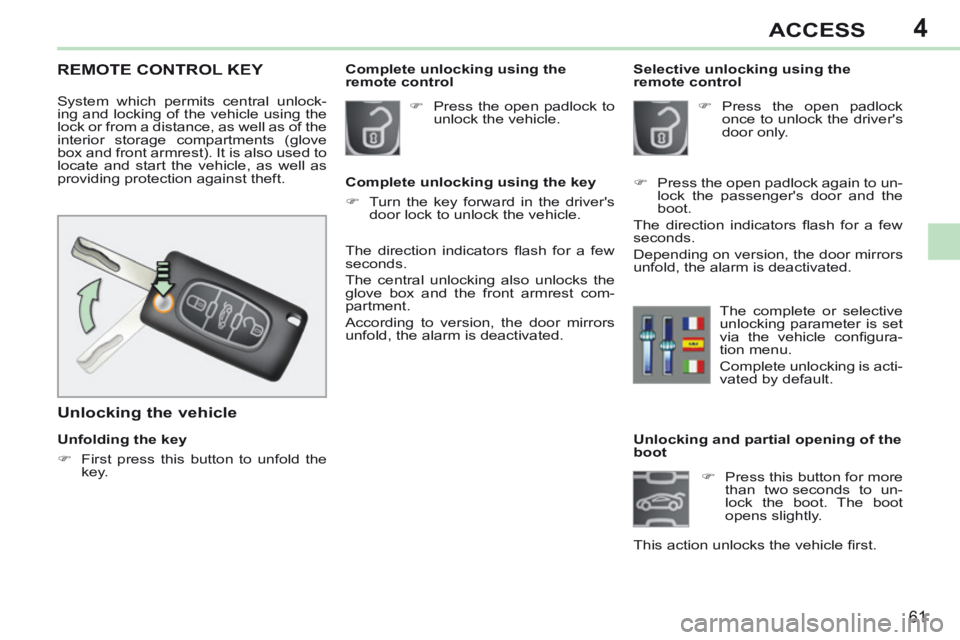
REMOTE CONTROL KEY
System which permits central unlock-
ing and locking of the vehicle using the
lock or from a distance, as well as of the
interior storage compartments (glove
box and front armrest). It is also used to
locate and start the vehicle, as well as
providing protection against theft.
Unfolding the key
First press this button to unfold the
key.
Unlocking the vehicle
The direction indicators fl ash for a few
seconds.
The central unlocking also unlocks the
glove box and the front armrest com-
partment.
According to version, the door mirrors
unfold, the alarm is deactivated. Press the open padlock to
unlock the vehicle.
Complete unlocking using the key
Turn the key forward in the driver's door lock to unlock the vehicle.
Complete unlocking using the
remote control
Press the open padlock again to un-lock the passenger's door and the
boot.
The direction indicators fl ash for a few
seconds.
Depending on version, the door mirrors
unfold, the alarm is deactivated.
The complete or selective
unlocking parameter is set
via the vehicle confi gura-
tion menu.
Complete unlocking is acti-
vated by default.
Page 64 of 268
4
!
i
i
62
ACCESS
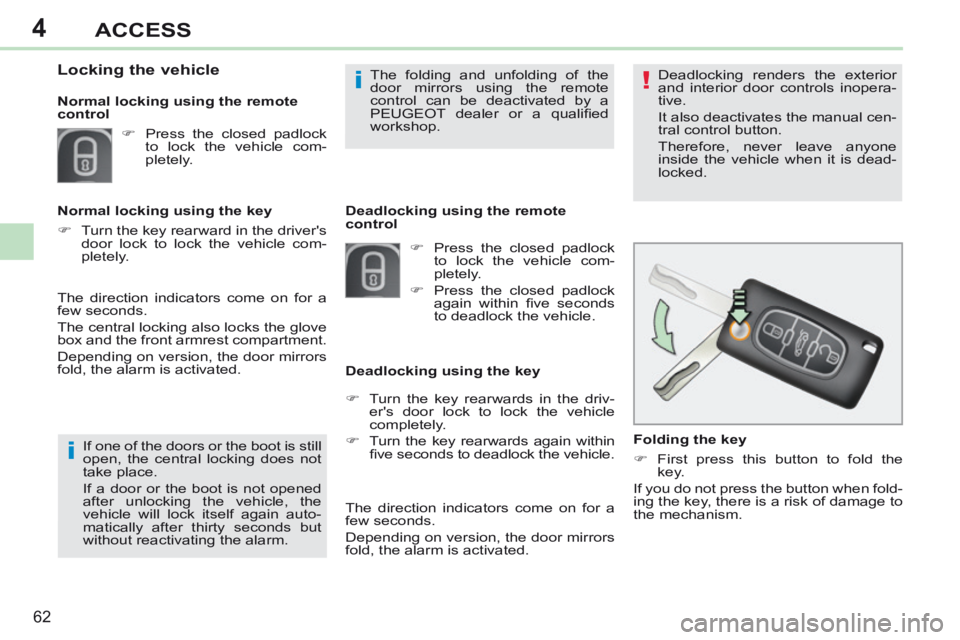
Folding the key
First press this button to fold the key.
If you do not press the button when fold-
ing the key, there is a risk of damage to
the mechanism. Deadlocking renders the exterior
and interior door controls inopera-
tive.
It also deactivates the manual cen-
tral control button.
Therefore, never leave anyone
inside the vehicle when it is dead-
locked.
If one of the doors or the boot is still
open, the central locking does not
take place.
If a door or the boot is not opened
after unlocking the vehicle, the
v ehicle will lock itself again auto-
matically after thirty seconds but
without reactivating the alarm. Deadlocking using the remote
control
Deadlocking using the key
The folding and unfolding of the
door mirrors using the remote
control can be deactivated by a
PEUGEOT dealer or a qualifi ed
workshop.
Press the closed padlock to lock the vehicle com-
pletely.
Press the closed padlock again within fi ve seconds
to deadlock the vehicle.
Locking the vehicle
Press the closed padlock to lock the vehicle com-
pletely.
Normal locking using the key
Turn the key rearward in the driver's door lock to lock the vehicle com-
pletely.
Normal locking using the remote
control
The direction indicators come on for a
few seconds.
Depending on version, the door mirrors
fold, the alarm is activated.
The direction indicators come on for a
few seconds.
The central locking also locks the glove
box and the front armrest compartment.
Depending on version, the door mirrors
fold, the alarm is activated.
Turn the key rearwards in the driv-er's door lock to lock the vehicle
completely.
Turn the key rearwards again within fi ve seconds to deadlock the vehicle.
Page 65 of 268
4
!
i
63
ACCESS
Locating your vehicle
Press the closed padlock to locate your locked ve-
hicle in a car park.
Electronic engine immobiliser
The key contains an electronic chip
which has a special code. When the
ignition is switched on, this code must
be recognised in order for starting to be
possible.
This electronic engine immobiliser locks
the engine management system a few
minutes after the ignition is switched off
and prevents starting of the engine by
anyone who does not have the key.
Anti-theft protection
In the event of a fault, you are
informed by illumination of this
warning lamp, an audible signal
and a message in the screen.
In this case, your vehicle will not start;
contact a PEUGEOT dealer as soon as
possible.
This is indicated by lighting of the cour-
tesy lamps and side spotlamps and
fl ashing of the direction indicators for a
few seconds.
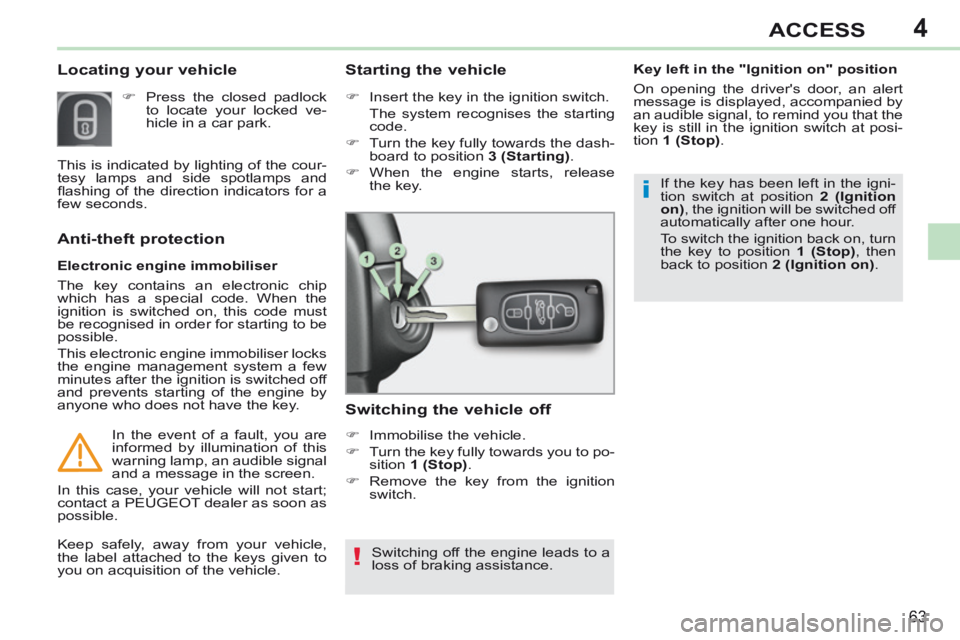
Starting the vehicle
Insert the key in the ignition switch.
The system recognises the starting
code.
Turn the key fully towards the dash- board to position 3 (Starting) .
When the engine starts, release the key.
Switching the vehicle off
Immobilise the vehicle.
Turn the key fully towards you to po-sition 1 (Stop) .
Remove the key from the ignition switch.
Switching off the engine leads to a
loss of braking assistance.
Keep safely, away from your vehicle,
the label attached to the keys given to
you on acquisition of the vehicle. If the key has been left in the igni-
tion switch at position
2 (Ignition
on) , the ignition will be switched off
automatically after one hour.
To switch the ignition back on, turn
the key to position 1 (Stop) , then
back to position 2 (Ignition on) .
Key left in the "Ignition on" position
On opening the driver's door, an alert
message is displayed, accompanied by
an audible signal, to remind you that the
key is still in the ignition switch at posi-
tion
1 (Stop) .
Page 66 of 268
4
64
ACCESS
Remote control problem
Following disconnection of the vehicle
battery, replacement of the remote con-
trol battery or in the event of a remote
control malfunction, you can no longer
unlock, lock or locate your vehicle.
First of all, use the key in the lock to unlock or lock your vehicle.
Then, reinitialise the remote control. Changing the battery
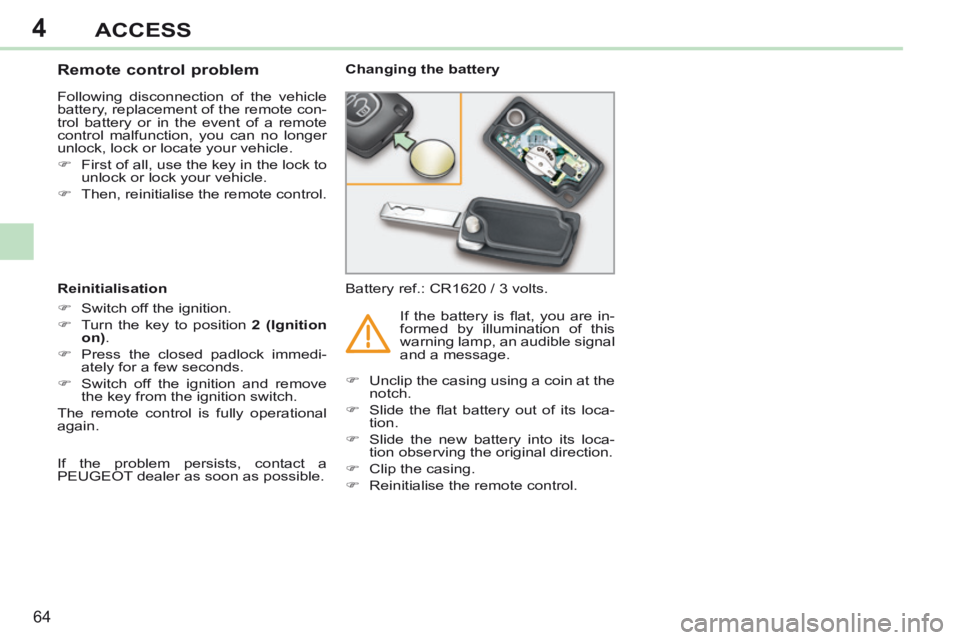
Battery ref.: CR1620 / 3 volts.
Reinitialisation
Switch off the ignition.
Turn the key to position 2 (Ignition
on) .
Press the closed padlock immedi- ately for a few seconds.
Switch off the ignition and remove the key from the ignition switch.
The remote control is fully operational
again. Unclip the casing using a coin at the
notch.
Slide the fl at battery out of its loca- tion.
Slide the new battery into its loca- tion observing the original direction.
Clip the casing.
Reinitialise the remote control. If the battery is fl at, you are in-
formed by illumination of this
warning lamp, an audible signal
and a message.
If the problem persists, contact a
PEUGEOT dealer as soon as possible.