phone PEUGEOT 308 CC 2013 Owner's Guide
[x] Cancel search | Manufacturer: PEUGEOT, Model Year: 2013, Model line: 308 CC, Model: PEUGEOT 308 CC 2013Pages: 268, PDF Size: 15.28 MB
Page 245 of 268
06
243
BLUETOOTH
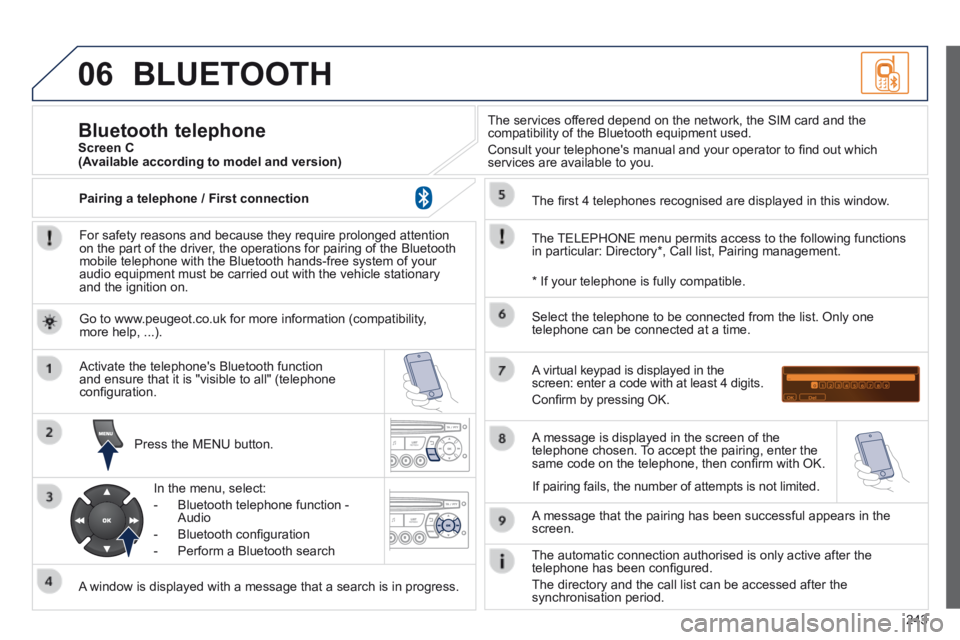
For safety reasons and because they require prolonged attention on the part of the driver, the operations for pairing of the Bluetooth mobile telephone with the Bluetooth hands-free system of your audio equipment must be carried out with the vehicle stationary and the ignition on.
Press the MENU button.
A window is displayed with a message that a search is in progress.
Activate the telephone's Bluetooth function and ensure that it is "visible to all" (telephone confi guration.
In the menu, select:
- Bluetooth telephone function - Audio
- Bluetooth confi guration
- Perform a Bluetooth search
The services offered depend on the network, the SIM card and the compatibility of the Bluetooth equipment used.
Consult your telephone's manual and your operator to fi nd out which services are available to you.
Bluetooth telephone Screen C
The TELEPHONE menu permits access to the following functions in particular: Directory * , Call list, Pairing management.
The fi rst 4 telephones recognised are displayed in this window.
A virtual keypad is displayed in the screen: enter a code with at least 4 digits.
Confi rm by pressing OK.
A message that the pairing has been successful appears in the screen.
Select the telephone to be connected from the list. Only one telephone can be connected at a time.
A message is displayed in the screen of the telephone chosen. To accept the pairing, enter the same code on the telephone, then confi rm with OK.
The automatic connection authorised is only active after the telephone has been confi gured.
The directory and the call list can be accessed after the synchronisation period.
(Available according to model and version)
* If your telephone is fully compatible.
If pairing fails, the number of attempts is not limited.
Go to www.peugeot.co.uk for more information (compatibility, more help, ...).
Pairing a telephone / First connection
Page 246 of 268
06
244
Receiving a call
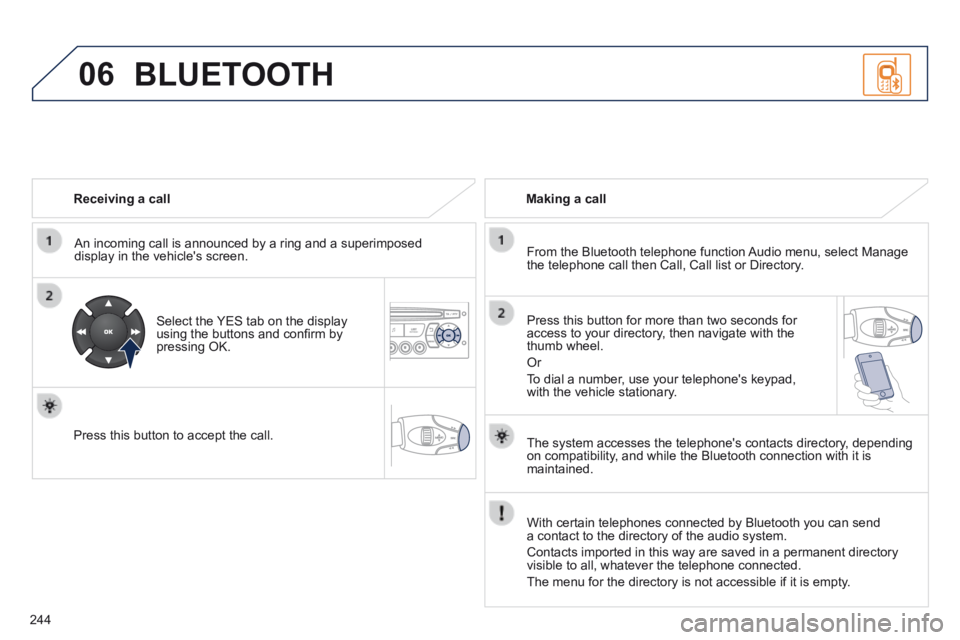
An incoming call is announced by a ring and a superimposed display in the vehicle's screen.
Select the YES tab on the display using the buttons and confi rm by pressing OK.
Press this button to accept the call.
Making a call
From the Bluetooth telephone function Audio menu, select Manage the telephone call then Call, Call list or Directory.
Press this button for more than two seconds for access to your directory, then navigate with the thumb wheel.
Or
To dial a number, use your telephone's keypad, with the vehicle stationary.
BLUETOOTH
The system accesses the telephone's contacts directory, depending on compatibility, and while the Bluetooth connection with it is maintained.
With certain telephones connected by Bluetooth you can send a contact to the directory of the audio system.
Contacts imported in this way are saved in a permanent directory visible to all, whatever the telephone connected.
The menu for the directory is not accessible if it is empty.
Page 247 of 268
06
245
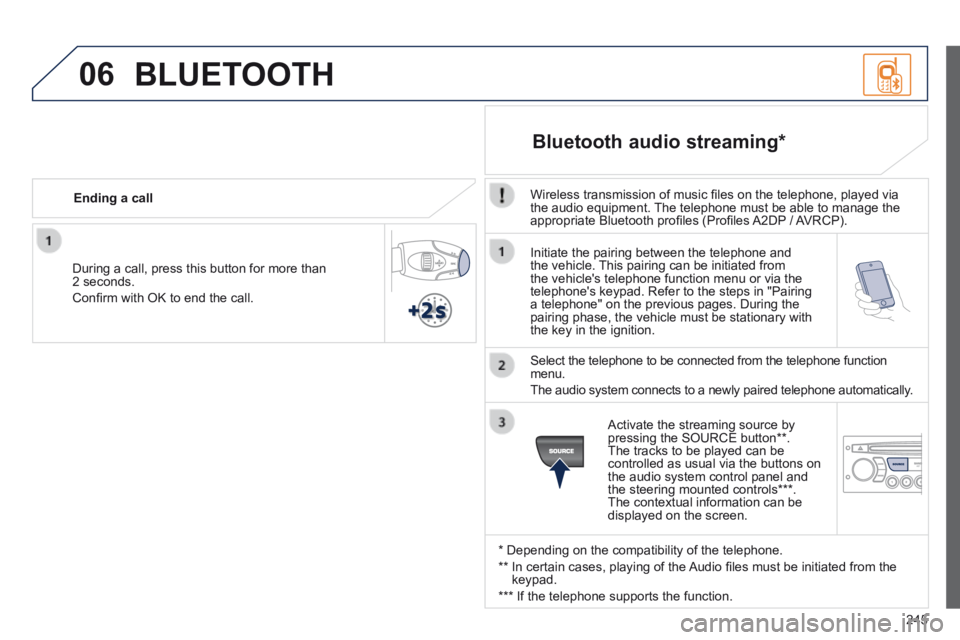
Initiate the pairing between the telephone and the vehicle. This pairing can be initiated from the vehicle's telephone function menu or via the telephone's keypad. Refer to the steps in "Pairing a telephone" on the previous pages. During the pairing phase, the vehicle must be stationary with the key in the ignition.
Select the telephone to be connected from the telephone function menu.
The audio system connects to a newly paired telephone automatically.
Bluetooth audio streaming *
Wireless transmission of music fi les on the telephone, played via the audio equipment. The telephone must be able to manage the appropriate Bluetooth profi les (Profi les A2DP / AVRCP).
* Depending on the compatibility of the telephone.
** In certain cases, playing of the Audio fi les must be initiated from the keypad.
*** If the telephone supports the function.
Activate the streaming source by pressing the SOURCE button ** . The tracks to be played can be controlled as usual via the buttons on the audio system control panel and the steering mounted controls *** . The contextual information can be displayed on the screen.
During a call, press this button for more than 2 seconds.
Confi rm with OK to end the call.
Ending a call
BLUETOOTH
Page 250 of 268
07
248
SCREEN MENU MAP(S)
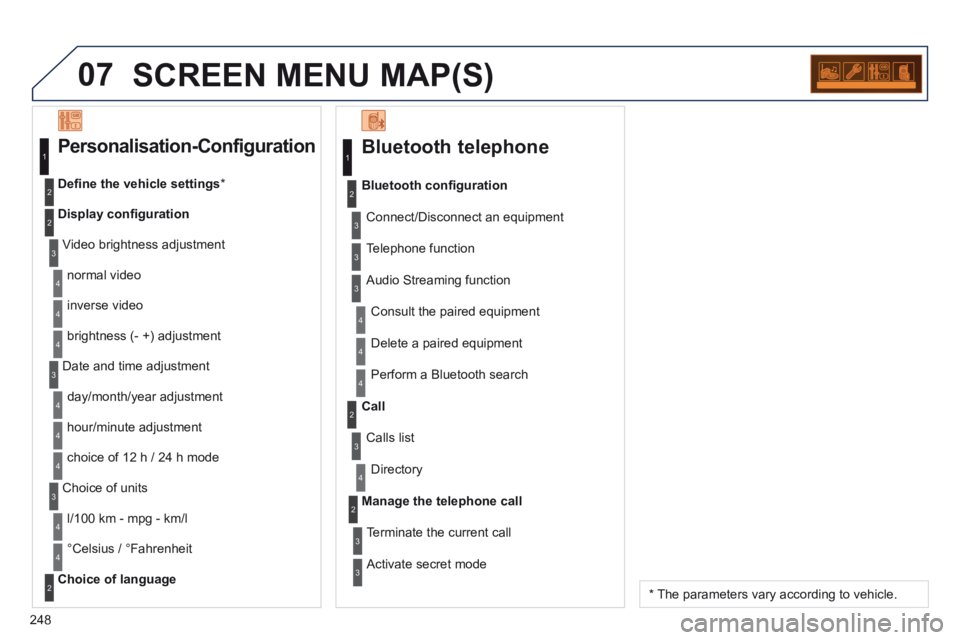
Bluetooth telephone
Connect/Disconnect an equipment
Consult the paired equipment
Bluetooth confi guration
Telephone function
Audio Streaming function
Delete a paired equipment
Perform a Bluetooth search
Calls list
Call
Directory
Terminate the current call
Manage the telephone call
Activate secret mode
1
2
3
3
3
4
4
4
2
3
4
2
3
3
Video brightness adjustment
Display confi guration
Defi ne the vehicle settings *
Personalisation-Configuration
normal video
inverse video
brightness (- +) adjustment
Date and time adjustment
day/month/year adjustment
hour/minute adjustment
choice of 12 h / 24 h mode
Choice of units
l/100 km - mpg - km/l
°Celsius / °Fahrenheit
Choice of language
1
2
4
3
2
4
4
3
4
4
2
3
4
4
4
* The parameters vary according to vehicle.
Page 252 of 268
250
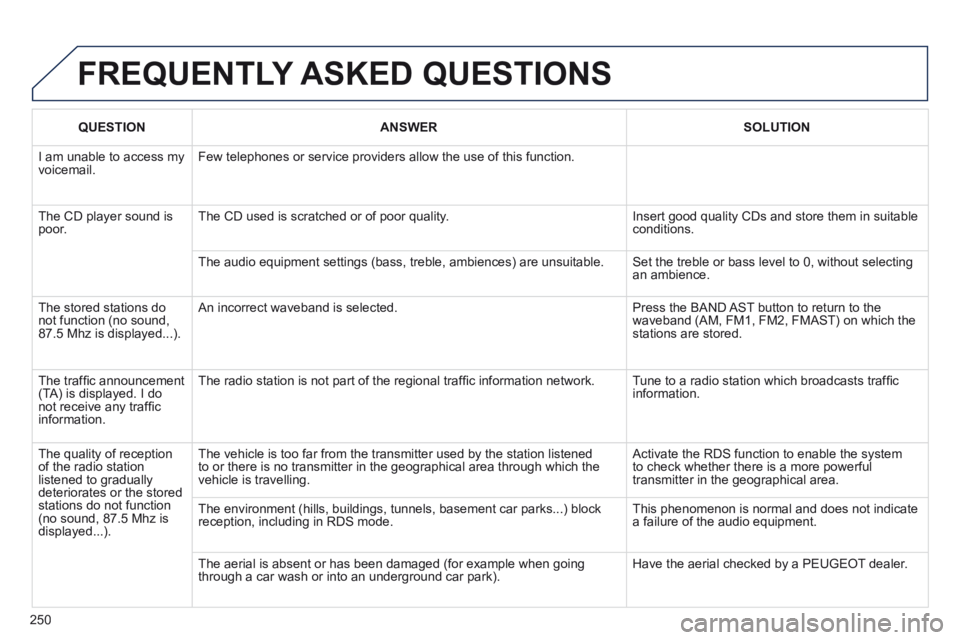
FREQUENTLY ASKED QUESTIONS
QUESTION ANSWER SOLUTION
I am unable to access my voicemail. Few telephones or service providers allow the use of this function.
The CD player sound is poor. The CD used is scratched or of poor quality. Insert good quality CDs and store them in suitable conditions.
The audio equipment settings (bass, treble, ambiences) are unsuitable.\
Set the treble or bass level to 0, without selecting an ambience.
The stored stations do not function (no sound, 87.5 Mhz is displayed...).
An incorrect waveband is selected. Press the BAND AST button to return to the waveband (AM, FM1, FM2, FMAST) on which the stations are stored.
The traffi c announcement (TA) is displayed. I do not receive any traffi c information.
The radio station is not part of the regional traffi c information network. Tune to a radio station which broadcasts traffi c information.
The quality of reception of the radio station listened to gradually deteriorates or the stored stations do not function (no sound, 87.5 Mhz is displayed...).
The vehicle is too far from the transmitter used by the station listened\
to or there is no transmitter in the geographical area through which the\
vehicle is travelling.
Activate the RDS function to enable the system to check whether there is a more powerful transmitter in the geographical area.
The environment (hills, buildings, tunnels, basement car parks...) blo\
ck reception, including in RDS mode. This phenomenon is normal and does not indicate a failure of the audio equipment.
The aerial is absent or has been damaged (for example when going through a car wash or into an underground car park). Have the aerial checked by a PEUGEOT dealer.
Page 258 of 268
256
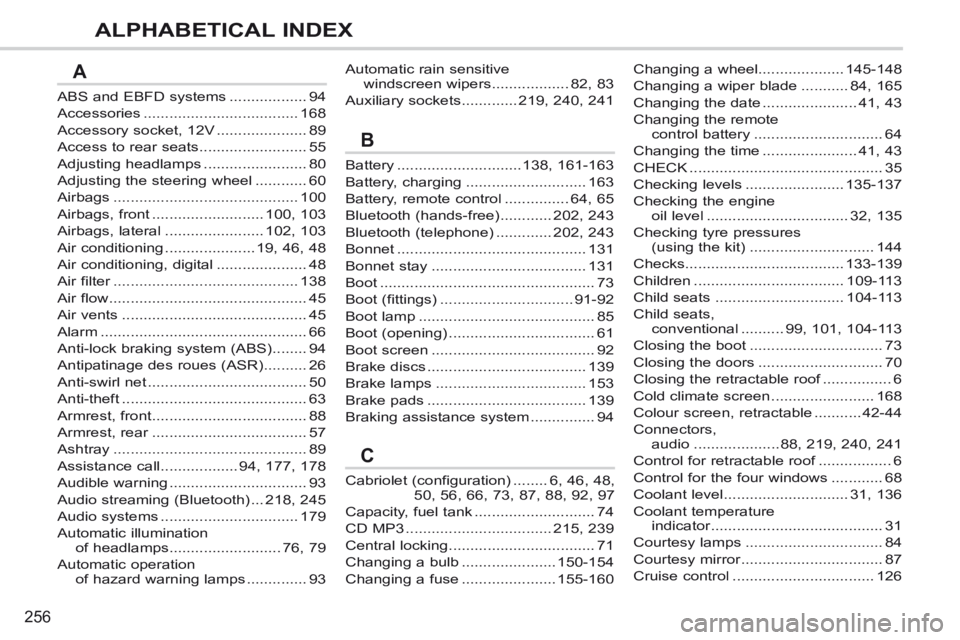
ALPHABETICAL INDEX
ABS and EBFD systems ..................94
Accessories ....................................168
Accessory socket, 12V .....................89
Access to rear seats .........................55
Adjusting headlamps ........................80
Adjusting the steering wheel ............60
Airbags ...........................................100
Airbags, front ..........................100, 103
Airbags, lateral .......................102, 103
Air conditioning .....................19, 46, 48
Air conditioning, digital .....................48
Air filter ...........................................Air filter ...........................................Air filter138
Air flow ..............................................45
Air vents ...........................................45
Alarm ................................................66
Anti-lock braking system (ABS) ........94
Antipatinage des roues (ASR) ..........26
Anti-swirl net .....................................50
Anti-theft ...........................................63
Armrest, front ....................................88
Armrest, rear ....................................Armrest, rear ....................................Armrest, rear57
Ashtray .............................................89
Assistance call ..................94, 177, 178
Audible warning ................................93
Audio streaming (Bluetooth) ...218, 245
Audio systems ................................179
Automatic illumination of headlamps ..........................76, 79
Automatic operation of hazard warning lamps ..............93
Battery .............................138, 161-163
Battery, charging ............................163
Battery, remote control ...............64, 65
Bluetooth (hands-free) ............202, 243
Bluetooth (telephone) .............202, 243
Bonnet ............................................131
Bonnet stay ....................................131
Boot ..................................................73
Boot (fittings) ...............................91-92
Boot lamp .........................................85
Boot (opening) ..................................61
Boot screen ......................................92
Brake discs .....................................139
Brake lamps ...................................153
Brake pads .....................................139
Braking assistance system ...............94
Cabriolet (configuration) ........6, 46, 48, 50, 56, 66, 73, 87, 88, 92, 97
Capacity, fuel tank ............................74
CD MP3 ..................................215, 239
Central locking ..................................71
Changing a bulb ......................150-154
Changing a fuse ......................155-160
Automatic rain sensitive windscreen wipers ..................82, 83
Auxiliary sockets .............219, 240, 241
A
B
C
Changing a wheel....................145-148
Changing a wiper blade ...........84, 165
Changing the date ......................41, 43
Changing the remote control battery ..............................64
Changing the time ......................41, 43
CHECK .............................................35
Checking levels .......................135-137
Checking the engine oil level .................................32, 135
Checking tyre pressures (using the kit) .............................144
Checks.....................................133-139
Children ...................................109-113
Child seats ..............................104-113
Child seats, conventional ..........99, 101, 104-113
Closing the boot ...............................73
Closing the doors .............................70
Closing the retractable roof ................Closing the retractable roof ................Closing the retractable roof6
Cold climate screen ........................168
Colour screen, retractable ...........42-44
Connectors, audio ....................88, 219, 240, 241
Control for retractable roof .................Control for retractable roof .................Control for retractable roof6
Control for the four windows ............68
Coolant level .............................31, 136
Coolant temperature indicator ........................................indicator ........................................indicator31
Courtesy lamps ................................84
Courtesy mirror .................................Courtesy mirror .................................Courtesy mirror87
Cruise control .................................126
Page 262 of 268
260
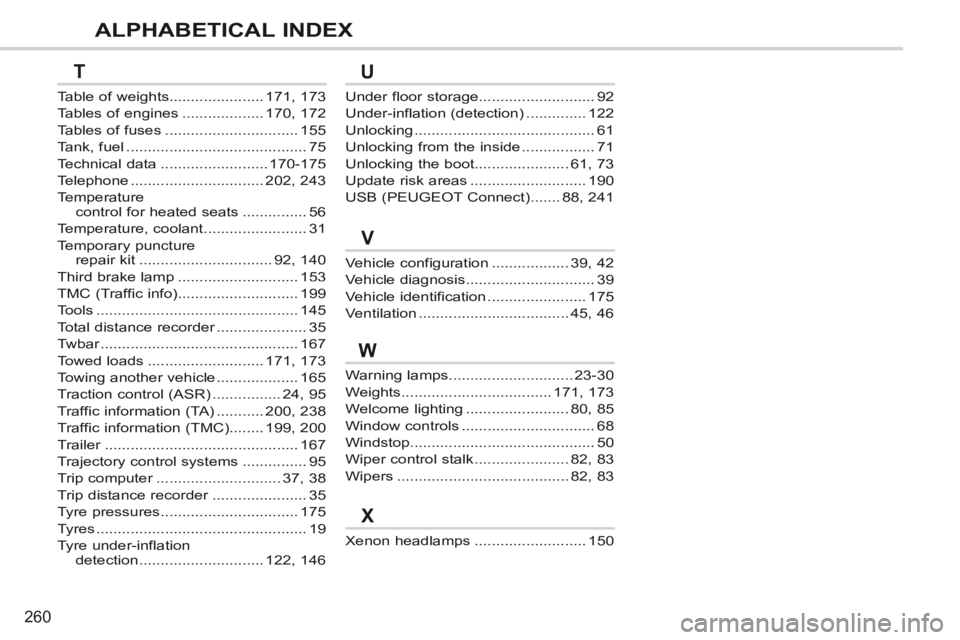
ALPHABETICAL INDEX
Warning lamps .............................23-30
Weights ...................................171, 173
Welcome lighting ........................80, 85
Window controls ...............................68
Windstop...........................................50
Wiper control stalk ......................82, 83
Wipers ........................................82, 83
Xenon headlamps ..........................150
Under floor storage...........................92
Under-inflation (detection) ..............122
Unlocking ..........................................61
Unlocking from the inside .................71
Unlocking the boot......................61, 73
Update risk areas ...........................190
USB (PEUGEOT Connect) .......88, 241
Vehicle configuration ..................39, 42
Vehicle diagnosis ..............................39
Vehicle identification .......................175
Ventilation ...................................45, 46
Table of weights......................171, 173
Tables of engines ...................170, 172
Tables of fuses ...............................155
Tank, fuel ..........................................75
Technical data .........................170-175
Telephone ...............................202, 243
Temperature control for heated seats ...............56
Temperature, coolant ........................31
Temporary puncture repair kit ...............................92, 140
Third brake lamp ............................153
TMC (Traffic info) ............................199
Tools ...............................................145
Total distance recorder .....................Total distance recorder .....................Total distance recorder35
Twbar ..............................................Twbar ..............................................Twbar167
Towed loads ...........................171, 173
Towing another vehicle ...................165
Traction control (ASR) ................24, 95
Traffic information (TA) ...........200, 238
Traffic information (TMC) ........199, 200
Trailer .............................................Trailer .............................................Trailer167
Trajectory control systems ...............95
Trip computer .............................Trip computer .............................Trip computer37, 38
Trip distance recorder ......................Trip distance recorder ......................Trip distance recorder35
Tyre pressures ................................175
Tyres .................................................19
Tyre under-inflation detection .............................122, 146
TU
V
X
W