audio Peugeot 308 CC Dag 2009 Owner's Manual
[x] Cancel search | Manufacturer: PEUGEOT, Model Year: 2009, Model line: 308 CC Dag, Model: Peugeot 308 CC Dag 2009Pages: 294, PDF Size: 23.27 MB
Page 5 of 294
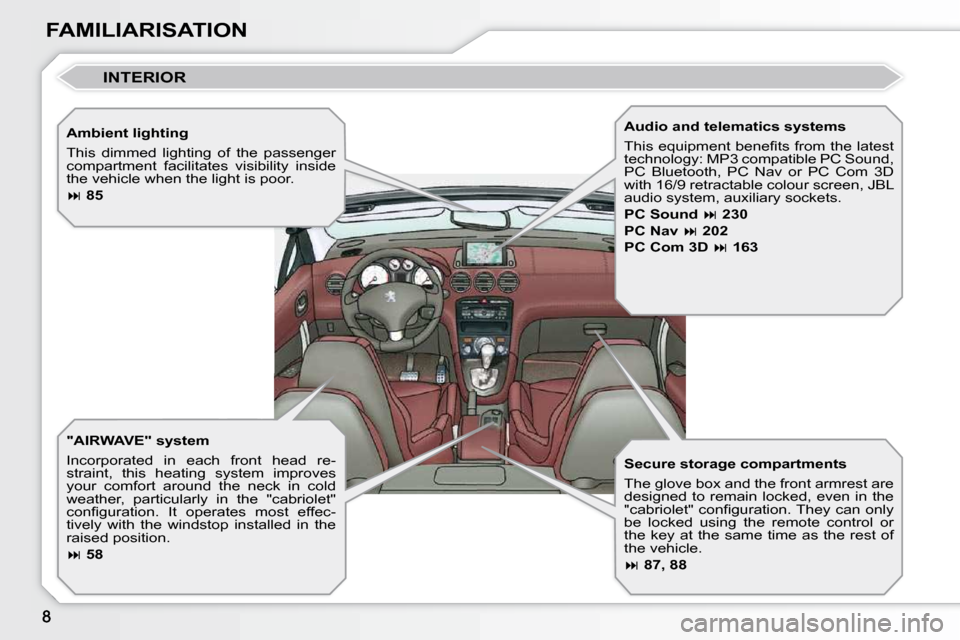
FAMILIARISATION Ambient lighting
This dimmed lighting of the passenger
compartment facilitates visibility inside
the vehicle when the light is poor.
85
"AIRWAVE" system
Incorporated in each front head re-
straint, this heating system improves
your comfort around the neck in cold
weather, particularly in the "cabriolet"
confi guration. It operates most effec-
tively with the windstop installed in the
raised position.
58 Audio and telematics systems
This equipment benefi ts from the latest
technology: MP3 compatible PC Sound,
PC Bluetooth, PC Nav or PC Com 3D
with 16/9 retractable colour screen, JBL
audio system, auxiliary sockets.
PC Sound
230
PC Nav
202
PC Com 3D
163
Secure storage compartments
The glove box and the front armrest are
designed to remain locked, even in the
"cabriolet" confi guration. They can only
be locked using the remote control or
the key at the same time as the rest of
the vehicle.
87, 88
INTERIOR
Page 7 of 294
FAMILIARISATION
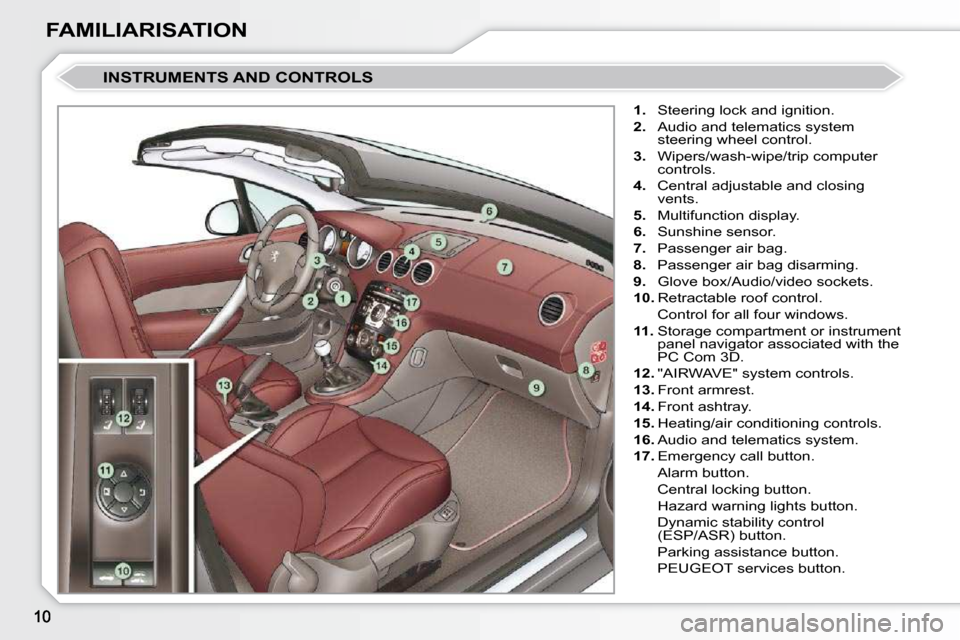
INSTRUMENTS AND CONTROLS
1. Steering lock and ignition.
2. Audio and telematics system
steering wheel control.
3. Wipers/wash-wipe/trip computer
controls.
4. Central adjustable and closing
vents.
5. Multifunction display.
6. Sunshine sensor.
7. Passenger air bag.
8. Passenger air bag disarming.
9. Glove box/Audio/video sockets.
10. Retractable roof control.
Control for all four windows.
11. Storage compartment or instrument
panel navigator associated with the
PC Com 3D.
12. "AIRWAVE" system controls.
13. Front armrest.
14. Front ashtray.
15. Heating/air conditioning controls.
16. Audio and telematics system.
17. Emergency call button.
Alarm button.
Central locking button.
Hazard warning lights button.
Dynamic stability control (ESP/ASR) button.
Parking assistance button.
PEUGEOT services button.
Page 33 of 294
2
36
MULTIFUNCTION DISPLAYS
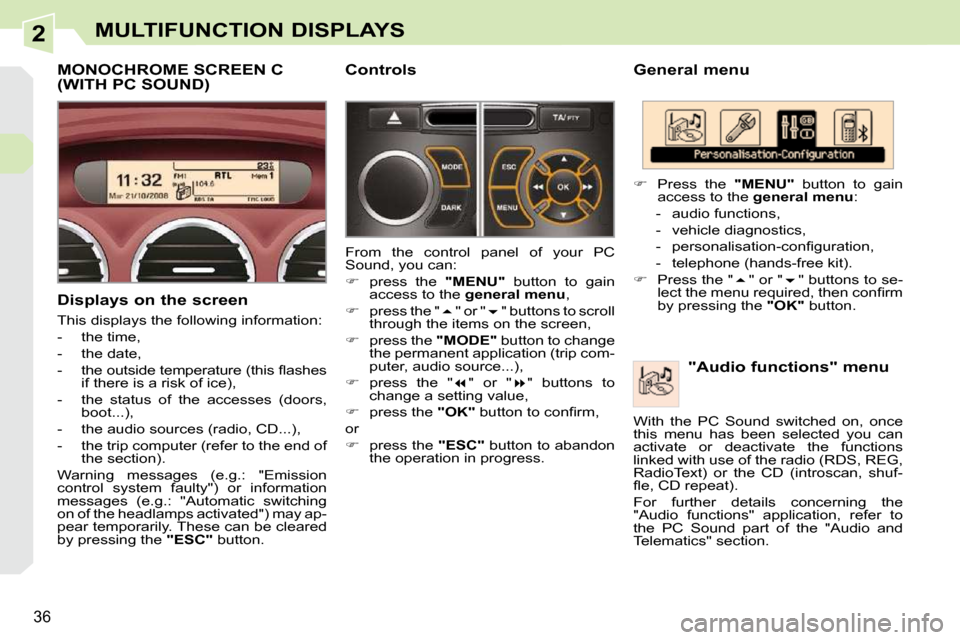
General menu "Audio functions" menu
Press the "MENU" button to gain
access to the general menu :
- audio functions,
- vehicle diagnostics,
- personalisation-confi guration,
- telephone (hands-free kit).
Press the " " or " " buttons to se-
lect the menu required, then confi rm
by pressing the "OK" button.
With the PC Sound switched on, once
this menu has been selected you can
activate or deactivate the functions
linked with use of the radio (RDS, REG,
RadioText) or the CD (introscan, shuf-
fl e, CD repeat).
For further details concerning the
"Audio functions" application, refer to
the PC Sound part of the "Audio and
Telematics" section.
MONOCHROME SCREEN C (WITH PC SOUND)
Displays on the screen
This displays the following information:
- the time,
- the date,
- the outside temperature (this fl ashes if there is a risk of ice),
- the status of the accesses (doors, boot...),
- the audio sources (radio, CD...),
- the trip computer (refer to the end of the section).
Warning messages (e.g.: "Emission
control system faulty") or information
messages (e.g.: "Automatic switching
on of the headlamps activated") may ap-
pear temporarily. These can be cleared
by pressing the "ESC" button. Controls
From the control panel of your PC
Sound, you can:
press the "MENU" button to gain
access to the general menu ,
press the " " or " " buttons to scroll
through the items on the screen,
press the "MODE" button to change
the permanent application (trip com-
puter, audio source...),
press the " " or " " buttons to
change a setting value,
press the "OK" button to confi rm,
or
press the "ESC" button to abandon
the operation in progress.
Page 35 of 294
2
!
38
MULTIFUNCTION DISPLAYS
For safety reasons, it is imperative
that confi guration of the multifunc-
tion displays by the driver takes
place when stationary. "Telephone" menu
Display confi guration
Once this menu has been selected, you
can gain access to the following set-
tings:
- brightness-video setting,
- date and time setting,
- selection of the units.
Selection of the language
Once this menu has been selected,
you can change the language used by
the display (Deutsch, English, Espanol,
Français, Italiano, Nederlands, Portugues,
Portugues-Brasil, Türkçe * ).
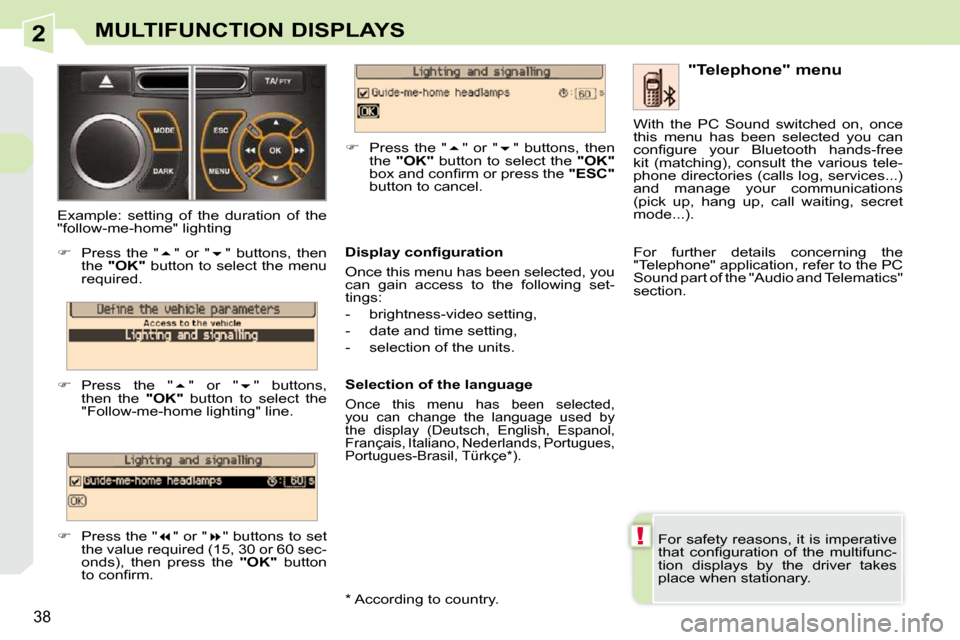
Example: setting of the duration of the
"follow-me-home" lighting
Press the " " or " " buttons, then
the "OK" button to select the menu
required.
Press the " " or " " buttons,
then the "OK" button to select the
"Follow-me-home lighting" line.
Press the " " or " " buttons to set
the value required (15, 30 or 60 sec-
onds), then press the "OK" button
to confi rm.
Press the " " or " " buttons, then
the "OK" button to select the "OK"
box and confi rm or press the "ESC"
button to cancel. With the PC Sound switched on, once
this menu has been selected you can
confi gure your Bluetooth hands-free
kit (matching), consult the various tele-
phone directories (calls log, services...)
and manage your communications
(pick up, hang up, call waiting, secret
mode...).
For further details concerning the
"Telephone" application, refer to the PC
Sound part of the "Audio and Telematics"
section.
* According to country.
Page 36 of 294
2
i
39
MULTIFUNCTION DISPLAYS
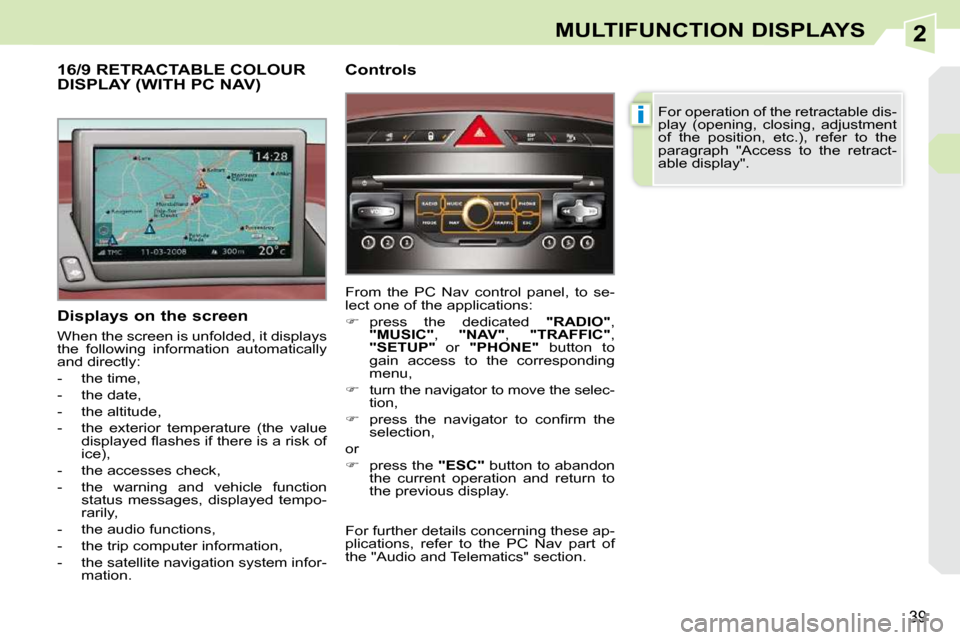
Displays on the screen
When the screen is unfolded, it displays
the following information automatically
and directly:
- the time,
- the date,
- the altitude,
- the exterior temperature (the value displayed fl ashes if there is a risk of
ice),
- the accesses check,
- the warning and vehicle function status messages, displayed tempo-
rarily,
- the audio functions,
- the trip computer information,
- the satellite navigation system infor- mation.
16/9 RETRACTABLE COLOUR DISPLAY (WITH PC NAV) Controls
From the PC Nav control panel, to se-
lect one of the applications:
press the dedicated "RADIO" ,
"MUSIC" , "NAV" , "TRAFFIC" ,
"SETUP" or "PHONE" button to
gain access to the corresponding
menu,
turn the navigator to move the selec-
tion,
press the navigator to confi rm the
selection,
or
press the "ESC" button to abandon
the current operation and return to
the previous display. For operation of the retractable dis-
play (opening, closing, adjustment
of the position, etc.), refer to the
paragraph "Access to the retract-
able display".
For further details concerning these ap-
plications, refer to the PC Nav part of
the "Audio and Telematics" section.
Page 37 of 294
2
!
40
MULTIFUNCTION DISPLAYS
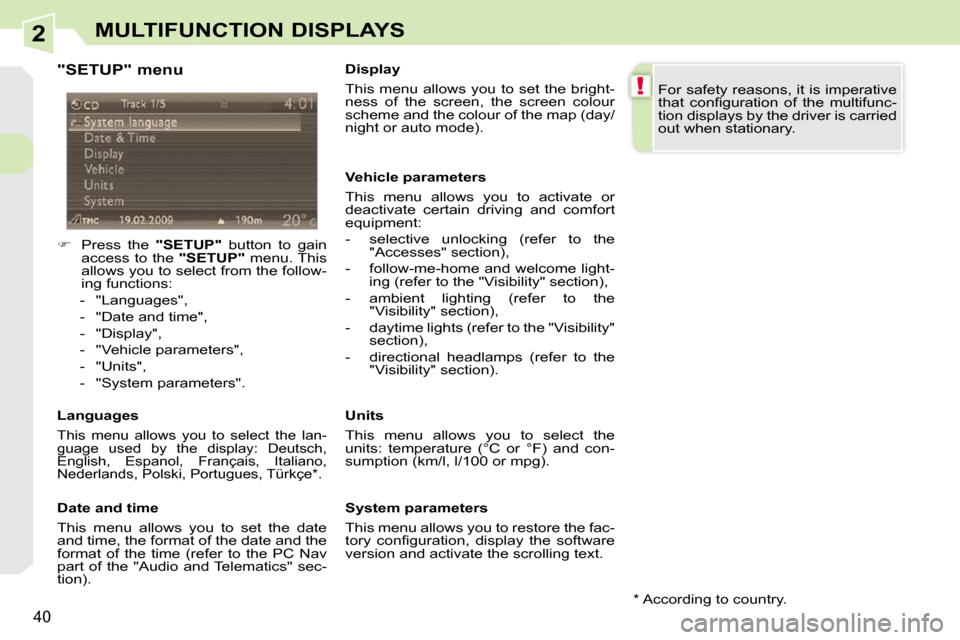
"SETUP" menu
Press the "SETUP" button to gain
access to the "SETUP" menu. This
allows you to select from the follow-
ing functions:
- "Languages",
- "Date and time",
- "Display",
- "Vehicle parameters",
- "Units",
- "System parameters".
Languages
This menu allows you to select the lan-
guage used by the display: Deutsch,
English, Espanol, Français, Italiano,
Nederlands, Polski, Portugues, Türkçe * .
Date and time
This menu allows you to set the date
and time, the format of the date and the
format of the time (refer to the PC Nav
part of the "Audio and Telematics" sec-
tion). Display
This menu allows you to set the bright-
ness of the screen, the screen colour
scheme and the colour of the map (day/
night or auto mode).
Vehicle parameters
This menu allows you to activate or
deactivate certain driving and comfort
equipment:
- selective unlocking (refer to the
"Accesses" section),
- follow-me-home and welcome light- ing (refer to the "Visibility" section),
- ambient lighting (refer to the "Visibility" section),
- daytime lights (refer to the "Visibility" section),
- directional headlamps (refer to the "Visibility" section).
Units
This menu allows you to select the
units: temperature (°C or °F) and con-
sumption (km/l, l/100 or mpg).
System parameters
This menu allows you to restore the fac-
tory confi guration, display the software
version and activate the scrolling text. For safety reasons, it is imperative
that confi guration of the multifunc-
tion displays by the driver is carried
out when stationary.
* According to country.
Page 38 of 294
2
i
41
MULTIFUNCTION DISPLAYS
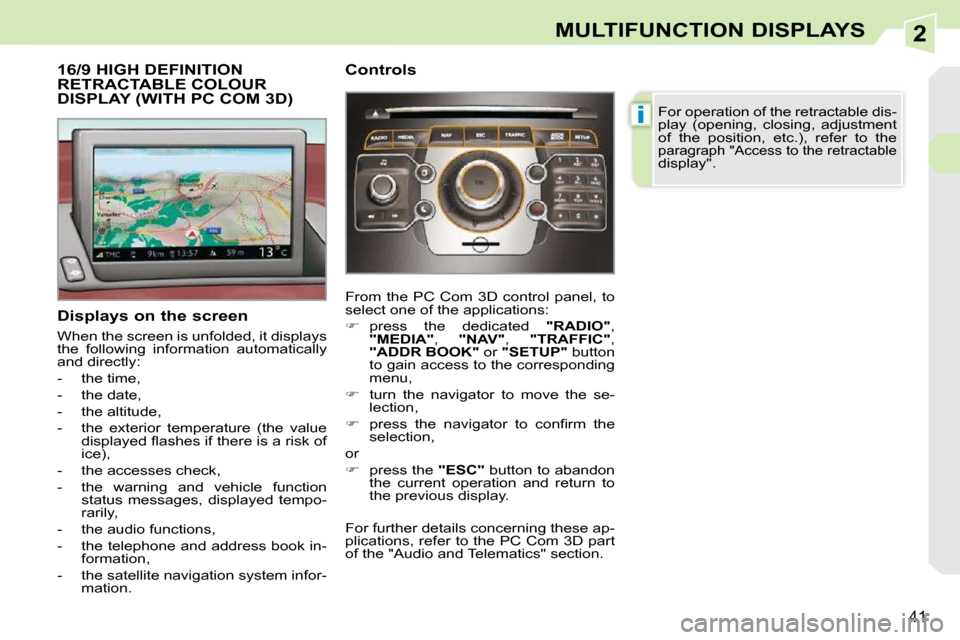
16/9 HIGH DEFINITION RETRACTABLE COLOUR DISPLAY (WITH PC COM 3D)
Displays on the screen
When the screen is unfolded, it displays
the following information automatically
and directly:
- the time,
- the date,
- the altitude,
- the exterior temperature (the value displayed fl ashes if there is a risk of
ice),
- the accesses check,
- the warning and vehicle function status messages, displayed tempo-
rarily,
- the audio functions,
- the telephone and address book in- formation,
- the satellite navigation system infor- mation. Controls
From the PC Com 3D control panel, to
select one of the applications:
press the dedicated "RADIO" ,
"MEDIA" , "NAV" , "TRAFFIC" ,
"ADDR BOOK" or "SETUP" button
to gain access to the corresponding
menu,
turn the navigator to move the se-
lection,
press the navigator to confi rm the
selection,
or
press the "ESC" button to abandon
the current operation and return to
the previous display. For operation of the retractable dis-
play (opening, closing, adjustment
of the position, etc.), refer to the
paragraph "Access to the retractable
display".
For further details concerning these ap-
plications, refer to the PC Com 3D part
of the "Audio and Telematics" section.
Page 39 of 294
2
!
42
MULTIFUNCTION DISPLAYS
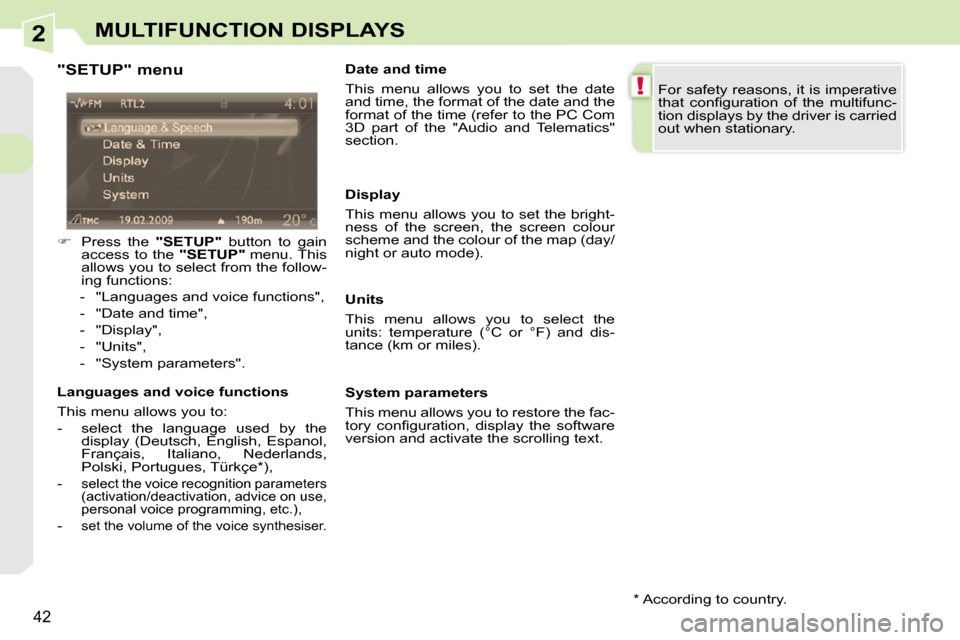
"SETUP" menu
Press the "SETUP" button to gain
access to the "SETUP" menu. This
allows you to select from the follow-
ing functions:
- "Languages and voice functions",
- "Date and time",
- "Display",
- "Units",
- "System parameters".
Languages and voice functions
This menu allows you to:
- select the language used by the display (Deutsch, English, Espanol,
Français, Italiano, Nederlands,
Polski, Portugues, Türkçe * ),
-
select the voice recognition parameters
(activation/deactivation, advice on use,
personal voice programming, etc.),
- set the volume of the voice synthesiser.
Date and time
This menu allows you to set the date
and time, the format of the date and the
format of the time (refer to the PC Com
3D part of the "Audio and Telematics"
section.
Units
This menu allows you to select the
units: temperature (°C or °F) and dis-
tance (km or miles).
System parameters
This menu allows you to restore the fac-
tory confi guration, display the software
version and activate the scrolling text. For safety reasons, it is imperative
that confi guration of the multifunc-
tion displays by the driver is carried
out when stationary.
Display
This menu allows you to set the bright-
ness of the screen, the screen colour
scheme and the colour of the map (day/
night or auto mode).
* According to country.
Page 40 of 294
2
i
i
43
MULTIFUNCTION DISPLAYS
Access to the retractable screen
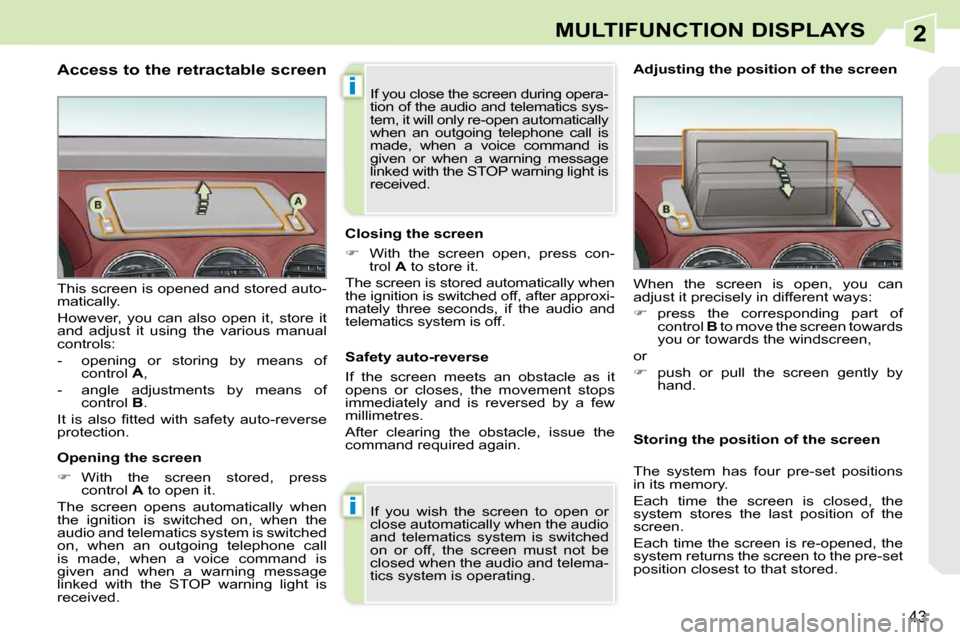
Opening the screen
With the screen stored, press
control A to open it.
The screen opens automatically when
the ignition is switched on, when the
audio and telematics system is switched
on, when an outgoing telephone call
is made, when a voice command is
given and when a warning message
linked with the STOP warning light is
received.
This screen is opened and stored auto-
matically.
However, you can also open it, store it
and adjust it using the various manual
controls:
- opening or storing by means of
control A ,
- angle adjustments by means of control B .
It is also fi tted with safety auto-reverse
protection. Closing the screen
With the screen open, press con-
trol A to store it.
The screen is stored automatically when
the ignition is switched off, after approxi-
mately three seconds, if the audio and
telematics system is off.
If you wish the screen to open or
close automatically when the audio
and telematics system is switched
on or off, the screen must not be
closed when the audio and telema-
tics system is operating. When the screen is open, you can
adjust it precisely in different ways:
press the corresponding part of
control B to move the screen towards
you or towards the windscreen,
or
push or pull the screen gently by
hand.
Adjusting the position of the screen
Safety auto-reverse
If the screen meets an obstacle as it
opens or closes, the movement stops
immediately and is reversed by a few
millimetres.
After clearing the obstacle, issue the
command required again. Storing the position of the screen
The system has four pre-set positions
in its memory.
Each time the screen is closed, the
system stores the last position of the
screen.
Each time the screen is re-opened, the
system returns the screen to the pre-set
position closest to that stored.
If you close the screen during opera-
tion of the audio and telematics sys-
tem, it will only re-open automatically
when an outgoing telephone call is
made, when a voice command is
given or when a warning message
linked with the STOP warning light is
received.
Page 97 of 294
6
88
LAYOUT
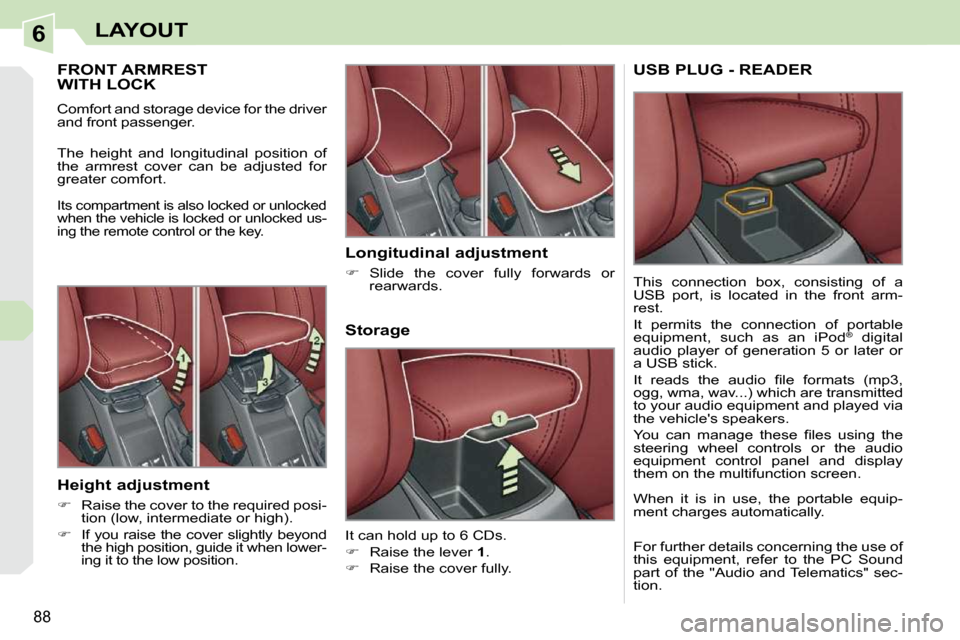
FRONT ARMREST WITH LOCK
Comfort and storage device for the driver
and front passenger.
The height and longitudinal position of
the armrest cover can be adjusted for
greater comfort.
Its compartment is also locked or unlocked
when the vehicle is locked or unlocked us-
ing the remote control or the key.
Storage
It can hold up to 6 CDs.
Raise the lever 1 .
Raise the cover fully.
Longitudinal adjustment
Slide the cover fully forwards or
rearwards.
Height adjustment
Raise the cover to the required posi-
tion (low, intermediate or high).
If you raise the cover slightly beyond
the high position, guide it when lower-
ing it to the low position.
USB PLUG - READER
This connection box, consisting of a
USB port, is located in the front arm-
rest.
It permits the connection of portable
equipment, such as an iPod ®
digital
audio player of generation 5 or later or
a USB stick.
It reads the audio fi le formats (mp3,
ogg, wma, wav...) which are transmitted
to your audio equipment and played via
the vehicle's speakers.
You can manage these fi les using the
steering wheel controls or the audio
equipment control panel and display
them on the multifunction screen.
When it is in use, the portable equip-
ment charges automatically.
For further details concerning the use of
this equipment, refer to the PC Sound
part of the "Audio and Telematics" sec-
tion.