engine PEUGEOT 308 SW BL 2010 Owners Manual
[x] Cancel search | Manufacturer: PEUGEOT, Model Year: 2010, Model line: 308 SW BL, Model: PEUGEOT 308 SW BL 2010Pages: 336, PDF Size: 21.2 MB
Page 226 of 336
1
224
TECHNICAL DATA
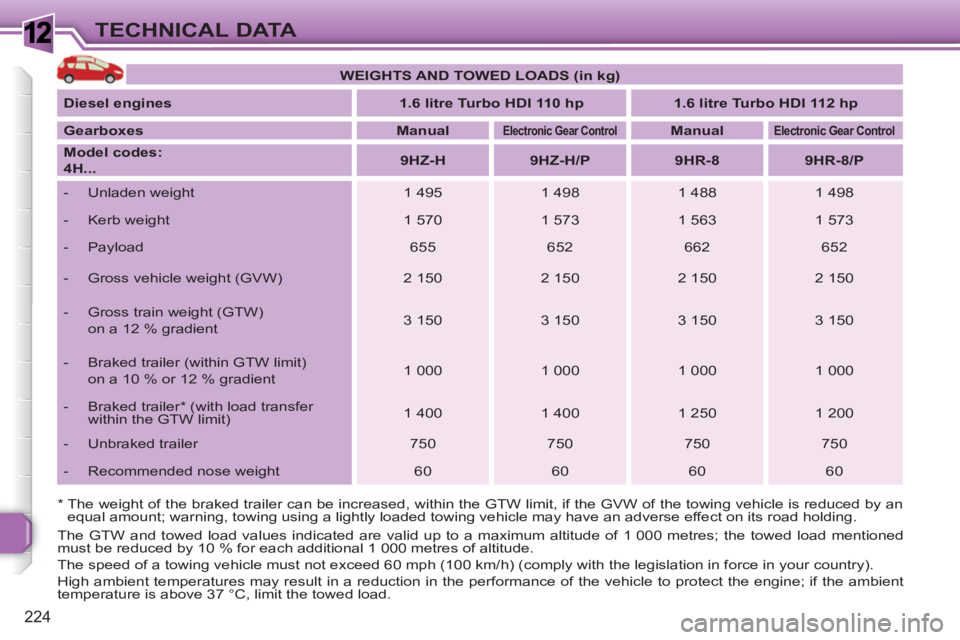
* The weight of the braked trailer can be increased, within the GTW limit, if the GVW of the towing vehicle is reduced by an
equal amount; warning, towing using a lightly loaded towing vehicle may have an adverse effect on its road holding.
The GTW and towed load values indicated are valid up to a maximum altitude of 1 000 metres; the towed load mentioned
must be reduced by 10 % for each additional 1 000 metres of altitude.
The speed of a towing vehicle must not exceed 60 mph (100 km/h) (comply with the legislation in force in your country).
High ambient temperatures may result in a reduction in the performance of the vehicle to protect the engine; if the ambient
temperature is above 37 °C, limit the towed load.
WEIGHTS AND TOWED LOADS (in kg)
Diesel
engines
1.6 litre Turbo HDI 110 hp
1.6
litre
Turbo HDI 112 hp
Gearboxes
Manual
Electronic Gear Control
Manual
Electronic Gear Control
Model codes:
4H...
9HZ-H
9HZ-H/P
9HR-8
9HR-8/P
- Unladen weight
1 495
1 498
1 488
1 498
- Kerb weight
1 570
1 573
1 563
1 573
- Payload
655
652
662
652
- Gross vehicle weight (GVW)
2 150
2 150
2 150
2 150
- Gross train weight (GTW)
on a 12 % gradient
3 150
3 150
3 150
3 150
- Braked trailer (within GTW limit)
on a 10 % or 12 % gradient
1 000
1 000
1 000
1 000
- Braked trailer * (with load transfer
within the GTW limit)
1 400
1 400
1 250
1 200
- Unbraked trailer
750
750
750
750
- Recommended nose weight
60
60
60
60
Page 227 of 336
1
225
TECHNICAL DATA
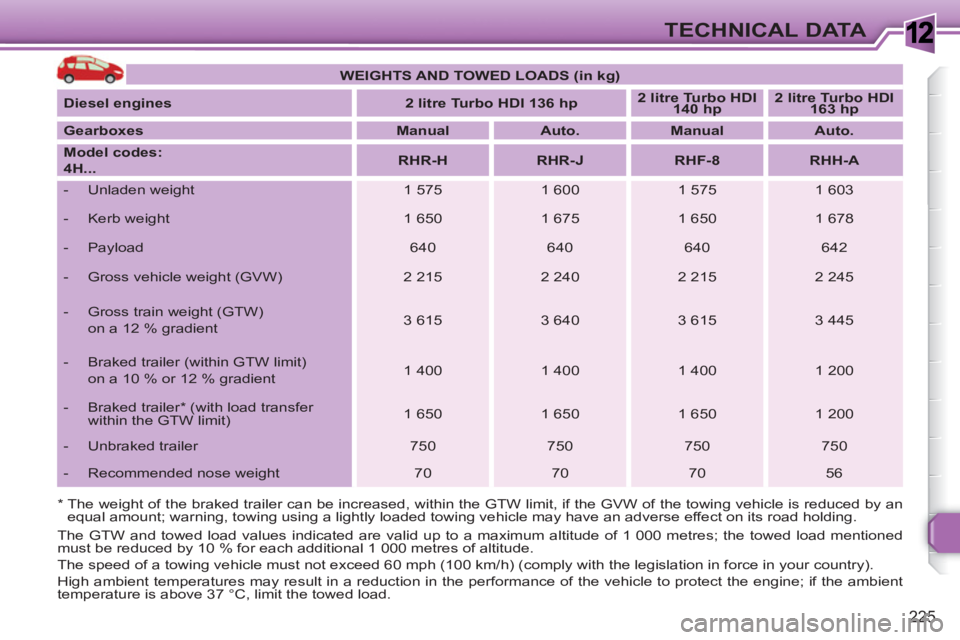
* The weight of the braked trailer can be increased, within the GTW limit, if the GVW of the towing vehicle is reduced by an
equal amount; warning, towing using a lightly loaded towing vehicle may have an adverse effect on its road holding.
The GTW and towed load values indicated are valid up to a maximum altitude of 1 000 metres; the towed load mentioned
must be reduced by 10 % for each additional 1 000 metres of altitude.
The speed of a towing vehicle must not exceed 60 mph (100 km/h) (comply with the legislation in force in your country).
High ambient temperatures may result in a reduction in the performance of the vehicle to protect the engine; if the ambient
temperature is above 37 °C, limit the towed load.
WEIGHTS AND TOWED LOADS (in kg)
Diesel engines
2 litre Turbo HDI 136 hp
2 litre Turbo HDI
140 hp
2 litre Turbo HDI
163 hp
Gearboxes
Manual
Auto.
Manual
Auto.
Model codes:
4H...
RHR-H
RHR-J
RHF-8
RHH-A
- Unladen weight
1 575
1 600
1 575
1 603
- Kerb weight
1 650
1 675
1 650
1 678
- Payload
640
640
640
642
- Gross vehicle weight (GVW)
2 215
2 240
2 215
2 245
- Gross train weight (GTW)
on a 12 % gradient
3 615
3 640
3 615
3 445
- Braked trailer (within GTW limit)
on a 10 % or 12 % gradient
1 400
1 400
1 400
1 200
- Braked trailer * (with load transfer
within the GTW limit)
1 650
1 650
1 650
1 200
- Unbraked trailer
750
750
750
750
- Recommended nose weight
70
70
70
56
Page 229 of 336
1
i
227
TECHNICAL DATA
IDENTIFICATION MARKINGS
Various visible markings for the identifi -
cation and tracking of your vehicle.
If the tyre pressures are too low,
this increases fuel consumption.
The tyre pressures must be
checked when the tyres are cold,
at least once a month.
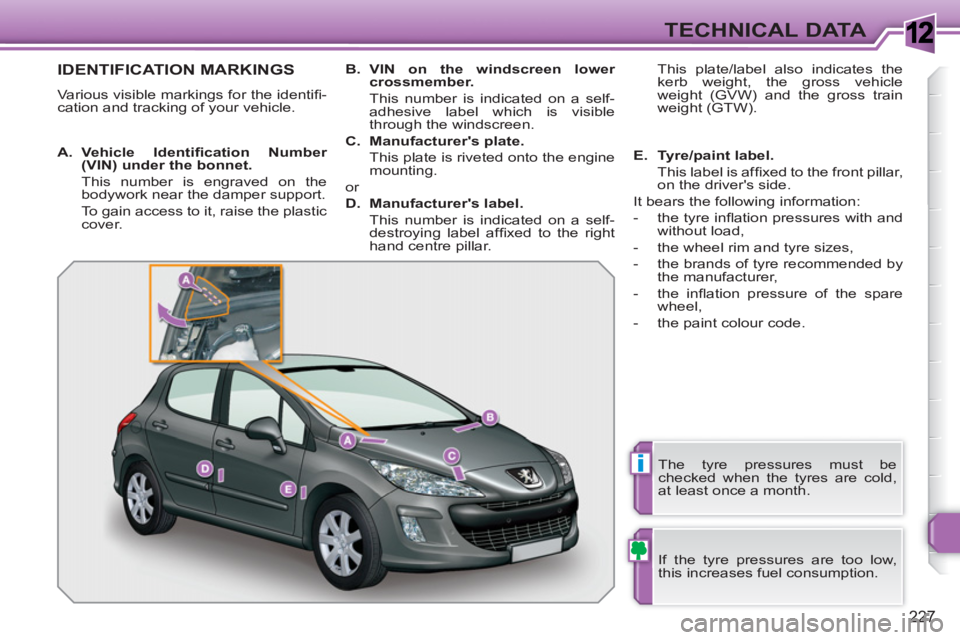
A.
Vehicle Identifi cation Number
(VIN)
under the bonnet.
This number is engraved on the
bodywork near the damper support.
To gain access to it, raise the plastic
cover.
B.
VIN
on the windscreen lower
crossmember.
This number is indicated on a self-
adhesive label which is visible
through the windscreen.
C.
Manufacturer's plate.
This plate is riveted onto the engine
mounting.
or
D.
Manufacturer's label.
This number is indicated on a self-
destroying label affi xed to the right
hand centre pillar. This plate/label also indicates the
kerb weight, the gross vehicle
weight (GVW) and the gross train
weight (GTW).
E.
Tyre/paint label.
This label is affi xed to the front pillar,
on the driver's side.
It bears the following information:
- the tyre infl ation pressures with and
without load,
- the wheel rim and tyre sizes,
- the brands of tyre recommended by
the manufacturer,
- the infl ation pressure of the spare
wheel,
- the paint colour code.
Page 235 of 336
233
2ABC3DEF5JKL4GHI6MNO8TUV7PQRS9WXYZ0*#
1
RADIOMEDIANAVESCTRAFFICSETUPADDRBOOK
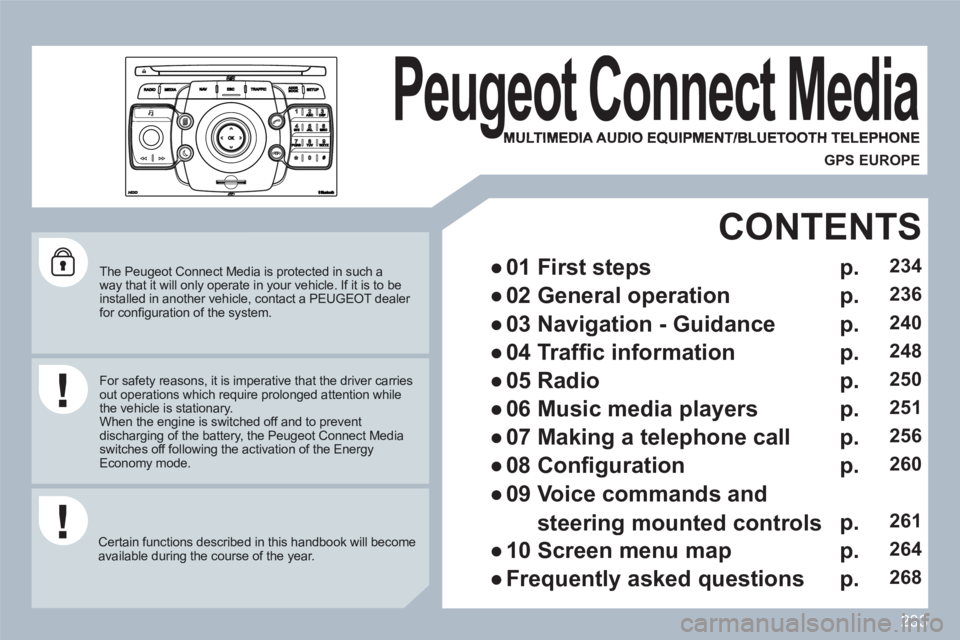
The Peugeot Connect Media is protected in such away that it will only operate in your vehicle. If it is to beinstalled in another vehicle, contact a PEUGEOT dealer for confi guration of the system.
Certain functions described in this handbook will become available during the course of the year.
Peugeot Connect Media
MULTIMEDIA AUDIO EQUIPMENT/BLUETOOTH TELEPHONE
gg
GPS EUROPE
For safety reasons, it is imperative that the driver carriesout operations which require prolonged attention while the vehicle is stationary.
When the engine is switched off and to prevent discharging of the battery, the Peugeot Connect Mediaswitches off following the activation of the EnergyEconomy mode.
●
01 First steps
CONTENTS
●
02 General operation
●
03 Navigation - Guidance
●
04 Traffi c information
●
05 Radio
●
06 Music media players
●
07 Making a telephone call
●
08 Confi guration
●
09 Voice commands and
steering mounted controls
●
10 Screen menu map
●
Frequently asked questions
p.
p.
p.
p.
p.
p.
p.
p.
p.
p.
p.
234
236
240
248
250
251
256
260
261
264
268
Page 271 of 336
269
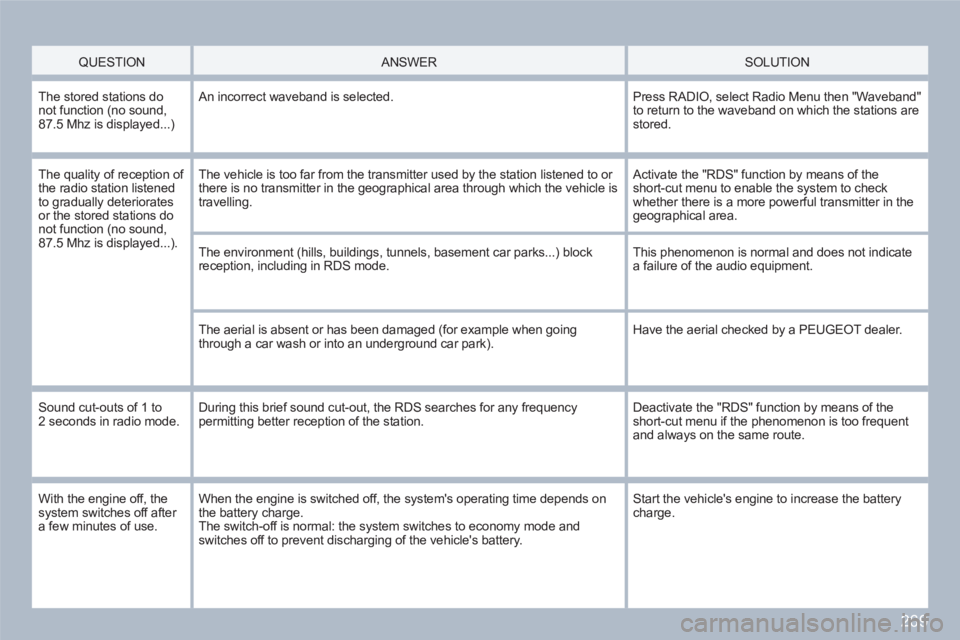
QUESTION
ANSWER SOLUTION
The stored stations do not function (no sound,87.5 Mhz is displayed...)
An incorrect waveband is selected.
Press RADIO, select Radio Menu then "Waveband" to return to the waveband on which the stations arestored.
The quality of reception of the radio station listened to gradually deterioratesor the stored stations donot function (no sound,87.5 Mhz is displayed...).
The vehicle is too far from the transmitter used by the station listened to or there is no transmitter in the geographical area through which the vehicle is travelling.
Activate the "RDS" function by means of the short-cut menu to enable the system to check whether there is a more powerful transmitter in the geographical area.
The environment (hills, buildings, tunnels, basement car parks...) block reception, including in RDS mode.
This phenomenon is normal and does not indicate a failure of the audio equipment.
The aerial is absent or has been damaged (for example when goingthrough a car wash or into an underground car park).
Have the aerial checked by a PEUGEOT dealer.
Sound cut-outs of 1 to 2 seconds in radio mode. During this brief sound cut-out, the RDS searches for any frequencypermitting better reception of the station.
Deactivate the "RDS" function by means of the short-cut menu if the phenomenon is too frequent and always on the same route.
With the engine off, thesystem switches off after a few minutes of use.
When the engine is switched off, the system's operating time depends on the battery charge. The switch-off is normal: the system switches to economy mode and switches off to prevent discharging of the vehicle's battery.
Start the vehicle's engine to increase the battery charge.
Page 275 of 336
273
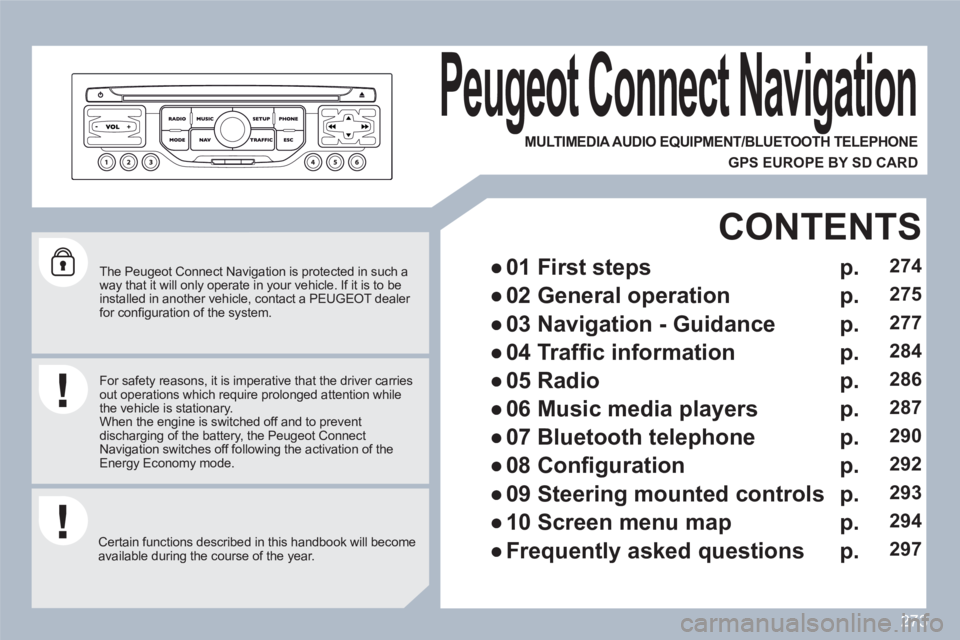
The Peugeot Connect Navigation is protected in such a way that it will only operate in your vehicle. If it is to beinstalled in another vehicle, contact a PEUGEOT dealer for confi guration of the system.
Certain functions described in this handbook will become available during the course of the year.
Peugeot Connect Navigation
For safety reasons, it is imperative that the driver carriesout operations which require prolonged attention while the vehicle is stationary.
When the engine is switched off and to prevent discharging of the battery, the Peugeot Connect Navigation switches off following the activation of theEnergy Economy mode.
MULTIMEDIA AUDIO EQUIPMENT/BLUETOOTH TELEPHONE
GPS EUROPE BY SD CARD
●
01 First steps
CONTENTS
●
02 General operation
●
03 Navigation - Guidance
●
04 Traffi c information
●
05 Radio
●
06 Music media players
●
07 Bluetooth telephone
●
08 Confi guration
●
09 Steering mounted controls
●
10 Screen menu map
●
Frequently asked questions
p.
p.
p.
p.
p.
p.
p.
p.
p.
p.
p.
274
275
277
284
286
287
290
292
293
294
297
Page 276 of 336
274
01
11
55
101
22
334466
131
111
99
144155
77881212161
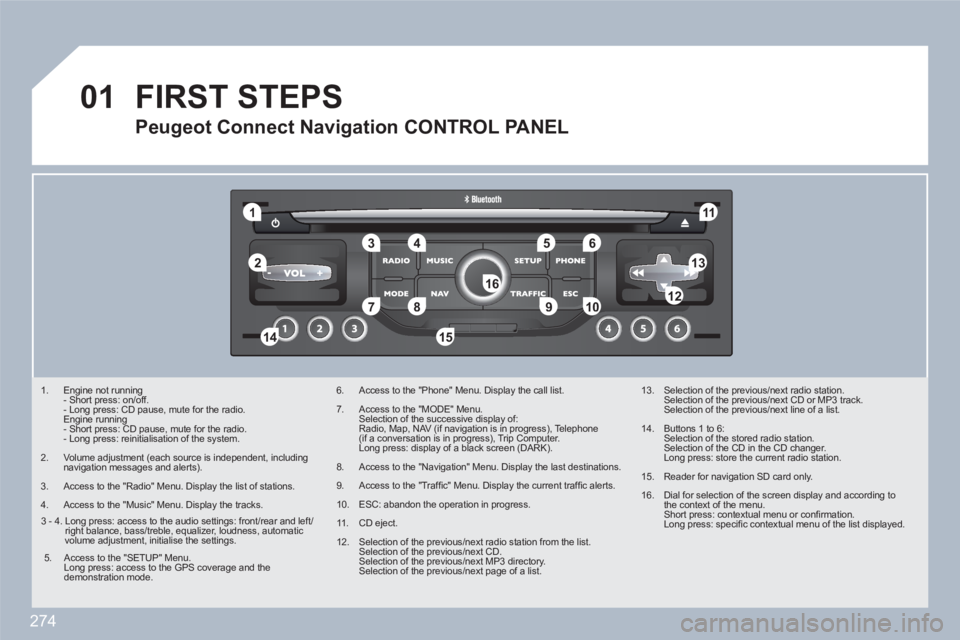
1. Engine not running
- Short press: on/off.
- Long press: CD pause, mute for the radio.
Engine running
- Short press: CD pause, mute for the radio.
- Long press: reinitialisation of the system.
2. Volume adjustment (each source is independent, including navigation messages and alerts).
3. Access to the "Radio" Menu. Display the list of stations.
4. Access to the "Music" Menu. Display the tracks.
6. Access to the "Phone" Menu. Display the call list.
7. Access to the "MODE" Menu.
Selection of the successive display of:
Radio, Map, NAV (if navigation is in progress), Telephone(if a conversation is in progress), Trip Computer.
Long press: display of a black screen (DARK).
8. Access to the "Navigation" Menu. Display the last destinations.
9. Access to the "Traffi c" Menu. Display the current traffi c alerts.
10. ESC: abandon the operation in progress.
11 . CD eject.
12. Selection of the previous/next radio station from the list.
Selection of the previous/next CD.
Selection of the previous/next MP3 directory.
Selection of the previous/next page of a list.
13. Selection of the previous/next radio station.
Selection of the previous/next CD or MP3 track.
Selection of the previous/next line of a list.
14. Buttons 1 to 6:
Selection of the stored radio station.
Selection of the CD in the CD changer.
Long press: store the current radio station.
15. Reader for navigation SD card only.
16. Dial for selection of the screen display and according tothe context of the menu.
Short press: contextual menu or confi rmation.
Long press: specifi c contextual menu of the list displayed.
FIRST STEPS
Peugeot Connect Navigation CONTROL PANEL
3 - 4. Long press: access to the audio settings: front/rear and left/right balance, bass/treble, equalizer, loudness, automaticvolume adjustment, initialise the settings.
5. Access to the "SETUP" Menu.
Long press: access to the GPS coverage and the demonstration mode.
Page 300 of 336
298
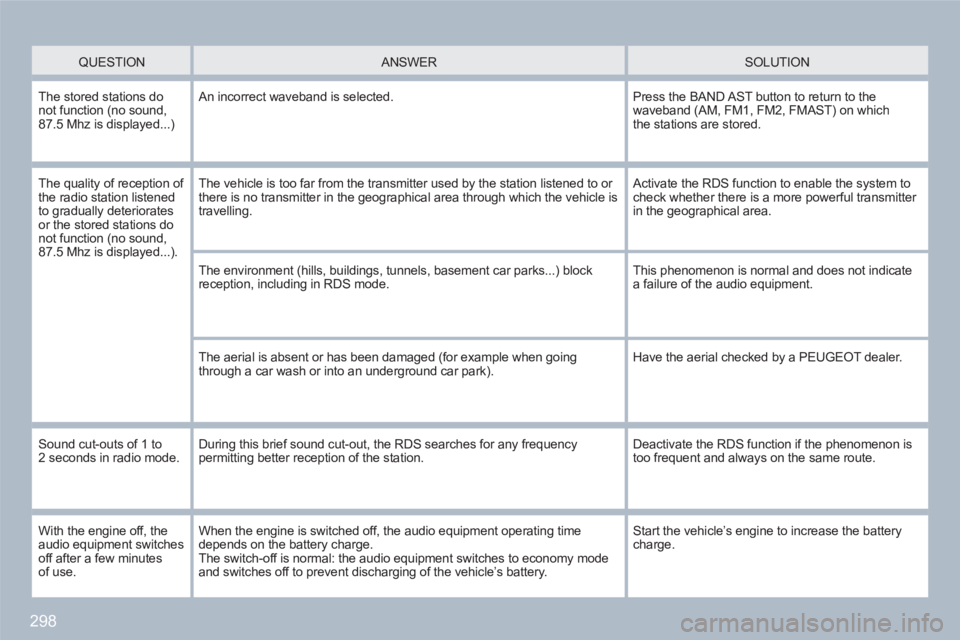
QUESTION
ANSWER SOLUTION
The stored stations do not function (no sound,87.5 Mhz is displayed...)
An incorrect waveband is selected.
Press the BAND AST button to return to thewaveband (AM, FM1, FM2, FMAST) on whichthe stations are stored.
The quality of reception of the radio station listened to gradually deterioratesor the stored stations donot function (no sound,87.5 Mhz is displayed...).
The vehicle is too far from the transmitter used by the station listened to or there is no transmitter in the geographical area through which the vehicle is travelling.
Activate the RDS function to enable the system tocheck whether there is a more powerful transmitter in the geographical area.
The environment (hills, buildings, tunnels, basement car parks...) block reception, including in RDS mode.
This phenomenon is normal and does not indicate a failure of the audio equipment.
The aerial is absent or has been damaged (for example when goingthrough a car wash or into an underground car park).
Have the aerial checked by a PEUGEOT dealer.
Sound cut-outs of 1 to 2 seconds in radio mode. During this brief sound cut-out, the RDS searches for any frequencypermitting better reception of the station.
Deactivate the RDS function if the phenomenon istoo frequent and always on the same route.
With the engine off, theaudio equipment switches off after a few minutesof use.
When the engine is switched off, the audio equipment operating time depends on the battery charge.The switch-off is normal: the audio equipment switches to economy modeand switches off to prevent discharging of the vehicle’s battery.
Start the vehicle’s engine to increase the batterycharge.
Page 303 of 336
301
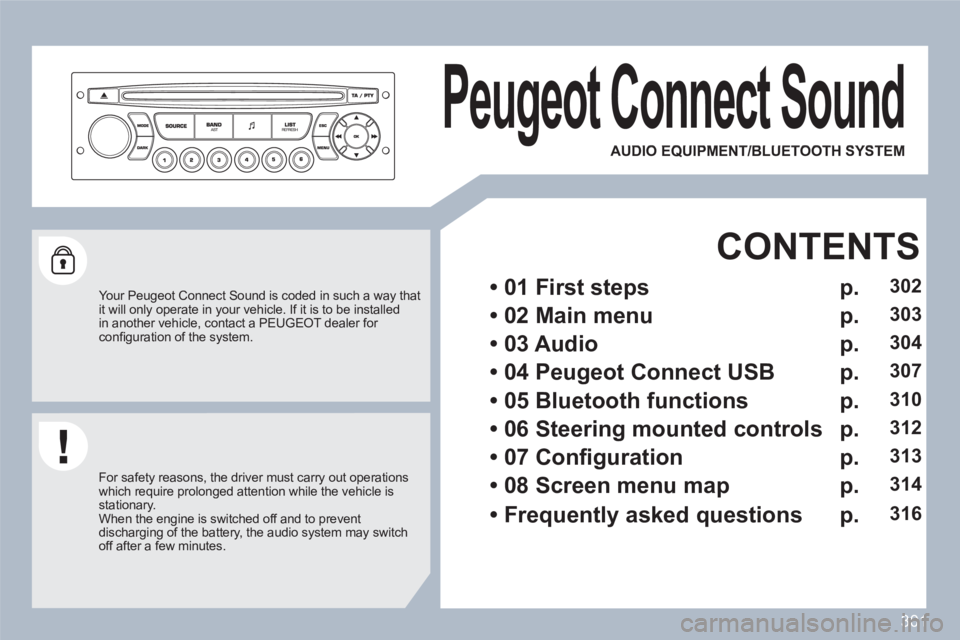
Peugeot Connect Sound
Your Peugeot Connect Sound is coded in such a way thatit will only operate in your vehicle. If it is to be installedin another vehicle, contact a PEUGEOT dealer for confi guration of the system.
For safety reasons, the driver must carry out operations which require prolonged attention while the vehicle is stationary.
When the engine is switched off and to prevent discharging of the battery, the audio system may switch off after a few minutes.
AUDIO EQUIPMENT/BLUETOOTH SYSTEM
• 01 First steps
CONTENTS
• 02 Main menu
• 03 Audio
• 04
Peugeot Connect
USB
• 05 Bluetooth functions
• 06 Steering mounted controls
• 07 Confi guration
• 08 Screen menu map
• Frequently asked questions
p.
p.
p.
p.
p.
p.
p.
p.
p.
302
303
304
307
310
312
313
314
316
Page 319 of 336
317
QUESTION
ANSWER
SOLUTION
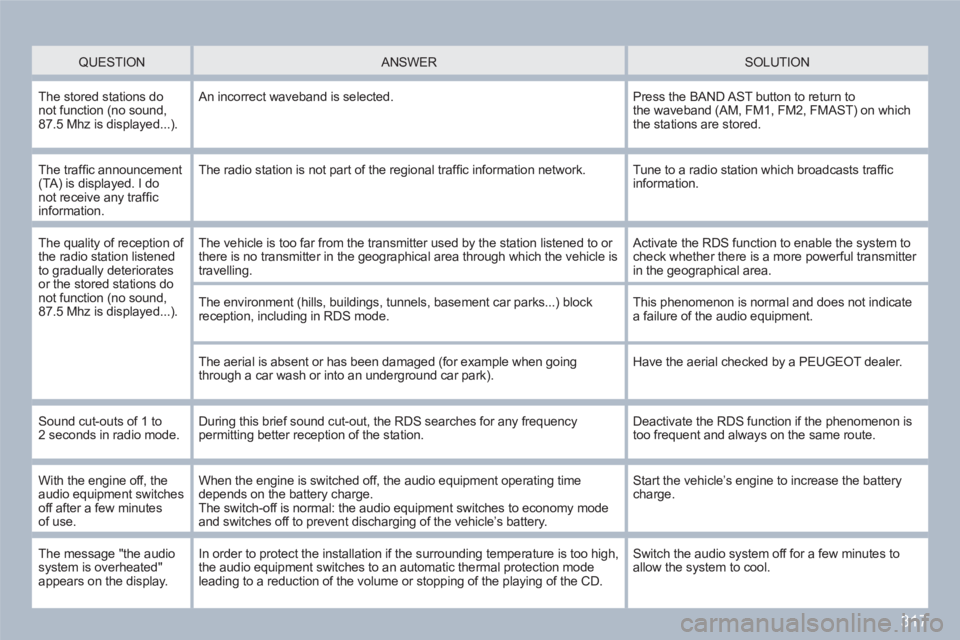
The stored stations do not function (no sound,87.5 Mhz is displayed...).
An incorrect waveband is selected.
Press the BAND AST button to return tothe waveband (AM, FM1, FM2, FMAST) on whichthe stations are stored.
The traffi c announcement(TA) is displayed. I do not receive any traffi c information.
The radio station is not part of the regional traffi c information network.
Tune to a radio station which broadcasts traffi c information.
The quality of reception of the radio station listened to gradually deterioratesor the stored stations donot function (no sound,87.5 Mhz is displayed...).
The vehicle is too far from the transmitter used by the station listened to or there is no transmitter in the geographical area through which the vehicle is travelling.
Activate the RDS function to enable the system tocheck whether there is a more powerful transmitter in the geographical area.
The environment (hills, buildings, tunnels, basement car parks...) block reception, including in RDS mode.
This phenomenon is normal and does not indicate a failure of the audio equipment.
The aerial is absent or has been damaged (for example when goingthrough a car wash or into an underground car park).
Have the aerial checked by a PEUGEOT dealer.
Sound cut-outs of 1 to 2 seconds in radio mode. During this brief sound cut-out, the RDS searches for any frequencypermitting better reception of the station.
Deactivate the RDS function if the phenomenon istoo frequent and always on the same route.
With the engine off, theaudio equipment switches off after a few minutesof use.
When the engine is switched off, the audio equipment operating time depends on the battery charge.The switch-off is normal: the audio equipment switches to economy modeand switches off to prevent discharging of the vehicleís battery.
Start the vehicleís engine to increase the batterycharge.
The message "the audio system is overheated" appears on the display.
In order to protect the installation if the surrounding temperature is too high,the audio equipment switches to an automatic thermal protection mode leading to a reduction of the volume or stopping of the playing of the CD.
Switch the audio system off for a few minutes to allow the system to cool.