consumption PEUGEOT 308 SW BL 2010 User Guide
[x] Cancel search | Manufacturer: PEUGEOT, Model Year: 2010, Model line: 308 SW BL, Model: PEUGEOT 308 SW BL 2010Pages: 336, PDF Size: 21.2 MB
Page 151 of 336
!
i
149
DRIVING
Stopping the vehicle
Before switching off the engine, you
can engage position P
or N
to place the
gearbox in neutral.
In both cases, apply the parking brake
to immobilise the vehicle.
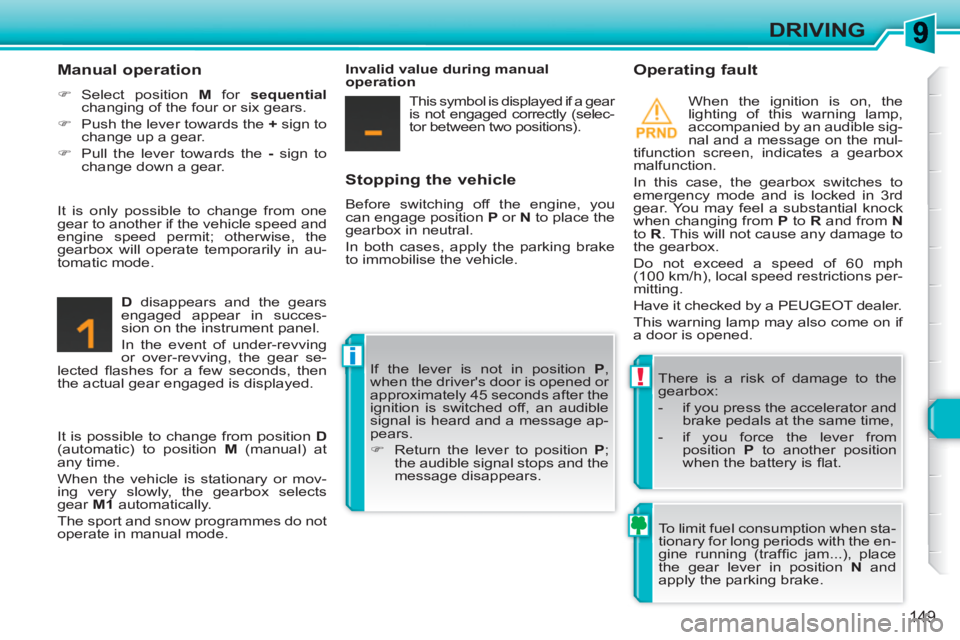
Operating fault
When the ignition is on, the
lighting of this warning lamp,
accompanied by an audible sig-
nal and a message on the mul-
tifunction screen, indicates a gearbox
malfunction.
In this case, the gearbox switches to
emergency mode and is locked in 3rd
gear. You may feel a substantial knock
when changing from P
to R
and from N
to R
. This will not cause any damage to
the gearbox.
Do not exceed a speed of 60 mph
(100 km/h), local speed restrictions per-
mitting.
Have it checked by a PEUGEOT dealer.
This warning lamp may also come on if
a door is opened.
There is a risk of damage to the
gearbox:
- if you press the accelerator and
brake pedals at the same time,
- if you force the lever from
position P
to another position
when the battery is fl at.
Manual operation
)
Select position M
for sequential
changing of the four or six gears.
)
Push the lever towards the +
sign to
change up a gear.
)
Pull the lever towards the -
sign to
change down a gear.
D
disappears and the gears
engaged appear in succes-
sion on the instrument panel.
In the event of under-revving
or over-revving, the gear se-
lected fl ashes for a few seconds, then
the actual gear engaged is displayed. If the lever is not in position P
,
when the driver's door is opened or
approximately 45 seconds after the
ignition is switched off, an audible
signal is heard and a message ap-
pears.
)
Return the lever to position P
;
the audible signal stops and the
message disappears.
It is only possible to change from one
gear to another if the vehicle speed and
engine speed permit; otherwise, the
gearbox will operate temporarily in au-
tomatic mode.
Invalid value during manual
operation
This symbol is displayed if a gear
is not engaged correctly (selec-
tor between two positions).
It is possible to change from position D
(automatic) to position M
(manual) at
any time.
When the vehicle is stationary or mov-
ing very slowly, the gearbox selects
gear M1
automatically.
The sport and snow programmes do not
operate in manual mode. To limit fuel consumption when sta-
tionary for long periods with the en-
gine running (traffi c jam...), place
the gear lever in position N
and
apply the parking brake.
Page 188 of 336
1
!
i
186
PRACTICAL INFORMATION
PEUGEOT will not accept responsi-
bility for the cost incurred in repairing
your vehicle or for rectifying malfunc-
tions resulting from the installation
of accessories not supplied and not
recommended by PEUGEOT and
not installed in accordance with its
instructions, in particular when the
combined consumption of all of the
additional equipment connected ex-
ceeds 10 milliamperes.
Installing electrical accessories
Your vehicle’s electrical system is
designed to operate with standard
or optional equipment.
Before installing other electrical equip-
ment or accessories on your vehicle,
contact a PEUGEOT dealer.
CHANGING A FUSE
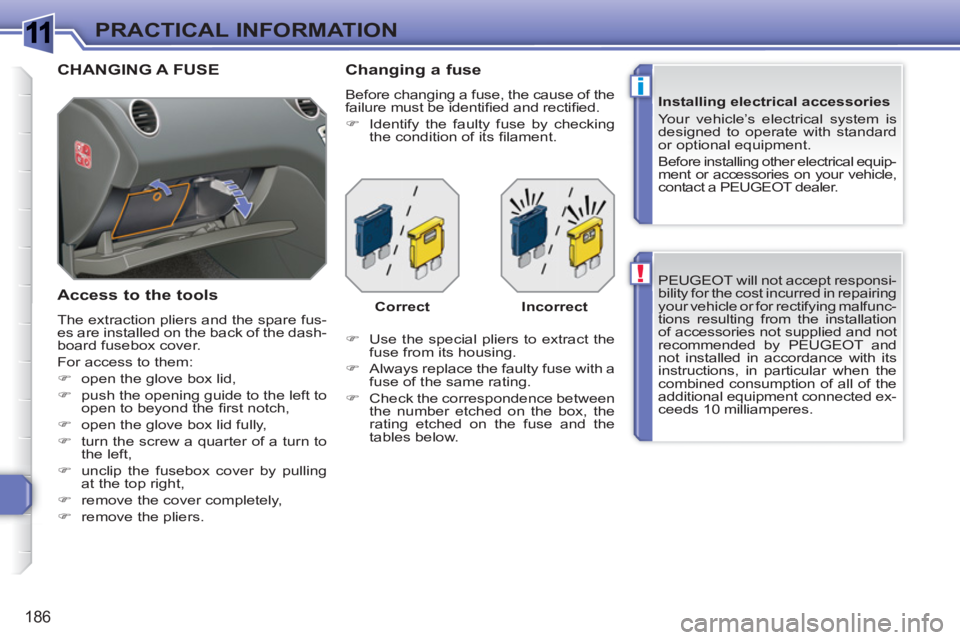
Access to the tools
The extraction pliers and the spare fus-
es are installed on the back of the dash-
board fusebox cover.
For access to them:
)
open the glove box lid,
)
push the opening guide to the left to
open to beyond the fi rst notch,
)
open the glove box lid fully,
)
turn the screw a quarter of a turn to
the left,
)
unclip the fusebox cover by pulling
at the top right,
)
remove the cover completely,
)
remove the pliers.
Changing a fuse
Before changing a fuse, the cause of the
failure must be identifi ed and rectifi ed.
)
Identify the faulty fuse by checking
the condition of its fi lament.
)
Use the special pliers to extract the
fuse from its housing.
)
Always replace the faulty fuse with a
fuse of the same rating.
)
Check the correspondence between
the number etched on the box, the
rating etched on the fuse and the
tables below. Correct
Incorrect
Page 202 of 336
1
!
i
i
200
PRACTICAL INFORMATION
The fi tting of electrical equipment
or accessories which are not rec-
ommended by PEUGEOT may
result in a failure of your vehicle's
electronic system and excessive
electrical consumption.
Please note this specifi c warn-
ing. You are advised to contact a
PEUGEOT representative to be
shown the range of recommended
equipment and accessories.
Depending on the country in which
the vehicle is sold, it may be compul-
sory to have a high visibility safety
jacket, warning triangle and spare
bulbs available in the vehicle.
"Protection":
mats *** , mud fl aps, seat covers compat-
ible with lateral airbags, vehicle covers,
door sill protectors, transluscent bum-
per protectors.
"Mulitmedia":
audio systems, amplifi ers, satellite
navigation systems, Bluetooth system,
speakers, DVD player, USB Box, WiFi
on board...
***
To avoid any risk of jamming of the
pedals:
- ensure that the mat is positioned
and secured correctly,
- never fi t one mat on top of another.
Installation of radio
communication transmitters
Before installing on your vehicle
any after-market radio communica-
tion transmitter with external aerial,
we recommend that you contact
a PEUGEOT dealer.
The PEUGEOT dealer network
will give you the specifi cation
for transmitters which can be fi t-
ted (frequency, maximum power,
aerial position, specifi c installation
requirements), in line with the Ve-
hicle Electromagnetic Compatibility
Directive (2004/104/EC).
You can also obtain products for cleaning
and maintenance (exterior and interior),
topping up (screenwash...) and refi lls
(fragrance cartridges, sealant cartridge
for the temporary puncture repair kit...)
from PEUGEOT dealers.
Page 229 of 336
1
i
227
TECHNICAL DATA
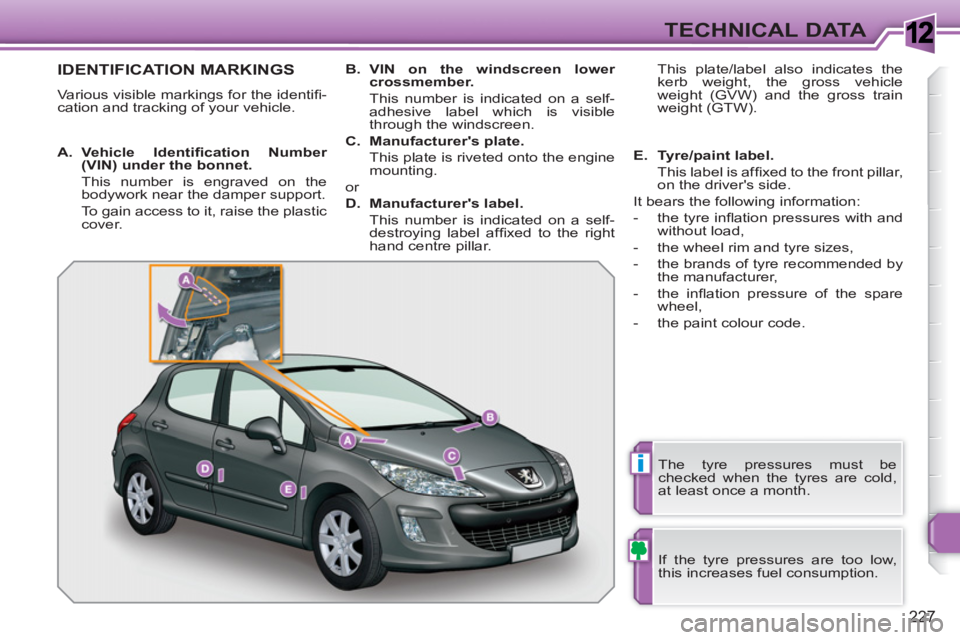
IDENTIFICATION MARKINGS
Various visible markings for the identifi -
cation and tracking of your vehicle.
If the tyre pressures are too low,
this increases fuel consumption.
The tyre pressures must be
checked when the tyres are cold,
at least once a month.
A.
Vehicle Identifi cation Number
(VIN)
under the bonnet.
This number is engraved on the
bodywork near the damper support.
To gain access to it, raise the plastic
cover.
B.
VIN
on the windscreen lower
crossmember.
This number is indicated on a self-
adhesive label which is visible
through the windscreen.
C.
Manufacturer's plate.
This plate is riveted onto the engine
mounting.
or
D.
Manufacturer's label.
This number is indicated on a self-
destroying label affi xed to the right
hand centre pillar. This plate/label also indicates the
kerb weight, the gross vehicle
weight (GVW) and the gross train
weight (GTW).
E.
Tyre/paint label.
This label is affi xed to the front pillar,
on the driver's side.
It bears the following information:
- the tyre infl ation pressures with and
without load,
- the wheel rim and tyre sizes,
- the brands of tyre recommended by
the manufacturer,
- the infl ation pressure of the spare
wheel,
- the paint colour code.
Page 298 of 336
296
1
2
3
4
1
3
4
3
4
2
2
2
3
4
4
4
4
2
3
3
3
2
3
3
3
2
3
4
4
4
4
2
4
3
4
3
3
3
3
3
3
3
3
2
4
4
2
3
4
4
3
4
4
4
2
3
3
3
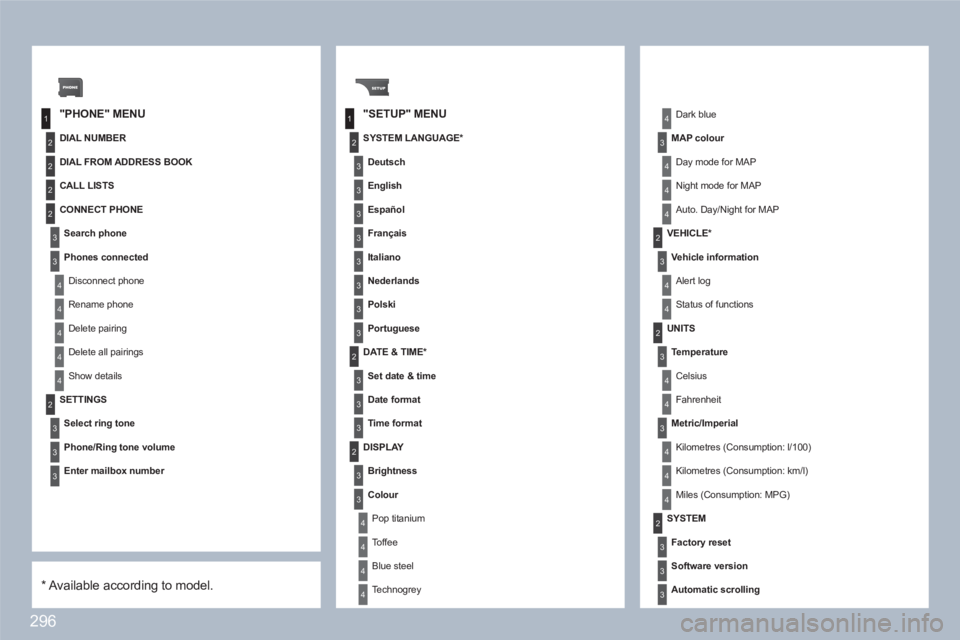
"PHONE" MENU"SETUP" MENU
DIAL NUMBER
SETTINGS
Select ring tone
Phone/Ring tone volume
Enter mailbox number
SYSTEM LANGUAGE *
Deutsch
English
Español
Français
Italiano
Nederlands
Polski
Portuguese
DATE & TIME *
Set date & time
Date format
Time format
Dark blue
MAP colour
Day mode for MAP
Night mode for MAP
Auto. Day/Night for MAP
VEHICLE *
Vehicle information
Alert log
Status of functions
DISPLAY
Brightness
Colour
Pop titanium
Toffee
Blue steel
Technogrey
UNITS
Temperature
Celsius
Fahrenheit
Metric/Imperial
Kilometres (Consumption: l/100)
Kilometres (Consumption: km/l)
Miles (Consumption: MPG)
SYSTEM
Factory reset
Software version
Automatic scrolling
*
Available according to model.
DIAL FROM ADDRESS BOOK
CALL LISTS
CONNECT PHONE
Search phone
Phones connected
Disconnect phone
Rename phone
Delete pairing
Delete all pairings
Show details
Page 316 of 336
314
1
2
2
2
2
1
2
2
1
2
3
3
1
2
2
2
2
2
2
1
2
2
2
2
2
2
2
2
1
2
2
123
23
08
1
1
1
1
1
1
1
1
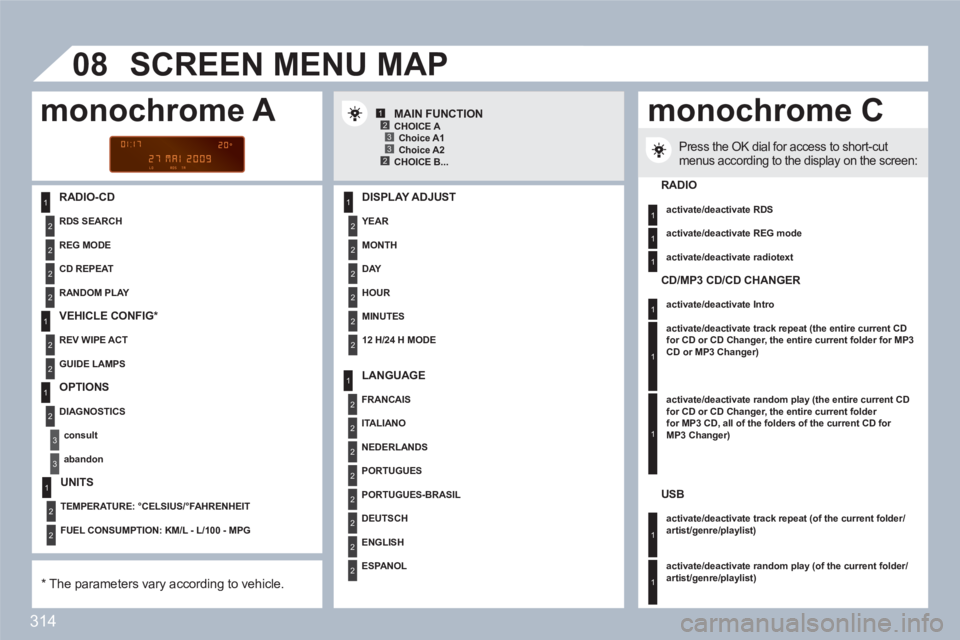
RADIO-CD
DISPLAY ADJUST
YEAR
MONTH
DAY
HOUR
MINUTES
12 H/24 H MODE
SCREEN MENU MAP
MAIN FUNCTION
*
The parameters vary according to vehicle.
CHOICE A
Choice A1
Choice A2
CHOICE B...
LANGUAGE
FRANCAIS
ITALIANO
NEDERLANDS
PORTUGUES
PORTUGUES-BRASIL
DEUTSCH
ENGLISH
ESPA N O L
Press the OK dial for access to short-cutmenus according to the display on the screen:
monochrome A monochrome C
RADIO
activate/deactivate RDS
activate/deactivate REG mode
activate/deactivate radiotext
RANDOM PLAY
RDS SEARCH
REG MODE
CD REPEAT
VEHICLE CONFIG *
REV WIPE ACT
GUIDE LAMPS
OPTIONS
DIAGNOSTICS
consult
abandon
UNITS
TEMPERATURE: °CELSIUS/°FAHRENHEIT
FUEL CONSUMPTION: KM/L - L/100 - MPG
CD/MP3 CD/CD CHANGER
activate/deactivate Intro
activate/deactivate track repeat (the entire current CDfor CD or CD Changer, the entire current folder for MP3CD or MP3 Changer)
activate/deactivate random play (the entire current CD for CD or CD Changer, the entire current folder for MP3 CD, all of the folders of the current CD for MP3 Changer)
USB
activate/deactivate track repeat (of the current folder/artist/genre/playlist)
activate/deactivate random play
(of the current folder/artist/genre/playlist)