fuse PEUGEOT 308 SW BL 2010 User Guide
[x] Cancel search | Manufacturer: PEUGEOT, Model Year: 2010, Model line: 308 SW BL, Model: PEUGEOT 308 SW BL 2010Pages: 336, PDF Size: 21.2 MB
Page 192 of 336
1
190
PRACTICAL INFORMATION
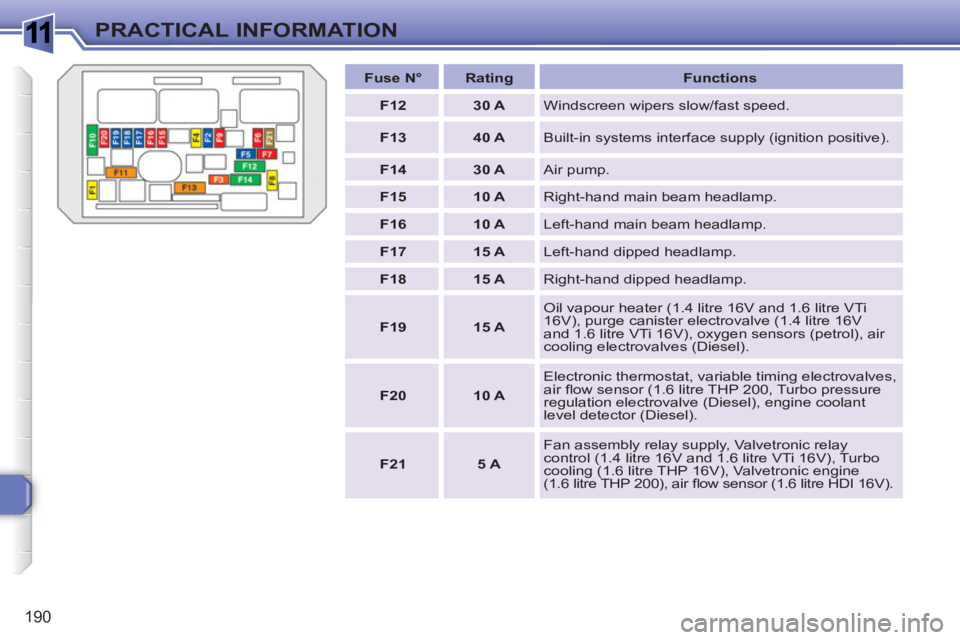
Fuse N°
Rating
Functions
F12
30 A
Windscreen wipers slow/fast speed.
F13
40 A
Built-in systems interface supply (ignition positive).
F14
30 A
Air pump.
F15
10 A
Right-hand main beam headlamp.
F16
10 A
Left-hand main beam headlamp.
F17
15 A
Left-hand dipped headlamp.
F18
15 A
Right-hand dipped headlamp.
F19
15 A
Oil vapour heater (1.4 litre 16V and 1.6 litre VTi
16V), purge canister electrovalve (1.4 litre 16V
and 1.6 litre VTi 16V), oxygen sensors (petrol), air
cooling electrovalves (Diesel).
F20
10 A
Electronic thermostat, variable timing electrovalves,
air fl ow sensor (1.6 litre THP 200, Turbo pressure
regulation electrovalve (Diesel), engine coolant
level detector (Diesel).
F21
5 A
Fan assembly relay supply, Valvetronic relay
control (1.4 litre 16V and 1.6 litre VTi 16V), Turbo
cooling (1.6 litre THP 16V), Valvetronic engine
(1.6 litre THP 200), air fl ow sensor (1.6 litre HDI 16V).
Page 193 of 336
1
191
PRACTICAL INFORMATION
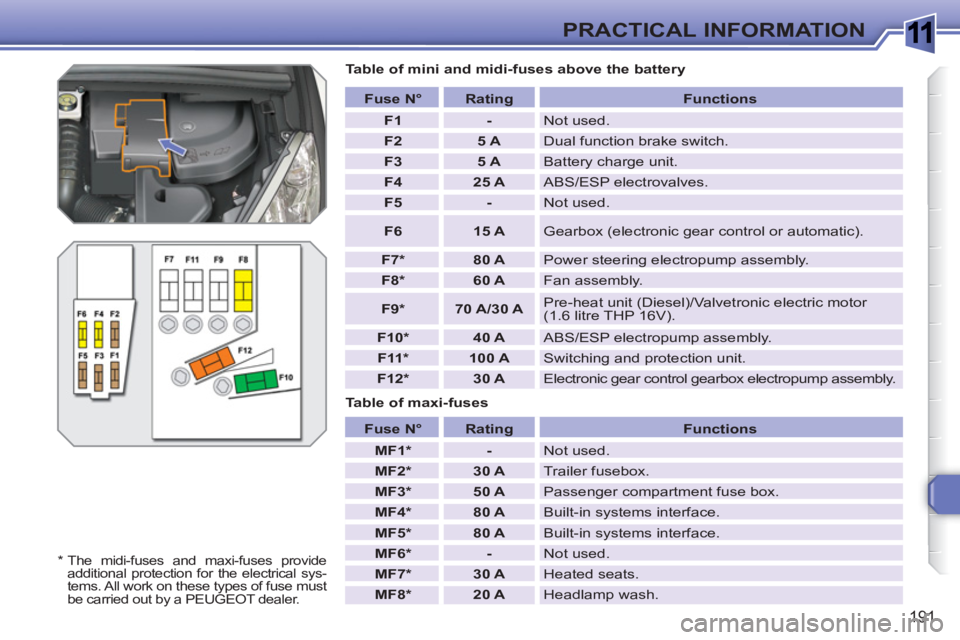
Table of mini and midi-fuses above the battery
Table of maxi-fuses
Fuse N°
Rating
Functions
F1
-
Not used.
F2
5 A
Dual function brake switch.
F3
5 A
Battery charge unit.
F4
25 A
ABS/ESP electrovalves.
F5
-
Not used.
F6
15 A
Gearbox (electronic gear control or automatic).
F7 *
80 A
Power steering electropump assembly.
F8 *
60 A
Fan assembly.
F9 *
70 A/30 A
Pre-heat unit (Diesel)/Valvetronic electric motor
(1.6 litre THP 16V).
F10 *
40 A
ABS/ESP electropump assembly.
F11 *
100 A
Switching and protection unit.
F12 *
30 A
Electronic gear control gearbox electropump assembly.
Fuse N°
Rating
Functions
MF1 *
-
Not used.
MF2 *
30 A
Trailer fusebox.
MF3 *
50 A
Passenger compartment fuse box.
MF4 *
80 A
Built-in systems interface.
MF5 *
80 A
Built-in systems interface.
MF6 *
-
Not used.
MF7 *
30 A
Heated seats.
MF8 *
20 A
Headlamp wash.
*
The midi-fuses and maxi-fuses provide
additional protection for the electrical sys-
tems. All work on these types of fuse must
be carried out by a PEUGEOT dealer.
Page 194 of 336
1
i
192
PRACTICAL INFORMATION
BATTERY
Procedure for charging your battery
when it is fl at or for starting the engine
using another battery.
Access to the battery
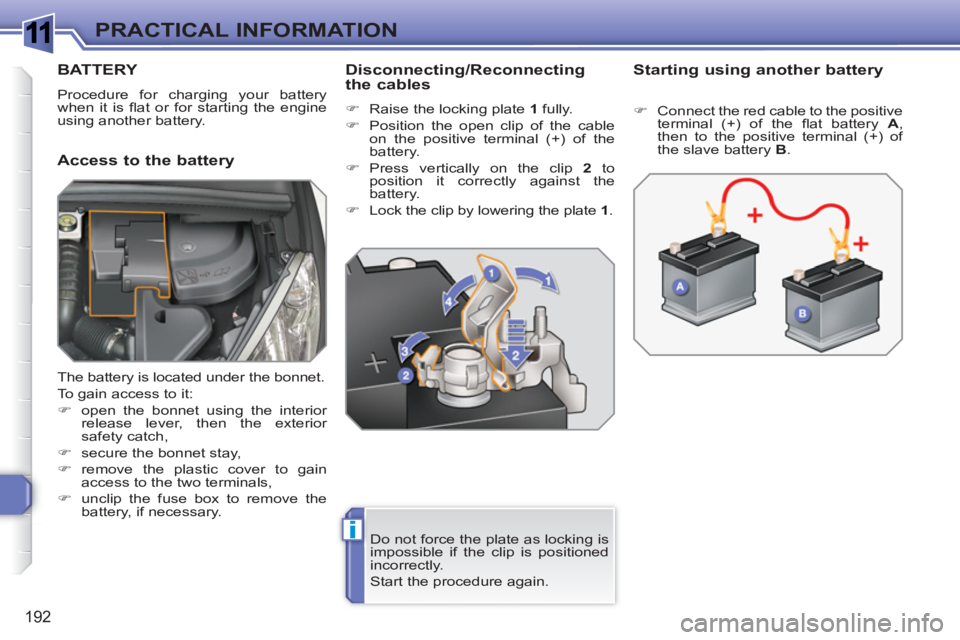
Disconnecting/Reconnecting
the cables
)
Raise the locking plate 1
fully.
)
Position the open clip of the cable
on the positive terminal (+) of the
battery.
)
Press vertically on the clip 2
to
position it correctly against the
battery.
)
Lock the clip by lowering the plate 1
.
Starting using another battery
Do not force the plate as locking is
impossible if the clip is positioned
incorrectly.
Start the procedure again.
)
Connect the red cable to the positive
terminal (+) of the fl at battery A
,
then to the positive terminal (+) of
the slave battery B
.
The battery is located under the bonnet.
To gain access to it:
)
open the bonnet using the interior
release lever, then the exterior
safety catch,
)
secure the bonnet stay,
)
remove the plastic cover to gain
access to the two terminals,
)
unclip the fuse box to remove the
battery, if necessary.
Page 232 of 336
230
EMERGENCY CALLASSISTANCE CALL
OPERATION OF THE SYSTEM
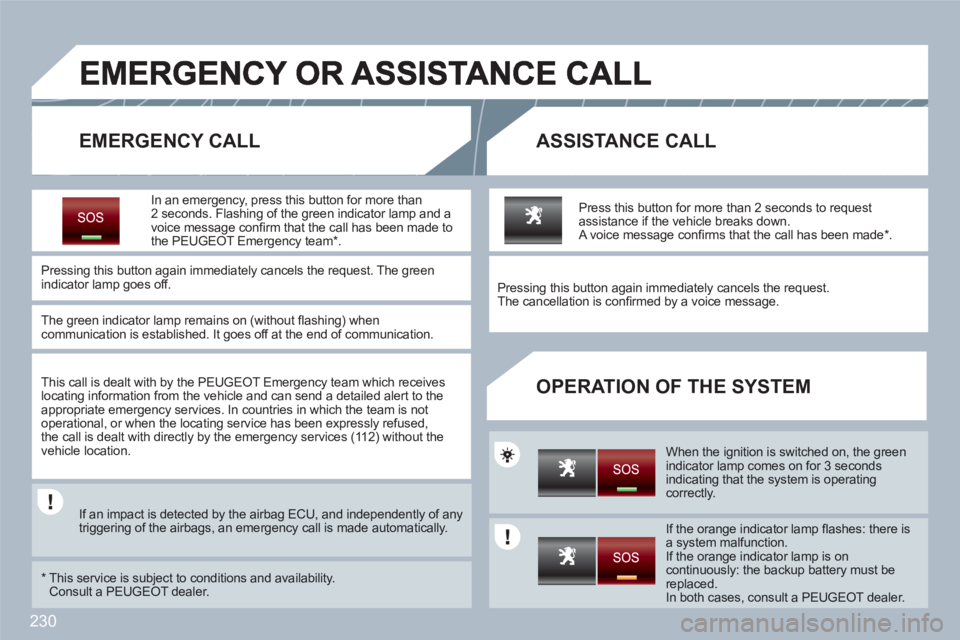
In an emergency, press this button for more than 2 seconds. Flashing of the green indicator lamp and avoice message confi rm that the call has been made tothe PEUGEOT Emergency team *
.
Pressing this button again immediately cancels the request. The greenindicator lamp goes off.
The green indicator lamp remains on (without fl ashing) when communication is established. It goes off at the end of communication.
This call is dealt with by the PEUGEOT Emergency team which receives locating information from the vehicle and can send a detailed alert to the appropriate emergency services. In countries in which the team is not operational, or when the locating service has been expressly refused,the call is dealt with directly by the emergency services (11 2) without thevehicle location.
If an impact is detected by the airbag ECU, and independently of any triggering of the airbags, an emergency call is made automatically.
*
This service is subject to conditions and availability. Consult a PEUGEOT dealer.
Press this button for more than 2 seconds to requestassistance if the vehicle breaks down. A voice message confi rms that the call has been made * .
Pressing this button again immediately cancels the request.
The cancellation is confi rmed by a voice message.
When the ignition is switched on, the greenindicator lamp comes on for 3 seconds indicating that the system is operating correctly.
If the orange indicator lamp fl ashes: there isa system malfunction.
If the orange indicator lamp is oncontinuously: the backup battery must bereplaced.
In both cases, consult a PEUGEOT dealer.
Page 236 of 336
234
01
2ABC3DEF
5JKL4GHI6MNO
8TUV7PQRS9WXYZ
0*#
1
RADIO MEDIANAV ESC TRAFFIC
SETUPADDR
BOOK
1
10
2
3
4
612
9
7
8
115
TU PQRS
0*
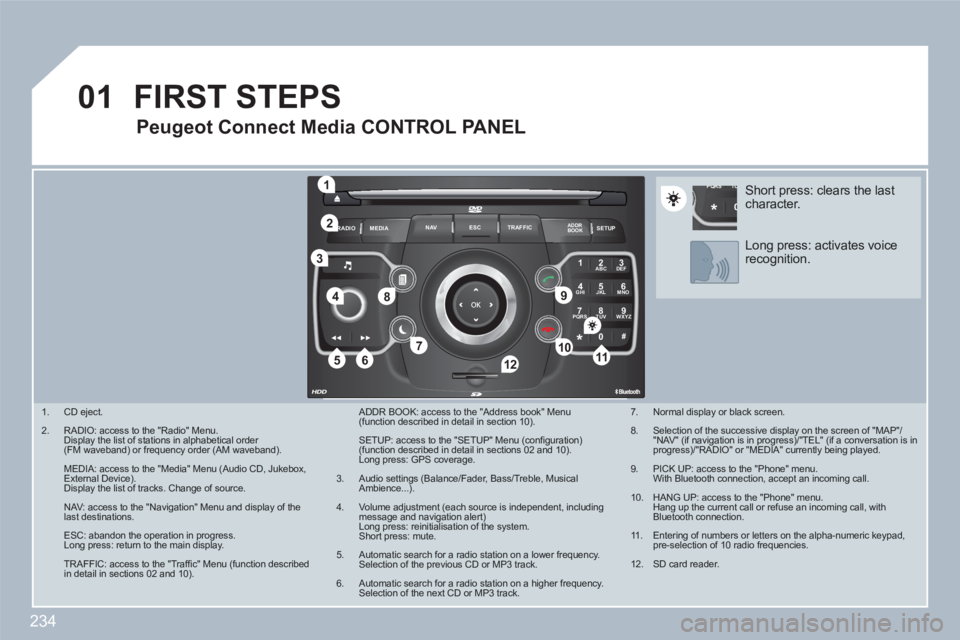
1.
CD eject.
2.
RADIO: access to the "Radio" Menu. Display the list of stations in alphabetical order (FM waveband) or frequency order (AM waveband).
MEDIA: access to the "Media" Menu (Audio CD, Jukebox, External Device). Display the list of tracks. Change of source.
NAV: access to the "Navigation" Menu and display of thelast destinations.
ESC: abandon the operation in progress. Long press: return to the main display.
TRAFFIC: access to the "Traffi c" Menu (function describedin detail in sections 02 and 10).
ADDR BOOK: access to the "Address book" Menu (function described in detail in section 10).
SETUP: access to the "SETUP" Menu (confi guration) (function described in detail in sections 02 and 10). Long press: GPS coverage.
3.
Audio settings (Balance/Fader, Bass/Treble, MusicalAmbience...).
4.
Volume adjustment (each source is independent, including message and navigation alert) Long press: reinitialisation of the system. Short press: mute.
5.
Automatic search for a radio station on a lower frequency. Selection of the previous CD or MP3 track.
6.
Automatic search for a radio station on a higher frequency. Selection of the next CD or MP3 track.
FIRST STEPS
Peugeot Connect Media CONTROL PANEL
7.
Normal display or black screen.
8.
Selection of the successive display on the screen of "MAP"/"NAV" (if navigation is in progress)/"TEL" (if a conversation is inprogress)/"RADIO" or "MEDIA" currently being played.
9.
PICK UP: access to the "Phone" menu. With Bluetooth connection, accept an incoming call.
10.
HANG UP: access to the "Phone" menu. Hang up the current call or refuse an incoming call, withBluetooth connection.
11 .
Entering of numbers or letters on the alpha-numeric keypad, pre-selection of 10 radio frequencies.
12.
SD card reader.
Short press: clears the last character.
Long press: activates voicerecognition.
Page 261 of 336
259
3
112ABC3DEF5JKL4GHI6MNO8TUV7PQRS9WXYZ0*#
1RADIOMEDIANAVESCTRAFFICSETUPADDRBOOK
2
3
2ABC3DEF5JKL4GHI6MNO8TUV7PQRS9WXYZ0*#
1RADIOMEDIANAVESCTRAFFICSETUPADDRBOOK
ABCDEF5JKL4GHI68TUV7PQRS90*#
RADIOMEDIANAVESCTRAFFICSETUPADDRBOOK
2ABC3DEF5JKL4GHI6MNO8TUV7PQRS9WXYZ0*#
1RADIOMEDIANAVESCTRAFFICSETUPADDRBOOK
2ABC3DEF5JKL4GHI6MNO8TUV7PQRS9WXYZ0*#
1RADIOMEDIANAVESCTRAFFICSETUPADDRBOOK
2
07
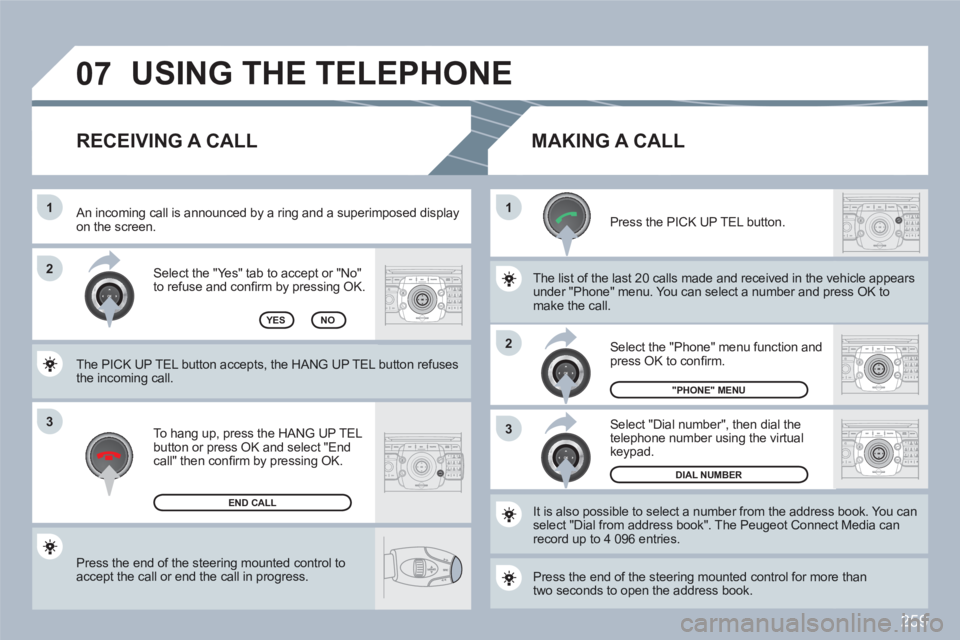
Press the end of the steering mounted control to accept the call or end the call in progress.
Select the "Yes" tab to accept or "No"to refuse and confi rm by pressing OK.
RECEIVING A CALL
MAKING A CALL
An incoming call is announced by a ring and a superimmposed display on the screen.
To hang up, press the HANG UP TEL button or press OK and select "End call" then confi rm by pressing OK.
END CALL
Press the PICK UP TEL button.
Press the end of the steering mounted control for moree thantwo seconds to open the address book.
It is also possible to select a number from the addresss book. You canselect "Dial from address book". The Peugeot Connecct Media can record up to 4 096 entries.
Select "Dial number", then dial thetelephone number using the virtual keypad.
Select the "Phone" menu function and press OK to confi rm.
DIAL NUMBER
"PHONE" MENU
The list of the last 20 calls made and received in the veehicle appears under "Phone" menu. You can select a number and prress OK tomake the call. YESNO
The PICK UP TEL button accepts, the HANG UP TEL button refuses the incoming call.
USING THE TELEPHONE
Page 265 of 336
263
09
VOICE RECO. INITIATION
VOICE COMMANDS AND STEERING MOUNTED CONTROLS
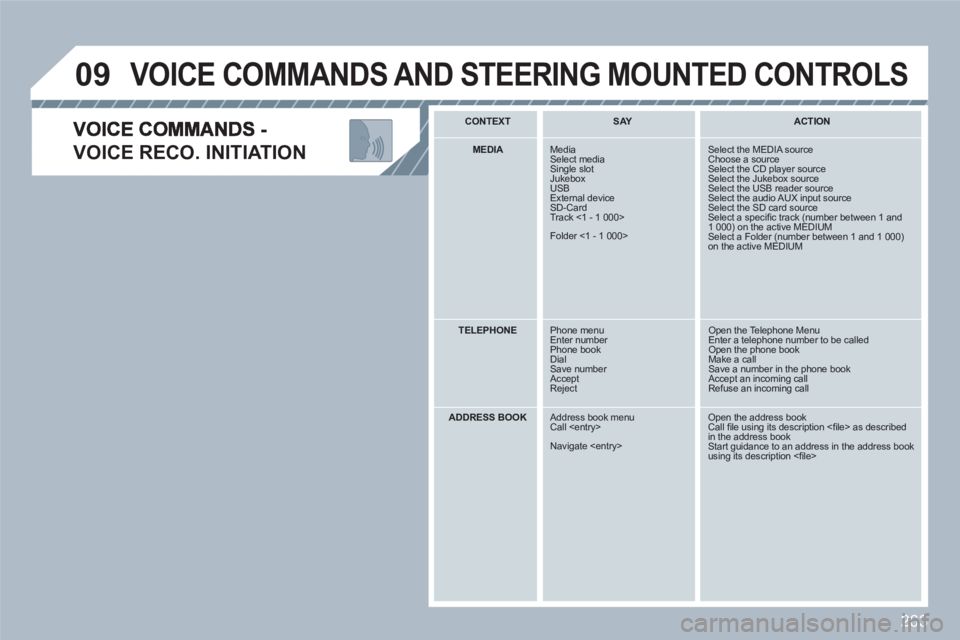
CONTEXT SAY
ACTION
MEDIA
Media Select mediaSingle slot Jukebox USBExternal deviceSD-Card Track <1 - 1 000>
Folder <1 - 1 000>
Select the MEDIA source Choose a sourceSelect the CD player sourceSelect the Jukebox source Select the USB reader source Select the audio AUX input source Select the SD card sourceSelect a specifi c track (number between 1 and 1 000) on the active MEDIUM Select a Folder (number between 1 and 1 000)on the active MEDIUM
TELEPHONE
Phone menuEnter number Phone bookDialSave number AcceptReject
Open the Telephone Menu Enter a telephone number to be called Open the phone book Make a call Save a number in the phone book Accept an incoming call Refuse an incoming call
ADDRESS BOOK
Address book menuCall
Navigate
Open the address bookCall fi le using its description <fi le> as described in the address bookStart guidance to an address in the address bookusing its description <fi le>
Page 293 of 336
291
07
2 1
1
3 2
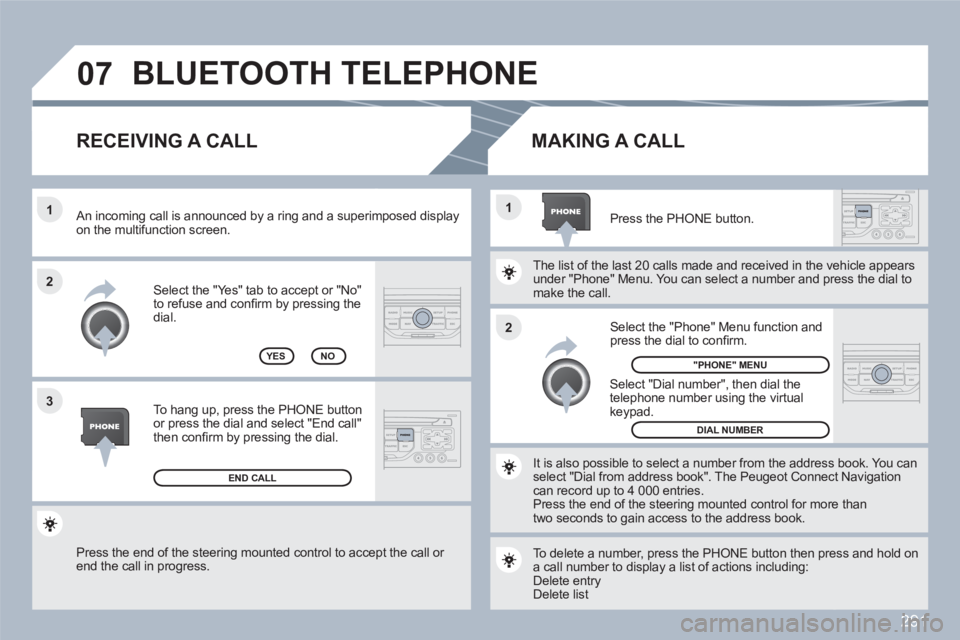
Press the end of the steering mounted control to accept the call or end the call in progress.
Select the "Yes" tab to accept or "No"to refuse and confi rm by pressing thedial.
RECEIVING A CALL
MAKING A CALL
An incoming call is announced by a ring and a superimmposed display on the multifunction screen.
YES
To hang up, press the PHONE button or press the dial and select "End call"then confi rm by pressing the dial.
END CALL
Press the PHONE button.
Select "Dial number", then dial the telephone number using the virtualkeypad.
Select the "Phone" Menu function and press the dial to confi rm.
The list of the last 20 calls made and received in the veehicle appears under "Phone" Menu. You can select a number and prress the dial tomake the call.
NO
It is also possible to select a number from the addresss book. You canselect "Dial from address book". The Peugeot Connecct Navigation can record up to 4 000 entries.
Press the end of the steering mounted control for moree thantwo seconds to gain access to the address book.
"PHONE" MENU
DIAL NUMBER
To delete a number, press the PHONE button then preess and hold ona call number to display a list of actions including:
Delete entry Delete list
BLUETOOTH TELEPHONE
Page 325 of 336
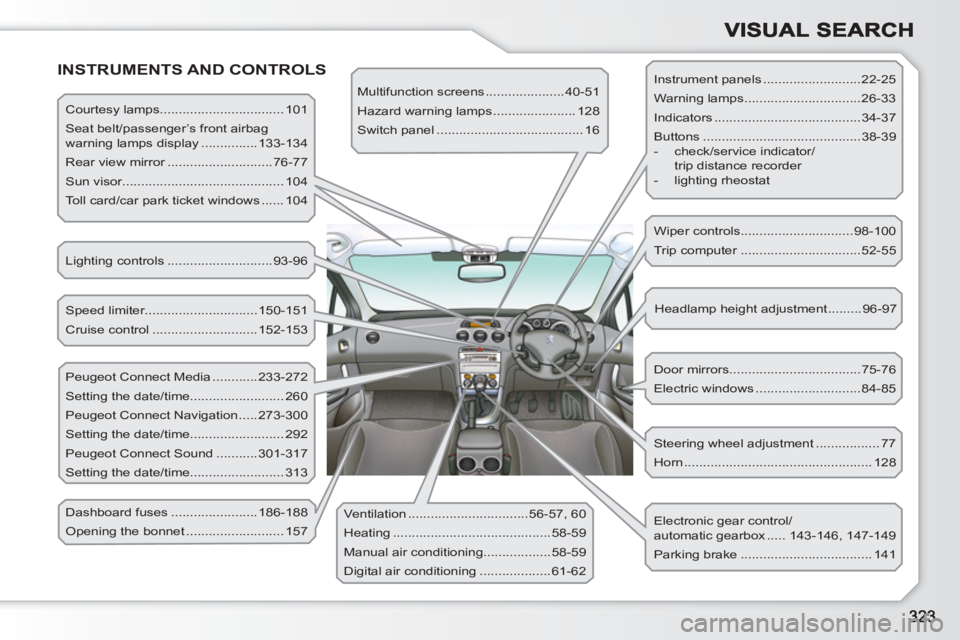
INSTRUMENTS AND CONTROLS
Courtesy lamps................................. 101
Seat belt/passenger’s front airbag
warning lamps display ...............133-134
Rear view mirror ............................76-77
Sun visor........................................... 104
Toll card/car park ticket windows ...... 104
Lighting controls ............................93-96
Speed limiter..............................150-151
Cruise control ............................152-153
Peugeot Connect Media ............233-272
Setting the date/time......................... 260
Peugeot Connect Navigation .....273-300
Setting the date/time......................... 292
Peugeot Connect Sound ...........301-317
Setting the date/time......................... 313
Dashboard fuses .......................186-188
Opening the bonnet .......................... 157 Ventilation ................................56-57, 60
Heating ..........................................58-59
Manual air conditioning..................58-59
Digital air conditioning ...................61-62 Multifunction screens .....................40-51
Hazard warning lamps ...................... 128
Switch panel ....................................... 16
Steering wheel adjustment ................. 77
Horn .................................................. 128 Door mirrors ...................................75-76
Electric windows ............................84-85 Headlamp height adjustment .........96-97 Wiper controls..............................98-100
Trip computer ................................52-55
Electronic gear control/
automatic gearbox ..... 143-146, 147-149
Parking brake ................................... 141 Instrument panels ..........................22-25
Warning lamps ...............................26-33
Indicators .......................................34-37
Buttons ..........................................38-39
- check/service indicator/
trip distance recorder
- lighting rheostat
Page 326 of 336
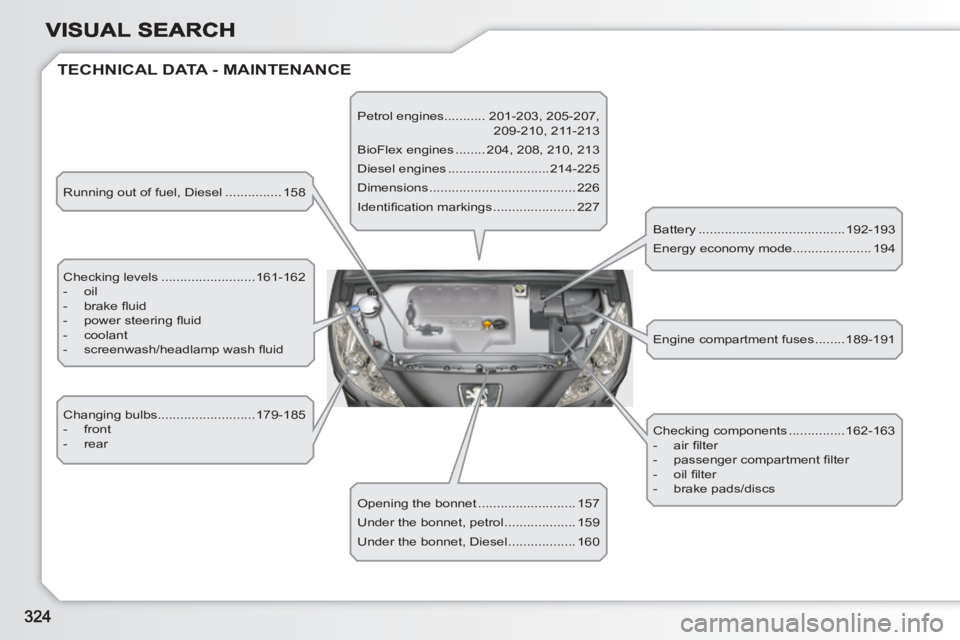
TECHNICAL DATA - MAINTENANCE
Running out of fuel, Diesel ............... 158
Checking levels .........................161-162
- oil
- brake fl uid
- power steering fl uid
- coolant
- screenwash/headlamp wash fl uid
Changing bulbs..........................179-185
- front
- rear
Opening the bonnet .......................... 157
Under the bonnet, petrol ................... 159
Under the bonnet, Diesel .................. 160 Petrol engines........... 201-203, 205-207,
209-210, 211-213
BioFlex engines ........ 204, 208, 210, 213
Diesel engines ...........................214-225
Dimensions ....................................... 226
Identifi cation markings ...................... 227
Battery .......................................192-193
Energy economy mode..................... 194
Checking components ...............162-163
- air fi lter
- passenger compartment fi lter
- oil fi lter
- brake pads/discs Engine compartment fuses ........189-191