language PEUGEOT 308 SW BL 2010 User Guide
[x] Cancel search | Manufacturer: PEUGEOT, Model Year: 2010, Model line: 308 SW BL, Model: PEUGEOT 308 SW BL 2010Pages: 336, PDF Size: 21.2 MB
Page 238 of 336
236
02
SETUP
MEDIA
TRAFFIC
GENERAL OPERATION
For a detailed global view of the menus available, refer to the "Screen menu map" section of this handbook.
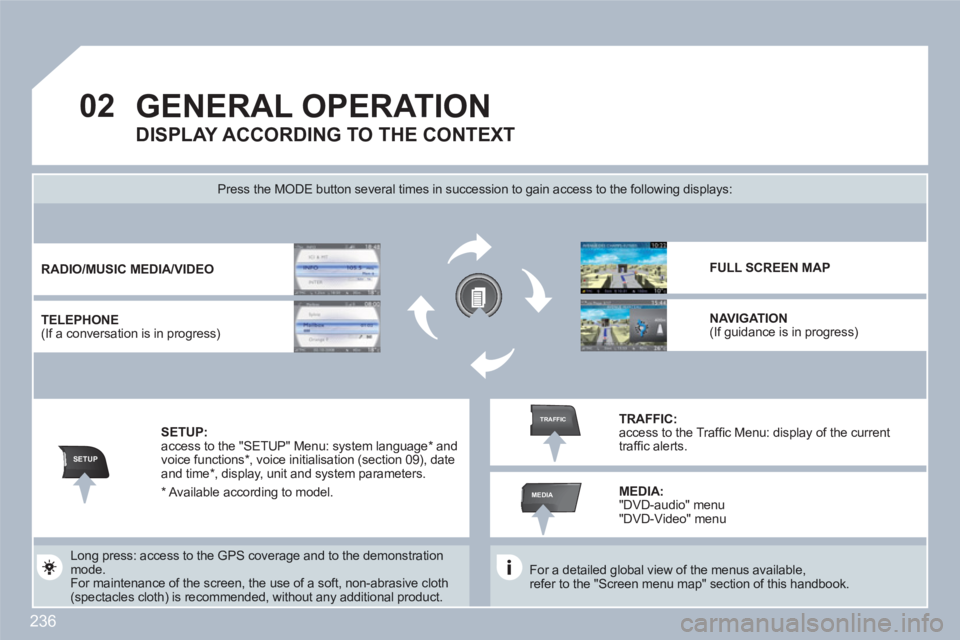
Press the MODE button several times in succession to gain access to the following displays:
Long press: access to the GPS coverage and to the demonstration mode.
For maintenance of the screen, the use of a soft, non-abrasive cloth (spectacles cloth) is recommended, without any additional product.
RADIO
/
MUSIC
MEDIA/VIDEO
TELEPHONE (If a conversation is in progress)
FULL SCREEN MAP
NAVIGATION (If guidance is in progress)
SETUP: access to the "SETUP" Menu: system language * and voice functions *
, voice initialisation (section 09), dateand time * , display, unit and system parameters.
TRAFFIC: access to the Traffi c Menu: display of the currenttraffi c alerts.
DISPLAY ACCORDING TO THE CONTEXT
MEDIA:
"DVD-audio" menu "DVD-Video" menu
* Available according to model.
Page 264 of 336
262
TU PQRS
0*
11
SETUPABCDEF5JKL4GHI68TUV7PQRS90*#
MEDIANAVESCTRAFFICADDRBOOKSETUP
22
09
Before using the system for the fi rst time, you are advised tolisten to, say and repeat the instructions for use.
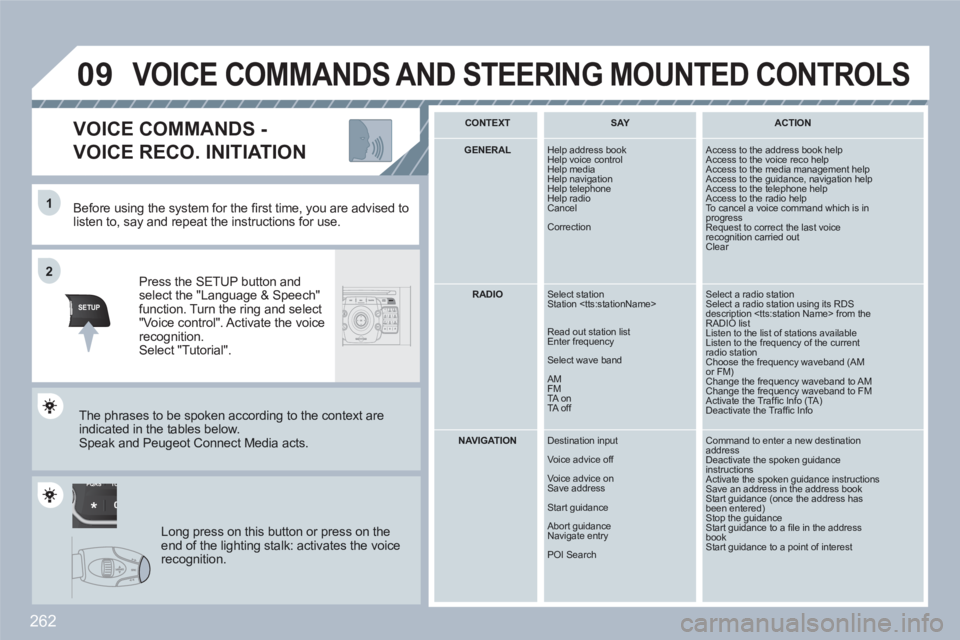
Press the SETUP button andselect the "Language & Speech"function. Turn the ring and select"Voice control". Activate the voicerecognition.Select "Tutorial".
VOICE COMMANDS -
VOICE RECO. INITIATION
The phrases to be spoken according to the context are indicated in the tables below.
Speak and Peugeot Connect Media acts.
Long press on this button or press on theend of the lighting stalk: activates the voicerecognition.
CONTEXT
SAY
ACTION
GENERAL
Help address book
Help voice control
Help media Help navigation
Help telephone
Help radio Cancel
Correction
Access to the address book help Access to the voice reco help Access to the media management help Access to the guidance, navigation help Access to the telephone help Access to the radio help To cancel a voice command which is inprogress Request to correct the last voicerecognition carried outClear
RADIO
Select station
Station
Read out station list
Enter frequency
Select wave band
AM
FM
TA on
TA off
Select a radio station Select a radio station using its RDS description
NAVIGATION
Destination input
Voice advice off
Voice advice on
Save address
Start guidance
Abort guidance
Navigate entry
POI Search
Command to enter a new destination addressDeactivate the spoken guidanceinstructions Activate the spoken guidance instructions Save an address in the address bookStart guidance (once the address hasbeen entered)Stop the guidance Start guidance to a fi le in the address bookStart guidance to a point of interest
VOICE COMMANDS AND STEERING MOUNTED CONTROLS
Page 266 of 336
264
10
MEDIA
1
2
3
1
2
3
3
3
3
4
3
3
3
3
12332
4
4
4
4
4
2
3
3
2
2
4
3
3
3
3
3
2
3
2
3
3
3
4
4
4
3
3
2
3
3
3
TRAFFIC
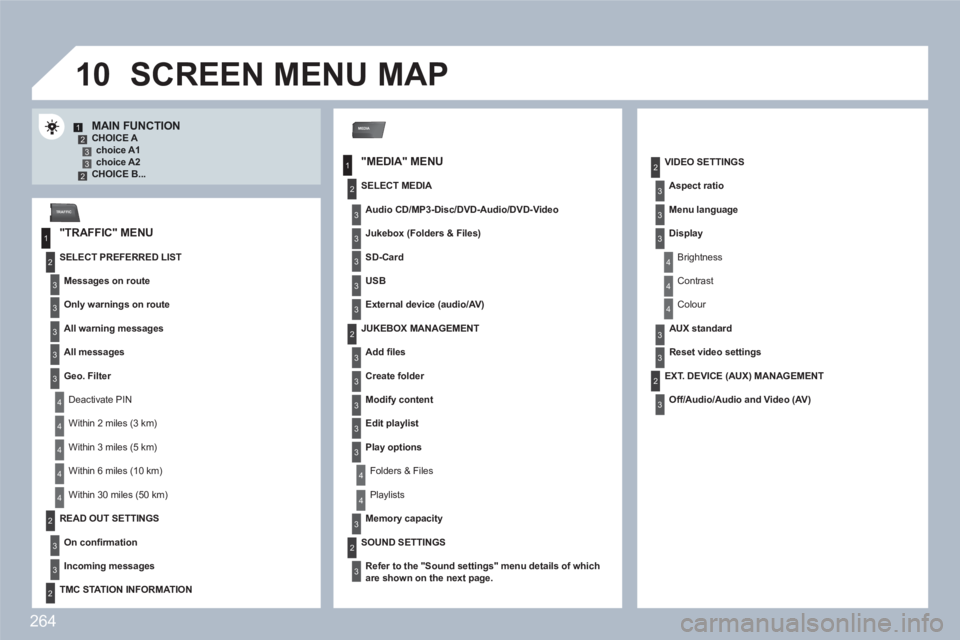
MAIN FUNCTION CHOICE A choice A1choice A2 CHOICE B...
SCREEN MENU MAP
"MEDIA" MENU
"TRAFFIC" MENU
SELECT PREFERRED LIST
Messages on route
Only warnings on route
All warning messages
All messages
Geo. Filter
Deactivate PIN
Within 2 miles (3 km)
Within 3 miles (5 km)
Within 6 miles (10 km)
Within 30 miles (50 km)
SELECT MEDIA
Audio CD/MP3-Disc/ DVD-Audio /DVD-Video
Jukebox (Folders & Files)
SD-Card
USB
External device (audio/AV)
VIDEO SETTINGS
Aspect ratio
Menu language
Display
Brightness
Contrast
Colour
AUX standard
Reset video settings
READ OUT SETTINGS
On confi rmation
Incoming messages
TMC STATION INFORMATION
JUKEBOX MANAGEMENT
Add fi les
Create folder
Modify content
Edit playlist
Play options
Folders & Files
Playlists
Memory capacity
SOUND SETTINGS
Refer to the " Sound settings
"
menu details of whichare shown on the next page.
EXT. DEVICE (AUX) MANAGEMENT
Off/Audio/Audio and Video (AV)
Page 269 of 336
267
SETUP
1
2
3
4
3
4
2
3
3
3
3
2
3
4
4
4
4
2
4
3
2
4
4
3
4
4
3
3
3
4
4
4
4
4
4
4
4
3
4
4
5
5
5
4
5
5
3
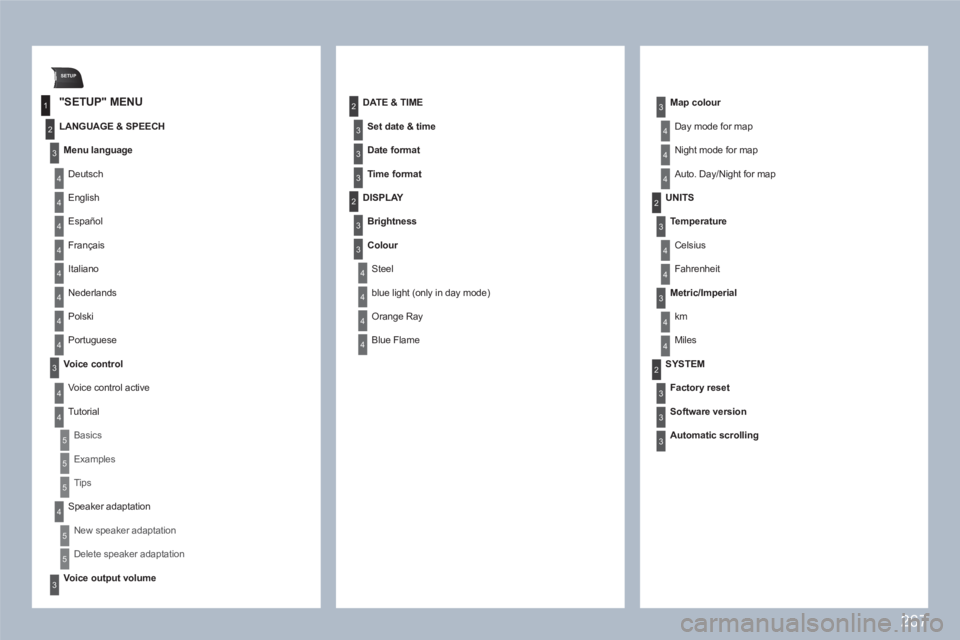
"SETUP" MENU
LANGUAGE & SPEECH
Menu language
Deutsch
English
Español
Français
Italiano
Nederlands
Polski
Portuguese
Voice control
Voice control active
Tutorial
Basics
Examples
Tips
Speaker adaptation
New speaker adaptation
Delete speaker adaptation
Voice output volume
DATE & TIME
Set date & time
Date format
Time format
DISPLAY
Brightness
Colour
Steel
blue light (only in day mode)
Orange Ray
Blue Flame
Map colour
Day mode for map
Night mode for map
Auto. Day/Night for map
UNITS
Te mperature
Celsius
Fahrenheit
Metric/Imperial
km
Miles
SYSTEM
Factory reset
Software version
Automatic scrolling
Page 277 of 336
275
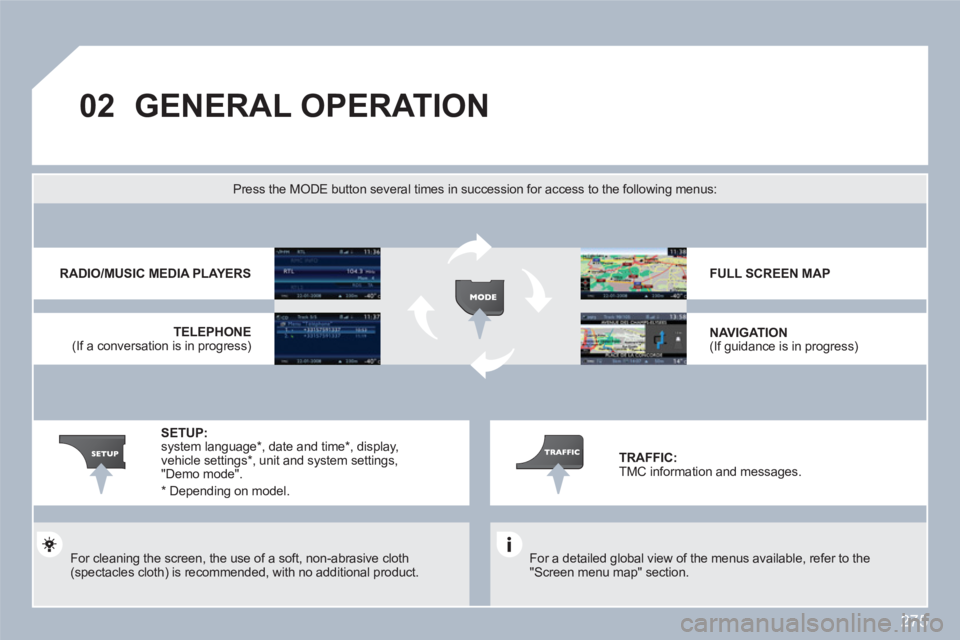
02GENERAL OPERATION
For a detailed global view of the menus available, refer to the "Screen menu map" section.
Press the MODE button several times in succession for access to the following menus:
For cleaning the screen, the use of a soft, non-abrasive cloth(spectacles cloth) is recommended, with no additional product.
RADIO/MUSIC MEDIA PLAYERS
TELEPHONE
(If a conversation is in progress)
FULL SCREEN MAP
NAVIGATION (If guidance is in progress)
SETUP: system language * , date and time * , display, vehicle settings *
, unit and system settings, "Demo mode".
TRAFFIC: TMC information and messages.
*
Depending on model.
Page 294 of 336
292
4 3 2 1
6 5
08CONFIGURATION
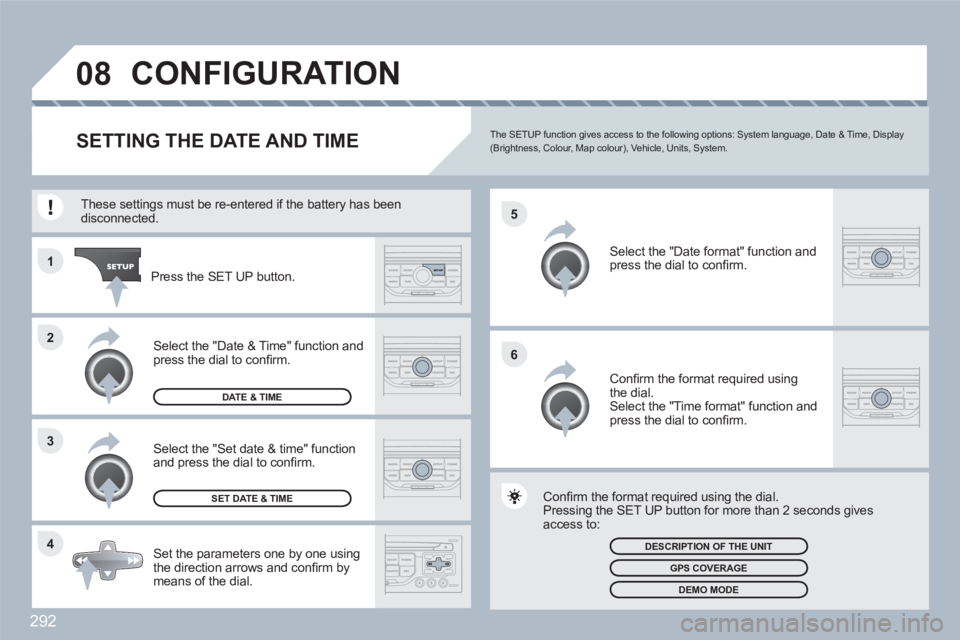
SETTING THE DATE AND TIMEThe SETUP function gives access to the following options: System language, Date & Time, Display (Brightness, Colour, Map colour), Vehicle, Units, System.
Set the parameters one by one using the direction arrows and confi rm by means of the dial.
Select the "Date format" function andpress the dial to confi rm.
Select the "Set date & time" functionand press the dial to confi rm.
Confi rm the format required using the dial.
Pressing the SET UP button for more than 2 secondds gives access to:
These settings must be re-entered if the battery has bbeen disconnected.
Press the SET UP button.
Confi rm the format required using the dial. Select the "Time format" function and press the dial to confi rm.
SET DATE & TIME
Select the "Date & Time" function and press the dial to confi rm.
DESCRIPTION OF THE UNIT
GPS COVERAGE
DEMO MODE
DATE & TIME
Page 298 of 336
296
1
2
3
4
1
3
4
3
4
2
2
2
3
4
4
4
4
2
3
3
3
2
3
3
3
2
3
4
4
4
4
2
4
3
4
3
3
3
3
3
3
3
3
2
4
4
2
3
4
4
3
4
4
4
2
3
3
3
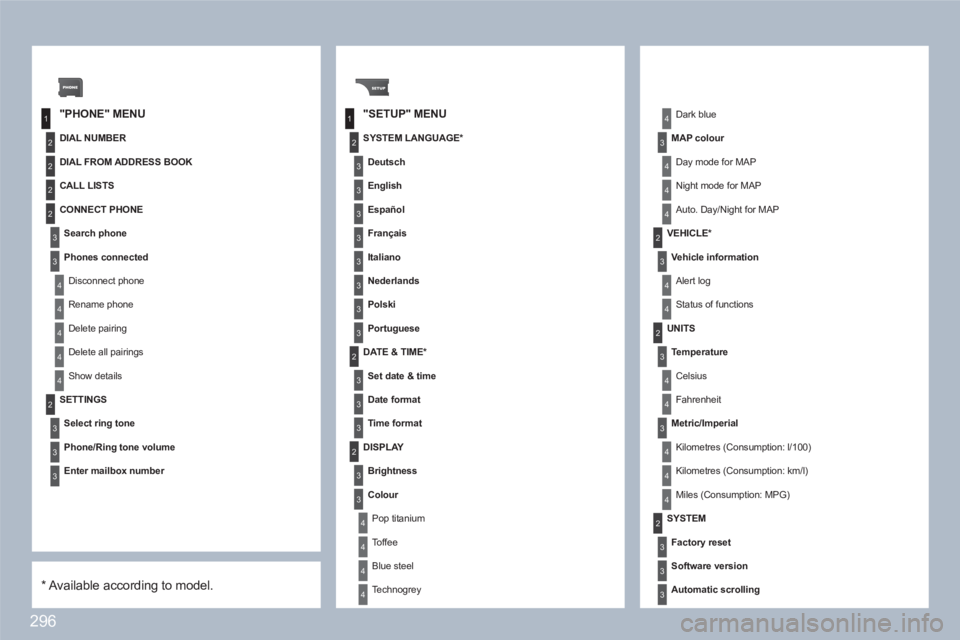
"PHONE" MENU"SETUP" MENU
DIAL NUMBER
SETTINGS
Select ring tone
Phone/Ring tone volume
Enter mailbox number
SYSTEM LANGUAGE *
Deutsch
English
Español
Français
Italiano
Nederlands
Polski
Portuguese
DATE & TIME *
Set date & time
Date format
Time format
Dark blue
MAP colour
Day mode for MAP
Night mode for MAP
Auto. Day/Night for MAP
VEHICLE *
Vehicle information
Alert log
Status of functions
DISPLAY
Brightness
Colour
Pop titanium
Toffee
Blue steel
Technogrey
UNITS
Temperature
Celsius
Fahrenheit
Metric/Imperial
Kilometres (Consumption: l/100)
Kilometres (Consumption: km/l)
Miles (Consumption: MPG)
SYSTEM
Factory reset
Software version
Automatic scrolling
*
Available according to model.
DIAL FROM ADDRESS BOOK
CALL LISTS
CONNECT PHONE
Search phone
Phones connected
Disconnect phone
Rename phone
Delete pairing
Delete all pairings
Show details
Page 305 of 336
303
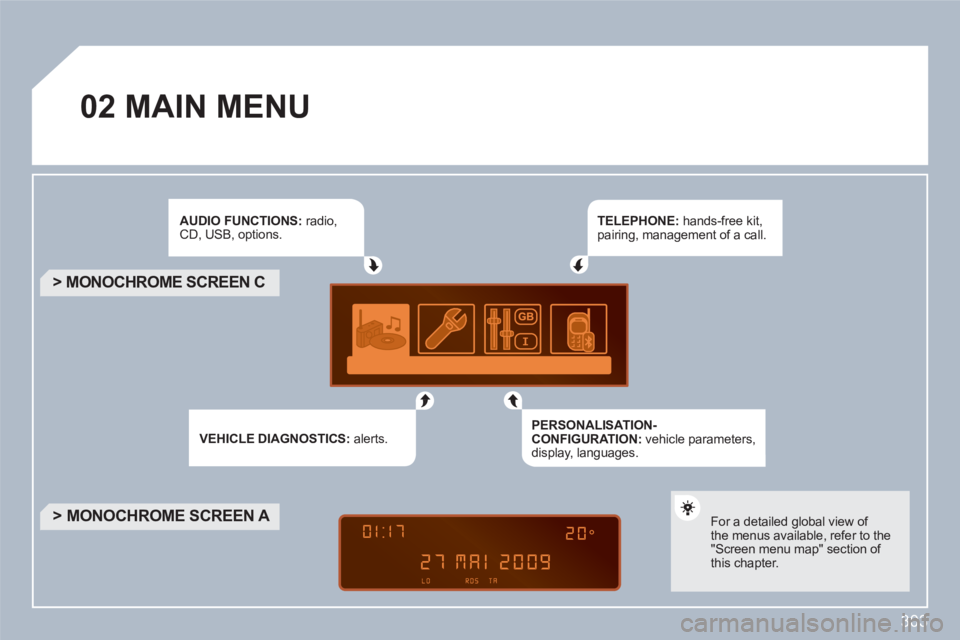
02MAIN MENU
AUDIO FUNCTIONS : radio,CD, USB, options.
VEHICLE DIAGNOSTICS :alerts.
TELEPHONE : hands-free kit, pairing, management of a call.
PERSONALISATION-CONFIGURATION : vehicle parameters, display, languages.
> MONOCHROME SCREEN C
> MONOCHROME SCREEN A
For a detailed global view ofthe menus available, refer to the"Screen menu map" section of this chapter.
Page 316 of 336
314
1
2
2
2
2
1
2
2
1
2
3
3
1
2
2
2
2
2
2
1
2
2
2
2
2
2
2
2
1
2
2
123
23
08
1
1
1
1
1
1
1
1
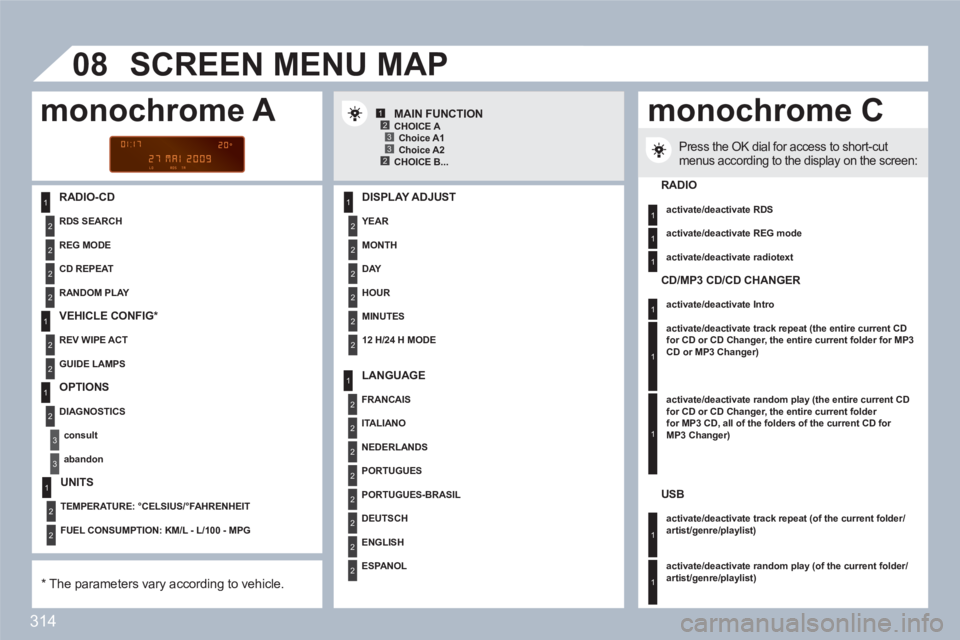
RADIO-CD
DISPLAY ADJUST
YEAR
MONTH
DAY
HOUR
MINUTES
12 H/24 H MODE
SCREEN MENU MAP
MAIN FUNCTION
*
The parameters vary according to vehicle.
CHOICE A
Choice A1
Choice A2
CHOICE B...
LANGUAGE
FRANCAIS
ITALIANO
NEDERLANDS
PORTUGUES
PORTUGUES-BRASIL
DEUTSCH
ENGLISH
ESPA N O L
Press the OK dial for access to short-cutmenus according to the display on the screen:
monochrome A monochrome C
RADIO
activate/deactivate RDS
activate/deactivate REG mode
activate/deactivate radiotext
RANDOM PLAY
RDS SEARCH
REG MODE
CD REPEAT
VEHICLE CONFIG *
REV WIPE ACT
GUIDE LAMPS
OPTIONS
DIAGNOSTICS
consult
abandon
UNITS
TEMPERATURE: °CELSIUS/°FAHRENHEIT
FUEL CONSUMPTION: KM/L - L/100 - MPG
CD/MP3 CD/CD CHANGER
activate/deactivate Intro
activate/deactivate track repeat (the entire current CDfor CD or CD Changer, the entire current folder for MP3CD or MP3 Changer)
activate/deactivate random play (the entire current CD for CD or CD Changer, the entire current folder for MP3 CD, all of the folders of the current CD for MP3 Changer)
USB
activate/deactivate track repeat (of the current folder/artist/genre/playlist)
activate/deactivate random play
(of the current folder/artist/genre/playlist)
Page 317 of 336
315
1
1
2
3
4
3
4
3
4
2
3
4
3
4
2
3
4
2
4
4
3
3
4
4
1
2
2
08
3
4
4
1
2
3
3
3
4
4
4
2
3
4
2
3
3
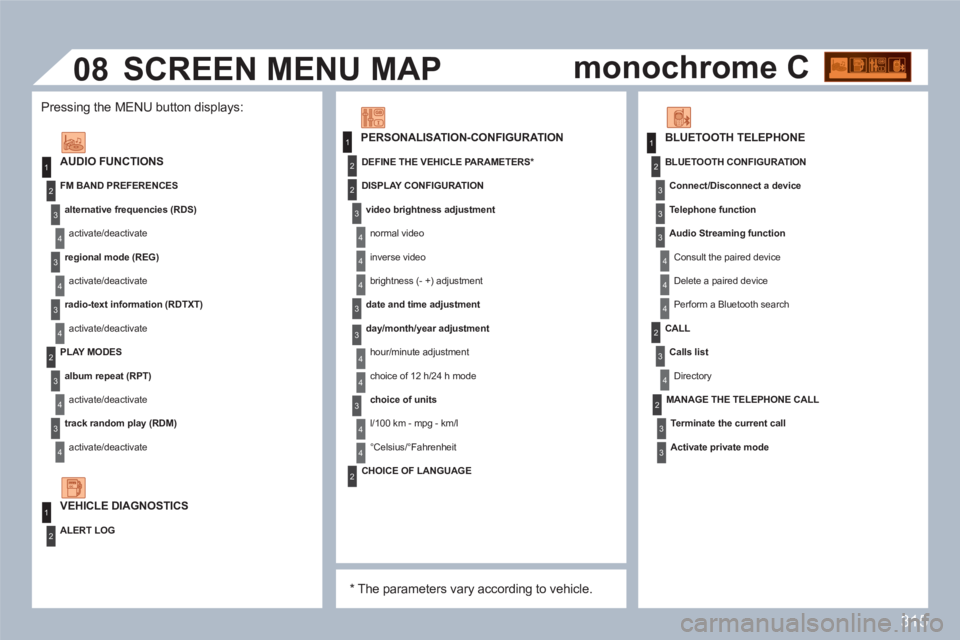
AUDIO FUNCTIONS
FM BAND PREFERENCES
alternative frequencies (RDS)
activate/deactivate
regional mode (REG)
activate/deactivate
radio-text information (RDTXT)
activate/deactivate
PLAY MODES
album repeat (RPT)
activate/deactivate
track random play (RDM)
activate/deactivate
ALERT LOG
PERSONALISATION-CONFIGURATION
DEFINE THE VEHICLE PARAMETERS *
DISPLAY CONFIGURATION
video brightness adjustment
normal video
inverse video
brightness (- +) adjustment
date and time adjustment
day/month/year adjustment
hour/minute adjustment
choice of 12 h/24 h mode
choice of units
l/100 km - mpg - km/l
°Celsius/°Fahrenheit
*
The parameters vary according to vehicle.
CHOICE OF LANGUAGE
BLUETOOTH TELEPHONE
MANAGE THE TELEPHONE CALL
Terminate the current call
Activate private mode
BLUETOOTH CONFIGURATION
Connect/Disconnect a device
Te l ephone function
Audio Streaming function
Consult the paired device
Delete a paired device
Perform a Bluetooth search
CALL
Calls list
Directory
SCREEN MENU MAP
VEHICLE DIAGNOSTICS
Pressing the MENU button displays:
monochrome C