navigation system PEUGEOT 308 SW BL 2010 Owner's Manual
[x] Cancel search | Manufacturer: PEUGEOT, Model Year: 2010, Model line: 308 SW BL, Model: PEUGEOT 308 SW BL 2010Pages: 336, PDF Size: 21.2 MB
Page 301 of 336
299
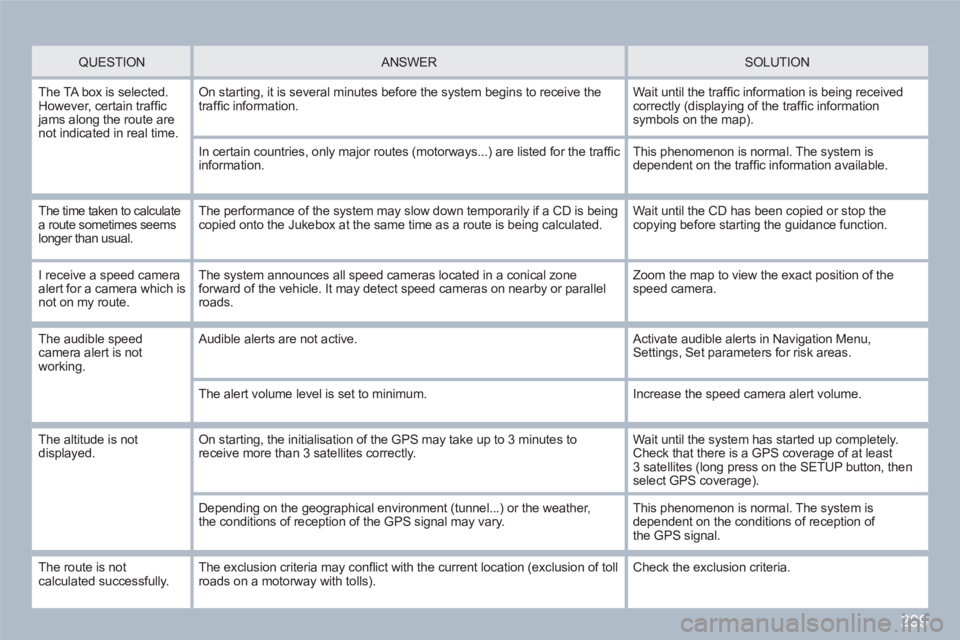
QUESTION
ANSWER SOLUTION
The TA box is selected. However, certain traffi c jams along the route are not indicated in real time.
On starting, it is several minutes before the system begins to receive thetraffi c information.
Wait until the traffi c information is being receivedcorrectly (displaying of the traffi c information symbols on the map).
In certain countries, only major routes (motorways...) are listed for the traffi cinformation.
This phenomenon is normal. The system is dependent on the traffi c information available.
The time taken to calculatea route sometimes seemslonger than usual.
The performance of the system may slow down temporarily if a CD is beingcopied onto the Jukebox at the same time as a route is being calculated.
Wait until the CD has been copied or stop the copying before starting the guidance function.
I receive a speed cameraalert for a camera which is not on my route.
The system announces all speed cameras located in a conical zoneforward of the vehicle. It may detect speed cameras on nearby or parallel roads.
Zoom the map to view the exact position of thespeed camera.
The audible speedcamera alert is not working.
Audible alerts are not active. Activate audible alerts in Navigation Menu,Settings, Set parameters for risk areas.
The alert volume level is set to minimum.
Increase the speed camera alert volume.
The altitude is not displayed. On starting, the initialisation of the GPS may take up to 3 minutes toreceive more than 3 satellites correctly.
Wait until the system has started up completely.Check that there is a GPS coverage of at least3 satellites (long press on the SETUP button, thenselect GPS coverage).
Depending on the geographical environment (tunnel...) or the weather,the conditions of reception of the GPS signal may vary.
This phenomenon is normal. The system is dependent on the conditions of reception ofthe GPS signal.
The route is notcalculated successfully. The exclusion criteria may confl ict with the current location (exclusion of tollroads on a motorway with tolls). Check the exclusion criteria.
Page 302 of 336
300
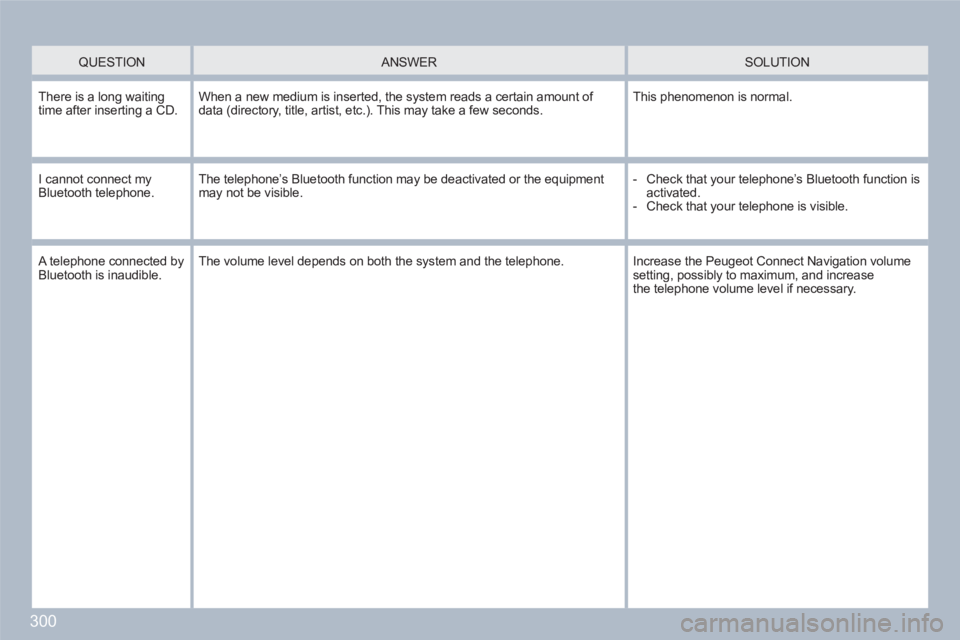
QUESTION
ANSWER
SOLUTION
There is a long waitingtime after inserting a CD. When a new medium is inserted, the system reads a certain amount of data (directory, title, artist, etc.). This may take a few seconds.
This phenomenon is normal.
I cannot connect myBluetooth telephone.The telephone’s Bluetooth function may be deactivated or the equipmentmay not be visible.
- Check that your telephone’s Bluetooth function isactivated.
- Check that your telephone is visible.
A telephone connected byBluetooth is inaudible.The volume level depends on both the system and the telephone.
Increase the Peugeot Connect Navigation volume setting, possibly to maximum, and increasethe telephone volume level if necessary.
Page 309 of 336
307
1
11
22
33
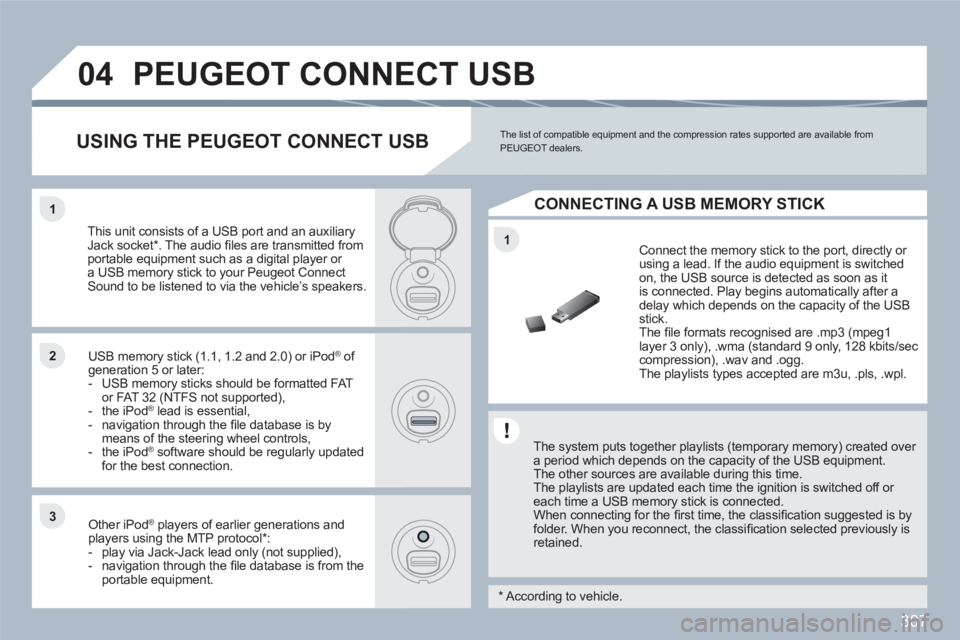
04PEUGEOT CONNECT USB
The system puts together playlists (temporary memory) created over a period which depends on the capacity of the USB equipment. The other sources are available during this time.
The playlists are updated each time the ignition is switched off or each time a USB memory stick is connected.
When connecting for the fi rst time, the classifi cation suggested is by folder. When you reconnect, the classifi cation selected previously is retained.
Connect the memory stick to the port, directly or using a lead. If the audio equipment is switched on, the USB source is detected as soon as itis connected. Play begins automatically after a delay which depends on the capacity of the USB stick.
The fi le formats recognised are .mp3 (mpeg1layer 3 only), .wma (standard 9 only, 128 kbits/seccompression), .wav and .ogg.
The playlists types accepted are m3u, .pls, .wpl.
This unit consists of a USB port and an auxiliaryJack socket * . The audio fi les are transmitted from portable equipment such as a digital player or a USB memory stick to your Peugeot Connect Sound to be listened to via the vehicle’s speakers.
USB memory stick (1.1, 1.2 and 2.0) or iPod®of ®
generation 5 or later: - USB memory sticks should be formatted FATor FAT 32 (NTFS not supported),- the iPod®lead is essential,®
- navigation through the fi le database is bymeans of the steering wheel controls,- the iPod®software should be regularly updated ®
for the best connection.
Other iPod ®players of earlier generations and®
players using the MTP protocol * :- play via Jack-Jack lead only (not supplied),- navigation through the fi le database is from theportable equipment.
The list of compatible equipment and the compression rates supported are available from PEUGEOT dealers. USING THE PEUGEOT CONNECT USB
CONNECTING A USB MEMORY STICK
*
According to vehicle.
Page 330 of 336
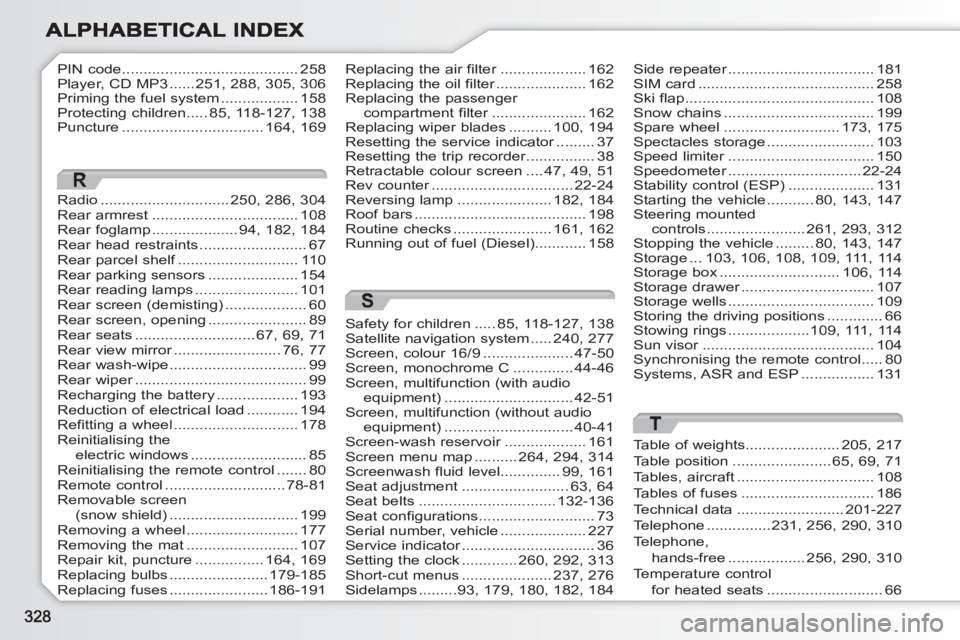
PIN code .........................................258Player, CD MP3......251, 288,305,306Priming the fuel system ..................158Protecting children .....85, 118-127, 138Puncture .................................164,169
Radio..............................250,286,304Rear armrest..................................108Rear foglamp....................94,182,184Rear head restraints .........................67Rear parcel shelf............................f110Rear parking sensors .....................154Rear reading lamps........................101Rear screen (demisting)...................60Rear screen, opening.......................89Rear seats............................67,69,71Rear view mirror.........................r76,77Rear wash-wipe ................................99Rear wiper........................................r99Recharging the battery...................193Reduction of electrical load ............194Refitting a wheel.............................178Reinitialising the electric windows...........................85Reinitialising the remote control .......80Remote control ............................78-81Removable screen (snow shield) ..............................199Removing a wheel..........................177Removing the mat..........................107Repair kit, puncture................164,169Replacing bulbs.......................179-185Replacing fuses .......................186-191
R
Replacing the air filter....................r162Replacing the oil filter.....................r162Replacing the passenger compartment filter......................r162Replacing wiper blades ..........100, 194Resetting the service indicator.........r37Resetting the trip recorder................r38Retractable colour screen ....47, 49, 51Rev counter.................................r22-24Reversing lamp......................182, 184Roof bars........................................198Routine checks.......................161, 162Running out of fuel (Diesel)............158
Side repeater..................................r181SIM card .........................................258Ski flap............................................108Snow chains...................................199Spare wheel ...........................173, 175Spectacles storage.........................103Speed limiter..................................r150Speedometer...............................r22-24Stability control (ESP) ....................131Starting the vehicle ...........80,143,147Steering mounted controls.......................261,293,312Stopping the vehicle .........80,143,147Storage ...103,106,108,109, 111,114Storage box............................106,114Storage drawer...............................r107Storage wells..................................109Storing the driving positions.............66Stowing rings...................109,111,114Sun visor........................................r104Synchronising the remote control .....80Systems, ASR and ESP .................131
S
Safety for children.....85, 118-127, 138Satellite navigation system.....240, 277Screen, colour 16/9.....................47-50Screen, monochrome C..............44-46Screen, multifunction (with audio equipment)..............................42-51Screen, multifunction (without audioequipment)..............................40-41Screen-wash reservoir...................r161Screen menu map..........264, 294, 314Screenwash fluid level..............99, 161Seat adjustment.........................63, 64Seat belts................................132-136Seat configurations...........................73Serial number, vehicle ....................227Service indicator...............................r36Setting the clock.............260, 292, 313Short-cut menus.....................237, 276Sidelamps.........93,179,180, 182, 184
T
Table of weights......................205, 217Table position.......................65,69,71Tables, aircraft................................108Tables of fuses...............................186Technical data.........................201-227Telephone...............231,256,290, 310Telephone,hands-free ..................256, 290, 310Temperature control for heated seats...........................66