PAGE 1 Peugeot 308 SW BL 2011 User Guide
[x] Cancel search | Manufacturer: PEUGEOT, Model Year: 2011, Model line: 308 SW BL, Model: Peugeot 308 SW BL 2011Pages: 336, PDF Size: 21.26 MB
Page 176 of 336
1
i
174
PRACTICAL INFORMATION
CHANGING A WHEEL
Procedure for changing a
faulty wheel for the spare
wheel using the tools pro-
vided with the vehicle.
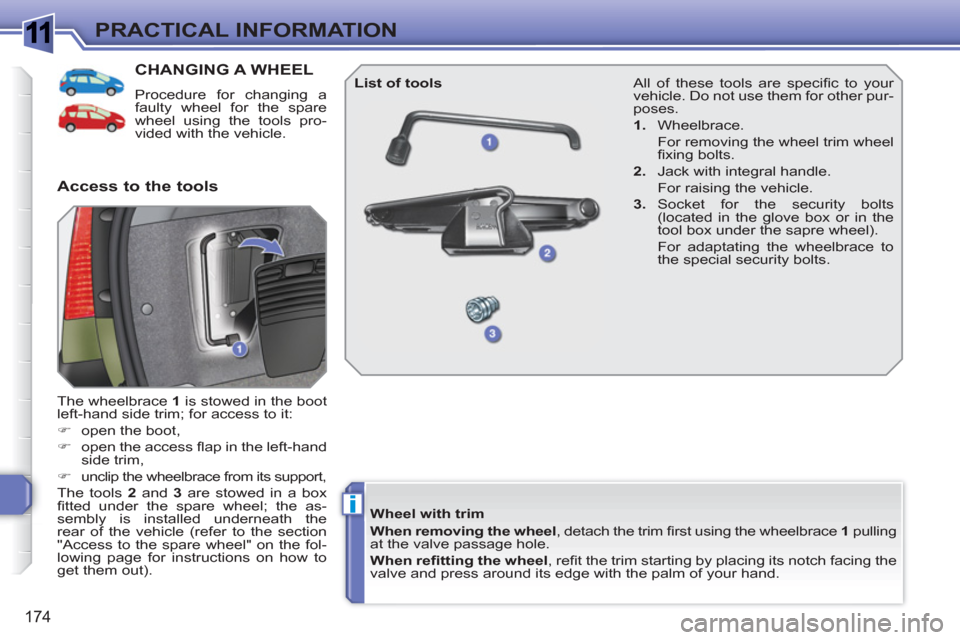
The wheelbrace 1
is stowed in the boot
left-hand side trim; for access to it:
)
open the boot,
)
open the access fl ap in the left-hand
side trim,
)
unclip the wheelbrace from its support,
The tools 2
and 3
are stowed in a box
fi tted under the spare wheel; the as-
sembly is installed underneath the
rear of the vehicle (refer to the section
"Access to the spare wheel" on the fol-
lowing page for instructions on how to
get them out).
Access to the tools
List of tools
Wheel with trim
When removing the wheel
, detach the trim fi rst using the wheelbrace 1
pulling
at the valve passage hole.
When refi tting the wheel
, refi t the trim starting by placing its notch facing the
valve and press around its edge with the palm of your hand.
All of these tools are specifi c to your
vehicle. Do not use them for other pur-
poses.
1.
Wheelbrace.
For removing the wheel trim wheel
fi xing bolts.
2.
Jack with integral handle.
For raising the vehicle.
3.
Socket for the security bolts
(located in the glove box or in the
tool box under the sapre wheel).
For adaptating the wheelbrace to
the special security bolts.
Page 237 of 336
235
01
2ABC3DEF
5JKL4GHI6MNO
8TUV7PQRS9WXYZ
0*#
1
13
14
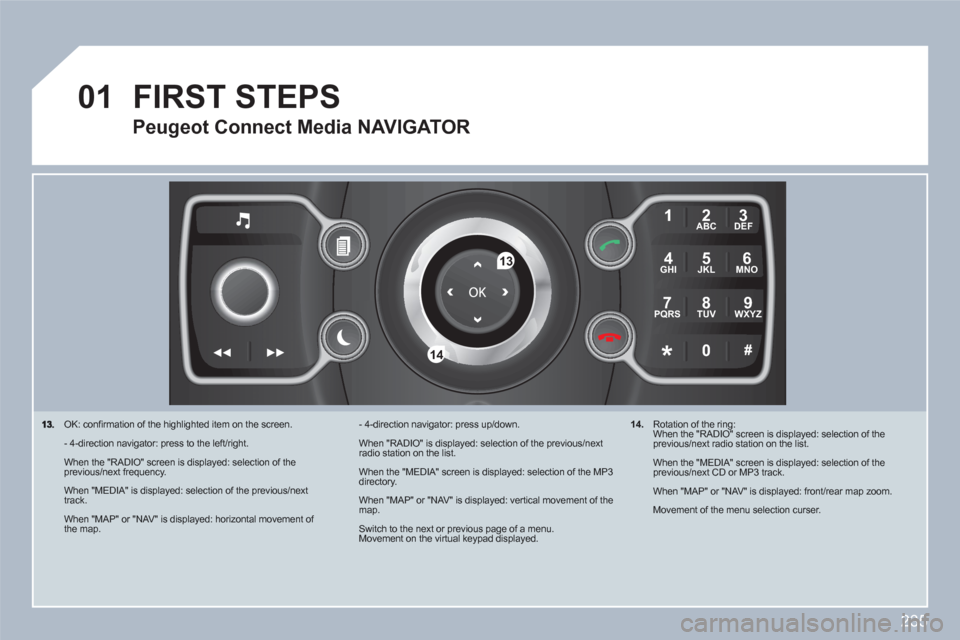
OK: confi rmation of the highlighted item on the screen.
- 4-direction navigator: press to the left/right.
When the "RADIO" screen is displayed: selection of theprevious/next frequency.
When "MEDIA" is displayed: selection of the previous/nexttrack.
When "MAP" or "NAV" is displayed: horizontal movement of the map.
- 4-direction navigator: press up/down.
When "RADIO" is displayed: selection of the previous/nextradio station on the list.
When the "MEDIA" screen is displayed: selection of the MP3directory.
When "MAP" or "NAV" is displayed: vertical movement of themap.
Switch to the next or previous page of a menu. Movement on the virtual keypad displayed.
FIRST STEPS
Peugeot Connect Media NAVIGATOR
14.
Rotation of the ring: When the "RADIO" screen is displayed: selection of the previous/next radio station on the list.
When the "MEDIA" screen is displayed: selection of the previous/next CD or MP3 track.
When "MAP" or "NAV" is displayed: front/rear map zoom.
Movement of the menu selection curser.
Page 266 of 336
264
10
MEDIA
1
2
3
1
2
3
3
3
3
4
3
3
3
3
12332
4
4
4
4
4
2
3
3
2
2
4
3
3
3
3
3
2
3
2
3
3
3
4
4
4
3
3
2
3
3
3
TRAFFIC
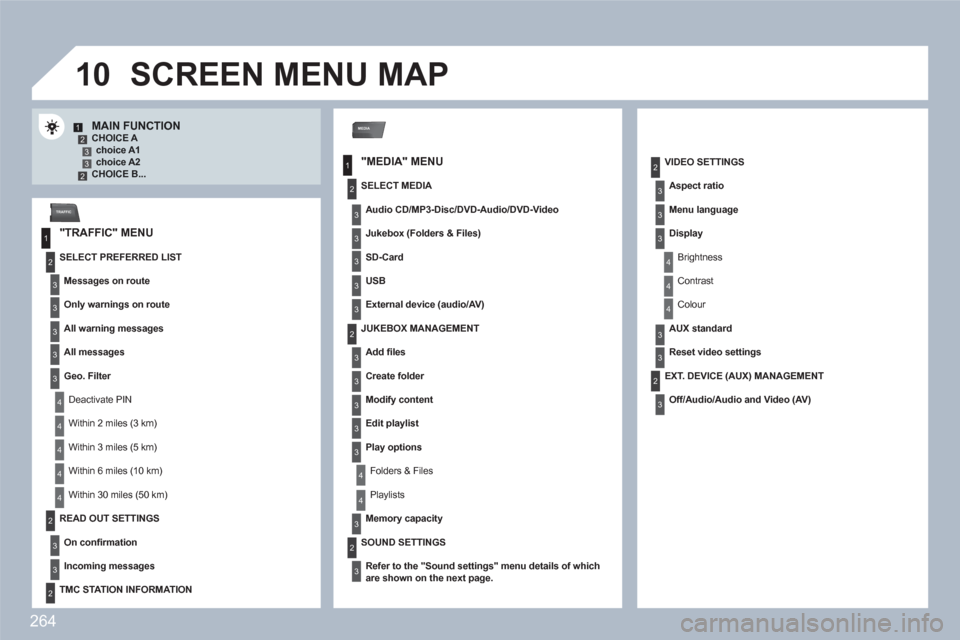
MAIN FUNCTION CHOICE A choice A1choice A2 CHOICE B...
SCREEN MENU MAP
"MEDIA" MENU
"TRAFFIC" MENU
SELECT PREFERRED LIST
Messages on route
Only warnings on route
All warning messages
All messages
Geo. Filter
Deactivate PIN
Within 2 miles (3 km)
Within 3 miles (5 km)
Within 6 miles (10 km)
Within 30 miles (50 km)
SELECT MEDIA
Audio CD/MP3-Disc/ DVD-Audio /DVD-Video
Jukebox (Folders & Files)
SD-Card
USB
External device (audio/AV)
VIDEO SETTINGS
Aspect ratio
Menu language
Display
Brightness
Contrast
Colour
AUX standard
Reset video settings
READ OUT SETTINGS
On confi rmation
Incoming messages
TMC STATION INFORMATION
JUKEBOX MANAGEMENT
Add fi les
Create folder
Modify content
Edit playlist
Play options
Folders & Files
Playlists
Memory capacity
SOUND SETTINGS
Refer to the " Sound settings
"
menu details of whichare shown on the next page.
EXT. DEVICE (AUX) MANAGEMENT
Off/Audio/Audio and Video (AV)
Page 276 of 336
274
01
11
55
101
22
334466
131
111
99
144155
77881212161
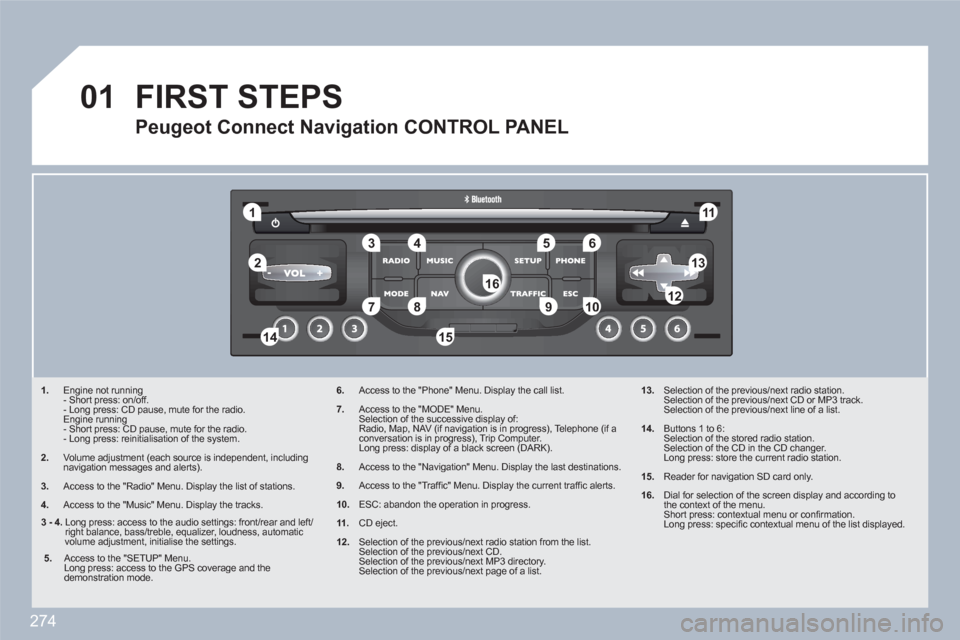
1. Engine not running
- Short press: on/off.
- Long press: CD pause, mute for the radio.
Engine running
- Short press: CD pause, mute for the radio.
- Long press: reinitialisation of the system.
2. Volume adjustment (each source is independent, including navigation messages and alerts).
3.
Access to the "Radio" Menu. Display the list of stations.
4.
Access to the "Music" Menu. Display the tracks.
6.Access to the "Phone" Menu. Display the call list.
7.Access to the "MODE" Menu.
Selection of the successive display of:
Radio, Map, NAV (if navigation is in progress), Telephone (if a conversation is in progress), Trip Computer.
Long press: display of a black screen (DARK).
8.Access to the "Navigation" Menu. Display the last destinations.
9.Access to the "Traffi c" Menu. Display the current traffi c alerts.
10.ESC: abandon the operation in progress.
11.CD eject.
12.Selection of the previous/next radio station from the list.
Selection of the previous/next CD.
Selection of the previous/next MP3 directory.
Selection of the previous/next page of a list.
13. Selection of the previous/next radio station.
Selection of the previous/next CD or MP3 track.
Selection of the previous/next line of a list.
14. Buttons 1 to 6:
Selection of the stored radio station.
Selection of the CD in the CD changer.
Long press: store the current radio station.
15. Reader for navigation SD card only.
16.
Dial for selection of the screen display and according tothe context of the menu.
Short press: contextual menu or confi rmation.
Long press: specifi c contextual menu of the list displayed.
FIRST STEPS
Peugeot Connect Navigation CONTROL PANEL
3 - 4.
Long press: access to the audio settings: front/rear and left/right balance, bass/treble, equalizer, loudness, automaticvolume adjustment, initialise the settings.
5.
Access to the "SETUP" Menu.
Long press: access to the GPS coverage and the demonstration mode.
Page 313 of 336
311
05
11
22
11
22
33
22
11
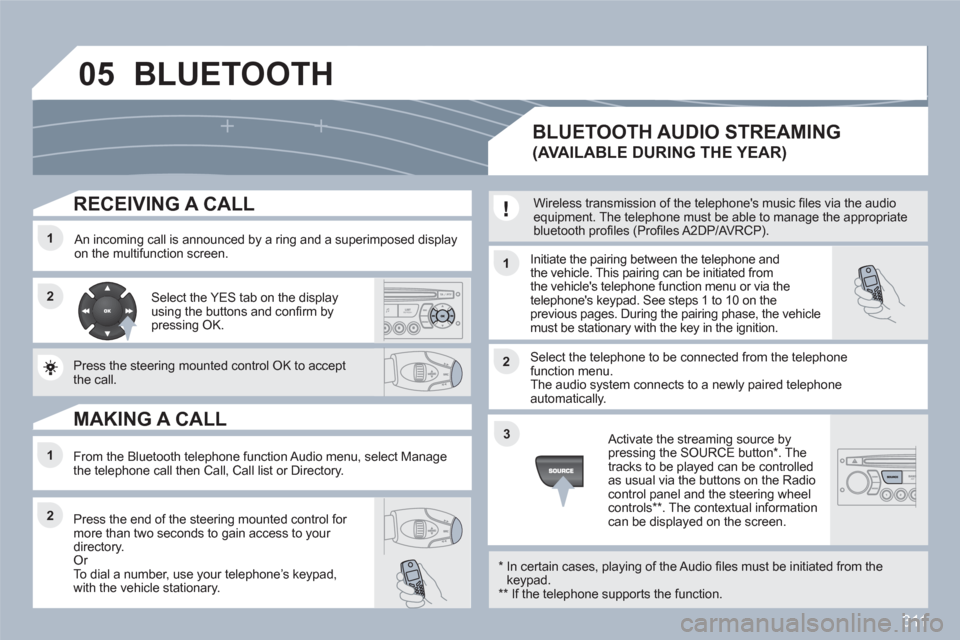
RECEIVING A CALL
An incoming call is announced by a ring and a superimposed display on the multifunction screen. Initiate the pairing between the telephone and the vehicle. This pairing can be initiated fromthe vehicle's telephone function menu or via the telephone's keypad. See steps 1 to 10 on theprevious pages. During the pairing phase, the vehiclemust be stationary with the key in the ignition.
Select the telephone to be connected from the telephone function menu. The audio system connects to a newly paired telephone automatically.
Select the YES tab on the display using the buttons and confi rm bypressing OK.
Press the steering mounted control OK to accept the call.
From the Bluetooth telephone function Audio menu, select Manage the telephone call then Call, Call list or Directory.
Press the end of the steering mounted control for more than two seconds to gain access to your directory. Or
To dial a number, use your telephoneís keypad, with the vehicle stationary.
MAKING A CALL
BLUETOOTH AUDIO STREAMING
(AVAILABLE DURING THE YEAR)
Wireless transmission of the telephone's music fi les via the audio equipment. The telephone must be able to manage the appropriatebluetooth profi les (Profi les A2DP/AVRCP).
*
In certain cases, playing of the Audio fi les must be initiated from thekeypad. **
If the telephone supports the function.
Activate the streaming source bypressing the SOURCE button * . Thetracks to be played can be controlled as usual via the buttons on the Radio control panel and the steering wheel controls
** . The contextual information can be displayed on the screen.
BLUETOOTH