phone Peugeot 308 SW BL 2011 Owner's Guide
[x] Cancel search | Manufacturer: PEUGEOT, Model Year: 2011, Model line: 308 SW BL, Model: Peugeot 308 SW BL 2011Pages: 336, PDF Size: 21.26 MB
Page 273 of 336
271
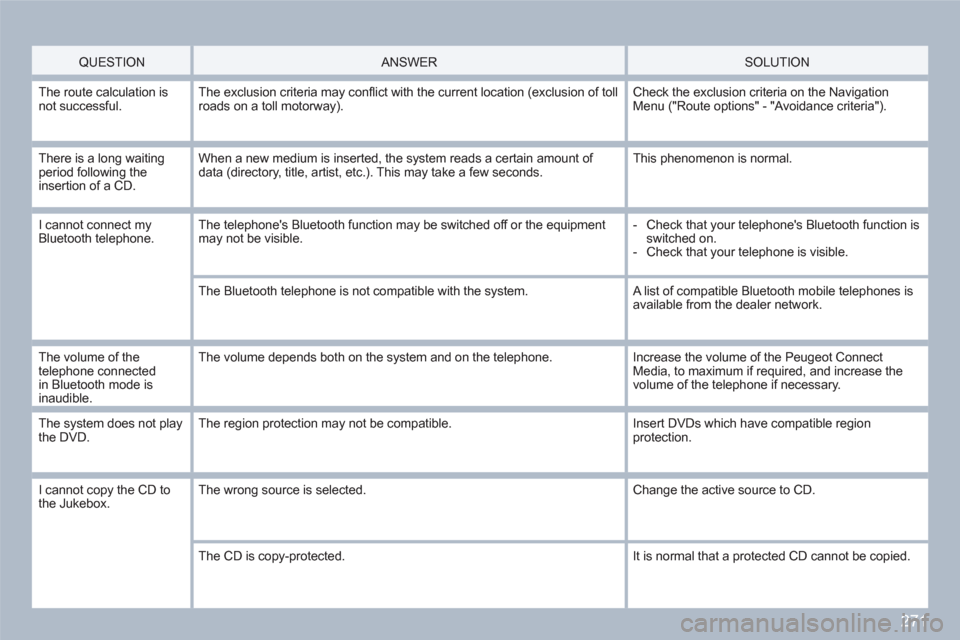
QUESTION
ANSWER SOLUTION
The route calculation isnot successful.The exclusion criteria may confl ict with the current location (exclusion of tollroads on a toll motorway).
Check the exclusion criteria on the NavigationMenu ("Route options" - "Avoidance criteria").
There is a long waitingperiod following the insertion of a CD.
When a new medium is inserted, the system reads a certain amount of data (directory, title, artist, etc.). This may take a few seconds.
This phenomenon is normal.
I cannot connect myBluetooth telephone.The telephone's Bluetooth function may be switched off or the equipment may not be visible.
- Check that your telephone's Bluetooth function is switched on.
- Check that your telephone is visible.
The Bluetooth telephone is not compatible with the system. A list of compatible Bluetooth mobile telephones isavailable from the dealer network.
The volume of the telephone connectedin Bluetooth mode is inaudible.
The volume depends both on the system and on the telephone.
Increase the volume of the Peugeot ConnectMedia, to maximum if required, and increase thevolume of the telephone if necessary.
The system does not playthe DVD.The region protection may not be compatible. Insert DVDs which have compatible regionprotection.
I cannot copy the CD to the Jukebox. The wrong source is selected. Change the active source to CD.
The CD is copy-protected.
It is normal that a protected CD cannot be copied.
Page 274 of 336
272
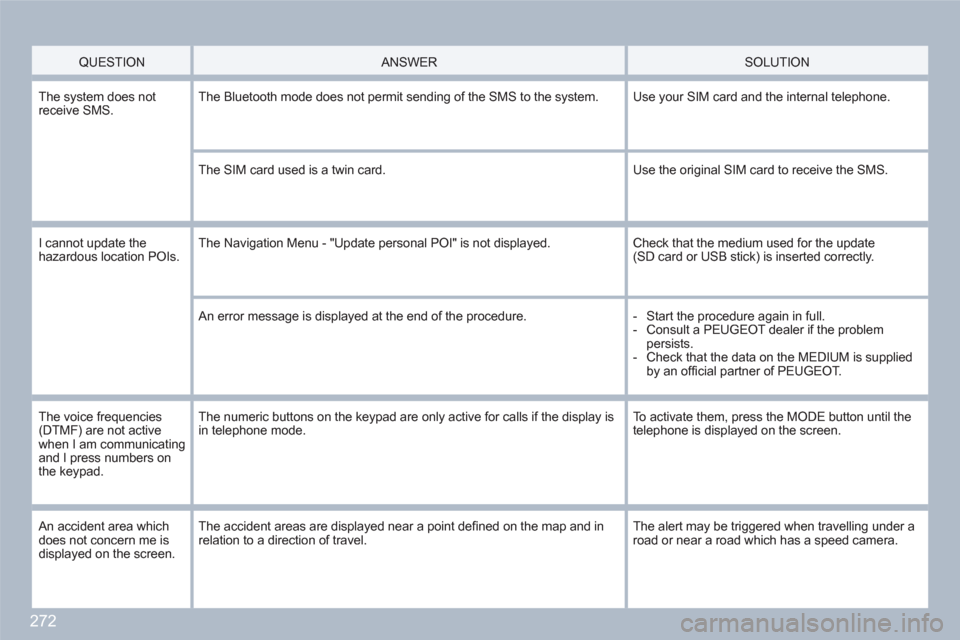
QUESTION
ANSWER
SOLUTION
The system does notreceive SMS. The Bluetooth mode does not permit sending of the SMS to the system.
Use your SIM card and the internal telephone.
The SIM card used is a twin card.
Use the original SIM card to receive the SMS.
I cannot update thehazardous location POIs.The Navigation Menu - "Update personal POI" is not displayed. Check that the medium used for the update (SD card or USB stick) is inserted correctly.
An error message is displayed at the end of the procedure.
- Start the procedure again in full.
- Consult a PEUGEOT dealer if the problem persists.
- Check that the data on the MEDIUM is supplied by an offi cial partner of PEUGEOT.
The voice frequencies (DTMF) are not active when I am communicatingand I press numbers on the keypad.
The numeric buttons on the keypad are only active for calls if the display isin telephone mode.
To activate them, press the MODE button until the telephone is displayed on the screen.
An accident area which does not concern me is displayed on the screen.
The accident areas are displayed near a point defi ned on the map and in relation to a direction of travel.
The alert may be triggered when travelling under aroad or near a road which has a speed camera.
Page 275 of 336
273
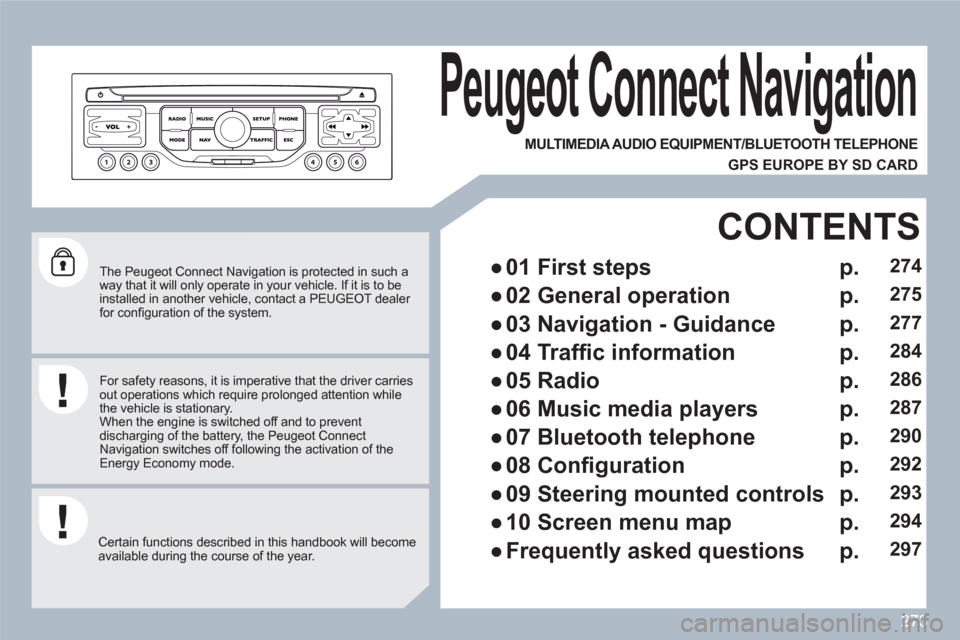
The Peugeot Connect Navigation is protected in such a way that it will only operate in your vehicle. If it is to beinstalled in another vehicle, contact a PEUGEOT dealer for confi guration of the system.
Certain functions described in this handbook will become available during the course of the year.
Peugeot Connect Navigation
For safety reasons, it is imperative that the driver carriesout operations which require prolonged attention while the vehicle is stationary.
When the engine is switched off and to prevent discharging of the battery, the Peugeot Connect Navigation switches off following the activation of theEnergy Economy mode.
MULTIMEDIA AUDIO EQUIPMENT/BLUETOOTH TELEPHONE
GPS EUROPE BY SD CARD
●
01 First steps
CONTENTS
●
02 General operation
●
03 Navigation - Guidance
●
04 Traffi c information
●
05 Radio
●
06 Music media players
●
07 Bluetooth telephone
●
08 Confi guration
●
09 Steering mounted controls
●
10 Screen menu map
●
Frequently asked questions
p.
p.
p.
p.
p.
p.
p.
p.
p.
p.
p.
274
275
277
284
286
287
290
292
293
294
297
Page 276 of 336
274
01
11
55
101
22
334466
131
111
99
144155
77881212161
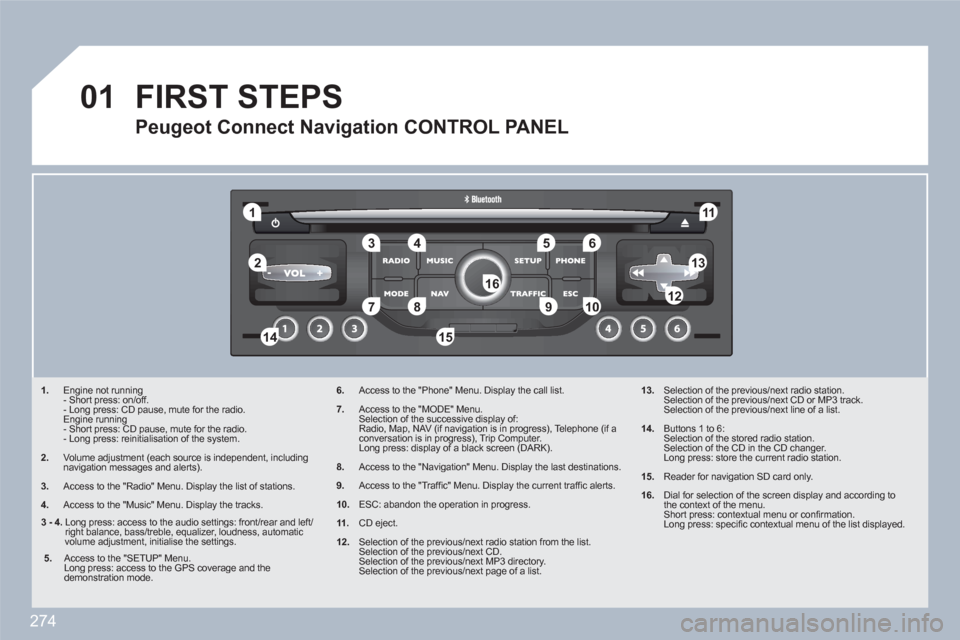
1. Engine not running
- Short press: on/off.
- Long press: CD pause, mute for the radio.
Engine running
- Short press: CD pause, mute for the radio.
- Long press: reinitialisation of the system.
2. Volume adjustment (each source is independent, including navigation messages and alerts).
3.
Access to the "Radio" Menu. Display the list of stations.
4.
Access to the "Music" Menu. Display the tracks.
6.Access to the "Phone" Menu. Display the call list.
7.Access to the "MODE" Menu.
Selection of the successive display of:
Radio, Map, NAV (if navigation is in progress), Telephone (if a conversation is in progress), Trip Computer.
Long press: display of a black screen (DARK).
8.Access to the "Navigation" Menu. Display the last destinations.
9.Access to the "Traffi c" Menu. Display the current traffi c alerts.
10.ESC: abandon the operation in progress.
11.CD eject.
12.Selection of the previous/next radio station from the list.
Selection of the previous/next CD.
Selection of the previous/next MP3 directory.
Selection of the previous/next page of a list.
13. Selection of the previous/next radio station.
Selection of the previous/next CD or MP3 track.
Selection of the previous/next line of a list.
14. Buttons 1 to 6:
Selection of the stored radio station.
Selection of the CD in the CD changer.
Long press: store the current radio station.
15. Reader for navigation SD card only.
16.
Dial for selection of the screen display and according tothe context of the menu.
Short press: contextual menu or confi rmation.
Long press: specifi c contextual menu of the list displayed.
FIRST STEPS
Peugeot Connect Navigation CONTROL PANEL
3 - 4.
Long press: access to the audio settings: front/rear and left/right balance, bass/treble, equalizer, loudness, automaticvolume adjustment, initialise the settings.
5.
Access to the "SETUP" Menu.
Long press: access to the GPS coverage and the demonstration mode.
Page 277 of 336
275
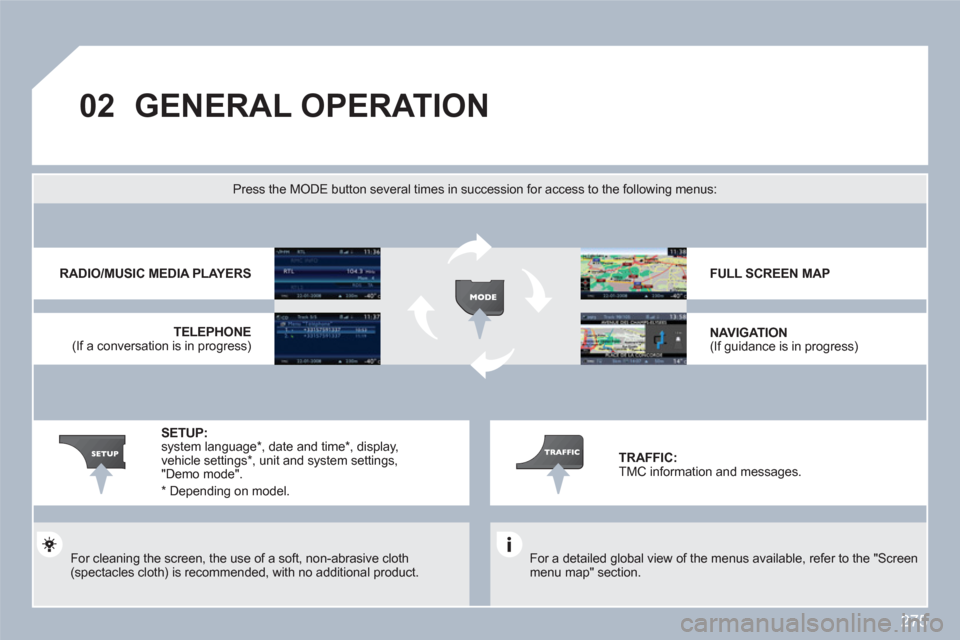
02GENERAL OPERATION
For a detailed global view of the menus available, refer to the "Screen menu map" section.
Press the MODE button several times in succession for access to the following menus:
For cleaning the screen, the use of a soft, non-abrasive cloth(spectacles cloth) is recommended, with no additional product.
RADIO/MUSIC MEDIA PLAYERS
TELEPHONE
(If a conversation is in progress)
FULL SCREEN MAP
NAVIGATION (If guidance is in progress)
SETUP: system language * , date and time * , display, vehicle settings *
, unit and system settings, "Demo mode".
TRAFFIC: TMC information and messages.
*
Depending on model.
Page 278 of 336
276
02
1
2
3
3
2
1
1
1
3
1
1
1
1
1
1
1
1
1
1
2
2
2
2
1
1
2
1
2
2
2
2
2
2
2
1
1
1
1
1
1
1
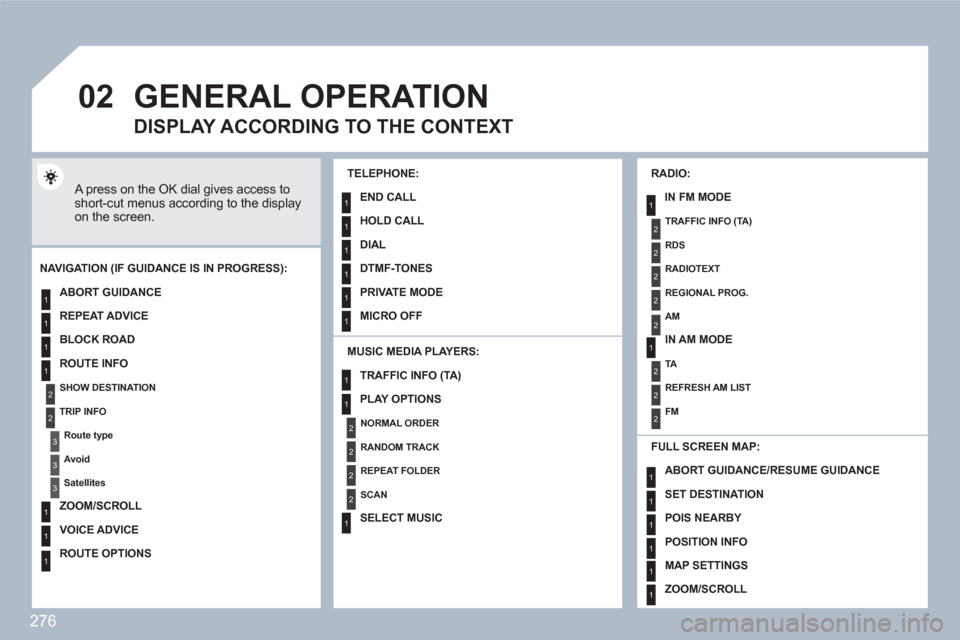
GENERAL OPERATION
A press on the OK dial gives access to short-cut menus according to the display on the screen.
MUSIC MEDIA PLAYERS:
NAVIGATION (IF GUIDANCE IS IN PROGRESS):
ABORT GUIDANCE
REPEAT ADVICE
BLOCK ROAD
ROUTE INFO
SHOW DESTINATION
TRIP INFO
Route type
Avoid
Satellites
ZOOM/SCROLL
VOICE ADVICE
ROUTE OPTIONS
RADIO:
IN FM MODE
TRAFFIC INFO (TA)
RDS
RADIOTEXT
REGIONAL PROG.
AM
IN AM MODE
TA
REFRESH AM LIST
FM
FULL SCREEN MAP:
DISPLAY ACCORDING TO THE CONTEXT
TRAFFIC INFO (TA)
PLAY OPTIONS
NORMAL ORDER
RANDOM TRACK
REPEAT FOLDER
SCAN
SELECT MUSIC
TELEPHONE:
END CALL
HOLD CALL
DIAL
DTMF-TONES
PRIVATE MODE
MICRO OFF
ABORT GUIDANCE /RESUME GUIDANCE
SET DESTINATION
POIS NEARBY
POSITION INFO
MAP SETTINGS
ZOOM/SCROLL
Page 281 of 336
279
4 3 2 1
7 6 5
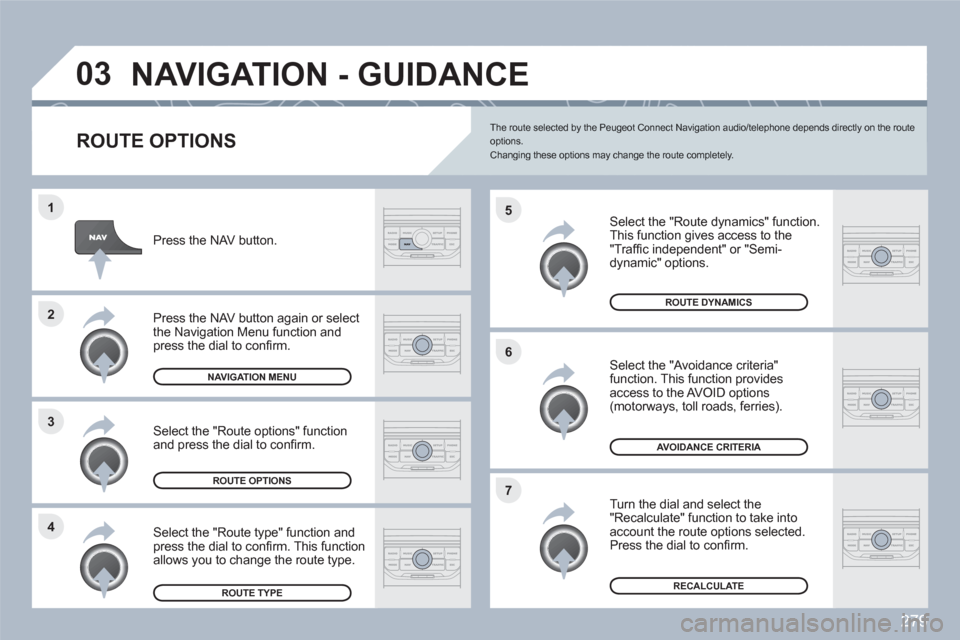
03NAVIGATION - GUIDANCE
ROUTE OPTIONS
Select the "Route dynamics" function.
This function gives access to the"Traffi c independent" or "Semi-dynamic" options.
Select the "Avoidance criteria" function. This function provides access to the AVOID options (motorways, toll roads, ferries).
Turn the dial and select the "Recalculate" function to take intoaccount the route options selected. Press the dial to confi rm.
Press the NAV button.
Press the NAV button again or select the Navigation Menu function and press the dial to confi rm.
Select the "Route type" function andpress the dial to confi rm. This function allows you to change the route type.
Select the "Route options" functionand press the dial to confi rm.
RECALCULATE
AVOIDANCE CRITERIA
ROUTE DYNAMICS
ROUTE TYPE
ROUTE OPTIONS
NAVIGATION MENU
The route selected by the Peugeot Connect Navigation audio/telephone depends directly on the route options.Changing these options may change the route completely.
Page 292 of 336
290
1
2
3
2 1 4
07
*
The services available depend on the network, the SIM card and the compatibility of the Bluetooth telephone used. Check the telephone manual and with your network provider for details of theservices available to you. A list of mobile telephones with the best level of compatibility is available from the dealer network.
BLUETOOTH TELEPHONE
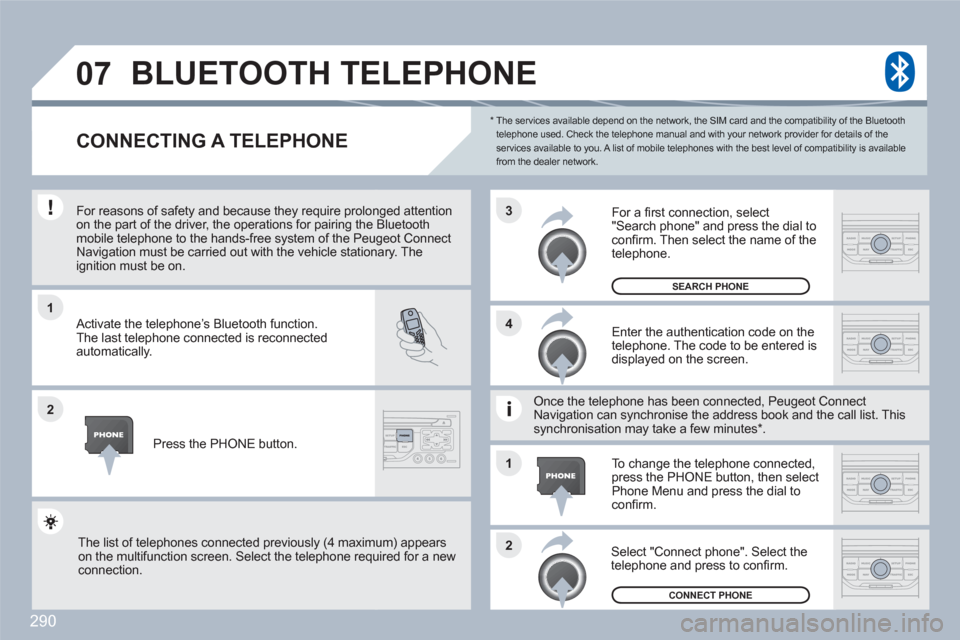
CONNECTING A TELEPHONE
For reasons of safety and because they require prolonnged attention on the part of the driver, the operations for pairing the Bluetoothmobile telephone to the hands-free system of the Peuugeot ConnectNavigation must be carried out with the vehicle stationnary. Theignition must be on.
Activate the telephone’s Bluetooth function.
The last telephone connected is reconnected automatically.
Enter the authentication code on thetelephone. The code to be entered is displayed on the screen.
To change the telephone connected,press the PHONE button, then select Phone Menu and press the dial to confi rm.
Once the telephone has been connected, Peugeot CoonnectNavigation can synchronise the address book and thee call list. Thissynchronisation may take a few minutes * .
Select "Connect phone". Select the telephone and press to confi rm.
The list of telephones connected previously (4 maximum) appearson the multifunction screen. Select the telephone requuired for a new connection.
Press the PHONE button.
For a fi rst connection, select"Search phone" and press the dial to confi rm. Then select the name of the telephone.
SEARCH PHONE
CONNECT PHONE
Page 293 of 336
291
07
2 1
1
3 2
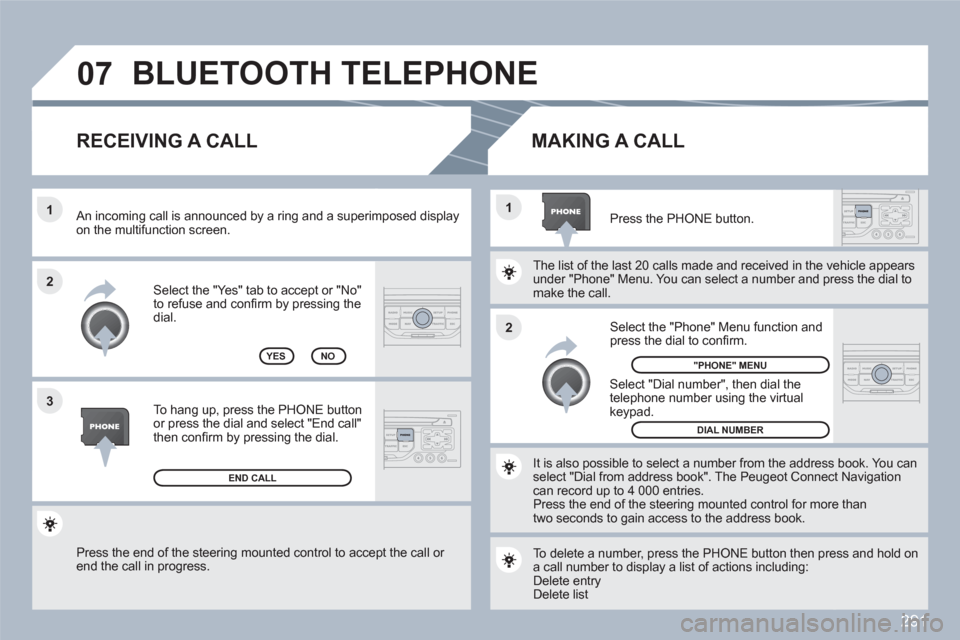
Press the end of the steering mounted control to accept the call or end the call in progress.
Select the "Yes" tab to accept or "No"to refuse and confi rm by pressing thedial.
RECEIVING A CALL
MAKING A CALL
An incoming call is announced by a ring and a superimmposed display on the multifunction screen.
YES
To hang up, press the PHONE button or press the dial and select "End call"then confi rm by pressing the dial.
END CALL
Press the PHONE button.
Select "Dial number", then dial the telephone number using the virtualkeypad.
Select the "Phone" Menu function and press the dial to confi rm.
The list of the last 20 calls made and received in the veehicle appears under "Phone" Menu. You can select a number and prress the dial tomake the call.
NO
It is also possible to select a number from the addresss book. You canselect "Dial from address book". The Peugeot Connecct Navigation can record up to 4 000 entries.
Press the end of the steering mounted control for moree thantwo seconds to gain access to the address book.
"PHONE" MENU
DIAL NUMBER
To delete a number, press the PHONE button then preess and hold ona call number to display a list of actions including:
Delete entry Delete list
BLUETOOTH TELEPHONE
Page 295 of 336
293
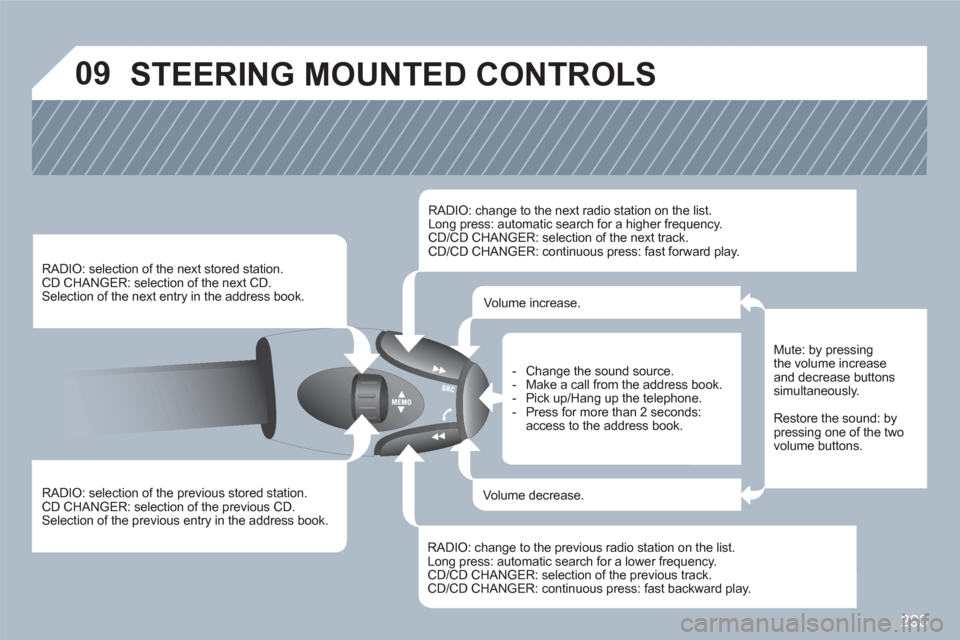
09 STEERING MOUNTED CONTROLS
RADIO: selection of the previous stored station.
CD CHANGER: selection of the previous CD. Selection of the previous entry in the address book.
RADIO: selection of the next stored station. CD CHANGER: selection of the next CD.
Selection of the next entry in the address book.
RADIO: change to the next radio station on the list.
Long press: automatic search for a higher frequency. CD/CD CHANGER: selection of the next track.
CD/CD CHANGER: continuous press: fast forward play.
RADIO: change to the previous radio station on the list. Long press: automatic search for a lower frequency.CD/CD CHANGER: selection of the previous track.CD/CD CHANGER: continuous press: fast backward play.
- Change the sound source.
- Make a call from the address book.
- Pick up/Hang up the telephone.
- Press for more than 2 seconds:access to the address book.
Volume increase.
Volume decrease.
Mute: by pressingthe volume increase and decrease buttonssimultaneously.
Restore the sound: by pressing one of the twovolume buttons.